
MSAZ-280 · Lesson 11 of 12 · 21 min
Infrastructure as code for databases
▶ Video coming soon A video version of this lesson is on the way.
By the end of November 2026 Walt has built three things by hand in the non-production subscription: the Finch Rewards test database, the StockLine managed instance and a small elastic pool for the scheduling pilot. Each worked. Each also took an afternoon, and when Renata asked him to build an identical copy of the Finch Rewards test database in a second resource group for a load test, he got two settings wrong: the backup redundancy and the maintenance window. Nobody noticed for a week. Renata's response was the rule that already governs the rest of Project Skylight: production infrastructure is described in code, reviewed like code and deployed by a pipeline. This lesson shows what that means for databases.
What infrastructure as code means
Infrastructure as code describes the resources an environment needs, and their settings, in text files that are stored in version control. A deployment tool reads the files and makes Azure match them. The benefits are the ones Walt has just experienced the lack of. A deployment from the same files always gives the same result, so test and production really match. Every change is visible as a difference between two versions of a file, so it can be reviewed before it happens and traced afterwards. And an environment that is lost or damaged can be rebuilt from the files, which is a recovery plan in its own right.
Most infrastructure-as-code tools for Azure are declarative: the file says what should exist, not the steps to create it, and the tool works out the steps. Running a declarative deployment twice does not create two servers; the second run sees that the server already matches and changes nothing. This property, called idempotence, is what makes it safe to redeploy the same files on every change.
The Azure options
Azure Resource Manager templates, usually called ARM templates, are JSON files that describe resources in the form Azure Resource Manager itself understands. Every Azure deployment, including one made in the portal, becomes an ARM deployment underneath, and the portal can export a template of what it built. ARM templates are complete but verbose. Bicep is a simpler language that Microsoft created for the same purpose: a Bicep file compiles into an ARM template, supports every resource type on the day it appears, and is much shorter and easier to read. Terraform, from HashiCorp, is a widely used alternative that describes resources across many clouds with its own language and keeps a state file recording what it deployed. Azure CLI and PowerShell scripts are imperative rather than declarative, but they remain useful for one-off tasks and for steps a template cannot express.
| Tool | Style | Strengths | Watch for |
|---|---|---|---|
| ARM templates | Declarative JSON | Native to Azure; every deployment uses it underneath | Verbose and hard to read |
| Bicep | Declarative, compiles to ARM | Short, readable, modules, what-if previews, no state file | Azure only |
| Terraform | Declarative, own language | Works across clouds; large ecosystem | State file must be stored and protected |
| Azure CLI and PowerShell | Imperative scripts | Quick, flexible, good for one-off tasks | Running twice may not be safe unless written carefully |
Harrow & Finch chose Bicep in September 2026 because every Skylight workload is in Azure, because Renata's team found it the easiest to review, and because it needs no separate state file. The DP-300 study guide asks you to choose an automated deployment method, so the exam may describe a team's situation and ask which tool fits; the table above is the reasoning it expects.
A Bicep file for the Finch Rewards database
Walt's first Bicep file describes the logical server and the serverless test database from lesson 3. Parameters at the top hold the values that differ between environments, so the same file can build test, load-test and production copies. Resources follow, each with its type, API version and properties. The database refers to the server as its parent, so Bicep knows to create the server first.
@description('Short region code used in names')
param regionCode string = 'cus'
param location string = 'centralus'
param environment string = 'test'
param entraAdminGroupName string = 'sg-dba-admins'
param entraAdminGroupId string
param minVcores int = 1
param maxVcores int = 2

var serverName = 'hf-sql-rewards-' + environment + '-' + regionCode

resource sqlServer 'Microsoft.Sql/servers@2023-08-01' = {
  name: serverName
  location: location
  tags: { environment: environment, 'cost-center': 'it-data' }
  properties: {
    publicNetworkAccess: 'Disabled'
    minimalTlsVersion: '1.2'
    administrators: {
      administratorType: 'ActiveDirectory'
      principalType: 'Group'
      login: entraAdminGroupName
      sid: entraAdminGroupId
      azureADOnlyAuthentication: true
    }
  }
}

resource rewardsDb 'Microsoft.Sql/servers/databases@2023-08-01' = {
  parent: sqlServer
  name: 'finchrewards'
  location: location
  sku: { name: 'GP_S_Gen5', tier: 'GeneralPurpose', family: 'Gen5', capacity: maxVcores }
  properties: {
    minCapacity: minVcores
    autoPauseDelay: 60
    maxSizeBytes: 34359738368
    requestedBackupStorageRedundancy: 'Local'
    zoneRedundant: false
    maintenanceConfigurationId: subscriptionResourceId('Microsoft.Maintenance/publicMaintenanceConfigurations', 'SQL_CentralUS_DB_1')
  }
}

output serverFqdn string = sqlServer.properties.fullyQualifiedDomainName
Several details are worth reading closely, because exam questions often show a template and ask what it does. The SKU name GP_S_Gen5 means General Purpose, serverless, standard-series hardware, and capacity is the maximum vCores. The minimum vCores is given as minCapacity; the file uses an integer of 1 for simplicity, while the portal also allows 0.5. The maximum size is given in bytes: 32 GB is 32 × 1,024 × 1,024 × 1,024 = 34,359,738,368 bytes. Microsoft Entra-only authentication is set on the server's administrators block, and public network access is disabled, so the private endpoint, defined in the network team's own Bicep file, is the only way in. The maintenance configuration points to a named maintenance window that Azure publishes for each region; the exact name in the file must match the list for the region, which Walt checks with the Azure CLI before deploying.
Worked problem
Converting sizes for a template
A template must set the maximum size of a production database to 250 GB, and another to 1 TB. What values should maxSizeBytes contain? Use binary units, where 1 GB = 1,073,741,824 bytes and 1 TB = 1,024 GB.
Show solution
- 250 GB: 250 × 1,073,741,824 = 268,435,456,000 bytes.
- 1 TB: 1,024 × 1,073,741,824 = 1,099,511,627,776 bytes.
- Check the result by dividing back: 268,435,456,000 ÷ 1,073,741,824 = 250.
Answer: 268,435,456,000 bytes for 250 GB and 1,099,511,627,776 bytes for 1 TB. A wrong number of zeros here produces a database a thousand times smaller or larger than intended, which is why Walt keeps a short table of common sizes in the repository.
Parameter files and environments
The values that change between environments live in parameter files, one per environment. The test file sets environment to test and a maximum of 2 vCores. The production file sets environment to prod and points to a different template, because production Finch Rewards uses provisioned compute, zone redundancy and geo-redundant backup storage. Walt keeps the production database in its own Bicep file rather than adding many conditions to one file, because two clear files are easier to review than one clever one.
using './main.bicep'

param environment = 'loadtest'
param entraAdminGroupId = '7f3c2a10-0000-4c1e-9a55-000000000000'
param minVcores = 1
param maxVcores = 4
Previewing and deploying
Before any deployment, the what-if operation compares the files with what already exists and lists the changes it would make: resources to create, properties to modify and resources that would be deleted in complete mode. It is the infrastructure version of reading a diff before merging. When Walt runs what-if against the hand-built load-test copy, it reports exactly the two mistakes he had made by hand, the backup redundancy and the maintenance window, as properties to modify.
az deployment group what-if --resource-group rg-rewards-loadtest-cus --template-file main.bicep --parameters loadtest.bicepparam

az deployment group create --resource-group rg-rewards-loadtest-cus --template-file main.bicep --parameters loadtest.bicepparam
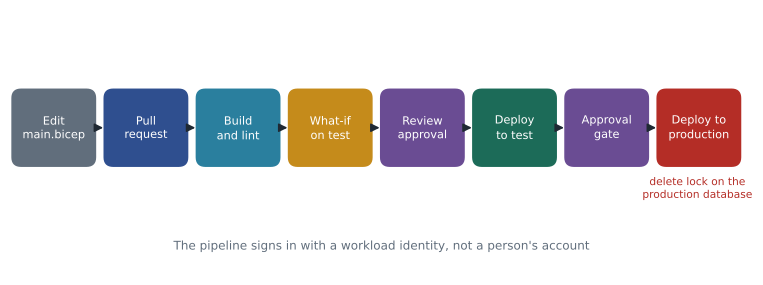
Deployments run in incremental mode by default: resources in the file are created or updated, and resources that exist in the resource group but are not in the file are left alone. Complete mode deletes anything not in the file, which is powerful and dangerous for a resource group that holds databases; Harrow & Finch's pipelines never use it for data resources. Production databases also carry a delete lock, a resource lock that stops anyone, including a pipeline, from deleting them until the lock is removed deliberately.
Secrets, identities and the Terraform alternative
Templates must never contain passwords. Because the Finch Rewards server uses Microsoft Entra-only authentication, Walt's Bicep file has no administrator password at all; the Entra group's object ID is the only identity value, and it is passed as a parameter rather than written into the file. Where a secret is unavoidable, for example a SQL administrator password on a server that still needs SQL authentication, Bicep can read it at deployment time from Azure Key Vault with a reference in the parameter file, so the value never appears in the repository or in the deployment history. The same principle applies to the pipeline itself: it signs in with a workload identity federated to the repository, not with a stored client secret.
Teams that already use Terraform describe the same resources with the azurerm provider, whose azurerm_mssql_server and azurerm_mssql_database resources take the same settings under slightly different names: sku_name GP_S_Gen5_2, min_capacity, auto_pause_delay_in_minutes and max_size_gb. Terraform's plan command plays the role of what-if, and its state file, stored in a protected storage account, records what it deployed. The exam does not expect Terraform syntax, only an understanding of when a team would choose it: usually when it manages resources in more than one cloud or already has Terraform skills and tooling.
Pipelines
Files in a repository become a deployment process through a pipeline in GitHub Actions or Azure Pipelines. Harrow & Finch's pipeline has the stages shown in the figure. A change starts as a pull request. The pipeline builds and lints the Bicep file, catching mistakes such as an unknown property; runs what-if against the test environment and posts the result on the pull request for the reviewer; deploys to test after approval; runs a few smoke tests, such as connecting through the private endpoint and checking the service objective; and then waits for a second approval before production. The pipeline signs in to Azure with a workload identity that has rights only on the resource groups it deploys, not with a person's account.
Database schema as code
Bicep describes the server and the database container: their size, tier, network and settings. It does not describe the tables, views and procedures inside the database. That is a second, separate kind of code. A SQL database project stores the schema as a set of .sql files and builds them into a DACPAC file, a package that describes the desired schema. The sqlpackage tool can then compare the DACPAC with a live database and apply only the differences, much as what-if does for Azure resources. Liam Ferreira's team already keeps the Finch Rewards schema in a SQL project, and their pipeline publishes the DACPAC after the Bicep deployment has created or updated the database. For StockLine, which has seventeen years of hand-made changes, the first step is to extract a DACPAC from the existing database and put it under version control, so that future changes can be reviewed the same way.
sqlpackage /Action:Publish /SourceFile:FinchRewards.dacpac /TargetServerName:hf-sql-rewards-loadtest-cus.database.windows.net /TargetDatabaseName:finchrewards /AccessToken:<token from the pipeline identity> /p:BlockOnPossibleDataLoss=trueKeeping code and reality in step
Infrastructure as code only works if people stop changing production by hand. Changes made directly in the portal, called drift, are overwritten by the next deployment or, worse, silently survive until someone is surprised. Harrow & Finch uses three controls. Contributors have read access to production in the portal, and only the pipeline identity can change it. Azure Policy enforces rules that every SQL resource must follow whoever deploys it, for example that public network access is disabled and that Microsoft Entra-only authentication is on; a deployment that breaks a rule is denied. And a weekly scheduled what-if against production reports any difference between the files and Azure, so drift is found within days.
Common mistakes
MistakeRunning the same declarative deployment twice creates duplicate resources.
InsteadDeclarative deployments are idempotent; the second run finds the resources already match and changes nothing.
MistakeBicep needs a state file like Terraform.
InsteadBicep compiles to ARM templates and reads the current state from Azure; Terraform keeps its own state file.
MistakeComplete deployment mode is a safe default for database resource groups.
InsteadComplete mode deletes resources that are not in the file; use incremental mode and resource locks for data.
MistakeA Bicep file also creates the tables inside the database.
InsteadBicep describes Azure resources; the schema is managed separately, for example with a SQL project, DACPAC and sqlpackage.
Summary and key terms
- Infrastructure as code stores resource definitions in version control so deployments are repeatable, reviewable and recoverable.
- ARM templates, Bicep and Terraform are declarative; Azure CLI and PowerShell scripts are imperative.
- Bicep compiles to ARM, uses parameters and parameter files for environments, and needs no state file.
- Use what-if to preview changes, incremental mode for deployments and resource locks on production databases.
- Pipelines in GitHub Actions or Azure Pipelines add linting, previews, approvals and a dedicated workload identity.
- Manage schemas separately with SQL projects, DACPAC files and sqlpackage, and prevent drift with Azure Policy and scheduled checks.
- Infrastructure as code
- Describing infrastructure in files kept in version control and deploying it with tools.
- Declarative
- Describing the desired end state rather than the steps to reach it.
- Idempotent
- Giving the same result however many times it is run.
- Bicep
- A Microsoft language for declaring Azure resources that compiles to ARM templates.
- What-if
- An Azure Resource Manager operation that previews the changes a deployment would make.
- DACPAC
- A package that describes a database schema, built from a SQL project and deployed with sqlpackage.
- Drift
- A difference between the deployed environment and its definition in code, usually caused by manual changes.
Practice problems
Work each problem on paper first, then reveal the answer to check.
What does the what-if operation do?
Show answer
It compares a template with the current resources and lists what a deployment would create, change or delete.
Why does Harrow & Finch never use complete mode for database resource groups?
Show answer
Complete mode deletes resources not in the file, which could delete a database.
How many bytes is 64 GB in binary units?
Show answer
64 × 1,073,741,824 = 68,719,476,736 bytes.
What tool applies a DACPAC to a live database?
Show answer
sqlpackage.
Name one control that prevents drift.
Show answer
For example: read-only portal access for people, Azure Policy rules, or a scheduled what-if against production.
Lesson quiz · 5 questions
Score 60% or more to complete this lesson.
Create a free account to save your progress, take quizzes and earn a certificate.