
MSAZ-280 · Lesson 4 of 12 · 21 min
Deploying Managed Instance
▶ Video coming soon A video version of this lesson is on the way.
StockLine's move to Managed Instance is planned for the spring of 2027, but the instance itself must be ready months earlier so that Walt can test the migration, rehearse the cutover and let the developers check every report. Deploying a managed instance also takes longer than deploying a database, sometimes several hours for the first instance in a subnet, so Elena wants the non-production instance built in November 2026 while there is still time to learn from mistakes. This lesson follows that build: network first, then the instance, then the settings that make it ready for StockLine.
Why the network comes first
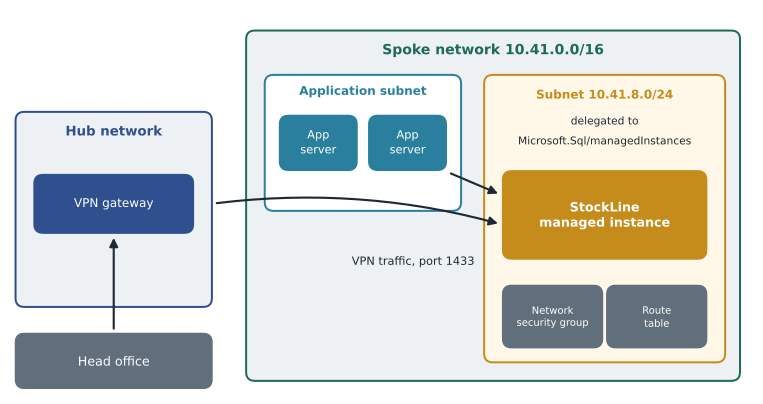
A managed instance is not reached through a shared gateway in the way a SQL database is. It is deployed into a subnet of the customer's own Azure virtual network, and it gets private IP addresses from that subnet. That is what makes Managed Instance feel like a server on the company network: StockLine's application servers, the head office over the VPN and later ExpressRoute can all reach it by a private address, and the instance can reach other private resources such as file shares for backups.
The subnet has rules of its own. It must be dedicated to managed instances, so no virtual machines or other services can share it. It must be delegated to the Microsoft.Sql/managedInstances resource provider, which lets the service manage the network intent policies it needs: a network security group and a route table that the service keeps up to date with the rules the instance requires. The customer may add their own security rules, but must not remove the rules the service adds. The subnet must also be large enough for the instances it will hold now and later, because changing the size of a subnet that already contains instances is difficult.
Sizing the subnet
Microsoft documents the address requirements, and the exact numbers have changed over time, so Walt checks the current page before building. The principle does not change: Azure reserves five addresses in every subnet, each instance needs a set of addresses for its virtual cluster, Business Critical instances need more than General Purpose ones, and an update or scaling operation temporarily needs room for a second set while the new configuration is prepared. For that reason Microsoft recommends planning a subnet larger than the minimum, and a /27 is the smallest size it allows. Renata's network plan gives the StockLine spoke a whole /24 for managed instances, 10.41.8.0/24, with 256 addresses, which leaves room for the non-production instance, the production instance and a future one for the Pricing database if the team ever splits it out.
Worked problem
Is a /26 enough?
A colleague suggests a /26 to save address space. Suppose the current documentation says that, for planning, each General Purpose instance should be counted as 16 addresses and each Business Critical instance as 32, with the same again available during scaling, and five addresses reserved by Azure. The plan is one General Purpose instance for non-production and one Business Critical instance for production. Does a /26 fit?
Show solution
- A /26 has 2 to the power of (32 − 26) = 64 addresses.
- Azure reserves 5, leaving 64 − 5 = 59.
- Steady state: 16 for General Purpose + 32 for Business Critical = 48 addresses.
- During a scaling operation on the Business Critical instance, another 32 are needed: 48 + 32 = 80, which is more than 59.
Answer: No. The two instances fit at rest, but the subnet would run out of room the first time the production instance is scaled, so a larger subnet such as the planned /24 is the safer choice. Always confirm the planning numbers in the current documentation.
Creating the instance
With the subnet ready, the creation wizard asks for the familiar things and a few new ones. The instance name becomes part of an address such as hf-mi-stockline-np.a1b2c3d4e5f6.database.windows.net, where the middle part is a unique identifier for the DNS zone the instance belongs to. The administrator sign-in is created at this point; as with SQL Database, Microsoft Entra authentication can be set alongside it, and Sunil's group sg-dba-admins becomes the Entra administrator.
Compute and storage are chosen next. Walt picks the General Purpose tier for the non-production instance, standard-series hardware, 8 vCores to match the processor count of today's HF-SQL01 server, and 1 TB of storage. StockLine is about 410 GB, the Pricing database is small, and the rest gives room for growth and for the copies he will restore while testing. Managed Instance storage is allocated in steps and shared by all databases on the instance, and the maximum depends on the tier and vCores; the current limits are on the resource limits page.
The license choice matters to Dana's budget. Harrow & Finch owns SQL Server Enterprise licenses with Software Assurance for HF-SQL01, so the production instance will use Azure Hybrid Benefit. For non-production, the company can also mark the instance as a development or test workload under its agreement; Walt leaves those details to the licensing specialist and notes only that the portal has a setting for each.
| Setting | Non-production choice | Production plan (2027) |
|---|---|---|
| Service tier | General Purpose | Business Critical |
| Hardware | Standard-series | Standard-series, reviewed after load tests |
| vCores | 8 | 8, adjusted after load tests |
| Storage | 1 TB | 1 TB |
| License | Development and test terms under the agreement | Azure Hybrid Benefit |
| Update policy | SQL Server 2022 | SQL Server 2022 |
| Backup storage redundancy | Locally redundant | Geo-redundant, decided in MSAZ-282 |
| Maintenance window | Weekday evening | Weekend early morning |
| Time zone | Central Standard Time (Des Moines) | Same |
Settings you cannot change later
Three choices made at creation are fixed for the life of the instance, and they are favorite exam topics. The first is the instance collation, which sets the default collation for system databases and new user databases; StockLine's server uses SQL_Latin1_General_CP1_CI_AS, so the instance uses the same, otherwise temporary tables and system catalog comparisons could behave differently. The second is the time zone. A managed instance can run in a time zone other than UTC, which matters for StockLine because its SQL Server Agent jobs are scheduled in local time and several reports use GETDATE() to decide what yesterday means. Walt sets the instance to the head office time zone. The third is the DNS zone the instance joins, which matters when instances will later be paired in a failover group.
The update policy can be changed only in one direction. An instance on the SQL Server 2022 or SQL Server 2025 update policy can move to Always-up-to-date later, but once it is on Always-up-to-date it cannot go back. Walt keeps the SQL Server 2022 policy for now, because the company wants the option of restoring a StockLine backup to an on-premises SQL Server 2022 if the migration fails, and because the vendors of two reporting tools have only certified SQL Server 2022 behavior.
Connecting to the instance
By default a managed instance has a private endpoint in its subnet, the VNet-local endpoint, reached on the usual port 1433 from the same virtual network, from peered networks and from on premises through VPN or ExpressRoute. An optional public endpoint can be enabled for scenarios such as connecting from a managed service outside the network; it uses port 3342 and must be opened explicitly in the subnet's network security group. Harrow & Finch leaves the public endpoint disabled. Instances can also be reached through private endpoints created in other virtual networks, which is useful when another team needs access without full network peering.
Walt signs in from SQL Server Management Studio over the VPN and runs his first checks. He looks at the instance properties, the version string and the list of system databases, and he confirms that SQL Server Agent is running, because on Managed Instance it is always on and cannot be stopped.
SELECT SERVERPROPERTY('EngineEdition') AS engine_edition,
       SERVERPROPERTY('ProductVersion') AS product_version,
       SERVERPROPERTY('Collation') AS instance_collation,
       CURRENT_TIMEZONE() AS instance_time_zone;

SELECT name, state_desc FROM sys.databases;
The query returns engine edition 8, which identifies Managed Instance, a version number in the SQL Server 2022 line, the expected collation and the head office time zone. The database list shows master, model, msdb and tempdb. There is no user database yet; lesson 6 brings StockLine in.
Scripting the deployment
Instance creation can be automated in the same ways as SQL Database. In the Azure CLI the command is az sql mi create, with parameters for the subnet, tier, vCores, storage, license type, collation, time zone and maintenance configuration. The command below shows the non-production build. Because a managed instance can take a long time to create, the command runs with the no-wait option and Walt checks progress later with az sql mi show.
az sql mi create --name hf-mi-stockline-np --resource-group rg-stockline-nonprod-cus --location centralus --subnet /subscriptions/00000000-0000-0000-0000-000000000000/resourceGroups/rg-network-cus/providers/Microsoft.Network/virtualNetworks/vnet-stockline-cus/subnets/snet-sqlmi --edition GeneralPurpose --family Gen5 --capacity 8 --storage 1024GB --license-type LicenseIncluded --collation SQL_Latin1_General_CP1_CI_AS --timezone-id "Central Standard Time" --enable-ad-only-auth --external-admin-principal-type Group --external-admin-name sg-dba-admins --external-admin-sid 7f3c2a10-0000-4c1e-9a55-000000000000 --no-waitTwo details in the command repay attention. The subnet is passed as a full resource ID, because the network often lives in a different resource group owned by the network team. The time zone uses the Windows time zone name, Central Standard Time, which covers Des Moines and observes daylight saving time.
Moving the Pricing database and checking connectivity
StockLine is not alone on HF-SQL01. The small Pricing database it queries with three-part names must land on the same managed instance, otherwise the query Pricing.dbo.PriceList would fail. Walt writes both databases into the migration plan as one unit and checks that the instance has room for both: 410 GB and 3 GB of data, their logs and the space Query Store needs, well within the 1 TB allocated. He also lists the server-level objects that live outside the databases and must be recreated on the instance: the SQL Server Agent jobs and their schedules, the Database Mail profile used by job alerts, the operators who receive those alerts, two linked server definitions used by finance reports, and the logins that map to database users. A database moves with its users, but the logins, jobs and mail settings live in master and msdb, so they must be scripted on the old server and run on the new one.
Before any migration test, Walt confirms that every client that will talk to the instance can reach it. From an application server in the StockLine spoke, he tests port 1433 to the instance's VNet-local address; from his workstation at head office he does the same over the VPN; and from the head office server that will run the Managed Instance link during migration, he also tests port 5022, which the link needs for replication traffic, as lesson 6 explains. Each test is a single PowerShell command, Test-NetConnection with the instance name and the port, and each result goes in the binder. A failed test at this stage costs a few minutes to fix; the same failure on cutover night would cost the whole window.
Instance pools and stop-start
Two Managed Instance features help with cost. Instance pools let a team pre-provision a block of vCores and then create several smaller instances inside it quickly, which suits a company that needs many small instances, such as one per customer. Harrow & Finch does not need that. For non-production General Purpose instances, there is also the ability to stop and start the instance, either by hand or on a schedule; while stopped, compute is not billed. Walt sets a schedule that stops the non-production instance at 20:00 and starts it at 7:00 on weekdays, and leaves it stopped at weekends unless a test is booked. At an illustrative compute price of 1.60 dollars an hour, running only 13 hours on 5 weekdays bills 65 hours a week instead of 168, about 104 dollars instead of about 269 dollars.
Common mistakes
MistakeA managed instance can share its subnet with ordinary virtual machines.
InsteadThe subnet must be dedicated to managed instances and delegated to Microsoft.Sql/managedInstances.
MistakeThe instance collation and time zone can be changed after creation.
InsteadBoth are fixed at creation; choose them to match the source server.
MistakeAn instance can move back from Always-up-to-date to the SQL Server 2022 update policy.
InsteadThe move is one way; Always-up-to-date cannot be reversed.
MistakeThe public endpoint of a managed instance uses port 1433.
InsteadThe public endpoint uses port 3342 and must be opened in the network security group; the VNet-local endpoint uses 1433.
Summary and key terms
- A managed instance is deployed into a dedicated subnet delegated to Microsoft.Sql/managedInstances, which the service protects with a network security group and route table.
- Plan the subnet larger than the minimum so that scaling and updates have room; a /27 is the smallest allowed.
- At creation choose the tier, hardware, vCores, storage, license type, update policy, maintenance window, collation and time zone.
- Collation, time zone and DNS zone are fixed; the update policy can only move toward Always-up-to-date.
- The VNet-local endpoint uses port 1433; an optional public endpoint uses port 3342.
- Instance pools and stop-start schedules help control cost for many small or non-production instances.
- Delegated subnet
- A subnet assigned to one Azure service, which can then manage required network policies in it.
- Network intent policy
- Network security and routing rules that the Managed Instance service adds and maintains in its subnet.
- VNet-local endpoint
- The private endpoint of a managed instance inside its own subnet, on port 1433.
- Public endpoint (Managed Instance)
- An optional internet-facing endpoint for a managed instance, on port 3342.
- Instance collation
- The default collation of a managed instance, fixed at creation.
- Instance pool
- A pre-provisioned set of vCores in which several smaller managed instances can be created quickly.
- Stop and start
- A feature that stops billing for compute on an eligible managed instance while it is stopped.
Practice problems
Work each problem on paper first, then reveal the answer to check.
Why must the Managed Instance subnet be planned larger than the steady-state need?
Show answer
Scaling and update operations temporarily need extra addresses for a second set of resources.
Name three settings of a managed instance that cannot be changed after creation.
Show answer
Collation, time zone and DNS zone.
Why did Walt choose the SQL Server 2022 update policy?
Show answer
To keep the option of restoring backups to on-premises SQL Server 2022 and to match what reporting vendors have certified.
Which engine edition value identifies Managed Instance?
Show answer
8.
How many hours a week is the non-production instance billed for compute with its schedule?
Show answer
13 hours on each of 5 weekdays, 65 hours.
Lesson quiz · 5 questions
Score 60% or more to complete this lesson.
Create a free account to save your progress, take quizzes and earn a certificate.