
MSAZ-190 · Lesson 6 of 12 · 23 min
Time management and answer strategy
▶ Video coming soon A video version of this lesson is on the way.
In her first timed rehearsal, Ama finishes with eleven minutes to spare and a score she is pleased with. In the second, she runs out of time with six items unanswered. The difference, she realizes afterwards, was a single item: a long scenario about Microsoft Purview retention that she reread four times, changed twice and finally guessed after nearly six minutes. "The exam does not give extra marks for the hard ones," Renata says. "Every point costs the same. Your job is to collect as many as you can in forty-five minutes." This lesson turns that idea into a method: a pace, checkpoints, a limit for slow items, a reserve for review and a set of answer strategies for the moments when you do not know.
The time you have
Microsoft's exam duration page lists fundamentals exams at 45 minutes of exam time, within 65 minutes of seat time, and says that most exams have 40 to 60 questions. It also says five minutes have been added to exams to allow for unscheduled breaks. The exact number of items for your exam appears on the screen when you begin, and that is the first number to write down mentally, because it sets your pace. Do not plan around a specific count you read online. Plan a method that works for any count from about 35 to 60.
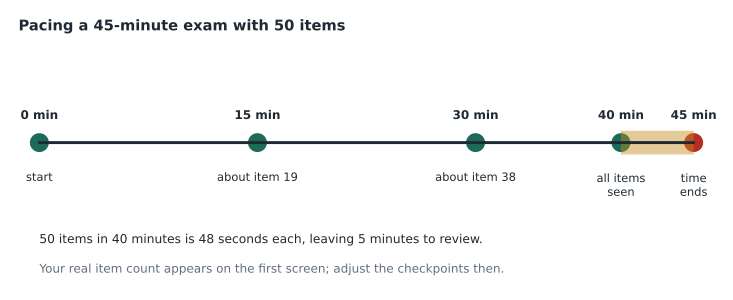
A simple method sets aside a reserve at the end for review, then divides the remaining time by the number of items. With a five-minute reserve, you have 40 minutes to work through the items once. The code below shows the average time per item for several possible counts, and the item you should have reached at the 15- and 30-minute checkpoints.
work_minutes = 40      # 45 minutes minus a 5-minute review reserve
for items in (40, 45, 50, 55, 60):
    per_item = work_minutes * 60 / items
    at15 = round(15 * 60 / per_item)
    at30 = round(30 * 60 / per_item)
print(f"{items} items: {per_item:4.0f} s each, item {at15} by 15 min, item {at30} by 30 min")40 items: 60 s each, item 15 by 15 min, item 30 by 30 min 45 items: 53 s each, item 17 by 15 min, item 34 by 30 min 50 items: 48 s each, item 19 by 15 min, item 38 by 30 min 55 items: 44 s each, item 21 by 15 min, item 41 by 30 min 60 items: 40 s each, item 22 by 15 min, item 45 by 30 min
What this code does
Works out a pacing plan for a fundamentals exam: from the time left after a five-minute review reserve, it calculates the seconds available per question for several possible question counts. It also shows which question you should have reached at 15 and 30 minutes. Checking progress at those points helps you finish on time.
Checkpoints instead of constant clock-watching
Looking at the timer after every item wastes attention and raises anxiety. Instead, set two checkpoints. With a five-minute reserve, at 15 minutes you should be a little over a third of the way through, and at 30 minutes about three quarters. If you are on pace or ahead, carry on without thinking about time. If you are behind, speed up a little on the next items, use the slow-item rule more strictly and plan to spend less of the reserve on review. Test centers set their own rules about erasable note boards or scratch material, and online exams allow no writing tools at all, so Theo plans not to rely on writing anything down. Instead he memorizes two numbers when he sees the item count: his item for minute 15 and his item for minute 30.
The slow-item rule
Most items on a fundamentals exam can be answered in under a minute by someone who knows the material. A few cannot: a long scenario, a tricky statement series, an unfamiliar screenshot. The danger is the item that grabs you, as Ama's retention question did. The slow-item rule is simple. If an item has taken about twice your average time and you still cannot decide, choose your best answer now, mark it for review and move on. You lose nothing by doing this: the answer is recorded, so if you never return you still have a chance at the point, and if you do return with time in hand, you can think about it again with a fresher mind.
There is one exception. Some items are part of a set that you cannot return to once you move on, such as certain problem-solution sets, and the exam tells you when this applies. For those, give the item your full attention before moving, but still respect a limit. A point you might win by spending three more minutes is worth less than three or four points you might lose at the end by running out of time.
Different formats take different times
An average pace is an average, and the formats in Lesson 3 do not all take the same time. A short single-answer multiple choice item can take 20 seconds when you know the answer. A statement series of three statements is really three questions and may take a minute and a half. A drag and drop with six targets, a build list with eight actions or a case study with several tabs can take longer still. That is fine, as long as the quick items pay for the slow ones. The checkpoints absorb the variation: if you reach minute 15 on pace, it does not matter that one item took three minutes, because others took twenty seconds.
What the checkpoints cannot absorb is a pattern of slowness. If you find that almost every item takes longer than your average, the cause is usually one of three things. You may be rereading each question several times out of anxiety; read once carefully and trust it. You may be deliberating between two options on every item; that is a knowledge gap to fix in study, not in the exam. Or the screen may be uncomfortable to read; adjust what you can before you start. Timed practice in the last two weeks shows which of these applies to you.
Always answer, then mark
Because there is no penalty for wrong answers, an unanswered item is a guaranteed zero. So the rule is: answer every item when you first see it, even if your answer is a guess, then mark the ones you want to revisit. Never leave an item blank intending to come back. If time runs out, or if you take an unscheduled break, which locks everything you have already seen, the blank stays blank. Microsoft's scoring page also notes that some items are unscored and that you cannot tell which, so every item deserves an answer.
Strategies for when you do not know
When you do not know the answer straight away, work through a short sequence. First, reread the question and look for the key requirement: the qualifier such as least administrative effort, most cost-effective or without changing code. Many wrong options are good solutions to a different requirement. Second, eliminate options you know are wrong, for example a product from the wrong family, a feature that does the opposite job, or a service that does not exist. Third, compare the remaining options against the requirement word by word. Fourth, if you are still unsure, pick the option that best matches Microsoft's recommended approach as presented on Learn; fundamentals questions usually reward the standard, documented answer rather than a clever workaround.
| Situation | Strategy |
|---|---|
| Two options both seem right | Find the qualifier in the question; one option usually fits it better |
| An option uses an absolute word such as always or never | Be suspicious; cloud services rarely do anything always |
| An option names a product you have never heard of | It may be a distractor or a renamed product; check it against what you know |
| A multiple-answer item where you know only one answer | Choose your best guess for the other; never submit fewer than asked |
| A long scenario | Read the question first, then scan the scenario for the requirement it depends on |
Should you change your answer?
A persistent piece of exam folklore says your first answer is usually right and you should never change it. Research on test-taking does not support that as a general rule; studies of students reviewing answers have often found that changes made for a clear reason more often go from wrong to right than the reverse. The useful rule is narrower: change an answer when you have a specific reason, such as noticing a word you misread, remembering a fact, or finding that a later item contains information that settles it. Do not change an answer because of a vague feeling, and do not change several answers in a row because of nerves.
Using the review reserve
When you reach the end with time left, go to the review screen. First, check that no item is unanswered; if any are, answer them immediately. Then revisit marked items, starting with the ones you thought were closest to a decision. For each, reread the question as if seeing it for the first time, apply the strategies above and change the answer only for a specific reason. If there is still time after the marked items, you can scan unmarked items with long scenarios for misreadings. Stop when a few seconds remain; you do not need to press any button for answered items to count when the timer ends, but check the exam's own instructions on the first screen.
Rehearsing the pace
A pace you have never practiced is only a plan. In the final two weeks, run at least one rehearsal under exam conditions: a set of 40 to 50 mixed original questions or the official practice assessment, 45 minutes on a timer, no notes, no phone and no breaks, in one sitting at the same time of day as your exam. Afterwards, look at three things besides the score: whether you hit your checkpoints, how many items you marked, and whether you had time to review all of them. If you finished with fifteen minutes to spare, you may be rushing and misreading; slow down a little next time. If you did not finish, practice the slow-item rule deliberately on a shorter set.
Keiko adds a useful twist. In one of her rehearsals she asks Theo to interrupt her at a random moment, to practice staying calm and picking up where she left off. It is not the same as a real disruption, which should not happen in a proctored exam, but it shows her that losing thirty seconds does not wreck her pace.
Managing nerves
Time pressure feels worse when you are anxious, and anxiety narrows attention. Three habits help. Before you begin, take three slow breaths and read the instructions screen fully; the exam clock does not start until you begin the exam itself. When you meet an item you cannot answer, treat it as expected rather than alarming: everyone meets several, and the passing standard allows for them. And keep your attention on the current item, not on the score you imagine you are getting; candidates are poor judges of their own performance mid-exam, and many who pass leave feeling they failed.
Worked problem
Recovering from a slow start
Theo's AZ-900 exam shows 48 items. At the 15-minute checkpoint he is on item 13. What should he do?
Show solution
- With a five-minute reserve, his pace is 40 minutes for 48 items, or 50 seconds per item. At 15 minutes he should be near item 18.
- He is about four or five items behind, roughly four minutes.
- He applies the slow-item rule more strictly: any item over about 100 seconds gets a best answer, a mark and a move.
- He plans to use part of his review reserve as working time if he is still behind at 30 minutes, but he keeps at least two minutes to check that nothing is blank.
Answer: Tighten the slow-item rule, keep moving, and if needed borrow from the reserve while protecting a short final check.
In her third rehearsal, Ama uses the rule on two items. Both turn out to be ones she gets right on review, with time to spare. "The answer was always there," she says. "I just needed to stop staring at it."
Common mistakes
MistakeWatching the timer after every item.
InsteadUse two checkpoints, at 15 and 30 minutes.
MistakeLeaving an item blank to return to later.
InsteadAnswer every item first, then mark it.
MistakeSpending five minutes on one item.
InsteadAfter about twice your average time, choose, mark and move on.
MistakeChanging answers because of a feeling.
InsteadChange only for a specific reason, such as a misread word.
MistakeTaking a break with unanswered items.
InsteadQuestions seen before a break are locked; answer them first.
Summary and key terms
- Fundamentals exams give 45 minutes of exam time; most Microsoft exams have 40 to 60 items, and the count appears at the start.
- Keep a five-minute review reserve and divide the remaining time by the item count to set your pace.
- Check progress at 15 and 30 minutes rather than after every item.
- After about twice your average time on an item, choose your best answer, mark it and move on.
- Always answer before marking; blanks score nothing and lock after a break.
- Use the qualifier, elimination and Microsoft's recommended approach when unsure.
- Change an answer only for a specific reason.
- Pace
- The average time available per item.
- Checkpoint
- A planned moment to compare progress with the expected item.
- Review reserve
- Time kept at the end to revisit marked items.
- Slow-item rule
- A limit after which you answer, mark and move on.
- Qualifier
- A phrase in the question that sets the deciding requirement, such as least cost.
- Elimination
- Removing options known to be wrong before choosing.
Practice problems
Work each problem on paper first, then reveal the answer to check.
With 40 working minutes and 50 items, what is the average time per item?
Show answer
48 seconds.
With a five-minute reserve, where should you be at the 30-minute checkpoint?
Show answer
About three quarters of the way through the items.
What does the slow-item rule say?
Show answer
After about twice your average time, choose your best answer, mark it and move on.
Why should you never leave an item blank?
Show answer
Wrong answers cost nothing and blanks score zero, especially if a break or the timer locks them.
When is it worth changing an answer?
Show answer
When you have a specific reason, such as a misread word or a recalled fact.
What is the first thing to do on the review screen?
Show answer
Check that no item is unanswered.
Why should you not plan around a precise item count found online?
Show answer
Microsoft says counts vary; the real count appears when you start.
Lesson quiz · 5 questions
Score 60% or more to complete this lesson.
Create a free account to save your progress, take quizzes and earn a certificate.