
MSAZ-190 · Lesson 3 of 12 · 23 min
Question types and exam interface
▶ Video coming soon A video version of this lesson is on the way.
Hana's first reaction to the AI-901 study guide is relief: it reads like a list of things she already half knows. Her second reaction comes when Renata asks her what the questions look like. "Multiple choice?" Hana guesses. "Some of them," Renata says, and opens Microsoft's exam demo on the boardroom screen. Over the next ten minutes the group clicks through items where you drag service names into boxes, put steps in order, click on part of a diagram and choose words from drop-down menus that change the rest of the sentence. Keiko says what everyone is thinking: "I would have lost five minutes just working out how to answer that one." That is the point of this lesson. You should meet every format before the exam, so that on the day you spend your time on the content and not on the controls.
Microsoft does not announce the formats
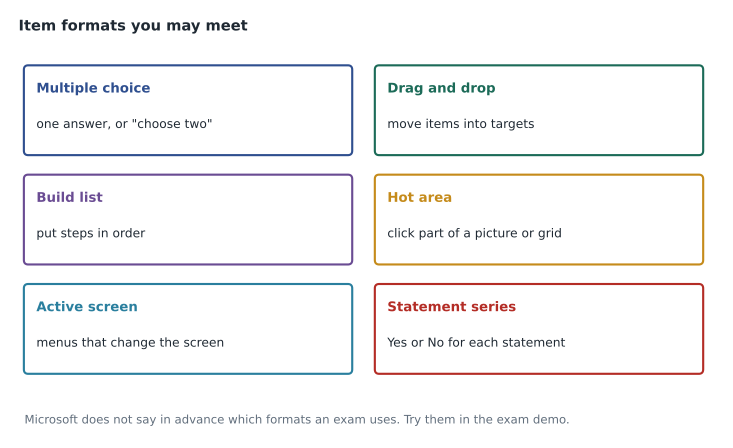
Microsoft's exam duration and experience page says that it does not identify which question types will appear on a given exam. Any exam may use any of the formats in its delivery system, and the mix can change when the exam is updated. To help candidates prepare, Microsoft provides an exam sandbox, reached from the exam experience page at aka.ms/examdemo, where you can try each format and the navigation without any pressure. The demo videos on that page name the formats and features as active screen, build list, case studies, drag and drop, hot area, multiple choice, labs, mark review, the review screen, and navigation and timer. Labs are listed for associate and expert role-based exams; Microsoft's page does not list labs for fundamentals exams.
Multiple choice
The familiar format: a question and a list of options. Some ask for one answer; others say "Each correct answer presents a complete solution" or "Each correct answer presents part of the solution" and tell you how many to choose. Read that instruction carefully, because the two phrases mean different things. A complete solution means each correct option, on its own, would solve the problem, and you pick the required number of independent answers. Part of the solution means the correct options work together, and you need all of them. Either way, select exactly the number asked. The exam usually prevents you from selecting more than the required number, but it will let you submit fewer, which can only cost you points.
Multiple choice is also where elimination helps most. On a four-option item, two options are often clearly wrong to anyone who knows the subject: a product from a different family, or a feature that does the opposite job. Strike those mentally first. Choosing between the remaining two is much easier than choosing among four, and if you must guess, your chance of being right doubles.
Statement series
Fundamentals exams often present a short scenario followed by three statements, each with Yes and No options: "For each of the following statements, select Yes if the statement is true. Otherwise, select No." This is a form of hot area item. Treat each statement as an independent true-or-false question, because it is. A common trap is to assume the three answers must be mixed, as though one Yes and two No would look more likely than three Yes. There is no such rule. Another trap is to let one statement color your reading of the next. Read each one fresh, decide it, and move on. Because most multi-part items score one point per correct part, getting two of three right still earns most of the credit.
Drag and drop
Drag and drop items show a set of choices on one side and targets on the other. You might drag Azure service names into boxes labeled with scenarios, or drag data types into the matching columns. Look at the instructions for whether each choice may be used once, more than once or not at all. If there are more choices than targets, some are distractors. If the item says choices may be used more than once, do not assume that every choice must be used. Before you start dragging, read all the targets: knowing the full set often makes the matches obvious, because only one choice fits each scenario precisely.
Build list
Build list items ask you to select actions from a list and arrange them in the correct order. They test processes: the order in which you create resources, the stages of a workflow, the steps to configure a feature. Some build list items contain more actions than you need, so the task is both choosing the right ones and putting them in order. A good method is to find the first step and the last step, which are usually the easiest to identify, then fill in the middle by asking what each step depends on. You cannot create something inside a resource group before the resource group exists; you cannot assign a policy before you know the scope.
Hot area and active screen
A hot area item shows a picture, such as a screenshot, a diagram or a table, and asks you to click the part that answers the question, or to choose an option in each of several boxes laid over it. An active screen item contains drop-down menus or controls, and your choice in one can change what the rest of the screen shows. Both test whether you can recognize how a product presents itself, not just recall its name. If you have spent time in the Azure portal or the Microsoft Foundry portal, these feel natural. If you have only read about the products, they can be disorienting, which is one reason Lesson 5 recommends hands-on practice in a free sandbox.
Case studies
A case study presents a longer scenario, often with tabs for background, requirements and existing environment, followed by several questions about it. Case studies are more common on associate and expert exams, but nothing in Microsoft's published material rules them out on a fundamentals exam, so be ready for one. The method is to read the questions first, then the scenario with those questions in mind. Requirements tabs often hide the deciding detail in a single sentence, such as "the solution must minimize administrative effort" or "data must remain in Canada". Microsoft's exam page also notes that you can take a break during a case study, but that you cannot return to any question you saw before the break.
The exam interface
Every Microsoft exam shares the same basic screen. A timer shows the remaining time; a counter shows which item you are on and the total. Buttons move you to the next or previous item, and a Mark for review option lets you flag an item to revisit. At the end of a section, a review screen lists every item and shows which are answered, unanswered or marked, and lets you jump back to any of them. Some items, such as certain problem-solution sets, appear one at a time and lock once you move on; the exam tells you when that is the case. The sandbox shows all of this, and five minutes spent in it saves real minutes on the day.
| Feature | What it does | How to use it |
|---|---|---|
| Timer | Counts down the exam time | Check it at planned checkpoints, not after every item |
| Item counter | Shows your position and the total | Note the total on the first screen to set your pace |
| Mark for review | Flags an item to revisit | Answer first, then mark; never leave a marked item blank |
| Review screen | Lists answered, unanswered and marked items | Use the time you saved to revisit marked items |
| Comments | Lets you leave feedback after the exam | Optional, and only if time remains; comments are not part of your answers |
Breaks and the locked questions rule
Microsoft's exam basics page says that five minutes have been added to exams to allow for unscheduled breaks, which do not need to be requested in advance. The exam duration page adds two important conditions. First, the exam clock keeps running during a break. Second, after an unscheduled break you cannot return to any question you viewed before the break, even if it is unanswered or marked for review. Breaks are also not allowed in the middle of a lab or a problem-solution question set. So if you must take a break, first answer every item you have seen and finish reviewing anything you marked. On a 45-minute fundamentals exam, most candidates are better off not taking a break at all.
How each format is scored
Microsoft's scoring page says that on most multi-part questions you earn one point for each correct part, and that you can earn all, some or none of the points available. A question worth more than one point says so in its text, and any other scoring method is also stated. So a statement series with three statements may be worth three points; a drag and drop with four targets may be worth four. That changes the arithmetic of guessing. If you are sure of two parts of a multi-part item and unsure of the third, answer the two with care and make your best guess on the third; you keep the points you earned. There is no penalty for a wrong answer anywhere on the exam.
A ten-minute sandbox drill
Renata gives the group a drill to run in the exam sandbox before they book. Spend the first two minutes on the opening screens: find the timer, the item counter and the buttons, and note where Mark for review sits. Spend the next six minutes answering one item of each format, deliberately using every control: drag a choice into a target and back out again, reorder a build list, open and close each drop-down in an active screen, and change an answer on a hot area. Spend the last two minutes on the review screen, jumping to a marked item and back. The drill is not about the content of the demo items, which are deliberately simple. It is about building the habit of reading the instruction line, seeing how many answers are wanted and knowing exactly how to change your mind. Candidates who skip this step often discover on exam day that they cannot work out how to undo a drag or how to reach the review screen, and they lose minutes they cannot afford.
The drill also exposes a quieter problem: reading speed on a screen. Some people read more slowly on a monitor than on paper, especially if the font is small or the room is bright. In the sandbox, try the zoom or display settings your exam delivery offers, and if you test at a center, ask the staff on the day whether the screen can be adjusted before your exam starts. If reading speed is a genuine difficulty because of a disability, that is exactly what the accommodations process in Lesson 2 is for.
Worked problem
Choosing the right method for each format
During a practice session, Ama meets four items. (a) A question asks which two Microsoft Entra features can enforce multifactor authentication, and says each correct answer presents a complete solution. (b) Three statements about Microsoft Purview, each needing Yes or No. (c) A list of six actions, of which four must be arranged in order to set up a security alert. (d) A screenshot of a Microsoft Defender portal page, asking where to find the incident queue. Which method suits each?
Show solution
- (a) Pick two independent answers, each of which could do the job on its own. Eliminate options from other product families first.
- (b) Treat each statement as a separate true-or-false question. Do not look for a pattern.
- (c) Choose the four needed actions, then fix the first and last steps and order the middle by dependency.
- (d) Use familiarity with the portal; if unsure, eliminate areas that clearly hold something else, such as settings or reports.
Answer: Complete-solution elimination, independent statements, dependency ordering and recognition from hands-on practice.
At the end of the session, Hana tries every format in the exam demo twice. The second time, she notices that she no longer reads the instructions for the controls. "That's the goal," Renata says. "On exam day, the controls should be invisible."
Common mistakes
MistakeReading "complete solution" and "part of the solution" as the same thing.
InsteadComplete means each option works alone; part means the options work together.
MistakeAssuming a statement series must mix Yes and No.
InsteadEach statement is independent; all three can be Yes.
MistakeTaking a break with marked items still open.
InsteadQuestions seen before a break are locked, even if marked.
MistakeUsing every drag-and-drop choice.
InsteadSome choices are distractors; read whether each may be used once, more than once or not at all.
MistakeSkipping the exam demo.
InsteadPractice every format in the sandbox before exam day.
Summary and key terms
- Microsoft does not announce which formats an exam uses; try them all in the exam sandbox.
- Formats include multiple choice, statement series, drag and drop, build list, hot area, active screen and case studies; labs are listed for role-based exams.
- "Complete solution" and "part of the solution" mean different things on multiple-answer items.
- Treat each statement in a series as a separate true-or-false question.
- The interface has a timer, item counter, mark for review and a review screen.
- Five minutes are added for unscheduled breaks, but the clock runs and earlier questions lock.
- Most multi-part items give a point per correct part, and wrong answers cost nothing.
- Exam sandbox
- Microsoft's demo of the exam interface and question formats.
- Hot area
- An item where you click part of an image or choose options laid over it.
- Active screen
- An item whose drop-down choices change the rest of the screen.
- Build list
- An item where you choose actions and put them in order.
- Case study
- A longer scenario followed by several related questions.
- Mark for review
- A flag that adds an item to the review screen for a second look.
Practice problems
Work each problem on paper first, then reveal the answer to check.
Where can you try the exam formats before the exam?
Show answer
In Microsoft's exam sandbox, linked from the exam experience page.
What does "each correct answer presents part of the solution" mean?
Show answer
The correct options work together; you need all of them.
How should you treat a series of Yes or No statements?
Show answer
As independent true-or-false questions.
What happens to marked questions if you take an unscheduled break?
Show answer
You cannot return to any question you saw before the break.
Does the exam clock stop during a break?
Show answer
No. It keeps running.
Are labs listed for fundamentals exams?
Show answer
No. Microsoft lists labs for associate and expert role-based exams.
Can you lose points for a wrong answer?
Show answer
No. Microsoft says there is no penalty for guessing.
Lesson quiz · 5 questions
Score 60% or more to complete this lesson.
Create a free account to save your progress, take quizzes and earn a certificate.