
MSAZ-190 · Lesson 2 of 12 · 22 min
Booking an exam: test center or online
▶ Video coming soon A video version of this lesson is on the way.
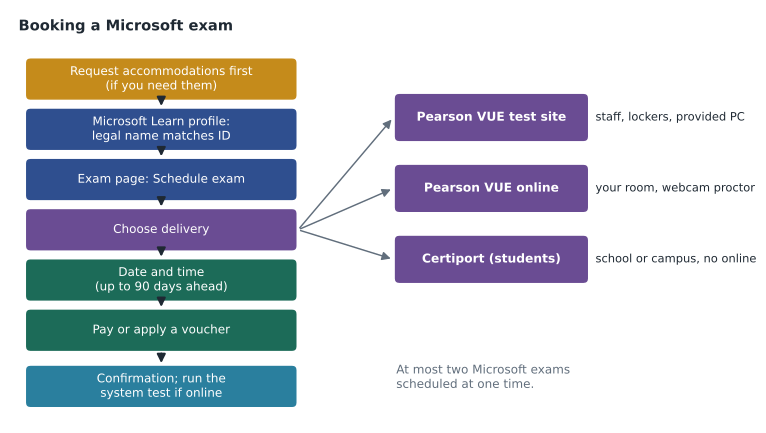
The week after the first lunch, Theo opens the AZ-900 exam page on his laptop and finds the Schedule exam section. He expects to pick a date and pay. Instead, Microsoft Learn asks him to complete his certification profile, and the profile asks for his legal name. Theo has been "Theo" since kindergarten, but his passport says Théodore Marchand. Renata looks over his shoulder. "Type it exactly as it appears on the ID you will bring," she says. "Accent and all. That one field stops more people at check-in than anything else." This lesson walks through booking a Microsoft fundamentals exam step by step: the profile, the delivery choices, accommodations, scheduling rules, changes and retakes.
Step one: the Microsoft Learn profile
Every Microsoft exam is booked from the exam's page on Microsoft Learn while you are signed in to your Learn profile. The profile links your Microsoft account to your certification record, which is where your exams, results, certifications and transcript live. Microsoft's scheduling page says that if your profile has no legal name, you are sent to add one, and that your legal name must match your legal ID or you will not be able to take the exam. For online exams the rule is stricter still: Microsoft's online exam page says the name on your ID must exactly match the name on your certification profile, and that legal name-change forms and ID renewal forms are not accepted. If your ID shows a married name, a second given name or an accent, the profile should show the same.
The profile also holds your contact details. For online exams, Microsoft asks that your mobile number be on the profile with its country code, because the proctor may phone you if there is a technical problem. It is worth checking the email address too: confirmations, rescheduling links and results all go there. Use an address you will still have if you change jobs. Theo uses his personal address, not his Harrow & Finch one, because the certification belongs to him, not to the company.
Step two: accommodations come first
If you need an accommodation, request it before you schedule. Microsoft's accommodations page lists examples such as extra time for people who need more time to process information because of a disability, assistive technology like screen readers or speech-to-text software, a reader, scribe or personal care assistant, and sensory accommodations such as noise-canceling headphones, movement, snacks or adjusted lighting. Requests are submitted through Pearson VUE with any supporting documentation, and Microsoft says approval can take up to 10 business days. Once a request is approved, you schedule the exam by phone so that the accommodation is attached to the booking.
There is a separate route for language. If the exam is not available in your native language, you can ask for extra time using Pearson VUE's English as a Second Language form; Microsoft's accommodations page says the extra time is given only when the exam is not offered in your native language, and each study guide mentions an extra 30 minutes. Keiko grew up speaking Japanese, so she checks the Schedule exam section for the languages DP-900 is offered in. If Japanese is on the list, she will not qualify for the extra time, but she could sit the exam in Japanese; since localized versions usually follow the English update by about eight weeks and DP-900's current version dates from July 2026, the Japanese version should be current by the time she sits it. She decides to read the list carefully before choosing.
Step three: choosing how to take the exam
Microsoft exams for technical certifications are delivered by Pearson VUE in two ways. You can sit the exam at a Pearson VUE test center, where staff check you in, you use the provided computer and your belongings go in a locker. Or you can take it online from home or an office with OnVUE, Pearson VUE's online proctoring service, where a remote proctor watches through your webcam and microphone. A third route exists for students: Microsoft's scheduling page says students, members of academic institutions and people taking Office Specialist exams can choose Schedule with Certiport, which delivers exams at schools and campuses. Microsoft notes that Certiport does not currently offer online proctored exams.
| Question | Test center | Online with OnVUE |
|---|---|---|
| Who provides the computer? | The center | You; it must pass the system test |
| Where are your phone and notes? | In a locker | Out of arm's reach; phone close enough to hear |
| Who checks your ID? | Staff in person | You photograph it; a greeter and proctor review it |
| What can go wrong? | Travel delays, a noisy room | Internet drops, interruptions, a desk that fails the room check |
| Best for | Candidates without a quiet, private room or reliable connection | Candidates with a closed private room, a dependable computer and a steady connection |
What online delivery requires
Microsoft's online exam page sets out the rules, and every one of them matters. Run Pearson VUE's system test on the same computer, in the same place and on the same internet connection you will use, both when you book and again on exam day. The room must have walls and a closed door, and no one else may be in it or enter it during the exam. Extra monitors must be unplugged and turned away, other computers turned off, and the desk cleared: books, notes, sticky notes, papers and every writing tool, including whiteboards, pens and markers, must be out of arm's reach. During check-in you use your phone to take photos of your workspace, your face and your ID, and after check-in the phone goes out of arm's reach but close enough to hear if the proctor calls.
Check-in opens 30 minutes before your appointment and closes 15 minutes after it, and Microsoft says the process takes about 15 minutes. If you have not heard from a proctor within 30 minutes of checking in, Microsoft suggests that the connection may have been lost and that you use Pearson VUE's online support chat. During the exam you may not use other devices, receive help from anyone or any AI tool, let anyone see your screen, or copy or record questions. Eating, smoking and chewing gum are not allowed unless you have an approved accommodation. If you do not want to be recorded, Microsoft says to tell the proctor and reschedule at a test center instead.
Ama decides to test online. She lives alone, works from a spare room with a door, and has taken another vendor's exam with OnVUE before. Theo chooses a test center. His apartment walls are thin, his neighbor's dog barks at the mail carrier, and he does not trust his building's internet in the middle of the morning. "Choose the room you can control," Renata tells them. "The exam is hard enough without wondering whether a delivery driver will knock."
Step four: date, time and the scheduling limits
Microsoft's exam basics page sets two limits worth knowing. You can schedule an exam no more than 90 days ahead, and you can have no more than two Microsoft certification exams scheduled at one time through Pearson VUE, whether on the same day or on different days. After you take or cancel one, you can book another. For the Harrow & Finch group, the 90-day rule means none of them can book a March exam until December. Keiko and Ama, aiming for February, could book in mid-November; Hana, aiming for March, has to wait.
Choose a time of day when you think clearly. For many people that is mid-morning. Online exams are often offered across a wide range of hours, which helps if you work shifts, but avoid times when your household is noisy or your internet is busy. For a test center, check the address and the parking or transit route before the day, and allow for weather; Winnipeg in January and Des Moines in January are both good reasons to leave early.
Step five: paying
Microsoft's certification pages say that exam prices are based on the country or region where the exam is proctored, that taxes may apply, and that you should confirm the exact price with the exam provider before registering; the Schedule exam section shows the price for your location. Third-party guides commonly report fundamentals exams at about 99 US dollars in the United States, but this course does not treat that figure as official, and prices in Canada are set in Canadian dollars. Employers, schools and Microsoft training events sometimes provide vouchers or discounts, which you enter at checkout. Harrow & Finch buys vouchers for its four candidates, so each of them enters a code instead of a card.
Changing or canceling a booking
You can reschedule or cancel an appointment from your Learn profile. The deadlines and any fees for late changes are set in Pearson VUE's policies and shown in your confirmation, not on Microsoft's exam basics page, so read the confirmation email when it arrives and note the cut-off. Microsoft's exam basics page is clear about one thing: it does not refund exams you fail or appointments you miss. If you know a week ahead that you will not be ready, rescheduling is almost always better than sitting an exam you expect to fail.
Retakes
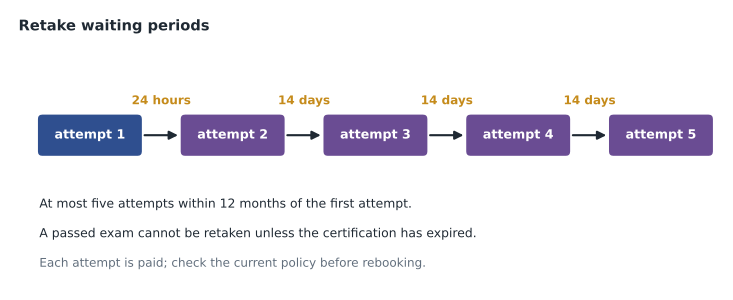
Microsoft's retake policy applies to role-based, specialty and fundamentals exams alike. If you fail an exam the first time, you must wait 24 hours before taking it again. A 14-day waiting period then applies between subsequent attempts, and you may take the same exam no more than five times within 12 months of your first attempt. After five attempts, you must wait until 12 months after the first attempt. You cannot retake an exam you have passed unless the certification has expired, and since fundamentals certifications do not expire, that means a passed fundamentals exam is never retaken. Each attempt is paid. The waiting period can be waived only when an attempt failed because of internet connectivity or equipment problems during the exam and a Pearson VUE case was opened at the time.
Worked problem
Working out the earliest retake
Suppose a candidate fails a fundamentals exam at 10 a.m. on Tuesday, February 9, 2027, then fails a second attempt on Friday, February 12. Using the waiting periods in Microsoft's retake policy, when is the earliest third attempt, and what is the latest date by which all five attempts must fall?
Show solution
- After the first failure, the wait is 24 hours, so the second attempt could be at 10 a.m. on Wednesday, February 10 or later. February 12 satisfies that.
- After the second attempt, a 14-day wait applies. Fourteen days after February 12 is February 26.
- The 12-month window starts with the first attempt on February 9, 2027, so all five attempts must fall before February 9, 2028.
- In practice, a candidate who has failed twice in four days should change their study approach, not just rebook.
Answer: The earliest third attempt is February 26, 2027, and the five attempts must all fall within 12 months of February 9, 2027.
By the end of the week, Theo's profile shows Théodore Marchand, his mobile number with country code, and a booked AZ-900 appointment at a test center on a Saturday morning in mid-January. Ama has run the system test on her own laptop twice, at different times of day, and both passed. Keiko has picked a date in February and is checking the language list. Hana has a calendar reminder for December 10, the first day she can book her March exam.
Common mistakes
MistakeUsing a nickname or leaving out an accent in the profile.
InsteadEnter your legal name exactly as it appears on your ID.
MistakeScheduling first and asking for accommodations later.
InsteadRequest accommodations first; approval can take up to 10 business days.
MistakeRunning the online system test on a different computer or network.
InsteadTest the same computer, place and connection you will use, and test again on the day.
MistakeKeeping a whiteboard or notepad on the desk for an online exam.
InsteadEvery writing tool, including whiteboards, must be out of arm's reach.
MistakeRebooking immediately after two failures without changing anything.
InsteadUse the 14-day wait to fix the weak areas shown on the score report.
Summary and key terms
- Book from the exam page on Microsoft Learn while signed in to your certification profile.
- Your legal name must match your ID; online, it must match exactly and name-change forms are not accepted.
- Request accommodations through Pearson VUE before scheduling; approval can take up to 10 business days.
- Pearson VUE delivers exams at test centers and online with OnVUE; students can use Certiport, which has no online option.
- Online exams need a closed private room, a clear desk, a passed system test and a phone out of reach but audible; check-in runs from 30 minutes before to 15 minutes after.
- You can book up to 90 days ahead and hold at most two scheduled exams.
- Retakes: 24 hours after the first failure, 14 days between later attempts, at most five attempts in 12 months; no refunds for failed or missed exams.
- Learn profile
- Your Microsoft Learn account record that holds exams, results and certifications.
- Pearson VUE
- The company that delivers Microsoft technical certification exams.
- OnVUE
- Pearson VUE's online proctored exam service.
- Certiport
- An exam delivery service for schools and Office Specialist exams.
- System test
- Pearson VUE's check that a computer and connection can run an online exam.
- Accommodation
- An approved change to exam conditions, such as extra time or assistive technology.
Practice problems
Work each problem on paper first, then reveal the answer to check.
What must the profile name match?
Show answer
The legal name on the ID you will present, exactly for online exams.
How far ahead can you schedule a Microsoft exam?
Show answer
No more than 90 days.
How many Microsoft exams can you have scheduled at once?
Show answer
Two.
When does online check-in open and close?
Show answer
From 30 minutes before the appointment until 15 minutes after it.
How long can accommodation approval take?
Show answer
Up to 10 business days.
What is the wait after a first failed attempt?
Show answer
24 hours.
Does Certiport offer online proctored exams?
Show answer
Not at this time, according to Microsoft's scheduling page.
Lesson quiz · 5 questions
Score 60% or more to complete this lesson.
Create a free account to save your progress, take quizzes and earn a certificate.