
LVT-320 · Lesson 5 of 12 · 18 min
Wi-Fi standards and channels (2.4, 5 and 6 GHz)
Wi-Fi is the wireless system Maya will touch on almost every job. In LVT-220 she mounted and powered access points and checked that they joined the network. Designing and surveying Wi-Fi asks more: which standard the access points and clients support, which bands and channels they use, how wide those channels are, and what the regulators allow in each band. Brightwater's office is moving to Wi-Fi 7 access points this term; St. Brendan's east wing will use the same generation; Hartwell's warehouse runs older Wi-Fi 5 equipment with handheld scanners that only work on 2.4 and 5 GHz. This lesson covers the IEEE 802.11 standards, the three Wi-Fi bands and their channels, channel width, dynamic frequency selection, the 6 GHz rules in Canada and the United States, and how a channel plan is built and checked.
The 802.11 family
Wi-Fi is the trade name for equipment that follows the IEEE 802.11 standards and passes the Wi-Fi Alliance's certification tests. Each amendment to 802.11 added speed and features, and the Wi-Fi Alliance gave the recent generations simple numbers.
| Generation | Standard | Bands | Key features |
|---|---|---|---|
| Wi-Fi 4 | 802.11n (2009) | 2.4 and 5 GHz | MIMO, 40 MHz channels |
| Wi-Fi 5 | 802.11ac (2013) | 5 GHz | 80 and 160 MHz channels, 256-QAM, downlink multi-user MIMO |
| Wi-Fi 6 | 802.11ax (2019) | 2.4 and 5 GHz | OFDMA, 1024-QAM, target wake time, BSS coloring |
| Wi-Fi 6E | 802.11ax | Adds 6 GHz | The same features in the new 6 GHz band |
| Wi-Fi 7 | 802.11be (2024) | 2.4, 5 and 6 GHz | 320 MHz channels, 4096-QAM, multi-link operation |
Older standards, 802.11a, b and g, still appear in some industrial and medical devices, and a network that must support them pays a price, because slow devices use more airtime for the same data. Wi-Fi 6 introduced OFDMA, orthogonal frequency-division multiple access, which divides a channel into small resource units so the access point can serve several clients in one transmission; this helps most where many devices send small amounts of data, such as badges, sensors and scanners. BSS coloring tags each network's transmissions so radios can tell their own network from a distant one on the same channel and, in some cases, transmit anyway. Target wake time lets battery devices sleep on a schedule.
Wi-Fi 7, based on 802.11be, was certified by the Wi-Fi Alliance from early 2024, and the IEEE amendment was published in its final form in 2025. Its headline feature is multi-link operation, MLO, which lets a client and access point use links in two or three bands at once, or switch between them instantly, for higher throughput and lower delay. It also allows 320 MHz channels in the 6 GHz band and 4096-QAM for very strong, clean signals close to the access point. Like every generation, its fastest features need clients that support them; a Wi-Fi 7 access point serving Wi-Fi 5 laptops behaves much like a Wi-Fi 5 access point to those laptops.
The 2.4 GHz band
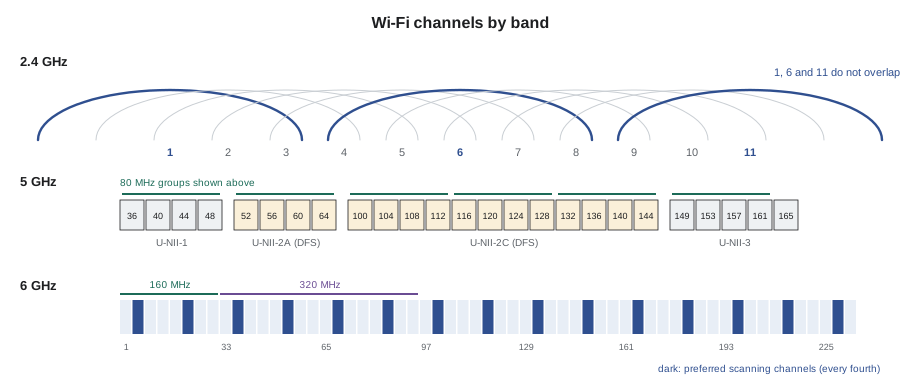
The 2.4 GHz band runs from 2,400 to 2,483.5 MHz, only 83.5 MHz wide. Wi-Fi divides it into channels spaced 5 MHz apart, numbered 1 to 11 in North America, but each Wi-Fi channel is 20 MHz wide, so neighboring channel numbers overlap. Only three 20 MHz channels fit without overlapping: 1, 6 and 11. Every competent 2.4 GHz design uses only those three. Using channels 3 or 8 does not add capacity; it causes access points on overlapping channels to interfere without being able to coordinate, which is worse than sharing a channel.
The band is also crowded with other users: Bluetooth, many IoT devices, cordless equipment and microwave ovens all use it. Its advantage is range, as lesson 2 showed, and support by nearly every device. Many designs now turn off 2.4 GHz radios on some access points, because with only three channels and good range, too many 2.4 GHz radios interfere with each other. Hartwell keeps it on because its scanners need it; Brightwater uses it only for a few older devices.
The 5 GHz band
The 5 GHz band offers far more spectrum, in several sub-bands called U-NII bands: U-NII-1 (channels 36 to 48), U-NII-2A (52 to 64), U-NII-2C (100 to 144) and U-NII-3 (149 to 165). With 20 MHz channels there are about 25; with 40 MHz, about 12; with 80 MHz, about 6; with 160 MHz, only 2 or 3. Channels in U-NII-2A and 2C are shared with weather and military radar, and access points using them must follow dynamic frequency selection, DFS: they listen for radar before transmitting and leave the channel within seconds if radar appears, avoiding it for at least 30 minutes. A DFS event looks to users like a brief outage as clients follow the access point to a new channel. Near airports and some coastal areas, DFS channels can be unusable, and a survey should look for radar events before a design depends on them.
The 6 GHz band
The 6 GHz band, from 5,925 to 7,125 MHz, opened to Wi-Fi in the United States in 2020 and in Canada in 2021. It adds 1,200 MHz of spectrum: 59 channels of 20 MHz, 29 of 40, 14 of 80, 7 of 160 or 3 of 320 MHz. Only devices that support Wi-Fi 6E or Wi-Fi 7 can use it, so older devices never compete for its airtime. It also requires WPA3 security, so it carries no legacy security baggage.
Both regulators created device classes for the band. Low-power indoor access points, the class used in buildings, must be installed indoors, cannot be weatherproof or battery powered, and transmit at lower power than outdoor equipment. Standard-power access points can transmit more and can be used outdoors, but must check with an automated frequency coordination system, which tells them which channels they may use at their location so they do not interfere with licensed microwave links in the band. Very-low-power devices, such as portable units, have their own limits. ISED's rules in Canada and the FCC's in the United States are similar in structure, though details differ; designers follow the rules for the country of installation.
Clients discover 6 GHz access points differently. Instead of scanning all 59 channels, they look on preferred scanning channels, PSCs, every fourth 20 MHz channel (5, 21, 37 and so on up to 229), or learn of the 6 GHz network from the same access point's 2.4 or 5 GHz radio. Designers who use 80 MHz or wider channels in 6 GHz usually place the primary channel on a PSC so clients find the network quickly.
Channel width
Wider channels carry more data, but they come with costs. A 40 MHz channel carries roughly twice the data of a 20 MHz channel when conditions are good, but it uses two 20 MHz channels' worth of spectrum, so there are half as many channels to assign to neighboring access points, and it collects twice the noise, lowering SNR by 3 dB. In a dense design with many access points, narrow channels with good reuse usually serve more users than wide channels that interfere. A common practice is 20 MHz channels at 2.4 GHz, 20 or 40 MHz at 5 GHz in dense areas, and 80 MHz or wider in 6 GHz, where there are enough channels to reuse. Brightwater's network team chose 40 MHz at 5 GHz and 80 MHz at 6 GHz; St. Brendan's chose 20 MHz at 5 GHz for its patient floors, because clinical devices value reliability over speed.
Channel planning
A channel plan assigns a channel and transmit power to each access point radio so that neighboring radios on the same channel are as far apart as possible. Two access points on the same channel that can hear each other share airtime, a situation called co-channel contention: only one can transmit at a time, so each gets less. The aim is that, at any location, a client hears one strong access point on each channel and others on that channel only weakly, typically 20 dB or more below. Most enterprise systems assign channels and power automatically, but designers set the allowed channels, widths and power ranges, and they check the result in the survey.
# Channel plan checker: non-overlapping channels, DFS use and co-channel neighbors
NON_OVERLAP_24 = {1, 6, 11}
DFS_5 = set(range(52, 65, 4)) | set(range(100, 145, 4))
PSC_6 = set(range(5, 230, 16))
plan = [  # access point, band, primary channel, width MHz, neighbors heard above the threshold
    ("AP-3E-01", "2.4", 1, 20, ["AP-3E-02", "AP-3E-04"]),
    ("AP-3E-02", "2.4", 6, 20, ["AP-3E-01", "AP-3E-03"]),
    ("AP-3E-03", "2.4", 3, 20, ["AP-3E-02"]),
    ("AP-3E-04", "2.4", 1, 20, ["AP-3E-01"]),
    ("AP-3E-01", "5", 36, 20, []), ("AP-3E-02", "5", 52, 20, []), ("AP-3E-03", "5", 100, 20, []),
    ("AP-3E-01", "6", 37, 80, []), ("AP-3E-02", "6", 53, 80, []), ("AP-3E-03", "6", 69, 80, []),
]
chan = {(ap, band): ch for ap, band, ch, w, nb in plan}
for ap, band, ch, width, nbrs in plan:
    notes = []
    if band == "2.4" and ch not in NON_OVERLAP_24: notes.append("overlapping 2.4 GHz channel")
    if band == "5" and ch in DFS_5: notes.append("DFS: check for radar events")
    if band == "6" and ch not in PSC_6: notes.append("primary not on a PSC")
    same = [n for n in nbrs if chan.get((n, band)) == ch]
    if same: notes.append("co-channel neighbor " + ", ".join(same))
print(f"{ap} {band:>3} GHz ch {ch:3d} {width:3d} MHz " + ("; ".join(notes) if notes else "ok"))AP-3E-01 2.4 GHz ch 1 20 MHz co-channel neighbor AP-3E-04 AP-3E-02 2.4 GHz ch 6 20 MHz ok AP-3E-03 2.4 GHz ch 3 20 MHz overlapping 2.4 GHz channel AP-3E-04 2.4 GHz ch 1 20 MHz co-channel neighbor AP-3E-01 AP-3E-01 5 GHz ch 36 20 MHz ok AP-3E-02 5 GHz ch 52 20 MHz DFS: check for radar events AP-3E-03 5 GHz ch 100 20 MHz DFS: check for radar events AP-3E-01 6 GHz ch 37 80 MHz ok AP-3E-02 6 GHz ch 53 80 MHz ok AP-3E-03 6 GHz ch 69 80 MHz ok
The checker flags the two problems Frank most often finds in other contractors' work: a 2.4 GHz radio on channel 3, which overlaps both 1 and 6, and two access points on the same channel close enough to hear each other strongly. It also reminds the designer which radios rely on DFS channels and which 6 GHz radios have their primary channel off a PSC, so those choices are deliberate.
Transmit power and clients
Access points can transmit more power than most clients. A phone might transmit 12 to 15 dBm; an access point, 20 dBm or more. If the access point is turned up to full power, a client can hear it from far away but the access point cannot hear the client, and the client stays connected to a distant access point instead of roaming to a nearer one. Good designs set access point power close to the clients' power, typically a few dB above, and cover the area with more access points rather than louder ones. Lesson 7 returns to this in the design of cells and roaming.
Worked problem
A 2.4 GHz plan that used four channels
In an older part of St. Brendan's, the existing access points use 2.4 GHz channels 1, 4, 8 and 11 on four neighboring access points. The clinical engineering team asks whether that gives more capacity than 1, 6 and 11. What should Maya explain, and what should the plan be?
Show solution
- Each 20 MHz channel spans about four 5 MHz channel numbers, so channel 4 overlaps both 1 and 6, and 8 overlaps 6 and 11.
- Overlapping channels interfere without coordinating, raising the noise and errors for all four radios.
- On the same channel, radios at least share airtime politely and can coordinate their transmissions.
- The plan should use 1, 6 and 11 only, reuse them in a pattern so neighbors differ, and turn off or reduce power on 2.4 GHz radios where the fourth access point would otherwise repeat a neighbor's channel at close range.
Answer: Only 1, 6 and 11 give three clean channels; the fourth radio is better off reusing one of them at lower power, or switched off at 2.4 GHz.
Common mistakes
MistakeUsing channels other than 1, 6 and 11 at 2.4 GHz.
InsteadUse only the three non-overlapping channels.
MistakeSetting every 5 GHz radio to 80 MHz in a dense building.
InsteadUse narrower channels where many access points must reuse spectrum.
MistakeDepending on DFS channels without checking for radar.
InsteadCheck for radar events and plan for channel changes.
MistakeTurning access points up to full power to cover more area.
InsteadMatch access point power to clients and add access points instead.
MistakeInstalling low-power indoor 6 GHz access points outdoors.
InsteadLow-power indoor equipment is for indoor use only; outdoor 6 GHz needs standard-power equipment with frequency coordination.
Summary and key terms
- Wi-Fi follows IEEE 802.11; Wi-Fi 6 added OFDMA, Wi-Fi 6E the 6 GHz band, and Wi-Fi 7 multi-link operation and 320 MHz channels.
- At 2.4 GHz only channels 1, 6 and 11 avoid overlap.
- The 5 GHz band has many channels; U-NII-2A and 2C need DFS to avoid radar.
- The 6 GHz band adds 1,200 MHz, used only by Wi-Fi 6E and 7 devices, with WPA3 required.
- Low-power indoor 6 GHz access points are indoor-only; standard power needs automated frequency coordination.
- Wider channels carry more data but leave fewer channels for reuse and add noise.
- Channel plans keep co-channel neighbors weak; access point power should be matched to clients.
- IEEE 802.11
- The family of standards that defines Wi-Fi.
- OFDMA
- Orthogonal frequency-division multiple access: dividing a channel to serve several clients at once.
- Multi-link operation
- Wi-Fi 7 feature that uses links in several bands at once or switches between them.
- DFS
- Dynamic frequency selection: radar detection and avoidance required on some 5 GHz channels.
- PSC
- Preferred scanning channel: one of the 6 GHz channels clients scan first.
- Co-channel contention
- Sharing of airtime between radios on the same channel that can hear each other.
- Low-power indoor
- A 6 GHz device class for indoor access points at reduced power.
Practice problems
Work each problem on paper first, then reveal the answer to check.
Which three 2.4 GHz channels do not overlap?
Show answer
1, 6 and 11.
What must an access point do on a DFS channel when it detects radar?
Show answer
Leave the channel quickly and avoid it for a set time.
How many 80 MHz channels does the 6 GHz band provide?
Show answer
14.
Why might a designer choose 20 MHz channels at 5 GHz on a hospital floor?
Show answer
More channels for reuse, a lower noise floor and better reliability for clinical devices.
Lesson quiz · 5 questions
Score 60% or more to complete this lesson.
Create a free account to save your progress, take quizzes and earn a certificate.