
JS-250 · Lesson 9 of 12 · 27 min
Offline support
▶ Video coming soon A video version of this lesson is on the way.
On Tuesday, September 19, Lucy joins the session for the first half hour, because the offline features are hers to decide. She describes a typical hamper drive Saturday at the church hall. Volunteers arrive between 7:45 and 8:15, check in on one of two tablets by the door, see which table they are on and start packing. When the Wi-Fi drops, the queue at the door stops moving, people wander in without checking in, and at the end of the day Lucy cannot tell who worked which shift. What she needs is simple to say: check-in must keep working when the network does not, and nothing anyone does while offline may be lost or counted twice.
What offline means
Being offline is rarely a clean on-or-off state. A device may have no connection at all, a connection to the hall's router but no internet behind it, a connection so slow that requests time out, or a connection that comes and goes every minute. The browser's navigator.onLine property and its online and offline events report only whether the device has a network interface that might work. True means maybe; only false can be trusted. A well-built offline app therefore treats every request as something that can fail or take too long, and decides what to do when it does.
| Situation | navigator.onLine | What actually happens to a request |
|---|---|---|
| Wi-Fi off, no mobile data | false | Fails at once |
| Connected to the hall's router, router has no internet | true | Hangs until a timeout, then fails |
| Very slow or overloaded network | true | May take tens of seconds |
| Connection drops for 40 seconds every few minutes | Changes back and forth | Some requests succeed, some fail part-way |
| Captive portal (a sign-in page for the Wi-Fi) | true | Gets the portal's page instead of the real response |
Lucy and Mira agree on three levels of offline support for the portal, from the cheapest to the most work. The first is an offline page, so that a volunteer who opens the portal with no connection sees a helpful message instead of the browser's error. The second is an offline app shell with cached data, so that the portal opens and shows the last known shift list with its time. The third, which the check-in tablets need, is offline writes: check-ins recorded on the tablet while offline and sent to the server later, safely.
Showing the state honestly
Before anything else, the portal must tell people what is going on. A list of shifts from 7:50 that looks exactly like a live list is worse than no list at all, because people trust it. Mira adds a status line at the top of the check-in screen with three states: live, showing saved data with its time, and waiting to send a number of check-ins. The status is driven by what actually happened to the latest requests, not by navigator.onLine alone.
// Derive the check-in screen's status line from events, not from navigator.onLine alone.
function statusLine(events) {
  let lastSuccess = null, failing = false, pending = 0;
  const lines = [];
  for (const e of events) {
    if (e.type === 'fetch-ok') { lastSuccess = e.at; failing = false; }
    if (e.type === 'fetch-failed') failing = true;
    if (e.type === 'queued') pending++;
    if (e.type === 'sent') pending--;
    const status = failing
      ? `Offline. Showing shifts saved at ${lastSuccess ?? 'never'}.`
      : 'Live.';
    lines.push(`${e.at}  ${e.type.padEnd(12)} ${status}${pending ? ` ${pending} check-in(s) waiting to send.` : ''}`);
  }
  return lines;
}

const saturday = [
  { at: '07:50', type: 'fetch-ok' },
  { at: '08:02', type: 'fetch-failed' },
  { at: '08:03', type: 'queued' },
  { at: '08:04', type: 'queued' },
  { at: '08:06', type: 'fetch-ok' },
  { at: '08:06', type: 'sent' },
  { at: '08:06', type: 'sent' },
];
console.log(statusLine(saturday).join('\n'));07:50 fetch-ok Live. 08:02 fetch-failed Offline. Showing shifts saved at 07:50. 08:03 queued Offline. Showing shifts saved at 07:50. 1 check-in(s) waiting to send. 08:04 queued Offline. Showing shifts saved at 07:50. 2 check-in(s) waiting to send. 08:06 fetch-ok Live. 2 check-in(s) waiting to send. 08:06 sent Live. 1 check-in(s) waiting to send. 08:06 sent Live.
What this code does
Each event updates three pieces of state: the time of the last successful fetch, whether requests are currently failing and how many check-ins are waiting. The status line is rebuilt from that state after every event, so it says 'Offline' only after a request has actually failed and shows the time of the data on screen. The pending count is shown alongside, so volunteers can see that their check-ins are safe and will be sent.
Sana designs the status line to be visible without being alarming: a small colored bar with text, announced to screen readers through an ARIA live region so that a blind volunteer using the tablet hears 'Offline, 2 check-ins waiting to send' rather than nothing. Color alone never carries the state, because the text does.
Storing data on the device
Cache Storage is for responses. For the app's own data, such as the list of shifts as structured objects, the queue of check-ins and the order board's last state, the browser offers IndexedDB, a database of object stores inside the browser, available both to pages and to service workers. Its raw interface is built around events and is awkward to use directly, so most projects use a small wrapper; the studio uses the idb library, which turns each request into a promise.
import { openDB } from 'idb';

// One database for the portal's offline data.
export const db = openDB('portal', 2, {
  upgrade(database, oldVersion) {
    if (oldVersion < 1) database.createObjectStore('shifts', { keyPath: 'id' });
    if (oldVersion < 2) {
      const outbox = database.createObjectStore('outbox', { keyPath: 'idempotencyKey' });
      outbox.createIndex('byCreated', 'createdAt');
    }
  },
});

export async function saveShifts(shifts, fetchedAt) {
  const tx = (await db).transaction(['shifts'], 'readwrite');
  await Promise.all([...shifts.map((s) => tx.store.put({ ...s, fetchedAt })), tx.done]);
}

export async function queueCheckIn(checkIn) {
  await (await db).put('outbox', checkIn);
}
What this code does
openDB() opens the database at version 2 and runs upgrade() only when a device has an older version, creating whatever stores that version lacks, so a tablet that had version 1 gains the outbox store without losing its saved shifts. The outbox is keyed by each check-in's idempotency key, so the same check-in can never be stored twice. Every write happens in a transaction, and waiting for tx.done means the data is really saved before the function returns.
Storage on a device is not unlimited or permanent. Browsers give each site a quota based on the device's free space, and navigator.storage.estimate() reports how much is used and available. Under storage pressure, browsers may evict a site's data, unless the site has been granted persistent storage with navigator.storage.persist(). Safari adds its own rule: data written by scripts for a site that the visitor has not used for seven days may be removed, although this does not apply to web apps added to the home screen. For the check-in tablets, which are used every week and will be installed as home-screen apps in lesson 10, these limits are comfortable, but the portal still treats the server as the source of truth and the device's copy as a convenience.
The outbox pattern
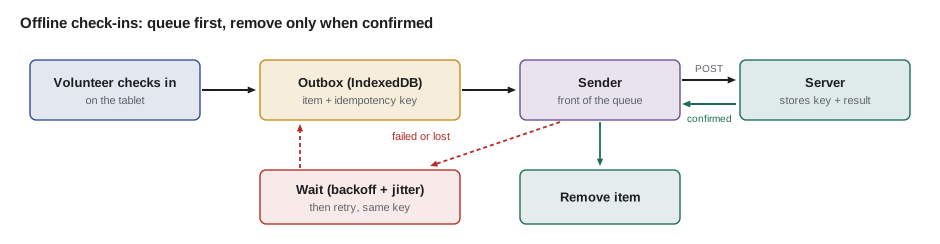
Recording a check-in offline means storing it on the tablet and sending it later. The pattern for that is an outbox: every write goes into a local queue first, and a sender takes items from the front of the queue and sends them to the server, removing each one only after the server has confirmed it. If the network fails, the items simply wait. Two details make it safe rather than merely convenient.
- Each item has an idempotency key. When the tablet creates a check-in, it generates a random key and stores it with the check-in. The partner API from JS-230 already accepts an Idempotency-Key header, and Theo adds the same to the portal's check-in endpoint. If a request reaches the server but the response is lost, the tablet sends it again with the same key, and the server recognizes the key and returns the first result instead of recording the check-in twice.
- Items record when they happened. A check-in made at 8:03 and sent at 8:41 still carries 8:03 as its time, so Lucy's records show when volunteers actually arrived.
// An outbox with idempotency keys, against a fake server whose responses are sometimes lost.
const server = { seen: new Map(), log: [] };
function serverCheckIn(item, attempt) {
  const lostResponse = item.key === 'k-2' && attempt === 1;     // the server records it, but the reply never arrives
  if (!server.seen.has(item.key)) {
    server.seen.set(item.key, `check-in #${server.seen.size + 1}`);
    server.log.push(`${item.volunteer} at ${item.at}`);
  }
  if (lostResponse) throw new Error('network: response lost');
  return server.seen.get(item.key);
}

const outbox = [
  { key: 'k-1', volunteer: 'Amir', at: '08:03' },
  { key: 'k-2', volunteer: 'Bea', at: '08:04' },
  { key: 'k-3', volunteer: 'Chen', at: '08:04' },
];
const attempts = new Map();

function flush() {
  while (outbox.length) {
    const item = outbox[0];
    const n = (attempts.get(item.key) ?? 0) + 1;
    attempts.set(item.key, n);
    try {
      const result = serverCheckIn(item, n);
      outbox.shift();                                      // remove only after the server confirmed it
      console.log(`sent ${item.key} (${item.volunteer}) on attempt ${n}: ${result}`);
    } catch (err) {
      console.log(`failed ${item.key} on attempt ${n}: ${err.message}; ${outbox.length} still queued`);
      return;
    }
  }
}

flush();   // the first try loses Bea's reply
flush();   // the retry uses the same key
console.log('server recorded:', server.log.join(', '));sent k-1 (Amir) on attempt 1: check-in #1 failed k-2 on attempt 1: network: response lost; 2 still queued sent k-2 (Bea) on attempt 2: check-in #2 sent k-3 (Chen) on attempt 1: check-in #3 server recorded: Amir at 08:03, Bea at 08:04, Chen at 08:04
What this code does
The sender always looks at the front of the queue and removes an item only after the server has answered, so a failure leaves it in place for the next attempt. Bea's first request is recorded by the server but its response is lost, so the tablet cannot know it worked and sends it again. Because the retry carries the same idempotency key, the server returns its first result, and Bea is recorded once.
The real outbox lives in the IndexedDB store from earlier in the lesson, and the sender runs in the service worker or the page whenever there is a chance the network is back. The server side of idempotency matters as much as the client side: Theo's endpoint stores each key with the response it produced and keeps the keys for 24 hours, long enough for any tablet to retry.
Retrying without making things worse
When the hall's Wi-Fi returns, both tablets and several volunteers' phones all try to send their queued requests at once. If every client retried at fixed intervals, they would keep hitting the server in synchronized bursts. The standard answer is exponential backoff with jitter: wait longer after each failure, doubling up to a maximum, and choose a random time within that window so that clients spread out.
// Exponential backoff with 'full jitter'. A seeded random number generator keeps the output repeatable.
function mulberry32(seed) {
  return () => {
    seed = (seed + 0x6d2b79f5) | 0;
    let t = Math.imul(seed ^ (seed >>> 15), 1 | seed);
    t = (t + Math.imul(t ^ (t >>> 7), 61 | t)) ^ t;
    return ((t ^ (t >>> 14)) >>> 0) / 4294967296;
  };
}

function backoff(attempt, { baseMs = 1000, capMs = 60000 } = {}) {
  return Math.min(capMs, baseMs * 2 ** (attempt - 1));
}

const random = mulberry32(2028);
console.log('attempt  window   wait (full jitter)');
for (let attempt = 1; attempt <= 8; attempt++) {
  const window = backoff(attempt);
  const wait = Math.round(random() * window);
  console.log(`${String(attempt).padStart(7)}  ${String(window).padStart(6)}  ${String(wait).padStart(6)} ms`);
}attempt window wait (full jitter)
1 1000 50 ms
2 2000 1714 ms
3 4000 855 ms
4 8000 2808 ms
5 16000 4870 ms
6 32000 26571 ms
7 60000 4349 ms
8 60000 10358 msWhat this code does
backoff() doubles the window after each failed attempt, starting at one second and never exceeding a minute. Full jitter then picks a wait anywhere between zero and the window, so two tablets that failed at the same moment are unlikely to retry at the same moment. mulberry32 is a tiny seeded generator, used here so the course's output is the same on every run; the real portal uses Math.random().
Retries also need a reason to stop. The portal gives up after eight attempts in a row, keeps the item in the outbox and shows it in the status line, and starts again whenever there is a new sign that the network is back: the online event, the page becoming visible again, or a successful fetch of anything else. A check-in is never thrown away by the client because of network trouble.
Background Sync
Retrying from the page works only while the page is open. Chromium-based browsers offer the Background Sync API, which lets a page ask its service worker to run a sync event when the browser believes the connection is back, even if the page has been closed in the meantime. Firefox and Safari do not support it, so the studio uses it as an improvement on top of the page's own retries, not instead of them.
// In the page: after queuing a check-in, ask for a background sync where it is supported.
async function requestSync() {
  const reg = await navigator.serviceWorker.ready;
  if ('sync' in reg) {
    await reg.sync.register('send-outbox');
  } else {
    flushOutbox();                    // no Background Sync: try now, and again on the triggers below
  }
}
window.addEventListener('online', flushOutbox);
document.addEventListener('visibilitychange', () => { if (!document.hidden) flushOutbox(); });

// In sw.js: the browser fires sync when it thinks the network is back.
self.addEventListener('sync', (event) => {
  if (event.tag === 'send-outbox') event.waitUntil(flushOutboxFromWorker());
});
What this code does
requestSync() registers a sync with a tag if the registration supports it, and otherwise tries to send at once, so every browser gets at least the page-based behavior. The online and visibilitychange listeners retry whenever the network or the visitor comes back. In the worker, waitUntil() keeps it alive while it sends, and if the promise rejects the browser will try the sync again later.
When the server says no
An offline write is a request made with old information, and sometimes the world has changed by the time it arrives. The shift a volunteer checks into may have been canceled, or the table may already be full. The portal must not pretend these did not happen. Lucy decides the rules, and Mira writes them as a function that the outbox runs on each server response.
// Apply the server's answers to queued check-ins and decide what to tell people.
const answers = [
  { key: 'k-4', volunteer: 'Dana', status: 201 },
  { key: 'k-5', volunteer: 'Eli', status: 200, note: 'already checked in at 08:01 on the other tablet' },
  { key: 'k-6', volunteer: 'Femi', status: 409, problem: 'shift-closed' },
  { key: 'k-7', volunteer: 'Gus', status: 422, problem: 'not-signed-up' },
  { key: 'k-8', volunteer: 'Hana', status: 503 },
];

function outcome(a) {
  if (a.status === 201) return ['done', 'Checked in'];
  if (a.status === 200) return ['done', `Already recorded: ${a.note}`];
  if (a.status === 409 || a.status === 422) return ['needs a person', `Ask Lucy at the desk (${a.problem})`];
  if (a.status >= 500 || a.status === 429) return ['retry later', 'Still waiting to send'];
  return ['needs a person', `Unexpected answer ${a.status}`];
}

for (const a of answers) {
  const [what, message] = outcome(a);
  console.log(`${a.volunteer.padEnd(5)} ${String(a.status).padEnd(4)} ${what.padEnd(15)} ${message}`);
}Dana 201 done Checked in Eli 200 done Already recorded: already checked in at 08:01 on the other tablet Femi 409 needs a person Ask Lucy at the desk (shift-closed) Gus 422 needs a person Ask Lucy at the desk (not-signed-up) Hana 503 retry later Still waiting to send
What this code does
Each response is turned into one of three outcomes: done, retry later or needs a person. A 200 for an existing check-in counts as done, because the volunteer is recorded, while 409 and 422 mean the server refused for a reason no retry will fix, so the item leaves the queue and appears in a list for Lucy. Server errors and 429 keep the item queued for the backoff schedule.
The order board needs less: it never writes, it only shows. Rosa's board already reconnects its event stream with the Last-Event-ID header from JS-240, so it catches up with every change after an outage. The offline work for the board is to keep its last state in IndexedDB and show it, grayed and clearly marked 'offline since 10:42', during the outage, instead of going blank. When the stream reconnects, the replayed events bring it up to date and the banner disappears.
Worked problem
How long can the queue wait?
A tablet fails to send at 08:02 and retries with backoff windows of 1, 2, 4, 8, 16, 32 and 60 seconds (the cap) for attempts 1 to 7. Suppose, in the worst case, that every jittered wait is the full window. When is the seventh retry, and is the outbox still safe if the hall's Wi-Fi is down from 08:02 to 08:04?
Show solution
- Add the windows: 1 + 2 + 4 + 8 + 16 + 32 + 60 = 123 seconds.
- The seventh retry is at the latest 123 seconds after 08:02:00, at 08:04:03.
- The Wi-Fi returns at 08:04:00, so the seventh retry, at the latest at 08:04:03, succeeds; with jitter it may come sooner.
- Nothing is lost while waiting, because the check-ins stay in IndexedDB until the server confirms them.
Answer: The seventh retry comes by 08:04:03 at the latest, after the Wi-Fi is back, and the check-ins are safe throughout.
Common mistakes
MistakeTrusting navigator.onLine as the truth.
InsteadTreat every request as one that can fail or hang, and decide status from what actually happened.
MistakeShowing cached data as if it were live.
InsteadMark saved data with its time and show the offline state clearly, in text and not only in color.
MistakeRetrying writes without idempotency keys.
InsteadGive every queued write a key so the server can recognize and ignore duplicates.
MistakeRetrying at fixed intervals.
InsteadUse exponential backoff with jitter and a maximum, and restart on signs the network is back.
MistakeRelying on Background Sync everywhere.
InsteadUse it where supported, on top of retries from the page.
Summary and key terms
- Offline is not a simple state: requests can fail, hang or get a captive portal's page, and navigator.onLine is only a hint.
- Offline support comes in levels: an offline page, an app shell with saved data, and offline writes.
- Show the state honestly, with the time of saved data and the number of waiting items.
- IndexedDB stores structured data for pages and service workers, within quotas that persistent storage and regular use make safer.
- The outbox pattern queues writes locally and removes them only after the server confirms them, with an idempotency key on each so retries cannot duplicate them.
- Retries use exponential backoff with jitter and restart when the network returns.
- Background Sync helps in Chromium browsers.
- Server refusals that no retry can fix are shown to a person.
- Offline-first
- Designing an app to work from local data first and use the network when it is available.
- App shell
- The minimal HTML, CSS and JavaScript an app needs to start, cached so it opens without a network.
- IndexedDB
- A database of object stores inside the browser, available to pages and service workers.
- Outbox
- A local queue of writes that are sent to the server later and removed only once confirmed.
- Idempotency key
- A unique value sent with a request so that repeating it has the same effect as sending it once.
- Exponential backoff
- Waiting longer after each failed attempt, usually doubling up to a maximum.
- Jitter
- Randomness added to retry delays so that many clients do not retry at the same moment.
- Background Sync
- A Chromium API that lets a service worker run a sync event when the connection returns.
Practice problems
Work each problem on paper first, then reveal the answer to check.
Why can a navigator.onLine value of true not be trusted?
Show answer
It only says a network interface is available; the router may have no internet, the connection may be too slow, or a captive portal may answer instead.
Why does the outbox remove an item only after the server confirms it?
Show answer
If the request or its response is lost, the item must still be there to retry, otherwise the check-in would be lost.
What stops a retried check-in from being recorded twice?
Show answer
The idempotency key: the server sees a key it has already stored and returns the first result instead of recording it again.
Why is jitter added to backoff delays?
Show answer
So that many devices that failed together do not all retry at the same moment and overload the server again.
Try it yourself
Backoff windows
Complete windows(attempts, baseMs, capMs) so that it returns an array of the backoff window for attempts 1 to attempts: baseMs for attempt 1, doubling each time, but never more than capMs.
The program prints the windows and their total.
function windows(attempts, baseMs, capMs) {
  return [];
}

const w = windows(8, 1000, 30000);
console.log(w.join(', '));
console.log('total', w.reduce((a, b) => a + b, 0), 'ms');
console.log(windows(3, 500, 600).join(', '));
Try it yourself
Idempotent check-ins
Complete makeServer() so that the returned checkIn(key, volunteer) records a new check-in the first time a key is seen and returns '201 created #n', where n counts check-ins from 1. For a key it has seen before, it must return '200 already recorded #n' with the original number, and must not record anything.
count() returns how many check-ins have been recorded.
function makeServer() {
  let n = 0;
  return {
    checkIn(key, volunteer) {
      n++;
      return `201 created #${n}`;
    },
    count: () => n,
  };
}

const s = makeServer();
console.log(s.checkIn('k-1', 'Amir'));
console.log(s.checkIn('k-2', 'Bea'));
console.log(s.checkIn('k-2', 'Bea'));
console.log(s.checkIn('k-3', 'Chen'));
console.log(s.checkIn('k-1', 'Amir'));
console.log('recorded', s.count());
Lesson quiz · 5 questions
Score 60% or more to complete this lesson.
Create a free account to save your progress, take quizzes and earn a certificate.