
JS-130 · Lesson 8 of 12 · 24 min
Classes in TypeScript
▶ Video coming soon A video version of this lesson is on the way.
Most of the Food Hub's code is plain functions and objects, but a few parts are classes: the counter page's OrderStore, which holds the current order and notifies the page when it changes; the ApiError class from Asynchronous JavaScript and APIs, which carries an HTTP status; and DonationError in riverside-data. On Thursday, May 13, 2027, the plan is to type them. "Classes are where TypeScript and JavaScript differ most," Gareth warns. "Some TypeScript class features are only types and disappear. One or two generate code. And JavaScript has grown its own versions of a couple of them. You need to know which is which."
This lesson covers typed class fields and constructors, strict property initialization, TypeScript's access modifiers compared with JavaScript's # private fields, readonly fields, parameter properties, implementing interfaces, abstract classes, static members and accessors, generic classes, the override keyword and typed error classes.
Fields and constructors
In a TypeScript class, each field is declared in the class body with its type, and the constructor's parameters are typed like any function's. Under strict mode, the option strictPropertyInitialization requires every field to be given a value, either where it is declared or in the constructor, unless its type allows undefined. That catches the classic bug of a field that some code path forgets to set.
interface Line { code: string; qty: number; price: number }

class OrderStore {
  lines: Line[] = [];
  tip: number;
  note: string;
  number?: number;

  constructor(tip: number) {
    this.tip = tip;
  }

  add(line: Line): void {
    this.lines.push(line);
  }
}store.ts(6,3): error TS2564: Property 'note' has no initializer and is not definitely assigned in the constructor.
What this code does
lines is initialized where it is declared and tip is set in the constructor, so both are fine. note is declared as a string but never set, which is reported as TS2564. number is optional, so it may stay undefined until the order is confirmed.
There are three ways to fix an uninitialized field, and each says something different: give it a starting value (note = ''), set it in the constructor, or admit it may be missing by making it optional (note?: string). A fourth option, the definite assignment assertion note!: string, tells the checker that something outside its view will set the field. It is occasionally needed with frameworks, and otherwise best avoided.
Access modifiers and private fields
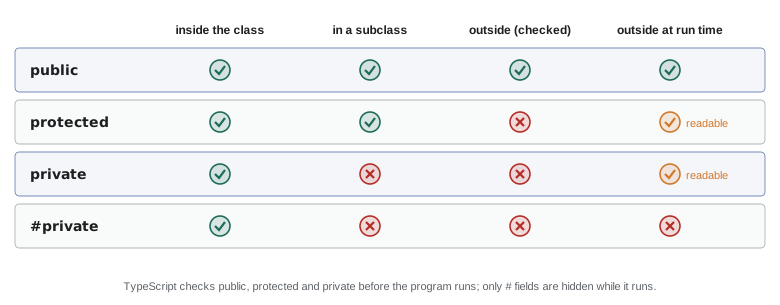
TypeScript has three access modifiers for class members. public, the default, means anyone can use the member. private means only code inside the class can. protected means code inside the class and its subclasses can. Like all types, they are checked before the code runs and then erased: at run time, a TypeScript private field is an ordinary property that any code can read.
JavaScript now has its own private fields, written with a # before the name, as in #lines. They are enforced by the engine itself: code outside the class cannot read or even detect them, whatever it does. TypeScript understands # fields fully and checks them too. For new code, Gareth prefers # fields for anything that is truly internal, and keeps private for the rare cases where code outside the class must reach in, such as tests.
class Tally {
  #counts = new Map<string, number>();
  private lastCode = '';
  protected day: string;

  constructor(day: string) {
    this.day = day;
  }

  add(code: string, qty: number): void {
    this.#counts.set(code, (this.#counts.get(code) ?? 0) + qty);
    this.lastCode = code;
  }

  count(code: string): number {
    return this.#counts.get(code) ?? 0;
  }
}

const tally = new Tally('2027-05-13');
tally.add('SOUP', 2);
console.log(tally.count('SOUP'));
console.log(tally.lastCode);
console.log(tally.day);tally.ts(23,19): error TS2341: Property 'lastCode' is private and only accessible within class 'Tally'. tally.ts(24,19): error TS2445: Property 'day' is protected and only accessible within class 'Tally' and its subclasses.
What this code does
count is public, so the call is fine. lastCode is private and day is protected, so reading either from outside the class is reported, with messages saying where each may be used. The #counts field could not be read from outside at all: even writing tally.#counts outside the class is a syntax error in JavaScript.
"use strict";
class Tally {
    #counts = new Map();
    lastCode = '';
    add(code, qty) {
        this.#counts.set(code, (this.#counts.get(code) ?? 0) + qty);
        this.lastCode = code;
    }
}
const tally = new Tally();
tally.add('SOUP', 2);
tally.add('EGG', 1);
console.log(Object.keys(tally));
console.log(tally.lastCode);
console.log(JSON.stringify(tally));[ "lastCode" ]
EGG
{"lastCode":"EGG"}What this code does
In the emitted JavaScript, lastCode is an ordinary property: Object.keys lists it, any code can read it and JSON.stringify includes it. The #counts field does not appear anywhere from outside, because the engine hides it. That difference is why # fields are the better choice for real privacy.
readonly fields
A readonly field may be assigned only in its declaration or in the constructor. It suits values that identify an object or are fixed when it is created, such as an order's day or an error's status code. As with readonly properties in interfaces, the protection is checked before the program runs and is shallow.
class Shift {
  readonly id: number;
  readonly area: string;
  booked = 0;

  constructor(id: number, area: string, readonly capacity: number) {
    this.id = id;
    this.area = area;
  }

  book(): void {
    if (this.booked >= this.capacity) throw new Error(this.area + ' is full');
    this.booked++;
  }
}

const s = new Shift(41, 'Kitchen', 4);
s.book();
s.capacity = 5;shift.ts(19,3): error TS2540: Cannot assign to 'capacity' because it is a read-only property.
What this code does
id and area are readonly fields set in the constructor, and booked changes freely. The constructor's third parameter, readonly capacity, is a parameter property: it declares and assigns the field in one go. Changing capacity from outside is reported because it is readonly.
Parameter properties and erasable syntax
The shorthand in that constructor, writing readonly capacity: number or private name: string as a constructor parameter, is called a parameter property. It is a TypeScript feature that saves a field declaration and an assignment. It is also one of the few TypeScript features that generate code: the compiler has to add this.capacity = capacity to the constructor. For that reason it is not erasable, and a project with erasableSyntaxOnly, like the Food Hub's, reports it.
class Shift {
  booked = 0;
  constructor(readonly id: number, readonly area: string, readonly capacity: number) {}
}shift.ts(3,15): error TS1294: This syntax is not allowed when 'erasableSyntaxOnly' is enabled. shift.ts(3,36): error TS1294: This syntax is not allowed when 'erasableSyntaxOnly' is enabled. shift.ts(3,59): error TS1294: This syntax is not allowed when 'erasableSyntaxOnly' is enabled.
What this code does
With erasableSyntaxOnly turned on, each parameter property is reported as TS1294, because removing the types would remove the assignments too. The Food Hub code therefore declares its fields in the class body and assigns them in the constructor, as the previous listing did for id and area. The behavior is identical; only the syntax differs.
"use strict";
class Shift {
    id;
    area;
    capacity;
    booked = 0;
    constructor(id, area, capacity) {
        this.id = id;
        this.area = area;
        this.capacity = capacity;
    }
}
const s = new Shift(41, 'Kitchen', 4);
console.log(s);Shift { id: 41, area: "Kitchen", capacity: 4, booked: 0 }What this code does
This is what the compiler emits when parameter properties are allowed: it adds three assignments to the constructor, which is code that was not in the source. That is exactly why Node.js type stripping cannot handle them. The resulting object has the three fields plus booked.
Implementing an interface
A class can promise to match an interface with the keyword implements. The checker then confirms that the class has every member the interface requires, with compatible types, and reports anything missing at the class declaration. Because typing is structural, implements is not required for a class to be used where the interface is expected; it is a way to get the error at the class instead of at some distant call.
interface Notifier {
  subscribe(listener: () => void): () => void;
  notify(): void;
}

class OrderStore implements Notifier {
  #listeners = new Set<() => void>();

  subscribe(listener: () => void): () => void {
    this.#listeners.add(listener);
    return () => this.#listeners.delete(listener);
  }
}store.ts(6,7): error TS2420: Class 'OrderStore' incorrectly implements interface 'Notifier'. Property 'notify' is missing in type 'OrderStore' but required in type 'Notifier'.
What this code does
The class claims to implement Notifier but has no notify method, so the class declaration itself is reported as TS2420, naming the missing member. Without implements, the error would only appear where an OrderStore was passed to something expecting a Notifier. subscribe returns a function that removes the listener, a common pattern for clean-up.
Abstract classes, static members and accessors
An abstract class is a base class that cannot be instantiated itself and may declare abstract methods that subclasses must provide. Unlike an interface, it can also contain real code shared by its subclasses. Static members belong to the class rather than to each instance, which suits constants and factory functions. Accessors, get and set, look like properties to callers but run code.
abstract class Panel {
  static refreshSeconds = 60;
  #updatedAt = 0;

  abstract title(): string;
  abstract body(): string;

  get ageSeconds(): number {
    return Math.round((Date.now() - this.#updatedAt) / 1000);
  }

  markUpdated(): void {
    this.#updatedAt = Date.now();
  }

  render(): string {
    return this.title() + '\n' + this.body();
  }
}

class CounterPanel extends Panel {
  constructor(private orders: number) { super(); }
  title(): string { return 'Lunch counter'; }
  body(): string { return this.orders + ' orders'; }
}
What this code does
Panel provides render, the update time and an ageSeconds accessor, and leaves title and body to its subclasses. CounterPanel supplies both; if it left one out, the checker would report the missing abstract member. refreshSeconds is static, so it is read as Panel.refreshSeconds. This listing uses a parameter property, which is fine in a project without erasableSyntaxOnly.
The keyword abstract is a type-level feature and disappears from the output, but the class it marks is still a real JavaScript class. Nothing stops plain JavaScript code from writing new Panel(); TypeScript simply reports it in TypeScript code.
override
When a subclass replaces a method of its base class, the keyword override says so explicitly. With the option noImplicitOverride, which Gareth turns on for the Food Hub, the checker requires override on every such method and reports override on a method that does not exist in the base class. That catches a base method being renamed while a subclass still provides the old name.
class Panel {
  title(): string { return 'Panel'; }
  render(): string { return this.title(); }
}

class GardenPanel extends Panel {
  title(): string { return 'Youth garden'; }
  override renderBody(): string { return 'Showers likely'; }
}panels.ts(7,3): error TS4114: This member must have an 'override' modifier because it overrides a member in the base class 'Panel'. panels.ts(8,12): error TS4113: This member cannot have an 'override' modifier because it is not declared in the base class 'Panel'.
What this code does
With noImplicitOverride, GardenPanel's title replaces the base method without saying override, which is reported. renderBody says override but the base class has no such method, which is reported too. Together the two rules keep subclasses in step with their base class.
Generic classes
Classes can have type parameters, exactly like functions and interfaces. A small store that holds a value and notifies listeners when it changes is useful for the counter page's order, the dashboard's state and the menu, so Mira writes it once as a generic class.
class Store<T> {
  #value: T;
  #listeners = new Set<(value: T) => void>();

  constructor(initial: T) {
    this.#value = initial;
  }

  get(): T {
    return this.#value;
  }

  set(next: T): void {
    this.#value = next;
    for (const listener of this.#listeners) listener(next);
  }

  subscribe(listener: (value: T) => void): () => void {
    this.#listeners.add(listener);
    return () => { this.#listeners.delete(listener); };
  }
}

type DashboardState = { status: 'loading' } | { status: 'ready'; orders: number };
const dashboard = new Store<DashboardState>({ status: 'loading' });
dashboard.set({ status: 'ready', orders: 30 });
What this code does
T is chosen when the store is created, so this store accepts and returns only DashboardState values. A Store<number> or Store<Line[]> would work the same way with full checking. Listeners receive the new value with its type, so a subscriber can switch on status as in Lesson 6.
"use strict";
class Store {
    #value;
    #listeners = new Set();
    constructor(initial) { this.#value = initial; }
    get() { return this.#value; }
    set(next) {
        this.#value = next;
        for (const listener of this.#listeners)
            listener(next);
    }
    subscribe(listener) {
        this.#listeners.add(listener);
        return () => { this.#listeners.delete(listener); };
    }
}
const count = new Store(0);
const unsubscribe = count.subscribe(n => console.log('orders now', n));
count.set(1);
count.set(2);
unsubscribe();
count.set(3);
console.log('final value', count.get());orders now 1 orders now 2 final value 3
What this code does
The emitted class is plain JavaScript with real # private fields. Each call to set notifies the subscriber, until the function returned by subscribe removes it, so the change to 3 is stored but not announced. The type parameter existed only for the checker.
Typed error classes
Error handling is where small classes earn their keep. A subclass of Error can carry extra information, such as the HTTP status of a failed request, and code that catches it can test for the class with instanceof and then use those properties safely, because instanceof narrows.
export class ApiError extends Error {
  override readonly name = 'ApiError';
  readonly status: number;
  readonly retryable: boolean;

  constructor(status: number, message: string) {
    super(message);
    this.status = status;
    this.retryable = status === 429 || status >= 500;
  }
}

export function userMessage(err: unknown): string {
  if (err instanceof ApiError) {
    return err.retryable ? 'The server is busy. Trying again shortly.' : 'Request failed (' + err.status + ').';
  }
  if (err instanceof Error) return err.message;
  return 'Something went wrong.';
}
What this code does
ApiError adds a status and a retryable flag, and sets name so that logs show the right class. In userMessage, the caught value is unknown; after instanceof ApiError the checker knows it has status and retryable. The override on name is required by noImplicitOverride because Error already has a name.
Try it yourself
A tally class
Complete the Tally class. add(code, qty) adds qty to that dish's count, count(code) returns the count or 0, and total() returns the sum of all counts. Keep the counts in a # private Map. The program adds four lines and prints the results.
class Tally {
  #counts = new Map();

  add(code, qty) {}

  count(code) {
    return 0;
  }

  total() {
    return 0;
  }
}

const t = new Tally();
t.add('SOUP', 2);
t.add('EGG', 1);
t.add('SOUP', 1);
t.add('DRINK', 3);
console.log(t.count('SOUP'), t.count('EGG'), t.count('WRAP'));
console.log('total', t.total());
Try it yourself
An error with a status
Complete ApiError so that the constructor stores status, sets name to 'ApiError' and sets retryable to true when status is 429 or 500 and above. Then complete describe(err) to return 'retry' for a retryable ApiError, 'fail ' followed by the status for any other ApiError, and 'other' for anything else.
class ApiError extends Error {
  constructor(status, message) {
    super(message);
  }
}

function describe(err) {
  return 'other';
}

console.log(describe(new ApiError(503, 'Service unavailable')));
console.log(describe(new ApiError(404, 'Not found')));
console.log(describe(new ApiError(429, 'Too many requests')));
console.log(describe(new TypeError('bad')));
console.log(new ApiError(500, 'x').name);
Common mistakes
MistakeUse private for fields that must be hidden.
Insteadprivate is erased and readable at run time; use # fields for real privacy.
MistakeSilence TS2564 with a ! on every field.
InsteadGive the field a value, set it in the constructor or make it optional; ! is a last resort.
MistakeUse parameter properties in a project meant for type stripping.
InsteadThey generate code; with erasableSyntaxOnly declare the fields and assign them in the constructor.
MistakeAssume a class must say implements to be used as an interface.
InsteadTyping is structural; implements only moves the error to the class declaration.
MistakeLeave out override when replacing a base method.
InsteadWith noImplicitOverride the checker requires it, which keeps subclasses in step with renamed base methods.
Summary and key terms
- TypeScript class fields are declared with their types, and strictPropertyInitialization reports fields that are never given a value. public, protected and private are checked by TypeScript and erased, so private fields are readable at run time; JavaScript's # fields are enforced by the engine. readonly fields may be set only in their declaration or the constructor.
- Parameter properties such as constructor(readonly id: number) declare and assign a field in one go, but they generate code and are rejected by erasableSyntaxOnly. implements makes the checker confirm that a class matches an interface.
- Abstract classes share code and require subclasses to provide abstract members; static members belong to the class; get and set define accessors.
- With noImplicitOverride, methods that replace base methods must say override, and override on a method that does not exist is reported.
- Classes can be generic, such as Store<T>.
- Error subclasses carry extra data, and instanceof narrows a caught unknown value to them.
- field
- A property declared in a class body, with a type and optionally a starting value.
- strictPropertyInitialization
- A strict option that reports class fields never given a value.
- access modifier
- public, protected or private, which say where a class member may be used; checked only by TypeScript.
- # private field
- A JavaScript private field, such as #lines, hidden by the engine from code outside the class.
- parameter property
- A constructor parameter with a modifier, such as readonly id: number, that declares and assigns a field.
- implements
- A keyword that makes the checker confirm a class matches an interface.
- abstract class
- A base class that cannot be created directly and may require subclasses to provide members.
- static member
- A property or method that belongs to the class itself rather than to each instance.
- accessor
- A get or set method that is used like a property.
- override
- A keyword marking a method that replaces one from the base class.
Practice problems
Work each problem on paper first, then reveal the answer to check.
A field is declared note: string and never assigned. What does strict mode report?
Show answer
TS2564: the property has no initializer and is not definitely assigned in the constructor.
What is the difference between private secret and #secret?
Show answer
private is checked only by TypeScript and is readable at run time; #secret is hidden by the engine.
Why does erasableSyntaxOnly reject constructor(readonly id: number)?
Show answer
A parameter property makes the compiler generate an assignment, so removing the types would remove code.
What does implements Notifier add to a class?
Show answer
A check at the class declaration that it has every member of Notifier.
How does a catch block safely read the status of an ApiError?
Show answer
Test err instanceof ApiError first, which narrows the unknown value.
Lesson quiz · 5 questions
Score 60% or more to complete this lesson.
Create a free account to save your progress, take quizzes and earn a certificate.