
JS-130 · Lesson 12 of 12 · 29 min
Capstone: migrating a project to TypeScript
▶ Video coming soon A video version of this lesson is on the way.
The last two sessions of the block, planned for Thursday, May 27, and Tuesday, June 1, 2027, are given over to the capstone: moving the Food Hub's front-end code from JavaScript to TypeScript without stopping the pages that the kitchen and the volunteer office use every day. A review with Gareth and Theo is planned for Friday, June 4. "Nobody rewrites a working system in one go," Gareth says. "We migrate it the way you'd replace the floor of a kitchen that stays open: one section at a time, with the counter still serving soup."
This lesson brings the course together. It plans a gradual migration, starts by type-checking the existing JavaScript with JSDoc comments and checkJs, converts files to TypeScript in dependency order, tightens the types until the temporary any values are gone, builds a typed and checked API client for the dashboard, and ends with the review checklist.
The project
Three pieces of code are in scope, all written by Mira over the winter. They share some modules, so the order of migration matters.
| Part | Files | Depends on | Used by |
|---|---|---|---|
| riverside-data library | rules.js, errors.js, records.js, stats.js, format.js, index.js | Nothing | The counter page, the dashboard, the season report |
| Counter order page | menu.js, money.js, order.js, store.js, storage.js, view.js, main.js | riverside-data (format, errors) | Rosa's kitchen trainees, every lunch |
| Dashboard API client | http.js, api.js, refresh.js, panels.js | riverside-data, the counter page's money.js | Lucy's office screen |
Gareth's rules for the migration are short. The pages must work after every single commit, so each step is small and can be released on its own. No behavior changes during the migration: a bug the checker finds is written down and fixed in a separate commit, so that if something breaks, it is clear whether the cause was a type change or a logic change. And the migration ends when strict mode, with the Food Hub's extra options, reports nothing and no any remains, not when the last file is renamed.
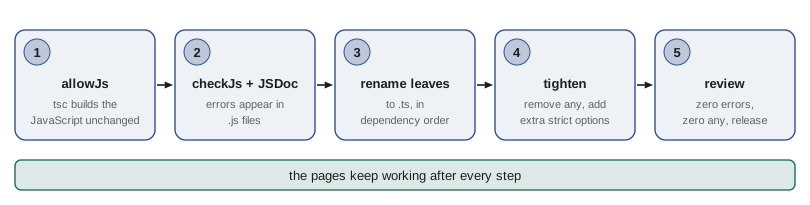
Step 1: let TypeScript build the JavaScript
The first commit changes no code at all. It adds TypeScript as a development dependency and a tsconfig.json with allowJs, which lets the compiler accept .js files as part of the project and copy them to the output folder. From now on, tsc builds the pages, so later steps can rename one file at a time without touching the build.
{
  "compilerOptions": {
    "rootDir": "src",
    "outDir": "public/js",
    "target": "es2022",
    "lib": ["es2022", "dom"],
    "module": "esnext",
    "moduleResolution": "bundler",
    "allowJs": true,
    "checkJs": false,
    "strict": true,
    "noEmitOnError": true,
    "sourceMap": true,
    "erasableSyntaxOnly": true,
    "verbatimModuleSyntax": true
  },
  "include": ["src"]
}
What this code does
allowJs makes the existing JavaScript files part of the project, so tsc copies them into public/js just as before. checkJs is off for now, so nothing is reported yet. The other settings are the Food Hub configuration from Lesson 2, ready for the files that will become TypeScript.
Mira checks step 1 by comparing the new public/js folder with the old one. Apart from source maps and a use strict line, the files are the same, so the commit can go to the server with no risk.
Step 2: check the JavaScript with JSDoc
Turning on checkJs makes the checker examine the .js files too, using whatever types it can infer. Types that cannot be inferred, such as parameters, can be given in JSDoc comments: a comment starting with /** above a function, with tags such as @param {number} cents and @returns {string}. The checker reads these exactly like annotations. The file is still plain JavaScript, so the browser runs it unchanged.
// @ts-check

/**
 * Formats a price in cents.
 * @param {number} cents
 * @returns {string}
 */
export function formatCents(cents) {
  return (cents / 100).toFixed(2);
}

/** @typedef {{ code: string, qty: number, price: number }} Line */

/**
 * @param {Line[]} lines
 * @returns {number}
 */
export function subtotal(lines) {
  return lines.reduce((sum, l) => sum + l.qty * l.price, 0);
}
What this code does
The JSDoc comments give every parameter and return value a type, and @typedef declares a Line type that the rest of the file can use. The checker accepts the file with no messages. A // @ts-check comment at the top turns checking on for one file, which is useful when checkJs is still off for the rest of the project.
With checkJs on, the checker reports problems in the existing code, and this is where a migration starts paying for itself before a single file has been renamed. Every report is either a real bug or a place where the code is correct but the checker cannot tell. Mira expects a mixture of both.
/**
 * @param {{ number: number, total: number }[]} orders
 */
export function dayReport(orders) {
  const best = orders[0];
  const average = orders.reduce((s, o) => s + o.total, 0) / orders.length;
  return 'Best order ' + best.nubmer + ', average ' + average.toFixed(0);
}

/** @param {HTMLElement} el */
export function showTotal(el, cents) {
  el.textContent = cents / 100;
}report.js(7,31): error TS2551: Property 'nubmer' does not exist on type '{ number: number; total: number; }'. Did you mean 'number'?
report.js(11,31): error TS7006: Parameter 'cents' implicitly has an 'any' type.
report.js(12,3): error TS2322: Type 'number' is not assignable to type 'string'.What this code does
The checker reports the misspelt property nubmer, a real bug that printed undefined on the report. It also reports that a number is assigned to textContent, which only accepts strings, and that cents has no type. The first is fixed in its own commit as a bug fix; the others need a String call and a JSDoc @param.
| Report | Kind | Fix |
|---|---|---|
| Property 'nubmer' does not exist | Real bug: the report showed undefined | Fix the spelling, in a separate bug-fix commit |
| Type 'number' is not assignable to type 'string' | Works by accident: the browser converts it | Convert explicitly with String or a format function |
| Parameter implicitly has an 'any' type | Missing information | Add a JSDoc @param, or wait for the file to become .ts |
| Object is possibly 'undefined' | Real gap: crashes on an empty day | Handle the empty case, as in Lesson 11 |
| Cannot find name or property on a DOM element | The checker needs to know the element type | Use querySelector<HTMLButtonElement> or a check |
JSDoc types are a complete system, able to express everything this course has covered, and some projects stay with them permanently because they need no build step at all. The Food Hub will go further, because its pages already have one, and TypeScript syntax is shorter and easier to read. But JSDoc is the right tool for the step in between.
Step 3: convert files in dependency order
Renaming a file from .js to .ts switches on full TypeScript for it. The order matters. A file whose imports are still JavaScript gets weaker types from them, while a file whose imports are already TypeScript gets their full types for free. So the migration starts at the leaves of the dependency graph, the files that import nothing from the project, and works up toward the entry points.
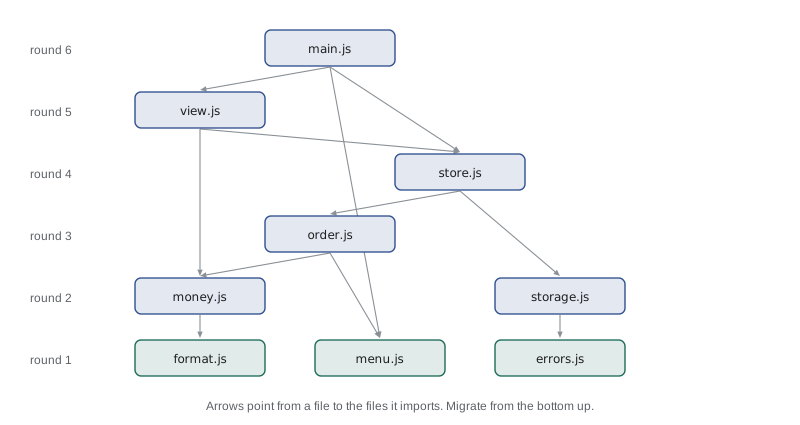
// Which files can be migrated in which round? A file is ready when everything it imports is done.
const imports = {
  'main.js': ['view.js', 'store.js', 'menu.js'],
  'view.js': ['store.js', 'money.js'],
  'store.js': ['order.js', 'storage.js'],
  'order.js': ['money.js', 'menu.js'],
  'storage.js': ['errors.js'],
  'money.js': ['format.js'],
  'menu.js': [],
  'format.js': [],
  'errors.js': [],
};

const done = new Set();
let round = 1;
while (done.size < Object.keys(imports).length) {
  const ready = Object.keys(imports).filter(f => !done.has(f) && imports[f].every(d => done.has(d)));
  console.log('Round ' + round + ': ' + ready.sort().join(', '));
  ready.forEach(f => done.add(f));
  round++;
}Round 1: errors.js, format.js, menu.js Round 2: money.js, storage.js Round 3: order.js Round 4: store.js Round 5: view.js Round 6: main.js
What this code does
Each round collects the files whose imports have all been migrated, starting with the three that import nothing. This is a simple form of topological sorting, which orders the nodes of a graph so that every node comes after the nodes it depends on. The counter page needs six rounds, with main.js alone in the last.
For each file, the routine is the same: rename it, run the check, add types to parameters and exports, replace JSDoc types with TypeScript syntax, and fix the errors. Where a fix would take long or would change behavior, a temporary any with a comment keeps the step small. Converting money.js shows the routine at its simplest.
export type Cents = number;
export interface Line { code: string; qty: number; price: Cents }

/** Formats a price in cents. */
export function formatCents(cents: Cents): string {
  return (cents / 100).toFixed(2);
}

export function subtotal(lines: readonly Line[]): Cents {
  return lines.reduce((sum, l) => sum + l.qty * l.price, 0);
}
What this code does
The JSDoc tags have become annotations and the @typedef an exported interface, which other modules now import with import type. The comment above formatCents stays, because it is still useful to readers, but its types have moved into the code. lines is readonly, a promise that subtotal does not change the order.
The trickiest file is storage.js, which reads the day's tally from localStorage. That data comes from outside the program, so in TypeScript it gets the treatment from Lesson 6: parse it as unknown and check it, falling back to an empty tally if it is missing, from an older version or damaged.
export interface Tally {
  version: 1;
  day: string;          // '2027-05-27'
  orders: number;
  sales: number;        // cents
  tips: number;         // cents
}

function isTally(x: unknown): x is Tally {
  if (typeof x !== 'object' || x === null) return false;
  const t = x as Record<string, unknown>;
  return t.version === 1 && typeof t.day === 'string' &&
    typeof t.orders === 'number' && typeof t.sales === 'number' && typeof t.tips === 'number';
}

export function loadTally(today: string, text: string | null): Tally {
  const empty: Tally = { version: 1, day: today, orders: 0, sales: 0, tips: 0 };
  if (text === null) return empty;
  try {
    const data: unknown = JSON.parse(text);
    return isTally(data) && data.day === today ? data : empty;
  } catch {
    return empty;
  }
}
What this code does
loadTally takes the stored text, or null if nothing was stored, so the function is easy to test without a browser. JSON.parse's result is typed unknown and must pass the isTally guard, including the version check, before it is trusted. A tally from another day, damaged text or an old format all give a fresh empty tally, as Rosa's rules require.
"use strict";
function isTally(x) {
    if (typeof x !== 'object' || x === null)
        return false;
    const t = x;
    return t.version === 1 && typeof t.day === 'string' &&
        typeof t.orders === 'number' && typeof t.sales === 'number' && typeof t.tips === 'number';
}
function loadTally(today, text) {
    const empty = { version: 1, day: today, orders: 0, sales: 0, tips: 0 };
    if (text === null)
        return empty;
    try {
        const data = JSON.parse(text);
        return isTally(data) && data.day === today ? data : empty;
    }
    catch {
        return empty;
    }
}
const today = '2027-05-27';
const saved = JSON.stringify({ version: 1, day: today, orders: 30, sales: 38140, tips: 2140 });
console.log(loadTally(today, saved).orders);
console.log(loadTally(today, null).orders);
console.log(loadTally(today, '{"version":1,"day":"2027-05-26","orders":41,"sales":1,"tips":0}').orders);
console.log(loadTally(today, '{not json').orders);
console.log(loadTally(today, '{"orders":"30"}').orders);30 0 0 0 0
What this code does
The emitted JavaScript behaves the same as the old storage.js for good data, so the first call returns today's 30 orders. Every bad case, nothing stored, yesterday's tally, text that is not JSON and an old format with a string count, returns the empty tally with 0 orders. The type guard is the run-time check that makes the Tally type trustworthy.
Step 4: tighten
When every file is TypeScript, the project compiles, but it is not finished. The temporary any values from step 3 are still there, and the extra strict options from Lesson 11 are not yet on. Tightening means turning those options on one at a time and removing each any, replacing it with a real type, unknown plus a check, or a generic. Gareth suggests measuring progress with a simple count, so the review can see it reach zero.
const files = {
  'store.ts': "let listeners: any[] = [];\nexport function add(line: Line): void {}\nconst saved = JSON.parse(text) as any;",
  'view.ts': "export function render(state: DashboardState): string { return ''; }",
  'http.ts': "export async function getJson(url: string): Promise<any> {}\n// @ts-expect-error: old menu format\nconst legacy: number = row.price;",
};

let totalAny = 0, totalExpect = 0;
for (const [name, text] of Object.entries(files)) {
  const anys = (text.match(/\bany\b/g) ?? []).length;
  const expects = (text.match(/@ts-expect-error/g) ?? []).length;
  totalAny += anys; totalExpect += expects;
  console.log(name.padEnd(9), 'any:', anys, ' @ts-expect-error:', expects);
}
console.log('Total any:', totalAny, ' Total @ts-expect-error:', totalExpect);store.ts any: 2 @ts-expect-error: 0 view.ts any: 0 @ts-expect-error: 0 http.ts any: 1 @ts-expect-error: 1 Total any: 3 Total @ts-expect-error: 1
What this code does
The script counts whole-word uses of any and @ts-expect-error comments in each file's text, using regular expressions with word boundaries. Here store.ts has two any values, http.ts has one any and one suppressed error, and view.ts is clean. Real projects use a linter rule for the same count, but a few lines of script are enough to track progress.
The most important tightening in the dashboard client is the getJson helper from Lesson 7, whose Promise<T> made an unchecked promise. Mira replaces it with a version that ties each endpoint to its response type through the Endpoints interface in api.ts, and that cannot return anything without a check.
interface CounterToday { orders: number; sales: number; tips: number; updatedAt: string }
interface Shift { id: number; area: string; start: string; capacity: number; booked: number }
interface Page<T> { items: T[]; next: string | null }

interface Endpoints {
  '/counter/today': CounterToday;
  '/shifts': Page<Shift>;
}

type Guard<T> = (x: unknown) => x is T;

export class ApiError extends Error {
  override readonly name = 'ApiError';
  readonly status: number;
  constructor(status: number, message: string) {
    super(message);
    this.status = status;
  }
}

export async function getChecked<P extends keyof Endpoints>(
  path: P,
  isValid: Guard<Endpoints[P]>,
  signal?: AbortSignal,
): Promise<Endpoints[P]> {
  const res = await fetch('/api/v1' + path, signal ? { signal } : {});
  if (!res.ok) throw new ApiError(res.status, path + ' failed with ' + res.status);
  const data: unknown = await res.json();
  if (!isValid(data)) throw new ApiError(502, path + ' returned an unexpected shape');
  return data;
}
What this code does
P is limited to the keys of Endpoints, so only real paths are accepted, and Endpoints[P] is the response type for that path. The caller must pass a guard for exactly that type, and the data is returned only after the guard accepts it. The result is a function whose type cannot lie: a wrong shape becomes an ApiError instead of a quiet undefined.
Because the signal parameter is optional and the project uses exactOptionalPropertyTypes, the helper passes { signal } only when there is one. It is a small example of how the strict options shape everyday code: they make you say what you mean.
"use strict";
const responses = {
    '/counter/today': { orders: 30, sales: 38140, tips: 2140, updatedAt: '2027-05-27T12:04:00Z' },
    '/shifts': { items: [{ id: 41, area: 'Kitchen', start: '09:00', capacity: 4, booked: 4 }], nxt: null },
};
async function fakeFetch(url) {
    const body = responses[url.replace('/api/v1', '')];
    await new Promise(r => setTimeout(r, 20));
    return { ok: body !== undefined, status: body === undefined ? 404 : 200, json: async () => body };
}
const isCounter = (x) => typeof x === 'object' && x !== null &&
    typeof x.orders === 'number' && typeof x.sales === 'number';
const isPage = (x) => typeof x === 'object' && x !== null &&
    Array.isArray(x.items) && 'next' in x;
async function getChecked(path, isValid) {
    const res = await fakeFetch('/api/v1' + path);
    if (!res.ok)
        throw new Error(path + ' failed with ' + res.status);
    const data = await res.json();
    if (!isValid(data))
        throw new Error(path + ' returned an unexpected shape');
    return data;
}
async function main() {
    const today = await getChecked('/counter/today', isCounter);
    console.log('Orders today:', today.orders, '| sales', (today.sales / 100).toFixed(2));
    for (const path of ['/shifts', '/volunteers']) {
        try {
            await getChecked(path, isPage);
        }
        catch (err) {
            console.log(err.message);
        }
    }
}
main();Orders today: 30 | sales 381.40 /shifts returned an unexpected shape /volunteers failed with 404
What this code does
This runnable version uses fakeFetch, a small stand-in for fetch that answers from a table after a short delay. The counter summary passes its guard and is used with its full type. The shifts response has a misspelt next property, so the guard rejects it with a clear message instead of letting undefined reach the dashboard, and the unknown path fails with 404.
Step 5: review and release
The review planned for Friday, June 4, works through a checklist that Gareth and Mira write together. Theo attends for the API items. Each line is something a reviewer can confirm by running a command or reading a file, not a matter of opinion.
| Check | How to confirm it |
|---|---|
| The project compiles with no errors under the full Food Hub configuration | npm run typecheck reports nothing; the CI job is green |
| No any and no @ts-ignore remain; each @ts-expect-error has a reason | The count script, or the linter, reports zero any |
| Every value from outside the program is checked at the boundary | Search for JSON.parse, res.json() and localStorage: each result is unknown and passes a guard |
| The API types match Theo's contract | Theo reads api.ts beside the contract document |
| The emitted JavaScript behaves as before | The counter page and dashboard pass the same manual test script as in April |
| Bugs found by the checker are fixed in their own commits | Each fix commit names the bug; none is mixed with renames |
| riverside-data publishes its declaration files | A test project imports it and gets completion |
If the review passes, the TypeScript version replaces the JavaScript one on the server the following week. Because each step has been released as it was finished, that last release is small: by then, nearly everything the kitchen and the office use has already been running as compiled TypeScript for days.
What the migration is expected to show
Gareth expects the checker to have found a handful of real bugs, like the misspelt property in the day report, and dozens of places where the code was correct only by accident, such as numbers assigned to textContent. He also expects the editor to be the part Mira notices most afterwards: completion for every API response, and renames that touch the right lines and only those. The measurable result for the review is simpler: zero errors, zero any, and the same behavior as before.
The course ends where the next one begins. Data Structures and Algorithms in JavaScript, in the second year, writes its code in TypeScript from the start, and Back-End Development with Node.js and Express uses the same shared API types on a Node.js server, where Theo is curious to see what a typed back end feels like after years of PHP.
Try it yourself
Order the migration
Complete order(imports) so that it returns an array of rounds. Each round is a sorted array of the files whose imports are all in earlier rounds; the first round is the files that import nothing. The program prints the rounds for a small project.
function order(imports) {
  return [];
}

const imports = {
  'refresh.js': ['http.js', 'panels.js'],
  'panels.js': ['format.js'],
  'http.js': ['errors.js', 'api.js'],
  'api.js': [],
  'format.js': [],
  'errors.js': [],
};
order(imports).forEach((round, i) => console.log('Round ' + (i + 1) + ': ' + round.join(', ')));
console.log('Rounds:', order(imports).length);
Try it yourself
Track the remaining any
Complete anyCount(text) so that it returns how many times the whole word any appears in the text, not counting words such as many or company. Then the program prints a progress line for three files and the total.
function anyCount(text) {
  return text.split('any').length - 1;
}

const files = {
  'store.ts': 'let listeners: any[] = []; const saved = JSON.parse(text) as any;',
  'view.ts': 'Shows how many orders the company has served.',
  'http.ts': 'export async function getJson(url: string): Promise<any> {}',
};
let total = 0;
for (const [name, text] of Object.entries(files)) {
  const n = anyCount(text);
  total += n;
  console.log(name + ': ' + n);
}
console.log('total: ' + total);
Common mistakes
MistakeRename every file to .ts at once.
InsteadMigrate gradually: allowJs first, then checkJs, then one file at a time in dependency order, releasing as you go.
MistakeFix bugs found by the checker in the same commit as the type changes.
InsteadFix each real bug in its own commit, so behavior changes are easy to find and review.
MistakeStart with main.js because it is the most important file.
InsteadStart with the leaves that import nothing; files higher up then get full types from their imports.
MistakeCall the migration finished when the last file is renamed.
InsteadFinish when strict mode with the extra options reports nothing and no any remains.
MistakeKeep a generic getJson<T> that only asserts its result.
InsteadTie each endpoint to its type and require a guard, so the response is checked before it is returned.
Summary and key terms
- A migration from JavaScript to TypeScript is done gradually, keeping the code working after every commit. allowJs lets tsc build the existing JavaScript unchanged. checkJs, or // @ts-check in one file, type-checks JavaScript using inference and JSDoc comments such as @param, @returns and @typedef, and usually finds real bugs before any file is renamed.
- Files are then renamed to .ts in dependency order, starting with the leaves that import nothing, adding types to parameters and exports and using temporary any only with a comment.
- Data from outside, such as localStorage and API responses, is parsed as unknown and checked with guards.
- Tightening turns on the extra strict options and removes every any, for example by replacing an unchecked generic fetch helper with one that ties each endpoint to its type and requires a guard.
- The review confirms zero errors, zero any, checked boundaries, API types matching the contract and unchanged behavior.
- migration
- Moving existing code to a new language or system in steps while it keeps working.
- allowJs
- An option that lets tsc include and emit JavaScript files as part of a TypeScript project.
- checkJs
- An option that makes tsc type-check JavaScript files.
- @ts-check
- A comment at the top of a JavaScript file that turns type checking on for that file.
- JSDoc
- A comment format, such as @param {number} cents, that can give types to JavaScript code.
- @typedef
- A JSDoc tag that declares a named type in a JavaScript file.
- leaf module
- A module that imports nothing from the project, and so can be migrated first.
- topological sort
- Ordering items so that each comes after the items it depends on.
- tightening
- Removing temporary any values and turning on stricter options after files are converted.
- checked client
- An API helper that returns a response only after a guard has confirmed its type.
Practice problems
Work each problem on paper first, then reveal the answer to check.
What does allowJs let a project do?
Show answer
Include JavaScript files, so tsc builds them alongside TypeScript files.
How can a single JavaScript file be type-checked without turning on checkJs for the project?
Show answer
Add a // @ts-check comment at the top of the file.
Why migrate the leaves of the dependency graph first?
Show answer
Files that import them then get their full TypeScript types immediately.
Why should a bug found by the checker be fixed in a separate commit?
Show answer
So a behavior change can be reviewed, and found later, separately from type-only changes.
What makes getChecked safer than getJson<T>?
Show answer
Each path is tied to its response type, and the data is returned only after a guard accepts it.
Lesson quiz · 5 questions
Score 60% or more to complete this lesson.
Create a free account to save your progress, take quizzes and earn a certificate.