
JS-130 · Lesson 5 of 12 · 24 min
Interfaces and type aliases
▶ Video coming soon A video version of this lesson is on the way.
By the fifth session, planned for Tuesday, May 4, 2027, the same object shapes keep appearing in Mira's code: a shift, an order line, a menu item, the totals of an order. Writing them out inline in every function signature is tiring and error-prone. "Give each shape a name," Gareth says, "once, in one place. Then the name becomes part of the vocabulary of the project, and Theo can use the same names on the server."
This lesson covers interfaces and type aliases for naming object types, optional and readonly properties, methods, index signatures and Record, extending interfaces and intersecting types, the differences between interfaces and aliases, and the structural typing rule that decides when one type can be used where another is expected.
Naming an object type with an interface
An interface declares a named object type. It lists the properties an object of that type has, each with its type, inside braces. Once declared, the name can be used anywhere a type can: in variables, parameters, return types, arrays and other interfaces. Interface names are written in PascalCase, like class names.
interface Shift {
  id: number;
  area: string;
  start: string;      // '09:00'
  end: string;        // '12:00'
  capacity: number;
  booked: number;
  note?: string;
}

function spacesLeft(shift: Shift): number {
  return shift.capacity - shift.booked;
}

const kitchen: Shift = { id: 41, area: 'Kitchen', start: '09:00', end: '12:00', capacity: 4, booked: 3 };
console.log(spacesLeft(kitchen));
What this code does
The interface describes a shift as Theo's server sends it, with the optional note marked by a question mark. spacesLeft accepts any Shift and the editor offers its properties as completions. The object literal is checked against the interface property by property.
If an object is missing a required property, or a property has the wrong type, the checker reports which one. Error TS2741 is the message for a missing property, and it names the property and the type that requires it.
interface MenuItem {
  code: string;
  name: string;
  price: number;
  category: 'soup' | 'sandwich' | 'drink' | 'treat';
}

const soup: MenuItem = { code: 'SOUP', name: 'Soup of the day', price: 550, category: 'soup' };
const egg: MenuItem = { code: 'EGG', name: 'Egg sandwich', price: 625 };
const drink: MenuItem = { code: 'DRINK', name: 'Juice', price: '200', category: 'drink' };menu.ts(9,7): error TS2741: Property 'category' is missing in type '{ code: string; name: string; price: number; }' but required in type 'MenuItem'.
menu.ts(10,57): error TS2322: Type 'string' is not assignable to type 'number'.What this code does
The first item matches the interface. The second is missing category, reported as TS2741 with the property's name. The third has a string price, reported at that property. Each message points at the part of the object that is wrong.
Readonly properties
The keyword readonly before a property means it may be set when the object is created but not changed afterwards. It suits identifiers and values that the server owns, such as an order's number or the time it was placed. Like every TypeScript type feature, readonly is checked before the code runs and disappears afterwards; it does not freeze the object.
interface Order {
  readonly number: number;
  readonly placedAt: string;
  lines: { code: string; qty: number }[];
}

const order: Order = { number: 31, placedAt: '2027-05-04T12:04:00Z', lines: [] };
order.lines.push({ code: 'SOUP', qty: 2 });
order.number = 32;order.ts(9,7): error TS2540: Cannot assign to 'number' because it is a read-only property.
What this code does
Adding a line is allowed, because lines itself is not readonly. Changing the order number is reported as TS2540, an attempt to assign to a read-only property. To prevent changes to the array as well, its type would be readonly { code: string; qty: number }[].
'use strict';
const order = Object.freeze({ number: 31, placedAt: '2027-05-04T12:04:00Z', lines: [] });

order.lines.push({ code: 'SOUP', qty: 2 });
console.log('Lines:', order.lines.length);

try {
  order.number = 32;
} catch (err) {
  console.log(err.name + ': cannot change the number');
}
console.log('Number:', order.number);Lines: 1 TypeError: cannot change the number Number: 31
What this code does
Object.freeze is the run-time version of readonly, and it behaves the same way: the top-level properties cannot change, but an array inside the object can still be modified. In strict mode the failed assignment throws a TypeError. Freezing is shallow, just as readonly applies only to the property it is written on.
Methods, index signatures and Record
An interface can describe methods as well as data. A method signature looks like a function type written as a property, and it is checked like any other function type. Interfaces for objects with behavior, such as the counter page's order store, are usually written this way.
interface OrderStore {
  lines: { code: string; qty: number }[];
  add(code: string, qty?: number): void;
  remove(code: string): boolean;
  count(): number;
}

const store: OrderStore = {
  lines: [],
  add(code, qty = 1) { this.lines.push({ code, qty }); },
  remove(code) {
    const before = this.lines.length;
    this.lines = this.lines.filter(l => l.code !== code);
    return this.lines.length < before;
  },
  count() { return this.lines.reduce((n, l) => n + l.qty, 0); },
};
What this code does
The interface lists one property and three methods with their parameters and return types. The object literal's methods get their parameter types from the interface by contextual typing, so code and qty need no annotations. If remove returned nothing, the checker would report that it promised a boolean.
Sometimes an object is used as a dictionary: its keys are not known in advance, but every value has the same type. A price list keyed by dish code is an example. An index signature, written [code: string]: number, says that any string key maps to a number. The built-in type Record<K, V> says the same thing more briefly, and with a union of literals for K it says exactly which keys must be present.
const prices: { [code: string]: number } = { SOUP: 550, EGG: 625 };
prices.WRAP = 700;

type Category = 'soup' | 'sandwich' | 'drink' | 'treat';
const tabLabels: Record<Category, string> = {
  soup: 'Soups',
  sandwich: 'Sandwiches',
  drink: 'Drinks',
};menu.ts(5,7): error TS2741: Property 'treat' is missing in type '{ soup: string; sandwich: string; drink: string; }' but required in type 'Record<Category, string>'.What this code does
The index signature allows any dish code to be added later, as long as its value is a number. Record<Category, string> requires a label for every category, so the object with three of the four is reported, naming the missing key treat. Record with a union of keys is a simple way to make sure no case is forgotten.
Type aliases
A type alias gives a name to any type with the keyword type and an equals sign. For object types it looks almost the same as an interface, but an alias can also name things an interface cannot: unions, tuples, function types, primitives and literal types. Lessons 3 and 4 already used aliases for Tip, Category, Line and Formatter.
type Cents = number;
type Tip = 0 | 0.1 | 0.15 | 0.2;
type Line = { code: string; qty: number; price: Cents };
type Totals = { subtotal: Cents; tip: Cents; tax: Cents; total: Cents };
type Formatter = (cents: Cents) => string;
type QuickAdd = [code: string, qty: number];

function totals(lines: Line[], tip: Tip = 0): Totals {
  const subtotal = lines.reduce((s, l) => s + l.qty * l.price, 0);
  const t = Math.round(subtotal * tip);
  const tax = Math.round(subtotal * 0.13);
  return { subtotal, tip: t, tax, total: subtotal + t + tax };
}
What this code does
Each alias names a type used across the order module, so the signature of totals now reads almost like a sentence. Cents is simply another name for number, which documents the unit without changing any checking. Totals gives the result of Lesson 4's function a name that other modules can import.
An alias like Cents is only a name. The checker treats Cents and number as the same type, so it will not stop you from passing a price in dollars where cents are expected. It helps the reader, not the checker. Making units truly distinct needs a technique called branding, which is mentioned in Lesson 10.
Extending and combining types
Types are often built from other types. An interface can extend one or more interfaces with the keyword extends, which copies in all their properties and lets it add more. Type aliases do the same with an intersection, written with &, which means a value has all the properties of both types.
interface Person {
  name: string;
  email: string;
}

interface Volunteer extends Person {
  areas: string[];
  foodSafe: boolean;
}

type Staff = Person & { role: string };

const sam: Volunteer = { name: 'Sam', email: 'sam@riverside-food-hub.example', areas: ['Kitchen'], foodSafe: true };
const lucy: Staff = { name: 'Lucy Tran', email: 'lucy@riverside-food-hub.example', role: 'Volunteer coordinator' };
const rosa: Staff = { name: 'Rosa Delgado', role: 'Kitchen manager' };people.ts(15,7): error TS2322: Type '{ name: string; role: string; }' is not assignable to type 'Staff'.
Property 'email' is missing in type '{ name: string; role: string; }' but required in type 'Person'.What this code does
Volunteer has every property of Person plus two of its own, and Staff combines Person with a role using an intersection. The first two objects match their types. The third lacks the email that Person requires, so it is reported against the intersection type.
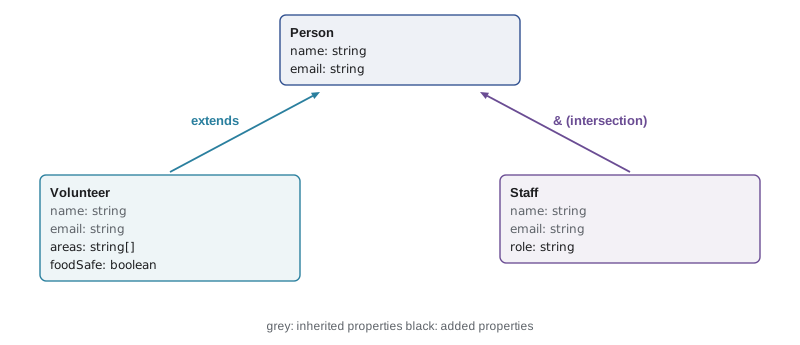
The two approaches behave almost identically for simple cases. The difference shows when properties conflict. Extending an interface with a property of an incompatible type is reported at the interface. Intersecting two types with incompatible properties is not reported at all: the property silently becomes never, and you only find out when you cannot create a value. For that reason the TypeScript team recommends extends for building object types from other object types.
Interface or type alias?
Because the two overlap so much, teams usually pick a convention. The differences that matter in practice are few.
| Question | interface | type alias |
|---|---|---|
| Can it name an object type? | Yes | Yes |
| Can it name a union, tuple, function or primitive? | No | Yes |
| How does it combine with others? | extends, with conflicts reported | &, with conflicts becoming never |
| Can it be declared twice and merged? | Yes (declaration merging) | No: a second declaration is an error |
| How does it appear in error messages? | Always by name | By name, or sometimes expanded |
Declaration merging means that two interface declarations with the same name in the same scope combine into one. It is how libraries let you add properties to built-in types, such as adding a custom property to the browser's Window interface, and it is occasionally a surprise when two files declare an interface with the same name by accident. Aliases cannot merge, which some teams prefer because it is more predictable.
The Food Hub convention, which Gareth writes into the project's README, is simple: interfaces for object shapes that describe data or objects with methods, and aliases for everything else, such as unions, tuples, function types and small helper types. The checker does not care; the convention is for readers.
Structural typing
Here is the rule that surprises developers who come from languages such as Java or C#. TypeScript does not check whether a value was declared as a particular type. It checks whether the value has the right shape: the properties the type requires, with compatible types. This is called structural typing. Any object with at least the properties of Shift, with matching types, can be used as a Shift, whatever its declared type and whatever extra properties it has.
interface HasCapacity {
  capacity: number;
  booked: number;
}

function isFull(x: HasCapacity): boolean {
  return x.booked >= x.capacity;
}

const shift = { id: 41, area: 'Kitchen', start: '09:00', end: '12:00', capacity: 4, booked: 4 };
const room = { name: 'Classroom', capacity: 12, booked: 7, projector: true };

console.log(isFull(shift), isFull(room));
console.log(isFull({ capacity: 4, booked: 2, area: 'Garden' }));capacity.ts(14,46): error TS2353: Object literal may only specify known properties, and 'area' does not exist in type 'HasCapacity'.
What this code does
The variables shift and room were never declared as HasCapacity, but both have a numeric capacity and booked, so both are accepted, extra properties and all. Only the last call is reported, because a fresh object literal gets the excess property check from Lesson 3. Assigning the same object to a variable first would make it acceptable.
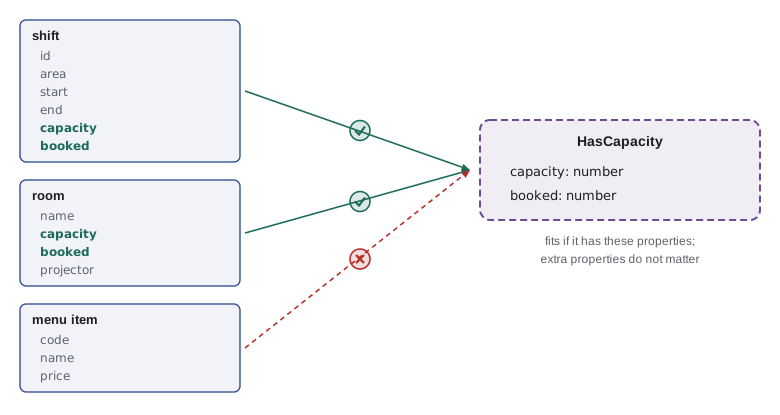
Structural typing matches how JavaScript is actually written. JavaScript has always relied on shape, sometimes called duck typing: if it has a capacity and a booked count, you can ask whether it is full. TypeScript simply checks that habit before the code runs.
function isFull(x) {
  return x.booked >= x.capacity;
}

const shift = { id: 41, area: 'Kitchen', capacity: 4, booked: 4 };
const room = { name: 'Classroom', capacity: 12, booked: 7, projector: true };
const item = { code: 'SOUP', price: 550 };

console.log('shift full?', isFull(shift));
console.log('room full?', isFull(room));
console.log('menu item full?', isFull(item));shift full? true room full? false menu item full? false
What this code does
isFull only reads two properties, so it works on any object that has them, which is duck typing. For the menu item, both properties are undefined, and undefined >= undefined is false, so the function returns a confident wrong answer instead of failing. The structural check in TypeScript would have rejected that call.
Structural typing also explains the excess property check. When you pass a variable, the checker cannot know whether the extra properties matter elsewhere, so it allows them. When you write an object literal directly in the call, the extra property can only be a mistake, such as a misspelling, so the checker reports it. The two rules together catch typos without breaking ordinary code.
Copying and updating typed objects
Much of the counter page's code creates new objects from old ones: an order with one more line, a shift with one more booking. The spread syntax does this neatly, and the checker understands it: spreading a Shift and overriding booked produces a Shift, and overriding a property with the wrong type is reported.
const shift = { id: 41, area: 'Kitchen', capacity: 4, booked: 3 };

const afterBooking = { ...shift, booked: shift.booked + 1 };
const withNote = { ...afterBooking, note: 'Bring closed-toe shoes' };

console.log(shift.booked, afterBooking.booked);
console.log(withNote);
console.log('Original changed?', shift.booked !== 3);3 4
{ id: 41, area: "Kitchen", capacity: 4, booked: 4, note: "Bring closed-toe shoes" }
Original changed? falseWhat this code does
Spreading copies every property into a new object, and properties written after the spread replace the copied ones. The original shift keeps its booked count of 3, so other code holding it sees no surprise change. In TypeScript, the result of the first spread has the Shift type, and the second adds an optional note.
Try it yourself
Does it look like a shift?
Server data arrives unchecked. Complete isShift(x) so that it returns true only when x is a non-null object whose area and start are strings and whose capacity and booked are numbers. The program prints the result for four values.
function isShift(x) {
  return false;
}

console.log(isShift({ area: 'Kitchen', start: '09:00', capacity: 4, booked: 3 }));
console.log(isShift({ area: 'Kitchen', start: '09:00', capacity: '4', booked: 3 }));
console.log(isShift(null));
console.log(isShift({ area: 'Garden', start: '10:00', capacity: 6, booked: 6, note: 'Hats' }));
Try it yourself
Fill in the defaults
Complete withDefaults(partial) so that it returns a new shift object with capacity 4, booked 0 and note '' as defaults, overridden by any properties in partial. The original object must not change. The program prints two results and checks the original.
const DEFAULTS = { capacity: 4, booked: 0, note: '' };

function withDefaults(partial) {
  return partial;
}

const input = { area: 'Kitchen', start: '09:00', booked: 2 };
const full = withDefaults(input);
console.log(full);
console.log(withDefaults({ area: 'Garden', start: '10:00', capacity: 6, note: 'Hats' }));
console.log('input has capacity?', 'capacity' in input);
Common mistakes
MistakeAssume readonly freezes an object.
Insteadreadonly is checked only before the program runs; use Object.freeze for run-time protection, and remember both are shallow.
MistakeUse & to combine object types with conflicting properties.
InsteadConflicts in an intersection silently become never; extends reports them.
MistakeExpect a type alias like Cents to stop dollar values being passed.
InsteadAn alias is just another name for the same type; it documents but does not distinguish.
MistakeThink a value must be declared as an interface to be used as one.
InsteadTyping is structural: any value with the required properties and types fits.
MistakeDeclare two interfaces with the same name in different parts of one scope by accident.
InsteadThey merge into one interface; give separate types separate names.
Summary and key terms
- An interface names an object type by listing its properties; type aliases name any type, including unions, tuples and function types.
- Optional properties use ?, and readonly properties may be set only when an object is created; readonly is not enforced at run time and, like Object.freeze, applies only one level deep.
- Interfaces can describe methods, index signatures describe dictionaries, and Record<K, V> requires a value for every key in K. extends builds an interface from others and reports conflicts; an intersection with & combines types but turns conflicts into never.
- Interfaces with the same name merge; aliases cannot be redeclared.
- A common convention is interfaces for object shapes and aliases for everything else.
- TypeScript is structurally typed: a value fits a type if it has the required properties with compatible types, whatever its declared type.
- Fresh object literals also get excess property checks.
- Spread syntax creates updated copies that the checker understands.
- interface
- A declaration that names an object type by listing its properties and methods.
- type alias
- A name for any type, declared with the keyword type.
- readonly
- A modifier that lets a property be set when an object is created but not changed later.
- index signature
- A type such as { [code: string]: number } for objects used as dictionaries.
- Record<K, V>
- A built-in type for an object whose keys are K and whose values are V.
- extends
- A keyword that makes an interface include all the properties of another.
- intersection type
- A type written with & that has all the properties of each of its parts.
- declaration merging
- Combining two interface declarations with the same name into one.
- structural typing
- Deciding type compatibility by shape, the properties and their types, rather than by name.
- duck typing
- Using any value that has the properties an operation needs, as JavaScript does at run time.
- spread syntax
- Copying an object's properties into a new object with ..., often to make an updated copy.
Practice problems
Work each problem on paper first, then reveal the answer to check.
What error does an object literal missing a required property produce?
Show answer
TS2741, naming the missing property and the type that requires it.
Can a type alias name a union of string literals? Can an interface?
Show answer
A type alias can; an interface can only describe object types.
Why is an object with extra properties accepted when passed in a variable but not as a literal?
Show answer
Typing is structural, so extra properties are allowed; the excess property check applies only to fresh object literals, where extras are likely typos.
What does Record<'soup' | 'drink', string> require?
Show answer
An object with exactly the keys soup and drink, each holding a string.
Does readonly stop a property changing while the program runs?
Show answer
No. It is checked only before the program runs; Object.freeze protects at run time.
Lesson quiz · 5 questions
Score 60% or more to complete this lesson.
Create a free account to save your progress, take quizzes and earn a certificate.