
JS-130 · Lesson 4 of 12 · 23 min
Functions and types
▶ Video coming soon A video version of this lesson is on the way.
Functions are where most of the Food Hub's logic lives, and they are where types pay off most. On Thursday, April 29, 2027, if the plan holds, Mira converts order.js, the module that adds lines to an order and works out the subtotal, tip, tax and total. "A function's types are a contract," Gareth says. "The parameters say what it needs, the return type says what it promises, and the checker holds both sides to it: the function's body and every caller."
This lesson covers annotating parameters and return values, optional, default and rest parameters, function types for callbacks, contextual typing, void and never as return types, async functions and promises, and overloads.
Parameters and return types
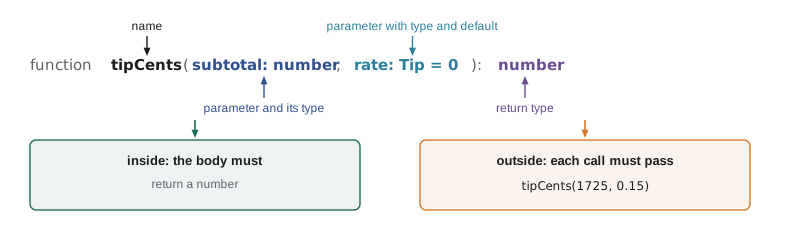
A parameter's type goes after its name, and the function's return type goes after the closing bracket of the parameter list. The checker then checks two things: inside the function, that the body uses the parameters correctly and returns what it promised; outside, that every call passes arguments of the right types, and the right number of them.
type Tip = 0 | 0.1 | 0.15 | 0.2;

function tipCents(subtotal: number, rate: Tip): number {
  return Math.round(subtotal * rate);
}

tipCents(1725, 0.15);
tipCents(1725);
tipCents(1725, 0.15, 'round up');
tipCents('1725', 0.15);order.ts(8,1): error TS2554: Expected 2 arguments, but got 1. order.ts(9,22): error TS2554: Expected 2 arguments, but got 3. order.ts(10,10): error TS2345: Argument of type 'string' is not assignable to parameter of type 'number'.
What this code does
The first call is correct. The next two pass too few and too many arguments, reported as TS2554 with the expected and actual counts, and the last passes a string where a number is needed. JavaScript would have run all four calls without complaint.
function tipCents(subtotal, rate) {
  return Math.round(subtotal * rate);
}

console.log(tipCents(1725, 0.15));
console.log(tipCents(1725));
console.log(tipCents(1725, 0.15, 'round up'));
console.log(tipCents('1725', 0.15));259 NaN 259 259
What this code does
Plain JavaScript never checks the number of arguments. A missing argument is undefined, so the second call multiplies by undefined and prints NaN, and an extra argument is simply ignored. The string in the last call happens to work only because multiplication converts it to a number.
The return type works the same way from the inside. If the body returns something else, or can reach its end without returning, the checker reports it at the return statement or at the function's return type.
function formatCents(cents: number): number {
  return (cents / 100).toFixed(2);
}

function spacesText(spacesLeft: number): string {
  if (spacesLeft === 0) return 'Full';
  if (spacesLeft === 1) return '1 space left';
  if (spacesLeft > 1) return spacesLeft + ' spaces left';
}money.ts(2,3): error TS2322: Type 'string' is not assignable to type 'number'. money.ts(5,42): error TS2366: Function lacks ending return statement and return type does not include 'undefined'.
What this code does
The first function promises a number but toFixed returns a string, so the return statement is reported. The second covers three cases with if statements, but the checker cannot be sure they cover every number, so it reports TS2366: the end of the function can be reached without returning a string. A final return or an else would fix it.
Should every function have an explicit return type? The checker can infer it from the return statements, so for small private helpers many teams leave it out. For exported functions, the ones other modules call, Gareth asks for it. The annotation documents the contract, and if a change to the body accidentally changes what the function returns, the error appears at the function rather than in every caller.
Optional, default and rest parameters
JavaScript has three ways to make a function flexible about its arguments, and TypeScript describes all three.
| Kind | Written as | Type inside the function | Call |
|---|---|---|---|
| Optional | note?: string | string | undefined | addLine(code, qty) or addLine(code, qty, note) |
| Default | qty: number = 1, or just qty = 1 | number | addLine(code) uses 1 |
| Rest | ...codes: string[] | string[] | addAll('SOUP', 'EGG', 'DRINK') |
An optional parameter has a question mark after its name and may be left out; inside the function its type includes undefined, so the checker makes you handle that case. A default parameter has a value after an equals sign, which is used when the argument is missing or undefined; its type is inferred from the default, and inside the function it is never undefined. A rest parameter gathers any remaining arguments into an array and must be the last parameter.
function addLine(code: string, qty: number = 1, note?: string): string {
  const extra = note.trim();
  return qty + ' x ' + code + (extra ? ' (' + extra + ')' : '');
}

function lineCount(...codes: string[]): number {
  return codes.length;
}

addLine('SOUP');
addLine('SOUP', 2, 'no bread');
lineCount('SOUP', 'EGG', 'DRINK');order.ts(2,17): error TS18048: 'note' is possibly 'undefined'.
What this code does
Because note is optional, its type is string | undefined, and calling trim on it directly is reported as possibly undefined. The default for qty means callers can leave it out and the body can use it as a number. The rest parameter accepts any number of strings.
function addLine(code, qty = 1, note) {
  const extra = note?.trim();
  return qty + ' x ' + code + (extra ? ' (' + extra + ')' : '');
}

console.log(addLine('SOUP'));
console.log(addLine('SOUP', undefined, ' no bread '));
console.log(addLine('SOUP', null));

function lineCount(...codes) {
  return codes.length;
}
console.log(lineCount('SOUP', 'EGG', 'DRINK'));1 x SOUP 1 x SOUP (no bread) null x SOUP 3
What this code does
The default value 1 is used when qty is missing or explicitly undefined, but not when it is null, which is passed through and printed. Optional chaining with note?.trim() returns undefined instead of throwing when note is missing, which is the fix the checker was asking for. The rest parameter collects all three codes into one array.
Function types
Functions are values in JavaScript: they are stored in variables, passed to other functions and returned from them. A function type describes such a value. It is written like an arrow function with types instead of a body: (cents: number) => string is the type of any function that takes a number and returns a string. The parameter names in a function type are only labels for readers; only the types and their order matter.
type Formatter = (cents: number) => string;

const plain: Formatter = cents => (cents / 100).toFixed(2);
const withLabel: Formatter = cents => 'Total ' + (cents / 100).toFixed(2);
const wrong: Formatter = cents => cents / 100;

function showTotals(totals: number[], format: Formatter): string[] {
  return totals.map(format);
}money.ts(5,35): error TS2322: Type 'number' is not assignable to type 'string'.
What this code does
Each variable is declared with the Formatter type, so its arrow function must take a number and return a string. The third returns a number and is reported. showTotals accepts any Formatter, so the counter page can choose how money is shown without showTotals knowing the details.
Look again at those arrow functions: none of them annotates cents, yet the checker knows it is a number and would have reported cents.toUpperCase(). This is contextual typing. When a function is written in a place where a function type is expected, such as a variable with a declared type or an argument to map, forEach or addEventListener, the checker takes the parameter types from that context. It is why callbacks in TypeScript rarely need annotations.
const lines = [
  { code: 'SOUP', qty: 2, price: 550 },
  { code: 'EGG', qty: 1, price: 625 },
];

const subtotal = lines.reduce((sum, line) => sum + line.qty * line.price, 0);
const codes = lines.map(line => line.code.toLowerCase());
const bad = lines.map(line => line.cost);

document.querySelector('button')?.addEventListener('click', event => {
  console.log(event.clientX, subtotal, codes);
});order.ts(8,36): error TS2339: Property 'cost' does not exist on type '{ code: string; qty: number; price: number; }'.What this code does
The checker infers the type of each element of lines and passes it to the callbacks, so line.qty is a number and line.code a string without any annotations. Reading line.cost is reported because the elements have no such property. Even the click handler's event is known to be a MouseEvent, so clientX is allowed.
const lines = [
  { code: 'SOUP', qty: 2, price: 550 },
  { code: 'EGG', qty: 1, price: 625 },
];

const subtotal = lines.reduce((sum, line) => sum + line.qty * line.price, 0);
const codes = lines.map(line => line.code.toLowerCase());
const costs = lines.map(line => line.cost);

console.log('Subtotal:', subtotal);
console.log('Codes:', codes);
console.log('Costs:', costs);Subtotal: 1725 Codes: [ "soup", "egg" ] Costs: [ undefined, undefined ]
What this code does
The working callbacks run as expected: the subtotal is 1725 cents and the codes are lower-cased. The misspelt property produces an array of undefined values rather than an error, which is the kind of quiet failure the checker reported in the TypeScript version. Nothing tells you until someone reads the output.
void and never as return types
A function that does its job without returning a value, such as a logger or an event handler, has the return type void. A function type with a void return is also a little forgiving: a callback that does return something can still be passed where a void-returning function is expected, and the returned value is simply ignored. That is why lines.forEach(line => total.push(line)) is allowed even though push returns a number.
A function whose end can never be reached has the return type never. The usual example is a function that always throws. It is useful as a helper for errors, because the checker knows that code after a call to it cannot run.
function fail(message: string): never {
  throw new Error(message);
}

function priceOf(code: string, menu: Map<string, number>): number {
  const price = menu.get(code);
  if (price === undefined) fail('Unknown dish ' + code);
  return price;   // number: the checker knows fail never returns
}

function logLine(code: string, qty: number): void {
  console.log(qty + ' x ' + code);
}
What this code does
Because fail returns never, the checker knows that if price is undefined the function stops there, so after the if statement price must be a number. Without the never annotation, return price would be reported as possibly undefined. logLine returns nothing, so its return type is void.
Async functions and promises
An async function always returns a promise, and TypeScript writes that as Promise<T>, where T is the type the promise resolves to. Inside the function you return a plain T; the checker wraps it. When you await a Promise<T>, you get a T. Writing the return type of async functions explicitly is especially useful, because the value usually comes from a server, where the checker cannot see it.
interface MenuItem { code: string; name: string; price: number }

async function loadMenu(): Promise<MenuItem[]> {
  const res = await fetch('/api/v1/menu');
  if (!res.ok) throw new Error('Menu request failed: ' + res.status);
  const data: unknown = await res.json();
  return data as MenuItem[];   // checked properly in Lesson 6
}

async function soupPrice(): Promise<number> {
  const menu = await loadMenu();
  const soup = menu.find(item => item.code === 'SOUP');
  return soup?.price ?? 'not on the menu';
}menu.ts(13,3): error TS2322: Type 'number | "not on the menu"' is not assignable to type 'number'. Type 'string' is not assignable to type 'number'.
What this code does
loadMenu promises an array of menu items, so callers that await it get a MenuItem[] with full completion. In soupPrice, find returns MenuItem | undefined, and the fallback string does not match the promised number, so that return is reported. The assertion in loadMenu is a temporary shortcut that Lesson 6 replaces with a real check.
A common mistake in async code is forgetting an await. Without it, a variable holds a promise rather than the value, and JavaScript will happily build a string such as "Total: [object Promise]". TypeScript catches most of these, because a Promise<number> does not have the properties of a number, and the no-floating-promises rule in the typescript-eslint linter can catch the rest.
Overloads
Some JavaScript functions behave differently depending on their arguments, and their return type depends on what was passed. TypeScript can describe that with overloads: several signatures written one after another without bodies, followed by one implementation. Callers see only the overload signatures.
function lookup(code: string): number | undefined;
function lookup(codes: string[]): (number | undefined)[];
function lookup(arg: string | string[]): number | undefined | (number | undefined)[] {
  const prices: Record<string, number> = { SOUP: 550, EGG: 625, DRINK: 200 };
  return Array.isArray(arg) ? arg.map(c => prices[c]) : prices[arg];
}

const one = lookup('SOUP');            // number | undefined
const many = lookup(['SOUP', 'EGG']);  // (number | undefined)[]
What this code does
The two overload signatures tell callers that one code gives one price and an array of codes gives an array of prices. The implementation has a broader signature that covers both and is not visible to callers. Overloads are worth using only when the return type really depends on the argument; often a union parameter or two separate functions are clearer.
A typed order module
By the end of the session, the core of Mira's order module has types on every exported function. The logic is exactly what it was in JavaScript; the difference is that every caller is now checked.
type Tip = 0 | 0.1 | 0.15 | 0.2;
type Line = { code: string; qty: number; price: number };

const TAX = 0.13;

export function subtotal(lines: Line[]): number {
  return lines.reduce((sum, l) => sum + l.qty * l.price, 0);
}

export function totals(lines: Line[], tip: Tip = 0): { subtotal: number; tip: number; tax: number; total: number } {
  const sub = subtotal(lines);
  const tipCents = Math.round(sub * tip);
  const tax = Math.round(sub * TAX);
  return { subtotal: sub, tip: tipCents, tax, total: sub + tipCents + tax };
}
What this code does
Every exported function states its parameters and its result, and the tip parameter has both a literal type and a default. The tax is calculated on the subtotal before the tip, as in the counter page's rules. The return type of totals is written inline here; Lesson 5 gives it a name.
const TAX = 0.055;

function subtotal(lines) {
  return lines.reduce((sum, l) => sum + l.qty * l.price, 0);
}

function totals(lines, tip = 0) {
  const sub = subtotal(lines);
  const tipCents = Math.round(sub * tip);
  const tax = Math.round(sub * TAX);
  return { subtotal: sub, tip: tipCents, tax, total: sub + tipCents + tax };
}

const order = [{ code: 'SOUP', qty: 2, price: 550 }, { code: 'EGG', qty: 1, price: 625 }];
console.log(totals(order));
console.log(totals(order, 0.15));{ subtotal: 1725, tip: 0, tax: 95, total: 1820 }
{ subtotal: 1725, tip: 259, tax: 95, total: 2079 }What this code does
This is the order module's logic with the types removed, using the Madison sales tax rate of 5.5 in 100. A subtotal of 1725 cents gives a tax of 95 cents, and a 15 in 100 tip adds 259 cents. The numbers are rounded to whole cents at each step, as the counter page does.
Try it yourself
Apply a tip with a default
Complete withTip(subtotal, rate) so that rate defaults to 0 when it is left out, and the function returns the subtotal plus the tip rounded to the nearest cent. The program prints three totals.
function withTip(subtotal, rate) {
  return subtotal + subtotal * rate;
}

console.log(withTip(1725));
console.log(withTip(1725, 0.15));
console.log(withTip(1000, 0.2));
Try it yourself
Total any number of lines
Complete orderTotal(...lines) so that it accepts any number of line objects as separate arguments and returns the sum of qty times price. The program prints three totals, including one with no lines.
function orderTotal(lines) {
  return 0;
}

console.log(orderTotal({ qty: 2, price: 550 }, { qty: 1, price: 625 }));
console.log(orderTotal({ qty: 3, price: 200 }));
console.log(orderTotal());
Common mistakes
MistakeLeave parameters unannotated and trust inference.
InsteadParameters cannot be inferred from the body; annotate them, or the checker reports an implicit any.
MistakeAnnotate the parameters of every callback.
InsteadCallbacks passed to map, reduce or addEventListener get their types from context.
MistakeUse an optional parameter as if it were always set.
InsteadIts type includes undefined, so handle that case or give it a default instead.
MistakeReturn a value from an async function typed Promise<T> by writing return Promise.resolve(value).
InsteadReturn the plain value; the async function wraps it in a promise.
MistakeWrite overloads for every flexible function.
InsteadUse overloads only when the return type depends on the argument; otherwise a union or two functions is clearer.
Summary and key terms
- A function's parameter types and return type form a contract that the checker enforces in both directions: the body must return what it promises, and callers must pass the right number and types of arguments.
- Return types can be inferred, but exported functions usually state them.
- Optional parameters (note?: string) include undefined in their type; default parameters are used when the argument is missing or undefined; rest parameters (...codes: string[]) collect remaining arguments into an array.
- A function type such as (cents: number) => string describes a function value.
- Contextual typing gives callbacks their parameter types from where they are used, so they rarely need annotations. void is the return type of functions with no useful result, and never is for functions that cannot return, such as one that always throws.
- Async functions return Promise<T> and await unwraps it.
- Overloads describe functions whose return type depends on their arguments.
- signature
- A function's parameter list and return type, which together describe how it may be called.
- return type
- The type a function promises to return, written after its parameter list.
- optional parameter
- A parameter marked with ? that may be left out; its type includes undefined.
- default parameter
- A parameter with a value used when the argument is missing or undefined.
- rest parameter
- A final parameter written with ... that gathers the remaining arguments into an array.
- function type
- A type for a function value, such as (cents: number) => string.
- contextual typing
- Inferring a callback's parameter types from the place where it is used.
- void
- The return type of a function that returns no useful value.
- never
- The return type of a function whose end can never be reached.
- Promise<T>
- The type of a promise that resolves to a value of type T.
- overload
- One of several signatures declared for the same function, each describing one way to call it.
Practice problems
Work each problem on paper first, then reveal the answer to check.
What does TS2554 report?
Show answer
A call with the wrong number of arguments, giving the expected and actual counts.
Inside function f(note?: string), what is the type of note?
Show answer
string | undefined.
Why does lines.map(line => line.code) need no annotation on line?
Show answer
Contextual typing: map's signature tells the checker the type of each element.
What return type does an async function that returns a number have?
Show answer
Promise<number>.
What return type should a function that always throws have?
Show answer
never.
Lesson quiz · 5 questions
Score 60% or more to complete this lesson.
Create a free account to save your progress, take quizzes and earn a certificate.