
JS-130 · Lesson 2 of 12 · 28 min
Setting up the compiler
▶ Video coming soon A video version of this lesson is on the way.
The second session, planned for Thursday, April 22, 2027, starts with an empty folder. "Before we touch the Food Hub code," Gareth says, "I want you to build one TypeScript setup by hand, line by line, so that when something goes wrong with the real one you know which line to look at." Mira creates a folder called ts-practice, opens a terminal in it and starts from nothing.
This lesson covers installing the TypeScript compiler, compiling a first file, the tsconfig.json file that controls a project, the commands you will use every day, and the three common ways TypeScript code ends up running: compiled to JavaScript by tsc, run directly by Node.js, or handled by a bundler for the browser.
Installing TypeScript in a project
The TypeScript compiler is an npm package called typescript, and its command is tsc. You could install it once for the whole computer, but the usual practice is to install it in each project as a development dependency. That records the exact version in the project's package.json, so everyone who works on the project, and every automated build, uses the same compiler with the same rules.
npm init -y
npm install --save-dev typescript
npx tsc --version
What this code does
The first command creates a package.json for the folder, and the second installs the compiler into node_modules and records it under devDependencies. The npx command runs the copy of tsc installed in this project rather than any other copy on the computer. The last line prints the installed version number.
A development dependency is a package the project needs while it is being written and built, but not while it runs. That fits TypeScript exactly: nothing from the compiler ships to the browser, because the output is plain JavaScript. Pinning the version matters more than it might seem. A new TypeScript release can find errors that the previous one missed, so a project that silently picks up a newer compiler can suddenly fail to build.
Compiling a first file
Mira writes a file called hello.ts with one function and one call. The .ts extension tells the compiler and the editor that the file is TypeScript.
function greet(name: string, shifts: number): string {
  return 'Hello, ' + name + '. You have ' + shifts + ' shifts this week.';
}

console.log(greet('Mira', 2));
What this code does
The function says that name is a string, shifts is a number and the result is a string. The call passes a string and a number, so the checker reports nothing. Running tsc hello.ts on this file writes hello.js next to it.
With no configuration file, the command npx tsc hello.ts checks the file and writes hello.js in the same folder. That file is the JavaScript below, which runs in Node.js or a browser like any other script. The types have gone, and so has nothing else.
"use strict";
function greet(name, shifts) {
    return 'Hello, ' + name + '. You have ' + shifts + ' shifts this week.';
}
console.log(greet('Mira', 2));Hello, Mira. You have 2 shifts this week.
What this code does
This is the JavaScript that tsc emits for hello.ts. The annotations after each colon have been removed, the function body is unchanged and the compiler has added a use strict line. Running it prints the greeting.
If Mira changes the call to greet('Mira', 'two'), the compiler prints an error, but by default it still writes hello.js. That surprises most people. TypeScript treats type errors as reports, not as reasons to refuse to produce output, so that a half-finished change does not stop the rest of a project from being built. The option noEmitOnError changes that: with it set, tsc writes nothing while any error remains. Many teams turn it on for production builds.
The project file: tsconfig.json
Compiling one file at a time with options on the command line does not scale. A real project has a file called tsconfig.json at its root, which tells the compiler which files belong to the project and how to check and compile them. When tsc runs with no file names, it looks for tsconfig.json in the current folder and uses it. The editor reads the same file, so its underlines match what the command reports.
The command npx tsc --init writes a starting tsconfig.json with recommended settings and comments explaining them. The version Mira gets with TypeScript 6 and 7 looks like this, slightly shortened.
{
  // Visit https://aka.ms/tsconfig to read more about this file
  "compilerOptions": {
    // File Layout
    // "rootDir": "./src",
    // "outDir": "./dist",

    // Environment Settings
    "module": "nodenext",
    "target": "esnext",
    "types": [],

    // Other Outputs
    "sourceMap": true,
    "declaration": true,
    "declarationMap": true,

    // Stricter Typechecking Options
    "noUncheckedIndexedAccess": true,
    "exactOptionalPropertyTypes": true,

    // Recommended Options
    "strict": true,
    "verbatimModuleSyntax": true,
    "isolatedModules": true,
    "noUncheckedSideEffectImports": true,
    "moduleDetection": "force",
    "skipLibCheck": true,
  }
}
What this code does
The generated file groups its options under headings and leaves some commented out for you to fill in. Strict checking is on, the module system is the one Node.js uses, and the output target is the newest version of JavaScript. The file also contains comments and a trailing comma, which plain JSON does not allow.
A tsconfig.json file is written in a relaxed form of JSON, sometimes called JSONC, that allows comments and trailing commas. The TypeScript tools read it happily, but JSON.parse does not, which matters if you ever write a script that reads the file.
const text = `{
  // Environment Settings
  "compilerOptions": { "strict": true, "target": "es2022", },
}`;

try {
  JSON.parse(text);
} catch (err) {
  console.log('JSON.parse failed:', err.name);
}

// Remove line comments and trailing commas, then parse.
const cleaned = text
  .replace(/^\s*\/\/.*$/gm, '')
  .replace(/,(\s*[}\]])/g, '$1');
const config = JSON.parse(cleaned);
console.log('strict:', config.compilerOptions.strict);
console.log('target:', config.compilerOptions.target);JSON.parse failed: SyntaxError strict: true target: es2022
What this code does
Plain JSON.parse rejects the comment and the trailing commas with a SyntaxError. Removing whole-line comments and any comma that comes just before a closing brace or bracket leaves valid JSON. This simple cleaner is fine for a known file, but TypeScript's own parser handles every case.
The options that matter most
A tsconfig.json can hold over a hundred options, but a small number decide how almost every project behaves. They fall into three groups: which files are in the project, what the code is allowed to assume about where it runs, and how strict the checking is.
| Option | What it controls | Typical value |
|---|---|---|
| include | Which files are part of the project, as glob patterns | ["src"] |
| exclude | Files to leave out of include | Rarely needed; node_modules is excluded already |
| rootDir | The folder whose structure is copied into the output | "src" (the default is the tsconfig folder) |
| outDir | Where emitted JavaScript goes | "dist" or, for the Food Hub, "public/js" |
| target | Which version of JavaScript to emit; newer syntax is rewritten for older targets | "es2022" to "esnext" |
| lib | Which built-in APIs the code may use, such as DOM for browsers | ["es2022", "dom"] |
| types | Which @types packages to load automatically | [] by default, or ["node"] for Node.js code |
| module | Which module system the output uses | "esnext" for browsers and bundlers, "nodenext" for Node.js |
| moduleResolution | How import paths are matched to files | "bundler" or "nodenext" |
| strict | Turns on the whole family of strict checks | true (the default since TypeScript 6) |
| noEmit | Check only; write no files | true when another tool produces the JavaScript |
| sourceMap | Write .map files so debuggers show the TypeScript source | true for browser code |
| declaration | Write .d.ts type files alongside the JavaScript | true for libraries (Lesson 9) |
| skipLibCheck | Skip checking the insides of .d.ts files from packages | true, to save time |
Two of these need more explanation. The target sets the JavaScript version of the output. If you write optional chaining, such as order?.total, and target a version of JavaScript older than ES2020, the compiler rewrites it into older code that does the same thing. Since every browser the Food Hub's tablets and office computers use supports modern JavaScript, Gareth sets the target to ES2022 and lets the compiler leave the code almost untouched.
The lib option is separate from the target. It tells the checker which built-in objects and functions exist. Code for the browser needs the DOM library so that document, HTMLElement and fetch have types. Code for Node.js does not have a DOM, and instead needs the types package for Node.js, @types/node, listed under types. Getting lib wrong produces errors such as Cannot find name 'document' in browser code, or the opposite problem: Node.js code that type-checks a call to document.querySelector and then crashes when it runs.
What changed in TypeScript 6 and 7
If you read older tutorials, you will see configurations that look quite different. TypeScript 6.0, released in March 2026, changed several defaults to match how projects are now set up, and TypeScript 7 keeps them. Strict checking is on unless you turn it off. The default module is esnext and the default target is the newest JavaScript version. The types list is empty by default, so a Node.js project must now ask for the Node.js types with "types": ["node"] instead of getting every installed @types package automatically. Several old options are deprecated: the target es5, the moduleResolution value node (also called node10), the baseUrl option and the outFile option. Projects that still use them get a deprecation error, and in TypeScript 7 those options are gone.
One change catches people out on the command line. If a folder contains a tsconfig.json and you run tsc with a file name, as in npx tsc hello.ts, TypeScript 6 and later refuse, because the file names would silently override the project configuration.
$ npx tsc hello.ts
error TS5112: tsconfig.json is present but will not be loaded if files are specified on commandline. Use '--ignoreConfig' to skip this error.
What this code does
Passing file names to tsc in a folder that has a tsconfig.json is now an error, numbered TS5112. Run npx tsc with no file names to use the project file. Add --ignoreConfig only if you really want to compile one file with the default settings.
Commands for every day
Once a project has its tsconfig.json, the commands are short. Most teams put them in package.json as npm scripts, so that nobody needs to remember the flags.
| Command | What it does | When to use it |
|---|---|---|
| npx tsc | Checks the project and writes the output files | Building for release |
| npx tsc --noEmit | Checks the project and writes nothing | Before committing, and in automated checks |
| npx tsc --watch | Checks and rebuilds every time a file is saved | While working, in a spare terminal |
| npx tsc -p tsconfig.build.json | Uses a different project file | When a project has separate settings for building and checking |
| npx tsc --showConfig | Prints the final settings after defaults and extends | When an option does not seem to work |
{
  "name": "ts-practice",
  "private": true,
  "type": "module",
  "scripts": {
    "typecheck": "tsc --noEmit",
    "build": "tsc",
    "dev": "tsc --watch"
  },
  "devDependencies": {
    "typescript": "^7.0.0"
  }
}
What this code does
The scripts section gives names to the three commands, so npm run typecheck checks the project and npm run build compiles it. The type field says that .js files in this folder are ES modules. The caret in the version allows later 7.x releases but never version 8.
The typecheck script is the one Gareth cares about most. He plans to add it to the checks that run automatically whenever code is pushed to the Food Hub repository, so that no change with a type error can be merged. Lesson 11 returns to that idea.
Three ways TypeScript code runs
The compiler is not the only tool that can turn TypeScript into JavaScript. Removing type annotations is simple compared with checking them, and several fast tools now do just that part. That leads to three common setups, which can be mixed in one organization.
| Setup | Who removes the types | Who checks the types | Good for |
|---|---|---|---|
| tsc builds the output | tsc | tsc | Libraries and small sites served as plain files |
| Node.js runs .ts directly | Node.js, by stripping | tsc --noEmit or the editor | Scripts, tools and servers |
| A bundler builds the site | The bundler, such as Vite or esbuild | tsc --noEmit or the editor | Larger web applications |
Since Node.js 22.18 and 23.6, the command node order.ts runs a TypeScript file directly. Node.js replaces each type annotation with spaces and runs what is left, which is why the line and column numbers in an error message still point at the right place in the original file. It does not read tsconfig.json and does not check types at all. A file with a type error runs anyway, exactly as the JavaScript would.
// A toy version of type stripping: replace ': type' with spaces.
const ts = "function lineTotal(price: number, qty: number): number {";
const js = ts.replace(/:\s*number/g, m => ' '.repeat(m.length));

console.log(ts);
console.log(js);
console.log('Same length:', ts.length === js.length);
console.log('qty still at column', ts.indexOf('qty') + 1, 'and', js.indexOf('qty') + 1);function lineTotal(price: number, qty: number): number {
function lineTotal(price , qty ) {
Same length: true
qty still at column 35 and 35What this code does
Replacing each annotation with the same number of spaces leaves every other character where it was. That is why Node.js needs no source maps when it strips types: an error on column 32 of the stripped code is on column 32 of the original. The real stripper understands all of TypeScript's syntax, not just this one pattern.
Stripping only works for TypeScript syntax that can be deleted without changing what the code does. A few older TypeScript features generate JavaScript of their own: enum declarations, namespaces that contain code, parameter properties in class constructors, and import aliases written with import x = require(). Node.js refuses to run files that use them. The compiler option erasableSyntaxOnly makes tsc report them, so that a project meant to be stripped never uses them by accident.
enum Category { Soup, Sandwich, Drink }

export const first = Category.Soup;menu.ts(1,6): error TS1294: This syntax is not allowed when 'erasableSyntaxOnly' is enabled.
What this code does
With erasableSyntaxOnly turned on, the enum declaration is reported as error TS1294, because removing it would remove code that the program needs. Lesson 3 shows the usual replacement: a union of string literal types, which strips cleanly. The column number points at the word Category.
Node.js's documentation recommends a small set of options for code that it will run directly: erasableSyntaxOnly, verbatimModuleSyntax, which makes you mark imports that are only types (Lesson 9), and rewriteRelativeImportExtensions, which lets you import './money.ts' and have the output say './money.js'. Bundlers have similar recommendations. In every case, tsc --noEmit remains the tool that actually checks the types.
The Food Hub setup
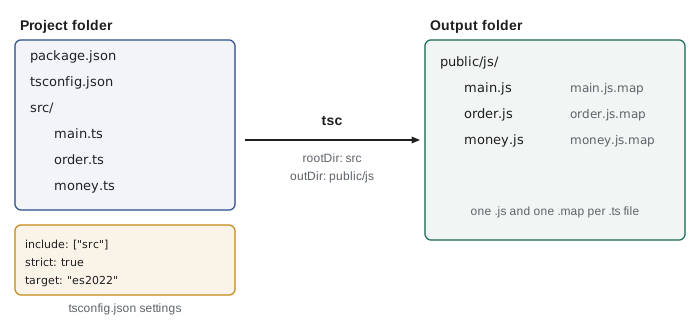
For the Food Hub's browser pages, Gareth chooses the first setup. The pages are already a handful of ES modules served as plain files, with no bundler, and he does not want to add one in the middle of a pilot. So tsc will compile the files in src to public/js, which is where the current JavaScript lives, and the page's script tags will not change at all.
{
  "compilerOptions": {
    "rootDir": "src",
    "outDir": "public/js",
    "target": "es2022",
    "lib": ["es2022", "dom"],
    "module": "esnext",
    "moduleResolution": "bundler",
    "strict": true,
    "noEmitOnError": true,
    "sourceMap": true,
    "erasableSyntaxOnly": true,
    "verbatimModuleSyntax": true,
    "skipLibCheck": true
  },
  "include": ["src"]
}
What this code does
The project reads every file under src and writes JavaScript and source maps to public/js. It targets the browsers the Food Hub uses, with the DOM library, and keeps checking strict. With noEmitOnError, a file with a type error never replaces the working JavaScript on the server.
The source maps let the browser's developer tools show the original TypeScript when Mira debugs the counter page, even though the browser runs the JavaScript. The erasableSyntaxOnly setting is a precaution: if the team later moves to a bundler or to Node.js stripping, nothing in the code will need to change.
Reading the compiler output
When a project has several errors, tsc prints one line for each, then a count. In a terminal it adds color and shows the offending line with a squiggle under it; with --pretty false, as in this course, it prints one compact line per error, which is easier to read in a log or to process with a script. Every line has the same shape: file, line and column in brackets, the word error, a TS code and a message.
$ npx tsc --noEmit --pretty false
src/order.ts(14,7): error TS2322: Type 'string' is not assignable to type 'number'.
src/order.ts(31,19): error TS2339: Property 'spacesLeft' does not exist on type 'Shift'.
src/view.ts(8,25): error TS2345: Argument of type 'number' is not assignable to parameter of type 'string'.
What this code does
Each line gives the file, the line and column of the problem, the error code and a description. TS2322 is an assignment of the wrong type, TS2339 is a property that the type does not have, and TS2345 is an argument of the wrong type. These three codes cover a large share of the errors in a typical project.
Try it yourself
Parse a compiler message
Complete parse(line) so that it returns an object with file, line, col and code taken from a tsc message, with line and col as numbers. Use the regular expression already given. The program prints a short summary for each message.
const pattern = /^(.+)\((\d+),(\d+)\): error (TS\d+):/;

function parse(text) {
  const m = text.match(pattern);
  // return { file, line, col, code } using m[1] to m[4]
  return { file: '?', line: 0, col: 0, code: '?' };
}

const messages = [
  "src/order.ts(14,7): error TS2322: Type 'string' is not assignable to type 'number'.",
  "src/view.ts(8,25): error TS2345: Argument of type 'number' is not assignable to parameter of type 'string'.",
];
for (const msg of messages) {
  const p = parse(msg);
  console.log(p.code + ' in ' + p.file + ' at line ' + p.line + ', column ' + p.col);
}
Try it yourself
Errors per file
Complete countByFile(lines) so that it returns a Map from each file name to the number of error lines for that file. The file name is everything before the first opening bracket. The program prints the counts in the order the files first appear.
function countByFile(lines) {
  const counts = new Map();
  for (const line of lines) {
    // find the file name and add one to its count
  }
  return counts;
}

const output = [
  "src/order.ts(14,7): error TS2322: Type 'string' is not assignable to type 'number'.",
  "src/order.ts(31,19): error TS2339: Property 'spacesLeft' does not exist on type 'Shift'.",
  "src/view.ts(8,25): error TS2345: Argument of type 'number' is not assignable to parameter of type 'string'.",
  "src/order.ts(40,3): error TS2554: Expected 2 arguments, but got 1.",
];
for (const [file, n] of countByFile(output)) console.log(file + ': ' + n);
Common mistakes
MistakeInstall TypeScript globally and use whatever version is there.
InsteadInstall it in each project as a development dependency, so the version is recorded and everyone checks with the same rules.
MistakeA type error stops tsc from writing JavaScript.
InsteadBy default tsc reports the error and still writes the output; set noEmitOnError to stop it.
MistakeRun npx tsc file.ts inside a project with a tsconfig.json.
InsteadRun npx tsc with no file names; passing files when a tsconfig.json exists is error TS5112.
MistakeNode.js checks types when it runs a .ts file.
InsteadIt only strips them; run tsc --noEmit to check.
MistakeSet target to choose which built-in APIs exist.
Insteadtarget controls the emitted syntax; lib and types control which built-in APIs the checker knows about.
Summary and key terms
- Install TypeScript in each project with npm install --save-dev typescript and run it with npx tsc.
- Compiling a .ts file writes a .js file with the types removed.
- By default tsc writes output even when there are errors; noEmitOnError prevents that.
- A project is described by tsconfig.json, which allows comments and trailing commas. include chooses the files, rootDir and outDir set the output layout, target chooses the emitted JavaScript version, lib and types choose the built-in APIs, module and moduleResolution set the module system, and strict turns on strict checking.
- TypeScript 6 made strict, esnext and an empty types list the defaults and deprecated es5, node10 resolution, baseUrl and outFile. tsc --noEmit checks without writing files, and --watch rebuilds on every save.
- Node.js and bundlers can strip types themselves, but only tsc or the editor checks them. erasableSyntaxOnly reports enums, namespaces with code, parameter properties and import aliases, which cannot be stripped.
- tsc
- The TypeScript compiler command, which checks a project and can write JavaScript output.
- development dependency
- A package needed to write or build a project but not to run it, listed under devDependencies.
- tsconfig.json
- The file at a project root that lists the project files and compiler options.
- compiler option
- A setting in tsconfig.json or on the command line that changes how tsc checks or emits.
- target
- The JavaScript version the compiler emits; newer syntax is rewritten for older targets.
- lib
- The set of built-in type definitions, such as es2022 and dom, that the checker assumes exist.
- outDir
- The folder where tsc writes emitted JavaScript files.
- noEmit
- An option that makes tsc check the project without writing any files.
- watch mode
- Running tsc --watch so that the project is checked and rebuilt on every save.
- source map
- A .map file that links emitted JavaScript back to its TypeScript source for debugging.
- erasable syntax
- TypeScript syntax that can be deleted to leave working JavaScript.
Practice problems
Work each problem on paper first, then reveal the answer to check.
Why install TypeScript as a development dependency rather than a normal dependency?
Show answer
It is needed only to check and build the code; nothing from the compiler runs in the browser.
What does npx tsc --noEmit do?
Show answer
It checks the whole project using tsconfig.json and writes no output files.
Your browser code fails to compile with Cannot find name 'document'. Which option is probably wrong?
Show answer
lib: it needs to include dom.
Why does tsc refuse to compile npx tsc hello.ts in a folder with a tsconfig.json?
Show answer
TypeScript 6 and later report TS5112, because the file names would override the project configuration.
Name two kinds of syntax that erasableSyntaxOnly reports.
Show answer
Any two of: enums, namespaces with code, constructor parameter properties, import aliases with import =.
Lesson quiz · 5 questions
Score 60% or more to complete this lesson.
Create a free account to save your progress, take quizzes and earn a certificate.