
JS-130 · Lesson 1 of 12 · 28 min
Why TypeScript
▶ Video coming soon A video version of this lesson is on the way.
On Monday, April 19, 2027, if the plan holds, the Riverside Community Food Hub's pilot on Theo Marchetti's new server begins. The lunch counter's tablet page will load the menu from the server and send every confirmed order to it, and the dashboard on Lucy Tran's office screen will refresh every minute with the day's shifts, the counter's sales and the youth garden forecast. Mira Castellanos wrote all of that code in plain JavaScript over the winter, in four blocks of sessions with her mentor, Gareth Lindqvist, the senior developer at Brightwater Web Studio.
The plan for the week after the launch is a fifth block, on Tuesdays and Thursdays from April 20 to early June. Its subject is TypeScript: the same JavaScript Mira already writes, with a layer of type information on top that a tool checks before the code ever runs. By the end of the block, the riverside-data library from JavaScript Programming II, the counter page from The DOM and Browser Events and the dashboard's API client from Asynchronous JavaScript and APIs should all be TypeScript, with types for Theo's API shared between the front end and the server.
This course follows that plan. It assumes you have finished JavaScript Programming II, or can write functions, objects, classes and modules and handle errors at the same level. Some lessons use promises and fetch from Asynchronous JavaScript and APIs, but they explain what they need as they go.
"I want to start with a confession," Gareth says at the first session. "Every bug on this list got past me in review. None of them was hard. Each one was a value that turned out to be a different kind of thing from what the code expected, and nobody noticed until a person used the page."
A class of bugs that JavaScript allows
JavaScript is dynamically typed. A variable can hold a number now and a string later, a function can be called with any number of arguments of any kind, and an object can be missing a property that the code reads. The engine only discovers a problem when the line that misuses the value actually runs, and even then it often does not complain. It converts the value to something else and carries on, so the problem shows up later, somewhere else, as a wrong number on a screen.
Gareth's list from the winter is short and typical. A total came out as "5506.25" because one price arrived from a form field as the string "550" and the plus sign joined strings instead of adding numbers. A shift card showed "undefined spaces left" because the code read spacesLeft while the server sent spaces_left. A tip button passed the string "15" to a function that expected 0.15. A report crashed on the one day with no orders, because the code took the first element of an empty array and read a property of undefined.
// A price read from a form field arrives as a string.
const soupPrice = '550';     // from input.value
const eggPrice = 625;        // from the menu module

console.log('Total in cents:', soupPrice + eggPrice);
console.log('Typeof total:', typeof (soupPrice + eggPrice));
console.log('Fixed total:', Number(soupPrice) + eggPrice);Total in cents: 550625 Typeof total: string Fixed total: 1175
What this code does
The plus sign adds numbers but joins strings, and when one side is a string JavaScript converts the other side to a string too. The first line therefore prints the two numbers stuck together rather than their sum. Converting the string with Number gives the intended total of 1175.
None of these bugs is a deep logic error. Each is a mismatch between the kind of value the code expected, its type, and the kind of value it got. Tests can catch them if someone thinks to write the right test. Code review can catch them if the reviewer notices. But both depend on a person spotting the problem, and both happen after the code has been written. TypeScript catches this class of bug mechanically, while the code is being written.
const shift = { area: 'Kitchen', start: '09:00', spaces_left: 2 };

// The code expected a different property name.
console.log(shift.area + ': ' + shift.spacesLeft + ' spaces left');

const orders = [];
const first = orders[0];
console.log('First order:', first);
// Reading first.total here would throw a TypeError.
console.log('Safe:', first ? first.total : 'no orders yet');Kitchen: undefined spaces left First order: undefined Safe: no orders yet
What this code does
Reading a property that does not exist gives undefined rather than an error, so the misspelt name quietly produces a wrong sentence. The empty array's first element is also undefined, and reading a property of undefined is what finally throws. JavaScript reports neither mistake until the line runs with real data.
What TypeScript is
TypeScript is a language created by Microsoft and first released in 2012. It is a superset of JavaScript: every JavaScript program is also a TypeScript program, and TypeScript adds syntax for describing the types of values. You write a type after a colon, as in let total: number. A tool called the type checker reads the code, works out the type of every expression and reports any place where a value is used in a way its type does not allow.
The key idea is that the types exist only for the checker. When the code is ready to run, the types are removed and what is left is ordinary JavaScript. Browsers and Node.js run that JavaScript exactly as they would run code you had written by hand. TypeScript does not add a new runtime, does not slow the program down and, with a few exceptions covered in later lessons, does not change what the code does. It only changes what you are told before it runs.
const soupPrice: number = 550;
const eggPrice: number = 625;

function lineTotal(price: number, qty: number): number {
  return price * qty;
}

console.log(lineTotal(soupPrice, 2) + lineTotal(eggPrice, 1));
What this code does
Each annotation after a colon states a type: the two prices are numbers, and lineTotal takes two numbers and returns a number. The checker confirms that every use matches, so this file compiles without a single message. Once the annotations are removed, the program prints 1725.
Now suppose the soup price is read from a form field again. The checker knows that an input element's value property is a string, so it reports the mistake before anyone opens the page.
const soupPrice: string = '550';   // read from input.value
const eggPrice: number = 625;

function lineTotal(price: number, qty: number): number {
  return price * qty;
}

console.log(lineTotal(soupPrice, 2) + lineTotal(eggPrice, 1));prices.ts(8,23): error TS2345: Argument of type 'string' is not assignable to parameter of type 'number'.
What this code does
The checker reports the exact place: line 8, column 23, where a string is passed to a parameter that must be a number. Error TS2345 is the code for an argument of the wrong type, and the message names both types. The fix is to convert the value with Number before the call, which the checker then accepts.
Read the message carefully, because every TypeScript error has the same parts. The file name and the line and column in brackets say where. The code, here TS2345, identifies the kind of problem and is useful for searching. The sentence says what was found and what was expected. Learning to read these messages quickly is most of the skill of working with TypeScript, and the lessons in this course show the real messages the compiler prints.
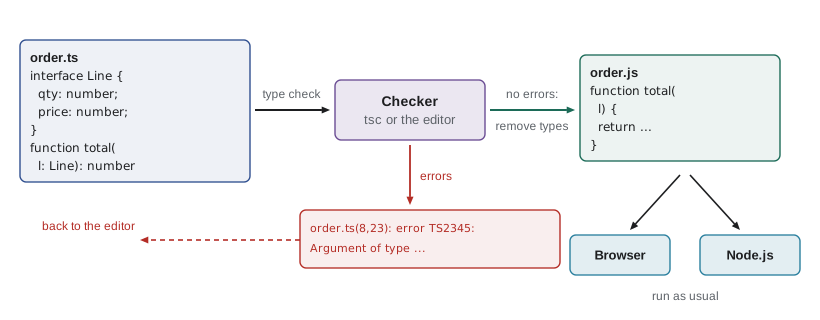
Static and dynamic checking
The difference between JavaScript and TypeScript is when type mistakes are found. JavaScript does dynamic checking: the engine checks a value only at the moment an operation uses it, and many operations do not check at all. TypeScript adds static checking: the checker examines the source code without running it, so it can find a problem on a line that would only run on a rare day, such as the day with no orders.
| Question | JavaScript alone | With TypeScript |
|---|---|---|
| When are type mistakes found? | When the faulty line runs, if it complains at all | While you type, and every time the project is checked |
| Which lines are checked? | Only the lines that actually run in a test or in use | Every line in the project, including rare branches |
| What does the editor know? | Guesses based on names and nearby code | The exact type of every value, used for completion and renaming |
| What does the program cost at run time? | Nothing extra | Nothing extra: the types are removed |
| Can the program still fail? | Yes | Yes, but not because a value is the wrong kind, where the types are accurate |
The last row matters. TypeScript does not prove a program correct. A function with all the right types can still add when it should subtract, and data from outside the program, such as a server response, has whatever shape the server actually sends, not the shape a type says it should have. Lesson 6 shows how to check outside data at the boundary so the types can be trusted inside. Within those limits, a large share of everyday bugs are exactly the kind a type checker reports. A 2017 study of fixed bugs in public JavaScript projects on GitHub, "To Type or Not to Type" by Gao, Bird and Barr, found that adding type annotations would have caught about 15 in 100 of them before the code was ever committed.
What the editor gains
The type checker does not only run when you build the project. Editors such as Visual Studio Code run the same checker in the background as you type, which is why most developers notice the benefits of TypeScript in the editor before they notice them anywhere else. Because the editor knows the type of every value, it can do several useful things.
- Completion. After typing order and a dot, the editor lists the properties an order actually has, with their types, instead of guessing from words it has seen in the file.
- Immediate errors. A misspelt property name or a wrong argument is underlined the moment it is typed, with the same message the compiler would print.
- Documentation on hover. Hovering over a function shows its parameters and return type, so you rarely need to open another file to remember how to call it.
- Safe renaming. Renaming a property renames every use of that property, and only those uses, even in other files. A text search cannot tell two properties called total apart; the checker can.
- Go to definition and find references. The editor can jump to where any function, type or property is declared and list every place it is used.
Plain JavaScript files get some of this too, because the editor runs the TypeScript checker on them and infers what it can. Lesson 12 uses that to migrate a project gradually. But inference alone cannot know what a function's parameters are meant to be, so the help in a JavaScript file is always weaker than in a typed one.
Types as documentation that cannot go out of date
A comment saying that a function takes a price in cents is useful until someone changes the function to take a price in dollars and forgets the comment. A type annotation cannot drift that way, because the checker compares it with the code on every check. Gareth calls types "documentation the compiler reads". When Theo publishes the types for his API in Lesson 9, Mira's code will be checked against them, and if Theo renames a field, every place in the front end that uses the old name will be reported at once.
/** A confirmed order as the server returns it. Money is in cents. */
interface Order {
  number: number;
  items: { code: string; qty: number }[];
  subtotal: number;
  tip: number;
  tax: number;
  total: number;
  placedAt: string;   // ISO 8601 time, e.g. '2027-04-20T12:04:00Z'
}

function receiptLine(order: Order): string {
  return 'Order ' + order.number + ': ' + order.items.length + ' items, ' + order.total + ' cents';
}
What this code does
The interface describes the shape of an order once, with a comment for the human reader and types for the checker. Any function that takes an Order can now use only the properties listed, and the editor offers them as completions. Lesson 5 covers interfaces in detail.
What TypeScript costs
TypeScript is not free, and Gareth is honest about the price. There is a build or check step to set up, which Lesson 2 covers. There is new syntax to learn, and some of the advanced type features are genuinely hard to read. Types for libraries written in plain JavaScript sometimes have to be installed separately or written by hand. And a project with types takes slightly longer to write at first, because you state things that JavaScript lets you leave implicit.
The trade usually pays off as a project grows and as more people work on it. A single-page script that one person writes in an afternoon gains little. A library used by three pages, written by one person and maintained by another, gains a great deal. The Food Hub's code is now in the second group: Mira wrote it, Gareth reviews it, Theo's server depends on it, and someone else may maintain it in a year.
| Cost | How large | How this course reduces it |
|---|---|---|
| Setup and tooling | An hour or two for a small project | Lesson 2 builds one configuration and explains every line |
| Learning the syntax | A few weeks to feel comfortable | Lessons 3 to 10 introduce one idea at a time with real compiler output |
| Writing annotations | Small; most types are inferred | Lesson 3 shows where annotations are needed and where they are not |
| Types for JavaScript libraries | Usually an install of a package | Lesson 9 covers declaration files and @types |
| Migrating existing code | Days to weeks for a medium project | Lesson 12 migrates the Food Hub code file by file |
TypeScript in 2026 and 2027
TypeScript is now one of the most used languages on GitHub and in developer surveys, and most popular JavaScript libraries either are written in it or ship type information for it. Two recent changes are worth knowing about, because they affect how projects are set up.
First, the compiler itself has been rewritten. TypeScript 6.0, released in March 2026, was the last version of the compiler written in TypeScript and running on JavaScript. It changed several defaults to match how modern projects are configured, for example by turning strict checking on by default. TypeScript 7.0, released in the summer of 2026, is a port of the same compiler to the Go language. It checks the same code with the same rules and the same error messages, but builds are typically around ten times faster. Some tools that use the compiler as a library, such as certain linters and framework plugins, were still waiting for its programming interface at the end of 2026, so projects that depend on them can keep using version 6 alongside it. The examples in this course were checked with the compiler in strict mode, and their messages are the ones you will see in either version.
Second, Node.js can now run TypeScript files directly. Since version 22.18 and 23.6 it removes type annotations from a .ts file and runs the result, and the feature is marked stable from Node.js 24.12 and 25.2. Node.js does not check the types when it does this; it only strips them. Checking is still the job of the TypeScript compiler or the editor. Lesson 2 explains which TypeScript syntax can be stripped this way and how to configure a project so that everything it uses can.
JavaScript that the checker understands
Because the types disappear, the runnable examples in this course are JavaScript. That is not a compromise: it is exactly what runs in a browser after a TypeScript project is built. When a lesson shows a TypeScript listing, it is checked by the real compiler and the messages shown are its real output. When a lesson shows a runnable example, it is the JavaScript the compiler produces, or JavaScript written to show the behavior that the types describe.
"use strict";
function tipCents(subtotal, rate) {
    return Math.round(subtotal * rate);
}
const subtotal = 550 * 2 + 625;
console.log('Subtotal:', subtotal);
console.log('Tip at 15 in 100:', tipCents(subtotal, 0.15));Subtotal: 1725 Tip at 15 in 100: 259
What this code does
This is the JavaScript the TypeScript compiler emitted for a short typed file. The type alias and every annotation are gone, and the rest of the code is unchanged apart from a use strict line at the top. It runs exactly as hand-written JavaScript would.
Look at the type Tip in that example: it allows only the four tip rates the counter page offers. In TypeScript, the call tipCents(subtotal, '15') or tipCents(subtotal, 15) would be reported, which would have caught the tip bug on Gareth's list. Lesson 3 explains these literal types.
Checking values by hand
Before TypeScript, the usual defense against wrong kinds of values was to check them at run time with typeof, Array.isArray and similar tests. Those checks are still needed at the edges of a program, where data arrives from a form, a file or a server, because the type checker cannot see that data until it exists. Inside the program, where every value comes from code the checker has read, the static types do the job and the run-time checks can go.
function describe(value) {
  if (typeof value === 'number') return 'number ' + value;
  if (typeof value === 'string') return 'string "' + value + '"';
  if (Array.isArray(value)) return 'array of ' + value.length;
  if (value === null) return 'null';
  return typeof value;
}

for (const v of [550, '550', [1, 2], null, undefined, { qty: 2 }]) {
  console.log(describe(v));
}number 550 string "550" array of 2 null undefined object
What this code does
The typeof operator returns a string naming a value's run-time type, but it reports object for arrays and for null, so those need their own tests. Checks like these are how JavaScript programs defend themselves at run time. TypeScript understands them too, and Lesson 6 shows how it uses them to narrow a type.
Try it yourself
Find the wrong kinds
A form gives an order line as an object with code, qty and price. Complete problems(line) so that it returns an array of messages: 'qty is not a number' if typeof line.qty is not 'number', and 'price is not a number' if typeof line.price is not 'number'. Return an empty array if both are numbers. The program prints the messages for three lines.
function problems(line) {
  const found = [];
  // add a message for each property that is not a number
  return found;
}

console.log(problems({ code: 'SOUP', qty: 2, price: 550 }));
console.log(problems({ code: 'EGG', qty: '1', price: 625 }));
console.log(problems({ code: 'DRINK', qty: 1, price: '200' }));
Try it yourself
Add, do not join
The function total(lines) should add qty times price for each line, but some values arrive as strings from form fields, so the result is wrong. Fix it by converting qty and price with Number before multiplying and adding. It should print 2325.
function total(lines) {
  let sum = 0;
  for (const line of lines) {
    sum = sum + line.qty + '' + line.price;
  }
  return sum;
}

console.log(total([{ qty: '2', price: '550' }, { qty: 1, price: 625 }, { qty: '3', price: 200 }]));
Common mistakes
MistakeTypeScript makes the program run differently.
InsteadThe types are removed before the program runs, so the JavaScript that runs is the same apart from the annotations.
MistakeIf the code compiles, it has no bugs.
InsteadCompiling only shows that values are used consistently with their types; logic errors and wrong outside data still need tests and run-time checks.
MistakeTypeScript replaces JavaScript.
InsteadIt is a superset: all JavaScript is valid TypeScript syntax, and what finally runs is JavaScript.
MistakeType errors only appear when you build.
InsteadThe editor runs the same checker as you type, so most errors are underlined before you save.
MistakeNode.js checks types when it runs a .ts file.
InsteadNode.js only strips the types; checking is done by the TypeScript compiler or the editor.
Summary and key terms
- JavaScript is dynamically typed, so a value of the wrong kind is only noticed, if at all, when the line using it runs.
- Many everyday bugs are type mismatches: a string in a sum, a misspelt property, a missing element.
- TypeScript is a superset of JavaScript that adds type annotations, which a type checker reads without running the code.
- Its messages give the file, line, column, a TS code and a sentence describing the mismatch.
- The types are removed before the code runs, so there is no run-time cost and the behavior is unchanged.
- The editor uses the same checker for completion, immediate errors, hover documentation and safe renaming.
- Types cannot check data that arrives from outside the program, which still needs run-time checks at the boundary.
- TypeScript 6.0 (March 2026) made strict checking the default, and TypeScript 7.0 (summer 2026) is a faster native port with the same rules.
- Node.js can run .ts files by stripping their types, but it does not check them.
- dynamic typing
- Checking the kind of a value only when an operation uses it, while the program runs.
- static typing
- Checking the kinds of values from the source code, before the program runs.
- type
- A description of a set of values and what can be done with them, such as number or string.
- type annotation
- A type written after a colon, as in let total: number, stating what a value must be.
- type checker
- The part of the TypeScript compiler that works out types and reports mismatches.
- superset
- A language that includes all of another language and adds more; all JavaScript is TypeScript syntax.
- compile error
- A message from the checker giving the location, a TS code and a description of a type mismatch.
- type stripping
- Removing type annotations to leave plain JavaScript, without checking them.
- boundary
- A place where data enters the program from outside, such as a form, a file or a server response.
- TypeScript 7
- The 2026 native port of the TypeScript compiler, written in Go, with the same checking rules.
Practice problems
Work each problem on paper first, then reveal the answer to check.
What happens in JavaScript when you add the string '550' and the number 625?
Show answer
The number is converted to a string and the two are joined, giving '550625'.
Does TypeScript add any code that runs in the browser?
Show answer
No. The types are removed and the remaining JavaScript runs unchanged.
What do the parts of the message prices.ts(8,23): error TS2345 mean?
Show answer
File prices.ts, line 8, column 23, error code TS2345, followed by a sentence describing the mismatch.
Why are run-time checks still needed in a TypeScript program?
Show answer
Data from outside the program, such as a server response, is not seen by the checker and may not match its type.
What does Node.js do with a .ts file in recent versions?
Show answer
It strips the type annotations and runs the result, without checking the types.
Lesson quiz · 5 questions
Score 60% or more to complete this lesson.
Create a free account to save your progress, take quizzes and earn a certificate.