
JS-102 · Lesson 5 of 12 · 28 min
Objects in depth and this
▶ Video coming soon A video version of this lesson is on the way.
Paul Desrosiers has asked for one place in the code where the Food Hub's rules live: how many volunteers each program needs, how many hampers fit on a pallet, when the pantry opens. Mira's first attempt is a large object called HUB with a property for each rule and a few methods that use them. It mostly works, but two things puzzle her. A method that reads this.openTime prints undefined when she passes it to setTimeout, and a copy of the object that she changes somehow changes the original too.
Both puzzles are about how objects really work, and they are the subject of the session planned for Tuesday, December 1. JavaScript Programming I introduced objects as records with properties and methods. This lesson goes further: shorthand and computed property names, safe ways to test and walk through properties, references and equality, freezing, getters and setters, and above all the keyword this, which is the part of objects that confuses almost everybody at first.
Object literals, revisited
An object literal is a list of properties in curly braces. Modern JavaScript adds three conveniences that you will see in nearly every codebase. Shorthand properties let you write { program, capacity } instead of { program: program, capacity: capacity } when a variable has the same name as the property. Method shorthand lets you write describe() { ... } instead of describe: function () { ... }. And computed property names, written in square brackets, let an expression decide the name of a property.
const program = 'Pantry';
const capacity = 6;
const field = 'openTime';

const rules = {
  program,
  capacity,
  [field]: '9:00',
  [`${program.toLowerCase()}Door`]: 'loading dock',
  describe() {
    return `${this.program}: ${this.capacity} volunteers from ${this.openTime}`;
  },
};

console.log(rules);
console.log(rules.describe());{ program: "Pantry", capacity: 6, openTime: "9:00", pantryDoor: "loading dock", describe: [Function: describe] }
Pantry: 6 volunteers from 9:00What this code does
The shorthand properties take their names and values from the variables program and capacity. The two computed names are worked out when the object is created, giving properties called openTime and pantryDoor. Inside the describe method, this refers to the rules object, so the method can read the object's own properties.
The printed object lists the method as describe: [Function: describe], because a method is simply a property whose value is a function. Browser developer tools show it in a slightly different style, often as f describe(), but it is the same property.
Reading, testing and removing properties
There are two ways to read a property. Dot notation, rules.capacity, is the usual one. Bracket notation, rules['capacity'], takes a string, so the name can come from a variable or contain characters that are not allowed in a dot name, such as spaces or hyphens. Reading a property that does not exist gives undefined, not an error.
Because a missing property gives undefined, testing for undefined is not quite the same as testing whether a property exists: a property can exist and hold undefined. When the difference matters, use the in operator, which also finds inherited properties, or Object.hasOwn, added in ES2022, which checks only the object's own properties. The delete operator removes a property entirely.
const shift = { program: 'Kitchen', lead: undefined, crew: 3 };
const key = 'crew';

console.log(shift[key], shift['program']);
console.log(shift.lead === undefined, 'lead' in shift, Object.hasOwn(shift, 'lead'));
console.log(shift.notes === undefined, 'notes' in shift);
console.log('toString' in shift, Object.hasOwn(shift, 'toString'));

delete shift.lead;
console.log(Object.hasOwn(shift, 'lead'), shift);3 Kitchen
true true true
true false
true false
false { program: "Kitchen", crew: 3 }What this code does
Bracket notation reads the property named by the variable key. The lead property exists but holds undefined, while notes does not exist at all, and only in and Object.hasOwn can tell those apart. toString is inherited from every object, so in finds it but Object.hasOwn does not, and after delete the lead property is gone.
For nested data from outside the program, such as a record loaded from a file, optional chaining is the everyday tool. shift.lead?.phone gives undefined if lead is null or undefined, instead of throwing a TypeError. It also works with brackets and calls: data?.[key] and rules.describe?.(). Combine it with ?? to supply a fallback: shift.lead?.phone ?? 'no phone listed'.
Walking through properties
Three built-in functions turn an object into an array so that the array methods from Lesson 3 can work on it. Object.keys gives the property names, Object.values the values and Object.entries pairs of name and value. Object.fromEntries goes the other way, building an object from pairs. Together they let you map and filter objects as easily as arrays.
const needed = { pantry: 6, kitchen: 4, hampers: 12 };

console.log(Object.keys(needed));
console.log(Object.values(needed).reduce((a, b) => a + b, 0));

for (const [program, count] of Object.entries(needed)) {
  console.log(`${program.padEnd(8)} ${count}`);
}

const doubled = Object.fromEntries(
  Object.entries(needed).map(([program, count]) => [program, count * 2]),
);
console.log(doubled);[ "pantry", "kitchen", "hampers" ]
22
pantry 6
kitchen 4
hampers 12
{ pantry: 12, kitchen: 8, hampers: 24 }What this code does
Object.keys lists the three program names, and adding Object.values gives the total of 22 volunteers needed. The loop destructures each entry into a name and a count and prints them in a neat column. The last part turns the object into pairs, doubles each count and builds a new object from the changed pairs for the holiday rush.
You may also meet the for...in loop, which visits every enumerable property name, including inherited ones. It predates Object.keys and has caught many people out when a library added properties to a shared prototype. Prefer for...of with Object.entries or Object.keys, which visit only the object's own properties and give you the array methods as well.
Property order is predictable. Properties whose names look like whole numbers come first, in numeric order; all other string names follow in the order they were added. That is why the needed object always prints pantry, kitchen, hampers, but an object with keys '10', '2' and 'a' lists '2', '10' and then 'a'.
References and equality
Here is the answer to Mira's second puzzle. A variable does not hold an object; it holds a reference to the object, like an address. Assigning an object to another variable copies the reference, not the object, so both names point to the same object, and a change made through one is visible through the other. Comparing objects with === compares references: two objects are equal only if they are the same object, even if every property matches.
const hubRules = { openTime: '9:00', capacity: 6 };
const alias = hubRules;
alias.capacity = 8;
console.log(hubRules.capacity);

const copy = { ...hubRules };
copy.capacity = 10;
console.log(hubRules.capacity, copy.capacity);

console.log(alias === hubRules, copy === hubRules);
console.log({ a: 1 } === { a: 1 });8 8 10 true false false
What this code does
alias is a second name for the same object, so setting its capacity also changes hubRules. The spread copy is a different object, and changing it leaves the original at 8. The comparisons show that === is true only for two names of the same object; two separate objects with identical contents are not equal.
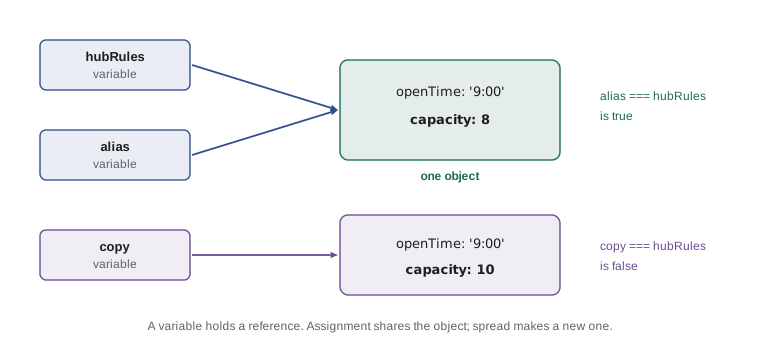
The same rule applies when you pass an object to a function. The function receives a reference, so if it changes the object's properties, the caller sees the change. That is useful when intended and surprising when not. A function that should not change its input can make a copy first, or simply return a new object, as the spread examples in Lesson 4 did. Comparing two objects by their contents needs your own code, for example comparing each property, or comparing JSON.stringify of both for simple data.
Freezing objects
const stops a variable from being reassigned to a different object, but it does not stop the object itself from changing: const rules = {} followed by rules.capacity = 6 is perfectly legal. When you want an object that cannot change, Object.freeze locks it: properties cannot be added, removed or changed. In normal scripts, attempts to change a frozen object are silently ignored; in strict mode, which modules and classes use automatically, they throw a TypeError.
const RULES = Object.freeze({ openTime: '9:00', pallet: { hampers: 24 } });

RULES.openTime = '7:00';
RULES.extra = 'ignored';
console.log(RULES.openTime, RULES.extra, Object.isFrozen(RULES));

RULES.pallet.hampers = 30;
console.log(RULES.pallet.hampers);9:00 undefined true 30
What this code does
Changing openTime and adding extra both fail quietly because the object is frozen, so it still shows 9:00 and the new property is undefined. Freezing is shallow, though. The nested pallet object was not frozen itself, so its number of hampers can still be changed to 30.
Gareth's rule for the Food Hub's settings: freeze objects that hold fixed rules, write their names in capitals as a signal to readers, and freeze nested objects too if they are meant to be fixed. Freezing is a safety net, not a security feature, but it turns an accidental change into an obvious error in strict code instead of a bug discovered weeks later.
What this means
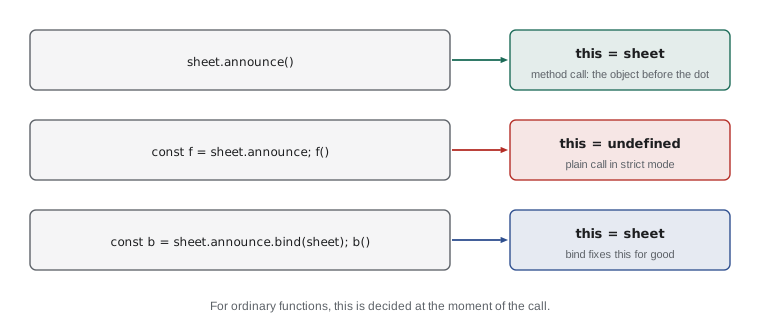
Now for this. Inside a function, this is a special value that refers to the object the function was called on. The crucial word is called: in ordinary functions and methods, this is not fixed when the function is written but decided each time the function is called, by how it is called. The rule of thumb is to look to the left of the dot at the call. In rules.describe(), the object to the left of the dot is rules, so inside describe, this is rules.
const pantry = {
  name: 'Pantry',
  open: '9:00',
  hours() {
    return `${this.name} opens at ${this.open}`;
  },
};

const kitchen = { name: 'Kitchen', open: '11:00', hours: pantry.hours };

console.log(pantry.hours());
console.log(kitchen.hours());Pantry opens at 9:00 Kitchen opens at 11:00
What this code does
Both objects share one function: kitchen's hours property refers to the same function as pantry's. When it is called as pantry.hours(), this is pantry, and when it is called as kitchen.hours(), this is kitchen. The function's code never changes; only the object to the left of the dot does.
That flexibility is what lets many objects share one method, which Lesson 6 builds on with prototypes and classes. It is also the cause of the most common this bug. If the function is called without an object to the left of the dot, there is nothing for this to refer to.
Losing this
When you take a method out of its object and call it on its own, the link to the object is lost. This happens whenever a method is stored in a variable or passed as a callback, for example to setTimeout or forEach. In strict mode, this is then undefined, and reading a property of it throws a TypeError. In older, non-strict scripts, this falls back to the global object, which usually means you quietly get undefined values instead, which is what happened to Mira.
'use strict';
const sheet = {
  program: 'Hamper packing',
  announce() {
    return `Sign-ups open for ${this.program}`;
  },
};

console.log(sheet.announce());

const detached = sheet.announce;
try {
  detached();
} catch (err) {
  console.log('Called on its own:', err.name);
}

const bound = sheet.announce.bind(sheet);
console.log(bound());Sign-ups open for Hamper packing Called on its own: TypeError Sign-ups open for Hamper packing
What this code does
The 'use strict' line at the top switches on strict mode, the same mode classes and modules use. Called through sheet, the method works, but the detached copy is called with nothing to the left of the dot, so this is undefined and reading this.program throws a TypeError. bind makes a new function whose this is permanently set to sheet, so it works on its own.
There are three usual fixes. bind creates a copy of the function with this fixed, as above. A wrapping arrow function, such as setTimeout(() => sheet.announce(), 0), keeps the call in method form, so the dot is still there. And methods that need a fixed this can be written as arrow functions in the first place, for the reason explained next. The related methods call and apply run a function once with a chosen this: fn.call(obj, a, b) passes arguments one by one and fn.apply(obj, [a, b]) passes them as an array.
Arrow functions and this
Arrow functions do not have a this of their own. Inside an arrow function, this means whatever it meant in the surrounding code at the place where the arrow was written. This is called lexical this, by analogy with lexical scope in Lesson 1. It makes arrow functions perfect for callbacks inside methods, where you want this to keep referring to the object. It also makes them a poor choice for methods themselves.
const drive = {
  name: 'Holiday hampers',
  teams: ['North', 'South'],
  listTeams() {
    return this.teams.map((team) => `${team} team, ${this.name}`);
  },
  badArrow: () => typeof this,
};

console.log(drive.listTeams());
console.log(drive.badArrow());[ "North team, Holiday hampers", "South team, Holiday hampers" ] object
What this code does
Inside listTeams, an ordinary method, this is the drive object, and the arrow function passed to map borrows that same this, so it can read this.name. badArrow is itself an arrow function, so it has no this of its own and takes the this of the top-level code instead. That outer this is not the drive object, which is why arrow functions should not be used as methods that need their object.
Before arrow functions, programmers wrote const self = this; at the top of a method and used self inside callbacks, or added bind(this) to every callback. You will still see both in older code. Today the guideline is simple: use method shorthand for methods, and arrow functions for callbacks inside them.
| How the function is called | Example | Value of this |
|---|---|---|
| As a method | sheet.announce() | The object before the dot (sheet) |
| On its own, strict mode | announce() | undefined |
| On its own, non-strict script | announce() | The global object |
| With call or apply | announce.call(kitchen) | The first argument (kitchen) |
| A function made by bind | announce.bind(sheet)() | The bound object, whatever the call |
| An arrow function | () => this | The this of the surrounding code |
| With new (Lesson 6) | new Shift() | The newly created object |
Getters and setters
A getter is a method that runs when a property is read, and a setter is one that runs when a property is assigned. You write them with the words get and set before a method name. To the code using the object, they look like ordinary properties, but they can compute a value on the fly or check a new value before storing it. Getters are a good fit for values that are always derived from other properties, so they can never get out of step.
const pallet = {
  hampers: 18,
  perPallet: 24,
  get spaces() {
    return this.perPallet - this.hampers;
  },
  set count(n) {
    if (n < 0 || n > this.perPallet) {
      console.log(`Ignored ${n}: must be 0 to ${this.perPallet}`);
      return;
    }
    this.hampers = n;
  },
};

console.log(pallet.spaces);
pallet.count = 30;
pallet.count = 20;
console.log(pallet.hampers, pallet.spaces);6 Ignored 30: must be 0 to 24 20 4
What this code does
Reading pallet.spaces runs the getter, which works out the free spaces from the other two properties instead of storing them. Assigning to count runs the setter, which rejects 30 because a pallet holds only 24 hampers. The second assignment, 20, passes the check, and the getter immediately reports 4 free spaces.
Getters and setters appear again in classes in Lesson 6, where they often guard private data. Use them sparingly: a getter that does slow work, or a setter with surprising side effects, makes code harder to reason about, because a line that looks like a simple property access is really a function call.
Worked problem
Predicting this
Given const hub = { name: 'Hub', greet() { return 'Hi from ' + this.name; } }; const kitchen = { name: 'Kitchen' }; in strict mode, what do hub.greet(), hub.greet.call(kitchen) and const g = hub.greet; g() each do?
Show solution
- hub.greet(): the object before the dot is hub, so this is hub and the result is 'Hi from Hub'.
- hub.greet.call(kitchen): call runs the function with this set to its first argument, so the result is 'Hi from Kitchen'.
- g(): the function is called with nothing before the dot. In strict mode this is undefined.
- Reading this.name when this is undefined throws a TypeError, so g() does not return at all.
Answer: Hi from Hub, then Hi from Kitchen, then a TypeError. To make g work, write const g = hub.greet.bind(hub).
Try it yourself
A pantry shelf object
Complete the shelf object. add(item, boxes) should add the boxes to the count for that item in this.stock, starting from 0 for a new item. report() should return one line per item in the form rice: 7, joined with new lines.
Use this inside both methods, and use Object.entries in report.
const shelf = {
  name: 'Dry goods',
  stock: {},
  add(item, boxes) {
    // add boxes to this.stock[item]
  },
  report() {
    // one line per item
  },
};

shelf.add('rice', 4);
shelf.add('pasta', 6);
shelf.add('rice', 3);
console.log(shelf.report());
Try it yourself
Keep hold of this
The commented-out line in the starter passes board.announce straight to setTimeout, so this is lost and the call fails in strict mode. Without changing the board object, schedule announce twice: once with bind, and once with a wrapping arrow function.
The output should be two lines, both starting with Hamper drive:.
'use strict';
const board = {
  title: 'Hamper drive',
  announce() {
    console.log(`${this.title}: volunteers needed`);
  },
};

// The broken version loses this:
// setTimeout(board.announce, 0);

// 1. Schedule board.announce using bind

// 2. Schedule board.announce using an arrow function
Common mistakes
Mistakethis always means the object a method was written in.
InsteadFor ordinary functions, this is set by the call. Look to the left of the dot at the moment of calling.
MistakePassing obj.method to setTimeout keeps this pointing at obj.
InsteadThe method is passed on its own and called without obj. Use bind or a wrapping arrow function.
MistakeArrow functions make good methods because they are shorter.
InsteadArrow functions have no this of their own. Use method shorthand for methods and arrows for callbacks inside them.
Mistakeconst makes an object unchangeable.
Insteadconst stops the variable being reassigned. Use Object.freeze to stop the object changing, and remember that freezing is shallow.
MistakeTwo objects with the same properties are equal with ===.
Instead=== compares references, so only two names for the same object are equal.
Summary and key terms
- Object literals support shorthand properties, method shorthand and computed property names.
- Bracket notation reads properties whose names are in variables. in finds own and inherited properties, Object.hasOwn only own ones, and delete removes a property.
- Object.keys, Object.values and Object.entries turn objects into arrays, and Object.fromEntries turns pairs back into an object.
- Variables hold references to objects, so assignment shares an object and === compares identity.
- Object.freeze makes an object unchangeable, but only at the top level. this is set by how an ordinary function is called: the object before the dot in a method call, undefined in a plain strict-mode call, or the value given to call, apply or bind.
- Arrow functions take this from their surroundings.
- Getters and setters run code when a property is read or assigned.
- object literal
- An object written directly in code as a list of properties in curly braces.
- shorthand property
- A property written as just a variable name, taking both its name and value from the variable.
- computed property name
- A property name written in square brackets and worked out from an expression.
- bracket notation
- Reading or writing a property with its name as a string in square brackets.
- optional chaining
- The ?. operator, which gives undefined instead of an error when the value before it is null or undefined.
- reference
- The link a variable holds to an object, rather than the object itself.
- Object.freeze
- A built-in function that stops an object's properties from being added, removed or changed.
- this
- A keyword that refers to the object a function was called on, decided by the call.
- bind
- A function method that returns a copy of the function with this fixed to a chosen object.
- lexical this
- The behavior of arrow functions, which take this from the surrounding code.
- getter
- A method that runs when a property is read, written with get.
- setter
- A method that runs when a property is assigned, written with set.
Practice problems
Work each problem on paper first, then reveal the answer to check.
Write an object literal with a property whose name comes from the variable key and whose value is 5.
Show answer
{ [key]: 5 }.
How can you tell a property holding undefined from a missing one?
Show answer
Use Object.hasOwn(obj, 'name') or 'name' in obj; reading the property gives undefined either way.
After const b = a; b.count = 2, what is a.count if a is an object?
Show answer
2, because a and b refer to the same object.
Inside an arrow function written in a method, what is this?
Show answer
The same this as in the method, usually the object the method was called on.
What does fn.call(obj, 1, 2) do?
Show answer
Calls fn once with this set to obj and the arguments 1 and 2.
Lesson quiz · 5 questions
Score 60% or more to complete this lesson.
Create a free account to save your progress, take quizzes and earn a certificate.