
JS-102 · Lesson 2 of 12 · 28 min
Higher-order functions and callbacks
▶ Video coming soon A video version of this lesson is on the way.
The second session, planned for Thursday, November 19, starts from a problem in Lucy Tran's sign-up code. Each Food Hub program sends volunteers a reminder the day before a shift, and each program wants it worded differently. The pantry wants the start time and the loading-dock door. The community kitchen wants a note about closed-toe shoes. The holiday hamper drive wants the warehouse address. Mira's first version had one large function with an if statement for every program, and every new program meant editing it again.
Gareth's suggestion is to stop writing the rules into the function and pass them in instead. "A function in JavaScript is a value, the same as a number or a string," he says. "You can hand one function to another and let the second one decide when to call it." Functions that take or return other functions are called higher-order functions, and the functions handed to them are called callbacks. Together they are one of the most important patterns in the language, and the foundation of the next lesson on map, filter and reduce.
Functions are values
In JavaScript, functions are first-class values. Anything you can do with a number, you can do with a function: store it in a variable, put it in an array or an object, pass it as an argument, return it from another function and compare it with ===. The only extra thing you can do with a function is call it, by writing parentheses after it.
The difference between a function and a call to the function is the parentheses. The name greet on its own refers to the function value itself. The expression greet() runs the function and produces whatever it returns. Mixing these two up is one of the most common mistakes with callbacks, so it is worth getting completely clear from the start.
function shout(text) {
  return text.toUpperCase() + '!';
}

const loud = shout;           // the function itself, not a call
console.log(typeof shout);
console.log(loud('doors open at 9'));
console.log(loud === shout);

const tools = { tidy: (t) => t.trim(), shout };
console.log(tools.shout(tools.tidy(' hampers ready ')));function DOORS OPEN AT 9! true HAMPERS READY!
What this code does
The second line copies the function into a new variable called loud, without running it, so both names refer to the same function. Calling loud therefore does exactly what calling shout would do, and comparing the two with === gives true. The object tools stores two functions as properties, and the last line calls one on the result of the other.
The line console.log(typeof shout) printed function. JavaScript treats functions as a special kind of object, so they can even have properties of their own, such as name and length. You will rarely need those, but they show that a function is a real value that can be passed around.
Passing a function as an argument
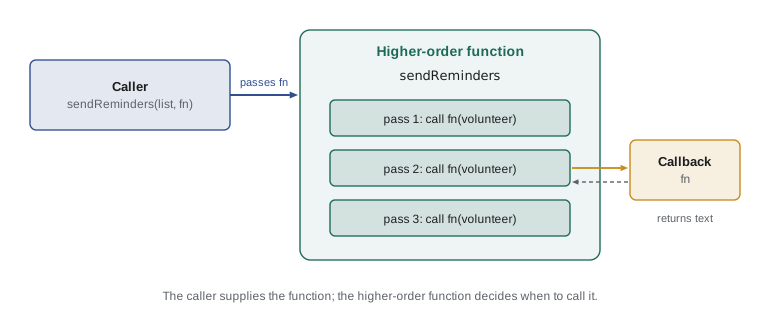
A callback is a function passed as an argument to another function, so that the other function can call it at the right moment. The function that receives the callback decides when to call it, how many times and with what arguments. The function that passes the callback decides what should happen each time. That split lets you write a general function once and reuse it for many specific jobs.
Here is Gareth's first fix for the reminder problem. The general function sendReminders knows how to go through a list of volunteers. It does not know how to word a reminder. Each program supplies its own wording as a callback.
function sendReminders(volunteers, makeMessage) {
  for (const v of volunteers) {
    console.log(makeMessage(v));
  }
}

const pantryCrew = [{ name: 'Amara', start: '9:00' }, { name: 'Jonah', start: '13:00' }];

sendReminders(pantryCrew, (v) => `${v.name}: pantry shift at ${v.start}, use the loading-dock door`);
sendReminders(pantryCrew, (v) => `Hi ${v.name}, see you at ${v.start}`);Amara: pantry shift at 9:00, use the loading-dock door Jonah: pantry shift at 13:00, use the loading-dock door Hi Amara, see you at 9:00 Hi Jonah, see you at 13:00
What this code does
The function sendReminders loops through the volunteers and calls whatever function it was given as makeMessage once for each person. The first call passes a callback that writes the formal pantry reminder, and the second passes one that writes a short greeting. The loop never changes; only the wording does, so four different lines are printed.
When a new program joins, nobody touches sendReminders. The new program writes its own callback and passes it in. Programmers describe this as separating the what from the how: sendReminders handles how to go through the list, and the callback handles what to say.
Naming and defining callbacks
A callback can be defined in several ways. You can write an arrow function directly in the call, as above. You can write a function expression with the function keyword. Or you can declare a named function separately and pass its name. All three produce the same kind of value. Named callbacks are easier to test and to reuse, and they make error messages clearer because the engine can report the function's name. Inline arrow functions are shorter for one-off jobs.
const hours = [4, 2.5, 6, 3];

function isLong(h) {
  return h >= 4;
}

console.log(hours.filter(isLong));                  // a named function
console.log(hours.filter((h) => h < 4));            // an arrow function
console.log(hours.filter(function (h) { return h === 6; })); // a function expression[ 4, 6 ] [ 2.5, 3 ] [ 6 ]
What this code does
All three lines give filter a callback that answers true or false for one number. The first passes the named function isLong without parentheses, so filter receives the function itself and keeps 4 and 6. The other two pass inline functions written in place, which keep the short shifts and the six-hour shift.
The key detail is in the first call: hours.filter(isLong), not hours.filter(isLong()). With the parentheses, JavaScript would call isLong straight away, with no argument, and pass its result, false, to filter. filter would then complain that false is not a function. When you pass a callback, you hand over the function; the receiver does the calling.
How many arguments does a callback get?
The higher-order function decides what arguments the callback receives, so you need to know what it passes. Array methods such as forEach, map and filter call their callback with three arguments: the current item, its index and the whole array. Most callbacks use only the first, and JavaScript quietly ignores arguments a function does not declare. But when you need the position, it is there.
const crew = ['Amara', 'Jonah', 'Priya'];

crew.forEach((name, index) => {
  console.log(`${index + 1}. ${name}`);
});

crew.forEach((name, index, all) => {
  if (index === all.length - 1) console.log(`Last on the list: ${name}`);
});1. Amara 2. Jonah 3. Priya Last on the list: Priya
What this code does
forEach calls its callback once for each name and passes the name, its index and the whole array. The first callback uses the index to number the list starting at 1. The second uses all three arguments to spot the final item, so only Priya is reported as last.
This extra-argument behavior has one famous trap. ['1', '2', '3'].map(parseInt) gives [1, NaN, NaN], not [1, 2, 3]. map passes the index as a second argument, and parseInt treats a second argument as the number base, so it tries to read '2' in base 1 and '3' in base 2. The safe form is map((s) => parseInt(s, 10)), or simply map(Number). When a callback behaves oddly, check exactly what arguments it is being given.
Sorting with a comparison callback
Array sort is a higher-order function too. Without a callback, sort converts items to strings and orders them alphabetically, which puts 10 before 9. With a comparison function, you decide the order. The callback receives two items, a and b, and returns a negative number if a should come first, a positive number if b should come first, and 0 if their order does not matter.
const donations = [
  { donor: 'Lakeside Grocers', boxes: 12 },
  { donor: 'St. Mark School', boxes: 30 },
  { donor: 'Northside Bakery', boxes: 7 },
];

const byBoxes = [...donations].sort((a, b) => b.boxes - a.boxes);
console.log(byBoxes.map((d) => `${d.donor}: ${d.boxes}`));

const byName = [...donations].sort((a, b) => a.donor.localeCompare(b.donor));
console.log(byName.map((d) => d.donor));[ "St. Mark School: 30", "Lakeside Grocers: 12", "Northside Bakery: 7" ] [ "Lakeside Grocers", "Northside Bakery", "St. Mark School" ]
What this code does
Subtracting a.boxes from b.boxes gives a positive number whenever b is larger, so the biggest donations move to the front. The second comparison uses localeCompare, which orders text alphabetically in a way that suits people. Each sort works on a copy made with the spread syntax, so the original donations array keeps its order.
Sorting numbers in ascending order is (a, b) => a - b and in descending order (a, b) => b - a. For strings, a.localeCompare(b) handles capital letters and accented characters properly. Remember that sort changes the array it is called on; the copy made with [...donations] protects the original. ES2023 also added toSorted, which returns a sorted copy without changing the original, and it takes the same comparison callback.
Writing your own higher-order functions
Built-in higher-order functions are useful, but the real power comes from writing your own. Any time you find two functions that differ only in one small step, you can usually turn that step into a callback and keep a single general function. Gareth calls this "finding the hole in the middle": the shared part is the doughnut and the varying step is the hole.
function countWhere(list, test) {
  let count = 0;
  for (const item of list) {
    if (test(item)) count += 1;
  }
  return count;
}

const shifts = [
  { program: 'pantry', hours: 4 },
  { program: 'kitchen', hours: 6 },
  { program: 'pantry', hours: 3 },
  { program: 'hampers', hours: 5 },
];

console.log(countWhere(shifts, (s) => s.program === 'pantry'));
console.log(countWhere(shifts, (s) => s.hours >= 5));
console.log(countWhere(shifts, () => true));2 2 4
What this code does
countWhere goes through the list and adds 1 to its count each time the test callback returns true for an item. The same function answers three different questions depending on the callback it is given. There are two pantry shifts and two shifts of five hours or more, and a test that always returns true simply counts all four shifts.
Without the callback, you would need countPantryShifts, countLongShifts, countAllShifts and so on, each a copy of the same loop. With it, the loop is written and tested once. A callback like the test given to countWhere, a function that answers yes or no about one item, is called a predicate. filter, find, some and every all take predicates too.
Functions that return functions
Higher-order functions can also return functions, as the factories in Lesson 1 did. One especially useful kind wraps an existing function to add behavior around it without changing the function itself. This is sometimes called a decorator or a wrapper. Below, withLog returns a new function that prints a line before and after calling the original.
function withLog(label, fn) {
  return (...args) => {
    console.log(`${label} called with`, args);
    const result = fn(...args);
    console.log(`${label} returned`, result);
    return result;
  };
}

const hoursToMinutes = (h) => h * 60;
const loggedMinutes = withLog('hoursToMinutes', hoursToMinutes);

const total = loggedMinutes(2.5) + loggedMinutes(1);
console.log('Total minutes:', total);hoursToMinutes called with [ 2.5 ] hoursToMinutes returned 150 hoursToMinutes called with [ 1 ] hoursToMinutes returned 60 Total minutes: 210
What this code does
withLog takes a label and a function and returns a new function that collects its arguments with the rest syntax, prints them, calls the original and prints the result. hoursToMinutes itself never changes, but every call made through loggedMinutes is reported. The two wrapped calls give 150 and 60, so the total is 210.
The rest parameter ...args gathers however many arguments the wrapper receives into an array, and the spread in fn(...args) passes them on unchanged. Lesson 4 covers both properly. Wrappers like this are how many testing and debugging tools work: they replace a function with a wrapped version that records how it was called.
Composing functions
Small functions that each do one job can be joined into a pipeline, where the output of one becomes the input of the next. Combining functions this way is called composition. A helper usually called pipe takes several functions and returns one new function that runs them in order from left to right.
const pipe = (...fns) => (value) => fns.reduce((acc, fn) => fn(acc), value);

const tidy = (s) => s.trim();
const lower = (s) => s.toLowerCase();
const dashed = (s) => s.replaceAll(' ', '-');

const toSlug = pipe(tidy, lower, dashed);
console.log(toSlug('  Holiday Hamper Drive '));
console.log(toSlug('Community Kitchen'));holiday-hamper-drive community-kitchen
What this code does
pipe returns a function that feeds a value through each function in the list, one after another. toSlug therefore trims the text, lowers its case and swaps spaces for dashes, in that order. The result is the kind of short, lower-case name used in a web address, such as holiday-hamper-drive.
pipe is only one line, but it uses reduce, which the next lesson explains in detail. For now, read it as "start with the value and apply each function in turn". The same idea appears throughout modern JavaScript, from data processing to the middleware of web servers, and it is a good reason to keep functions small and focused.
Synchronous and asynchronous callbacks
Some callbacks run straight away, before the higher-order function returns. These are synchronous callbacks; forEach, map, filter and sort all work this way. Others are stored and run later, after the current code has finished. These are asynchronous callbacks. setTimeout is the simplest example: it schedules its callback to run after a delay and returns immediately.
console.log('1. Start packing hampers');

setTimeout(() => {
  console.log('3. Reminder: the truck arrives soon');
}, 0);

[10, 20].forEach((n) => console.log(`2. Packed ${n} boxes`));
console.log('2. Finished the loop');1. Start packing hampers 2. Packed 10 boxes 2. Packed 20 boxes 2. Finished the loop 3. Reminder: the truck arrives soon
What this code does
The forEach callback runs immediately for each number, so its lines appear in order with the rest of the code. The setTimeout callback is only scheduled, even with a delay of 0, and it waits until all the other code has finished. That is why the reminder line, labeled 3, is printed last although it appears second in the program.
Asynchronous callbacks are how JavaScript handles anything that takes time: a timer, a click, a network request, a file being read. The program carries on, and the callback runs when the event happens. Asynchronous JavaScript and APIs covers this fully, with promises and async and await. For this course, the main thing to remember is that a callback passed to setTimeout runs after the surrounding code, never in the middle of it.
| Higher-order function | Callback receives | Callback should return | Result |
|---|---|---|---|
| forEach | item, index, array | Nothing in particular | undefined; used for side effects |
| map | item, index, array | The new value for this item | A new array of the same length |
| filter | item, index, array | true to keep the item | A new, possibly shorter array |
| find | item, index, array | true for the item wanted | The first matching item, or undefined |
| some / every | item, index, array | true or false | A single true or false |
| sort / toSorted | a, b | Negative, zero or positive | The sorted array (sort changes the original) |
| reduce | accumulator, item, index, array | The new accumulator | One combined value |
| setTimeout | Any extra arguments given | Nothing in particular | A timer ID; the callback runs later |
Worked problem
Choosing the right shape of callback
Dev wants a list of the donors who gave more than 10 boxes, written as one line of text. The data is an array of objects with donor and boxes properties. Which higher-order functions and callbacks should you combine?
Show solution
- The job has three parts: choose some items, turn each chosen item into a name, and join the names into one string.
- Choosing items is filter, with a predicate callback: (d) => d.boxes > 10.
- Turning each item into a name is map, with a callback that returns the new value: (d) => d.donor.
- Joining is not a higher-order function at all; the array method join(', ') does it.
- Chained together: donations.filter((d) => d.boxes > 10).map((d) => d.donor).join(', ').
Answer: filter with a predicate, then map with a transforming callback, then join. For the three donations in the sort example, the result is Lakeside Grocers, St. Mark School, in the original order of the array.
Try it yourself
Count what matches
Write a higher-order function countWhere(list, test) that returns how many items in list make the callback test return a truthy value. Do not use filter; write the loop yourself.
Then use it with arrow-function callbacks to print the number of hamper boxes that are packed, and the number that weigh more than 8.
function countWhere(list, test) {
  // loop through list and count the items that pass test
}

const boxes = [
  { id: 1, packed: true, weight: 9 },
  { id: 2, packed: false, weight: 6 },
  { id: 3, packed: true, weight: 7 },
  { id: 4, packed: true, weight: 11 },
];

console.log('Packed:', countWhere(boxes, (b) => b.packed));
// print the number of boxes heavier than 8 here
Try it yourself
Build a pipe
Write pipe(...fns), which returns a new function. The new function takes one value and passes it through each function in fns from left to right, returning the final result. You may use a loop or reduce.
Use it to build formatName, which trims a name, lowers its case and then capitalizes the first letter, and print the two names in the starter.
function pipe(...fns) {
  return function (value) {
    // apply each function in turn
  };
}

const trim = (s) => s.trim();
const lower = (s) => s.toLowerCase();
const capital = (s) => s[0].toUpperCase() + s.slice(1);

const formatName = pipe(trim, lower, capital);
console.log(formatName('  aMARA '));
console.log(formatName('JONAH'));
Common mistakes
Mistakelist.filter(isLong()) passes the function isLong to filter.
InsteadThe parentheses call isLong immediately. Pass the function itself: list.filter(isLong).
Mistake['1', '2', '3'].map(parseInt) gives [1, 2, 3].
Insteadmap passes the index as a second argument, which parseInt reads as a number base. Use map(Number) or map((s) => parseInt(s, 10)).
Mistakesort() with no callback sorts numbers by size.
InsteadWithout a comparison function, sort compares items as text, so 10 comes before 9. Pass (a, b) => a - b.
MistakeA setTimeout callback with a delay of 0 runs immediately.
InsteadIt runs only after the current code has finished, however short the delay.
MistakeCallbacks must always be arrow functions.
InsteadAny function value works: a named function, a function expression or an arrow function.
Summary and key terms
- Functions in JavaScript are first-class values that can be stored, passed and returned.
- A higher-order function takes a function as an argument or returns one.
- A callback is a function passed to another function, which decides when and with what arguments to call it.
- Pass the function itself, without parentheses.
- Array methods give their callbacks the item, its index and the array. sort uses a comparison callback that returns a negative, zero or positive number.
- Your own higher-order functions turn the varying step of similar functions into a callback.
- Wrappers return a new function that adds behavior around an existing one, and composition joins small functions into a pipeline.
- Synchronous callbacks run before the higher-order function returns; asynchronous ones, such as those given to setTimeout, run later.
- first-class value
- A value that can be stored, passed as an argument and returned, as functions can in JavaScript.
- higher-order function
- A function that takes a function as an argument or returns one.
- callback
- A function passed to another function so that it can be called later.
- predicate
- A callback that answers true or false about one item.
- comparison function
- A callback for sort that says which of two items should come first.
- wrapper
- A function that calls another function and adds behavior before or after it.
- composition
- Combining functions so that the output of one becomes the input of the next.
- pipeline
- A chain of functions through which a value flows in order.
- synchronous callback
- A callback that runs before the function receiving it returns.
- asynchronous callback
- A callback that is stored and run later, after the current code has finished.
Practice problems
Work each problem on paper first, then reveal the answer to check.
What is the difference between shout and shout() in an expression?
Show answer
shout is the function value itself; shout() calls it and gives its return value.
What three arguments does forEach give its callback?
Show answer
The current item, its index and the whole array.
Write a comparison callback that sorts numbers from largest to smallest.
Show answer
(a, b) => b - a.
Why does a setTimeout callback with delay 0 run after the following lines?
Show answer
It is scheduled to run once the current code has finished, so it always waits its turn.
What does pipe(f, g, h)(x) compute?
Show answer
h(g(f(x))): f runs first, then g, then h.
Lesson quiz · 5 questions
Score 60% or more to complete this lesson.
Create a free account to save your progress, take quizzes and earn a certificate.