
JS-102 · Lesson 12 of 12 · 33 min
Capstone: a modular data library
▶ Video coming soon A video version of this lesson is on the way.
The hamper drive ends on Saturday, December 19, and by then Dev's notes, Lucy's sign-up records and the pantry's donation log will hold the busiest month of the Food Hub's year. Dev wants the January newsletter, going out on Monday, January 4, 2027, to report the results: boxes received by category, the most generous donors, the number of donations that needed fixing, and a thank-you line for every donor. Paul wants the same figures for the board. Lucy wants to use the same rules for the sign-up page.
Gareth's capstone plan, for the first sessions of January 2027, is for Mira to build the piece all of them can share: a small data library called riverside-data, made of ES modules, that reads raw donation notes, checks them, summarizes them and formats the results. It brings together every lesson in this course: closures and higher-order functions, map, filter and reduce, destructuring and spread, objects, classes, modules, errors, JSON, numbers and dates, and regular expressions. This lesson walks through the design and the code module by module, then puts it together in one runnable program.
Because the code runner here runs a single file, each module is shown first as a listing, the way it would look in its own file in the project, and the complete library is then shown as one runnable file in which each module is simulated by a function that returns its exports, as in Lesson 7. On your own computer, you can copy each listing into its own file and run the report with Node.js.
Step 1: plan the library
Gareth starts every project with a short written plan, and asks Mira to write one before touching the code. It lists what the library must do, what goes in and what comes out, and how the work is divided into modules with one responsibility each. A plan like this takes twenty minutes and saves days, because it decides the boundaries before code makes them hard to move.
| Module | Responsibility | Exports |
|---|---|---|
| rules.js | Fixed rules and lists, frozen | RULES |
| errors.js | The library's own error type | DonationError |
| records.js | Read one note line into a checked record | parseLine, parseNotes |
| stats.js | Summaries calculated from records | totalBoxes, byCategory, topDonors |
| format.js | Turn numbers and records into text for people | formatBoxes, formatTable |
| index.js | The public entry point (a barrel) | Re-exports the functions above |
| report.js | The newsletter report, using the library | Nothing; it prints |
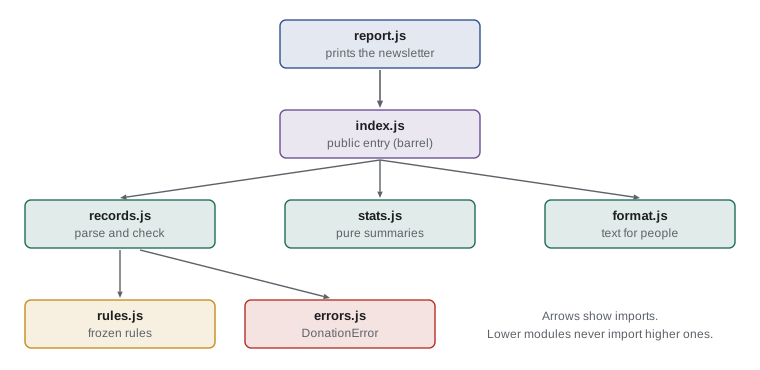
Two design decisions follow from the lessons. First, the calculation modules are pure: they take arrays of records and return new values, with no printing and no reading of input. That makes them easy to test and lets the sign-up page, the newsletter and the board report all use them. Second, all checking happens in one place, records.js, at the boundary where raw text enters the library. Everything after that can trust that a record has a donor, a whole number of boxes and a known category.
Step 2: the rules and the error type
The lowest modules have no imports at all. rules.js holds the fixed facts the rest of the library depends on, frozen so that nothing can change them by accident. errors.js defines a custom error class, as in Lesson 8, which carries the line number and the original text of a note that could not be read.
// rules.js
export const RULES = Object.freeze({
  categories: Object.freeze(['tinned', 'dry', 'fresh', 'hygiene']),
  maxBoxes: 500,
  months: Object.freeze(['jan', 'feb', 'mar', 'apr', 'may', 'jun', 'jul', 'aug', 'sep', 'oct', 'nov', 'dec']),
});// errors.js
export class DonationError extends Error {
constructor(message, { line, text } = {}) {
super(message);
this.name = 'DonationError';
this.line = line;
this.text = text;
}
}Step 3: reading and checking records
records.js is where Dev's messy notes become clean records. It uses the named-group pattern from Lesson 11, extended to allow the category to be missing, and throws a DonationError with a clear message for anything it cannot accept. parseNotes handles a whole block of notes: it splits the text into lines, skips blank ones, and collects the good records and the problems separately, so that one bad line never stops the rest, as Lesson 8 recommended.
// records.js
import { RULES } from './rules.js';
import { DonationError } from './errors.js';

const LINE = /^(?<month>[a-z]{3})\s+(?<day>\d{1,2})\W+(?<donor>.+?),?\s+(?<boxes>\d+)\s*(?:boxes|box|bx)\b\s*(?<category>\w+)?$/i;

export function parseLine(text, line = 0) {
  const m = text.trim().match(LINE);
  if (!m) throw new DonationError('could not read this note', { line, text });
  const { month, day, donor, boxes, category = 'dry' } = m.groups;
  const monthIndex = RULES.months.indexOf(month.toLowerCase());
  const n = Number(boxes);
  const cat = category.toLowerCase();
  if (monthIndex === -1) throw new DonationError(`unknown month ${month}`, { line, text });
  if (n < 1 || n > RULES.maxBoxes) throw new DonationError(`boxes must be 1 to ${RULES.maxBoxes}`, { line, text });
  if (!RULES.categories.includes(cat)) throw new DonationError(`unknown category ${cat}`, { line, text });
  return Object.freeze({ month: monthIndex + 1, day: Number(day), donor: donor.trim(), boxes: n, category: cat });
}

export function parseNotes(block) {
  const records = [];
  const problems = [];
  block.split('\n').forEach((text, i) => {
    if (text.trim() === '') return;
    try {
      records.push(parseLine(text, i + 1));
    } catch (err) {
      if (!(err instanceof DonationError)) throw err;
      problems.push({ line: err.line, reason: err.message });
    }
  });
  return { records, problems };
}
Several details are deliberate. The category has a default of dry, because Dev leaves it off when he is busy and most such donations are dry goods. Every record is frozen, so later code cannot alter the data it was given. The catch block handles only DonationError and rethrows anything else, so a bug in the library is never mistaken for a bad note. And the result is a plain object, { records, problems }, so the caller can decide how to show the problems.
Before going further, Mira tests parseLine on its own. Here is the rules, errors and records part of the library as one runnable file, with each module simulated by a function that returns its exports.
const { RULES } = (() => {
  const RULES = Object.freeze({
    categories: Object.freeze(['tinned', 'dry', 'fresh', 'hygiene']),
    maxBoxes: 500,
    months: Object.freeze(['jan', 'feb', 'mar', 'apr', 'may', 'jun', 'jul', 'aug', 'sep', 'oct', 'nov', 'dec']),
  });
  return { RULES };
})();

const { DonationError } = (() => {
  class DonationError extends Error {
    constructor(message, { line, text } = {}) {
      super(message);
      this.name = 'DonationError';
      this.line = line;
      this.text = text;
    }
  }
  return { DonationError };
})();

const { parseLine } = (() => {
  const LINE = /^(?<month>[a-z]{3})\s+(?<day>\d{1,2})\W+(?<donor>.+?),?\s+(?<boxes>\d+)\s*(?:boxes|box|bx)\b\s*(?<category>\w+)?$/i;
  function parseLine(text, line = 0) {
    const m = text.trim().match(LINE);
    if (!m) throw new DonationError('could not read this note', { line, text });
    const { month, day, donor, boxes, category = 'dry' } = m.groups;
    const monthIndex = RULES.months.indexOf(month.toLowerCase());
    const n = Number(boxes);
    const cat = category.toLowerCase();
    if (monthIndex === -1) throw new DonationError(`unknown month ${month}`, { line, text });
    if (n < 1 || n > RULES.maxBoxes) throw new DonationError(`boxes must be 1 to ${RULES.maxBoxes}`, { line, text });
    if (!RULES.categories.includes(cat)) throw new DonationError(`unknown category ${cat}`, { line, text });
    return Object.freeze({ month: monthIndex + 1, day: Number(day), donor: donor.trim(), boxes: n, category: cat });
  }
  return { parseLine };
})();

console.log(parseLine('Dec 14 Lakeside Grocers 12 boxes tinned'));
console.log(parseLine('dec 15 - St. Mark School, 30 bx'));
for (const bad of ['Dex 3 Harvest Farm 4 boxes fresh', 'Dec 9 Bay Street Church 900 boxes dry', 'Dec 9 coffee']) {
  try {
    parseLine(bad, 7);
  } catch (err) {
    console.log(`${err.name} on line ${err.line}: ${err.message}`);
  }
}{ month: 12, day: 14, donor: "Lakeside Grocers", boxes: 12, category: "tinned" }
{ month: 12, day: 15, donor: "St. Mark School", boxes: 30, category: "dry" }
DonationError on line 7: unknown month Dex
DonationError on line 7: boxes must be 1 to 500
DonationError on line 7: could not read this noteWhat this code does
Each simulated module runs once and hands its exports to the next, just as real modules import from the ones below them. Two good notes become frozen records, the second taking the default category of dry because none was written. The three bad notes each throw a DonationError, and the message shows which rule they broke: an unknown month, too many boxes, or a line that does not fit the pattern at all.
Step 4: the statistics
stats.js turns an array of records into summaries, using the techniques of Lessons 2 to 4. Every function is pure and short. topDonors shows a pattern worth remembering: reduce into an object of totals, turn it into entries, sort the entries with a comparison callback and slice off the first few. It also breaks ties alphabetically, so the order is always the same, which matters for a newsletter and for tests.
// stats.js
export const totalBoxes = (records) => records.reduce((sum, r) => sum + r.boxes, 0);

export function byCategory(records) {
  return records.reduce((totals, { category, boxes }) => {
    totals[category] = (totals[category] ?? 0) + boxes;
    return totals;
  }, {});
}

export function topDonors(records, n = 3) {
  const totals = records.reduce((acc, { donor, boxes }) => ({ ...acc, [donor]: (acc[donor] ?? 0) + boxes }), {});
  return Object.entries(totals)
    .sort(([nameA, a], [nameB, b]) => b - a || nameA.localeCompare(nameB))
    .slice(0, n)
    .map(([donor, boxes]) => ({ donor, boxes }));
}
The comparison callback in topDonors, b - a || nameA.localeCompare(nameB), sorts by boxes from most to fewest; when two donors have the same total, b - a is 0, which is falsy, so the || moves on and compares the names. The reduce in topDonors uses spread and a computed property name to build a new totals object at each step, which keeps the callback pure. For the few hundred records the Food Hub has, that is fast enough; for very large data, changing the accumulator in place, as byCategory does, would be quicker.
Step 5: formatting
format.js is the only part of the library that produces text for people. Keeping it separate means the newsletter, the board report and a future web page can each format the same numbers differently. formatBoxes uses Intl.NumberFormat from Lesson 10 for thousands separators and gets the singular right. formatTable builds a text table from an array of objects, working out each column's width from its longest value.
// format.js
const whole = new Intl.NumberFormat('en-CA', { maximumFractionDigits: 0 });

export const formatBoxes = (n) => `${whole.format(n)} ${n === 1 ? 'box' : 'boxes'}`;

export function formatTable(rows, columns) {
  const widths = columns.map((c) => Math.max(c.length, ...rows.map((r) => String(r[c]).length)));
  const line = (values) => values.map((v, i) => String(v).padEnd(widths[i])).join('  ').trimEnd();
  return [line(columns), line(widths.map((w) => '-'.repeat(w))), ...rows.map((r) => line(columns.map((c) => r[c])))].join('\n');
}
formatTable is a good example of small functions inside a larger one. widths is calculated once, with map and Math.max over spread values. line is a helper arrow function, a closure over widths, that pads each value to its column's width. The table is then the header line, a line of dashes and one line per row, joined with new lines.
Step 6: the entry point and the report
index.js is a barrel: it re-exports the public functions, so users of the library import from one place and never depend on how the files are arranged inside. report.js is the program Dev runs. It reads the notes, calls the library and prints the newsletter section. It contains no parsing rules and no arithmetic of its own, only decisions about what to show.
// index.js
export { RULES } from './rules.js';
export { DonationError } from './errors.js';
export { parseLine, parseNotes } from './records.js';
export { totalBoxes, byCategory, topDonors } from './stats.js';
export { formatBoxes, formatTable } from './format.js';// report.js (run with: node report.js)
import { readFileSync } from 'node:fs';
import { parseNotes, totalBoxes, byCategory, topDonors, formatBoxes, formatTable } from './index.js';
const { records, problems } = parseNotes(readFileSync('december-notes.txt', 'utf8'));
console.log(`December donations: ${records.length} notes, ${formatBoxes(totalBoxes(records))}`);
const rows = Object.entries(byCategory(records)).map(([category, boxes]) => ({ category, boxes }));
console.log(formatTable(rows, ['category', 'boxes']));
console.log('Top donors:', topDonors(records).map((d) => `${d.donor} (${formatBoxes(d.boxes)})`).join(', '));
console.log(`Notes needing a second look: ${problems.length}`);The report uses node:fs to read the notes file, which is why it runs in Node.js rather than in a browser. On a web page, the same library functions would receive text from a form or from a fetch call instead. That is the payoff of the design: only the outermost file knows where the data comes from.
The whole library in one runnable file
Here is the complete library and report as a single file. Each module is simulated by a function that runs once and returns its exports, and the notes file is replaced by a string. The output is exactly what Dev's report would print for these sample notes.
// ---- rules.js
const { RULES } = (() => {
  const RULES = Object.freeze({
    categories: Object.freeze(['tinned', 'dry', 'fresh', 'hygiene']),
    maxBoxes: 500,
    months: Object.freeze(['jan', 'feb', 'mar', 'apr', 'may', 'jun', 'jul', 'aug', 'sep', 'oct', 'nov', 'dec']),
  });
  return { RULES };
})();

// ---- errors.js
const { DonationError } = (() => {
  class DonationError extends Error {
    constructor(message, { line, text } = {}) {
      super(message);
      this.name = 'DonationError';
      this.line = line;
      this.text = text;
    }
  }
  return { DonationError };
})();

// ---- records.js
const { parseNotes } = (() => {
  const LINE = /^(?<month>[a-z]{3})\s+(?<day>\d{1,2})\W+(?<donor>.+?),?\s+(?<boxes>\d+)\s*(?:boxes|box|bx)\b\s*(?<category>\w+)?$/i;
  function parseLine(text, line = 0) {
    const m = text.trim().match(LINE);
    if (!m) throw new DonationError('could not read this note', { line, text });
    const { month, day, donor, boxes, category = 'dry' } = m.groups;
    const monthIndex = RULES.months.indexOf(month.toLowerCase());
    const n = Number(boxes);
    const cat = category.toLowerCase();
    if (monthIndex === -1) throw new DonationError(`unknown month ${month}`, { line, text });
    if (n < 1 || n > RULES.maxBoxes) throw new DonationError(`boxes must be 1 to ${RULES.maxBoxes}`, { line, text });
    if (!RULES.categories.includes(cat)) throw new DonationError(`unknown category ${cat}`, { line, text });
    return Object.freeze({ month: monthIndex + 1, day: Number(day), donor: donor.trim(), boxes: n, category: cat });
  }
  function parseNotes(block) {
    const records = [];
    const problems = [];
    block.split('\n').forEach((text, i) => {
      if (text.trim() === '') return;
      try {
        records.push(parseLine(text, i + 1));
      } catch (err) {
        if (!(err instanceof DonationError)) throw err;
        problems.push({ line: err.line, reason: err.message });
      }
    });
    return { records, problems };
  }
  return { parseLine, parseNotes };
})();

// ---- stats.js
const { totalBoxes, byCategory, topDonors } = (() => {
  const totalBoxes = (records) => records.reduce((sum, r) => sum + r.boxes, 0);
  function byCategory(records) {
    return records.reduce((totals, { category, boxes }) => {
      totals[category] = (totals[category] ?? 0) + boxes;
      return totals;
    }, {});
  }
  function topDonors(records, n = 3) {
    const totals = records.reduce((acc, { donor, boxes }) => ({ ...acc, [donor]: (acc[donor] ?? 0) + boxes }), {});
    return Object.entries(totals)
      .sort(([nameA, a], [nameB, b]) => b - a || nameA.localeCompare(nameB))
      .slice(0, n)
      .map(([donor, boxes]) => ({ donor, boxes }));
  }
  return { totalBoxes, byCategory, topDonors };
})();

// ---- format.js
const { formatBoxes, formatTable } = (() => {
  const whole = new Intl.NumberFormat('en-CA', { maximumFractionDigits: 0 });
  const formatBoxes = (n) => `${whole.format(n)} ${n === 1 ? 'box' : 'boxes'}`;
  function formatTable(rows, columns) {
    const widths = columns.map((c) => Math.max(c.length, ...rows.map((r) => String(r[c]).length)));
    const line = (values) => values.map((v, i) => String(v).padEnd(widths[i])).join('  ').trimEnd();
    return [line(columns), line(widths.map((w) => '-'.repeat(w))), ...rows.map((r) => line(columns.map((c) => r[c])))].join('\n');
  }
  return { formatBoxes, formatTable };
})();

// ---- report.js
const notes = `Dec 1 Lakeside Grocers 12 boxes tinned
dec 2 - St. Mark School, 30 bx dry
Dec 3 Northside Bakery 7 BOXES fresh
Dec 5 Riverside Rotary 18 boxes tinned

Dec 8 Lakeside Grocers 25 boxes dry
Dec 9 Harvest Farm 1 box fresh
Dec 10 Bay Street Church 900 boxes dry
Dec 11 Riverside Rotary 19 boxes hygiene
Dec 12 coffee for the volunteers`;

const { records, problems } = parseNotes(notes);
console.log(`December donations: ${records.length} notes, ${formatBoxes(totalBoxes(records))}`);
const rows = Object.entries(byCategory(records)).map(([category, boxes]) => ({ category, boxes }));
console.log(formatTable(rows, ['category', 'boxes']));
console.log('Top donors:', topDonors(records).map((d) => `${d.donor} (${formatBoxes(d.boxes)})`).join(', '));
console.log(`Notes needing a second look: ${problems.length}`);
for (const p of problems) console.log(` line ${p.line}: ${p.reason}`);December donations: 7 notes, 112 boxes category boxes -------- ----- tinned 30 dry 55 fresh 8 hygiene 19 Top donors: Lakeside Grocers (37 boxes), Riverside Rotary (37 boxes), St. Mark School (30 boxes) Notes needing a second look: 2 line 8: boxes must be 1 to 500 line 10: could not read this note
What this code does
The five simulated modules run in order, each passing its exports to the ones that use them, and the report at the end uses only the public functions. Seven of the nine notes become records totaling 112 boxes, summarized in a table by category and ranked by donor, where Lakeside Grocers and Riverside Rotary lead with 37 boxes each and the tie is broken alphabetically. The two notes that could not be accepted are listed with their line numbers so that Dev can fix them.
Step 7: testing the library
A library that several pages depend on needs tests, so that a change made for one page does not quietly break another. A unit test calls one function with known input and checks its output. JavaScript Testing and Tooling covers proper testing tools; for the capstone, Gareth shows Mira that a test can be a few lines of plain JavaScript, using a tiny helper that compares an actual value with an expected one by turning both into JSON.
let passed = 0;
let failed = 0;
function check(name, actual, expected) {
  const ok = JSON.stringify(actual) === JSON.stringify(expected);
  if (ok) passed += 1;
  else {
    failed += 1;
    console.log(`FAIL ${name}: expected ${JSON.stringify(expected)}, got ${JSON.stringify(actual)}`);
  }
}

const totalBoxes = (records) => records.reduce((sum, r) => sum + r.boxes, 0);
const byCategory = (records) =>
  records.reduce((t, { category, boxes }) => ({ ...t, [category]: (t[category] ?? 0) + boxes }), {});

const sample = [
  { donor: 'A', boxes: 5, category: 'dry' },
  { donor: 'B', boxes: 3, category: 'fresh' },
  { donor: 'A', boxes: 2, category: 'dry' },
];

check('total of sample', totalBoxes(sample), 10);
check('total of nothing', totalBoxes([]), 0);
check('by category', byCategory(sample), { dry: 7, fresh: 3 });
check('deliberately wrong', totalBoxes(sample), 11);
console.log(`${passed} passed, ${failed} failed`);FAIL deliberately wrong: expected 11, got 10 3 passed, 1 failed
What this code does
check compares an actual result with the expected one by turning both into JSON text, counts a pass or a failure, and prints details only for failures. Three tests cover the normal case, the empty case and the category totals, and all of them pass. The fourth test is deliberately wrong, to show what a failure report looks like.
Good tests cover the ordinary case, the edges, such as an empty list or a single item, and the failures, such as a note with too many boxes. Writing them while the library is small is far easier than adding them later. JSON comparison is fine here because the records are plain data; it would not be suitable for values JSON cannot represent, such as Dates or Maps, which is one reason real projects use a testing library.
Worked problem
Adding a feature without breaking anything
Paul asks for the report to include the average size of a donation, to one decimal place. Where should the change go, and what tests should be added?
Show solution
- The average is a calculation on records, so it belongs in stats.js, as a new pure function such as averageBoxes(records).
- It must handle an empty list without dividing by zero: return 0 when there are no records.
- It should return a number, not text. Formatting to one decimal place belongs in report.js or format.js, using toFixed(1) or an Intl.NumberFormat.
- Export it from stats.js and re-export it from index.js, so that report.js can import it from the entry point.
- Tests: an ordinary list, such as boxes 5, 3 and 2 giving about 3.33; an empty list giving 0; and a single record giving its own number of boxes. Run the existing tests too, to check nothing else changed.
Answer: A new pure function in stats.js, exported through index.js and formatted in the report, with tests for an ordinary list, an empty list and a single record.
What the capstone shows
Looking back over the library, every lesson of the course has a place. Closures from Lesson 1 make each simulated module private and let formatTable's line helper remember its column widths. Higher-order functions and the array methods of Lessons 2 and 3 do all the calculation. Destructuring, spread and rest from Lesson 4 unpack match groups and build totals. Frozen objects from Lesson 5 protect the rules, and a class from Lesson 6 defines the library's error type. Lesson 7's modules give it structure, Lesson 8's error handling keeps one bad note from spoiling the rest, Lesson 9's JSON drives the tests, Lesson 10's Intl formatting shapes the numbers and Lesson 11's regular expression reads the notes.
Just as important are the habits the capstone practices. Plan the modules before writing them. Keep calculation pure and separate from input and output. Check data once, at the boundary. Throw specific errors with clear messages and catch only the ones you understand. Name things clearly, and test small pieces as you go. These habits matter more than any single feature of the language, and they carry over to every course that follows.
From here, the program continues with The DOM and Browser Events, where the same library will power a live sign-up page, and Asynchronous JavaScript and APIs, where its records will come from Theo's server through fetch. JavaScript Testing and Tooling turns the small check helper into a full test suite, and TypeScript adds type checking that would catch many of the mistakes this course has warned about before the code even runs.
Try it yourself
Top donors
Write topDonors(records, n), which returns the n donors who gave the most boxes in total, as an array of strings in the form Lakeside Grocers: 37. Sort from most to fewest boxes, and sort donors with the same total alphabetically.
Use reduce to total the boxes by donor, Object.entries to get pairs, sort with a comparison callback and slice. The starter prints the top three.
const records = [
  { donor: 'Lakeside Grocers', boxes: 12 },
  { donor: 'St. Mark School', boxes: 30 },
  { donor: 'Northside Bakery', boxes: 7 },
  { donor: 'Riverside Rotary', boxes: 18 },
  { donor: 'Lakeside Grocers', boxes: 25 },
  { donor: 'Riverside Rotary', boxes: 19 },
];

function topDonors(records, n) {
  // total by donor, sort, keep n, format
  return [];
}

console.log(topDonors(records, 3));
Try it yourself
Add a stats function with tests
Add a pure function averageBoxes(records) that returns the average number of boxes per record, rounded to one decimal place as a number (use Math.round(x * 10) / 10), or 0 for an empty list.
The starter already has the check helper and three tests. When your function is right, the program prints 3 passed, 0 failed.
let passed = 0;
let failed = 0;
function check(name, actual, expected) {
  if (actual === expected) passed += 1;
  else {
    failed += 1;
    console.log(`FAIL ${name}: expected ${expected}, got ${actual}`);
  }
}

function averageBoxes(records) {
  return 0; // replace with the real calculation
}

check('ordinary list', averageBoxes([{ boxes: 5 }, { boxes: 3 }, { boxes: 2 }]), 3.3);
check('empty list', averageBoxes([]), 0);
check('one record', averageBoxes([{ boxes: 12 }]), 12);
console.log(`${passed} passed, ${failed} failed`);
Common mistakes
MistakeEvery module should print its own results.
InsteadKeep calculation modules pure; only the outermost program, such as report.js, should print or read input.
MistakeChecks should be repeated in every function that uses a record.
InsteadCheck data once, where it enters the library, so that the rest of the code can trust it.
MistakeA catch block in parseNotes should catch every error and record it as a problem.
InsteadCatch only DonationError; rethrow anything else so that bugs in the library are not hidden.
MistakeSorting donors by total alone gives a stable newsletter order.
InsteadTies can come out in either order. Add a second comparison, such as the name, to make the order fixed.
MistakeTests can wait until the library is finished.
InsteadTests are easiest to write while each function is small and fresh; write them as you go.
Summary and key terms
- The capstone builds riverside-data, a library of ES modules that reads raw donation notes, checks them, summarizes them and formats the results.
- Planning first divides the work into modules with one responsibility each: rules, errors, records, statistics, formatting, a barrel entry point and the report.
- A custom DonationError carries the line and text of a bad note. records.js checks data once, at the boundary, with a named-group regular expression, and collects problems without stopping. stats.js holds pure functions built from reduce, Object.entries, sort and slice, with ties broken by name. format.js alone turns values into text, using Intl and padding.
- The report contains no rules or arithmetic of its own.
- A small check helper gives unit tests for ordinary, edge and failure cases.
- Pure functions, single-purpose modules, boundary checks, specific errors and early tests are the habits that make a program easy to change.
- library
- A collection of reusable code, organized for other programs to import.
- responsibility
- The single job a module or function is designed to do.
- boundary
- The point where data enters a program from outside and should be checked.
- pure module
- A module whose functions compute results without printing, reading input or changing shared data.
- barrel
- An entry module that re-exports the public parts of a library.
- tie-breaker
- A second comparison used in sorting when the first comparison finds two items equal.
- unit test
- A small test that calls one function with known input and checks its output.
- edge case
- An unusual input at the limit of what a function handles, such as an empty list.
- refactoring
- Changing the structure of code without changing what it does.
- regression
- A bug introduced into something that used to work, which tests are designed to catch.
Practice problems
Work each problem on paper first, then reveal the answer to check.
Why is formatting kept out of stats.js?
Show answer
So that the same numbers can be shown differently by the newsletter, the board report and web pages.
Why does parseNotes rethrow errors that are not DonationError?
Show answer
They indicate bugs in the library rather than bad notes, and should not be hidden.
What does b - a || nameA.localeCompare(nameB) do in a sort callback?
Show answer
Sorts by number from largest to smallest and, when the numbers are equal, alphabetically by name.
Name three kinds of case a set of unit tests should cover.
Show answer
Ordinary input, edge cases such as an empty list, and invalid input that should fail.
Which file in the library is the only one that knows the notes come from a file?
Show answer
report.js, the outermost program.
Lesson quiz · 5 questions
Score 60% or more to complete this lesson.
Create a free account to save your progress, take quizzes and earn a certificate.