
JS-102 · Lesson 1 of 12 · 31 min
Scope and closures
▶ Video coming soon A video version of this lesson is on the way.
On Friday, November 13, 2026, Mira Castellanos tried out the tip and order calculator she had built for the lunch counter at the Riverside Community Food Hub, and it worked. Over the weekend she sent the code to Gareth Lindqvist, the senior developer at Brightwater Web Studio in Madison, Wisconsin, who had taught her the first course in JavaScript on Tuesday and Thursday afternoons since late October. His reply came back on Sunday evening with a single line of praise and a much longer list of plans.
The list came from the Food Hub. Lucy Tran, the volunteer coordinator, wants the shift sign-up code to handle several programs at once without their counts getting mixed up. Dev Bhatt, who writes the Food Hub's newsletter, wants a tidy summary of pantry donations each month. Paul Desrosiers, the executive director, wants one place in the code where the rules for donations, shifts and the lunch counter live, so that the next developer does not have to hunt through five pages to change a number. And in December the Food Hub runs its holiday hamper drive, when donations and volunteer sign-ups both triple.
"You can write functions now," Gareth wrote. "The next step is learning how to organize them, so that a program stays understandable when it grows from a hundred lines to a few thousand." His plan is a second block of Tuesday and Thursday sessions, starting on Tuesday, November 17, 2026, and running into December. It ends with a capstone: a small, modular data library that the Food Hub's pages can share. This course follows that plan, lesson by lesson. It assumes you have finished JavaScript Programming I, or know variables, conditions, loops, functions, arrays and objects at the same level.
The first session is about two ideas that sit underneath everything else in the course: scope, which decides where in a program a variable can be seen, and closures, which let a function keep hold of variables from the place where it was created. They sound abstract. In practice they are the reason Lucy's counts can stay separate, and the reason JavaScript can have private data at all.
What scope means
Every variable in a program has a scope: the region of the code where its name means something. Outside that region, the name is unknown, or it refers to a different variable. Scope is what lets two functions each have a variable called total without interfering with each other, and it is what stops a helper variable inside a loop from leaking out and being changed by mistake somewhere else.
JavaScript has three main levels of scope. Global scope is the outermost level: a variable declared at the top of a script, outside every function and block, can be used anywhere in that script. Function scope is the inside of a function: a variable declared there exists only while the function runs and can only be used inside it. Block scope is the inside of any pair of curly braces, such as the body of an if statement or a loop. Variables declared with let and const belong to the nearest enclosing block.
const program = 'Pantry';          // global scope

function describeShift(hours) {
  const label = `${program} shift`; // function scope
  if (hours > 4) {
    const note = 'long shift';      // block scope
    console.log(label, '-', note);
  }
  console.log(label, '-', hours, 'hours');
}

describeShift(6);
describeShift(3);
console.log(typeof label, typeof note);Pantry shift - long shift Pantry shift - 6 hours Pantry shift - 3 hours undefined undefined
What this code does
The function can read program because a global variable is visible everywhere in the script. The variable note exists only inside the if block, so it is printed only for the six-hour shift. Outside the function, neither label nor note exists, which is why typeof reports undefined for both.
The last line uses typeof because it is one of the few ways to mention a name that does not exist without causing an error. Writing console.log(label) outside the function would stop the program with a ReferenceError, which says that label is not defined. That error is scope doing its job: the name is private to the function.
Lexical scope and the scope chain
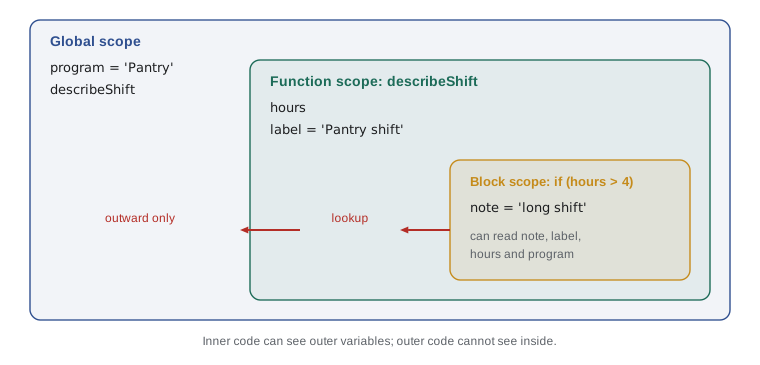
JavaScript uses lexical scope, also called static scope. The word lexical refers to the text of the program: a function's scope is decided by where the function is written, not by where it is called from. If you can see, in the source code, that one function sits inside another, then the inner function can use the outer function's variables. You can work out which variables a piece of code can reach just by reading it, without running it.
When the engine meets a name, it looks for it in the current scope first. If the name is not declared there, it looks in the scope that encloses the current one, and then in the scope that encloses that, all the way out to the global scope. This sequence of nested scopes is the scope chain. The search always goes outward, never inward: an outer function cannot see the variables of a function written inside it.
const hub = 'Riverside Community Food Hub';

function outer() {
  const program = 'Holiday hampers';
  function inner() {
    const task = 'Pack boxes';
    console.log(`${task} for ${program} at ${hub}`);
  }
  inner();
}

outer();Pack boxes for Holiday hampers at Riverside Community Food Hub
What this code does
The function inner uses three names but declares only task. When the engine looks for program it does not find it in inner, so it moves out to outer, where program is declared. For hub it has to go one more step, to the global scope, and the finished sentence uses all three values.
Gareth drew the chain as a set of nested boxes on the whiteboard and gave Mira a rule of thumb: "Inner code can look out of the window, but nobody outside can look in." That rule is the whole of lexical scope.
Shadowing
Two variables in different scopes can have the same name. When an inner scope declares a variable with the same name as one in an outer scope, the inner one shadows the outer one: inside the inner scope the name refers to the inner variable, and the outer variable is hidden until the inner scope ends. The outer variable is not changed; it is simply out of sight.
let count = 40;  // volunteers on the whole list

function countKitchenVolunteers() {
  let count = 6; // a different variable with the same name
  count = count + 1;
  return count;
}

console.log('Kitchen:', countKitchenVolunteers());
console.log('Whole list:', count);Kitchen: 7 Whole list: 40
What this code does
Inside the function, the new count declared with let shadows the global count, so adding 1 changes only the inner variable. The function returns 7. The global count is untouched and is still 40 when the last line prints it.
Shadowing is legal and sometimes convenient, but it is a common source of confusion, because a reader has to check which count is meant on each line. Most teams use a linting tool that warns about it. A better habit is to give variables names that describe exactly what they hold, such as kitchenCount and listCount, so that shadowing never happens by accident.
Hoisting and the temporal dead zone
Before the engine runs any code in a scope, it scans the scope for declarations and sets up their names. This setting-up step is called hoisting, because the declarations behave as if they had been lifted to the top of their scope. Hoisting works differently for each kind of declaration, and the differences explain several behaviors that surprise newcomers.
A function declaration is hoisted completely, name and body together. That is why you can call a function declared with the function keyword on a line above its declaration. A variable declared with var is hoisted too, but only its name: until the line with the declaration runs, its value is undefined. Variables declared with let and const are hoisted as names, but they cannot be used at all until their declaration has run. The stretch of code between the start of the scope and the declaration is called the temporal dead zone, and using the name there throws a ReferenceError.
console.log(formatHours(7.5));   // works: the declaration is hoisted
console.log(oldStyle);           // undefined, not an error

function formatHours(h) {
  return `${h} hours`;
}
var oldStyle = 'declared with var';
console.log(oldStyle);7.5 hours undefined declared with var
What this code does
The first line calls formatHours before it appears in the file, and it works because function declarations are hoisted with their bodies. The var variable exists from the start of the script but holds undefined until its line runs. After the assignment, the last line prints its real value.
The same trick with let or const fails. If the program read console.log(total) and only then let total = 0, the engine would stop on the first line with ReferenceError: Cannot access 'total' before initialization. That error is helpful. With var, the same mistake silently produces undefined, and the bug shows up later, far from its cause. This is one of the main reasons modern JavaScript uses let and const.
| Feature | var | let | const |
|---|---|---|---|
| Scope | Function (or global) | Block | Block |
| Hoisted | Yes, as undefined | Yes, but in the temporal dead zone | Yes, but in the temporal dead zone |
| Use before declaration | Gives undefined | ReferenceError | ReferenceError |
| Reassign | Allowed | Allowed | Not allowed |
| Declare the same name twice in one scope | Allowed | SyntaxError | SyntaxError |
| Global declaration becomes a property of the global object | Yes, in scripts | No | No |
Why var leaks out of blocks
Because var has function scope rather than block scope, a var declared inside a loop or an if block belongs to the whole surrounding function. That rarely matters in straight-line code, but it matters a great deal when a loop creates functions that run later. The classic demonstration uses setTimeout, which runs a function after a delay. Each loop below schedules three messages; only the keyword in the loop header differs.
for (var i = 1; i <= 3; i++) {
  setTimeout(() => console.log('var shift', i), 0);
}
for (let j = 1; j <= 3; j++) {
  setTimeout(() => console.log('let shift', j), 0);
}var shift 4 var shift 4 var shift 4 let shift 1 let shift 2 let shift 3
What this code does
The scheduled functions run only after both loops have finished. With var there is a single i shared by every pass, and by then it has been counted up to 4, so all three messages show 4. With let, each pass of the loop gets its own fresh j, so the messages show 1, 2 and 3.
This behavior caught out web developers for years, typically when they attached a click handler to each button in a list and found that every button reported the last item. The fix used to be awkward. Since ES2015 it is one word: use let. For the rest of this course, var appears only when you need to recognize it in older code.
Closures
Now for the idea that makes scope powerful. A function in JavaScript is a value: it can be stored in a variable, passed to another function or returned from one. When a function is created inside another function, it keeps a link to the variables of the scope it was created in, and that link survives even after the outer function has returned. A function together with the variables it keeps alive in this way is called a closure.
function makeCounter() {
  let count = 0;
  return function () {
    count += 1;
    return count;
  };
}

const countPantry = makeCounter();
const countKitchen = makeCounter();
console.log(countPantry(), countPantry(), countPantry());
console.log(countKitchen());
console.log(countPantry());1 2 3 1 4
What this code does
Each call to makeCounter creates a new count variable and returns a small function that adds 1 to it. The variable should disappear when makeCounter returns, but the returned function still refers to it, so it stays alive. The pantry and kitchen counters each have their own count, which is why the kitchen counter starts at 1 while the pantry counter carries on to 4.
Read that example slowly, because it is the heart of the lesson. When makeCounter returns, its local variable count would normally be thrown away. It is not, because the returned function still refers to it. Every time you call countPantry, it reaches back into that saved scope and updates the same count. Calling makeCounter a second time creates a completely separate scope with its own count, so the two counters never interfere.
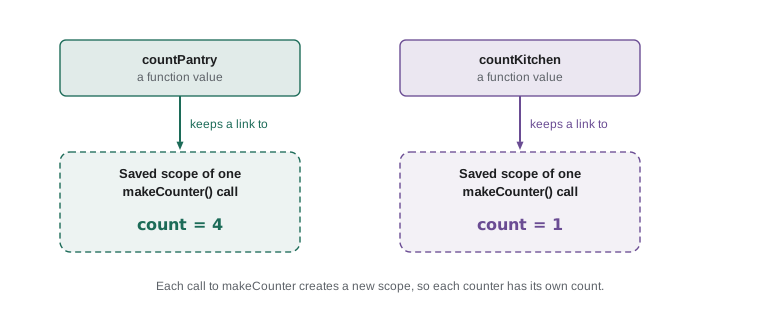
Gareth's favorite way to picture a closure is a backpack. When a function is created, it packs up a reference to every variable it might need from the surrounding scopes and carries the pack wherever it goes. If you return the function, store it or pass it to setTimeout, the backpack goes with it. Note that it carries live references, not copies: if the variable changes, the function sees the new value.
Private state with closures
Closures give JavaScript a simple way to keep data private. A variable that lives only in the scope of a function cannot be read or changed by any code outside that function. If the function returns a few other functions that use the variable, those functions become the only way in. Programmers call this encapsulation: hiding the details and offering a small, controlled set of operations instead.
Lucy's problem is a good fit. Each program needs its own sign-up sheet with a capacity and a list of names, and nobody should be able to push a name onto the list without the capacity check. A function that builds a sheet can keep the list in a closure and hand back an object of functions that work on it.
function createSignupSheet(program, capacity) {
  const names = [];
  return {
    book(name) {
      if (names.length >= capacity) return `${program} is full`;
      names.push(name);
      return `${name} booked for ${program}`;
    },
    openPlaces() {
      return capacity - names.length;
    },
  };
}

const hampers = createSignupSheet('Hamper packing', 2);
console.log(hampers.book('Amara'));
console.log(hampers.book('Jonah'));
console.log(hampers.book('Priya'));
console.log('Open places:', hampers.openPlaces());
console.log(hampers.names);Amara booked for Hamper packing Jonah booked for Hamper packing Hamper packing is full Open places: 0 undefined
What this code does
The array names and the number capacity live only inside createSignupSheet, but the two returned functions keep them alive through a closure. The third booking is refused because the sheet already holds two names. The last line shows that the list itself cannot be reached from outside: the returned object has no property called names, so it prints undefined.
Outside code can only book and ask for the number of open places. It cannot empty the list, change the capacity or add a name without the check, because there is no way to name those variables from outside. Lesson 6 shows a newer way to get the same protection with private class fields, but the closure version still appears all over real code, and it is worth understanding first.
Function factories
A function that builds and returns other functions is called a function factory. makeCounter and createSignupSheet are both factories. Factories are useful whenever you need several functions that do the same job with different settings: each returned function remembers its own settings through its closure.
function makeLabeller(prefix, width) {
  return (text) => `${prefix}: ${text}`.padEnd(width, '.') + '|';
}

const pantryLabel = makeLabeller('PANTRY', 24);
const kitchenLabel = makeLabeller('KITCHEN', 24);
console.log(pantryLabel('canned beans'));
console.log(pantryLabel('rice'));
console.log(kitchenLabel('soup pots'));PANTRY: canned beans....| PANTRY: rice............| KITCHEN: soup pots......|
What this code does
makeLabeller returns an arrow function that remembers the prefix and the width it was given. pantryLabel and kitchenLabel are two different functions built from the same factory with different settings. Each one pads its label with dots to 24 characters and ends it with a bar, so the labels line up.
The settings are captured once, when the factory is called, and then reused for every label. If you later decide that pantry labels should be wider, you change one call to makeLabeller rather than every place a label is printed. Factories like this appear again in Lesson 2, where functions are passed around as arguments, and in Lesson 3, where small functions are built to feed map and filter.
Worked problem
Tracing a closure by hand
What does this program print? function makeTally(start) { let total = start; return (n) => { total += n; return total; }; } const boxes = makeTally(10); boxes(5); console.log(boxes(2)); const tins = makeTally(0); console.log(tins(3), boxes(1));
Show solution
- Calling makeTally(10) creates a scope in which total is 10 and returns an arrow function. Call it boxes.
- boxes(5) adds 5 to that total, which becomes 15. The result is not printed.
- boxes(2) adds 2, making 17, and the first console.log prints 17.
- makeTally(0) creates a new, separate scope with total equal to 0. tins(3) makes that total 3.
- boxes(1) goes back to the first scope, where total is 17, and makes it 18.
Answer: The program prints 17 and then 3 18. Each call to makeTally makes a new total, and each returned function keeps updating its own.
Closures you have already used
You have been writing closures since JavaScript Programming I without calling them that. Any time a callback passed to map, filter, forEach or setTimeout uses a variable from the surrounding code, the callback is a closure over that variable. In the code below, the arrow function given to filter uses minHours, which is declared outside it.
const shifts = [
  { name: 'Amara', hours: 6 },
  { name: 'Dev', hours: 2 },
  { name: 'Lucy', hours: 4 },
];

function longShifts(list, minHours) {
  return list.filter((s) => s.hours >= minHours).map((s) => s.name);
}

console.log(longShifts(shifts, 4));
console.log(longShifts(shifts, 3));[ "Amara", "Lucy" ] [ "Amara", "Lucy" ]
What this code does
The arrow function passed to filter is created inside longShifts, so it can read the parameter minHours from the surrounding scope. With a minimum of 4 hours only Amara and Lucy qualify. Calling longShifts again with 3 creates a new scope and a new callback that remembers the new minimum, and the result is the same two names because Dev's two hours are still too few.
Closures also explain an older pattern you may meet in existing code: the immediately invoked function expression, or IIFE, written as a function wrapped in parentheses and called straight away. Before JavaScript had modules and block scope, developers used an IIFE to give a chunk of code its own private scope so that its variables did not pollute the global scope. Lesson 7 shows how modules replaced that pattern.
// An IIFE: the older way to get a private scope
const counter = (function () {
  let visits = 0;
  return { add() { visits += 1; return visits; } };
})();
counter.add();
Closures and memory
A closure keeps its variables alive as long as the function itself can still be reached. Usually that is exactly what you want. Occasionally it means a large value, such as a big array of records, stays in memory longer than expected because a small function that refers to it is still stored somewhere. The fix is to keep closures small and to capture only the values a function actually needs, not whole data sets. In ordinary programs of the size you will write in this course, you do not need to worry about it, but it is worth knowing why a long-running page can slowly use more memory.
Closures also capture variables, not values frozen at one moment. If a closure refers to a variable declared with let and the variable changes later, the closure sees the change. That is usually helpful, as with the counters, but it is also why the var loop printed 4 three times: all three callbacks closed over the same variable.
Try it yourself
A donation tally
Write a function factory makeTally(category) that returns a function. Each time the returned function is called with a number of boxes, it adds them to a running total for that category and returns a message such as Tinned food: 12 boxes.
Create one tally for Tinned food and one for Dry goods, then make the calls in the starter so that the output matches the expected lines exactly. Each tally must keep its own total.
function makeTally(category) {
  // keep a running total here
  return function (boxes) {
    // add boxes to the total and return the message
  };
}

const tinned = makeTally('Tinned food');
const dry = makeTally('Dry goods');
console.log(tinned(5));
console.log(dry(8));
console.log(tinned(7));
Try it yourself
A private sign-up sheet
Complete createSheet(capacity). It should keep an array of names private and return an object with two methods. add(name) adds the name and returns true if there is room and the name is not already on the sheet; otherwise it returns false. list() returns the names joined with a comma and a space.
The starter makes five calls. With a capacity of 3, the duplicate Dev and the fourth person should both be refused.
function createSheet(capacity) {
  const names = [];
  return {
    add(name) {
      // refuse duplicates and refuse when full
    },
    list() {
      return names.join(', ');
    },
  };
}

const sheet = createSheet(3);
console.log(sheet.add('Amara'), sheet.add('Dev'), sheet.add('Dev'));
console.log(sheet.add('Lucy'), sheet.add('Jonah'));
console.log(sheet.list());
Common mistakes
MistakeAn outer function can read the variables of a function written inside it.
InsteadScope lookup only goes outward. Inner code sees outer variables, never the reverse.
MistakeA variable declared with var inside a loop belongs to the loop.
Insteadvar has function scope, so it is shared across the whole function. Use let for loop variables.
MistakeA closure takes a copy of each variable when it is created.
InsteadA closure keeps a live link to the variable itself, so it sees later changes.
MistakeCalling a factory twice gives two functions that share one set of variables.
InsteadEach call creates a new scope, so each returned function has its own variables.
MistakeUsing a let variable before its declaration gives undefined.
InsteadIt throws a ReferenceError because the name is in the temporal dead zone until its declaration runs.
Summary and key terms
- Scope is the region of code in which a variable's name can be used.
- JavaScript has global, function and block scope; let and const are block-scoped, while var is function-scoped.
- Scope is lexical: it is decided by where code is written, and lookup moves outward along the scope chain.
- An inner variable with the same name as an outer one shadows it.
- Declarations are hoisted: function declarations completely, var as undefined, and let and const into a temporal dead zone that throws a ReferenceError.
- A closure is a function together with the variables from its surrounding scope that it keeps alive.
- Closures make counters, private state and function factories possible, and every callback that uses an outside variable is a closure.
- scope
- The region of a program in which a variable name can be used.
- global scope
- The outermost scope; variables declared there are visible throughout the script.
- block scope
- The scope of a pair of curly braces; let and const belong to it.
- lexical scope
- Scope decided by where code is written in the source, not by where it is called.
- scope chain
- The sequence of enclosing scopes searched, from inner to outer, when a name is looked up.
- shadowing
- Declaring an inner variable with the same name as an outer one, hiding the outer one.
- hoisting
- The setting up of declared names at the start of their scope, before the code runs.
- temporal dead zone
- The part of a scope before a let or const declaration, where using the name throws an error.
- closure
- A function together with the variables from its surrounding scope that it keeps alive.
- function factory
- A function that creates and returns other functions configured by its arguments.
- encapsulation
- Hiding data inside a unit of code and allowing access only through chosen operations.
Practice problems
Work each problem on paper first, then reveal the answer to check.
Where can a const declared inside an if block be used?
Show answer
Only inside that block, between its curly braces.
Why does a var loop variable give the same value to every delayed callback?
Show answer
There is only one var variable for the whole function, and the callbacks run after the loop has finished changing it.
What does a function declaration's hoisting allow you to do?
Show answer
Call the function on a line above the place where it is declared.
Two counters are made by calling makeCounter twice. Why do they not interfere?
Show answer
Each call creates a fresh scope with its own count variable, and each counter closes over its own.
How can a closure keep data private?
Show answer
The data lives only in the factory's scope, so outside code can reach it only through the functions the factory returns.
Lesson quiz · 5 questions
Score 60% or more to complete this lesson.
Create a free account to save your progress, take quizzes and earn a certificate.