
JS-102 · Lesson 11 of 12 · 30 min
Regular expressions
▶ Video coming soon A video version of this lesson is on the way.
Dev Bhatt keeps a running log of donations in a shared notes file, typed quickly on his phone as boxes come in: lines like "Dec 14 Lakeside Grocers 12 boxes tinned" and "dec 15 - St. Mark School, 30 bx dry". Before the newsletter, he wants those notes turned into tidy records. Lucy has a related problem with the sign-up form: people type phone numbers and ZIP codes in every format imaginable. String methods such as includes, split and slice can do some of this, but each new format needs more code.
For the session planned for Tuesday, December 22, the last regular lesson before the capstone, Gareth introduces regular expressions: a small language for describing patterns in text. "A regular expression is a description of what you are looking for, rather than the exact text," he says. "Some digits, then a space, then a word. Once you can write that, finding it, checking it and pulling it apart are each one line." He also gives a warning: regular expressions are powerful and compact, which makes them easy to write and hard to read, so the lesson ends with advice on keeping them under control.
What a regular expression is
A regular expression, often shortened to regex, is a pattern that describes a set of strings. In JavaScript, a regex is a value of type RegExp, usually written as a regex literal between two forward slashes, such as /boxes/. Letters and digits in a pattern match themselves. Other characters, such as the dot, brackets and backslash, have special meanings. After the closing slash come optional flags, single letters that change how the pattern works, such as i for ignoring case.
The simplest use is the test method, which answers whether a string contains a match anywhere. The string methods search, match, matchAll, replace, replaceAll and split all accept regular expressions too, and most of this lesson uses them.
const notes = [
  'Dec 14 Lakeside Grocers 12 boxes tinned',
  'dec 15 - St. Mark School, 30 bx dry',
  'Dec 15 Northside Bakery 7 BOXES fresh',
];

for (const line of notes) {
  console.log(/boxes/.test(line), /boxes/i.test(line));
}true true false false false true
What this code does
The pattern /boxes/ matches the exact letters boxes, so it finds them in the first line but not in the second, which says bx, or the third, which is in capitals. Adding the i flag makes the match ignore case, so the third line now matches as well. The second line still fails because bx is a different word.
You can also build a regex from a string with new RegExp('boxes', 'i'). That is useful when the pattern comes from a variable, such as a word typed into a search box. Literal patterns are clearer and are checked for mistakes when the code is loaded, so use them whenever the pattern is fixed.
Character classes
A character class matches any one character from a set. Square brackets list the set: [aeiou] matches one vowel, and a hyphen gives a range, as in [a-z] for a lower-case letter or [0-9] for a digit. A caret straight after the opening bracket negates the class: [^0-9] matches any character that is not a digit. Several classes are so common that they have shorthands.
| Pattern | Matches | Example match |
|---|---|---|
| \d | One digit, 0 to 9 | 7 in 7 boxes |
| \w | One word character: a letter, digit or underscore | L in Lakeside |
| \s | One whitespace character: space, tab or new line | The space in Dec 14 |
| \D, \W, \S | Anything except a digit, word character or whitespace | A comma, for \W |
| . | Any one character except a new line | Any letter, digit or symbol |
| [abc] | One of the listed characters | b in box |
| [^abc] | One character not listed | x in box |
| [A-Z] | One character in the range | D in Dec |
To match a character that normally has a special meaning, such as a dot or a bracket, put a backslash before it: \. matches a real full stop and \( a real opening parenthesis. This is called escaping. ES2025 added RegExp.escape(text), which escapes every special character in a string, so that text typed by a user can be searched for safely in a pattern built with new RegExp. It is new, so check support before relying on it.
Quantifiers
A quantifier after a character or class says how many times it may repeat. + means one or more, ***** means zero or more and ? means zero or one, which makes something optional. Curly braces give exact counts: {3} means exactly three, {2,4} means two to four and {2,} means two or more. Quantifiers are what let one pattern match 7 and 30 and 125 with \d+.
const line = 'Dec 14 Lakeside Grocers 12 boxes tinned, 3 bags';

console.log(line.match(/\d+/));
console.log(line.match(/\d+/g));
console.log(line.match(/\d+ (boxes|bags)/g));
console.log('1 bag, 2 bags'.match(/bags?/g));
console.log(/^\d{5}$/.test('53703'), /^\d{5}$/.test('5370'));[ "14" ] [ "14", "12", "3" ] [ "12 boxes", "3 bags" ] [ "bag", "bags" ] true false
What this code does
Without a flag, match finds only the first run of one or more digits, 14, and returns it in an array that also carries its position in an index property. The g flag makes match return every run of digits as a simple array. The third pattern only accepts numbers followed by a space and boxes or bags, the optional s matches both bag and bags, and the last line checks for exactly five digits and nothing else.
That last line used two anchors. A caret at the start of a pattern matches the start of the string, and a dollar sign at the end matches the end of the string, so the pattern only succeeds when the whole string is exactly five digits. Without the anchors, /\d{5}/ would also accept 1234567, because it contains five digits in a row. Anchors are essential whenever a regex is used to validate a whole value rather than search inside one. Another anchor, \b, matches a word boundary, the point between a word character and a non-word character, so /\bbox\b/ finds the word box but not the box inside boxes.
Groups and alternation
Parentheses make a group. A group can have a quantifier applied to the whole of it, as in (ab)+, and a vertical bar inside it gives alternation, a choice between alternatives: (boxes|bx|bags) matches any one of the three. Groups also capture: the part of the string that matched each group is remembered, so you can pull values out of the text.
const line = 'Dec 14 Lakeside Grocers 12 boxes tinned';
const m = line.match(/(\d+) (boxes|bx|bags)/i);

console.log(m[0]);
console.log(m[1], m[2], m.index);

const datePart = /^(Jan|Feb|Mar|Apr|May|Jun|Jul|Aug|Sep|Oct|Nov|Dec) (\d{1,2})/i.exec(line);
console.log(datePart[1], Number(datePart[2]));12 boxes 12 boxes 24 Dec 14
What this code does
The match result is an array whose first item is the whole matching text and whose later items are the captured groups: the number and the unit. Its index property gives the position where the match started. The second pattern captures a month name and a day from the start of the line, using alternation for the twelve month abbreviations.
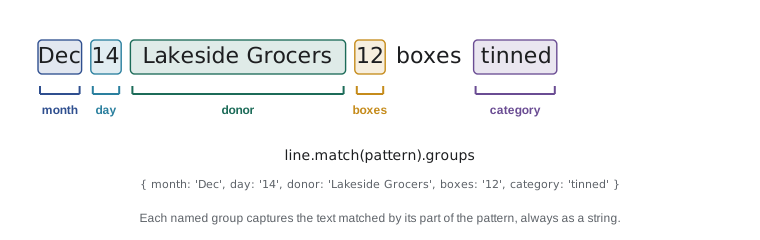
Numbered groups become hard to follow when a pattern has several of them. Named groups, written (?<name>...), give each capture a name, and the match result holds them in its groups property. They make both the pattern and the code that uses it much easier to read, and they are what Mira will use for Dev's notes.
const pattern = /^(?<month>[a-z]{3})\s+(?<day>\d{1,2})\W+(?<donor>.+?),?\s+(?<boxes>\d+)\s*(boxes|bx)\s+(?<category>\w+)$/i;

const notes = [
  'Dec 14 Lakeside Grocers 12 boxes tinned',
  'dec 15 - St. Mark School, 30 bx dry',
  'Dec 15 Northside Bakery 7 BOXES fresh',
  'Dec 16 coffee for the volunteers',
];

for (const line of notes) {
  const m = line.match(pattern);
  if (!m) {
    console.log('Could not read:', line);
    continue;
  }
  const { donor, boxes, category } = m.groups;
  console.log(`${donor} | ${Number(boxes)} | ${category.toLowerCase()}`);
}Lakeside Grocers | 12 | tinned St. Mark School | 30 | dry Northside Bakery | 7 | fresh Could not read: Dec 16 coffee for the volunteers
What this code does
The pattern names five parts of a note line: the month, the day, the donor, the number of boxes and the category. For each line that matches, destructuring the groups object gives the donor, boxes and category, which are printed as a tidy record with the category in small letters. The last line has no number of boxes, so the pattern does not match and the line is reported instead.
Two details in that pattern deserve a closer look. The donor group uses .+? rather than .+. A plain quantifier is greedy: it takes as many characters as it can and gives back only as many as needed for the rest of the pattern to match. Adding ? makes it lazy: it takes as few as possible. Here the lazy version stops the donor at the comma or space before the number instead of trying to swallow as much as possible. And ,? makes the comma optional, so both note styles match.
Finding every match
With the g flag, match returns all the matching texts but throws away the groups. When you need every match with its groups, use matchAll, which requires the g flag and returns an iterator of full match results. Loop over it with for...of, or spread it into an array.
const message = 'Packed: 12 tinned, 30 dry, 7 fresh and 4 dry.';
const counts = {};

for (const m of message.matchAll(/(?<n>\d+) (?<kind>\w+)/g)) {
  const { n, kind } = m.groups;
  counts[kind] = (counts[kind] ?? 0) + Number(n);
}
console.log(counts);

const all = [...message.matchAll(/\d+/g)].map((m) => Number(m[0]));
console.log(all, all.reduce((a, b) => a + b, 0));{ tinned: 12, dry: 34, fresh: 7 }
[ 12, 30, 7, 4 ] 53What this code does
matchAll finds every number followed by a word and gives each match with its named groups, which the loop adds into a totals object by kind. The two dry amounts are added together, giving 34. The second part spreads every match of a run of digits into an array, converts them to numbers and adds them to 53.
Replacing text
replace and replaceAll accept a regex as their first argument. With replace, only the first match is changed unless the regex has the g flag; replaceAll requires the g flag. The replacement can be a string, in which special codes refer to captured groups, or a function, which receives the match and its groups and returns the replacement. A function gives you the full power of JavaScript for each match.
const messy = '  St.   Mark    School ';
console.log(`[${messy.replace(/\s+/g, ' ').trim()}]`);

const phone = '(555) 014-2000';
console.log(phone.replace(/\D/g, ''));

const date = '2026-12-19';
console.log(date.replace(/(\d{4})-(\d{2})-(\d{2})/, '$3/$2/$1'));
console.log(date.replace(/(?<y>\d{4})-(?<m>\d{2})-(?<d>\d{2})/, '$<m>/$<d>/$<y>'));

const shouted = 'LAKESIDE GROCERS DONATED TINNED FOOD';
console.log(shouted.toLowerCase().replace(/\b\w/g, (letter) => letter.toUpperCase()));[St. Mark School] 5550142000 19/12/2026 12/19/2026 Lakeside Grocers Donated Tinned Food
What this code does
The first replacement turns every run of spaces into one space before trimming the ends. The second removes everything that is not a digit from a phone number. The next two rearrange a date using numbered and then named groups in the replacement text, and the last passes a function that capitalizes the first letter of each word.
The codes in a replacement string, a dollar sign followed by a group number, or a dollar sign followed by a group name in angle brackets, are part of the replacement syntax rather than the pattern. If you need the replacement to contain a literal dollar sign, write two of them. A function replacement avoids those codes altogether and is often clearer.
Splitting and validating
split accepts a regex too, which makes it easy to split on any of several separators at once, such as commas, semicolons or the word and. For validation, a regex with both anchors checks that a whole value has the right form. Gareth's advice is to validate shape, not meaning: a regex can check that a postal code has the right pattern of letters and digits, but not that the code exists.
const crew = 'Amara, Jonah;Priya and Dev ,Lucy';
console.log(crew.split(/\s*(?:,|;|\band\b)\s*/));

const caPostal = /^[ABCEGHJ-NPRSTVXY]\d[ABCEGHJ-NPRSTV-Z] ?\d[ABCEGHJ-NPRSTV-Z]\d$/i;
const usZip = /^\d{5}(-\d{4})?$/;

for (const code of ['K7L 3N6', 'k7l3n6', 'D7L 3N6', '53703', '53703-1234', '5370']) {
  console.log(code.padEnd(11), caPostal.test(code), usZip.test(code));
}[ "Amara", "Jonah", "Priya", "Dev", "Lucy" ] K7L 3N6 true false k7l3n6 true false D7L 3N6 false false 53703 false true 53703-1234 false true 5370 false false
What this code does
split cuts the crew list at commas, semicolons or the word and, together with any spaces around them, so five clean names come out. The Canadian postal code pattern checks the letter, digit, letter, optional space, digit, letter, digit form, using only the letters Canada Post allows in each place. The ZIP code pattern accepts five digits with an optional dash and four more, so each test line shows which codes fit which format.
The (?: ... ) in the split pattern is a non-capturing group: it groups the alternatives without capturing them. With a capturing group, split would include the separators themselves in the result. The postal code pattern shows how quickly regular expressions become dense. It is correct, but nobody can read it at a glance, which leads to the last part of this lesson.
The Food Hub's form needs to accept ZIP codes, either five digits or ZIP+4 with a dash. The example also checks Canadian postal codes, which alternate letter and digit and never use certain letters, to show how a pattern can encode which characters are allowed in each place. A regex that is too strict rejects real people, so test patterns against real examples before using them on a form.
Flags
Flags change how the whole pattern behaves. You have used i and g. The others are worth knowing by sight, because you will meet them in other people's code.
| Flag | Name | Effect |
|---|---|---|
| g | global | Find every match, not just the first |
| i | ignore case | Treat upper and lower case as the same |
| m | multiline | Make the start and end anchors work at each line, not just the whole string |
| s | dotAll | Let the dot match new-line characters too |
| u | unicode | Treat the pattern and text as full Unicode characters, so emoji and accented letters count as one |
| v | unicode sets | An upgraded u, added in ES2024, with set operations inside character classes |
| y | sticky | Match only at the exact position given by lastIndex |
| d | indices | Record where each group started and ended |
One flag needs a warning. A regex with the g or y flag remembers where its last match ended, in its lastIndex property, and its test and exec methods start from there next time. Calling test repeatedly with the same global regex on different strings can therefore give surprising false results. For simple yes-or-no checks, leave out the g flag.
const hasDigits = /\d+/g;
console.log(hasDigits.test('12 boxes'), hasDigits.lastIndex);
console.log(hasDigits.test('7 boxes'), hasDigits.lastIndex);

const safe = /\d+/;
console.log(safe.test('12 boxes'), safe.test('7 boxes'));true 2 false 0 true true
What this code does
The global regex matches 12 and remembers that it stopped at position 2. The next test starts from position 2 in the new string, where there are no more digits, so it wrongly answers false and resets lastIndex to 0. The same pattern without the g flag starts from the beginning every time and answers true both times.
Keeping regular expressions readable
Regular expressions are a little language, and like any language they can be written clearly or badly. Gareth's guidelines for the Food Hub's code are short. Keep each pattern for one job, and give it a descriptive name, such as POSTAL_CODE, rather than writing it inline. Prefer named groups to numbered ones. Build long patterns from smaller pieces with new RegExp and template literals, or replace them with a few lines of ordinary string code if that is clearer. And always test a pattern against examples that should match and examples that should not.
Be wary of patterns with nested quantifiers, such as (a+)+, applied to long text typed by strangers. On some inputs they make the regex engine try an enormous number of combinations before giving up, a problem called catastrophic backtracking, which can freeze a page or slow a server. Keeping patterns simple and anchored, and limiting the length of input before matching, avoids it.
Finally, know when not to use a regex. Email addresses are the classic example: the full rules are so complicated that a strict pattern rejects real addresses. A simple anchored check for some text, an at sign, more text, a dot and more text, with no spaces anywhere, catches obvious typing mistakes, and sending a confirmation email checks the rest. HTML and JSON should be read with proper parsers, not regular expressions.
Worked problem
Writing a pattern for a phone number
Lucy's form should accept a 10-digit North American phone number typed as 555-014-2000, (555) 014-2000, 555.014.2000 or 5550142000, and store it as 555-014-2000. Design the approach.
Show solution
- Validating every style with one pattern would be long. A simpler plan is to normalize first: remove everything that is not a digit with replace(/\D/g, '').
- Then validate the digits only, with a pattern anchored at both ends that allows exactly ten digits, \d{10}.
- A leading 1, the country code, is common too. Allow an optional 1 before the ten digits, and remove it if the result has 11 digits.
- Finally, format with groups: digits.replace(/(\d{3})(\d{3})(\d{4})/, ...) with a replacement that inserts the dashes, or slice the string into three parts.
- Test with all four sample styles, with a nine-digit number that should fail and with text such as call me that should fail.
Answer: Strip non-digits, check for ten digits (after removing a leading 1) with an anchored pattern, then format. Normalizing before validating keeps the pattern short.
Try it yourself
Add up the boxes
Each line in the Input box is one of Dev's notes. Read the lines with readline() until it returns null. For each line, find the number of boxes with a regular expression that matches one or more digits followed by optional spaces and then boxes or bx, ignoring case.
Add up the boxes from the lines that match and print Total: 49 boxes. Lines without a box count, such as the coffee note, should be skipped. Be careful: the date also contains digits, so your pattern must include the unit.
let total = 0;
let line = readline();
while (line !== null) {
  // find the number of boxes in line and add it to total
  line = readline();
}
console.log(`Total: ${total} boxes`);
Try it yourself
Check and tidy postal codes
Write tidyPostal(text). It should trim the text, convert it to capital letters and check it against the pattern for a Canadian postal code: letter, digit, letter, an optional space, digit, letter, digit. For this exercise, any letter A to Z is allowed.
If it matches, return it in the standard form with exactly one space in the middle, such as K7L 3N6; otherwise return invalid. The starter prints the results for five inputs.
function tidyPostal(text) {
  // trim, upper-case, test and format
}

for (const t of ['k7l3n6', ' K7L 3N6 ', 'M5V  2T6', '53703', 'k7l 3n']) {
  console.log(tidyPostal(t));
}
Common mistakes
Mistake/\d{5}/ checks that a value is a five-digit code.
InsteadWithout anchors it also matches longer strings that contain five digits. Anchor both ends of a validation pattern.
MistakeA dot in a pattern matches a full stop.
InsteadA dot matches any character. Escape it as \. to match a real full stop.
Mistakematch with the g flag returns the captured groups.
InsteadWith g, match returns only the matched texts. Use matchAll to get every match with its groups.
MistakeReusing one global regex for test is safe.
InsteadA g or y regex keeps lastIndex between calls. Leave out the g flag for yes-or-no tests.
MistakeA strict regex is the best way to validate email addresses.
InsteadThe real rules are too complex; use a simple check and confirm the address by sending a message.
Summary and key terms
- A regular expression is a pattern for text, written between slashes with optional flags, or built with new RegExp.
- Letters match themselves; character classes such as [a-z], \d, \w and \s match one character from a set; quantifiers +, *, ? and {n,m} set how many times something repeats.
- Anchors match the start and end of the string, and \b matches a word boundary; anchor both ends when validating.
- Parentheses group, alternate with a vertical bar and capture; named groups make captures readable. test checks for a match, match and matchAll extract matches and groups, replace and replaceAll substitute text using group codes or a function, and split can cut on a pattern.
- Quantifiers are greedy unless followed by ?.
- Flags include g, i, m, s, u, v, y and d; beware lastIndex with g.
- Keep patterns short, named and tested, and use proper parsers for formats such as HTML and JSON.
- regular expression
- A pattern that describes a set of strings, used to search, check and change text.
- flag
- A letter after a regex that changes how it matches, such as i for ignoring case.
- character class
- A part of a pattern that matches any one character from a set.
- quantifier
- A symbol that says how many times the previous item may repeat.
- anchor
- A part of a pattern that matches a position, such as the start or end of the string.
- word boundary
- The position between a word character and a non-word character, matched by \b.
- capturing group
- A part of a pattern in parentheses whose matched text is remembered.
- named group
- A capturing group with a name, written (?<name>...).
- alternation
- A choice between alternatives in a pattern, written with a vertical bar.
- greedy
- Describes a quantifier that matches as much text as possible.
- lazy
- Describes a quantifier, followed by ?, that matches as little text as possible.
- catastrophic backtracking
- Extremely slow matching caused by patterns with nested quantifiers on certain inputs.
Practice problems
Work each problem on paper first, then reveal the answer to check.
Does /\d{5}/.test('1234567') return true or false?
Show answer
true, because without anchors the pattern only needs to find five digits in a row somewhere.
Write a pattern that matches box or boxes but not boxed.
Show answer
/\bbox(es)?\b/.
What does 'a1b22c333'.match(/\d+/g) return?
Show answer
['1', '22', '333'], every run of digits as text.
How do you make a quantifier lazy?
Show answer
Put ? after it, as in .+? or \d*?.
Why use matchAll instead of match with the g flag?
Show answer
matchAll keeps each match's groups and position; match with g returns only the matched text.
Lesson quiz · 5 questions
Score 60% or more to complete this lesson.
Create a free account to save your progress, take quizzes and earn a certificate.