
JAVA-120 · Lesson 7 of 12 · 21 min
Packaging and running JAR files
▶ Video coming soon A video version of this lesson is on the way.
Kofi's trial of PartsDesk had been running on the counter computer since December, from a folder Hamza copied over by hand. On Monday, March 1, 2027 Leif set the goal of replacing that folder with something that could be handed over properly: one versioned file, a command that starts it, and a way for Kofi to tell which version he is running. That is packaging, the step between a build that works and a program someone else can use.
Inside a JAR
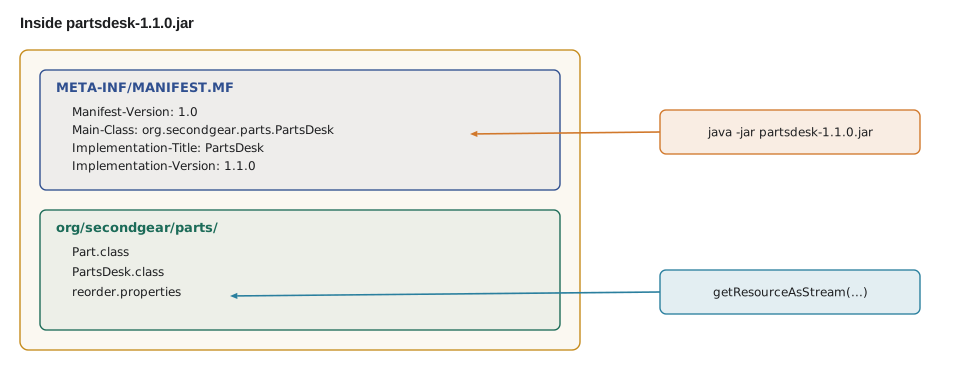
A JAR file is an ordinary zip archive with a particular layout. The class files sit in folders that match their packages, resources sit next to them, exactly as they did in the build's output folder, and a folder named META-INF holds the manifest, META-INF/MANIFEST.MF, a short text file of name: value lines that tells the JVM how to treat the archive. Because a JAR is a zip, any zip tool can open it, which is handy when you need to check what a build really put inside.
$ jar --create --file partsdesk.jar --main-class org.secondgear.parts.ReorderLevels -C out .
$ jar --list --file partsdesk.jar
META-INF/
META-INF/MANIFEST.MF
org/
org/secondgear/
org/secondgear/parts/
org/secondgear/parts/Part.class
org/secondgear/parts/ReorderLevels.class
org/secondgear/parts/reorder.properties
$ java -jar partsdesk.jar
CHAIN-8 reorders at 4
PAD-RIM reorders at 8
TUBE-700x25 reorders at 10
What this code does
jar --list shows that the resource file from lesson 3 traveled into the archive alongside the class files, in the same package folder. Because the manifest's Main-Class names ReorderLevels, java -jar starts it without a class path. The program then finds reorder.properties inside the JAR as a resource.
The manifest
The jar tool writes a minimal manifest itself. To add more, give it a manifest file of your own, and it merges the entries. Three entries matter most for a program. Main-Class names the class whose main java -jar should call. Implementation-Title and Implementation-Version record what the archive is and which version it contains, and the program can read them at run time. A fourth, Class-Path, lists other JAR files, relative to this one, that should be added to the class path when it runs.
$ javac -d out src/org/secondgear/parts/*.java
$ jar --create --file partsdesk-1.1.0.jar --manifest manifest.txt -C out .
$ unzip -p partsdesk-1.1.0.jar META-INF/MANIFEST.MF
Manifest-Version: 1.0
Main-Class: org.secondgear.parts.PartsDesk
Implementation-Title: PartsDesk
Implementation-Version: 1.1.0
Created-By: 21.0.12.1 (Ubuntu)
$ java -jar partsdesk-1.1.0.jar
TUBE-700x25  4  REORDER
PAD-RIM  22
CHAIN-8  3  REORDER
What this code does
The manifest file supplied with --manifest adds the title and version to the entries jar writes itself. unzip -p prints the manifest straight out of the archive without extracting it. The JAR runs with java -jar because Main-Class is present.
import java.io.ByteArrayInputStream;
import java.io.IOException;
import java.nio.charset.StandardCharsets;
import java.util.jar.Attributes;
import java.util.jar.Manifest;

public class Main {
    public static void main(String[] args) throws IOException {
        String text = "Manifest-Version: 1.0\n"
            + "Main-Class: org.secondgear.parts.PartsDesk\n"
            + "Implementation-Title: PartsDesk\n"
            + "Implementation-Version: 1.1.0\n"
            + "Class-Path: lib/core-1.1.0.jar lib/gson-2.13.1.jar\n";
        Manifest m = new Manifest(new ByteArrayInputStream(text.getBytes(StandardCharsets.UTF_8)));
        Attributes a = m.getMainAttributes();
        System.out.println("Starts: " + a.getValue(Attributes.Name.MAIN_CLASS));
        System.out.println("Version: " + a.getValue("Implementation-Version"));
        for (String jar : a.getValue(Attributes.Name.CLASS_PATH).split(" ")) {
            System.out.println("Also loads: " + jar);
        }
    }
}Starts: org.secondgear.parts.PartsDesk Version: 1.1.0 Also loads: lib/core-1.1.0.jar Also loads: lib/gson-2.13.1.jar
What this code does
java.util.jar.Manifest reads the same name: value format the JVM reads from META-INF/MANIFEST.MF. The main attributes include Main-Class and the version, which the program prints. Class-Path entries are separated by spaces and are resolved relative to the JAR's own folder.
Manifest files have a few traps worth knowing. Each line can hold at most 72 bytes, so long values are wrapped onto continuation lines that start with a space; the file must end with a newline, or the last entry is silently ignored; and the names are case-sensitive in practice. Build tools write manifests for you and avoid all three, which is one more reason to let them.
Reading the version at run time
A program that prints its own version saves everyone time when something goes wrong: Kofi can say which version he has, and Hamza can tell whether a fix has reached him. The JVM exposes the manifest's Implementation entries through the class's Package object. Run from a JAR with those entries, getImplementationVersion returns the version; run from plain class files, as in an IDE or in the example below, there is no manifest and it returns null, so the program should fall back to something sensible.
public class Main {
    static String version() {
        String v = Main.class.getPackage().getImplementationVersion();
        return v != null ? v : "development build";
    }

    public static void main(String[] args) {
        System.out.println("PartsDesk " + version());
        System.out.println("Title from manifest: " + Main.class.getPackage().getImplementationTitle());
        System.out.println("Running on Java " + Runtime.version().feature() + " or later: "
            + (Runtime.version().feature() >= 21));
    }
}PartsDesk development build Title from manifest: null Running on Java 21 or later: true
What this code does
When this class is loaded from plain class files there is no manifest, so both Implementation values are null and the version falls back to development build. Packaged in a JAR whose manifest has Implementation-Version: 1.1.0, the same code would print PartsDesk 1.1.0. Printing the version at start-up is a cheap habit that makes support much easier.
Programs with dependencies
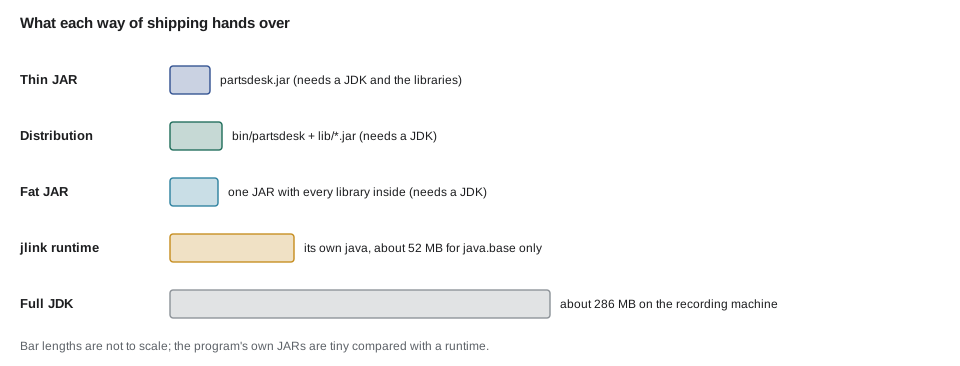
A JAR that contains only your own classes is a thin JAR. Once the program uses libraries, java -jar app.jar is not enough on its own, because the libraries are separate JARs. There are three common ways to ship such a program.
- A distribution folder: the program's JAR and its libraries in a lib folder, plus start scripts that build the class path. Gradle's application plugin produces this with installDist or distZip, and the manifest's Class-Path can do the same job.
- A fat JAR, also called an uber JAR: every library's classes unpacked and repacked into one archive, made with the Shadow plugin for Gradle or the Shade plugin for Maven. One file is simple to hand over, but merging can clash when two libraries contain files with the same name.
- A framework's own format: Spring Boot, which JAVA-260 uses, builds an executable JAR that keeps library JARs nested inside it and uses its own launcher.
$ gradle --offline installDist -q --console=plain
$ find app/build/install -type f | sort
app/build/install/app/bin/app
app/build/install/app/bin/app.bat
app/build/install/app/lib/app-1.0.0.jar
$ app/build/install/app/bin/app
TUBE-700x25  4  REORDER
PAD-RIM  22
CHAIN-8  3  REORDER
What this code does
installDist builds the JAR and lays out a ready-to-run folder, with Linux and macOS start scripts in bin and the JARs in lib. The bin/app script builds the class path from lib and starts the main class named in the build script, so no one has to type java commands. With libraries added, they would appear in lib next to app-1.0.0.jar.
For Kofi, the distribution folder is the right choice: Gradle's distZip task makes a zip of exactly that folder, which can be unpacked on the counter computer, and the start script hides every java option. Gradle names the scripts after the project, app here; lesson 12's capstone renames them partsdesk and shopbook by naming the modules so.
import java.io.ByteArrayInputStream;
import java.io.ByteArrayOutputStream;
import java.io.IOException;
import java.nio.charset.StandardCharsets;
import java.util.jar.*;

public class Main {
    public static void main(String[] args) throws IOException {
        Manifest mf = new Manifest();
        mf.getMainAttributes().put(Attributes.Name.MANIFEST_VERSION, "1.0");
        mf.getMainAttributes().put(Attributes.Name.MAIN_CLASS, "org.secondgear.parts.PartsDesk");

        ByteArrayOutputStream bytes = new ByteArrayOutputStream();
        try (JarOutputStream jar = new JarOutputStream(bytes, mf)) {
            jar.putNextEntry(new JarEntry("org/secondgear/parts/reorder.properties"));
            jar.write("TUBE-700x25=10\n".getBytes(StandardCharsets.UTF_8));
            jar.closeEntry();
        }

        try (JarInputStream in = new JarInputStream(new ByteArrayInputStream(bytes.toByteArray()))) {
            System.out.println("Main-Class: " + in.getManifest().getMainAttributes().getValue("Main-Class"));
            JarEntry e;
            while ((e = in.getNextJarEntry()) != null) {
                System.out.println("Entry: " + e.getName());
            }
        }
    }
}Main-Class: org.secondgear.parts.PartsDesk Entry: org/secondgear/parts/reorder.properties
What this code does
JarOutputStream writes a JAR, manifest first, and each putNextEntry adds a file at a path inside the archive. Reading it back with JarInputStream shows the manifest's Main-Class and the one entry that was written. Build tools and the jar command do the same thing with real class files on disk instead of bytes in memory.
Libraries: sources and documentation JARs
Core is not a program but a library that the other modules use, so it has no Main-Class. When a library is published to a repository, it is customary to publish two extra JARs with it: a sources JAR, so IDEs can show the library's source, and a Javadoc JAR, so they can show its documentation. In Gradle, java { withSourcesJar(); withJavadocJar() } adds both; Maven uses the Source and Javadoc plugins. Maven Central requires both for anything published there.
A smaller runtime with jdeps and jlink
PartsDesk still needs a JDK, or at least a Java runtime, installed on the counter computer, and keeping that up to date is one more job. Since Java 9 the JDK can build a custom runtime image containing only the modules a program uses. jdeps works out which modules those are by reading the class files, and jlink copies just those modules into a folder that has its own bin/java. The session below is real.
$ jdeps --print-module-deps partsdesk-1.1.0.jar
java.base
$ jlink --add-modules java.base --strip-debug --no-header-files --no-man-pages --output partsdesk-runtime
$ du -sh partsdesk-runtime
52M	partsdesk-runtime
$ partsdesk-runtime/bin/java -jar partsdesk-1.1.0.jar
TUBE-700x25  4  REORDER
PAD-RIM  22
CHAIN-8  3  REORDER
$ partsdesk-runtime/bin/java --list-modules
java.base@21.0.12.1
What this code does
jdeps reads the JAR's class files and reports that PartsDesk needs only java.base, the core module every program uses. jlink builds a runtime image with just that module, stripped of debugging information, header files and manual pages, in about 52 MB. The image's own java runs the JAR, and --list-modules confirms it contains one module.
The full JDK on the machine that recorded this session takes about 286 MB, so the custom runtime is under a fifth of the size and contains nothing PartsDesk does not use. The JDK's jpackage tool goes one step further and wraps an application and such a runtime into a native installer, an .msi or .exe for Windows, a .dmg or .pkg for macOS or a .deb or .rpm for Linux, which installs like any other program. Lesson 12 and JAVA-280 return to these choices; for Kofi, a zip and an installed JDK are enough for now.
| Way to ship | What the user gets | Good for |
|---|---|---|
| Thin JAR | One JAR; needs a JDK and any libraries on the class path | Libraries; programs with no dependencies |
| Distribution folder (installDist, distZip) | JARs in lib and start scripts in bin | Command-line programs with dependencies |
| Fat JAR (Shadow, Shade) | One JAR containing every library's classes | Simple hand-over, small services |
| Custom runtime (jlink) | A folder with its own small Java runtime | Computers without a JDK installed |
| Native installer (jpackage) | An installer for the operating system | Desktop programs for non-technical users |
Try it yourself
Read a manifest
Complete mainClass so it reads manifest text and returns the value of its Main-Class entry, or (none) when there is no such entry. Use java.util.jar.Manifest.
The program should print org.secondgear.parts.PartsDesk and then (none).
import java.io.ByteArrayInputStream;
import java.io.IOException;
import java.nio.charset.StandardCharsets;
import java.util.jar.Manifest;

public class Main {
    static String mainClass(String text) throws IOException {
        return "";
    }

    public static void main(String[] args) throws IOException {
        System.out.println(mainClass("Manifest-Version: 1.0\nMain-Class: org.secondgear.parts.PartsDesk\n"));
        System.out.println(mainClass("Manifest-Version: 1.0\nCreated-By: 21\n"));
    }
}
Try it yourself
JAR file names
Build tools name a JAR from the project name and version. Complete jarName so it returns name-version.jar, and, when classifier is not empty, name-version-classifier.jar, as used for sources and Javadoc JARs.
The program should print partsdesk-1.1.0.jar, core-1.1.0-sources.jar and core-1.1.0-javadoc.jar.
public class Main {
    static String jarName(String name, String version, String classifier) {
        return name + ".jar";
    }

    public static void main(String[] args) {
        System.out.println(jarName("partsdesk", "1.1.0", ""));
        System.out.println(jarName("core", "1.1.0", "sources"));
        System.out.println(jarName("core", "1.1.0", "javadoc"));
    }
}
Common mistakes
MistakeExpecting java -jar app.jar to find libraries that are not in the JAR or its Class-Path.
InsteadShip a distribution folder with start scripts, a fat JAR, or a manifest Class-Path.
MistakeWriting a manifest file without a final newline.
InsteadEnd the file with a newline, or let the build tool write the manifest.
MistakeNot putting a version in the manifest.
InsteadAdd Implementation-Version and print it at start-up.
MistakeBuilding a fat JAR without checking for clashing files.
InsteadUse the Shadow or Shade plugin's merge settings and test the result.
MistakeAssuming the target computer has the right JDK.
InsteadCheck the version, or ship a custom runtime made with jlink.
Summary and key terms
- A JAR is a zip archive of package folders, class files and resources, with a manifest at META-INF/MANIFEST.MF.
- Main-Class lets java -jar start it, Implementation-Version records its version and Class-Path names other JARs to load; a program can read its version through getPackage().getImplementationVersion(), which is null outside a JAR.
- A thin JAR holds only your classes; programs with libraries are shipped as a distribution folder with start scripts (Gradle's installDist and distZip), as a fat JAR, or in a framework's own format.
- Libraries are published with sources and Javadoc JARs. jdeps finds the modules a program needs, jlink builds a small custom runtime of just those, and jpackage makes native installers.
- Manifest
- META-INF/MANIFEST.MF, the text file of name: value entries that describes a JAR.
- Main-Class
- The manifest entry naming the class java -jar should start.
- Implementation-Version
- A manifest entry recording the version of the code in the JAR.
- Class-Path (manifest)
- A manifest entry listing other JARs, relative to this one, to load at run time.
- Thin JAR
- A JAR containing only the project's own classes and resources.
- Fat JAR
- A single JAR that also contains the classes of every library the program uses.
- Distribution
- A folder or zip with a program's JARs in lib and start scripts in bin.
- Sources JAR
- A JAR of a library's source code, published for IDEs to show.
- jdeps
- A JDK tool that reports which packages and modules a program depends on.
- jlink
- A JDK tool that builds a custom runtime image from chosen modules.
- jpackage
- A JDK tool that packages an application and runtime as a native installer.
Practice problems
Work each problem on paper first, then reveal the answer to check.
Where is a JAR's manifest stored?
Show answer
In META-INF/MANIFEST.MF inside the archive.
Why does getImplementationVersion() return null when a program runs in the IDE?
Show answer
The classes are loaded from folders, not from a JAR, so there is no manifest to read.
What does Gradle's installDist produce?
Show answer
A folder with the program's JAR and libraries in lib and start scripts in bin.
What did jdeps report for PartsDesk?
Show answer
That it needs only the java.base module.
What is one risk of a fat JAR?
Show answer
Files with the same name from different libraries can clash when they are merged.
Lesson quiz · 5 questions
Score 60% or more to complete this lesson.
Create a free account to save your progress, take quizzes and earn a certificate.