
JAVA-120 · Lesson 4 of 12 · 22 min
Maven: the POM and the build life cycle
▶ Video coming soon A video version of this lesson is on the way.
On Monday, February 1, 2027 Leif brought printouts of two build files, one for Maven and one for Gradle, and laid them side by side. Both describe the same PartsDesk project. Tonight is Maven, the older and more rigid of the two, and for that reason the easier to learn first: almost everything about a Maven build follows rules you can learn once and then expect everywhere. Leif's company builds most of its services with it, and a large share of the Java world does too.
What Maven is
Apache Maven is a build tool built on convention over configuration. It assumes the standard directory layout from lesson 3, a fixed sequence of build steps and a central place to download libraries from, so a project only has to describe what makes it different. That description is one XML file at the project root, the POM, short for project object model, named pom.xml. The current stable line is Maven 3.9. Maven 4, a large rework that requires Java 17 to run, has been in release candidates through 2025 and 2026 (4.0.0-rc-6 at the time of writing) and is close to its final release; the POM files in this lesson work with both.
A minimal POM
This is the real POM Leif and Hamza wrote for PartsDesk. Every POM names the project with three coordinates: the groupId, usually the organization's reversed domain; the artifactId, the project's own name; and the version. Together, written groupId:artifactId:version, they identify the project, or any library, uniquely, in the way a package name identifies a class.
<?xml version="1.0" encoding="UTF-8"?>
<project xmlns="http://maven.apache.org/POM/4.0.0"
         xmlns:xsi="http://www.w3.org/2001/XMLSchema-instance"
         xsi:schemaLocation="http://maven.apache.org/POM/4.0.0 https://maven.apache.org/xsd/maven-4.0.0.xsd">
  <modelVersion>4.0.0</modelVersion>

  <groupId>org.secondgear</groupId>
  <artifactId>partsdesk</artifactId>
  <version>1.0.0-SNAPSHOT</version>
  <packaging>jar</packaging>

  <properties>
    <maven.compiler.release>21</maven.compiler.release>
    <project.build.sourceEncoding>UTF-8</project.build.sourceEncoding>
  </properties>
</project>
What this code does
The modelVersion line is always 4.0.0 for Maven 3 POMs, and the coordinates org.secondgear, partsdesk and 1.0.0-SNAPSHOT identify the project. packaging jar says the build should produce a JAR. The maven.compiler.release property tells the compiler to build for Java 21, and the encoding property makes the build read source files as UTF-8 on every computer.
Look at what the POM does not say. It does not list the source files, the output folder, the order of the build steps or how to make a JAR. Maven knows all of that from its conventions, and from a built-in parent called the super POM that every POM inherits. The command mvn help:effective-pom prints the full POM with all the inherited settings filled in, which runs to hundreds of lines and is the place to look when you need to know what Maven will actually do.
public class Main {
    record Coordinates(String groupId, String artifactId, String version) {
        static Coordinates parse(String gav) {
            String[] p = gav.split(":");
            return new Coordinates(p[0], p[1], p[2]);
        }
        boolean isSnapshot() { return version.endsWith("-SNAPSHOT"); }
        @Override public String toString() { return groupId + ":" + artifactId + ":" + version; }
    }

    public static void main(String[] args) {
        Coordinates mine = Coordinates.parse("org.secondgear:partsdesk:1.0.0-SNAPSHOT");
        Coordinates lib = Coordinates.parse("com.google.code.gson:gson:2.13.1");
        for (Coordinates c : new Coordinates[] {mine, lib}) {
            System.out.println(c + "  group=" + c.groupId() + "  artifact=" + c.artifactId()
                + "  snapshot=" + c.isSnapshot());
        }
    }
}org.secondgear:partsdesk:1.0.0-SNAPSHOT group=org.secondgear artifact=partsdesk snapshot=true com.google.code.gson:gson:2.13.1 group=com.google.code.gson artifact=gson snapshot=false
What this code does
Maven coordinates are written as one string separated by colons, which the record's parse method splits into the three parts. A version ending in -SNAPSHOT marks work in progress that may change, while a plain version such as 2.13.1 is a fixed release. The second line shows the coordinates of a real library, Google's Gson, written the same way.
A SNAPSHOT version, such as 1.0.0-SNAPSHOT, means a version still being worked on: Maven treats it as changeable and will fetch a newer copy of a snapshot dependency when one is published. A release version, such as 1.0.0, must never change once published. Projects use a snapshot version while they are developed and change it to a release version when they ship.
The build life cycle
Maven builds run through a life cycle, a fixed, ordered list of phases. You never ask Maven to run individual tools; you ask it to reach a phase, and it runs every phase up to and including that one. The default life cycle's main phases are:
| Phase | What happens in it (for a JAR project) |
|---|---|
| validate | Checks that the POM is correct and complete |
| compile | Copies resources and compiles src/main/java into target/classes |
| test | Compiles src/test/java and runs the unit tests |
| package | Puts the compiled classes and resources into a JAR in target |
| verify | Runs further checks, such as integration tests and quality tools |
| install | Copies the JAR into the local repository so other local projects can use it |
| deploy | Uploads the JAR to a shared remote repository |
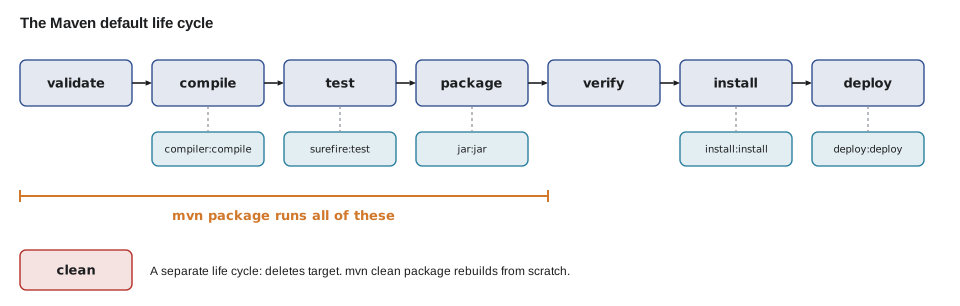
There are two other life cycles. clean deletes the target folder, and site generates a project website. They can be combined on the command line: mvn clean package deletes old output and then builds from scratch, which is what you do when a build seems to be using stale files.
import java.util.List;

public class Main {
    static final List<String> PHASES = List.of(
        "validate", "compile", "test", "package", "verify", "install", "deploy");

    static List<String> runUpTo(String phase) {
        int end = PHASES.indexOf(phase);
        if (end < 0) throw new IllegalArgumentException("Unknown phase: " + phase);
        return PHASES.subList(0, end + 1);
    }

    public static void main(String[] args) {
        System.out.println("mvn compile runs: " + runUpTo("compile"));
        System.out.println("mvn package runs: " + runUpTo("package"));
        System.out.println("mvn install runs: " + runUpTo("install"));
        try {
            runUpTo("pakage");
        } catch (IllegalArgumentException e) {
            System.out.println(e.getMessage());
        }
    }
}mvn compile runs: [validate, compile] mvn package runs: [validate, compile, test, package] mvn install runs: [validate, compile, test, package, verify, install] Unknown phase: pakage
What this code does
The life cycle is an ordered list, so reaching a phase means running the slice of the list up to and including it. That is why mvn package also compiles and tests the code first, and why mvn install does everything package does and more. A misspelled phase is rejected, as real Maven rejects an unknown phase name.
Plugins and goals
Maven itself does almost nothing; the work is done by plugins, and each plugin offers goals. The compiler plugin's compile goal runs javac, the Surefire plugin's test goal runs tests, and the JAR plugin's jar goal builds the archive. Maven binds goals to phases: for a project with jar packaging, compiler:compile is bound to the compile phase, surefire:test to test and jar:jar to package. You can also run a goal directly, as in mvn dependency:tree or mvn help:effective-pom, without running the life cycle.
Plugins are themselves downloaded from Maven Central the first time they are used, and every plugin has a version. If a POM does not say which version, Maven uses defaults that change between Maven releases, so a build that worked last year can behave differently after an upgrade. Teams therefore pin plugin versions in the POM, as below. The version numbers shown are recent releases at the time of writing; check for newer ones when you start a project.
<build>
  <plugins>
    <plugin>
      <groupId>org.apache.maven.plugins</groupId>
      <artifactId>maven-compiler-plugin</artifactId>
      <version>3.14.0</version>
    </plugin>
    <plugin>
      <groupId>org.apache.maven.plugins</groupId>
      <artifactId>maven-jar-plugin</artifactId>
      <version>3.4.2</version>
      <configuration>
        <archive>
          <manifest>
            <mainClass>org.secondgear.parts.PartsDesk</mainClass>
          </manifest>
        </archive>
      </configuration>
    </plugin>
  </plugins>
</build>
What this code does
The build section lists plugins with their own coordinates and a fixed version, so every computer runs the same plugin code. The JAR plugin is also configured to write a Main-Class entry into the manifest, so the JAR it builds can be run with java -jar. Everything not mentioned keeps Maven's defaults.
Running a build
Hamza ran mvn package on his laptop, which had internet access. The output below is representative of a first successful Maven 3.9 build of PartsDesk; the first build also prints many Downloading lines while it fetches plugins, left out here. The lines in square brackets name each plugin goal as it runs, which is how you read a Maven log: find the goal that failed and you know which tool to look at.
$ mvn package[INFO] Scanning for projects... [INFO] [INFO] ----------------------< org.secondgear:partsdesk >---------------------- [INFO] Building partsdesk 1.0.0-SNAPSHOT [INFO] from pom.xml [INFO] --------------------------------[ jar ]--------------------------------- [INFO] [INFO] --- resources:3.3.1:resources (default-resources) @ partsdesk --- [INFO] skip non existing resourceDirectory /home/hamza/partsdesk/src/main/resources [INFO] [INFO] --- compiler:3.14.0:compile (default-compile) @ partsdesk --- [INFO] Recompiling the module because of changed source code. [INFO] Compiling 2 source files with javac [debug release 21] to target/classes [INFO] [INFO] --- resources:3.3.1:testResources (default-testResources) @ partsdesk --- [INFO] skip non existing resourceDirectory /home/hamza/partsdesk/src/test/resources [INFO] [INFO] --- compiler:3.14.0:testCompile (default-testCompile) @ partsdesk --- [INFO] No sources to compile [INFO] [INFO] --- surefire:3.2.5:test (default-test) @ partsdesk --- [INFO] No tests to run. [INFO] [INFO] --- jar:3.4.2:jar (default-jar) @ partsdesk --- [INFO] Building jar: /home/hamza/partsdesk/target/partsdesk-1.0.0-SNAPSHOT.jar [INFO] ------------------------------------------------------------------------ [INFO] BUILD SUCCESS [INFO] ------------------------------------------------------------------------
What this code does
Each block starts with the plugin, its version, the goal and, after the at sign, the execution id, so the log shows exactly which tool ran in which phase. There were no tests yet, so Surefire reports nothing to run. The build ends with the JAR in target and BUILD SUCCESS.
After the build, target holds classes, the compiled output, and partsdesk-1.0.0-SNAPSHOT.jar, named artifactId-version.jar. mvn install would then copy that JAR into the local repository, a folder in your home directory, so that another project on the same computer could depend on it.
The local repository and offline builds
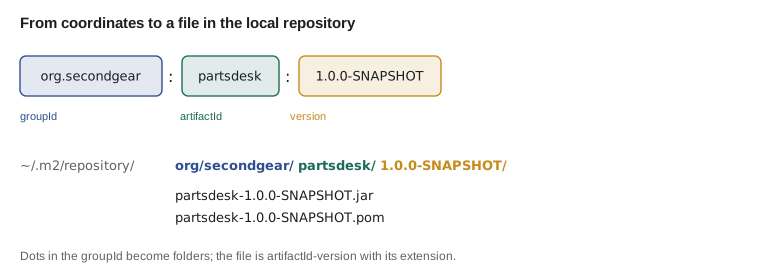
Everything Maven downloads, libraries and plugins alike, is stored in the local repository, by default the folder .m2/repository in your home folder, laid out by coordinates. The second build of a project is fast because nothing has to be downloaded again. The session below is real, recorded on a computer that had Maven installed but had never downloaded anything, with mvn run in offline mode (--offline or -o), which forbids downloads. Maven cannot even start the first phase, because the plugin it needs has never been fetched.
$ mvn -v
Apache Maven 3.9.11 (3e54c93a704957b63ee3494413a2b544fd3d825b)
Maven home: /opt/maven
Java version: 21.0.12.1, vendor: Ubuntu, runtime: /usr/lib/jvm/java-21-openjdk-amd64
What this code does
mvn -v shows the Maven version and, importantly, which JDK Maven itself is running on. That JDK compiles the project unless the POM or a toolchain says otherwise. It is the first thing to check when a Maven build uses the wrong Java version.
$ mvn --offline --batch-mode package
[INFO] Scanning for projects...
[INFO]
[INFO] ----------------------< org.secondgear:partsdesk >----------------------
[INFO] Building partsdesk 1.0.0-SNAPSHOT
[INFO]   from pom.xml
[INFO] --------------------------------[ jar ]---------------------------------
[WARNING] The POM for org.apache.maven.plugins:maven-resources-plugin:jar:3.3.1 is missing, no dependency information available
[INFO] ------------------------------------------------------------------------
[INFO] BUILD FAILURE
[INFO] ------------------------------------------------------------------------
[INFO] Total time:  0.166 s
[INFO] Finished at: 2026-11-16T04:58:36-07:00
[INFO] ------------------------------------------------------------------------
[ERROR] Plugin org.apache.maven.plugins:maven-resources-plugin:3.3.1 or one of its dependencies could not be resolved:
[ERROR] 	Cannot access central (https://repo.maven.apache.org/maven2) in offline mode and the artifact org.apache.maven.plugins:maven-resources-plugin:jar:3.3.1 has not been downloaded from it before.
[ERROR] -> [Help 1]
What this code does
The build starts, reads the POM and then needs the resources plugin, which is not in the local repository. Offline mode forbids downloading it, so the build fails before any code is compiled. The error says exactly that: the plugin has not been downloaded from Maven Central before.
Offline mode is useful once the local repository is filled, for example on a train or when a remote repository is down. An error like this one, on a computer that should be online, usually means a network or proxy problem rather than a problem in the POM.
public class Main {
    static String repoPath(String groupId, String artifactId, String version, String ext) {
        return groupId.replace('.', '/') + "/" + artifactId + "/" + version + "/"
            + artifactId + "-" + version + "." + ext;
    }

    public static void main(String[] args) {
        String home = "~/.m2/repository/";
        System.out.println(home + repoPath("org.secondgear", "partsdesk", "1.0.0-SNAPSHOT", "jar"));
        System.out.println(home + repoPath("org.apache.maven.plugins", "maven-resources-plugin", "3.3.1", "jar"));
        System.out.println(home + repoPath("com.google.code.gson", "gson", "2.13.1", "pom"));
    }
}~/.m2/repository/org/secondgear/partsdesk/1.0.0-SNAPSHOT/partsdesk-1.0.0-SNAPSHOT.jar ~/.m2/repository/org/apache/maven/plugins/maven-resources-plugin/3.3.1/maven-resources-plugin-3.3.1.jar ~/.m2/repository/com/google/code/gson/gson/2.13.1/gson-2.13.1.pom
What this code does
The local repository stores each artifact in a folder made from its coordinates: the groupId with dots turned into slashes, then the artifactId, then the version. The file inside is named artifactId-version with the right extension. The second path is exactly the plugin JAR the offline build was looking for.
The Maven Wrapper
Different versions of Maven can build the same POM slightly differently, so teams also pin Maven itself. The Maven Wrapper is a pair of small scripts, mvnw and mvnw.cmd, plus a properties file, committed to the project. Running ./mvnw package instead of mvn package downloads the exact Maven version named in .mvn/wrapper/maven-wrapper.properties the first time and uses it from then on, so everyone, including the build server, uses the same Maven without installing it. Lesson 5 shows Gradle's equivalent, which works the same way.
Try it yourself
Where Maven stores it
Complete repoPath so it returns the path of an artifact inside the local repository: the groupId with dots replaced by slashes, the artifactId, the version, then the file artifactId-version.ext.
The program should print org/secondgear/core/1.1.0/core-1.1.0.jar and com/google/code/gson/gson/2.13.1/gson-2.13.1.pom.
public class Main {
    static String repoPath(String groupId, String artifactId, String version, String ext) {
        return artifactId + "." + ext;
    }

    public static void main(String[] args) {
        System.out.println(repoPath("org.secondgear", "core", "1.1.0", "jar"));
        System.out.println(repoPath("com.google.code.gson", "gson", "2.13.1", "pom"));
    }
}
Try it yourself
Which phases run?
Complete phasesFor so it returns, as a comma-separated string, every phase Maven runs to reach the given phase, for example validate, compile, test for test.
If the command line also starts with clean, the result should begin with clean, . The program should print the three lines shown in its main.
import java.util.List;

public class Main {
    static final List<String> PHASES = List.of(
        "validate", "compile", "test", "package", "verify", "install", "deploy");

    static String phasesFor(boolean clean, String phase) {
        return phase;
    }

    public static void main(String[] args) {
        System.out.println(phasesFor(false, "test"));
        System.out.println(phasesFor(true, "package"));
        System.out.println(phasesFor(false, "validate"));
    }
}
Common mistakes
MistakeEditing files in target by hand.
InsteadChange the source or the POM; target is rebuilt and mvn clean deletes it.
MistakeLeaving plugin versions out of the POM.
InsteadPin plugin versions so the build behaves the same after a Maven upgrade.
MistakeExpecting mvn package to skip the tests.
Insteadpackage runs every earlier phase, including test; fix failing tests rather than skipping them.
MistakePublishing a release and then changing it under the same version.
InsteadRelease versions never change; use a SNAPSHOT version while work is in progress.
MistakeAssuming Maven uses the JDK your IDE uses.
InsteadCheck mvn -v, which shows the JDK Maven runs on, and set maven.compiler.release in the POM.
Summary and key terms
- Apache Maven builds Java projects by convention, described in a POM, pom.xml, that names the project with groupId, artifactId and version coordinates.
- Everything not stated comes from the super POM and the standard layout.
- A build runs through a life cycle of ordered phases, validate, compile, test, package, verify, install and deploy, and reaching a phase runs all earlier ones; clean is a separate life cycle.
- Plugins do the work through goals bound to phases, and their versions should be pinned.
- Downloads are cached in the local repository, .m2/repository, laid out by coordinates, and offline mode uses only what is already there.
- SNAPSHOT versions may change; releases never do.
- The Maven Wrapper pins the Maven version for a project.
- Maven
- A build tool for Java that works by convention from a POM file.
- POM
- The project object model, pom.xml, which describes a Maven project.
- Coordinates
- groupId, artifactId and version, which together identify a project or library.
- SNAPSHOT
- A version suffix meaning work in progress that may change.
- Life cycle
- An ordered list of phases a Maven build runs through.
- Phase
- One step of a life cycle, such as compile or package.
- Plugin
- A Maven component that does build work, such as compiling or packaging.
- Goal
- One task a plugin can perform, such as compiler:compile.
- Super POM
- The built-in parent POM that supplies Maven's defaults.
- Local repository
- The cache of downloaded artifacts, by default .m2/repository in the home folder.
- Maven Wrapper
- Scripts committed with a project that download and run a fixed Maven version.
Practice problems
Work each problem on paper first, then reveal the answer to check.
What three coordinates identify a Maven project?
Show answer
groupId, artifactId and version.
Which phases run for mvn package?
Show answer
validate, compile, test and package.
What does mvn clean package do?
Show answer
Deletes target, then runs the default life cycle up to package.
Where would Maven store org.secondgear:core:1.1.0 as a JAR?
Show answer
In ~/.m2/repository/org/secondgear/core/1.1.0/core-1.1.0.jar.
Why pin plugin versions?
Show answer
So the build does not change behavior when Maven's default plugin versions change.
Lesson quiz · 5 questions
Score 60% or more to complete this lesson.
Create a free account to save your progress, take quizzes and earn a certificate.