
JAVA-120 · Lesson 6 of 12 · 22 min
Managing dependencies and repositories
▶ Video coming soon A video version of this lesson is on the way.
After reading week, Leif came back on Monday, February 22, 2027 with a request from Odile. Second Gear's accountant wants the stock report as a spreadsheet file, and the bike-share partner wants the rental list as JSON. Writing either format by hand is slow and error-prone; well-tested libraries already do both. Using a library means adding a dependency, and that is where builds stop being only about your own code. Tonight's topic is how Maven and Gradle find, download and choose the code other people wrote, and how to stay in control of it.
What a dependency is
A dependency is a library your project needs, named by its coordinates, groupId, artifactId and version, exactly as lesson 4 described for your own project. You declare it in the build file, and the build tool downloads the library's JAR from a repository, stores it in a local cache and puts it on the class path for compiling, testing and running. You never copy library JARs into the project by hand: the build file is the record of exactly which libraries, in which versions, the project uses.
<dependencies>
  <dependency>
    <groupId>com.google.code.gson</groupId>
    <artifactId>gson</artifactId>
    <version>2.13.1</version>
  </dependency>
  <dependency>
    <groupId>org.junit.jupiter</groupId>
    <artifactId>junit-jupiter</artifactId>
    <version>5.13.4</version>
    <scope>test</scope>
  </dependency>
</dependencies>
What this code does
Each dependency element gives a library's coordinates, and Maven downloads it from Maven Central. Gson, a JSON library, has the default compile scope, so it is available to the program and packaged with it. JUnit has test scope, so it is available only to test code and never ships with the program.
repositories {
    mavenCentral()
}

dependencies {
    implementation("com.google.code.gson:gson:2.13.1")
    testImplementation("org.junit.jupiter:junit-jupiter:5.13.4")
    testRuntimeOnly("org.junit.platform:junit-platform-launcher")
}
What this code does
Gradle writes the same coordinates as one string, and the repositories block says where to find them. The word before each dependency is a configuration that decides where the library is visible: implementation for the program's own code, testImplementation for tests only. Gradle requires repositories to be declared, while Maven assumes Maven Central.
Scopes and configurations
Not every library is needed everywhere. A testing library is needed only to compile and run tests; a database driver may be needed only at run time; a library provided by the server that runs the program should not be packaged at all. Maven expresses this with scopes and Gradle with configurations.
| Need | Maven scope | Gradle configuration |
|---|---|---|
| Compile and run the program | compile (the default) | implementation |
| Part of a library's public API, needed by its users too | compile | api (java-library plugin) |
| Only at run time, not to compile | runtime | runtimeOnly |
| Only to compile; supplied by the platform at run time | provided | compileOnly |
| Only for tests | test | testImplementation |
| Another module of the same build | a dependency on its coordinates | implementation(project(":core")) |
import java.util.*;

public class Main {
    enum Path { COMPILE, RUNTIME, TEST_COMPILE, TEST_RUNTIME }

    static final Map<String, EnumSet<Path>> ON = new LinkedHashMap<>();
    static {
        ON.put("implementation", EnumSet.allOf(Path.class));
        ON.put("compileOnly", EnumSet.of(Path.COMPILE));
        ON.put("runtimeOnly", EnumSet.of(Path.RUNTIME, Path.TEST_RUNTIME));
        ON.put("testImplementation", EnumSet.of(Path.TEST_COMPILE, Path.TEST_RUNTIME));
    }

    public static void main(String[] args) {
        System.out.printf("%-20s%-9s%-9s%-14s%s%n", "configuration", "compile", "runtime", "test compile", "test runtime");
        for (var e : ON.entrySet()) {
            StringBuilder row = new StringBuilder(String.format("%-20s", e.getKey()));
            int[] widths = {9, 9, 14, 0};
            for (Path p : Path.values()) {
                String mark = e.getValue().contains(p) ? "yes" : "-";
                row.append(String.format("%-" + Math.max(widths[p.ordinal()], 1) + "s", mark));
            }
            System.out.println(row.toString().stripTrailing());
        }
    }
}configuration compile runtime test compile test runtime implementation yes yes yes yes compileOnly yes - - - runtimeOnly - yes - yes testImplementation - - yes yes
What this code does
Each Gradle configuration puts a dependency on some of the four class paths a Java build uses: compiling and running the program, and compiling and running its tests. An EnumSet records which paths each configuration reaches, and the table prints a yes where the library is visible. It shows, for example, that a compileOnly library is missing at run time and a testImplementation library never reaches the program.
Gradle's distinction between implementation and api matters for modules like core. A dependency declared with implementation is used inside core but is not exposed to the modules that depend on core, so they cannot accidentally start using it, and changing it does not force them to recompile. Use api only for a library whose types appear in core's own public methods.
Repositories
Maven Central is the main public repository for Java libraries, run by Sonatype, and both tools use it by default or with one line. Android libraries are published to Google's Maven repository. Companies usually run their own repository manager, such as Sonatype Nexus or JFrog Artifactory, which stores the company's internal libraries and caches Maven Central for its developers, and is configured in the build or in a settings file. Gradle's mavenLocal() lets a build read the local Maven repository; it is convenient for testing a library you installed with mvn install, but it makes builds depend on what happens to be in one person's cache, so Leif keeps it out of committed build files.
Transitive dependencies
Libraries have dependencies too. When Hamza adds a spreadsheet library, it may need a compression library, a logging library and an XML library, each of which needs others. These transitive dependencies are downloaded automatically, which is a great convenience and the source of most dependency trouble: a project with five declared dependencies can easily have fifty on its class path. Both tools can print the whole dependency tree, which is the first thing to look at when a class is missing, appears twice or has the wrong version.
$ gradle --offline :shopbook:dependencies --configuration runtimeClasspath --console=plain -q

------------------------------------------------------------
Project ':shopbook'
------------------------------------------------------------

runtimeClasspath - Runtime classpath of source set 'main'.
\--- project :core

A web-based, searchable dependency report is available by adding the --scan option.
What this code does
This is the real dependency report for ShopBook's run-time class path in the multi-module build from lesson 12. ShopBook depends only on the core module of the same build, so the tree has one entry. With libraries added, each would appear with its own transitive dependencies indented beneath it.
$ mvn dependency:tree[INFO] org.secondgear:partsdesk:jar:1.1.0 [INFO] +- com.google.code.gson:gson:jar:2.13.1:compile [INFO] | \- com.google.errorprone:error_prone_annotations:jar:2.38.0:compile [INFO] \- org.junit.jupiter:junit-jupiter:jar:5.13.4:test [INFO] +- org.junit.jupiter:junit-jupiter-api:jar:5.13.4:test [INFO] | +- org.opentest4j:opentest4j:jar:1.3.0:test [INFO] | +- org.junit.platform:junit-platform-commons:jar:1.13.4:test [INFO] | \- org.apiguardian:apiguardian-api:jar:1.1.2:test [INFO] +- org.junit.jupiter:junit-jupiter-params:jar:5.13.4:test [INFO] \- org.junit.jupiter:junit-jupiter-engine:jar:5.13.4:test [INFO] \- org.junit.platform:junit-platform-engine:jar:1.13.4:test
What this code does
Each line is one artifact, with its coordinates, packaging, version and scope, and indentation shows which library brought in which. Gson pulls in one transitive dependency for its annotations, and JUnit's test-scoped tree brings several more. Reading the tree from top to bottom shows exactly how each JAR reached the class path.
Version conflicts
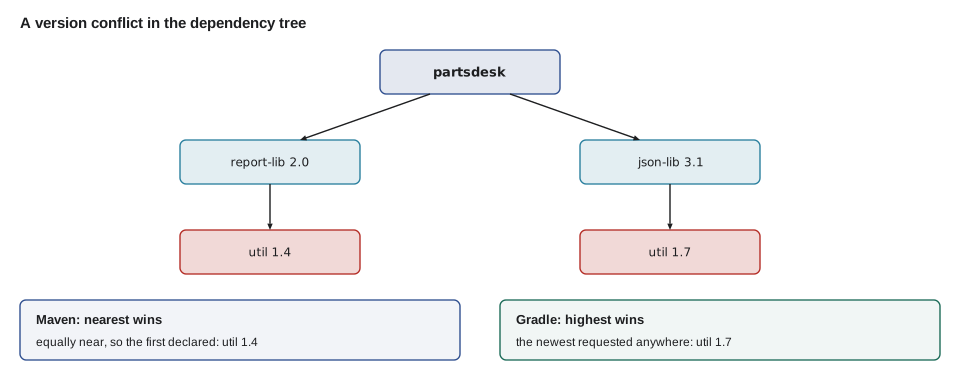
Sooner or later two libraries need different versions of the same third library, and only one version can be on the class path. The tools settle this differently. Maven uses nearest wins: the version closest to your project in the tree is chosen, and among equally near ones, the one declared first. Gradle uses highest wins: it picks the newest version requested anywhere, on the reasoning that newer versions usually stay compatible. Neither rule is always right, which is why you should look at the tree when you add a dependency and, if needed, settle the version yourself: in Maven with a dependencyManagement section, and in Gradle with a constraint or a platform.
import java.util.*;

public class Main {
    record Req(String via, int depth, String version) { }

    static int compare(String a, String b) {
        String[] x = a.split("\\."), y = b.split("\\.");
        for (int i = 0; i < Math.max(x.length, y.length); i++) {
            int p = i < x.length ? Integer.parseInt(x[i]) : 0;
            int q = i < y.length ? Integer.parseInt(y[i]) : 0;
            if (p != q) return Integer.compare(p, q);
        }
        return 0;
    }

    public static void main(String[] args) {
        List<Req> util = List.of(new Req("report-lib", 2, "1.4"), new Req("json-lib", 2, "1.7"));
        Req nearest = util.stream().min(Comparator.comparingInt(Req::depth)).get();
        Req highest = util.stream().max((r, s) -> compare(r.version(), s.version())).get();
        System.out.println("Maven, nearest wins: util " + nearest.version() + " (via " + nearest.via() + ")");
        System.out.println("Gradle, highest wins: util " + highest.version() + " (via " + highest.via() + ")");
        System.out.println("1.10 is newer than 1.9: " + (compare("1.10", "1.9") > 0));
    }
}Maven, nearest wins: util 1.4 (via report-lib) Gradle, highest wins: util 1.7 (via json-lib) 1.10 is newer than 1.9: true
What this code does
Both requests for util are two levels down, so Maven's nearest rule keeps the first one in the list, version 1.4, while Gradle's rule takes the highest, 1.7. Versions are compared part by part as numbers, which is why 1.10 counts as newer than 1.9 even though it sorts earlier as text. Real tools also understand qualifiers such as -beta and -SNAPSHOT, which this sketch leaves out.
The comparison also shows why versions must never be compared as plain strings. Most Java libraries follow semantic versioning, MAJOR.MINOR.PATCH, where a new patch only fixes bugs, a new minor version adds features without breaking existing code, and a new major version may break it. A conflict between 1.4 and 1.7 is usually safe to resolve upwards; a conflict between 1.7 and 2.0 deserves a careful look.
Keeping versions in one place
As a project grows, versions get repeated: four JUnit artifacts, three Jackson ones. Gradle's version catalog, a file named gradle/libs.versions.toml, lists libraries and versions once, and build scripts refer to them by name, such as libs.gson. Maven projects use properties and a dependencyManagement section for the same purpose, and many libraries publish a BOM, a bill of materials, a POM that fixes the versions of all their artifacts so they always match.
[versions]
gson = "2.13.1"
junit = "5.13.4"

[libraries]
gson = { module = "com.google.code.gson:gson", version.ref = "gson" }
junit-bom = { module = "org.junit:junit-bom", version.ref = "junit" }
junit-jupiter = { module = "org.junit.jupiter:junit-jupiter" }
What this code does
The versions table names each version once, and the libraries table gives each library a short name and points at its version. A build script then writes implementation(libs.gson), and the IDE completes the names. JUnit's artifacts take their versions from the JUnit BOM, so they always match each other.
Dependencies are a security question
Every dependency is code from someone else that runs with your program's permissions, so choosing one is a decision about trust. Before adding a library, Leif checks that it is maintained, widely used, published by who it claims and under a license the project can use. After adding it, the work continues: vulnerabilities are found in popular libraries every year, and the fix is usually an upgrade. Tools such as GitHub's Dependabot, the OWASP Dependency-Check plugin for Maven and Gradle, and Gradle's dependency verification, which records the checksum of every downloaded file, help a small team keep up.
- Pin exact versions in build files; never use version ranges or latest in a program you ship.
- Look at the dependency tree after adding a library, so you know what came with it.
- Upgrade regularly, in small steps, rather than once every few years.
- Remove dependencies the code no longer uses.
- Check the license: some open-source licenses put conditions on programs that include the library.
import java.util.*;

public class Main {
    static final Map<String, List<String>> NEEDS = Map.of(
        "partsdesk", List.of("core", "report-lib"),
        "core", List.of(),
        "report-lib", List.of("util", "zip-lib"),
        "zip-lib", List.of("util"),
        "util", List.of());

    static void print(String name, String indent, Set<String> seen) {
        boolean again = !seen.add(name);
        System.out.println(indent + name + (again ? " (already listed)" : ""));
        if (again) return;
        for (String dep : NEEDS.get(name)) print(dep, indent + "  ", seen);
    }

    public static void main(String[] args) {
        Set<String> all = new LinkedHashSet<>();
        print("partsdesk", "", all);
        System.out.println("Declared: " + NEEDS.get("partsdesk").size() + ", on the class path: " + (all.size() - 1));
    }
}partsdesk
core
report-lib
util
zip-lib
util (already listed)
Declared: 2, on the class path: 4What this code does
The tree is printed by visiting each library and then, indented, the libraries it needs. A library reached a second time is marked rather than expanded again, much as Gradle marks repeated entries in its dependency report. Two declared dependencies bring four libraries onto the class path, which is the effect of transitive dependencies.
Try it yourself
Compare two versions
Complete compare so it compares two versions such as 1.10.2 and 1.9 part by part as numbers, returning a negative number, zero or a positive number like Integer.compare. A missing part counts as 0, so 2.0 equals 2.0.0.
The program should print true, true and true.
public class Main {
    static int compare(String a, String b) {
        return a.compareTo(b);
    }

    public static void main(String[] args) {
        System.out.println(compare("1.10.2", "1.9") > 0);
        System.out.println(compare("2.0", "2.0.0") == 0);
        System.out.println(compare("2.13.1", "2.14") < 0);
    }
}
Try it yourself
Highest version wins
Gradle resolves a conflict by choosing the highest requested version. Complete resolve so it returns the highest version in the array, using the compare method given.
The program should print util 1.10.0.
public class Main {
    static int compare(String a, String b) {
        String[] x = a.split("\\."), y = b.split("\\.");
        for (int i = 0; i < Math.max(x.length, y.length); i++) {
            int p = i < x.length ? Integer.parseInt(x[i]) : 0;
            int q = i < y.length ? Integer.parseInt(y[i]) : 0;
            if (p != q) return Integer.compare(p, q);
        }
        return 0;
    }

    static String resolve(String[] requested) {
        return requested[0];
    }

    public static void main(String[] args) {
        System.out.println("util " + resolve(new String[] {"1.4", "1.10.0", "1.7.2", "1.9"}));
    }
}
Common mistakes
MistakeCopying library JARs into a lib folder and committing them.
InsteadDeclare dependencies in the build file and let the tool download them.
MistakeUsing a test library with compile scope or implementation.
InsteadUse test scope or testImplementation so it never ships with the program.
MistakeComparing versions as text, so 1.10 sorts before 1.9.
InsteadCompare version parts as numbers, as the build tools do.
MistakeAdding a library without looking at what it brings in.
InsteadPrint the dependency tree and check the transitive dependencies.
MistakeUsing version ranges or latest in a program you ship.
InsteadPin exact versions so every build uses the same code.
Summary and key terms
- A dependency is a library named by its coordinates and declared in the build file; the build tool downloads it from a repository, usually Maven Central, caches it and puts it on the right class paths.
- Maven scopes and Gradle configurations decide where a dependency is visible: compile or implementation, runtime or runtimeOnly, provided or compileOnly, test or testImplementation, and Gradle's api for a library's public API.
- Transitive dependencies come automatically and are shown by the dependency tree.
- Conflicts are resolved by nearest wins in Maven and highest wins in Gradle, and can be settled by hand.
- Version catalogs and BOMs keep versions in one place.
- Dependencies are a security and licensing decision: pin versions, review the tree, upgrade regularly and scan for vulnerabilities.
- Dependency
- A library a project needs, declared by its coordinates in the build file.
- Repository
- A server that stores libraries by coordinates, such as Maven Central.
- Maven Central
- The main public repository of Java libraries.
- Scope
- Maven's setting for where a dependency is visible, such as compile or test.
- Configuration (Gradle)
- A named group of dependencies with a purpose, such as implementation or testImplementation.
- Transitive dependency
- A library brought in because another dependency needs it.
- Dependency tree
- The listing of all dependencies and what brought each one in.
- Version conflict
- Two parts of the tree requesting different versions of the same library.
- Semantic versioning
- The MAJOR.MINOR.PATCH convention in which only a new major version may break compatibility.
- Version catalog
- Gradle's libs.versions.toml file listing libraries and versions in one place.
- BOM
- A bill of materials: a POM that fixes the versions of a set of related artifacts.
Practice problems
Work each problem on paper first, then reveal the answer to check.
Which Gradle configuration should JUnit use?
Show answer
testImplementation.
What is a transitive dependency?
Show answer
A library brought in because one of your dependencies depends on it.
Two paths request util 1.4 and 1.7. Which does Gradle choose by default?
Show answer
1.7, the highest version.
Why is 1.10 newer than 1.9?
Show answer
Versions are compared part by part as numbers, and 10 is greater than 9.
Why keep mavenLocal() out of committed build files?
Show answer
It makes builds depend on what is in one person's local cache.
Lesson quiz · 5 questions
Score 60% or more to complete this lesson.
Create a free account to save your progress, take quizzes and earn a certificate.