
JAVA-120 · Lesson 11 of 12 · 23 min
Javadoc and project documentation
▶ Video coming soon A video version of this lesson is on the way.
The last regular session, on Monday, March 29, 2027, was about the people who will use Hamza's code without him in the room. The core module that PartsDesk and ShopBook are about to share will be used by Ingrid, by next year's student volunteer and, a year from now, by Hamza himself after he has forgotten the details. Leif's question was simple: when one of them types money. in the IDE and waits, what should appear? The answer is Javadoc, documentation written in the code and shown wherever the code is used, plus a few plain files that explain the project as a whole.
Doc comments
A doc comment starts with /** instead of /* and sits immediately before a class, field, constructor or method. Its first sentence is the summary, shown in lists and IDE pop-ups, so it should say in a few words what the element does. Further paragraphs add detail, and block tags, lines starting with @, describe parts of the element in a standard way. Doc comments are for the public and protected parts of a class, the ones other code calls; private helpers get ordinary comments, if they need any.
package org.secondgear.core;

/**
 * An amount of money in whole cents.
 *
 * @param cents the amount in cents; may be negative for refunds
 */
public record Money(long cents) {

    /** Zero dollars. */
    public static final Money ZERO = new Money(0);

    /**
     * Returns the sum of this amount and another.
     *
     * @param other the amount to add
     * @return a new Money holding the total
     */
    public Money plus(Money other) {
        return new Money(cents + other.cents);
    }

    /**
     * Returns this amount multiplied by a whole number.
     *
     * @param n how many times to count the amount
     * @return a new Money holding the product
     */
    public Money times(int n) {
        return new Money(cents * n);
    }

    @Override
    public String toString() {
        String sign = cents < 0 ? "-" : "";
        long a = Math.abs(cents);
        return String.format("%s%d.%02d", sign, a / 100, a % 100);
    }
}
What this code does
The class comment's summary says what a Money is, and its @param tag documents the record's component. Each public method has a summary, an @param for each parameter and an @return describing the result. toString has no comment of its own because it overrides Object's method and inherits that documentation.
| Tag | Use | Example |
|---|---|---|
| @param name | One per parameter, in order | @param ways how many people pay |
| @return | What a non-void method returns | @return the share of each person, in cents |
| @throws Type | Each exception the caller should expect, and when | @throws IllegalArgumentException if ways is less than 1 |
| @see | A related class or method | @see Money#plus(Money) |
| @since | The version that added the element | @since 1.1.0 |
| @deprecated | Why not to use it, and what to use instead | @deprecated use {@link #times(int)} |
| {@code ...} | Inline code in a sentence, shown in a code font | {@code new Money(899)} |
| {@link ...} | An inline link to another element | see {@link Shop#NAME} |
public class Main {
    /**
     * Splits a bill evenly between several people.
     *
     * <p>Any cents left over are paid by the first person, so the shares
     * always add up to the bill. For example, {@code split(1000, 3)}
     * returns {@code [334, 333, 333]}.
     *
     * @param cents the total bill in cents; must not be negative
     * @param ways  how many people pay; at least 1
     * @return each person's share in cents, largest first
     * @throws IllegalArgumentException if {@code ways} is less than 1
     */
    static long[] split(long cents, int ways) {
        if (ways < 1) {
            throw new IllegalArgumentException("ways must be at least 1, was " + ways);
        }
        long[] shares = new long[ways];
        java.util.Arrays.fill(shares, cents / ways);
        shares[0] += cents % ways;
        return shares;
    }

    public static void main(String[] args) {
        System.out.println(java.util.Arrays.toString(split(1000, 3)));
        System.out.println(java.util.Arrays.toString(split(4500, 2)));
        try {
            split(1000, 0);
        } catch (IllegalArgumentException e) {
            System.out.println(e.getMessage());
        }
    }
}[334, 333, 333] [2250, 2250] ways must be at least 1, was 0
What this code does
The doc comment states the method's contract: what it does, what each parameter must be, what it returns and when it throws. The paragraph tag and the code tags format the description, and the example in it is one the program actually prints. Calling split with zero people throws exactly the exception the @throws tag promised.
A doc comment is a contract. The method above promises that the shares add up to the bill and names the exception for a bad argument; code that calls it may rely on both, and a later change that breaks either is a bug even if the new code is otherwise correct. Writing the contract down before coding a method is a good way to find out whether you know what it should do.
public class Main {
    /**
     * Returns the amount in dollars as a double.
     *
     * @param cents the amount in cents
     * @return the amount in dollars
     * @deprecated doubles cannot hold every cent exactly; use
     *     {@link #format(long)} or keep amounts in cents
     */
    @Deprecated(since = "1.1.0", forRemoval = true)
    static double dollars(long cents) {
        return cents / 100.0;
    }

    /**
     * Formats an amount in cents as dollars and cents, such as 8.99.
     *
     * @param cents the amount in cents; not negative
     * @return the formatted amount
     */
    static String format(long cents) {
        return cents / 100 + "." + String.format("%02d", cents % 100);
    }

    public static void main(String[] args) throws NoSuchMethodException {
        System.out.println(format(899));
        Deprecated d = Main.class.getDeclaredMethod("dollars", long.class).getAnnotation(Deprecated.class);
        System.out.println("dollars is deprecated since " + d.since() + ", for removal: " + d.forRemoval());
        System.out.println("0.1 + 0.2 as doubles: " + (0.1 + 0.2));
    }
}8.99 dollars is deprecated since 1.1.0, for removal: true 0.1 + 0.2 as doubles: 0.30000000000000004
What this code does
The @deprecated tag in the comment tells readers why not to use dollars and what to use instead, while the @Deprecated annotation tells the compiler, which warns any code that still calls it. The annotation's since and forRemoval values can be read at run time, as the program shows. The last line prints the kind of tiny rounding error that is the reason for the deprecation.
Generating the documentation
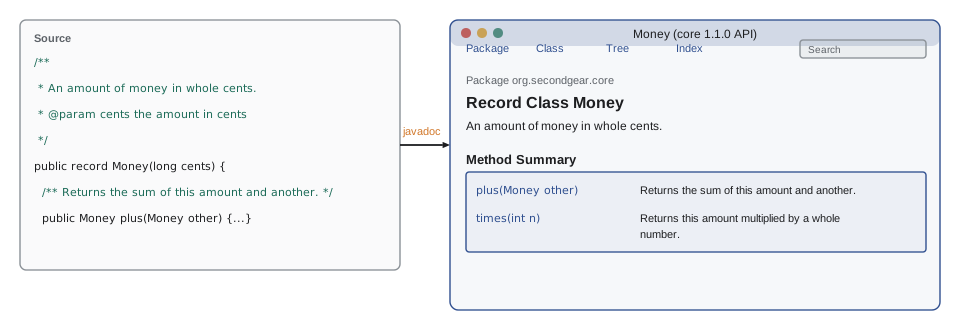
The JDK's javadoc tool reads doc comments and produces a website of HTML pages, the same format as the Java API documentation on Oracle's site. Gradle's java plugin adds a javadoc task, and Maven's Javadoc plugin does the same; both write the site into the build folder. The session below is real, run on the core module's sources.
$ javadoc -d docs -sourcepath src -subpackages org.secondgear -windowtitle "Second Gear core" -quiet
$ find docs -name "*.html" | sort | head -20
docs/allclasses-index.html
docs/allpackages-index.html
docs/constant-values.html
docs/help-doc.html
docs/index-all.html
docs/index.html
docs/org/secondgear/core/Money.html
docs/org/secondgear/core/Shop.html
docs/org/secondgear/core/package-summary.html
docs/org/secondgear/core/package-tree.html
docs/overview-tree.html
docs/search.html
What this code does
javadoc reads every package under org.secondgear in the source folder and writes the site into docs; -quiet hides the progress messages. The output has a page for each class and for the package, plus indexes, a search page and a page listing the constant values. Opening docs/index.html in a browser shows it.
Checking documentation with doclint
javadoc can also check doc comments, with doclint. It reports missing @param and @return tags, broken links, malformed HTML and public elements with no comment at all. The class below documents only one of its two parameters and has no @return, and javadoc with -Xdoclint:all says so, file and line included. Gradle runs doclint when it runs the javadoc task, so a broken comment can fail the build just as a compile error does.
package org.secondgear.core;

/** A deliberately incomplete doc comment. */
public class Broken {
    /**
     * Splits a bill.
     *
     * @param ways how many people pay
     */
    public static long split(long cents, int ways) {
        return cents / ways;
    }
}
What this code does
The method's doc comment describes ways but not cents, and says nothing about what it returns. The class also relies on the default constructor, which has no comment because the compiler writes it. Each of these is the kind of gap a reader stumbles over and doclint reports.
$ javadoc -d docs2 -sourcepath src -subpackages org.secondgear -Xdoclint:all -quiet
src/org/secondgear/core/Broken.java:10: warning: no @param for cents
    public static long split(long cents, int ways) {
                       ^
src/org/secondgear/core/Broken.java:10: warning: no @return
    public static long split(long cents, int ways) {
                       ^
src/org/secondgear/core/Broken.java:4: warning: use of default constructor, which does not provide a comment
public class Broken {
       ^
3 warnings
What this code does
doclint reports the missing @param for cents and the missing @return, pointing at the method's line. It also notes that the public class's default constructor has no comment; giving the class a private constructor or a documented public one removes the warning. These are warnings, and javadoc still writes the pages, unless the build is set to treat them as errors.
Snippets and Markdown comments
Two newer features make doc comments easier to write. The {@snippet} tag, added in Java 18, holds an example of code in a doc comment with proper formatting and highlighting, and can even pull the example from a real source file, so it is compiled and stays correct. And since Java 23, a doc comment can be written in Markdown, the plain-text format used in README files, by starting each line with /// instead of using /** ... */. The examples in this course use the classic form, which every Java version reads and almost all existing code uses.
/// Returns this amount multiplied by a whole number.
///
/// For example, ten inner tubes at 8.99 each:
/// ```
/// new Money(899).times(10)   // 89.90
/// ```
///
/// @param n how many times to count the amount
/// @return a new `Money` holding the product
public Money times(int n) {
    return new Money(cents * n);
}
What this code does
Each line of a Markdown doc comment starts with three slashes, and the text uses Markdown: backticks for code and a fenced block for an example. The block tags such as @param work exactly as in classic comments. This form needs JDK 23 or later to generate documentation from, so a project must agree to use it.
package-info.java
A package can have documentation of its own, in a special file named package-info.java in the package's folder. It holds only a doc comment and the package declaration. javadoc uses it as the package's summary page, which is the right place to explain what the package is for and how its classes fit together.
/**
 * Classes shared by every Second Gear Cycles program.
 *
 * <p>{@link org.secondgear.core.Money} holds amounts in whole cents, and
 * {@link org.secondgear.core.Shop} holds facts about the shop itself.
 * Nothing in this package depends on any other Second Gear package.
 */
package org.secondgear.core;
What this code does
The doc comment comes before the package declaration, and the file has no class. Its summary sentence appears on javadoc's list of packages, and the rest becomes the package's overview page. Stating the rule that core depends on nothing else, from lesson 3, puts the design where every future developer will see it.
Project documentation
Javadoc describes the code. A project also needs a few files that describe the project, kept in the root folder and written in Markdown so they display nicely on GitHub and in IDEs. The most important is the README, which every developer opens first.
# Second Gear programs

Programs for Second Gear Cycles' parts room and bookings desk.

| Module    | What it is                                      |
|-----------|-------------------------------------------------|
| core      | Money and shop facts shared by every program    |
| partsdesk | Console tool for parts stock and reorders       |
| shopbook  | Repair and rental bookings                      |

## Building

Requires a JDK 21 or later. The Gradle wrapper downloads Gradle itself.

    ./gradlew build              # compile and check everything
    ./gradlew :partsdesk:run     # start PartsDesk
    ./gradlew installDist        # ready-to-run folders in */build/install

## Contact

Hamza Belcourt (code), Odile Branscombe (Second Gear)
What this code does
A README says what the project is, how it is organized and, above all, how to build and run it, in commands someone can copy. Headings start with # and the table and indented commands are plain Markdown. If a new volunteer can go from cloning the repository to a running program using only the README, it is doing its job.
- CHANGELOG.md lists what changed in each version, newest first, so users can see what an upgrade brings.
- LICENSE states the terms under which others may use the code; Second Gear chose an open-source license for its programs.
- CONTRIBUTING.md tells volunteers how to set up, which style to follow and how to propose changes.
- Decision records (often docs/adr) record important design decisions and why they were made, such as choosing Gradle.
import java.util.List;

public class Main {
    record Release(String version, String date, List<String> changes) { }

    public static void main(String[] args) {
        List<Release> log = List.of(
            new Release("1.1.0", "2027-04-30", List.of("Money and Shop moved to the core module", "Version shown at start-up")),
            new Release("1.0.0", "2026-12-01", List.of("First release for the counter computer")));
        System.out.println("# Changelog");
        for (Release r : log) {
            System.out.println();
            System.out.println("## " + r.version() + " (" + r.date() + ")");
            for (String c : r.changes()) {
                System.out.println("- " + c);
            }
        }
    }
}# Changelog ## 1.1.0 (2027-04-30) - Money and Shop moved to the core module - Version shown at start-up ## 1.0.0 (2026-12-01) - First release for the counter computer
What this code does
Each release is a record with its version, date and list of changes, kept newest first. The program prints them as Markdown: a level-two heading per release and a bullet per change, the usual shape of a CHANGELOG.md file. Generating the file from structured data is one way to keep it consistent; most small projects simply edit it by hand.
The planned 1.1.0 date in the changelog is the capstone's: lesson 12 is the release that moves Money and Shop into core.
Try it yourself
The summary sentence
javadoc uses the first sentence of a doc comment as the summary. Complete summary so it returns the text up to and including the first period that is followed by a space or the end of the text, with any leading * and spaces on each line removed.
The program should print Splits a bill evenly between several people. and Returns the sum of this amount and another.
public class Main {
    static String summary(String comment) {
        return comment;
    }

    public static void main(String[] args) {
        System.out.println(summary("Splits a bill evenly between several people. Any cents\n * left over are paid by the first person."));
        System.out.println(summary("Returns the sum of this amount and another."));
    }
}
Try it yourself
Missing @param tags
Complete missing so it returns the names of parameters that have no @param line in the comment, the check doclint makes. Return them as a list in parameter order.
The program should print [cents] and then [].
import java.util.ArrayList;
import java.util.List;

public class Main {
    static List<String> missing(String[] params, String comment) {
        return new ArrayList<>();
    }

    public static void main(String[] args) {
        String c1 = "Splits a bill.\n@param ways how many people pay";
        String c2 = "Splits a bill.\n@param cents the bill\n@param ways how many people pay";
        System.out.println(missing(new String[] {"cents", "ways"}, c1));
        System.out.println(missing(new String[] {"cents", "ways"}, c2));
    }
}
Common mistakes
MistakeStarting a doc comment with /* instead of /**.
InsteadDoc comments start with /** (or /// for Markdown comments in Java 23+).
MistakeWriting a first sentence that is not a summary, such as This method.
InsteadStart with a short verb phrase saying what it does: Returns the sum of this amount and another.
MistakeDocumenting how a method works rather than what it promises.
InsteadDocument the contract: parameters, result, exceptions and rules callers can rely on.
MistakeLetting doc comments drift from the code.
InsteadRun doclint in the build so missing and broken documentation is reported.
MistakeA README that does not say how to build the project.
InsteadGive the exact commands, such as ./gradlew build, and test them on a fresh clone.
Summary and key terms
- Doc comments, starting with /**, document public classes, fields, constructors and methods; the first sentence is the summary, and block tags such as @param, @return, @throws, @see, @since and @deprecated describe the contract, with inline tags {@code} and {@link}.
- The javadoc tool, and Gradle's javadoc task, generate an HTML site from them, and doclint, enabled with -Xdoclint, reports missing tags and broken comments. {@snippet} holds code examples, and Java 23 added Markdown doc comments written with ///. package-info.java documents a package.
- A project also needs a README with build instructions, and usually a CHANGELOG, a LICENSE, contributing notes and decision records.
- Javadoc
- Documentation written in doc comments and the tool that turns it into HTML.
- Doc comment
- A comment starting with /** placed before a declaration it documents.
- Summary sentence
- The first sentence of a doc comment, shown in lists and pop-ups.
- Block tag
- A line starting with @ in a doc comment, such as @param or @return.
- Inline tag
- A tag in braces inside text, such as {@code ...} or {@link ...}.
- Contract
- What a method promises callers about its parameters, result and exceptions.
- doclint
- javadoc's checker for missing and malformed documentation.
- package-info.java
- A file holding a package's doc comment and declaration.
- README
- The file in a project's root that explains the project and how to build it.
- CHANGELOG
- A file listing what changed in each version.
Practice problems
Work each problem on paper first, then reveal the answer to check.
How does javadoc know which comments are documentation?
Show answer
They start with /** (or, from Java 23, /// lines) and sit right before a declaration.
Which tag describes an exception a caller should expect?
Show answer
@throws, with the exception type and when it is thrown.
What did doclint report about Broken.split?
Show answer
A missing @param for cents and a missing @return.
Where does a package's own documentation go?
Show answer
In package-info.java in the package's folder.
What is the most important thing a README should contain?
Show answer
How to build and run the project, as exact commands.
Lesson quiz · 5 questions
Score 60% or more to complete this lesson.
Create a free account to save your progress, take quizzes and earn a certificate.