
JAVA-120 · Lesson 12 of 12 · 25 min
Capstone: a buildable multi-module project
▶ Video coming soon A video version of this lesson is on the way.
ShopBook's demo is planned for Saturday, April 17, 2027, and the capstone for this course is planned to start the Monday after. From April 19 to 30, Hamza is to turn his two programs into one project that anyone can build, and on Monday, May 3 Leif and Ingrid will review it with Odile and Kofi. Odile's request, written down at the March 29 session, sets the requirements. Everything below is the plan Hamza and Leif worked out, built and checked on a practice copy so that every command and its output are real.
The requirements
| # | Requirement | Lesson it draws on |
|---|---|---|
| R1 | One repository holds PartsDesk, ShopBook and the code they share | 3, 12 |
| R2 | Money and the shop's name exist once, in a core module, used by both programs | 3, 6 |
| R3 | Anyone with a JDK can build everything with one command, without installing Gradle | 5 |
| R4 | Every module compiles with Java 21, whatever JDK the computer has | 2, 5 |
| R5 | Compiler warnings fail the build | 10 |
| R6 | Each program ships as a folder with start scripts that Kofi can unzip and run | 7 |
| R7 | Each program prints its version, 1.1.0, at start-up | 7 |
| R8 | core has generated documentation, and the README says how to build and run | 11 |
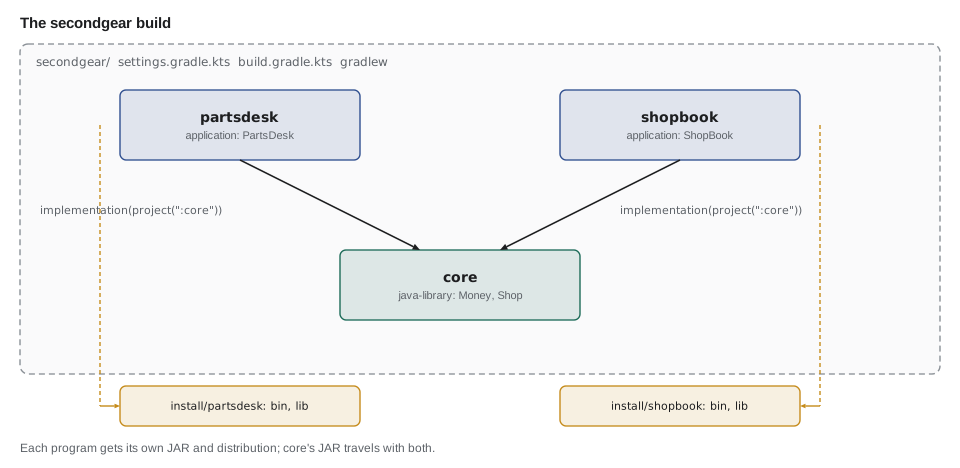
Step 1: the settings and the root build
The project folder is named secondgear. Its settings file names the build and includes the three modules, and a build script at the root holds what every module shares: the group, the version, the strict compiler settings and the manifest entries. Putting shared settings in one place means the three module build scripts stay short and cannot drift apart.
rootProject.name = "secondgear"

include("core", "partsdesk", "shopbook")
What this code does
The build is named secondgear and has three modules, each in a folder of the same name. Gradle reads this file first to learn which projects exist. Adding a fourth program later means adding one name here.
subprojects {
    group = "org.secondgear"
    version = "1.1.0"

    plugins.withType<JavaPlugin> {
        tasks.withType<JavaCompile>().configureEach {
            options.compilerArgs.addAll(listOf("-Xlint:all", "-Werror"))
        }
        tasks.named<Jar>("jar") {
            manifest {
                attributes(
                    "Implementation-Title" to project.name,
                    "Implementation-Version" to project.version
                )
            }
        }
    }
}
What this code does
The subprojects block applies to every module. Each gets the group org.secondgear and version 1.1.0, and, for modules that use the java plugin, every compile task gets -Xlint:all -Werror and every JAR's manifest gets the module's name and version. That covers requirements R5 and R7 for all three modules at once.
On a larger build, Leif would move these shared settings into a convention plugin, a small plugin kept in the build's own buildSrc folder or an included build, which each module applies by name. A subprojects block is fine for three modules and easier to read while learning.
Step 2: the core module
core uses the java-library plugin instead of application: it is a library with no main class, and java-library adds the api configuration from lesson 6 in case core ever needs to expose a library's types. Money moves here from ShopBook, with the doc comments from lesson 11, together with a tiny Shop class holding the shop's name and a package-info.java.
plugins {
    `java-library`
}

java {
    toolchain {
        languageVersion = JavaLanguageVersion.of(21)
    }
}
What this code does
java-library compiles core and packages it as a JAR, without start scripts. The toolchain pins Java 21 for this module, which is requirement R4. core declares no dependencies, which keeps the rule that it depends on nothing else in Second Gear's code.
package org.secondgear.core;

/** Facts about the shop shared by every Second Gear program. */
public final class Shop {
    private Shop() { }

    /** The shop's name as printed on receipts. */
    public static final String NAME = "Second Gear Cycles";
}
What this code does
Shop is a final class with a private constructor, the utility-class pattern from JAVA-102, so it cannot be instantiated or extended. Its one constant is the name both programs print. Facts like the sales tax rate could join it later.
Step 3: the two programs
Each program's build script applies the application plugin, pins Java 21, names its main class and declares a dependency on core with implementation(project(":core")). That one line does three things: Gradle builds core first, puts core's classes on the program's class path, and includes core's JAR in the program's distribution.
plugins {
    application
}

java {
    toolchain {
        languageVersion = JavaLanguageVersion.of(21)
    }
}

dependencies {
    implementation(project(":core"))
}

application {
    mainClass = "org.secondgear.parts.PartsDesk"
}
What this code does
The dependencies block refers to core by its project path rather than by coordinates, so Gradle builds it from source in the same run. The application block names PartsDesk's main class for gradle run and the start scripts. shopbook/build.gradle.kts is identical apart from its main class, org.secondgear.booking.ShopBook.
package org.secondgear.parts;

import org.secondgear.core.Money;
import org.secondgear.core.Shop;

public class PartsDesk {
    static String version() {
        String v = PartsDesk.class.getPackage().getImplementationVersion();
        return v != null ? v : "(development build)";
    }

    public static void main(String[] args) {
        Money tube = new Money(899);
        System.out.println(Shop.NAME + " PartsDesk " + version());
        System.out.println("10 inner tubes at " + tube + " = " + tube.times(10));
    }
}
What this code does
PartsDesk imports Money and Shop from org.secondgear.core, so the shared code is used, not copied. version reads Implementation-Version from the package, which comes from the JAR's manifest when the program runs from its distribution and is missing when it runs from class folders. The practice copy keeps only enough of PartsDesk to show the wiring; the real program keeps all its features.
The practice copy's two programs are deliberately small, so the session output fits on the page. Here is the same structure squeezed into one file you can run, with the core classes nested where the build would have them in their own module.
public class Main {
    // --- module core ---
    record Money(long cents) {
        Money times(int n) { return new Money(cents * n); }
        @Override public String toString() {
            String sign = cents < 0 ? "-" : "";
            long a = Math.abs(cents);
            return String.format("%s%d.%02d", sign, a / 100, a % 100);
        }
    }

    static final class Shop {
        private Shop() { }
        static final String NAME = "Second Gear Cycles";
    }

    // --- module partsdesk ---
    static void partsDesk() {
        Money tube = new Money(899);
        System.out.println(Shop.NAME + " PartsDesk");
        System.out.println("10 inner tubes at " + tube + " = " + tube.times(10));
    }

    // --- module shopbook ---
    static void shopBook() {
        Money cityDay = new Money(1500);
        Money deposit = new Money(2500);
        System.out.println(Shop.NAME + " ShopBook");
        System.out.println("City bike, 3 days: " + cityDay.times(3) + " plus deposit " + deposit);
    }

    public static void main(String[] args) {
        partsDesk();
        shopBook();
        System.out.println("Refund shown as: " + new Money(-150));
    }
}Second Gear Cycles PartsDesk 10 inner tubes at 8.99 = 89.90 Second Gear Cycles ShopBook City bike, 3 days: 45.00 plus deposit 25.00 Refund shown as: -1.50
What this code does
Both programs use the same Money and Shop, which is the point of the core module: one definition, used twice. Money stores whole cents and formats them only when printed, and its toString puts the sign in front so a refund prints correctly. In the real build each part lives in its own module and JAR, but the code is the same.
The refund line is there because of a bug found while preparing the capstone. Money's first toString printed -150 cents as -1.50 correctly but -50 cents as 0.50, dropping the sign, because the sign was carried only by the dollars part. Moving the class into core, where both programs and their future tests use it, was the moment to fix it once.
Step 4: build, run and check
With the files in place, one command builds everything. The session below is real, recorded on the practice copy with Gradle 8.14 and the --offline flag, as in lesson 5; on Hamza's laptop the same commands run through ./gradlew and Gradle 9.
$ gradle --offline projects -q --console=plain

Projects:

------------------------------------------------------------
Root project 'secondgear'
------------------------------------------------------------

Root project 'secondgear'
+--- Project ':core'
+--- Project ':partsdesk'
\--- Project ':shopbook'

To see a list of the tasks of a project, run gradle <project-path>:tasks
For example, try running gradle :core:tasks
$ gradle --offline build --console=plain
> Task :core:compileJava
> Task :core:processResources NO-SOURCE
> Task :core:classes
> Task :core:jar
> Task :core:assemble
> Task :core:compileTestJava NO-SOURCE
> Task :core:processTestResources NO-SOURCE
> Task :core:testClasses UP-TO-DATE
> Task :core:test NO-SOURCE
> Task :core:check UP-TO-DATE
> Task :core:build
> Task :partsdesk:compileJava
> Task :partsdesk:processResources NO-SOURCE
> Task :partsdesk:classes
> Task :partsdesk:jar
> Task :partsdesk:startScripts
> Task :partsdesk:distTar
> Task :partsdesk:distZip
> Task :partsdesk:assemble
> Task :partsdesk:compileTestJava NO-SOURCE
> Task :partsdesk:processTestResources NO-SOURCE
> Task :partsdesk:testClasses UP-TO-DATE
> Task :partsdesk:test NO-SOURCE
> Task :partsdesk:check UP-TO-DATE
> Task :partsdesk:build
> Task :shopbook:compileJava
> Task :shopbook:processResources NO-SOURCE
> Task :shopbook:classes
> Task :shopbook:jar
> Task :shopbook:startScripts
> Task :shopbook:distTar
> Task :shopbook:distZip
> Task :shopbook:assemble
> Task :shopbook:compileTestJava NO-SOURCE
> Task :shopbook:processTestResources NO-SOURCE
> Task :shopbook:testClasses UP-TO-DATE
> Task :shopbook:test NO-SOURCE
> Task :shopbook:check UP-TO-DATE
> Task :shopbook:build

BUILD SUCCESSFUL in 2s
12 actionable tasks: 12 executed
$ gradle --offline :partsdesk:run -q --console=plain
Second Gear Cycles PartsDesk (development build)
10 inner tubes at 8.99 = 89.90
What this code does
gradle projects confirms the three modules. gradle build compiles core first, because both programs depend on it, then builds each program's JAR and distributions, with -Xlint:all -Werror on every compile; all twelve tasks run and the build succeeds with no warnings. gradle :partsdesk:run starts PartsDesk from the class folders, so it reports a development build.
import java.util.*;

public class Main {
    static List<String> buildOrder(Map<String, List<String>> deps) {
        List<String> order = new ArrayList<>();
        Set<String> done = new HashSet<>(), visiting = new HashSet<>();
        for (String m : deps.keySet()) visit(m, deps, done, visiting, order);
        return order;
    }

    static void visit(String m, Map<String, List<String>> deps, Set<String> done, Set<String> visiting, List<String> order) {
        if (done.contains(m)) return;
        if (!visiting.add(m)) throw new IllegalStateException("Cycle through " + m);
        for (String d : deps.get(m)) visit(d, deps, done, visiting, order);
        visiting.remove(m);
        done.add(m);
        order.add(m);
    }

    public static void main(String[] args) {
        Map<String, List<String>> deps = new LinkedHashMap<>();
        deps.put("partsdesk", List.of("core"));
        deps.put("shopbook", List.of("core"));
        deps.put("core", List.of());
        System.out.println("Build order: " + buildOrder(deps));

        deps.put("core", List.of("shopbook"));      // a mistake: core must not depend on a program
        try {
            buildOrder(deps);
        } catch (IllegalStateException e) {
            System.out.println("Refused: " + e.getMessage());
        }
    }
}Build order: [core, partsdesk, shopbook] Refused: Cycle through core
What this code does
buildOrder visits each module after its dependencies, so core comes first even though it was listed last, as in Gradle's real build. A module met again while still being visited means the dependencies loop back on themselves. The second call shows the result of letting core depend on shopbook: there is no order that works, and the build is refused.
Step 5: distributions and versions
Requirement R6 is the installDist task from lesson 7, now for both programs at once, and R7 is the manifest entry the root build script adds. The session shows the result, again real.
$ gradle --offline installDist -q --console=plain
$ find . -path "*/build/install/*" -type f | sort
./partsdesk/build/install/partsdesk/bin/partsdesk
./partsdesk/build/install/partsdesk/bin/partsdesk.bat
./partsdesk/build/install/partsdesk/lib/core-1.1.0.jar
./partsdesk/build/install/partsdesk/lib/partsdesk-1.1.0.jar
./shopbook/build/install/shopbook/bin/shopbook
./shopbook/build/install/shopbook/bin/shopbook.bat
./shopbook/build/install/shopbook/lib/core-1.1.0.jar
./shopbook/build/install/shopbook/lib/shopbook-1.1.0.jar
$ partsdesk/build/install/partsdesk/bin/partsdesk
Second Gear Cycles PartsDesk 1.1.0
10 inner tubes at 8.99 = 89.90
$ shopbook/build/install/shopbook/bin/shopbook
Second Gear Cycles ShopBook 1.1.0
City bike, 3 days: 45.00 plus deposit 25.00
$ unzip -p partsdesk/build/libs/partsdesk-1.1.0.jar META-INF/MANIFEST.MF
Manifest-Version: 1.0
Implementation-Title: partsdesk
Implementation-Version: 1.1.0
What this code does
installDist lays out one folder per program, each with its start scripts in bin and two JARs in lib: the program's own and core's, which came with it through the implementation dependency. Run from its distribution, each program reads its version from its JAR's manifest and prints 1.1.0. unzip shows the manifest entries the root build script added.
For the counter computer, gradle :partsdesk:distZip makes partsdesk-1.1.0.zip, the same folder zipped, which Kofi can unpack and run with bin/partsdesk, or bin/partsdesk.bat on Windows. Upgrading later means unzipping the next version over it.
Step 6: documentation
R8 asks for documentation of core and a README. The java plugin's javadoc task generates core's site, with doclint checking the comments as it goes; the README from lesson 11, at the root of the repository, gives the build and run commands.
$ gradle --offline :core:javadoc --console=plain
> Task :core:compileJava UP-TO-DATE
> Task :core:processResources NO-SOURCE
> Task :core:classes UP-TO-DATE
> Task :core:javadoc

BUILD SUCCESSFUL in 3s
2 actionable tasks: 1 executed, 1 up-to-date
$ ls core/build/docs/javadoc/org/secondgear/core
Money.html
Shop.html
package-summary.html
package-tree.html
What this code does
The javadoc task needs core's compiled classes, which were already up to date, and then writes the site under core/build/docs/javadoc. The package folder holds a page for each class and the package summary that comes from package-info.java. Because doclint found nothing to report, the task printed no warnings.
The same build in Maven
Leif asked Hamza to sketch the Maven equivalent too, because his next job may well use it. A Maven multi-module build has a parent POM at the root with packaging pom, listing the modules and holding shared settings; each module's POM names the parent and declares its dependencies, with core referred to by its coordinates.
<project xmlns="http://maven.apache.org/POM/4.0.0">
  <modelVersion>4.0.0</modelVersion>
  <groupId>org.secondgear</groupId>
  <artifactId>secondgear</artifactId>
  <version>1.1.0</version>
  <packaging>pom</packaging>

  <modules>
    <module>core</module>
    <module>partsdesk</module>
    <module>shopbook</module>
  </modules>

  <properties>
    <maven.compiler.release>21</maven.compiler.release>
    <project.build.sourceEncoding>UTF-8</project.build.sourceEncoding>
  </properties>
</project>
What this code does
The parent POM's packaging is pom, because it builds nothing itself; it lists the three modules and holds the settings they share. Running mvn package in the root folder builds the modules in dependency order, which Maven calls the reactor. Each module's own POM points back to this one as its parent.
<project xmlns="http://maven.apache.org/POM/4.0.0">
  <modelVersion>4.0.0</modelVersion>
  <parent>
    <groupId>org.secondgear</groupId>
    <artifactId>secondgear</artifactId>
    <version>1.1.0</version>
  </parent>
  <artifactId>partsdesk</artifactId>

  <dependencies>
    <dependency>
      <groupId>org.secondgear</groupId>
      <artifactId>core</artifactId>
      <version>${project.version}</version>
    </dependency>
  </dependencies>
</project>
What this code does
The module inherits its groupId, version and properties from the parent, so it only names itself. Its dependency on core uses core's coordinates, with the version taken from the project's own version so the two can never mismatch. Maven sees that core is part of the same build and builds it first.
Release and review
The plan for the last day of the capstone is Leif's release checklist, which he uses at work in a longer form. Each item is something a reviewer can check by running a command, not by taking Hamza's word for it.
import java.util.*;

public class Main {
    record Check(String requirement, String how, boolean passed) { }

    public static void main(String[] args) {
        List<Check> checks = List.of(
            new Check("R1, R2", "One repository; Money and Shop only in core", true),
            new Check("R3", "./gradlew build on a fresh clone", true),
            new Check("R4", "Toolchain languageVersion 21 in every module", true),
            new Check("R5", "-Xlint:all -Werror; build has no warnings", true),
            new Check("R6", "installDist folders run from bin", true),
            new Check("R7", "Both programs print 1.1.0", true),
            new Check("R8", "core javadoc builds; README build steps tested", true));
        long passed = checks.stream().filter(Check::passed).count();
        for (Check c : checks) {
            System.out.printf("[%s] %-7s %s%n", c.passed() ? "x" : " ", c.requirement(), c.how());
        }
        System.out.println(passed + " of " + checks.size() + " checks pass: "
            + (passed == checks.size() ? "ready to tag 1.1.0" : "not ready"));
    }
}[x] R1, R2 One repository; Money and Shop only in core [x] R3 ./gradlew build on a fresh clone [x] R4 Toolchain languageVersion 21 in every module [x] R5 -Xlint:all -Werror; build has no warnings [x] R6 installDist folders run from bin [x] R7 Both programs print 1.1.0 [x] R8 core javadoc builds; README build steps tested 7 of 7 checks pass: ready to tag 1.1.0
What this code does
Each check pairs a requirement with the way a reviewer can confirm it, so the list doubles as instructions for the May 3 review. The program counts the passing checks and decides whether the release is ready. A version-control tag, v1.1.0, would then mark the exact commit that was released.
After the review, the plan is that Kofi will replace the hand-copied PartsDesk folder with the 1.1.0 distribution, and Odile will start using ShopBook for spring rentals. Hamza's next Java course, JAVA-201, puts the collections and data structures inside these modules to work, and JAVA-220 adds the tests that the empty src/test/java folders are waiting for.
Try it yourself
Next version
Complete bump so it returns the next semantic version: for major, add 1 to the first number and reset the others to 0; for minor, add 1 to the second and reset the third; for patch, add 1 to the third.
The program should print 1.1.0, 1.1.1 and 2.0.0.
public class Main {
    static String bump(String version, String part) {
        return version;
    }

    public static void main(String[] args) {
        System.out.println(bump("1.0.0", "minor"));
        System.out.println(bump("1.1.0", "patch"));
        System.out.println(bump("1.1.1", "major"));
    }
}
Try it yourself
What does each module need?
A module's class path holds its own classes plus everything it depends on, directly or through other modules. Complete classPath so it returns the module followed by all the modules it needs, each once, in the order they are first reached.
The program should print [partsdesk, core] and then [report, partsdesk, core, shopbook].
import java.util.*;

public class Main {
    static List<String> classPath(String module, Map<String, List<String>> deps) {
        return List.of(module);
    }

    public static void main(String[] args) {
        Map<String, List<String>> deps = Map.of(
            "core", List.of(),
            "partsdesk", List.of("core"),
            "shopbook", List.of("core"),
            "report", List.of("partsdesk", "shopbook"));
        System.out.println(classPath("partsdesk", deps));
        System.out.println(classPath("report", deps));
    }
}
Common mistakes
MistakeCopying shared classes into each program.
InsteadPut them in one core module and depend on it with implementation(project(":core")).
MistakeRepeating the same settings in every module's build script.
InsteadShare them in the root build script, or in a convention plugin for larger builds.
MistakeLetting the shared module depend on a program.
InsteadKeep dependencies pointing toward core; Gradle and Maven refuse cycles.
MistakeTesting only with gradle run.
InsteadAlso run the installDist folder, which is what users get, and check the version it prints.
MistakeCalling a build releasable because it works on your laptop.
InsteadBuild from a fresh clone with the wrapper and go through the checklist.
Summary and key terms
- The capstone plans one Gradle build, secondgear, with three modules: core, a java-library holding Money and Shop, and two application modules, partsdesk and shopbook, each depending on core with implementation(project(":core")).
- The settings file lists the modules, and the root build script shares the group, version 1.1.0, -Xlint:all -Werror and manifest entries with every module; larger builds use convention plugins.
- Every module pins Java 21 with a toolchain. gradle build compiles core first; installDist and distZip produce ready-to-run folders with both JARs; each program reads its version from its manifest. core's javadoc and a README cover documentation.
- Maven expresses the same structure with a parent POM listing modules.
- A checklist tied to the requirements decides when the release is ready.
- Multi-module build
- One build containing several modules that depend on each other.
- Root project
- The top-level project of a Gradle build, holding the settings file and shared configuration.
- Project dependency
- A dependency on another module of the same build, such as project(":core").
- java-library plugin
- The Gradle plugin for library modules, adding the api configuration.
- Convention plugin
- A plugin kept in the build itself that applies shared settings to modules.
- Parent POM
- A Maven POM with packaging pom that lists modules and holds shared settings.
- Reactor
- Maven's name for the mechanism that builds a multi-module project in dependency order.
- Release checklist
- A list of checks that must pass before a version is released.
- Tag
- A version-control label marking the exact commit of a release, such as v1.1.0.
Practice problems
Work each problem on paper first, then reveal the answer to check.
Why does gradle build compile core first?
Show answer
Both programs depend on core, so Gradle orders core's tasks before theirs.
What does implementation(project(":core")) put in partsdesk's distribution?
Show answer
core's JAR, in the lib folder next to partsdesk's own JAR.
Why did gradle :partsdesk:run print (development build)?
Show answer
It runs from class folders, so there is no manifest with Implementation-Version to read.
Where are -Xlint:all and -Werror configured for every module?
Show answer
In the subprojects block of the root build script.
What is the Maven equivalent of the settings file's include list?
Show answer
The modules section of a parent POM with packaging pom.
Lesson quiz · 5 questions
Score 60% or more to complete this lesson.
Create a free account to save your progress, take quizzes and earn a certificate.