
JAVA-101 · Lesson 8 of 12 · 23 min
Methods, parameters and return values
▶ Video coming soon A video version of this lesson is on the way.
By the end of October, Hamza's programs had grown long. The planning tool from lesson 7 was one main method of forty lines, and when he wanted to try a new reorder rule he had to read the whole thing to find the right spot. On Wednesday, October 28, Ingrid showed him how to break a program into methods: small, named pieces that each do one job. "A good method," she said, "is one you can describe in a sentence without using the word and." This lesson covers writing methods, passing values in through parameters, getting values back with return, overloading, scope, and how Java passes values to methods.
What a method is
You have been calling methods since lesson 1: println, length, parseInt and Math.round are all methods written by someone else. A method is a named block of code that can be called from elsewhere in the program. It may take input values, called parameters, and may hand back one result, called its return value. Writing your own methods lets you give a name to an idea, such as "work out the tax", and then use that idea anywhere without repeating the code.
For now, every method you write goes inside the class, next to main, and starts with public static. The word static means the method belongs to the class itself, so main can call it directly without creating an object. Lesson 11 introduces methods that belong to objects instead.
public class Main {
    public static void main(String[] args) {
        printHeader();
        System.out.println("700x25c inner tube    15");
        System.out.println("Brake pads (pair)     32");
        printHeader();
    }

    public static void printHeader() {
        System.out.println("=== SECOND GEAR PARTS ROOM ===");
    }
}=== SECOND GEAR PARTS ROOM === 700x25c inner tube 15 Brake pads (pair) 32 === SECOND GEAR PARTS ROOM ===
What this code does
printHeader is a method with no parameters and no return value, so its return type is void. main calls it twice by writing its name followed by brackets. Each call runs the method's body and then returns to the line after the call.
The first line of a method is its header or signature: public static void printHeader(). The return type comes before the name, and void means "returns nothing". The brackets after the name hold the parameter list, empty here. Method names, like variable names, use camelCase and usually start with a verb, because a method does something: printHeader, calculateTax, isLowStock.
Parameters and arguments
A method becomes far more useful when it can work on different values each time. Parameters are variables listed in the method header, each with a type and a name. When you call the method you supply arguments, the actual values, in the same order. Inside the method, each parameter starts with the value of its argument.
public class Main {
    public static void main(String[] args) {
        printStockLine("700x25c inner tube", 15);
        printStockLine("Brake pads (pair)", 32);
        printStockLine("Chain 8-speed", 6);
    }

    public static void printStockLine(String part, int count) {
        String flag = count < 10 ? "  LOW" : "";
        System.out.printf("%-20s %4d%s%n", part, count, flag);
    }
}700x25c inner tube 15 Brake pads (pair) 32 Chain 8-speed 6 LOW
What this code does
printStockLine has two parameters, a String called part and an int called count. Each call passes a different part name and count as arguments, matched by position. The method formats one line and adds LOW when the count is below 10.
The compiler checks every call against the header. Calling printStockLine(15, "tube") with the arguments in the wrong order, or with only one argument, is a compile error, because the types do not match. That strictness is one of Java's strengths: a whole class of mix-ups is caught before the program runs.
Returning a value
A method that calculates something should usually return the result rather than print it. Its header names the type of the value it returns, such as int, double or boolean, and its body uses a return statement to hand the value back. The call itself then becomes an expression with that value, which can be stored, printed or used in a calculation. When return runs, the method ends at once.
public class Main {
    public static void main(String[] args) {
        long priceCents = 2495;
        long tax = salesTaxCents(priceCents);
        System.out.println("Price: " + formatCents(priceCents));
        System.out.println("Sales tax: " + formatCents(tax));
        System.out.println("Total: " + formatCents(priceCents + tax));
    }

    public static long salesTaxCents(long cents) {
        return Math.round(cents * 0.08);
    }

    public static String formatCents(long cents) {
        return String.format("%d.%02d", cents / 100, cents % 100);
    }
}Price: 24.95 Sales tax: 2.00 Total: 26.95
What this code does
salesTaxCents returns the tax on an amount in cents, rounded to the nearest cent, so 8 in 100 of 2,495 cents gives 200 cents. formatCents returns text with two digits for the cents, fixing the missing zero problem from lesson 3. main stores and prints the returned values rather than doing the arithmetic itself.
In formatCents, the specifier with 02 before the d pads the cents to two digits with a leading zero, so 5 cents prints as 05. Keeping calculation and printing in separate methods has a big advantage: the calculation can be reused anywhere, including in a test, without its output getting in the way.
A method with a non-void return type must return a value on every path. If an if statement returns in one branch but not the other, javac reports missing return statement. A void method may also use return; on its own to finish early, as the command-line example in lesson 5 did.
Methods that answer questions
Methods that return boolean read beautifully in conditions. Naming them as questions, such as isLowStock or isRepairNight, makes the calling code read almost like English. Kofi's reorder rule from lesson 7 turns into a one-line method, and if the rule ever changes, there is only one place to change it.
public class Main {
    static final int REORDER_LEVEL = 40;

    public static void main(String[] args) {
        int[] counts = {52, 39, 40, 7};
        for (int c : counts) {
            if (isLowStock(c)) {
                System.out.println(c + ": reorder " + reorderAmount(c));
            } else {
                System.out.println(c + ": fine");
            }
        }
    }

    public static boolean isLowStock(int count) {
        return count < REORDER_LEVEL;
    }

    public static int reorderAmount(int count) {
        int target = REORDER_LEVEL + 20;
        return target - count;
    }
}52: fine 39: reorder 21 40: fine 7: reorder 53
What this code does
isLowStock returns the result of the comparison directly, so it needs no if statement of its own. reorderAmount works out how many to order to bring stock up to 20 above the reorder level. The constant REORDER_LEVEL is declared once in the class, so both methods and main share the same value.
REORDER_LEVEL is declared inside the class but outside any method, with static final. That makes it a class constant, visible to every method in the class. Variables declared inside a method are local variables: they exist only while that method runs and cannot be seen from other methods.
Scope
The scope of a variable is the part of the program where its name can be used. A local variable's scope runs from its declaration to the end of the block in braces that contains it. A parameter's scope is the whole method. A for loop's variable exists only inside the loop. Two different methods can each have a local variable called count without any conflict, because each lives in its own scope. Keeping scopes small is good practice: a variable that exists only where it is needed cannot be changed by accident somewhere else.
public class Main {
    public static void main(String[] args) {
        int count = 15;
        addDelivery(count);
        System.out.println("In main, count is still " + count);

        for (int i = 0; i < 2; i++) {
            int doubled = i * 2;
            System.out.println("i = " + i + ", doubled = " + doubled);
        }
        // i and doubled do not exist here
    }

    public static void addDelivery(int count) {
        count += 40;
        System.out.println("In addDelivery, count is " + count);
    }
}In addDelivery, count is 55 In main, count is still 15 i = 0, doubled = 0 i = 1, doubled = 2
What this code does
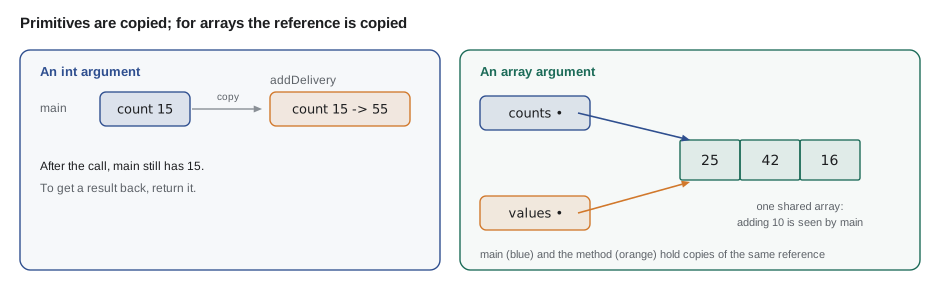
addDelivery's parameter is also called count, but it is a separate variable that starts as a copy of main's value. Adding 40 inside the method changes only the copy, so main's count is still 15 afterwards. The loop variable i and the variable doubled exist only inside the loop's block.
How Java passes arguments
That last example shows a rule that confuses many learners: Java always passes arguments by value. The method receives a copy of each argument's value, so changing a parameter of a primitive type, such as int, never changes the caller's variable. The way to give a result back is to return it. Arrays and objects add one twist: the value that is copied is a reference, an address telling Java where the array lives. The method gets its own copy of the address, but both copies point to the same array, so changes to the array's elements are visible to the caller.
import java.util.Arrays;

public class Main {
    public static void main(String[] args) {
        int[] counts = {15, 32, 6};
        addToAll(counts, 10);
        System.out.println("After addToAll: " + Arrays.toString(counts));

        replace(counts);
        System.out.println("After replace: " + Arrays.toString(counts));
    }

    public static void addToAll(int[] values, int amount) {
        for (int i = 0; i < values.length; i++) {
            values[i] += amount;
        }
    }

    public static void replace(int[] values) {
        values = new int[] {0, 0, 0};
    }
}After addToAll: [25, 42, 16] After replace: [25, 42, 16]
What this code does
addToAll receives a copy of the reference to the same array, so adding to its elements changes the array main sees. replace makes its own parameter point to a brand new array, which does not affect main's variable. Arrays.toString prints the contents of an array, a helper that lesson 9 uses often.
Overloading
Java lets a class have several methods with the same name, as long as their parameter lists differ in number or types. This is called overloading. println is heavily overloaded: there is a version for int, one for double, one for String and so on, which is why it accepts almost anything. The compiler picks the version whose parameters match the arguments. The return type alone does not count, so two methods that differ only in what they return are not allowed.
public class Main {
    public static void main(String[] args) {
        System.out.println(label("Chain 8-speed"));
        System.out.println(label("Chain 8-speed", "C-03"));
        System.out.println(label("Chain 8-speed", "C-03", 6));
    }

    public static String label(String part) {
        return "[" + part + "]";
    }

    public static String label(String part, String bin) {
        return "[" + part + " | bin " + bin + "]";
    }

    public static String label(String part, String bin, int count) {
        return label(part, bin) + " x" + count;
    }
}[Chain 8-speed] [Chain 8-speed | bin C-03] [Chain 8-speed | bin C-03] x6
What this code does
The three label methods share a name but take one, two and three parameters. Java chooses the right one from the arguments in each call. The third version reuses the second instead of repeating its code, which is a common pattern with overloads.
The Math class and other ready-made methods
Java's standard library is full of static methods ready to call. The Math class is a good example: Math.max and Math.min choose the larger or smaller of two values, Math.abs removes a minus sign, Math.round rounds, Math.floor and Math.ceil round down and up, Math.sqrt takes a square root and Math.pow raises to a power. Integer.parseInt and String.valueOf from earlier lessons are static methods too. Before writing a method, it is worth checking whether the library already has one.
public class Main {
    public static void main(String[] args) {
        int onHand = 7, needed = 18;
        System.out.println("Short by: " + Math.max(0, needed - onHand));
        System.out.println("Boxes of 10 to cover 18: " + (int) Math.ceil(18 / 10.0));
        System.out.println("Difference ignoring sign: " + Math.abs(onHand - needed));
        double wheelDiameter = 0.622;   // metres, a 700c rim
        double circumference = Math.PI * wheelDiameter;
        System.out.printf("Rim circumference: %.3f m%n", circumference);
    }
}Short by: 11 Boxes of 10 to cover 18: 2 Difference ignoring sign: 11 Rim circumference: 1.954 m
What this code does
Math.max with 0 stops a shortage from being negative when there is plenty on hand. Math.ceil rounds 1.8 up to 2, which is how many boxes are needed, and the cast turns the double result into an int. Math.PI is a constant, used here with the rim's diameter of 0.622 to work out its circumference.
Designing good methods
Ingrid gave Hamza a short checklist for methods. Each method should do one job, described in one sentence. It should be short enough to see on one screen; ten to twenty lines is typical. Its name should say what it does or what it answers. Calculations should return values rather than print them, so they can be reused and tested. And a method should depend only on its parameters where possible, which makes it a pure function: called with the same arguments, it always returns the same result and changes nothing else.
| Good sign | Sign of trouble |
|---|---|
| Name starts with a verb or is a question: calculateTotal, isOpen | Vague name: doStuff, process2 |
| One job, describable without the word and | Several unrelated jobs mixed together |
| Returns its result | Prints its result and returns nothing, so it cannot be reused |
| Three or fewer parameters | Six parameters, several of the same type |
| Fits on one screen | Scrolling to find the end |
Methods also make code easier to check. Before the next session Hamza wrote tiny checks for his methods in a separate main: he called isLowStock(39) and isLowStock(40) and printed the results, because the edge value, exactly the reorder level, is where mistakes hide. Professional Java developers do this with a testing framework called JUnit, which JAVA-120 covers. The habit starts here.
public class Main {
    public static void main(String[] args) {
        check("39 is low", isLowStock(39), true);
        check("40 is not low", isLowStock(40), false);
        check("0 is low", isLowStock(0), true);
        check("tax on 1000 cents", taxCents(1000), 130L);
        check("tax rounds 1004", taxCents(1004), 131L);
    }

    static boolean isLowStock(int count) { return count < 40; }
    static long taxCents(long cents) { return Math.round(cents * 0.13); }

    static void check(String name, Object actual, Object expected) {
        String result = actual.equals(expected) ? "PASS" : "FAIL (got " + actual + ")";
        System.out.println(result + "  " + name);
    }
}PASS 39 is low PASS 40 is not low PASS 0 is low PASS tax on 1000 cents PASS tax rounds 1004
What this code does
Each call to check compares a method's actual result with the expected value and prints PASS or FAIL. The checks deliberately include the edge value 40 and a tax amount that must round up. The parameters have type Object so that one check method can compare booleans and numbers.
Try it yourself
Work out a discount
Write a method discountCents(long cents, boolean member) that returns 10 in 100 of the amount, rounded with Math.round, for members and 0 for everyone else.
The program should then print Member: 460 and Non-member: 0 for an amount of 4600 cents.
public class Main {
    public static void main(String[] args) {
        long amount = 4600;
        System.out.println("Member: " + discountCents(amount, true));
        System.out.println("Non-member: " + discountCents(amount, false));
    }

    public static long discountCents(long cents, boolean member) {
        return -1;
    }
}
Try it yourself
Boxes to order
Write a method boxesToOrder(int onHand, int target, int perBox) that returns how many whole boxes are needed to bring stock up to at least the target, or 0 if stock is already high enough.
For the calls in main the program should print 3, 0 and 1.
public class Main {
    public static void main(String[] args) {
        System.out.println(boxesToOrder(12, 40, 10));
        System.out.println(boxesToOrder(55, 40, 10));
        System.out.println(boxesToOrder(39, 40, 10));
    }

    public static int boxesToOrder(int onHand, int target, int perBox) {
        return 0;
    }
}
Common mistakes
MistakePrinting a result inside a calculation method instead of returning it.
InsteadReturn the value and let the caller decide whether to print it.
MistakeForgetting a return statement on one path of a non-void method.
InsteadEvery path must return a value; javac reports missing return statement.
MistakeExpecting a method to change an int variable passed to it.
InsteadArguments are copied; return the new value and assign it in the caller.
MistakeCalling a method with arguments in the wrong order.
InsteadArguments are matched to parameters by position and type.
MistakeOverloading methods that differ only by return type.
InsteadOverloads must differ in their parameter lists.
Summary and key terms
- A method is a named block of code with a header giving its return type, name and parameters; static methods inside the class can be called directly from main.
- Parameters receive copies of the arguments, matched by position and type.
- A method with a return type hands back one value with return, and every path must return; void methods return nothing.
- Local variables and parameters exist only within their method's scope, while static final class constants are shared.
- Java passes arguments by value: primitives are copied, and for arrays and objects the reference is copied, so element changes are shared but reassigning the parameter is not.
- Overloaded methods share a name with different parameter lists.
- The Math class offers ready-made methods.
- Good methods do one job, have clear names, return results and are easy to check, including at edge values.
- Method
- A named block of code that can be called, with optional parameters and an optional return value.
- Parameter
- A variable in a method header that receives an argument's value.
- Argument
- The actual value passed to a method in a call.
- Return value
- The value a method hands back to its caller.
- void
- The return type of a method that returns nothing.
- Signature
- A method's name and parameter types.
- Scope
- The part of a program where a variable's name can be used.
- Local variable
- A variable declared inside a method, which exists only while the method runs.
- Pass by value
- Giving a method a copy of each argument's value.
- Reference
- A value that tells Java where an array or object is stored.
- Overloading
- Having several methods with the same name but different parameter lists.
- Pure function
- A method whose result depends only on its arguments and which changes nothing else.
Practice problems
Work each problem on paper first, then reveal the answer to check.
What is the difference between a parameter and an argument?
Show answer
A parameter is the variable in the method header; an argument is the value supplied in a particular call.
Why might a method's change to an int parameter not be seen by the caller?
Show answer
The method received a copy of the value; the caller's variable is untouched.
Why can a method change the elements of an array passed to it?
Show answer
It receives a copy of the reference, which points to the same array the caller has.
What makes two overloaded methods legal?
Show answer
Their parameter lists differ in number or types.
Why should calculation methods return values rather than print them?
Show answer
Returned values can be reused, combined and checked; printed values cannot.
Lesson quiz · 5 questions
Score 60% or more to complete this lesson.
Create a free account to save your progress, take quizzes and earn a certificate.