
JAVA-101 · Lesson 2 of 12 · 22 min
Installing the JDK and running a first program
▶ Video coming soon A video version of this lesson is on the way.
On Saturday morning, September 19, 2026, before the shop opened, Hamza brought his laptop in early and Ingrid stopped by on her way to the market. The plan was simple: install a JDK, write a first program in a text editor, compile it, run it and understand every word in it. Ingrid insisted on a plain text editor and a terminal for the first few weeks, before any IDE. "An IDE hides the two steps from you," she said. "Once you have done them by hand, the buttons make sense."
Choosing and installing a JDK
Lesson 1 explained that several organizations publish builds of the same OpenJDK code. Hamza chose Eclipse Temurin 25, the current long-term support version, from the Adoptium project. It is free for any use and gets regular security updates. The installer adds the JDK's bin folder, where javac and java live, to the system's PATH, the list of folders the terminal searches when you type a command name.
| System | One way to install Temurin 25 | Notes |
|---|---|---|
| Windows | Download the .msi installer from adoptium.net, or run winget install EclipseAdoptium.Temurin.25.JDK | Tick the options that set JAVA_HOME and add Java to the PATH |
| macOS | Download the .pkg installer from adoptium.net, or run brew install --cask temurin@25 | Apple silicon and Intel Macs each have their own build |
| Linux | Use the Adoptium package repository, or a tool such as SDKMAN! | Many distributions also package OpenJDK builds directly |
| ChromeOS | Turn on the Linux development environment, then install as on Linux | Works on most recent Chromebooks |
After installing, close and reopen the terminal so it picks up the new PATH, then check both tools. The -version option asks each tool to print its version and stop. The exact numbers depend on which update you installed: Java publishes security updates four times a year, in January, April, July and October, so a laptop set up in September 2026 shows a 25.0.x update number.
java -version
javac -versionopenjdk version "25.0.x" (an update date) LTS OpenJDK Runtime Environment Temurin-25.0.x (build 25.0.x+y-LTS) OpenJDK 64-Bit Server VM Temurin-25.0.x (build 25.0.x+y-LTS, mixed mode, sharing) javac 25.0.x
What this code does
Each command prints the version of one tool. If the terminal says the command is not recognized, the JDK's bin folder is not on the PATH yet, so reopen the terminal or rerun the installer with the PATH option ticked. Both tools should report the same main version, 25 here.
Hamza's first attempt failed in a very common way. He had an old Java 8 runtime from a game launcher installed years earlier, and java -version reported 1.8 while javac was missing entirely. The fix was to uninstall the old runtime and reopen the terminal. If two versions must live side by side, the PATH decides which one runs: the first matching folder wins. Many developers also set an environment variable named JAVA_HOME to the JDK folder, because build tools such as Maven and Gradle look there.
Writing the first program
Hamza made a folder called java101 in his home folder and, inside it, a file called HelloShop.java. Ingrid had one rule about the file name: it must match the name of the public class inside it exactly, including capital letters, followed by .java. Java is case-sensitive: HelloShop, helloshop and Helloshop are three different names.
public class HelloShop {
    public static void main(String[] args) {
        // Print a greeting for the shop's volunteers.
        System.out.println("Hello from Second Gear Cycles!");
        System.out.println("Today's job: true the wheels.");
    }
}Hello from Second Gear Cycles! Today's job: true the wheels.
What this code does
The class is called HelloShop, so the file must be called HelloShop.java. The line starting with two slashes is a comment, which the compiler ignores. The two println statements print two lines, and the program ends when main reaches its closing brace.
Every part of this program has a job. Ingrid went through it with Hamza line by line, and this table records what they wrote down.
| Part | What it means |
|---|---|
| public class HelloShop | Declares a class named HelloShop that any other code may use. Every Java program lives inside at least one class. |
| { and } | Braces mark the start and end of a block: here, the body of the class and the body of the method. |
| public static void main(String[] args) | The entry point. The JVM looks for a method with exactly this shape and starts there. |
| public | The method can be called from outside the class, which the JVM needs to do. |
| static | The method belongs to the class itself, so the JVM can call it without creating an object first. |
| void | The method does not hand back a value when it finishes. |
| String[] args | A list of text values passed in from the command line; lesson 5 uses it. |
| // ... | A comment for human readers. Everything after // on that line is ignored. |
| System.out.println(...); | A statement that prints one line. The semicolon ends the statement. |
Indentation, the spaces at the start of lines, does not matter to the compiler in Java, unlike in Python. It matters a great deal to people. The common style, which this course follows, indents each level of braces by four spaces and puts the opening brace at the end of the line that starts the block. Keeping to one style makes it easy to see which statements belong to which block.
Compiling and running
With the file saved, Hamza opened a terminal, moved into the folder with cd, compiled the file with javac and ran it with java. Look closely at the two different arguments. javac takes the file name, with .java. java takes the class name, without .class, because it asks the JVM to find and run a class, not a file.
cd java101
javac HelloShop.java
ls
java HelloShopHelloShop.class HelloShop.java Hello from Second Gear Cycles! Today's job: true the wheels.
What this code does
javac prints nothing when compilation succeeds, which surprises many beginners; silence means success. Listing the folder shows the new HelloShop.class file next to the source. java HelloShop starts the JVM, loads that class and runs its main method.
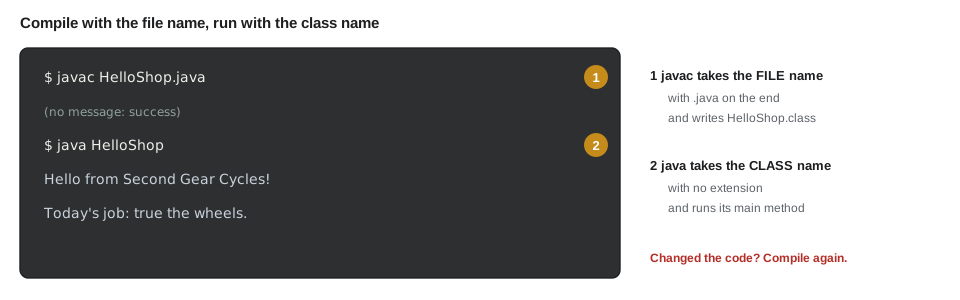
If Hamza edits the source file, he must compile again before running, or java will happily run the old .class file and he will wonder why his change did nothing. This is the single most common confusion in the first week of Java, and it is one reason IDEs compile automatically when you save.
Running a source file directly
Since Java 11, the java launcher can also run a single source file without a separate javac step. java HelloShop.java compiles the file in memory and runs it straight away, without leaving a .class file behind. This source-file mode is handy for small programs and experiments, and many examples in this course could be run that way. Larger programs made of many files still use javac, or a build tool, because they need the compiled classes kept on disk.
java HelloShop.javaHello from Second Gear Cycles! Today's job: true the wheels.
What this code does
Giving java a file name that ends in .java switches it into source-file mode. It compiles the program in memory, runs main and leaves no class file behind. Any compile error is reported exactly as javac would report it.
When the file name and class name disagree
Hamza copied his file to try something new and saved it as Main.java without changing the class name inside. The compiler refused. The message names the file, the line number and the problem, and then shows the offending line with a caret pointing at the exact spot. Reading these messages calmly, top line first, is a skill this course practices in every lesson.
public class HelloShop {
    public static void main(String[] args) {
        System.out.println("Hello from Second Gear Cycles!");
    }
}
What this code does
The file is called Main.java but declares a public class named HelloShop. Java requires a public class to live in a file with the same name, so javac stops and reports the mismatch. Renaming either the file or the class makes the two agree again.
$ javac Main.java
Main.java:1: error: class HelloShop is public, should be declared in a file named HelloShop.java
public class HelloShop {
       ^
1 error
The fix is to rename the class to Main or the file to HelloShop.java. From now on, most examples in this course use a class called Main in a file called Main.java, which keeps things simple. When an example uses a different class name, its caption shows the file name.
Comments and statements
Java has three kinds of comment. A line comment starts with // and runs to the end of the line. A block comment starts with /* and ends with */, and can cover several lines. A documentation comment starts with /** and is read by the javadoc tool to build reference pages. Comments should explain why the code does something, not repeat what it obviously does.
/**
 * Prints the shop's opening hours.
 * Written by Hamza Belcourt, September 2026.
 */
public class Main {
    public static void main(String[] args) {
        /* The shop is closed on Sundays and Mondays,
           so only five days are listed. */
        System.out.println("Tuesday   10:00 to 18:00");
        System.out.println("Wednesday 10:00 to 18:00");
        System.out.println("Thursday  10:00 to 20:00"); // repair night
        System.out.println("Friday    10:00 to 18:00");
        System.out.println("Saturday  09:00 to 17:00");
    }
}Tuesday 10:00 to 18:00 Wednesday 10:00 to 18:00 Thursday 10:00 to 20:00 Friday 10:00 to 18:00 Saturday 09:00 to 17:00
What this code does
The documentation comment at the top describes the class for javadoc. The block comment explains a decision, and the line comment after the Thursday statement explains why that day is longer. None of the comments change what the program prints.
A statement is one complete instruction, and in Java most statements end with a semicolon. Blocks in braces group statements together. You can put two statements on one line or split one statement over several lines; the compiler goes by semicolons and braces, not by line breaks. Good style keeps one statement per line.
Escape sequences in text
Inside double quotes, the backslash starts an escape sequence, a short code for a character that is awkward to type directly. \n starts a new line, \t inserts a tab, \" prints a double quote without ending the text, and \\ prints one backslash. Hamza used them to print a small sign for the workbench.
public class Main {
    public static void main(String[] args) {
        System.out.println("Bench rules:\n\t1. Tools back on the wall\n\t2. Sweep your spot");
        System.out.println("Kofi says: \"Count it before you take it.\"");
        System.out.println("Shared folder: C:\\shop\\parts");
    }
}Bench rules: 1. Tools back on the wall 2. Sweep your spot Kofi says: "Count it before you take it." Shared folder: C:\shop\parts
What this code does
The \n sequences break the first message into three lines, and \t indents the numbered rules with a tab. The \" sequences put real quotation marks inside the text. Each pair of backslashes prints a single backslash in the folder path.
Trying code in jshell
The JDK also includes jshell, an interactive tool where you type a piece of Java and see the result at once, without writing a class or a main method. It is excellent for checking how an expression behaves. Type jshell in a terminal to start it and /exit to leave.
jshell> 19 + 23
$1 ==> 42

jshell> String shop = "Second Gear"
shop ==> "Second Gear"

jshell> shop.length()
$3 ==> 11
What this code does
jshell evaluates each line as soon as you press Enter and shows the value after the arrow. When a value has no name, jshell gives it one such as the first numbered name shown. The last line asks the text for its length, which is 11 characters including the space.
A look at Java 25's simpler main
Java 25 made writing small programs easier. Under compact source files and instance main methods, which became a final feature in Java 25, a file may contain just a main method with no class around it, and main no longer needs public, static or the args parameter. Java 25 also added a small class called IO with a println method for beginners. The program below runs on Java 25 or later; it does not compile on Java 21, so it is shown here only as a listing.
void main() {
    IO.println("Hello from Second Gear Cycles!");
}
What this code does
On Java 25 or later the compiler wraps this file in a class automatically and treats main as the entry point. IO.println prints a line just like System.out.println. On older versions the same file is a compile error.
Ingrid's view is that the short form is pleasant for scripts, but Hamza will read the classic form in almost all existing code, in job interviews and in the rest of his program, so this course uses public static void main(String[] args) throughout. Knowing both is useful.
Choosing an editor or IDE
After the first few weeks, most Java developers work in an IDE, an integrated development environment that combines an editor, the compiler, a debugger and many helpers. IntelliJ IDEA (whose Community edition is free), Eclipse and Visual Studio Code with the Java extensions are the most common. They underline errors as you type, suggest names, run programs with one click and step through code in a debugger. Hamza's college uses IntelliJ IDEA, so he installed it the following week, but he kept compiling by hand for a month as Ingrid suggested.
Try it yourself
A sign for the workbench
Write a program that prints this sign exactly, using one System.out.println call with escape sequences:
Second Gear Cycles on the first line, then "Fix it, ride it, share it" (with the quotation marks) on the second line, then a tab followed by Since 2014 on the third line.
public class Main {
    public static void main(String[] args) {
        System.out.println("Second Gear Cycles");
    }
}
Try it yourself
Opening hours
Complete the program so that it prints the shop's three evening events, one per line: Tuesday repair night 18:00, Thursday repair night 18:00 and Saturday earn-a-bike 13:00.
Add a comment above the println statements that says why the program exists.
public class Main {
    public static void main(String[] args) {
        System.out.println("Tuesday repair night 18:00");
    }
}
Common mistakes
MistakeRunning java HelloShop.class.
InsteadGive java the class name without the extension: java HelloShop.
MistakeEditing the .java file and running java again without recompiling.
InsteadCompile with javac after every change, or use source-file mode with java HelloShop.java.
MistakeNaming the file helloshop.java for public class HelloShop.
InsteadThe file name must match the public class exactly, including capitals.
MistakeLeaving out the semicolon after a statement.
InsteadMost statements end with a semicolon; the compiler reports a missing one with ';' expected.
MistakeExpecting javac to print a success message.
Insteadjavac is silent when it succeeds; check for the new .class file.
Summary and key terms
- A JDK such as Eclipse Temurin 25 provides javac and java; after installing it, java -version and javac -version confirm that both are on the PATH.
- A Java source file holds a public class whose name must match the file name exactly, and the program starts in public static void main(String[] args). javac FileName.java compiles the file into a .class file and prints nothing when it succeeds; java ClassName runs the class.
- Since Java 11, java FileName.java runs a single source file directly.
- Comments come in line, block and documentation forms, statements end with semicolons and braces group blocks.
- Escape sequences such as backslash n, backslash t and backslash quote put special characters inside text. jshell evaluates snippets interactively.
- Java 25 allows a shorter main without a class, but the classic form remains the one to know.
- PATH
- The list of folders the terminal searches for commands such as java and javac.
- JAVA_HOME
- An environment variable that tells build tools where the JDK is installed.
- Entry point
- The main method where the JVM starts running a program.
- Case-sensitive
- Treating capital and small letters as different, as Java does in all names.
- Statement
- One complete instruction, usually ending with a semicolon.
- Block
- A group of statements between braces.
- Comment
- Text for human readers that the compiler ignores.
- Escape sequence
- A backslash code inside text, such as backslash n for a new line.
- Source-file mode
- Running a single .java file directly with the java launcher, without a separate compile step.
- jshell
- An interactive tool in the JDK that evaluates Java snippets immediately.
- IDE
- An integrated development environment that combines an editor, compiler, debugger and helpers.
Practice problems
Work each problem on paper first, then reveal the answer to check.
Which command compiles Main.java, and which runs it?
Show answer
javac Main.java compiles it; java Main runs the compiled class.
What does it mean when javac prints nothing?
Show answer
Compilation succeeded and a .class file was written.
Why must the file holding public class Shop be called Shop.java?
Show answer
Java requires a public class to be in a file with exactly the same name followed by .java.
What does the escape sequence backslash t produce?
Show answer
A tab character.
When would you use java Main.java instead of javac then java?
Show answer
For a small single-file program or experiment, when you do not need to keep the compiled class.
Lesson quiz · 5 questions
Score 60% or more to complete this lesson.
Create a free account to save your progress, take quizzes and earn a certificate.