
JAVA-101 · Lesson 10 of 12 · 25 min
Debugging and reading compiler errors
▶ Video coming soon A video version of this lesson is on the way.
Halfway through building his capstone, on Monday, November 9, Hamza had a bad evening. The compiler gave him fourteen errors at once, he fixed one and got nine different ones, and when the program finally ran it said the shop had -12 brake cables. At Wednesday's session Ingrid did not fix anything for him. Instead she taught him how to read what Java was telling him. "Every error message is a clue," she said, "and they are usually more precise than people expect. Most beginners lose hours because they glance at an error and start changing things at random." This lesson is that evening: reading compiler errors, reading exceptions and stack traces, and finding logic errors methodically.
A method for any bug
Whatever the kind of bug, the same calm routine works. First, read the message completely, especially the first error, which is usually the real one. Second, find the exact place: the file name and line number. Third, form a guess about the cause. Fourth, make one change to test the guess. Fifth, check the result, compiling or running again. Changing several things at once makes it impossible to know which change mattered, and often adds new bugs.
Reading a compiler error
A javac error message has a fixed layout. It starts with the file name and line number, then the word error and a short description. The next line shows the source line, and a caret below points at the spot where the compiler noticed the problem. The compiler reports the place it got confused, which is sometimes just after the real mistake: a missing semicolon at the end of one line is often reported at the start of the next.
public class Main {
    public static void main(String[] args) {
        int cables = 12
        System.out.println("Cables: " + cables);
    }
}
What this code does
The first statement in main is missing its semicolon. javac names the file and line 3, says that a semicolon was expected, and puts the caret just after 12. Adding the semicolon fixes it.
$ javac Main.java
Main.java:3: error: ';' expected
        int cables = 12
                       ^
1 error
The message ends with 1 error. When there are many errors, fix the first one and compile again. One small mistake, such as an unclosed brace, can confuse the compiler so much that it reports dozens of errors further down the file, and most of them disappear when the first one is fixed.
cannot find symbol
The most common error of all is cannot find symbol. A symbol is any name: a variable, a method or a class. The compiler is saying that it does not know the name you used. The causes are almost always a typing mistake, a difference in capital letters, a variable used outside its scope, or a missing import. The message helpfully names the symbol and where it was looked for.
public class Main {
    public static void main(String[] args) {
        int brakeCables = 12;
        System.out.println("Cables: " + brakecables);
    }
}
What this code does
The variable was declared as brakeCables with a capital C, but the println uses brakecables. Because Java is case-sensitive, these are two different names, and javac cannot find the second one. The message names the symbol and the class it searched.
$ javac Main.java
Main.java:4: error: cannot find symbol
        System.out.println("Cables: " + brakecables);
                                        ^
  symbol:   variable brakecables
  location: class Main
1 errorpublic class Main {
public static void main(String[] args) {
Scanner in = new Scanner(System.in);
System.out.println(in.nextLine());
}
}What this code does
This program uses Scanner without the import line, so javac does not know the class. It reports the same symbol twice, once for the type of the variable and once after new. Adding import java.util.Scanner; at the top fixes both errors.
$ javac Main.java
Main.java:3: error: cannot find symbol
        Scanner in = new Scanner(System.in);
        ^
  symbol:   class Scanner
  location: class Main
Main.java:3: error: cannot find symbol
        Scanner in = new Scanner(System.in);
                         ^
  symbol:   class Scanner
  location: class Main
2 errors
Type errors
Because Java is statically typed, many mistakes show up as type errors. incompatible types means a value of one type was used where another type is needed, such as storing text in an int. possible lossy conversion means a value would lose information, such as putting a double into an int without a cast. These errors look strict, but each one is a bug that would otherwise have reached Kofi.
public class Main {
    public static void main(String[] args) {
        int count = "12";
        double price = 8.50;
        int whole = price;
        System.out.println(count + whole);
    }
}
What this code does
The first error tries to store the text 12 in an int; converting needs Integer.parseInt. The second puts a double into an int, which could lose the fraction, so Java asks for an explicit cast. javac reports both errors in one compile, each with its own line number.
$ javac Main.java
Main.java:3: error: incompatible types: String cannot be converted to int
        int count = "12";
                    ^
Main.java:5: error: incompatible types: possible lossy conversion from double to int
        int whole = price;
                    ^
2 errors
Errors about paths through the code
Some errors come from the compiler following every possible path through a method. variable might not have been initialized means some path reads a variable that has not been assigned. missing return statement means some path reaches the end of a non-void method without returning. unreachable statement means code that can never run, such as a line after return. All three point to real logic mistakes.
public class Main {
    public static void main(String[] args) {
        System.out.println(status(15));
    }

    static String status(int count) {
        if (count < 20) {
            return "reorder";
        } else if (count >= 20) {
            return "ok";
        }
    }
}
What this code does
A person can see that one of the two conditions is always true, but the compiler does not reason about the conditions, only about the paths. Because the chain has no final else, there is a path that falls off the end without returning. Replacing else if (count >= 20) with a plain else fixes the error and makes the code clearer.
$ javac Main.java
Main.java:12: error: missing return statement
    }
    ^
1 error| Message | Usual cause | Usual fix |
|---|---|---|
| ';' expected | A missing semicolon, often on the line before | Add the semicolon |
| cannot find symbol | A misspelled name, a missing import, or a variable out of scope | Check spelling and capitals, add the import, move the declaration |
| incompatible types | A value of the wrong type, such as text where a number is needed | Convert the value, or change the variable's type |
| possible lossy conversion | A double or long put into a smaller type | Add a cast if losing data is intended, or use the bigger type |
| variable might not have been initialized | Some path reads the variable before assigning it | Assign it on every path, or give it a starting value |
| missing return statement | Some path ends a non-void method without return | Add a final else or a return at the end |
| reached end of file while parsing | A missing closing brace | Count the braces; an IDE highlights matching pairs |
| class X is public, should be declared in a file named X.java | The file name and class name differ | Rename the file or the class |
Exceptions and stack traces
A program that compiles can still fail while running. When Java hits a problem it cannot continue from, it throws an exception: it stops the normal flow and, unless the program handles the exception, prints a stack trace and ends. The first line gives the exception's class and a message. The lines starting with at list the chain of method calls that led there, most recent first, each with a file name and line number. The top at line is where the problem happened; the lines below show how the program got there.
public class Main {
    public static void main(String[] args) {
        String[] counts = {"12", "7", "1O", "4"};
        System.out.println("Total: " + total(counts));
    }

    static int total(String[] values) {
        int sum = 0;
        for (String v : values) {
            sum += toCount(v);
        }
        return sum;
    }

    static int toCount(String text) {
        return Integer.parseInt(text);
    }
}
What this code does
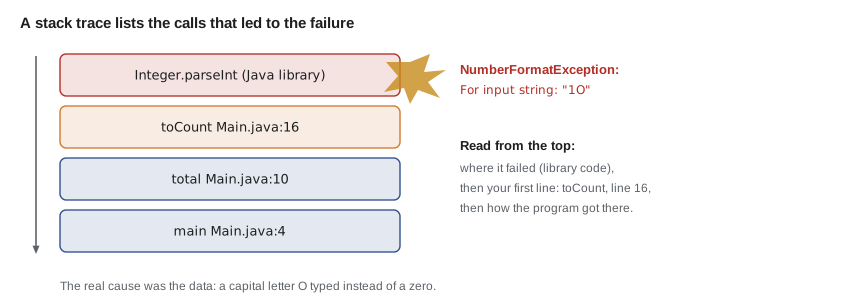
One count was typed with a capital letter O instead of a zero, so parseInt cannot convert it. The stack trace's first line names NumberFormatException and quotes the bad text. Reading the at lines from the top down, the failure started in toCount at line 16, called from total at line 10, called from main at line 4.
$ javac Main.java
$ java Main
Exception in thread "main" java.lang.NumberFormatException: For input string: "1O"
	at java.base/java.lang.NumberFormatException.forInputString(NumberFormatException.java:67)
	at java.base/java.lang.Integer.parseInt(Integer.java:662)
	at java.base/java.lang.Integer.parseInt(Integer.java:778)
	at Main.toCount(Main.java:16)
	at Main.total(Main.java:10)
	at Main.main(Main.java:4)
The top few at lines in a stack trace like this point into Java's own library code, such as Integer.parseInt. Skip down to the first line that names your own file: that is where your program made the call that failed. Here it is toCount, line 16, and the real cause is one line up the call chain, the bad data in the array.
Common exceptions
A small set of exceptions accounts for most crashes in beginners' programs. Each name says what went wrong. ArithmeticException with the message / by zero comes from dividing a whole number by zero; dividing a double by zero does not throw but gives Infinity or NaN. NullPointerException comes from using a reference that holds null, meaning no object, as if it pointed to one. Since Java 14, the message says exactly which reference was null, which makes these much easier to fix than they used to be.
public class Main {
    public static void main(String[] args) {
        String[] bins = new String[3];
        bins[0] = "A-02";
        for (String b : bins) {
            System.out.println(b.toUpperCase());
        }
    }
}
What this code does
new String[3] fills the array with null, and only the first element was given a bin code. The first pass prints A-02, but the second pass calls toUpperCase on null and fails. The helpful message says toUpperCase cannot be called because a local variable is null; it shows the name as local5 because the class was compiled without debugging details, and compiling with javac -g, as IDEs do, makes it say b.
$ javac Main.java
$ java Main
A-02
Exception in thread "main" java.lang.NullPointerException: Cannot invoke "String.toUpperCase()" because "<local5>" is null
at Main.main(Main.java:6)| Exception | Typical cause |
|---|---|
| ArrayIndexOutOfBoundsException | An index below 0 or not less than the array's length |
| StringIndexOutOfBoundsException | A bad index in charAt or substring |
| NullPointerException | Calling a method or reading a field through a null reference |
| NumberFormatException | parseInt or parseDouble given text that is not a number |
| ArithmeticException | Whole-number division or remainder by zero |
| InputMismatchException | Scanner's nextInt meeting a token that is not a whole number |
| NoSuchElementException | Scanner asked for more input when there is none left |
Catching an exception
A program can catch an exception and recover, using a try block for the code that might fail and a catch block for what to do if it does. Exceptions are a major topic in JAVA-102; for now, it is enough to know the basic shape and to use it for the most common case, bad numbers typed by a person. Catch only the exceptions you expect and know how to handle. Catching everything hides bugs.
public class Main {
    public static void main(String[] args) {
        String[] typed = {"12", "seven", "4"};
        int total = 0;
        for (String t : typed) {
            try {
                total += Integer.parseInt(t);
            } catch (NumberFormatException e) {
                System.out.println("Skipping \"" + t + "\": not a whole number");
            }
        }
        System.out.println("Total of valid counts: " + total);
    }
}Skipping "seven": not a whole number Total of valid counts: 16
What this code does
Each conversion runs inside a try block. When seven cannot be parsed, Java jumps to the catch block for NumberFormatException, prints a message and carries on with the next value. The total includes only the two valid counts, 12 and 4.
Finding logic errors
The hardest bugs are logic errors: the program compiles, runs without exceptions and gives the wrong answer. Hamza's -12 brake cables was one. Nothing tells you where a logic error is, so you have to find the place where what the program does first differs from what you expected. Three techniques do most of the work. Print debugging adds temporary println lines that show the values of variables at key points. A debugger, built into every IDE, pauses the program at a breakpoint and lets you step through it one line at a time, watching variables change. And explaining the code line by line to someone else, or to an object on the desk, which programmers call rubber duck debugging, often reveals the mistake as you say it.
public class Main {
    public static void main(String[] args) {
        int stock = 30;
        int[] sales = {4, 6, 2, 8};
        int[] deliveries = {0, 0, 20, 0};

        for (int week = 0; week < sales.length; week++) {
            stock -= sales[week];
            stock -= deliveries[week];      // bug: should add deliveries
            System.out.println("DEBUG week " + week + ": stock=" + stock);
        }
        System.out.println("Final stock: " + stock);
    }
}DEBUG week 0: stock=26 DEBUG week 1: stock=20 DEBUG week 2: stock=-2 DEBUG week 3: stock=-10 Final stock: -10
What this code does
The temporary DEBUG line prints the stock after every week, so the moment it goes wrong is easy to see. The values fall steadily and then drop by 22 in week 2, when the delivery arrives. That points straight at the line that subtracts deliveries instead of adding them.
Hamza's real bug was almost exactly this one: a delivery entered with a minus sign. Once the print line showed the stock falling when a delivery arrived, the fix took ten seconds. The DEBUG prefix makes the temporary lines easy to find and delete afterwards.
Ingrid then showed him the same search in IntelliJ IDEA's debugger. Clicking in the margin next to the loop set a breakpoint, a red dot. Running in debug mode paused the program there, with every variable's value shown beside its line. Step over ran one line, step into followed a method call into the method, and resume ran to the next breakpoint. Watching stock change from 26 to 20 and then to -2 made the bug obvious without adding any code.
| Debugger action | What it does |
|---|---|
| Breakpoint | Pauses the program when it reaches a chosen line |
| Step over | Runs the current line, treating a method call as one step |
| Step into | Goes inside the method called on the current line |
| Step out | Finishes the current method and returns to its caller |
| Resume | Runs until the next breakpoint or the end |
| Watch | Shows the value of a chosen variable or expression as you step |
Narrowing down where the bug is
When a long calculation gives a wrong answer, check the result halfway through. If it is already wrong at the halfway point, the bug is in the first half; if not, it is in the second. Repeating this narrows the search fast, the same idea as binary search in lesson 9. The same trick works on input data: if a file of 600 parts gives a wrong total, try the first 300.
Writing small checks for methods, as lesson 8 showed, stops many logic errors from appearing in the first place. Java also has an assert statement, assert stock >= 0 : "stock went negative";, which throws an error when its condition is false. Assertions are switched off by default and are switched on with java -ea, so they are a tool for development, not for checking user input.
public class Main {
    public static void main(String[] args) {
        check("week totals", weekTotal(new int[] {9, 11}), 20);
        check("empty week", weekTotal(new int[] {}), 0);
        check("stock after sale", afterSale(30, 4), 26);
        check("cannot go below zero", afterSale(3, 5), 0);
    }

    static int weekTotal(int[] nights) {
        int t = 0;
        for (int n : nights) t += n;
        return t;
    }

    static int afterSale(int stock, int sold) {
        return Math.max(0, stock - sold);
    }

    static void check(String name, int actual, int expected) {
        System.out.println((actual == expected ? "PASS  " : "FAIL  ") + name
            + (actual == expected ? "" : " (expected " + expected + ", got " + actual + ")"));
    }
}PASS week totals PASS empty week PASS stock after sale PASS cannot go below zero
What this code does
Each check calls a small method with known input and compares the result with the expected value. The checks cover an ordinary case and an edge case for each method, such as an empty week and a sale larger than the stock. All four pass, so these methods can be trusted when the bigger program misbehaves.
Try it yourself
Fix the compile errors
This program has three compile errors: a missing semicolon, a misspelled variable and a double stored in an int. Fix them so that it prints Pads: 32 and Value: 216.
The value is the count times the price, rounded with Math.round, which returns a long. The starter shown here compiles (the broken lines are in comments) so that you can see what to change; write the fixed versions.
public class Main {
    public static void main(String[] args) {
        int pads = 32;
        double price = 6.75;
        // int value = pads * price
        // System.out.println("Pads: " + Pads);
        System.out.println("Pads: ?");
    }
}
Try it yourself
Find the logic error
The method averageSold should return the average number of tubes sold per day, as a decimal, but it gives the wrong answer. Fix it so the program prints Average: 5.57.
Use a print-debugging line if it helps, then remove it.
public class Main {
    public static void main(String[] args) {
        int[] sold = {4, 9, 2, 12, 7, 0, 5};
        System.out.printf("Average: %.2f%n", averageSold(sold));
    }

    static double averageSold(int[] sold) {
        int total = 0;
        for (int i = 1; i < sold.length; i++) {
            total += sold[i];
        }
        return total / sold.length;
    }
}
Common mistakes
MistakeFixing the last compiler error first.
InsteadFix the first error and compile again; later errors are often caused by it.
MistakeChanging several things at once to see what helps.
InsteadMake one change per guess, so you know which change fixed it.
MistakeReading a stack trace from the bottom.
InsteadThe top lines show where it failed; find the first line in your own code.
MistakeWrapping everything in try and catching every exception.
InsteadCatch only exceptions you expect and can handle, such as NumberFormatException on typed input.
MistakeLeaving DEBUG print lines in finished code.
InsteadRemove them, or search for the DEBUG prefix before handing the program over.
Summary and key terms
- Debugging follows a loop: read the whole message, find the file and line, guess the cause, make one change and check. javac errors give the file, line, description and a caret; the first error is usually the real one. cannot find symbol means an unknown name, often a typing mistake, wrong capitals or a missing import; incompatible types and possible lossy conversion are type errors; missing return statement and might not have been initialized come from paths through the code.
- Run-time failures throw exceptions and print a stack trace whose first line names the exception and whose at lines list the calls, most recent first. try and catch handle expected exceptions such as NumberFormatException.
- Logic errors are found with print debugging, an IDE debugger with breakpoints and stepping, explaining the code aloud, halving the search and small checks of methods.
- Compile-time error
- A mistake javac reports before the program can run.
- Symbol
- A name in the program: a variable, method or class.
- Caret
- The ^ mark under a source line in a javac message, pointing at the problem.
- Exception
- An object Java throws when a problem stops normal execution.
- Stack trace
- The list of method calls, most recent first, printed when an exception is not caught.
- NullPointerException
- The exception from using a null reference as if it pointed to an object.
- try and catch
- Blocks that run code which might fail and handle a chosen exception.
- Logic error
- A mistake that makes a program give wrong results without any error message.
- Print debugging
- Adding temporary print statements to see values while the program runs.
- Breakpoint
- A marked line where a debugger pauses the program.
- assert
- A statement that checks a condition during development when assertions are enabled.
Practice problems
Work each problem on paper first, then reveal the answer to check.
Why should you fix the first compiler error before the others?
Show answer
Later errors are often caused by the first, and disappear when it is fixed.
What are the three most common causes of cannot find symbol?
Show answer
A misspelled name or wrong capitals, a missing import and a variable used outside its scope.
In a stack trace, which line shows where the failure happened?
Show answer
The first at line, though you usually look for the first one in your own code.
What does a NullPointerException message tell you since Java 14?
Show answer
Which reference was null and what the program tried to do with it, such as calling toUpperCase.
Name two ways to find a logic error.
Show answer
Any two of: print debugging, stepping through with a debugger, explaining the code aloud, halving the search and writing small checks.
Lesson quiz · 5 questions
Score 60% or more to complete this lesson.
Create a free account to save your progress, take quizzes and earn a certificate.