
JAVA-101 · Lesson 1 of 12 · 23 min
What Java is and how the JVM runs it
▶ Video coming soon A video version of this lesson is on the way.
On Wednesday, September 16, 2026, Hamza Belcourt sat down at the long workbench at the back of Second Gear Cycles, on Parsons Avenue in Columbus, with a laptop, a notebook and a mug of the shop's terrible coffee. Hamza had been a bike courier for eight years. A week earlier he had started a two-year associate of applied science in software development at a local college, and Ingrid Vallancourt, a back-end Java developer who sits on the shop's board, had offered to meet him every Wednesday evening to help. Odile Branscombe, the shop's general manager, had one request: whatever Hamza learned, she hoped it would one day help the shop keep track of its parts room, where nobody ever quite knew how many inner tubes were left.
Ingrid started with a question rather than a program. "Before you write any Java," she said, "you should know what actually happens when a Java program runs. Most of the confusing error messages you will see in your first month make sense once you know there are two separate steps, compiling and running, done by two separate tools." This lesson follows that first evening. It explains what Java is, where it came from, how the Java Virtual Machine runs programs, and what the JDK contains. Lesson 2 installs the tools and runs a first program.
What Java is
Java is a general-purpose programming language. General-purpose means it is not tied to one kind of job: people use Java to build the back ends of banking and insurance systems, Android apps, big data tools, games such as Minecraft, and the systems that run airline bookings and stock exchanges. Ingrid's own company writes insurance software in Java, and so do thousands of other businesses. The language is statically typed, which means every variable has a type, such as a whole number or a piece of text, and the compiler checks that the types fit together before the program is allowed to run. It is object-oriented, which means programs are organized around objects that hold data and the actions on that data. You will meet both ideas properly in later lessons.
Java was created at Sun Microsystems by a team led by James Gosling. Work began in 1991, and the first public release, Java 1.0, came out in 1996. Sun's slogan was "write once, run anywhere": a Java program compiled on one kind of computer should run unchanged on any other computer that has Java installed. Oracle bought Sun in 2010 and now leads Java's development, together with other companies and individuals in the open-source OpenJDK project, where the reference version of Java is built in public.
Java changes in a steady rhythm. Since 2018 a new version has come out every six months, in March and September. Most versions are supported for only six months, but every two years one version is marked LTS, for long-term support, and companies keep using it for years. Java 21 (September 2023) and Java 25 (September 2025) are the two most recent LTS versions, and the next one is planned to be Java 29, in September 2027. The newest version on the day Hamza started was Java 27, released on September 15, 2026. Ingrid recommends that learners use the current LTS, so Hamza uses Java 25. Every example in this course also works on Java 21.
| Version | Released | Long-term support | A few things it added |
|---|---|---|---|
| Java 8 | March 2014 | Yes | Lambda expressions and streams |
| Java 11 | September 2018 | Yes | Running a single source file directly with java |
| Java 17 | September 2021 | Yes | Records and sealed classes in their final form |
| Java 21 | September 2023 | Yes | Virtual threads, pattern matching in switch |
| Java 25 | September 2025 | Yes | Compact source files and instance main methods |
| Java 27 | September 2026 | No | G1 as the default garbage collector everywhere |
You do not need to remember these versions. What matters is the idea that Java keeps adding features while still running old programs: a program written for Java 8 in 2014 almost always runs on Java 25 today. That backward compatibility is one reason large organizations trust Java with systems they expect to keep for twenty years.
Source code, bytecode and the JVM
Computers do not understand Java directly. A processor understands only its own machine code, a long list of very small instructions such as "add these two numbers" or "jump to that address". Different processors understand different machine code: the chip in Hamza's laptop does not run the same instructions as the chip in his phone. Some languages, such as C, are compiled straight into machine code for one kind of processor. A program compiled that way must be compiled again for every other kind of processor.
Java takes a different route with two steps. First, the Java compiler, a program called javac, reads your source code, the text you write in a file ending in .java, and checks it. If the code is correct, javac translates it into bytecode and saves it in a file ending in .class. Bytecode is a set of instructions for an imaginary computer, the Java Virtual Machine, or JVM. Second, when you run the program, a real program called java starts a JVM on your computer, loads the .class file and carries out the bytecode instructions.
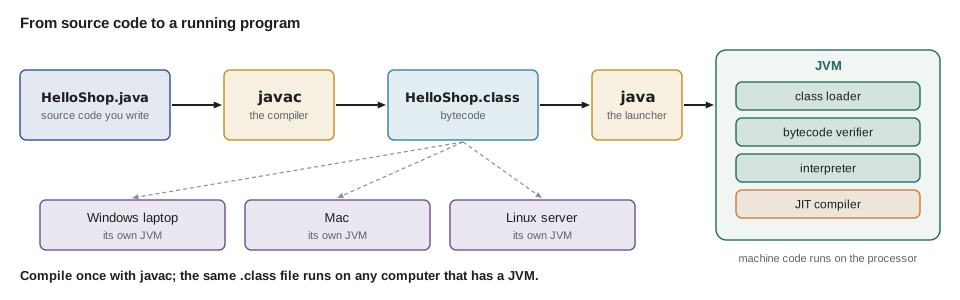
This is how "write once, run anywhere" works. The bytecode in a .class file is the same on every computer. What differs is the JVM: there is a JVM for Windows on Intel chips, one for macOS on Apple chips, one for Linux servers and so on, and each one knows how to run the same bytecode on its own processor. Ingrid's company compiles its insurance software once and runs the same files on developers' laptops and on servers in a data center.
Inside the JVM several parts work together. The class loader finds and loads .class files when the program needs them. The bytecode verifier checks that the loaded bytecode follows the rules, so that a damaged or tampered file cannot crash the JVM or read memory it should not. The interpreter carries out bytecode instructions one at a time, which lets the program start quickly. Meanwhile the JVM watches which parts of the program run most often, and its just-in-time compiler, or JIT compiler, translates those busy parts into real machine code while the program runs. That is why long-running Java programs often get faster after their first few seconds: the JIT compiler has had time to optimize the code that matters.
The JVM also manages memory for you. When a program creates data, the JVM finds space for it in an area called the heap. When the data is no longer used by any part of the program, the garbage collector frees that space automatically. In C, programmers must free memory themselves, and forgetting to do so, or doing it twice, causes some of the worst bugs in software. Java removes that whole family of bugs, at the cost of the JVM doing some extra work in the background.
A first look at a Java program
Ingrid typed a short program to show Hamza what Java source code looks like. Do not worry about every word yet; lesson 2 takes it apart line by line. For now, notice three things: the code is inside a class named Main, the program starts at a method named main, and each statement ends with a semicolon.
public class Main {
    public static void main(String[] args) {
        System.out.println("Welcome to Second Gear Cycles");
        System.out.println("Java is running.");
    }
}Welcome to Second Gear Cycles Java is running.
What this code does
The class Main holds the program, and the JVM starts running it at the main method. Each System.out.println call prints one line of text and then moves to a new line. The text between the double quotes is printed exactly as written.
When Hamza asked what System.out.println means, Ingrid broke it into pieces. System is a class that comes with Java and gives access to things about the computer the program runs on. out is the standard output, the stream of text that appears in the terminal. println is a method that prints a line, short for "print line". So the whole statement means "print this line of text to the terminal". There is also print, without ln, which prints text but stays on the same line.
public class Main {
    public static void main(String[] args) {
        System.out.print("Parts room: ");
        System.out.print("open ");
        System.out.println("Tuesday to Saturday");
        System.out.println("Repair nights: Tuesday and Thursday");
    }
}Parts room: open Tuesday to Saturday Repair nights: Tuesday and Thursday
What this code does
The two print calls write their text on the same line, one after the other. The println call adds its text and then ends the line, so the next output starts on a fresh line. Spaces inside the quotes are printed too, which is why the words do not run together.
Java also does arithmetic. If you put numbers or a calculation inside println instead of quoted text, Java works out the value first and prints the result. You can join text and numbers with the plus sign: when one side of + is text, Java turns the other side into text and joins them. That is how most programs build their messages.
public class Main {
    public static void main(String[] args) {
        System.out.println(19 + 23);
        System.out.println("Bikes refurbished this week: " + (19 + 23));
        System.out.println("Hours of volunteer time: " + 6 * 4);
    }
}42 Bikes refurbished this week: 42 Hours of volunteer time: 24
What this code does
The first line adds two numbers and prints 42. In the second line the brackets make Java add the numbers before joining the result to the text. In the third line multiplication happens before joining, because Java multiplies before it adds or joins, so the message shows 24.
Hamza tried removing the brackets in the second line and got Bikes refurbished this week: 1923, because Java joined "19" and then "23" to the text one at a time, from left to right. That small surprise is a good first lesson: computers do exactly what the rules say, and the rules are worth learning precisely.
JDK, JRE and JVM
Three similar-looking names cause confusion for every beginner. The JVM is the virtual machine that runs bytecode. The JRE, the Java Runtime Environment, used to mean a JVM plus the standard library of ready-made classes that every program needs, such as System and String. The JDK, the Java Development Kit, contains everything in the JRE plus the developer tools: the javac compiler, the java launcher, the javadoc documentation tool, the jshell interactive tool, the jar packaging tool and others. Since Java 11, most vendors ship only the JDK, so in practice you install a JDK and get everything at once.
| Name | What it is | Who needs it |
|---|---|---|
| JVM | The virtual machine that loads, checks and runs bytecode | Every computer that runs Java programs |
| Standard library | Thousands of ready-made classes: text, numbers, files, networking, dates | Every program uses it |
| JDK | The JVM and standard library plus javac, jshell, jar, javadoc and other tools | Developers, and servers that run modern Java |
The JDK is built from the open-source OpenJDK code, and several organizations publish their own builds of it. Eclipse Temurin, from the Adoptium project, is free and widely used. Oracle publishes Oracle JDK and the free Oracle OpenJDK builds. Amazon publishes Corretto, Microsoft publishes the Microsoft Build of OpenJDK, and Azul publishes Zulu. They all pass the same compatibility tests, so a program that runs on one runs on the others. The differences are mostly in licensing, support and how long each version gets security updates. Hamza installs Temurin 25 in lesson 2.
Where Java fits among other languages
Hamza had tried a little Python before he started his program, and he asked why the college teaches Java first in his program instead. Ingrid gave an honest answer: there is no single best first language, but Java has some useful habits built in. Because Java is statically typed, the compiler catches many mistakes before the program runs, and its error messages point to the exact line. Because Java programs are organized into classes, learners get used to structuring code from the start. And because so much business software is written in Java, the skills lead directly to jobs.
| Language | How it usually runs | Typing | Typical uses |
|---|---|---|---|
| Java | Compiled to bytecode, run by the JVM | Static | Business back ends, Android, large systems |
| C | Compiled to machine code for one processor | Static | Operating systems, devices, fast tools |
| Python | Run by an interpreter from source | Dynamic | Scripts, data analysis, teaching |
| JavaScript | Run by an engine in a browser or Node.js | Dynamic | Web pages and web servers |
| Kotlin | Compiled to JVM bytecode | Static | Android and JVM back ends |
Despite the name, Java and JavaScript are different languages with different designs. The name JavaScript was chosen in 1995 partly for marketing, when Java was new and fashionable. Kotlin, on the other hand, really is closely related: it compiles to the same JVM bytecode and can use Java's libraries, and Android now recommends it. Learning Java first makes Kotlin easy to pick up later.
Hamza's first session
By the end of the evening Hamza had a page of notes and a diagram he had drawn himself: a .java file going into javac, a .class file coming out, and the java launcher starting a JVM. Ingrid asked him to explain it back to her in his own words, as if to Odile. He said: "I write instructions in a text file. One tool checks them and turns them into a universal format. Another tool runs that format on whatever computer we have. If the first tool complains, my instructions have a mistake. If the second tool complains, the instructions were valid but something went wrong while they ran." Ingrid said that was better than most first-year explanations, and that the distinction between those two kinds of complaint would save him hours.
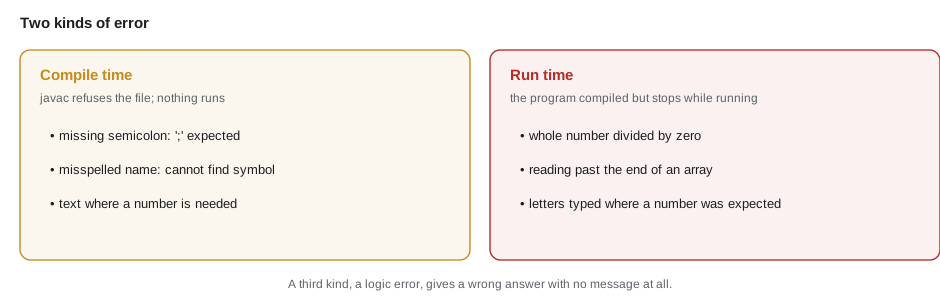
Those two kinds of error have names. A compile-time error is found by javac before the program runs; the program does not run at all until it is fixed. A run-time error, which Java calls an exception, happens while the program is running, for example when it tries to divide a whole number by zero. A third kind, a logic error, is the sneakiest: the program compiles and runs without complaint but gives the wrong answer, like Hamza's 1923 bikes. Lesson 10 is devoted to finding and fixing all three.
Try it yourself
Your first output
Change the program so that it prints exactly these three lines: Second Gear Cycles, Refurbished bikes for everyone and Open Tuesday to Saturday.
Keep the class name Main and use one System.out.println call for each line.
public class Main {
    public static void main(String[] args) {
        System.out.println("Second Gear Cycles");
        // Add the other two lines here.
    }
}
Try it yourself
Brackets and joining
Kofi counted 18 inner tubes on one shelf and 7 in a bin. Make the program print Tubes in stock: 25 by adding the two numbers inside the println.
Use brackets so that Java adds the numbers before joining them to the text.
public class Main {
    public static void main(String[] args) {
        System.out.println("Tubes in stock: " + 18 + 7);
    }
}
Common mistakes
MistakeSaying that the JVM reads .java files directly.
Insteadjavac compiles the .java file into a .class file of bytecode, and the JVM runs the bytecode.
MistakeThinking Java and JavaScript are versions of the same language.
InsteadThey are separate languages with different rules; only the names are similar.
MistakeInstalling only a JVM or JRE to write programs.
InsteadDevelopers need the JDK, which includes javac and the other tools.
MistakeExpecting "Total: " + 2 + 3 to print Total: 5.
InsteadJava joins from left to right, so it prints Total: 23; use brackets to add first.
MistakeTreating every Java version as long-term support.
InsteadOnly every fourth six-monthly release is LTS; Java 21 and 25 are the current ones.
Summary and key terms
- Java is a general-purpose, statically typed, object-oriented language first released by Sun Microsystems in 1996 and now led by Oracle through the open-source OpenJDK project.
- A new version comes out every six months, and every two years one is a long-term support release; Java 25 is the current LTS.
- The javac compiler turns source code in .java files into bytecode in .class files.
- The JVM loads, verifies and runs bytecode, interpreting it at first and compiling busy code to machine code with its JIT compiler, and frees unused memory with its garbage collector.
- Because every platform has its own JVM, the same bytecode runs everywhere.
- The JDK contains the JVM, the standard library and developer tools, and is published by several vendors such as Eclipse Temurin, Oracle, Amazon and Microsoft.
- Errors are found at compile time by javac, at run time as exceptions, or as logic errors that give wrong answers.
- Java
- A general-purpose, statically typed, object-oriented programming language.
- Source code
- The program text a person writes, saved in a file ending in .java.
- Compiler (javac)
- The tool that checks Java source code and translates it into bytecode.
- Bytecode
- The platform-independent instructions in a .class file, run by the JVM.
- JVM
- The Java Virtual Machine, which loads, verifies and runs bytecode on a real computer.
- JIT compiler
- The part of the JVM that turns frequently used bytecode into machine code while the program runs.
- Garbage collector
- The part of the JVM that frees memory the program no longer uses.
- JDK
- The Java Development Kit: the JVM, the standard library and tools such as javac and jshell.
- LTS
- Long-term support: a Java version that receives updates for several years.
- Compile-time error
- A mistake javac finds before the program can run.
- Exception
- An error that happens while a program is running.
Practice problems
Work each problem on paper first, then reveal the answer to check.
What two steps happen between writing Java code and seeing it run?
Show answer
javac compiles the .java source file into a .class file of bytecode, then the java launcher starts a JVM that runs the bytecode.
Why can the same .class file run on Windows, macOS and Linux?
Show answer
Bytecode is the same everywhere; each platform has its own JVM that knows how to run it.
What does the JIT compiler do?
Show answer
It translates the parts of the bytecode that run most often into machine code while the program is running, making them faster.
Which Java versions are the current long-term support releases?
Show answer
Java 21 and Java 25; the next is planned to be Java 29.
What does System.out.println("A" + 1 + 2) print, and why?
Show answer
A12, because Java joins from left to right and each number is turned into text when it meets text.
Lesson quiz · 5 questions
Score 60% or more to complete this lesson.
Create a free account to save your progress, take quizzes and earn a certificate.