
JAVA-101 · Lesson 3 of 12 · 21 min
Variables, primitive types and operators
▶ Video coming soon A video version of this lesson is on the way.
On Wednesday, September 23, Kofi Amankwah, who looks after the parts room, joined Hamza and Ingrid at the bench with a clipboard. He wanted to know how many 700x25c inner tubes he had, how much they were worth and how many he would have left after the Tuesday repair night. Ingrid saw a perfect first problem for variables: named places in the program that hold values, such as a count of tubes, a price or a yes-or-no answer. This lesson covers how Java stores values, the eight primitive types, how to choose between them, and the operators that combine values into new ones.
Declaring and assigning variables
A variable in Java has a name, a type and a value. The type says what kind of value the variable can hold, and Java checks it at compile time: once a variable is declared as a whole number, it can never hold text. You declare a variable by writing its type and name, and you assign it a value with a single equals sign. Usually you do both at once, which is called initializing the variable.
public class Main {
    public static void main(String[] args) {
        int tubesOnShelf = 18;
        int tubesInBin = 7;
        int tubesTotal = tubesOnShelf + tubesInBin;
        System.out.println("Tubes on the shelf: " + tubesOnShelf);
        System.out.println("Tubes in the bin: " + tubesInBin);
        System.out.println("Total tubes: " + tubesTotal);

        tubesTotal = tubesTotal - 9;   // used on Tuesday's repair night
        System.out.println("Left after Tuesday: " + tubesTotal);
    }
}Tubes on the shelf: 18 Tubes in the bin: 7 Total tubes: 25 Left after Tuesday: 16
What this code does
Each line starting with int declares a whole-number variable and gives it a starting value. The third variable is calculated from the first two. Later the program assigns tubesTotal a new value, nine fewer than before, which replaces the old value.
The single equals sign does not mean "is equal to" as it does in mathematics. It means "store the value on the right in the variable on the left". That is why tubesTotal = tubesTotal - 9 makes sense in a program: Java first works out the right side using the current value, 25 minus 9, and then stores the result, 16, back in the same variable.
Java insists that a local variable has a value before it is used. If Hamza declares int tubes; and then prints tubes without ever assigning it, javac refuses with the message variable tubes might not have been initialized. That rule catches a whole class of mistakes that, in some languages, produce random garbage at run time.
Naming variables
Variable names may contain letters, digits, underscores and the dollar sign, but must not start with a digit and must not be one of Java's reserved words, such as int, class or public. By convention Java uses camelCase for variables: start with a small letter and begin each following word with a capital, as in tubesOnShelf or pricePerTube. Names should say what the value means. Kofi can read tubesInBin and know what it holds; he cannot do that with t2 or x.
| Name | Allowed? | Comment |
|---|---|---|
| tubesOnShelf | Yes | Good: camelCase and meaningful |
| tubes_on_shelf | Yes | Legal, but not the usual Java style |
| 2ndShelf | No | Cannot start with a digit |
| class | No | A reserved word |
| TubesOnShelf | Yes | Legal, but capitals at the start are kept for class names |
| x | Yes | Legal, but says nothing about the value |
The eight primitive types
Java has eight primitive types, built into the language, that hold simple values directly. Four are for whole numbers of different sizes, two are for numbers with decimal points, one is for a single character and one is for true or false. Everything else in Java, including text, is an object, which later lessons explore.
| Type | Holds | Size | Range or example |
|---|---|---|---|
| byte | Whole number | 8 bits | -128 to 127 |
| short | Whole number | 16 bits | -32,768 to 32,767 |
| int | Whole number | 32 bits | About plus or minus 2.1 billion |
| long | Whole number | 64 bits | About plus or minus 9.2 quintillion; literals end in L |
| float | Decimal number | 32 bits | About 7 significant digits; literals end in f |
| double | Decimal number | 64 bits | About 15 to 16 significant digits |
| char | One character | 16 bits | 'A', '7' or '?', in single quotes |
| boolean | Truth value | Not specified | true or false |
In practice beginners need only four of them. Use int for counts and whole numbers, double for measurements with decimals, boolean for yes-or-no facts, and char when a single character matters. Reach for long when numbers can grow past about two billion, such as milliseconds since 1970 or the total number of kilometers ridden by all of a city's bikes. byte, short and float exist mostly for saving memory in very large arrays and for working with files and devices.
public class Main {
    public static void main(String[] args) {
        int bikesForSale = 14;
        double wheelSizeInches = 27.5;
        boolean repairNightTonight = true;
        char sizeCode = 'M';
        long secondsInAYear = 365L * 24 * 60 * 60;

        System.out.println("Bikes for sale: " + bikesForSale);
        System.out.println("Wheel size: " + wheelSizeInches);
        System.out.println("Repair night tonight? " + repairNightTonight);
        System.out.println("Frame size code: " + sizeCode);
        System.out.println("Seconds in a year: " + secondsInAYear);
    }
}Bikes for sale: 14 Wheel size: 27.5 Repair night tonight? true Frame size code: M Seconds in a year: 31536000
What this code does
Each variable uses the type that fits its value: a count, a measurement, a yes-or-no fact, a single letter and a large number. The L after 365 makes the multiplication use long arithmetic. When joined to text, every value is printed in its usual form.
A literal is a value written directly in the code, such as 14, 27.5, true or 'M'. Whole-number literals are int unless they end in L, and decimal literals are double unless they end in f. Long numbers can include underscores for readability, as in 1_000_000, which Java treats exactly like 1000000.
Arithmetic operators
Java has the usual arithmetic operators: + for addition, - for subtraction, * for multiplication, / for division, and a fifth operator, the remainder operator, that gives what is left over after whole-number division (you can see its symbol in the code below). Java follows the usual order: multiplication, division and remainder come before addition and subtraction, and brackets override everything. Operators of equal rank work from left to right.
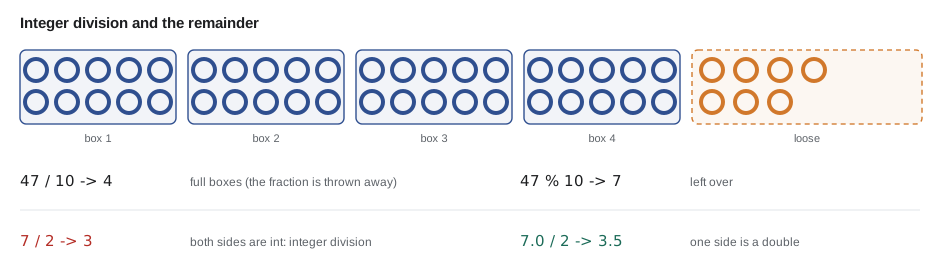
Division needs care. When both sides of / are whole numbers, Java does integer division: it divides and throws away any fractional part, without rounding. 7 / 2 is 3, not 3.5. If at least one side is a double, the result is a double. The remainder operator is useful for things that wrap around, such as splitting tubes into boxes of ten.
public class Main {
    public static void main(String[] args) {
        int tubes = 47;
        int perBox = 10;

        int fullBoxes = tubes / perBox;
        int loose = tubes % perBox;
        System.out.println(tubes + " tubes make " + fullBoxes + " full boxes and " + loose + " loose tubes");

        System.out.println("7 / 2 = " + (7 / 2));
        System.out.println("7.0 / 2 = " + (7.0 / 2));
        System.out.println("2 + 3 * 4 = " + (2 + 3 * 4));
        System.out.println("(2 + 3) * 4 = " + ((2 + 3) * 4));
    }
}47 tubes make 4 full boxes and 7 loose tubes 7 / 2 = 3 7.0 / 2 = 3.5 2 + 3 * 4 = 14 (2 + 3) * 4 = 20
What this code does
Dividing 47 by 10 with whole numbers gives 4, and the remainder operator gives the 7 that are left over. 7 / 2 gives 3 because both sides are whole numbers, while 7.0 / 2 gives 3.5. The last two lines show that multiplication happens before addition unless brackets say otherwise.
Shortcuts: compound assignment and increment
Changing a variable by some amount is so common that Java has shortcuts. count += 5 means count = count + 5, and there are matching forms for the other operators: -=, *=, /= and the remainder version. The increment operator ++ adds one, and the decrement operator -- subtracts one. They are most often used in loops, which lesson 7 covers.
public class Main {
    public static void main(String[] args) {
        int stock = 16;
        stock += 24;      // a delivery of 24 tubes
        System.out.println("After delivery: " + stock);
        stock -= 3;       // three sold on Saturday
        System.out.println("After Saturday: " + stock);
        stock++;          // one returned unused
        System.out.println("After a return: " + stock);
        stock--;          // one found punctured
        System.out.println("After checking: " + stock);
        stock *= 2;       // Kofi's planned double order
        System.out.println("If doubled: " + stock);
    }
}After delivery: 40 After Saturday: 37 After a return: 38 After checking: 37 If doubled: 74
What this code does
Each compound operator updates stock using its current value. The plus-equals line adds 24 and the minus-equals line takes away 3. The increment and decrement operators add and subtract one, and times-equals doubles the value.
Constants with final
Some values should never change while the program runs, such as a tax rate or the number of tubes in a box. Declaring a variable final makes the compiler refuse any second assignment. By convention, constants that are fixed for the whole program are named in capital letters with underscores, such as TUBES_PER_BOX. Using a named constant instead of typing the number everywhere also means there is only one place to change it.
public class Main {
    public static void main(String[] args) {
        final double SALES_TAX_RATE = 0.08;
        final int TUBES_PER_BOX = 10;

        double tubePrice = 8.50;
        int boxes = 2;
        double subtotal = tubePrice * TUBES_PER_BOX * boxes;
        double tax = subtotal * SALES_TAX_RATE;
        System.out.println("Subtotal: " + subtotal);
        System.out.println("Sales tax: " + tax);
        System.out.println("Total: " + (subtotal + tax));
    }
}Subtotal: 170.0 Sales tax: 13.6 Total: 183.6
What this code does
The two final variables are constants, so any later attempt to change them would be a compile error. The subtotal for two boxes of ten tubes at 8.50 is 170.0, and the Columbus sales tax of 8 in 100 adds 13.6. The total is printed exactly here, but other amounts can show a long tail of digits, as the next section explains.
Why 0.1 + 0.2 is not quite 0.3
A double stores numbers in binary, and many decimal fractions, such as 0.1, have no exact binary form, just as one third has no exact decimal form. The stored value is extremely close but not exact, and tiny differences can appear when values are added. For measurements, such as tire pressures, this does not matter. For money it does, because a bill must add up to the cent.
public class Main {
    public static void main(String[] args) {
        System.out.println(0.1 + 0.2);
        System.out.println(1.10 * 3);

        long priceCents = 110;            // 1.10 as whole cents
        long totalCents = priceCents * 3;
        System.out.println("Total in cents: " + totalCents);
        System.out.println("Total: " + totalCents / 100 + "." + totalCents % 100);
    }
}0.30000000000000004 3.3000000000000003 Total in cents: 330 Total: 3.30
What this code does
The first two lines show the small errors that come from storing decimals in binary. Working in whole cents with a long avoids the problem, because whole numbers are exact. The last line splits the cents into dollars and cents with integer division and the remainder operator.
Two common ways to handle money in Java are counting whole cents in a long, as above, and using the BigDecimal class, which stores decimal numbers exactly. JAVA-102 and later courses use BigDecimal for prices. One catch with the simple split shown above: 305 cents would print as 3.5, because the remainder 5 has no leading zero. For now, Hamza keeps money in cents and formats it for display; lesson 4 shows a neater way to print two decimal places.
Converting between types
Java converts values automatically when nothing can be lost, which is called a widening conversion: an int fits in a long or a double, so int count = 5; double d = count; is fine. Going the other way, from double to int, could lose the fractional part, so Java insists on an explicit cast, written as the target type in brackets: (int) 9.99. A cast to int cuts off the fraction; it does not round. For rounding, use Math.round.
public class Main {
    public static void main(String[] args) {
        int bikes = 7;
        double average = 233.0 / bikes;   // the int is widened automatically
        System.out.println("Average km per bike: " + average);

        double price = 9.99;
        int wholeDollars = (int) price;
        long rounded = Math.round(price);
        System.out.println("Cast to int: " + wholeDollars);
        System.out.println("Rounded: " + rounded);

        int big = 2_000_000_000;
        System.out.println("Overflow: " + (big + big));
        System.out.println("As long: " + ((long) big + big));
    }
}Average km per bike: 33.285714285714285 Cast to int: 9 Rounded: 10 Overflow: -294967296 As long: 4000000000
What this code does
Dividing a double by an int gives a double, because Java widens the int first. Casting 9.99 to int cuts it to 9, while Math.round gives 10. Adding two large ints overflows and wraps around to a negative number, but casting one of them to long first gives the right answer.
That last line is worth remembering. When a whole-number calculation goes past the largest value its type can hold, Java does not stop with an error: the value silently overflows and wraps around to the other end of the range. Choosing long for values that can grow large prevents it.
The var keyword
Since Java 10, a local variable can be declared with var instead of a type when the type is obvious from the value. var count = 25; makes count an int, and var price = 8.50; makes price a double. The variable is still statically typed: the compiler works out the type once and enforces it from then on, so assigning text to count later is still an error. Many teams use var when the type is plain from the right-hand side and write the type out when it is not. This course writes types out in the early lessons so that you can see them.
Try it yourself
Boxes and loose tubes
Kofi has 83 tubes and they come in boxes of 12. Using integer division and the remainder operator, make the program print 83 tubes: 6 full boxes and 11 loose.
Store the counts in int variables rather than typing the answers.
public class Main {
    public static void main(String[] args) {
        int tubes = 83;
        int perBox = 12;
        // Work out fullBoxes and loose here.
        System.out.println(tubes + " tubes: ");
    }
}
Try it yourself
Brake pads in cents
Brake pads cost 675 cents a pair and a customer buys 4 pairs. Store the price in a long number of cents, then print Total: 2700 cents and then Total: 27 dollars and 0 cents on the next line.
Use integer division and the remainder operator to split the cents.
public class Main {
    public static void main(String[] args) {
        long priceCents = 675;
        int pairs = 4;
        System.out.println("Total: ");
    }
}
Common mistakes
MistakeWriting 7 / 2 and expecting 3.5.
InsteadBoth sides are int, so the answer is 3; write 7.0 / 2 or cast one side to double.
MistakeStoring prices as double and expecting exact totals.
InsteadUse whole cents in a long, or BigDecimal, for money.
MistakeUsing a variable before giving it a value.
InsteadInitialize every local variable before reading it; javac checks this.
MistakeCasting 9.99 to int and expecting 10.
InsteadA cast cuts off the fraction; use Math.round to round.
MistakeAdding large ints and getting a negative number.
InsteadThe int overflowed; use long for values that can pass about two billion.
Summary and key terms
- A variable has a type, a name and a value; the single equals sign stores the value on the right in the variable on the left, and local variables must be initialized before use.
- Java's eight primitive types are byte, short, int, long, float, double, char and boolean; int, double, boolean and char cover most needs, with long for very large whole numbers.
- Arithmetic follows the usual order, integer division throws away the fraction and the remainder operator gives what is left over.
- Compound assignment operators and ++ and -- update variables in place, and final makes a constant.
- Doubles store binary approximations, so money is kept in whole cents or BigDecimal.
- Widening conversions are automatic, narrowing needs a cast that truncates, ints can silently overflow, and var lets the compiler infer a local variable's type.
- Variable
- A named place in a program that holds a value of a declared type.
- Primitive type
- One of Java's eight built-in simple types, such as int or boolean.
- Literal
- A value written directly in code, such as 42, 3.5, true or 'M'.
- Initialize
- Give a variable its first value, usually when it is declared.
- camelCase
- A naming style that starts small and capitalizes each later word, as in pricePerTube.
- Integer division
- Division of two whole numbers that discards the fractional part.
- Remainder operator
- The operator that gives what is left after whole-number division.
- final
- A keyword that stops a variable from being assigned again.
- Cast
- An explicit conversion to another type, written as the type in brackets.
- Overflow
- A whole-number result too large for its type, which wraps around.
- var
- A keyword that lets the compiler infer a local variable's type from its value.
Practice problems
Work each problem on paper first, then reveal the answer to check.
What does 17 / 5 give in Java, and what does the remainder operator give for 17 and 5?
Show answer
17 / 5 is 3, and the remainder is 2.
Why should money not be stored in a double?
Show answer
Decimal fractions are stored as binary approximations, so totals can be off by tiny amounts.
What does (int) 4.8 give?
Show answer
4, because a cast to int cuts off the fraction.
What type does var x = 2.5; give x?
Show answer
double.
Which primitive type would you use for a count of all the bolts sold in a city over many years?
Show answer
long, because the total could pass the int limit of about 2.1 billion.
Lesson quiz · 5 questions
Score 60% or more to complete this lesson.
Create a free account to save your progress, take quizzes and earn a certificate.