
JAVA-101 · Lesson 4 of 12 · 21 min
Strings and text output
▶ Video coming soon A video version of this lesson is on the way.
Most of what a program shows people is text: labels, messages, receipts and reports. On Wednesday, September 30, Kofi brought Hamza a problem from the parts room. The spreadsheet's part names had been typed by a dozen volunteers over the years, so the same tube appeared as "700x25c tube", " 700X25C Tube " and "Tube 700x25c". Kofi wanted labels printed neatly and searches that found a part however it had been typed. Ingrid said that meant a whole evening on strings, Java's type for text.
What a String is
A String is a sequence of characters, written in double quotes: "Second Gear". Unlike int or double, String is not a primitive type. It is a class from Java's standard library, and each piece of text is an object of that class. Objects carry methods, actions you can ask them to perform, and you call a method by writing the object, a dot and the method name with brackets: name.length(). String is so central that Java gives it special treatment, such as the double-quote literals and joining with +.
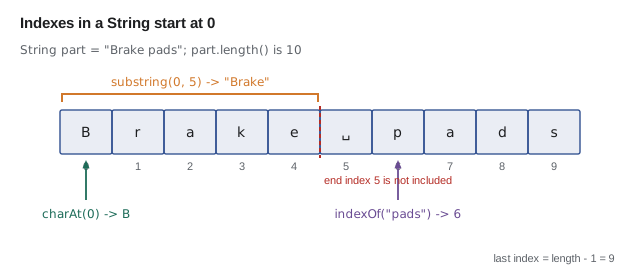
Every character in a String has a position called its index, counting from zero. In "Brake", B is at index 0 and e is at index 4. The length is the number of characters, 5 here, so the last index is always one less than the length. Counting from zero feels odd at first, but it is used everywhere in Java, including arrays in lesson 9.
public class Main {
    public static void main(String[] args) {
        String part = "Brake pads";
        System.out.println("Length: " + part.length());
        System.out.println("First character: " + part.charAt(0));
        System.out.println("Last character: " + part.charAt(part.length() - 1));
        System.out.println("Where pads starts: " + part.indexOf("pads"));
        System.out.println("First word: " + part.substring(0, 5));
        System.out.println("From index 6: " + part.substring(6));
        System.out.println("Shouting: " + part.toUpperCase());
    }
}Length: 10 First character: B Last character: s Where pads starts: 6 First word: Brake From index 6: pads Shouting: BRAKE PADS
What this code does
length counts all ten characters, including the space. charAt picks out one character by index, so the last one is at length minus one. indexOf finds where a piece of text starts, and substring copies the characters from the start index up to, but not including, the end index.
If you ask for an index that does not exist, such as part.charAt(10) on a ten-character String, the program stops with a StringIndexOutOfBoundsException. indexOf behaves differently: when the text is not found it returns -1 rather than failing, so code can check the result.
Useful String methods
String has dozens of methods. These are the ones Hamza used most in his first month. None of them change the original String. They all return a new value.
| Method | What it returns | Example and result |
|---|---|---|
| length() | The number of characters | "tube".length() gives 4 |
| charAt(i) | The character at index i | "tube".charAt(1) gives u |
| indexOf(s) | Where s first appears, or -1 | "tube".indexOf("be") gives 2 |
| substring(a, b) | Characters from index a up to but not including b | "tubeless".substring(0, 4) gives tube |
| toUpperCase(), toLowerCase() | A copy in capitals or small letters | "Tube".toLowerCase() gives tube |
| strip(), trim() | A copy without spaces at the ends | " tube ".strip() gives tube |
| contains(s) | true if s appears anywhere | "inner tube".contains("tube") gives true |
| startsWith(s), endsWith(s) | true if the text begins or ends with s | "700x25c".endsWith("c") gives true |
| replace(a, b) | A copy with every a replaced by b | "700X25C".replace("X", "x") gives 700x25C |
| isBlank() | true if empty or only spaces | " ".isBlank() gives true |
| repeat(n) | The text repeated n times | "-".repeat(5) gives ----- |
strip and trim both remove spaces from the ends. trim is older and removes only basic spaces and control characters; strip, added in Java 11, also understands other kinds of space characters from Unicode, so modern code usually prefers strip.
Strings never change
Strings in Java are immutable: once created, a String object can never be changed. Methods such as toUpperCase do not alter the String you call them on; they build a new one and return it. This is a frequent beginner surprise: calling name.toUpperCase(); on its own line does nothing useful, because the new String is thrown away. To keep the result, assign it, often back to the same variable.
public class Main {
    public static void main(String[] args) {
        String label = "  700X25C Tube ";
        label.strip();                  // result thrown away
        System.out.println("[" + label + "]");

        label = label.strip();          // keep the new String
        label = label.toLowerCase();
        System.out.println("[" + label + "]");

        String tidy = "  Tube 700X25C  ".strip().toLowerCase().replace("tube ", "");
        System.out.println("[" + tidy + "]");
    }
}[ 700X25C Tube ] [700x25c tube] [700x25c]
What this code does
The first call to strip creates a tidied copy but nothing keeps it, so the label still has its spaces. Assigning the results back to label keeps each change. The last line chains three methods, each working on the String returned by the one before.
Immutability has real benefits. A String can be shared safely between different parts of a program, because nobody can change it unexpectedly, and Java can store one copy of a repeated literal for the whole program. The cost is that building a long piece of text by repeated joining creates many short-lived Strings, which is what StringBuilder, later in this lesson, is for.
Comparing Strings correctly
Comparing text is where many beginners' programs go wrong. The == operator, which works for numbers, checks whether two variables refer to the very same object in memory, not whether they hold the same characters. Two Strings with identical text can be separate objects, so == may give false. To compare content, always use equals, or equalsIgnoreCase when capitals should not matter.
public class Main {
    public static void main(String[] args) {
        String fromSheet = "tube";
        String typed = new String("tube");   // a separate String object with the same text

        System.out.println("== says: " + (fromSheet == typed));
        System.out.println("equals says: " + fromSheet.equals(typed));
        System.out.println("Ignoring case: " + "TUBE".equalsIgnoreCase(typed));
        System.out.println("compareTo: " + "chain".compareTo("tube"));
    }
}== says: false equals says: true Ignoring case: true compareTo: -17
What this code does
The two variables hold the same characters but refer to different objects, so == gives false while equals gives true. equalsIgnoreCase treats capitals and small letters as the same. compareTo returns a negative number because chain comes before tube in alphabetical order.
compareTo is used for sorting. It returns zero when the Strings are equal, a negative number when the first comes before the second, and a positive number when it comes after. It compares by character codes, so all capital letters come before all small letters; compareToIgnoreCase avoids that.
Characters and the char type
A single character has the primitive type char and is written in single quotes: 'A'. charAt returns a char. Each char is stored as a number, its Unicode code, which is why char values can be compared with < and >, and why adding to a char moves through the alphabet. The Character class has helpers such as Character.isDigit, Character.isLetter and Character.toUpperCase.
public class Main {
    public static void main(String[] args) {
        String code = "B7-Q";
        char first = code.charAt(0);
        char second = code.charAt(1);
        System.out.println(first + " is a letter: " + Character.isLetter(first));
        System.out.println(second + " is a digit: " + Character.isDigit(second));
        System.out.println("Numeric value of " + second + ": " + Character.getNumericValue(second));
        char next = (char) (first + 1);
        System.out.println("The letter after " + first + " is " + next);
    }
}B is a letter: true 7 is a digit: true Numeric value of 7: 7 The letter after B is C
What this code does
charAt returns single characters, which the Character helpers can test. getNumericValue turns the digit character 7 into the number 7. Adding one to the code for B gives the code for C, and the cast turns that number back into a char.
Formatted output with printf
Joining text with + gets messy for columns and decimal places. printf and String.format take a pattern with format specifiers and fill in values. In the pattern, each specifier starts with a special marker character, which you can see in the code below, followed by a letter: d for a whole number, f for a decimal, s for text and n for a line break. A number between the marker and the letter sets a minimum width, a minus sign aligns text to the left, and .2 before f means two decimal places. This is how prices are usually printed.
public class Main {
    public static void main(String[] args) {
        String item1 = "Inner tube 700x25c";
        String item2 = "Brake pads (pair)";
        double price1 = 8.50, price2 = 6.75;
        int qty1 = 2, qty2 = 1;
        double subtotal = price1 * qty1 + price2 * qty2;
        double tax = subtotal * 0.08;

        System.out.printf("%-20s %3s %8s%n", "Item", "Qty", "Amount");
        System.out.printf("%-20s %3d %8.2f%n", item1, qty1, price1 * qty1);
        System.out.printf("%-20s %3d %8.2f%n", item2, qty2, price2 * qty2);
        System.out.printf("%-20s %3s %8.2f%n", "Subtotal", "", subtotal);
        System.out.printf("%-20s %3s %8.2f%n", "Sales tax 8", "", tax);
        System.out.printf("%-20s %3s %8.2f%n", "Total", "", subtotal + tax);
    }
}Item Qty Amount Inner tube 700x25c 2 17.00 Brake pads (pair) 1 6.75 Subtotal 23.75 Sales tax 8 1.90 Total 25.65
What this code does
Each printf pattern lays out three columns: text padded to 20 characters on the left, a quantity in 3 characters and an amount in 8 characters with two decimals. The values after the pattern fill the specifiers in order. Rounding to two decimals happens only in the display, while the stored double keeps its full value.
String.format uses the same patterns but returns the text instead of printing it, so you can store it or join it with other text. Java 15 also added the formatted method, so "Total: ...".formatted(value) does the same job. One caution: printf follows the computer's locale, its language and region settings, so on a computer set to French it prints a comma as the decimal separator. Programs that must always use a point can pass Locale.ROOT as the first argument.
Building text with StringBuilder
When a program builds text in many small pieces, for example a label line by line in a loop, joining Strings with + creates a new String every time. StringBuilder is a changeable buffer for text. Its append method adds to the end, and toString gives the finished String. For a handful of pieces + is fine and clearer; StringBuilder matters when there are hundreds or thousands.
public class Main {
    public static void main(String[] args) {
        StringBuilder label = new StringBuilder();
        label.append("SECOND GEAR CYCLES").append('\n');
        label.append("Part: ").append("700x25c inner tube").append('\n');
        label.append("Bin: ").append("C-14").append('\n');
        label.append("-".repeat(24));
        String text = label.toString();
        System.out.println(text);
        System.out.println("Label length: " + text.length());
    }
}SECOND GEAR CYCLES Part: 700x25c inner tube Bin: C-14 ------------------------ Label length: 78
What this code does
The StringBuilder starts empty and each append adds to the end of the same buffer, so the calls can be chained. toString turns the buffer into an ordinary String. The repeat method draws a line of 24 dashes under the label.
Text blocks for longer text
Since Java 15, a text block lets you write text over several lines without escape sequences. It starts with three double quotes followed by a new line and ends with three double quotes. Java removes the indentation that all the lines share, so the block can be indented to match the code around it. Text blocks are ideal for help messages, templates and sample data.
public class Main {
    public static void main(String[] args) {
        String help = """
            PartsDesk commands:
              list    show every part
              find    search by name
              quit    leave the program
            """;
        System.out.print(help);
        System.out.println("Lines: " + help.lines().count());
    }
}PartsDesk commands: list show every part find search by name quit leave the program Lines: 4
What this code does
The text block keeps the line breaks and the extra spaces inside it, but removes the indentation that every line shares. Its last line ends with a line break, so print rather than println avoids a blank line. lines().count() counts the four lines of the help text.
Joining and splitting
Two more methods finish Kofi's toolbox. String.join puts a separator between several pieces of text. split does the reverse: it cuts a String at each separator and gives back an array of pieces. Arrays are the topic of lesson 9, but split is too useful to wait for, so here is a first look.
public class Main {
    public static void main(String[] args) {
        String bins = String.join(", ", "A-02", "C-14", "D-07");
        System.out.println("Bins to check: " + bins);

        String row = "C-14;700x25c inner tube;18";
        String[] fields = row.split(";");
        System.out.println("Bin: " + fields[0]);
        System.out.println("Part: " + fields[1]);
        System.out.println("Count: " + fields[2]);
    }
}Bins to check: A-02, C-14, D-07 Bin: C-14 Part: 700x25c inner tube Count: 18
What this code does
String.join puts a comma and a space between the three bin codes. split cuts the row at each semicolon and returns the three pieces in an array. The pieces are reached by index, starting from zero, and the count is still text until it is converted, which lesson 5 shows.
Try it yourself
Tidy a part name
Kofi's spreadsheet holds the name " Tube 700X25C ". Make the program print [tube 700x25c] by removing the spaces at both ends and changing it to small letters.
Remember that String methods return new Strings: assign the results.
public class Main {
    public static void main(String[] args) {
        String name = "  Tube 700X25C  ";
        name.strip();
        System.out.println("[" + name + "]");
    }
}
Try it yourself
A price line
Use printf to print the line Chain 8-speed x3 74.85 for a chain priced at 24.95 with quantity 3.
The name is left-aligned in 20 characters, the quantity follows the letter x, and the amount is 8 characters wide with two decimal places.
public class Main {
    public static void main(String[] args) {
        String name = "Chain 8-speed";
        double price = 24.95;
        int qty = 3;
        System.out.println(name + " " + qty + " " + price * qty);
    }
}
Common mistakes
MistakeComparing Strings with ==.
InsteadUse equals, or equalsIgnoreCase, to compare the characters.
MistakeCalling label.toUpperCase(); and expecting label to change.
InsteadStrings are immutable; write label = label.toUpperCase();
MistakeUsing substring(2, 5) and expecting the character at index 5.
InsteadThe end index is not included; substring(2, 5) gives three characters.
MistakeAsking for charAt(length()).
InsteadThe last index is length() minus 1; asking past it throws StringIndexOutOfBoundsException.
MistakePrinting money with println and getting 25.849999999.
InsteadUse printf or String.format with two decimal places for display.
Summary and key terms
- A String is an immutable object holding a sequence of characters, indexed from zero; length, charAt, indexOf, substring, strip, toUpperCase, contains, replace and repeat return new values and never change the original.
- Compare text with equals or equalsIgnoreCase, not ==, and use compareTo to order it. char holds one character as a Unicode number, and the Character class tests and converts characters. printf and String.format fill format specifiers for text, whole numbers and decimals with widths and decimal places, following the computer's locale.
- StringBuilder builds long text efficiently, text blocks hold multi-line text, String.join combines pieces and split cuts a String into an array.
- String
- Java's class for text: an immutable sequence of characters.
- Object
- A value created from a class, which holds data and has methods.
- Method
- An action an object or class can perform, called with a dot and brackets.
- Index
- The position of a character, counting from zero.
- Immutable
- Unable to be changed after creation.
- equals
- The method that compares two Strings' characters.
- char
- The primitive type for one character, written in single quotes.
- Format specifier
- A code in a printf pattern that says where and how a value appears.
- Locale
- A computer's language and region settings, which affect formatting.
- StringBuilder
- A changeable buffer for building text piece by piece.
- Text block
- A multi-line String literal between triple double quotes.
Practice problems
Work each problem on paper first, then reveal the answer to check.
What does "sprocket".substring(1, 4) return?
Show answer
pro, the characters at indexes 1, 2 and 3.
Why might a == b be false when both hold "tube"?
Show answer
== checks whether they are the same object, and two Strings with the same text can be different objects.
What does "wheel".indexOf("z") return?
Show answer
-1, because the text is not found.
When is StringBuilder better than joining with +?
Show answer
When building text from many pieces, such as inside a long loop.
How do you print a double with exactly two decimal places?
Show answer
Use printf or String.format with a specifier for a decimal with .2 before the letter f.
Lesson quiz · 5 questions
Score 60% or more to complete this lesson.
Create a free account to save your progress, take quizzes and earn a certificate.