
HSE-108 · Lesson 8 of 12 · 25 min
Working alone, in the community and online
A growing share of work happens away from a fixed workplace with colleagues nearby. Home care workers, social workers, real estate agents, delivery drivers, ride-share and taxi drivers, inspectors, utility workers, security guards on night patrol, cleaners working after hours and many employees working from home all spend at least part of their day alone or out of sight of co-workers. Working alone is not unsafe in itself, but it removes the protection that comes from having others nearby to deter aggression, notice a problem and call for help. At the same time, digital tools have created new ways for harassment to reach workers wherever they are. This lesson covers how to protect workers who are alone, mobile or remote, and how to prevent and respond to online harassment.
What counts as working alone
There is no federal OSHA standard on working alone. Employers must still protect lone workers under the General Duty Clause, and OSHA guidance for health care and social services, late-night retail and taxi drivers addresses working alone. California's Labor Code section 6401.9 requires employers to consider workplace violence hazards, including working alone, in their plans, although it does not apply to employees teleworking from a location of their choice. Some states regulate specific lone-work settings: for example, several states have laws on panic buttons for hotel housekeepers who work alone in guest rooms, and many cities have such ordinances. Industry standards and good practice fill much of the gap, and a written lone worker procedure is a sensible part of any workplace violence prevention program.
Working alone covers more situations than people often think. A pharmacist alone in a store at night, a home support worker in a client's home, a property manager showing an apartment, a worker staying late in an empty office, a security guard patrolling a site, a parking enforcement officer and a researcher doing field interviews are all working alone for part of their shift. So is someone working at home, although the risks there are usually different.
Assessing lone work
Start with the general risk assessment from Lesson 5 and add questions specific to lone work: How long is the worker alone? How far away is help, and how long would it take to arrive? Can the worker communicate reliably, including in areas with poor mobile coverage? Does the work involve contact with the public, cash, enforcement or clients with a history of violence? Are there medical risks that could leave the worker unable to call for help? Is the location known and is it safe to reach, park and leave? What happens if the worker does not check in?
Controls for lone and mobile workers
- Avoid lone work where the risk is high: send two workers, schedule visits to high-risk clients during the day, or meet clients in a safe, public or office setting rather than at home.
- Screen in advance: gather information before a first visit, such as who lives at the address, any history of violence, pets, weapons, and safety concerns raised by other agencies, consistent with privacy law.
- Plan the visit: share the itinerary, including addresses and expected times, with a designated contact; plan parking, routes and exits; and know where help is available.
- Communicate: provide reliable phones, radios or satellite devices where coverage is poor, and lone worker apps or devices with duress buttons, fall detection and location tracking, used with clear privacy rules.
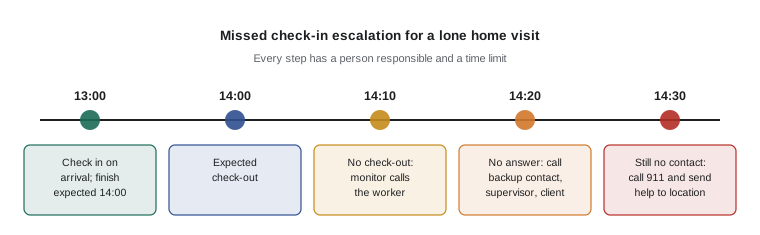
- Check in: set up a check-in procedure with defined intervals, a person responsible for monitoring, and an escalation plan when a worker misses a check-in.
- Empower workers: give them clear authority to leave any situation where they feel unsafe, without penalty, and to reschedule a visit or refuse service when conditions are unsafe.
- Use a code phrase: agree a phrase that a worker can use on the phone to signal danger without alerting the person present, such as asking the office to "check the blue file".
- Train: provide training in situational awareness, de-escalation, the check-in system, home visit safety, vehicle safety and what to do if things go wrong.
Designing a check-in system
A check-in system is only as good as its response. Each check-in should confirm that the worker is safe; a missed check-in should trigger a defined sequence of actions with a time limit for each. The interval between check-ins depends on the risk: the higher the risk, the shorter the interval. Some employers check in at the start and end of each visit; others use automatic timers that alert a monitor if the worker does not cancel them.
Worked problem
Setting a check-in interval
A community agency's risk assessment says that, for visits to clients rated medium risk, help should be able to reach a worker within 45 minutes of the worker getting into trouble. The monitor's escalation procedure takes 10 minutes from a missed check-in to calling police, and police typically take 15 minutes to arrive in this area. What is the longest check-in interval the agency can use? What should it do for high-risk clients, where the target is 20 minutes?
Show solution
- Think about the worst case: the worker gets into trouble just after checking in, so the time until help arrives is the interval plus the escalation time plus the response time.
- \[T_{\text{help}} = I + t_{\text{escalate}} + t_{\text{response}} \le 45\ \text{min}\]
- \[I \le 45 - 10 - 15 = 20\ \text{min}\]
- For medium-risk visits, check-ins should be no more than 20 minutes apart, or the worker should carry a device with a duress button that bypasses the interval.
- \[\text{High risk: } I \le 20 - 10 - 15 = -5\ \text{min}\]
- A negative result means no check-in interval can meet the target. For high-risk clients, the agency must change the work: send two workers, meet in a safe setting, or provide a duress device with immediate monitored response.
Answer: Medium-risk visits need check-ins at least every 20 minutes or a duress device. For high-risk clients, check-ins alone cannot meet a 20-minute target, so the agency must use two-person visits, a safer location or immediate-response alarms.
Vehicles and travel
Many lone workers spend much of their time in vehicles. Basic precautions include keeping the vehicle well maintained and fueled, parking in well-lit areas facing the exit, keeping doors locked while driving and parked, not leaving bags or equipment visible, having a plan if followed or approached, and avoiding giving rides to clients unless a policy allows it and the risk has been assessed. Taxi, ride-share and delivery drivers face particular risks; controls include cashless payment, in-vehicle cameras, partitions, GPS tracking and emergency buttons connected to a dispatcher.
Working from home
Remote work reduces some risks, such as commuting and contact with the public, but it can create others. Workers at home may be isolated from support, may experience online harassment, may have blurred boundaries between work and personal time and, in some cases, may be exposed to domestic violence at the same place where they work. Employers' legal duties generally extend to home workplaces, although their practical control over the space is limited.
Practical measures include regular contact between managers and remote workers, clear policies on communication outside working hours, inclusion of remote workers in training and reporting systems, and making sure that remote workers know how to report harassment and access support. Employers should also make it known that domestic violence affecting remote workers is a workplace issue, and that the worker can ask for help confidentially. Lesson 9 covers domestic violence in more detail.
Online and virtual harassment
Harassment through email, messaging apps, video calls and social media is now one of the most common forms of workplace harassment. It can be relentless, because it follows workers home, and it can involve large audiences when it happens in group chats or public posts. Examples include insulting or threatening messages, sexual messages or images, exclusion from group channels, mocking colleagues in video meetings, sharing private information or images, impersonation, coordinated pile-ons in comments, and publishing a worker's personal details online, sometimes called doxxing.
Anti-discrimination law applies to harassment through any medium. Courts have accepted that messages, social media posts and video calls can contribute to a hostile work environment under Title VII when they have a connection to work. State laws on harassment and workplace violence, including California's definition in Labor Code 6401.9, cover threats regardless of how they are delivered. Federal and state criminal laws address threats, stalking, cyberstalking and non-consensual distribution of intimate images, and the TAKE IT DOWN Act of 2025 created federal requirements for removing non-consensual intimate images, including AI-generated ones, from online platforms.
Employers should cover online conduct in their harassment policies, set expectations for respectful communication in workplace channels, give administrators the ability to remove abusive content and block users, train workers on how to document online harassment, and support workers who are targeted by members of the public online, for example journalists, public servants and health workers who face abuse on social media because of their jobs.
| Step | What to do after online harassment |
|---|---|
| Preserve | Take screenshots showing the content, date, time, sender and platform; save links and messages |
| Report | Report to your supervisor or the designated person under the policy; report to the platform where appropriate |
| Protect | Adjust privacy settings, block or mute where appropriate, and ask the employer to remove your personal details from public sites |
| Escalate | Contact police if there are threats, stalking, sharing of intimate images or other criminal conduct |
| Support | Use the employee assistance program or other support; online harassment can be as harmful as in-person harassment |
Reviewing lone work arrangements
Lone work procedures should be tested and reviewed like any other control. Run occasional drills in which a monitor deliberately simulates a missed check-in to see whether the escalation steps are followed and how long they take. Review any incident or near miss involving a lone worker, ask workers whether the check-in system is practical, and check that phones, devices and contact lists are up to date. When a worker's caseload, route or client mix changes, revisit the risk assessment for their lone work.
Finally, make sure that lone workers have a say in the arrangements that protect them. They are the people best placed to know whether check-in times are realistic, which locations feel unsafe and which devices work in practice, and procedures designed without them are often ignored.
Common mistakes
MistakeSetting up check-ins with no defined response to a missed check-in.
InsteadDefine escalation steps, responsible people and time limits for each.
MistakeChoosing a check-in interval without considering response time.
InsteadWork back from how quickly help must arrive to set the interval.
MistakePenalizing workers who leave a home visit because they felt unsafe.
InsteadGive workers clear authority to leave and reschedule without penalty.
MistakeTreating online harassment as less serious than in-person harassment.
InsteadCover virtual conduct in policies and respond with the same seriousness.
MistakeForgetting remote workers in training and reporting systems.
InsteadInclude remote workers and check in with them regularly.
Summary and key terms
- There is no federal OSHA working alone standard, but the General Duty Clause and state laws apply.
- Assess how long workers are alone, how far away help is, communication reliability and client risk.
- Controls include avoiding high-risk lone work, screening, planning visits, reliable communication, check-ins, code phrases and training.
- Check-in interval ≤ target time for help − escalation time − response time.
- Workers must be able to leave unsafe situations without penalty.
- Remote work brings isolation, online harassment and, for some, domestic violence risks.
- Online harassment is harassment; preserve evidence, report, protect and escalate.
- Working alone
- Working where help is not readily available if needed.
- Check-in procedure
- System of regular contact with a lone worker, with steps if contact fails.
- Escalation plan
- Defined actions and time limits when a worker cannot be contacted.
- Lone worker device
- Device or app with duress, location and fall detection features.
- Code phrase
- Agreed words that signal danger without alerting others present.
- Situational awareness
- Ongoing attention to surroundings and changes that may signal danger.
- Cyber harassment
- Harassment carried out through digital technology.
- Doxxing
- Publishing a person's private information online without consent.
- Telework
- Work performed away from the employer's premises, often at home.
- Pre-visit screening
- Gathering safety information before visiting a client or site.
Practice problems
Work each problem on paper first, then reveal the answer to check.
Help must arrive within 60 minutes; escalation takes 15 minutes and response 20 minutes. What is the maximum check-in interval?
Show answer
25 minutes.
What should happen when a worker misses a check-in?
Show answer
A defined escalation sequence with time limits, ending in sending help or calling police.
Name three controls for home visits.
Show answer
Pre-visit screening, two-person visits for high-risk clients and a check-in system (also code phrases, duress devices).
Why is a code phrase useful?
Show answer
It lets a worker signal danger without alerting the person present.
Give two vehicle safety precautions for lone workers.
Show answer
Park in well-lit areas facing the exit and keep doors locked (also keep valuables out of sight).
Name two risks of working from home related to this course.
Show answer
Online harassment and domestic violence (also isolation).
What is doxxing?
Show answer
Publishing a person's private information online without consent.
What should a worker do first to document online harassment?
Show answer
Take screenshots showing content, date, time, sender and platform.
When should police be contacted about online harassment?
Show answer
When there are threats, stalking, sharing of intimate images or other criminal conduct.
If no check-in interval can meet the target, what must change?
Show answer
The work itself, such as two-person visits, safer locations or immediate-response alarms.
Lesson quiz · 5 questions
Score 60% or more to complete this lesson.
Create a free account to save your progress, take quizzes and earn a certificate.