
GCP-193 · Lesson 8 of 12 · 18 min
Commonly confused services and features
▶ Video coming soon A video version of this lesson is on the way.
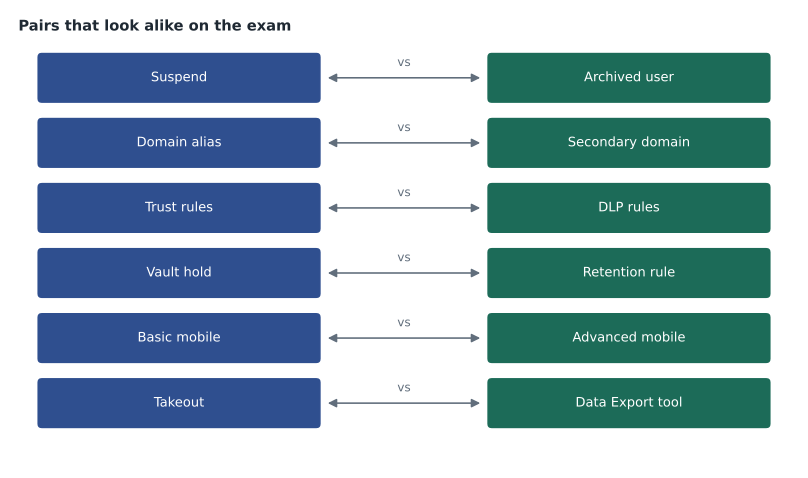
When Owen reviews the questions he has missed since November, a second pattern appears beside the reading errors of lesson 3. Many wrong answers name a real feature that does something close to what the question needs, but not quite. He chose a domain alias where a secondary domain was needed, a DLP rule where a trust rule fitted, an IP allowlist where an inbound gateway was right. Sofia calls these look-alike pairs. Exam writers use them deliberately, because only someone who knows exactly what each feature does can tell them apart.
This lesson collects the pairs and groups that cause most trouble in Workspace administration. For each, it gives the difference in one line and the clue in a question that points to each side. Owen turns the result into the second of his two cards for the final week.
Accounts and directory
| Feature | What it does | Clue that points to it |
|---|---|---|
| Suspend | Blocks sign-in, keeps data, usually still uses a license | "temporarily", "pending investigation", "on leave" |
| Archived User license | Blocks sign-in, keeps data at lower cost | "former employees", "keep data for years", "reduce cost" |
| Delete | Removes account and data after a short restore window, frees the license | "no longer needed", after data has been transferred |
| Domain alias | Gives every existing user another address in another domain | "same people", "old brand", "receive mail at both" |
| Secondary domain | Holds separate users with their own addresses in the same tenant | "acquired company", "separate accounts", "different people" |
| User alias | Gives one user one extra address | "one person also needs sales@" (though a group is often better) |
| GCDS | Server-installed tool that syncs from a directory to Google | "install on a server", "LDAP", "existing sync server" |
| Directory Sync | Console-based sync from Active Directory or Entra ID without installed software | "without installing software", "from the Admin console" |
The suspend-archive-delete group is the most tested of all. Sofia gives Owen a way to remember it: suspend is a pause button, archive is a storage room, delete is the bin with a short time to change your mind. The question's time frame usually decides: days or weeks suggests suspend; years suggests archive; never again, with data already safe, suggests delete.
Scoping settings
| Feature | What it does | Clue that points to it |
|---|---|---|
| Organizational unit | Holds each user in exactly one place; child OUs inherit from parents | "all users in the department", "a different set of settings for a whole group" |
| Configuration group | Applies settings to members wherever their OU is; wins over the OU for that setting | "users in several OUs", "a few people need an exception" |
| Access group | Shares files, calendars or resources with members | "give the team access to", "share with" |
| Distribution list | Delivers mail sent to one address to all members | "send to everyone in" |
| Collaborative Inbox | Lets members assign and resolve conversations to a group address | "track and assign requests", "shared mailbox" |
| Dynamic group | Keeps membership up to date from user attributes | "automatically include everyone whose department is" |
Mail flow
| Feature | What it does | Clue that points to it |
|---|---|---|
| Inbound gateway | Tells Gmail mail arrives through another server, so it checks the real sender | "mail passes through a filtering service first", "SPF fails since" |
| IP allowlist | Tells Gmail to trust mail from listed servers, skipping some spam checks | "trusted internal application server", used sparingly |
| Split delivery | Sends each message to one of two systems depending on the recipient | "some mailboxes moved, others not yet" |
| Dual delivery | Sends a copy of each message to both systems | "users should receive mail in both systems during the pilot" |
| Content compliance rule | Acts on messages matching words, patterns or attributes | "block messages containing account numbers" |
| Objectionable content rule | Acts on messages containing words from a list | "a list of offensive words" |
| Attachment compliance rule | Acts on file types, sizes or encrypted attachments | "block executable attachments", "files over a size" |
| Approved senders list | Lets mail from listed senders bypass spam filtering | "a partner's newsletters keep landing in spam" |
The inbound gateway and the IP allowlist are the pair Sofia singles out. Both involve another server's IP address, and both change how Gmail treats mail from it. The difference is trust. An inbound gateway says: this server is a hop on the way, look past it. An IP allowlist says: trust what this server sends. Allowlisting a filtering service that relays outside mail would let through whatever it relays, which is why the inbound gateway is usually the correct answer for a filtering service in front of Gmail.
Data protection and governance
| Feature | What it does | Clue that points to it |
|---|---|---|
| External sharing settings | Turn sharing outside the organization on, off or allowlisted, per OU or group | "stop the stores sharing outside at all" |
| Trust rules | Allow or block Drive sharing between specific OUs, groups, domains or users | "Finance may share only with the auditor's domain", "block sharing between two subsidiaries" |
| DLP rules | Act on content: audit, warn or block when sensitive data is shared or sent | "files containing card numbers", "social insurance or social security numbers" |
| Labels | Classify files or messages so rules and people can act on them | "mark confidential files", "classify automatically" |
| Vault retention rule | Keeps data for a set time, then allows deletion | "keep financial records seven years" |
| Vault hold | Keeps data indefinitely while a matter is open, overriding retention | "litigation", "preserve the mailbox of a former manager" |
| Google Takeout | Lets users download their own data | "an employee wants a copy of their own files" |
| Data Export tool | Lets a super admin export the whole organization's data | "the organization is leaving Workspace", "export everything" |
| Data regions | Keeps covered data at rest in the United States or Europe | "data must be stored in Europe" |
Sofia reduces the sharing trio to one question: is the rule about who or about what? External sharing settings and trust rules are about who may share with whom. DLP rules are about what is in the content. A question that names a type of data, such as card numbers or health records, points to DLP; a question that names people, groups or domains points to sharing settings or trust rules, and to trust rules when the control is between specific parties rather than simply inside versus outside.
Security and monitoring
| Feature | What it does | Clue that points to it |
|---|---|---|
| Audit and investigation logs | Record who did what, when, from where | "find out who changed", "who shared" |
| Alert center | Lists alerts for review and assignment | "where to review alerts" |
| Activity rules | Create alerts or actions when log events match conditions | "notify when", "automatically act when" |
| Security investigation tool | Searches across data and acts on it, on editions that include it | "delete a message from every mailbox", "bulk action" |
| Security health page | Compares settings with recommendations | "which settings are weaker than recommended" |
| Context-aware access | Allows or blocks apps based on network, country and device | "only from company devices", "block sign-ins from other countries" |
| Google session control | Sets how long users stay signed in before reauthenticating | "sign users out after 12 hours" |
| 2-step verification | Requires a second factor at sign-in | "stolen passwords", "phishing of passwords" |
Devices, browsers and releases
| Feature | What it does | Clue that points to it |
|---|---|---|
| Basic mobile management | No agent; simple rules such as a screen lock; limited remote actions | "quick", "no app to install", "minimum control" |
| Advanced mobile management | Device policies, work profiles, app management, full wipe of company devices | "company-owned", "separate work data", "block compromised devices" |
| Managed browser | Enrolled Chrome on a computer; policies follow the computer | "shared computers", "every user of this machine" |
| Managed profile | Signed-in Chrome profile; user policies follow the person | "on any computer the user signs in to", "personal computers" |
| Rapid Release | New features arrive as soon as Google releases them | "see features earliest", "test new features" |
| Scheduled Release | New features arrive at least a week later, on a predictable schedule | "time to prepare", "predictable changes" |
Building the card
Owen cannot carry all of these tables into the final week, and he should not try. Sofia asks him to choose the 12 pairs he got wrong at least once and write each on one line in the form "A does X; B does Y; clue for A; clue for B". Writing them in his own words is the point; reading Sofia's tables helps much less than producing his own.
# Owen's misses by look-alike pair since November (illustrative counts).
misses = {
    "Inbound gateway vs IP allowlist": 3,
    "Domain alias vs secondary domain": 2,
    "Trust rules vs DLP rules": 3,
    "Suspend vs archive": 1,
    "Hold vs retention rule": 1,
    "Managed browser vs managed profile": 2,
    "Split vs dual delivery": 2,
    "Takeout vs Data Export tool": 1,
    "Activity rules vs alert center": 1,
}
total = sum(misses.values())
print("Questions lost to look-alike pairs:", total)
running = 0
for pair, n in sorted(misses.items(), key=lambda kv: -kv[1]):
    running += n
print(f"{pair:38s} {n} (cumulative {running} of {total})")Questions lost to look-alike pairs: 16 Inbound gateway vs IP allowlist 3 (cumulative 3 of 16) Trust rules vs DLP rules 3 (cumulative 6 of 16) Domain alias vs secondary domain 2 (cumulative 8 of 16) Managed browser vs managed profile 2 (cumulative 10 of 16) Split vs dual delivery 2 (cumulative 12 of 16) Suspend vs archive 1 (cumulative 13 of 16) Hold vs retention rule 1 (cumulative 14 of 16) Takeout vs Data Export tool 1 (cumulative 15 of 16) Activity rules vs alert center 1 (cumulative 16 of 16)
What this code does
The program lists how many practice questions Owen lost to each look-alike pair, adds them up, and sorts the pairs from most to fewest misses. As it goes down the list it keeps a running total, so it shows how quickly the first few pairs account for most of the lost questions. That tells him which pairs to study first.
Of 16 questions lost to look-alike pairs, the top four pairs account for 10. That is where Owen starts. Sofia warns him not to stop there: the pairs he missed once may simply not have come up often yet.
Worked problem
Telling a pair apart
A question says: a company's legal department must make sure that all mail and files of an employee under investigation are kept, even if the employee or an administrator tries to delete them, until the case is closed. The company already has a 3-year retention rule for mail. What should the administrator do?
Show solution
- The key phrases are "until the case is closed" and "even if someone tries to delete them".
- A retention rule keeps data for a set time and then allows deletion; it is not tied to a case.
- A hold keeps data indefinitely while a matter is open and overrides retention rules.
- So the answer is a Vault hold on the employee's mail and Drive, inside a matter for the investigation.
- The existing 3-year rule stays as it is for everyone else.
Answer: Place a Vault hold on the employee's data in a matter; a retention rule does not fit an open-ended case.
Common mistakes
MistakeChoosing an IP allowlist for a filtering service that relays outside mail.
InsteadUse an inbound gateway; an allowlist trusts everything the server sends.
MistakeUsing a DLP rule to limit sharing to one partner domain.
InsteadUse trust rules or allowlisted domains; DLP rules act on content, not on people.
MistakeUsing a retention rule to preserve data for an open legal case.
InsteadUse a Vault hold, which lasts until it is released.
MistakeTelling a user to ask an administrator for the Data Export tool to get their own files.
InsteadUsers download their own data with Takeout, if it is allowed for their OU.
MistakeReading look-alike tables instead of writing them.
InsteadWrite each pair in your own words with a clue for each side.
Summary and key terms
- Look-alike pairs are features that do related jobs, and exam options often swap one for the other.
- Suspend pauses, archive stores at lower cost, delete removes after a short window.
- Domain aliases are for the same people; secondary domains for different people.
- OUs hold users in one place; configuration groups apply settings across OUs.
- Inbound gateways look past a relay; IP allowlists trust a server.
- Split delivery chooses one system per message; dual delivery sends to both.
- Sharing settings and trust rules are about who; DLP is about what.
- Holds last until released; retention rules have a time limit.
- Takeout is for users, the Data Export tool for super admins.
- Managed browsers follow the computer; managed profiles follow the person.
- Write each pair in your own words.
- Look-alike pair
- Two features that do related jobs and are easy to confuse in exam options.
- Objectionable content rule
- A Gmail rule that acts on messages containing words from a list.
- Attachment compliance rule
- A Gmail rule that acts on attachment types, sizes or encryption.
- Approved senders list
- A list of senders whose mail bypasses spam filtering.
- Google session control
- The setting for how long users stay signed in before reauthenticating.
- Rapid Release
- The release track on which new features arrive first.
- Scheduled Release
- The release track on which new features arrive later on a predictable schedule.
- Matter
- A Vault container for the searches, holds and exports of one case.
Practice problems
Work each problem on paper first, then reveal the answer to check.
Is a question about card numbers in files about who or what, and which control fits?
Show answer
What; a DLP rule.
Which pair does Sofia single out for mail, and what is the difference?
Show answer
Inbound gateway and IP allowlist: a gateway is a hop to look past; an allowlist is a server to trust.
A user wants a copy of their own files. Which tool?
Show answer
Google Takeout, if allowed for their OU.
Lesson quiz · 5 questions
Score 60% or more to complete this lesson.
Create a free account to save your progress, take quizzes and earn a certificate.