
DCT-320 · Lesson 7 of 12 · 20 min
Optics and transceivers: form factors and speeds
Almost every network port Jamal turns up holds an optic: a small module, a transceiver, that slides into a cage on the switch and turns the switch's electrical signals into light on a fiber and back again. Optics are the part of the network a technician handles most, the part that fails most often, and one of the largest costs in an AI fabric. A single 800 Gb/s optic costs as much as a good laptop, and Corvid's pod in Hall D holds thousands of them. DCT-210 covered the fibers, connectors and loss budgets the optics plug into. This lesson covers the modules themselves: their shapes, their names and how to tell, before plugging one in, whether it is the right one.
Lanes and speeds
An optic's speed is built from lanes. Each lane is one electrical channel from the switch chip and, usually, one optical channel on its own fiber or wavelength. A 100 Gb/s optic of a few years ago used four lanes of 25 Gb/s; a 400 Gb/s optic uses eight lanes of 50 Gb/s or four of 100 Gb/s; an 800 Gb/s optic uses eight lanes of 100 Gb/s. The next generation runs 200 Gb/s per lane: the IEEE 802.3dj project defines 200, 400 and 800 Gb/s and 1.6 Tb/s Ethernet on 200 Gb/s lanes, and it was in its final drafting stages during 2026, with 1.6 Tb/s optics already shipping in early deployments. Lane counts matter on the floor because they decide how a port can be broken out and how many fibers a link uses.
Faster lanes need stronger error correction. Links at 50 Gb/s per lane and above run forward error correction, FEC, which adds check data to the signal so the receiver can repair a certain number of bit errors without asking for anything to be sent again. Both ends of a link must use the same FEC mode, a detail that Lesson 11 returns to, because a mismatch keeps a link down even when everything physical is perfect.
Form factors
A form factor is the module's shape and its electrical connection to the switch. The switch's cages accept only their own form factor, so the form factor is the first thing to check.
| Form factor | Electrical lanes | Typical speeds | Where Jamal sees it |
|---|---|---|---|
| SFP / SFP+ / SFP28 | 1 | 1, 10, 25 Gb/s | Management networks, Hall A servers |
| QSFP28 | 4 | 100 Gb/s | Hall A uplinks, older cloud racks |
| QSFP56 / QSFP112 | 4 | 200, 400 Gb/s | Some newer leaves |
| QSFP-DD | 8 | 400, 800 Gb/s | Cloud fabric in Halls B and C |
| OSFP | 8 | 400, 800 Gb/s, 1.6 Tb/s | Corvid's Hall D fabric and GPU servers |
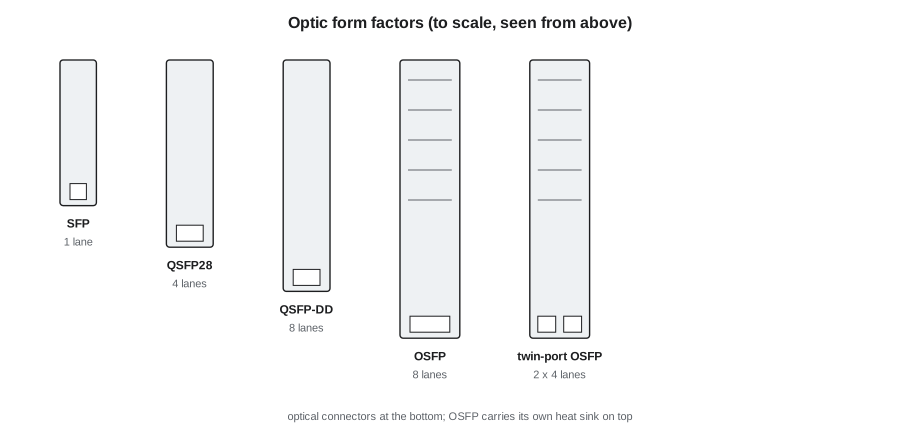
QSFP-DD, the double-density QSFP, keeps the width of the older QSFP but adds a second row of electrical contacts for eight lanes, and a QSFP-DD cage will usually accept older QSFP modules. OSFP is slightly wider and longer, has its own heat sink on top and is designed for higher power; an OSFP cage does not accept QSFP modules at all. Corvid's GPU servers and switches use OSFP, including twin-port modules that carry two independent 400 Gb/s links in one 800 Gb/s module, each with its own connector on the front.
Reading the name
An optic's name tells most of what a technician needs. The standard Ethernet names follow a pattern: the speed, the letters GBASE, and a suffix for the reach and the medium. The suffix is the part to read.
| Suffix | Meaning | Fiber and connector | Typical reach |
|---|---|---|---|
| SR4 / SR8 | Short reach, 4 or 8 multimode lanes | Multimode, MPO | 230 to 330 ft |
| DR4 / DR8 | 1,640 ft reach, 4 or 8 parallel single-mode lanes | Single-mode, MPO | 1,640 ft |
| FR4 | 1.2 mi, 4 wavelengths on one pair | Single-mode, duplex LC or CS | 1.2 mi |
| LR4 | 6.2 mi, 4 wavelengths on one pair | Single-mode, duplex LC | 6.2 mi |
| CR / AEC | Copper cable, passive or active | No optic; a cable with modules on both ends | 6.5 to 23 ft |
So 400GBASE-DR4 means 400 Gb/s on four parallel single-mode fibers in each direction, an MPO connector and about 1,640 ft of reach, and 2x400G-FR4 in an OSFP means two separate 400 Gb/s links, each on its own duplex connector, reaching about 1.2 mi. The connector type matters as much as the speed: a DR4 optic will not mate with a duplex LC cord, and an FR4 optic will not mate with an MPO trunk. DCT-210 Lesson 5 covered the fiber types and the polarity each kind of link needs.
# Choose an optic type from the link's speed and route length (typical values, meters)
options = [  # (name, speed Gb/s, medium, max reach m)
    ("400G-SR4", 400, "multimode MPO", 100), ("400G-DR4", 400, "single-mode MPO", 500),
    ("400G-FR4", 400, "single-mode duplex", 2000), ("800G-SR8", 800, "multimode MPO", 100),
    ("800G-DR8", 800, "single-mode MPO", 500), ("2x400G-FR4", 800, "single-mode duplex x2", 2000),
    ("800G AEC", 800, "copper cable", 7),
]
TO_UNIT, UNIT = 3.281, "ft"
def choose(speed, route_m):
    fits = [o for o in options if o[1] == speed and o[3] >= route_m]
    return min(fits, key=lambda o: o[3]) if fits else None
for speed, route in [(800, 4), (800, 38), (800, 310), (400, 85), (800, 1300)]:
    o = choose(speed, route)
    r = route * TO_UNIT
print(f"{speed}G over {r:,.0f} {UNIT}: " + (f"{o[0]} ({o[2]}, up to {o[3] * TO_UNIT:,.0f} {UNIT})" if o else "no standard option"))800G over 13 ft: 800G AEC (copper cable, up to 23 ft) 800G over 125 ft: 800G-SR8 (multimode MPO, up to 328 ft) 800G over 1,017 ft: 800G-DR8 (single-mode MPO, up to 1,640 ft) 400G over 279 ft: 400G-SR4 (multimode MPO, up to 328 ft) 800G over 4,265 ft: 2x400G-FR4 (single-mode duplex x2, up to 6,562 ft)
The rule in the code is the rule engineers use: the shortest-reach option that covers the route, because shorter-reach optics are cheaper and use less power. The technician's part is to check that what arrives in the box matches what the design chose, and that the cabling at the port is the kind the optic needs.
Breakouts
A port with several lanes can sometimes be split into several slower ports, a breakout. A 400G-DR4 optic's four lanes can serve four 100 Gb/s servers through an MPO-to-duplex breakout cable or cassette; an 800G port can run as two 400G or eight 100G ports. The switch must be configured for the breakout, and the far ends must be the right optics, so breakouts appear on tickets as a set: the optic, the breakout cable or cassette, and the port names the switch gives to each lane.
# What a port can break out into, and the port names the switch will show
ports = {"Ethernet1/9": (800, 8), "Ethernet1/10": (400, 4)}   # speed Gb/s, lanes
for port, (speed, lanes) in ports.items():
    per_lane = speed // lanes
    print(f"{port}: {speed}G on {lanes} lanes of {per_lane}G")
    for n in (1, 2, 4, 8):
        if n <= lanes and lanes % n == 0:
            names = ", ".join(f"{port}/{k}" for k in range(1, n + 1)) if n > 1 else port
print(f" {n} x {speed // n}G -> {names}")Ethernet1/9: 800G on 8 lanes of 100G 1 x 800G -> Ethernet1/9 2 x 400G -> Ethernet1/9/1, Ethernet1/9/2 4 x 200G -> Ethernet1/9/1, Ethernet1/9/2, Ethernet1/9/3, Ethernet1/9/4 8 x 100G -> Ethernet1/9/1, Ethernet1/9/2, Ethernet1/9/3, Ethernet1/9/4, Ethernet1/9/5, Ethernet1/9/6, Ethernet1/9/7, Ethernet1/9/8 Ethernet1/10: 400G on 4 lanes of 100G 1 x 400G -> Ethernet1/10 2 x 200G -> Ethernet1/10/1, Ethernet1/10/2 4 x 100G -> Ethernet1/10/1, Ethernet1/10/2, Ethernet1/10/3, Ethernet1/10/4
Coding and compatibility
Every optic stores information about itself in a small memory chip: its type, its maker, its part and serial numbers, its wavelength and reach, and its diagnostic thresholds. The switch reads this when the optic is inserted. Some switch makers check the coded vendor and refuse, or only grudgingly accept, optics they did not approve; many owners therefore buy optics coded for their switch brand, even from third-party makers. Corvid keeps an approved list, and an optic not on it may come up but be unsupported if anything goes wrong.
Newer optics use a management interface called CMIS, the Common Management Interface Specification, which also lets the switch tell the module how to configure its lanes for a breakout. CMIS optics take a few seconds to initialize after insertion, so a link that does not appear the instant the optic clicks in is not necessarily faulty. Older QSFP modules use the SFF-8636 interface and SFP modules SFF-8472. All of them report the diagnostics that Lesson 8 explains.
Checking before inserting
Jamal's check before any optic goes into a port takes half a minute. Read the part number on the module and compare it with the ticket. Check the form factor against the cage. Check the connector type against the cord or trunk that will plug in. For a breakout, check the far-end optics too. And check that the module is new or comes from the approved spares stock with a test record, not from a drawer of loose optics removed from other jobs, which may be faulty, the wrong type or coded for another switch.
Worked problem
The optic that fitted but would not link
A Hall B ticket asks Jamal to replace a failed optic in leaf b3-leaf-08 port Ethernet1/31. He takes a 400G optic from the spares cabinet, inserts it, connects the trunk leg, and the link stays down.
Show solution
- He reads the module's label: 400G-FR4, duplex. The failed module he removed was 400G-DR4, MPO.
- The MPO trunk leg had clicked into a duplex-to-MPO adapter left in the cage's dust cap bag by a previous job, so it seemed to connect.
- He removes the FR4 optic and the adapter, collects a 400G-DR4 from the approved stock, inspects the trunk end as DCT-210 Lesson 8 describes, and inserts it.
- The link comes up at 400G. The engineer checks the optic readings and the BGP session, and Jamal returns the FR4 to the spares cabinet with a note that it was misfiled.
Answer: The two optics were the same speed and the same form factor but used different fibers. The suffix on the label was the detail that mattered.
Copper and active cables in the same cages
Not every module in an optic cage is an optic. Direct attach copper cables, DACs, have a module shape fixed at each end of a short twinax cable, and plug into the same cages; active electrical cables, AECs, add a chip in each end that re-times the signal to reach further. Active optical cables, AOCs, have optics built permanently into each end of a fiber cable. DCT-210 Lesson 4 covered their reaches and where each is allowed. In the cages they look like optics from the front, and the switch reads their memory in the same way, so the port shows the cable type, its length and its maker. The practical differences for a technician are that these cables cannot be cleaned or inspected, since there is no connector to open, and that a faulty one is replaced whole; and that a DAC's weight and stiffness strain the cage if it is not supported in the cable manager.
Wavelengths and colors
Multimode optics such as SR4 and SR8 use light at about 850 nm, on several parallel fibers. Single-mode optics use longer wavelengths: DR4 and DR8 use 1,310 nm on parallel fibers, and FR4 and LR4 combine four wavelengths near 1,310 nm on a single pair, separated inside the optic. Some optics carry a colored pull tab or label that hints at their type, but the colors are not consistent across makers, and Stonebridge's rule is to read the part number, not the color. Bidirectional optics, which send and receive on different wavelengths over a single fiber, must be paired with their partner type at the far end: one end's transmit wavelength is the other end's receive wavelength. A ticket that pairs two of the same kind of bidirectional optic will never link, however clean the fiber.
Optics and power in the hall
Optics are now a significant part of a data center's power. At roughly 15 to 18 watts per 800G optic, a pod of a few thousand backend links spends tens of kilowatts on optics alone, all of it heat for the cooling of DCT-230 to remove. This is one reason the industry is working on linear-drive optics, which drop the signal-processing chip inside the module and rely on the switch to do that work, and on co-packaged optics, which put the optical engines on the switch package itself, with fibers connected directly to the switch. Some co-packaged switches were already in early deployment in 2026. For technicians, co-packaged optics will change the work: there will be fewer pluggable modules to swap, more fiber connectors on the front of the switch to inspect and clean, and a failed optical engine may mean replacing a larger part or the whole switch.
Common mistakes
MistakeChoosing an optic by speed alone.
InsteadRead the suffix: reach, fiber type and connector must match the link.
MistakeForcing a QSFP module into an OSFP cage or the reverse.
InsteadCheck the form factor; OSFP cages do not take QSFP modules.
MistakeTaking optics from a drawer of used modules.
InsteadUse new or tested modules from the approved stock.
MistakeAssuming a CMIS optic is dead because the link does not appear at once.
InsteadAllow a few seconds for the module to initialize.
MistakeConfiguring a breakout by plugging in a breakout cable alone.
InsteadThe switch must be configured too; breakouts come as a set on the ticket.
Summary and key terms
- Optic speeds are built from lanes; 800 Gb/s optics typically use eight lanes of 100 Gb/s.
- The 802.3dj project brings 200 Gb/s lanes and 1.6 Tb/s Ethernet.
- SFP, QSFP28, QSFP-DD and OSFP are the common form factors; the cage accepts only its own.
- The name's suffix gives reach, fiber type and connector: SR multimode, DR parallel single-mode, FR and LR duplex single-mode.
- Breakouts split a port's lanes into several slower ports and need switch configuration.
- Optics store their type and diagnostics in memory; owners keep approved lists.
- Transceiver
- A module that converts between electrical signals and light.
- Lane
- One electrical and optical channel within an optic.
- Form factor
- An optic's shape and electrical connection to the switch.
- FEC
- Forward error correction, which repairs bit errors at the receiver.
- Breakout
- Splitting one port's lanes into several slower ports.
- CMIS
- Common Management Interface Specification for configuring and monitoring newer optics.
Practice problems
Work each problem on paper first, then reveal the answer to check.
What does the DR in 400GBASE-DR4 tell you?
Show answer
About 1,640 ft of reach on parallel single-mode fiber, with an MPO connector.
How many 100G servers can one 400G-DR4 port serve through a breakout?
Show answer
Four.
Will a QSFP28 module fit an OSFP cage?
Show answer
No; OSFP is a different, wider form factor.
A 2x400G-FR4 OSFP has two connectors. How many links does it carry?
Show answer
Two independent 400 Gb/s links.
Lesson quiz · 5 questions
Score 60% or more to complete this lesson.
Create a free account to save your progress, take quizzes and earn a certificate.