
DCT-320 · Lesson 3 of 12 · 20 min
Ethernet, MAC addresses and switching
Every network in the data center, from the 1 Gb/s management network to Corvid's 800 Gb/s frontend, carries Ethernet. LVT-220 introduced Ethernet from an installer's view: frames, speeds, MAC addresses and the idea that a switch sends a frame only to the port where its destination lives. In this lesson Jamal goes a step further, with Elif Demir from Stonebridge's network team, because two everyday data center faults only make sense once you know how a switch learns: a server that works on one port and not another, and a loop that brings a whole network down in seconds.
The Ethernet frame
Ethernet carries data in frames. A frame starts with the destination MAC address and the source MAC address, six bytes each, followed by a type field that says what is inside, then the data itself, and finally a four-byte check sequence. The sending device calculates the check sequence from the rest of the frame; the receiving device calculates it again, and if the two do not match, the frame was damaged in transit and is thrown away. That discarded frame is counted as a CRC or FCS error on the receiving port, and those counters are among the most useful things a technician can read, as Lesson 11 shows.
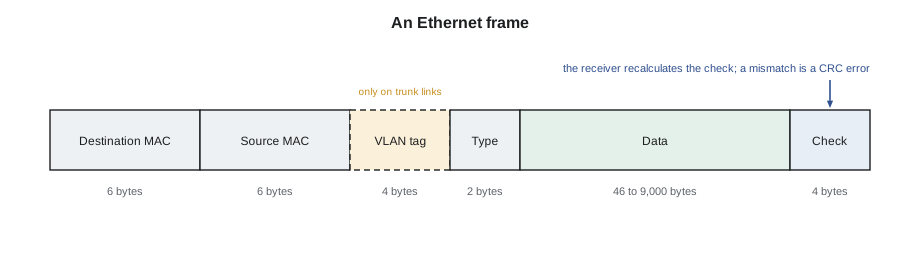
The data part of a standard frame can be up to 1,500 bytes. Many data center networks allow jumbo frames of about 9,000 bytes, which carry the same data in fewer frames and so reduce the work the switches and servers do per byte. Storage networks and AI fabrics almost always use jumbo frames. If one device in a path allows jumbo frames and the next does not, large frames are dropped while small ones pass, and the symptom is strange: a server can be reached by a quick test but file transfers fail. That is a configuration fault for the owner, but a technician who knows about frame sizes can recognize the pattern when an engineer asks what was changed.
MAC addresses
Every Ethernet port has a MAC address, a 48-bit number written as six pairs of hexadecimal digits, for example 3c:fd:fe:a1:52:07. The first three pairs identify the manufacturer, the organizationally unique identifier, and the last three are assigned by the manufacturer to that port. A server with four network ports has four MAC addresses; a switch has one for each port and usually one for itself. Virtual machines and containers have MAC addresses of their own too, so one physical server port can carry traffic from dozens of MAC addresses.
MAC addresses are useful to a technician in two ways. The manufacturer part identifies what kind of device is on a port, which helps when a cord turns up unlabeled. And the address printed on a server's label or shown by its baseboard controller lets an engineer confirm that the right server is on the right port, by finding the address in the switch's table.
How a switch learns
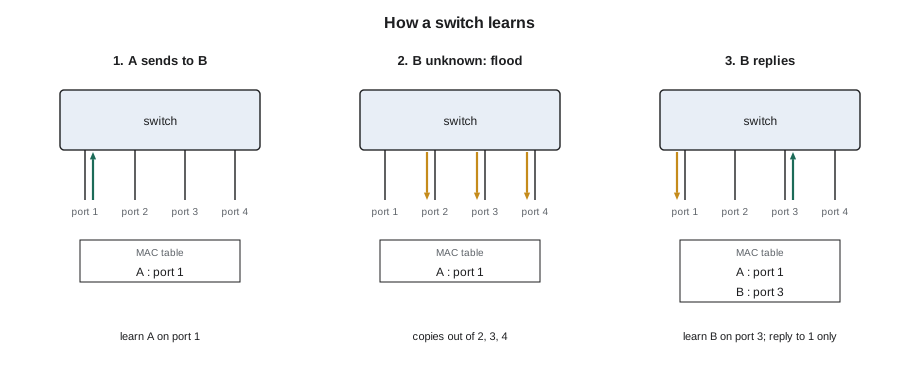
When a switch is first powered on, it knows nothing about which device is on which port. It learns by reading the source address of every frame that arrives. If a frame from MAC address A arrives on port 3, the switch writes A against port 3 in its MAC address table. When a later frame arrives for destination A, the switch looks up A, finds port 3 and sends the frame out of port 3 only.
If the destination is not yet in the table, the switch floods the frame: it sends a copy out of every port except the one it came in on. The device that owns the address will answer, and its answer teaches the switch where it lives. Broadcast frames, addressed to every device, are always flooded; they are how devices find each other before they know any addresses. Entries in the table age out after a few minutes without traffic, so a device that moves to another port is learned again on its new port.
# Simulate how a switch learns MAC addresses and forwards frames
table = {}                     # MAC address -> port
ports = [1, 2, 3, 4]
frames = [                     # (arriving port, source, destination)
    (1, "aa:01", "bb:02"),
    (3, "bb:02", "aa:01"),
    (2, "cc:03", "ff:ff"),      # broadcast
    (1, "aa:01", "cc:03"),
    (4, "bb:02", "aa:01"),      # server B has moved to port 4
]
for port, src, dst in frames:
    moved = src in table and table[src] != port
    table[src] = port
    if dst == "ff:ff":
        out = [p for p in ports if p != port]; how = "broadcast, flood"
    elif dst in table:
        out = [table[dst]]; how = "known"
    else:
        out = [p for p in ports if p != port]; how = "unknown, flood"
    note = "  (moved)" if moved else ""
    print(f"in port {port}: {src} -> {dst}: {how}, out {out}{note}")
print("MAC table:", dict(sorted(table.items())))in port 1: aa:01 -> bb:02: unknown, flood, out [2, 3, 4]
in port 3: bb:02 -> aa:01: known, out [1]
in port 2: cc:03 -> ff:ff: broadcast, flood, out [1, 3, 4]
in port 1: aa:01 -> cc:03: known, out [2]
in port 4: bb:02 -> aa:01: known, out [1] (moved)
MAC table: {'aa:01': 1, 'bb:02': 4, 'cc:03': 2}The last frame shows a server moving: the switch had learned B on port 3, and when B's next frame arrives on port 4, the entry simply changes. That is why a technician who moves a server from one port to another usually sees it work within seconds, as long as both ports are configured the same way. If they are not, for example if the new port is on a different VLAN, the server is learned but cannot reach anything, which is the subject of Lesson 4.
Broadcast domains and why loops are dangerous
All the devices that receive each other's broadcasts form a broadcast domain. In a small network that is the whole network; in a data center, broadcast domains are kept small by VLANs and by routing between them, because every broadcast is processed by every device in the domain.
Ethernet frames carry no counter that limits how far they can travel. If two switches are connected by two cables, a broadcast leaves the first switch on both, arrives at the second on both, and is flooded back on both, and the copies circle forever, multiplying at every turn. Within seconds the links are full of copies of the same frames, the switches' MAC tables change constantly as the same addresses appear on different ports, and the network stops working. This is a broadcast storm, and a single cord plugged between two wrong ports can cause one.
Networks protect themselves in two ways. Older and simpler networks run the spanning tree protocol, which finds loops and blocks one link of each so that only one path is active; Bayview's three-tier network in Hall A works this way, which is why one of its two uplinks shows as blocked. Modern fabrics avoid layer 2 loops altogether by routing between switches, as Lessons 5 and 6 explain, and bundle parallel links with link aggregation, as Lesson 4 explains. Both methods depend on the cabling matching the design. A cord added between two access ports, or the two ends of a patch cord plugged into the same switch, can defeat the protection.
Worked problem
A storm in a customer cage
A Hall A customer calls the operations center: everything in its cage has stopped working. Its engineer can see both access switches running at full load on every port.
Show solution
- Elif asks Jamal to look for any cord added in the cage in the past hour. The access log shows a customer technician visited forty minutes earlier.
- In cabinet A-22-03, Jamal finds a new short cord between port 47 of the top switch and port 47 of the bottom switch, neither end labeled.
- He photographs it and reads the ports to the customer's engineer, who confirms the switches already connect to each other through the uplinks and that port 47 is not protected by spanning tree.
- On the engineer's instruction he removes the cord. Within seconds the load on every port falls and the customer's services return.
Answer: One cord made a second path between two switches that were already connected. The customer later enabled loop protection on its access ports.
Neighbor discovery
Most data center switches and many servers run a neighbor discovery protocol, usually LLDP, the Link Layer Discovery Protocol. Every few seconds each port sends a small frame saying, in effect: I am this device, this is my port name, this is my management address. The device at the other end of the cable records it. An engineer can then read, for any port, the name of the device and port at the far end.
For a technician, LLDP is the second check after the label. When a new cord is plugged in, the engineer can confirm that the switch sees exactly the server port the work order named. If the label says one thing and LLDP says another, either the label is wrong or the cord is in the wrong place, and either way the ticket is not finished. Nadia Okoro's rule for the cabling crew, from DCT-210, depends on this: every new link is checked by the label and by neighbor discovery before the ticket closes.
Speeds and auto-negotiation on copper
Copper Ethernet ports, such as the 1 Gb/s management ports and the Category 6A server ports in Hall A, usually auto-negotiate: when the cord is connected, the two ends exchange signals that advertise the speeds and modes each supports and agree on the best they share. A 10 Gb/s port connected to a 1 Gb/s device comes up at 1 Gb/s. Most of the time this is invisible and correct. It goes wrong when one end is fixed to a speed and the other is set to negotiate, or when a cord has a broken pair: a 1 Gb/s link needs all four pairs, and a cord with one damaged pair may come up at 100 Mb/s instead, working but slowly. A management port that shows 100 Mb/s where 1 Gb/s is expected is a strong hint to replace the cord.
Duplex is the other setting that negotiation agrees. Full duplex means both ends can send at once; half duplex means they take turns. Modern data center links are always full duplex, and a link that comes up at half duplex is either misconfigured at one end or has a faulty cord. Both show up as poor performance and, often, as a rising count of errors on the port, which is why engineers ask for the speed and duplex a port reports when a server seems slow.
Unknown devices on a port
Sometimes a technician finds a device on a port that is not in any record: a small switch in a customer cage, a laptop left connected to a management port, a cord running to a cabinet that should be empty. The switch's MAC table and neighbor discovery can identify such devices, and the first three pairs of the MAC address identify the maker. A technician does not remove an unknown device; he reports it to the owner, with photographs and the port, because it may be important to the owner or, in a management network, a security concern that needs the owner's attention at once.
# Identify devices from the maker part of their MAC addresses (illustrative prefixes)
makers = {"3c:fd:fe": "server network card maker", "b8:ce:f6": "switch maker", "00:1b:21": "network card maker",
          "a4:bf:01": "laptop maker"}
seen = {"Eth1/3": "3c:fd:fe:a1:52:07", "Eth1/4": "3c:fd:fe:a1:52:0b", "Eth1/48": "a4:bf:01:7c:22:91"}
expected = {"Eth1/3": "server", "Eth1/4": "server", "Eth1/48": None}
for port, mac in seen.items():
    maker = makers.get(mac[:8], "unknown maker")
    note = "" if expected[port] else "  <- not in the port map: report to the owner"
print(f"{port:7} {mac} {maker}{note}")Eth1/3 3c:fd:fe:a1:52:07 server network card maker Eth1/4 3c:fd:fe:a1:52:0b server network card maker Eth1/48 a4:bf:01:7c:22:91 laptop maker <- not in the port map: report to the owner
Common mistakes
MistakeAssuming a server that works on one port will work on any port.
InsteadPorts differ in VLAN and settings; move a server only to the port the ticket names.
MistakePlugging a cord between two ports of the same switch or between two switches already connected.
InsteadNever add a cable that is not in the work order; it can create a loop.
MistakeReading CRC errors as a configuration problem.
InsteadCRC errors usually point to the physical layer: a dirty connector, a damaged cable or a failing optic.
MistakeTrusting the label alone on a new link.
InsteadConfirm with neighbor discovery that the far end is the device and port named.
MistakeIdentifying a device by its position in the cabinet.
InsteadUse the label, the serial number or the MAC address in the switch's table.
Summary and key terms
- An Ethernet frame carries destination and source MAC addresses, a type, the data and a check sequence.
- Frames that fail the check are discarded and counted as CRC or FCS errors.
- A switch learns which port each MAC address is on from the source of arriving frames.
- Unknown destinations and broadcasts are flooded to every other port.
- A second path between two switches without protection causes a broadcast storm within seconds.
- Neighbor discovery shows the device and port at the far end of each cable.
- MAC address
- The 48-bit hardware address of an Ethernet port.
- Frame check sequence
- The four bytes at the end of a frame that let the receiver detect damage.
- MAC address table
- The switch's list of which port each MAC address was last seen on.
- Flooding
- Sending a frame out of every port except the one it arrived on.
- Broadcast storm
- Frames circling endlessly in a loop until the network stops working.
- LLDP
- Link Layer Discovery Protocol, which tells each device what is at the other end of its cables.
Practice problems
Work each problem on paper first, then reveal the answer to check.
A switch has never seen MAC address bb:02. What does it do with a frame for bb:02?
Show answer
It floods the frame to every port except the one it arrived on.
A server moves from port 3 to port 4 on the same switch. How does the switch find it?
Show answer
It learns the server's MAC address on port 4 from its next frame.
A port shows rising CRC errors. Which layer do you suspect first?
Show answer
The physical layer: connector, cable or optic.
Why are jumbo frames used in storage and AI networks?
Show answer
They carry the same data in fewer frames, reducing work per byte.
Lesson quiz · 5 questions
Score 60% or more to complete this lesson.
Create a free account to save your progress, take quizzes and earn a certificate.