
DCT-320 · Lesson 6 of 12 · 20 min
Spine-leaf fabrics, ECMP and BGP at a glance
DCT-210 showed Jamal the shape of a spine-leaf fabric from the cabling side: every leaf joined to every spine, links counted from the design, trunks laid in the trays to match. This lesson looks at the same fabric from the network side. Traffic between two servers on different leaves can take any of the spines, all the links carry traffic at once, and the switches decide among themselves which paths are working. The two ideas behind this are ECMP, which spreads traffic across equal paths, and a routing protocol, usually BGP, that tells each switch which paths exist. A technician does not configure either, but almost every fabric ticket in Halls B, C and D mentions them, and knowing what they do tells Jamal what his work will change.
Routing between switches
In a modern fabric, the links between leaves and spines are routed, not switched. Each link is its own /31 network, as Lesson 5 explained, and each leaf is the gateway for the servers in its own rack. Frames do not cross the fabric; packets are routed from leaf to spine to leaf. This removes the layer 2 loops of Lesson 3 from the fabric altogether: there is no flooding between switches and no spanning tree, because routing protocols never forward a packet back the way it came. Where a customer needs a VLAN to stretch across racks, the fabric carries it inside routed packets, with an overlay such as VXLAN, which the owner configures and which looks, from the floor, like ordinary routed traffic.
Equal-cost multipath
From any leaf, there are as many equal paths to another leaf as there are spines. A leaf with eight uplinks to eight spines has eight routes to every other leaf, all the same length. ECMP, equal-cost multipath, lets the leaf use all eight at once. For each packet it calculates a hash, a short number derived from fields in the packet header, typically the source and destination addresses and ports, and uses the hash to choose an uplink. Every packet of one conversation produces the same hash and takes the same path, so packets stay in order; different conversations spread across all the uplinks.
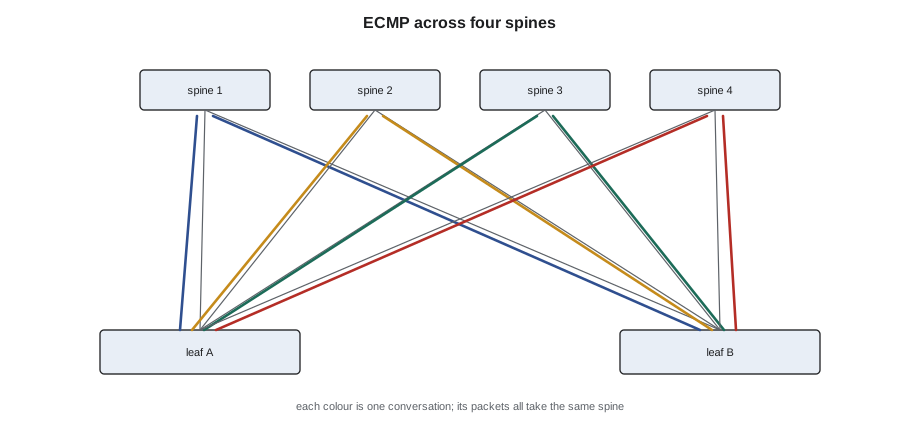
# How ECMP hashing spreads conversations across uplinks (illustrative hash)
import hashlib
uplinks = ["sp1", "sp2", "sp3", "sp4"]
def pick(flow, links):
    h = int(hashlib.sha256(flow.encode()).hexdigest(), 16)
    return links[h % len(links)]
flows = [f"10.40.{a}.{b}->10.41.{b}.{a}:{4000 + a * b}" for a in range(1, 9) for b in range(1, 26)]
for links in (uplinks, uplinks[:3]):
    count = {l: 0 for l in links}
    for f in flows:
        count[pick(f, links)] += 1
    shares = ", ".join(f"{l} {n}" for l, n in count.items())
    print(f"{len(links)} uplinks, {len(flows)} flows: {shares}")
print("With sp4 down, its flows are spread over the other three; each now carries about a third")4 uplinks, 200 flows: sp1 45, sp2 47, sp3 48, sp4 60 3 uplinks, 200 flows: sp1 68, sp2 61, sp3 71 With sp4 down, its flows are spread over the other three; each now carries about a third
The second run shows what happens when an uplink is lost. The leaf removes it from the set, recalculates, and the conversations that used it move to the others. Capacity falls by a quarter; nothing stops. This is why a fabric survives one bad optic or one unplugged trunk without an outage, and also why the loss can go unnoticed until someone looks at the counters or the neighbor list.
Hashing has one consequence a technician sometimes meets. A single very large conversation, such as one backup stream, always takes one path, so it can fill one uplink while the others are quiet. An engineer looking at that uplink may ask whether its optic is faulty, when the real cause is just the traffic. Uneven load is not always a physical fault.
BGP in the data center
The switches learn which paths exist by running a routing protocol between them. Most large data center fabrics use BGP, the Border Gateway Protocol, the same protocol that joins networks across the internet, configured in a style described in an internet standards document, RFC 7938. Each leaf, and each group of spines, is given an autonomous system number, and every leaf forms a BGP session with every spine it connects to. Through these sessions each switch tells its neighbors which prefixes it can reach: a leaf announces its server subnets and its loopback, and the spines pass the announcements on to the other leaves.
A BGP session runs between two switches over the link between them. When the link is up and both sides are configured, the session reaches the established state and routes flow. When a cable is unplugged, the link goes down and the session drops at once; when a link has errors, the session may stay up but packets are lost. Many fabrics add BFD, bidirectional forwarding detection, which checks the path many times a second and takes a session down within a fraction of a second when the link stops passing traffic, so that ECMP moves traffic off a bad link quickly.
| BGP session state | What it means | Typical physical cause when it is not established |
|---|---|---|
| Idle | Not trying, or waiting before retrying | Link down: cable, optic or port |
| Connect / Active | Trying to open the session | Link up but wrong neighbor, wrong port or wrong address |
| OpenSent / OpenConfirm | Exchanging parameters | Usually a configuration mismatch for the owner |
| Established | Up and exchanging routes | None; the session is working |
Reading a neighbor table
When Jamal replaces an optic or a trunk on a fabric link, the engineer checks the BGP neighbor table before and after. The table lists each neighbor's address, its autonomous system number, how long the session has been in its current state and either the number of prefixes received or the state name if it is not established. Engineers often paste it into the ticket, and a technician who can read it can see at a glance which link is affected.
# Parse a BGP neighbor summary pasted into a ticket and flag sessions that are not established
summary = '''
Neighbor        AS     Up/Down   State/PfxRcd
10.255.0.1      65101  41d03h    218
10.255.0.3      65101  41d03h    218
10.255.0.5      65101  00:02:41  Active
10.255.0.7      65101  41d03h    218
10.255.0.9      65102  12d07h    0
'''
rows = [l.split() for l in summary.strip().splitlines()[1:]]
for addr, asn, updown, state in rows:
    if state.isdigit():
        flag = "established" + ("  but no routes received" if state == "0" else "")
    else:
        flag = f"NOT established ({state}) for {updown}"
    print(f"{addr:12} AS{asn}  {flag}")
down = [r[0] for r in rows if not r[3].isdigit()]
print("Check the physical link to:", ", ".join(down) if down else "none")10.255.0.1 AS65101 established 10.255.0.3 AS65101 established 10.255.0.5 AS65101 NOT established (Active) for 00:02:41 10.255.0.7 AS65101 established 10.255.0.9 AS65102 established but no routes received Check the physical link to: 10.255.0.5
Here the neighbor at 10.255.0.5 has been trying to connect for under three minutes, which matches the time Jamal swapped the optic on that spine link. If the session does not come up within a minute or two after a physical change, the change is the first suspect. The neighbor with zero routes received is established but learning nothing; that is a question for the engineer, not the floor.
What a fabric change looks like from the floor
Because a fabric survives the loss of one link, engineers can let technicians work on fabric links during the day. The usual sequence is the same on every ticket. The engineer drains the link: tells the switches to stop sending traffic over it, so that ECMP moves the conversations elsewhere before anything is touched. The technician does the physical work. The link comes up, the BGP session establishes, the engineer checks the counters and the optic readings, and only then undrains the link so traffic returns. Draining turns a link failure into a planned event. Jamal waits for the word drained before he touches a cable on a fabric ticket, and he tells the engineer when he has finished so that the link is not left drained.
Worked problem
A spine link that would not come back
On a Hall B ticket, the cloud provider's engineer drains link sp3 to leaf b2-leaf-17 so Jamal can replace a failed 400G optic. After the swap, the link is up but the BGP session stays in Active.
Show solution
- Jamal reads the port at the spine end against the ticket: Ethernet3/12, correct.
- At the leaf end, the new trunk leg is in port Ethernet1/52. The ticket says Ethernet1/51.
- The leg was moved one port across when he reseated the neighboring optic. The link came up because both ports are uplinks to spines, but the leaf expected a different neighbor on port 52.
- He tells the engineer, moves the leg to port 51 on instruction, and the session establishes within seconds. The engineer checks the counters and undrains the link.
Answer: Link up is not the end of a fabric ticket. The session state showed that the link was up to the wrong place.
Why BGP and not something simpler
Engineers sometimes explain to new technicians why a protocol built for the internet runs between two switches a few meters apart. There are three reasons. BGP is designed to handle very large numbers of routes and neighbors, and a large fabric has thousands of each. It gives the engineer fine control over which routes are announced where, which matters when tenants, overlays and the outside world all meet in one fabric. And every switch maker supports it, so a fabric can mix switch brands. Smaller networks may use other routing protocols, such as OSPF, which works by every router sharing a map of the whole network; Bayview's network in Hall A uses OSPF between its core and its firewalls. From the floor, the difference does not matter: the session or adjacency comes up when the link is good and the configuration is right, and goes down when either is not.
Overlays and what they mean for cabling
Most cloud and enterprise fabrics today run an overlay on top of the routed fabric, most often VXLAN with EVPN. The overlay lets the owner create virtual networks that span racks and halls, while the physical fabric only routes packets between leaves. For a technician, the overlay has one important effect: the physical fabric is the same for every tenant and every virtual network, so the cabling is regular and every leaf's uplinks are cabled identically. A leaf replaced under a ticket is cabled exactly like its neighbors, and the engineer reapplies the overlay configuration. It also means that a fault in one tenant's virtual network is almost never a cabling fault, because the cabling is shared by everything else that works.
Spines and super-spines
A fabric grows by adding leaves, until the spines run out of ports. Larger fabrics then add a third layer: several spine-leaf pods, each with its own spines, joined by super-spines. The cloud provider's network in Halls B and C is built this way, with each hall a pod and a super-spine layer in the campus network rooms joining them. The same rules apply at every layer: links between layers are routed, ECMP spreads traffic across equal paths, and a link can be drained and worked on without an outage. The cabling between the pods and the super-spines runs through the campus backbone trunks and the intermediate distribution areas that DCT-210 described, which is why those trunks are high-count single-mode.
# How many leaves and servers a two-tier fabric can hold, and when a third tier is needed
spine_ports = 64          # ports per spine switch
leaf_uplinks = 8          # uplinks per leaf, one to each spine
leaf_down = 48            # server ports per leaf
spines = leaf_uplinks
max_leaves = spine_ports            # each spine port serves one leaf
servers = max_leaves * leaf_down
print(f"{spines} spines of {spine_ports} ports: up to {max_leaves} leaves and {servers:,} server ports")
for wanted in (40, 64, 200):
    pods = -(-wanted // max_leaves)
print(f"{wanted} leaves -> " + ("one pod" if pods == 1 else f"{pods} pods joined by super-spines"))8 spines of 64 ports: up to 64 leaves and 3,072 server ports 40 leaves -> one pod 64 leaves -> one pod 200 leaves -> 4 pods joined by super-spines
Common mistakes
MistakeTouching a fabric link before the engineer confirms it is drained.
InsteadWait for the word drained; then work.
MistakeLeaving a link drained after finishing.
InsteadTell the engineer the work is done so traffic can be restored.
MistakeAssuming an uneven load on one uplink means a faulty optic.
InsteadECMP keeps large conversations on one path; check errors before blaming the hardware.
MistakeTreating link up as success on a fabric port.
InsteadConfirm the routing session establishes with the expected neighbor.
MistakeAssuming nothing is wrong because no service went down.
InsteadFabrics hide single failures; read the neighbor list and counters.
Summary and key terms
- Spine-leaf fabrics route between leaves and spines; there is no flooding or spanning tree between switches.
- ECMP spreads conversations across equal paths by hashing header fields; each conversation keeps to one path.
- Losing one uplink reduces capacity but does not stop traffic, so failures can go unnoticed.
- Most fabrics run BGP between every leaf and spine; a session is established when the link and configuration are right.
- BFD takes a session down quickly when a link stops passing traffic.
- Fabric work follows drain, change, check, undrain.
- ECMP
- Equal-cost multipath: using several equal routes at once.
- Hash
- A short number calculated from packet fields to choose a path.
- BGP
- Border Gateway Protocol, used between fabric switches to exchange routes.
- Autonomous system number
- The number that identifies a switch or group of switches in BGP.
- Established
- The BGP state in which a session is up and exchanging routes.
- Drain
- To move traffic off a link or switch before work on it.
Practice problems
Work each problem on paper first, then reveal the answer to check.
A leaf has eight uplinks and one is unplugged. What happens to its traffic?
Show answer
ECMP spreads it over the seven remaining uplinks; capacity falls by an eighth.
Why does one conversation always take the same path?
Show answer
Its packets all produce the same hash, which keeps them in order.
A BGP session stays in Active after an optic swap. What is the first physical check?
Show answer
That both ends of the link are in the ports the ticket names.
What must happen before a technician touches a fabric link?
Show answer
The engineer drains it.
Lesson quiz · 5 questions
Score 60% or more to complete this lesson.
Create a free account to save your progress, take quizzes and earn a certificate.