
DCT-320 · Lesson 4 of 12 · 20 min
VLANs, trunks and link aggregation
Bayview Credit Union's cage in Hall A holds about forty servers, two firewalls, a storage array and four switches. The servers belong to three different groups that must not see each other's traffic directly: the branch banking systems, the internal office systems and the storage network. Bayview does not buy three sets of switches for this. It divides its switches into virtual networks, VLANs, and every port is assigned to one of them. When Jamal moves a Bayview server from one port to another in this lesson, the VLAN of the new port decides whether the server works.
What a VLAN is
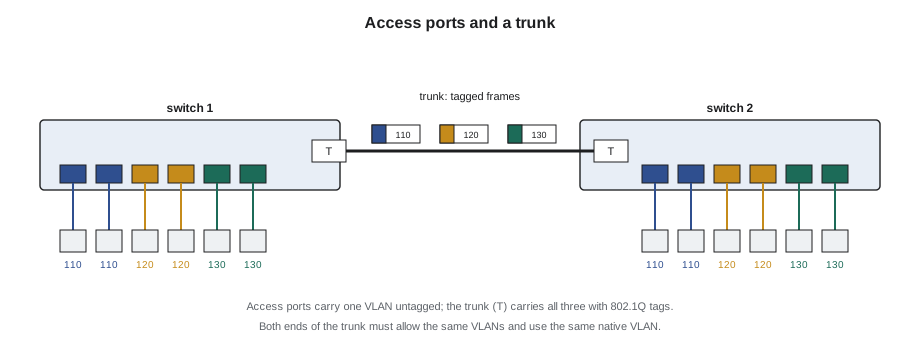
A VLAN, a virtual local area network, is a separate broadcast domain inside a switch. Ports assigned to VLAN 110 can exchange frames with each other but not with ports in VLAN 120, even on the same switch, as if they were on different switches. Traffic between VLANs must pass through a router or a firewall, where the owner can control it. VLANs are numbered from 1 to 4094; each owner chooses its own numbers, so VLAN 110 in Bayview's cage has nothing to do with VLAN 110 anywhere else on the campus.
A port assigned to one VLAN is an access port. The device on it sends ordinary frames with no idea which VLAN it is in; the switch knows from the port's configuration. This is why moving a server is not as simple as moving its cord. If the new port is an access port in a different VLAN, the server comes up, its link light glows, the switch learns its MAC address, and it still cannot reach anything it needs.
Trunks and tags
Between switches, and between a switch and a server that runs virtual machines, a single link often carries many VLANs. Such a link is a trunk. To keep the VLANs apart on the shared link, the sending switch inserts a four-byte tag into each frame, defined by the IEEE 802.1Q standard, carrying the VLAN number. The receiving switch reads the tag, removes it and delivers the frame into the right VLAN. Lesson 3's frame diagram showed the tag's place, just after the source address.
Each trunk is configured with a list of allowed VLANs. Frames for a VLAN not on the list are dropped at the trunk. Most trunks also have a native VLAN, whose frames cross the trunk without a tag. If the two ends of a trunk disagree about the allowed list or the native VLAN, some traffic is quietly lost or, worse, leaks into the wrong VLAN. Both are configuration faults for the owner, but they often follow physical work: a trunk moved to a port with a different configuration, or a replacement switch configured from an old template.
# Check that both ends of each trunk agree on allowed and native VLANs
trunks = {
    "A-14-01 Eth49 <-> A-14-02 Eth49": ({110, 120, 130}, 1, {110, 120, 130}, 1),
    "A-14-01 Eth50 <-> A-14-03 Eth50": ({110, 120, 130}, 1, {110, 120}, 1),
    "A-14-02 Eth51 <-> BCU-FW-1 p3":   ({110, 120}, 99, {110, 120}, 1),
}
for name, (allowed_a, native_a, allowed_b, native_b) in trunks.items():
    problems = []
    if allowed_a != allowed_b:
        only_a = sorted(allowed_a - allowed_b); only_b = sorted(allowed_b - allowed_a)
        problems.append(f"allowed differ (only A: {only_a}, only B: {only_b})")
    if native_a != native_b:
        problems.append(f"native VLAN {native_a} vs {native_b}")
print(f"{name}: {'consistent' if not problems else '; '.join(problems)}")A-14-01 Eth49 <-> A-14-02 Eth49: consistent A-14-01 Eth50 <-> A-14-03 Eth50: allowed differ (only A: [130], only B: []) A-14-02 Eth51 <-> BCU-FW-1 p3: native VLAN 99 vs 1
The checker does what an engineer does when a trunk misbehaves: compare the two ends. Jamal will never edit those lists, but when he replaces a switch or moves a trunk he can ask the engineer to run exactly this comparison before he closes the ticket.
Moving a server between ports
Every move ticket at Stonebridge names the target port, and for customer networks the customer's engineer confirms that the port is configured for the server before the move. Jamal's routine is: confirm the new port in the ticket, confirm with the contact that it is configured, move the cord, watch the link come up, and ask the contact to confirm the server is reachable. If the server comes up but cannot reach anything, the most likely cause is the VLAN, and the fix belongs to the owner.
Link aggregation
One cable between two devices is a single point of failure, and it limits the bandwidth to one link's speed. Link aggregation bundles several physical links into one logical link. The devices at both ends treat the bundle as one port: traffic is spread across the members, and if a member fails, traffic simply continues on the others. The common protocol is LACP, the Link Aggregation Control Protocol, now in IEEE 802.1AX, which lets the two ends agree which links belong to the bundle and stop using any link that misbehaves.
Several rules matter on the floor. All members of a bundle must run at the same speed. Each member's two ends must be in the same bundle at both devices: a member plugged into the wrong port at one end will not join, or will join a different bundle. And a bundle can be lost one member at a time without an outage, which is exactly why a missing member often goes unnoticed. A four-link bundle running on three carries three-quarters of its capacity and has less protection, and nothing stops working until the next failure.
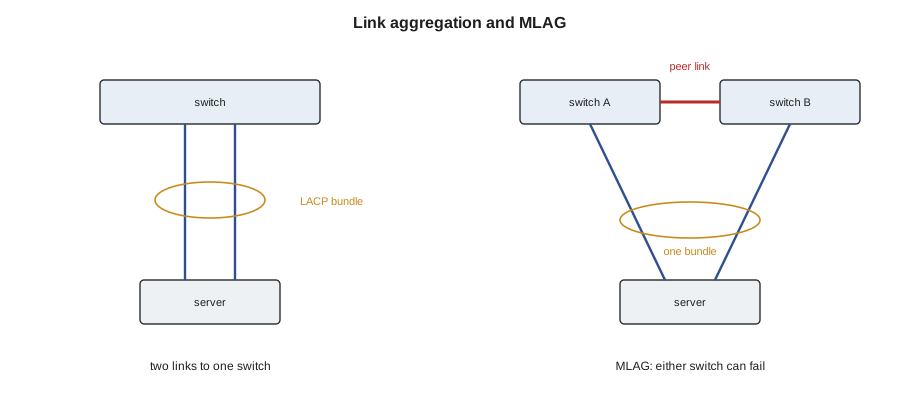
Data centers usually go one step further. A server's two links run to two different switches, so that a whole switch can fail. The two switches cooperate to present themselves to the server as one, through a feature that vendors call MLAG, multi-chassis link aggregation, or by similar names. The switch pair is connected by a peer link that keeps them in step, and like a firewall sync link, it must never be mistaken for a spare.
# Check the members of LACP bundles against the design
design = {"Po11": {"Eth1/1", "Eth1/2"}, "Po12": {"Eth1/3", "Eth1/4"}, "Po20": {"Eth1/49", "Eth1/50", "Eth1/51", "Eth1/52"}}
actual = {   # member -> (bundle it joined, speed in Gb/s, state)
    "Eth1/1": ("Po11", 25, "bundled"), "Eth1/2": ("Po11", 25, "bundled"),
    "Eth1/3": ("Po12", 25, "bundled"), "Eth1/4": ("Po12", 10, "suspended"),
    "Eth1/49": ("Po20", 100, "bundled"), "Eth1/50": ("Po20", 100, "bundled"),
    "Eth1/51": ("Po20", 100, "bundled"), "Eth1/52": (None, 0, "down"),
}
for bundle, members in design.items():
    up = [m for m in members if actual[m][0] == bundle and actual[m][2] == "bundled"]
    print(f"{bundle}: {len(up)} of {len(members)} members bundled")
    for m in sorted(members):
        b, speed, state = actual[m]
        if state != "bundled":
print(f" {m}: {state}, speed {speed} Gb/s -> check this link")Po11: 2 of 2 members bundled Po12: 1 of 2 members bundled Eth1/4: suspended, speed 10 Gb/s -> check this link Po20: 3 of 4 members bundled Eth1/52: down, speed 0 Gb/s -> check this link
Eth1/4 joined at the wrong speed and was suspended, probably because a 10 Gb/s optic or cord had been fitted. Eth1/52 is down altogether. Both bundles are still passing traffic, which is the point of aggregation and also why someone has to look.
Worked problem
Two servers that could not see the storage
After a Hall A rack move, two of Bayview's servers can reach each other but not the storage array. Both servers' links are up.
Show solution
- Jamal checks the move ticket: both servers were moved to ports 13 and 14 of switch A-31-03-SW1 in the new cage.
- M. Leblanc, Bayview's engineer, compares those ports with the old ones: the old ports carried VLANs 110 and 130 as a trunk; the new ports are access ports in VLAN 110 only.
- The storage network is VLAN 130, so the servers lost it. Leblanc changes the two ports to match the old configuration.
- Jamal confirms both servers now reach the storage and notes in the ticket that the move form should have recorded the old port configuration.
Answer: The physical move was right; the ports were not ready. Stonebridge's move template now asks for the source port configuration.
VLANs in a colocation campus
Stonebridge uses VLANs on its own networks too. The campus management network is divided into VLANs by purpose: one for network device management ports, one for console servers, one for the controllers of power strips and cooling units, and one for the security system's cameras and door controllers. The building systems network is separate again. Keeping these apart means that a fault or a compromise in one, for example a camera with a security flaw, cannot reach the management ports of the switches. When Jamal connects a new device to a Stonebridge management switch, the port he uses decides which of these networks the device joins, which is why the work order names the exact port and why the ports on management switches are labeled by VLAN.
Carriers and cloud on-ramps use VLANs in another way. A single fiber cross-connect from a customer to a carrier may carry several separate services, each on its own VLAN tag agreed between them. The physical link is Stonebridge's cross-connect; the VLANs on it belong to the customer and the carrier. When a customer reports that one service on a cross-connect works and another does not, the physical link is almost certainly fine, and the tags are the place to look.
Bundles and breakouts together
On the newer leaves, bundles and breakouts are often combined. A server with two 100 Gb/s ports may connect, through a 400G-to-4x100G breakout, to one lane of a leaf port on each of two switches, and the two lanes form an MLAG bundle. On the floor, that means one MPO cassette port feeds four servers' links, and moving one server's cord changes one member of one bundle. The port map names each lane, such as Ethernet1/9/3, and the cassette label names the duplex position. Both must match, and after any change the engineer checks that the bundle shows all its members. Jamal keeps a habit from DCT-210: before touching a breakout cassette, he photographs it, so that if anything is disturbed the positions can be restored exactly.
Port descriptions
Most switches let the engineer give each port a description, a short text such as the far end's name. Good descriptions are another check: an engineer reading the switch can see what each port should connect to without opening the port map. When a technician moves or adds a link, the description is updated as part of the ticket, and a description that disagrees with the label or with neighbor discovery is a fault in the records that the technician reports. At Stonebridge, quarterly port audits compare descriptions, labels and neighbor information for every switch port on the campus management network, and the differences become tickets.
# Compare port descriptions, cable labels and neighbor discovery for a few ports
ports = [
    ("Eth1/1", "A-31-03-SRV01 nic1", "A-31-03-SRV01 nic1", "a31-03-srv01 eno1"),
    ("Eth1/2", "A-31-03-SRV02 nic1", "A-31-03-SRV02 nic1", "a31-03-srv03 eno1"),
    ("Eth1/3", "spare",              "A-31-03-SRV03 nic1", "a31-03-srv03 eno2"),
]
for port, descr, label, lldp in ports:
    issues = []
    if descr != label: issues.append("description differs from label")
    if lldp.split()[0].replace("-", "") != label.split()[0].lower().replace("-", ""): issues.append(f"neighbor is {lldp}")
print(f"{port}: " + ("all agree" if not issues else "; ".join(issues)))Eth1/1: all agree Eth1/2: neighbor is a31-03-srv03 eno1 Eth1/3: description differs from label
When a bundle member is replaced
Replacing the optic or cord of one bundle member is routine, but it follows a small routine of its own. The engineer first confirms that the other members are healthy, so that removing one does not leave the bundle on a single link with no protection. The technician replaces the part, and the engineer checks that the member rejoins the bundle at the right speed, which LACP shows within a few seconds. If the member stays out, the usual causes are a different optic speed, the cord landing in a neighboring port, or the far end of that member being in a different bundle. Each is checked against the port map before anything else is changed.
Common mistakes
MistakeAssuming any free port on the right switch will do for a server.
InsteadUse the port named in the ticket, configured by the owner for that server.
MistakeTreating a bundle that is still passing traffic as healthy.
InsteadCount the members; a bundle can run on fewer links with less protection.
MistakeFitting an optic of a different speed in one member of a bundle.
InsteadAll members must run at the same speed.
MistakeUnplugging the peer link between an MLAG switch pair.
InsteadTreat any link between paired switches as live and essential.
MistakeEditing trunk settings yourself to fix a VLAN fault.
InsteadGive the owner the evidence; configuration is theirs.
Summary and key terms
- A VLAN is a separate broadcast domain; ports in different VLANs cannot exchange frames without a router or firewall.
- Access ports belong to one VLAN; trunks carry many VLANs using 802.1Q tags.
- Both ends of a trunk must agree on allowed VLANs and the native VLAN.
- A moved server that links up but cannot reach anything usually has a VLAN mismatch.
- Link aggregation bundles several links into one; LACP manages the members.
- MLAG spreads a bundle across two switches joined by a peer link that must never be unplugged.
- VLAN
- A virtual LAN: a separate broadcast domain inside a switch.
- Access port
- A port carrying a single VLAN with untagged frames.
- Trunk
- A link carrying several VLANs, with each frame tagged.
- Native VLAN
- The VLAN whose frames cross a trunk without a tag.
- LACP
- Link Aggregation Control Protocol, which forms and checks bundles.
- MLAG
- Multi-chassis link aggregation: one bundle spread across two switches.
Practice problems
Work each problem on paper first, then reveal the answer to check.
Why can two servers on the same switch fail to reach each other?
Show answer
They may be in different VLANs.
What does an 802.1Q tag carry?
Show answer
The VLAN number of the frame on a trunk.
A four-member bundle has one member down. Is there an outage?
Show answer
No, but capacity and protection are reduced; the member must be fixed.
What is the peer link in an MLAG pair?
Show answer
The link that keeps the two switches in step; it must stay connected.
Lesson quiz · 5 questions
Score 60% or more to complete this lesson.
Create a free account to save your progress, take quizzes and earn a certificate.