
DCT-320 · Lesson 5 of 12 · 20 min
IP addressing and routing basics
Ethernet and VLANs move frames inside one network. Anything that leaves that network, to another VLAN, another hall or the internet, travels by IP address and is passed from router to router. LVT-220 covered IPv4 addresses, subnet masks and gateways for installers connecting devices; this lesson builds on that for the data center, where almost every switch link is a tiny routed network of its own and where Jamal will hear engineers talk about loopbacks, slash thirty-ones and longest prefix match in the same breath.
Addresses and prefixes, briefly
An IPv4 address is 32 bits, written as four numbers from 0 to 255, such as 10.40.12.7. The prefix length after the slash says how many of the leading bits identify the network: in 10.40.12.0/24, the first 24 bits are the network and the last 8 identify hosts within it, so the network holds 256 addresses, of which 254 can be given to devices. The first address names the network itself and the last is the broadcast address. Lesson 4 of LVT-220 practiced these calculations; here they are applied to a rack.
Data centers use private address ranges inside their networks, mostly from 10.0.0.0/8, which has room for about sixteen million addresses, and translate to public addresses only at the edge. They increasingly run IPv6 as well, whose addresses are 128 bits long and written in hexadecimal groups separated by colons, such as 2001:db8:40:12::7. The ideas are the same: a prefix length marks the network part, routers forward by the longest matching prefix, and every interface can carry both an IPv4 and an IPv6 address at once.
Gateways and routing tables
A server sends traffic for its own subnet directly over Ethernet. For any other destination it sends the traffic to its default gateway, the router interface on its subnet, and lets the router decide. The router looks up the destination in its routing table, a list of prefixes and, for each, the next router to send to and the interface to use. It chooses the entry with the longest matching prefix, the most specific route. A route to 10.40.12.0/24 wins over a route to 10.40.0.0/16 for an address inside both; a default route, 0.0.0.0/0, matches everything and is used only when nothing more specific does.
# Longest prefix match: which route does a router use for each destination?
import ipaddress
routes = [
    ("0.0.0.0/0",      "edge router"),
    ("10.40.0.0/16",   "spine b2-spine-01"),
    ("10.40.12.0/24",  "leaf b2-leaf-12"),
    ("10.40.12.64/26", "firewall pair"),
]
table = [(ipaddress.ip_network(p), hop) for p, hop in routes]
for dest in ["10.40.12.7", "10.40.12.70", "10.40.33.5", "8.8.8.8"]:
    d = ipaddress.ip_address(dest)
    matches = [(n, hop) for n, hop in table if d in n]
    best = max(matches, key=lambda m: m[0].prefixlen)
print(f"{dest:12} matches {len(matches)} routes; uses {str(best[0]):15} -> {best[1]}")10.40.12.7 matches 3 routes; uses 10.40.12.0/24 -> leaf b2-leaf-12 10.40.12.70 matches 4 routes; uses 10.40.12.64/26 -> firewall pair 10.40.33.5 matches 2 routes; uses 10.40.0.0/16 -> spine b2-spine-01 8.8.8.8 matches 1 routes; uses 0.0.0.0/0 -> edge router
Nobody on the floor edits a routing table, but the idea explains a common surprise: a server that can reach part of a network but not another part. If a specific route is missing, traffic falls back to a less specific one that may lead somewhere else entirely.
Address resolution
To send an IP packet to a device on its own subnet, including its gateway, a server needs that device's MAC address. It finds it with ARP, the Address Resolution Protocol, for IPv4, or neighbor discovery for IPv6: it broadcasts a question, who has 10.40.12.1, and the gateway answers with its MAC address. The server keeps the answer in a cache for a few minutes. When a technician replaces a server's network card, or moves an address from one device to another, the old answer can stay cached for a while; the engineer may ask for a moment's patience or clear the cache. It is one of the few times a correct physical change can look broken for a minute.
Point-to-point links and the /31
In a routed spine-leaf fabric, every link between a leaf and a spine is its own tiny network with exactly two devices on it. Giving each such link a /30, four addresses of which two are usable, wastes half the space. Data centers use /31 prefixes instead, two addresses with both usable, which the standards allow on point-to-point links. A fabric with thousands of links therefore consumes thousands of /31s, carved from one larger block.
Each switch also has a loopback address, a /32 that belongs to the switch itself rather than to any one port. The loopback stays reachable as long as any link to the switch works, so routing sessions and management traffic use it. When Jamal reads a switch's name on a ticket, the engineer may give its loopback address as the way to find it.
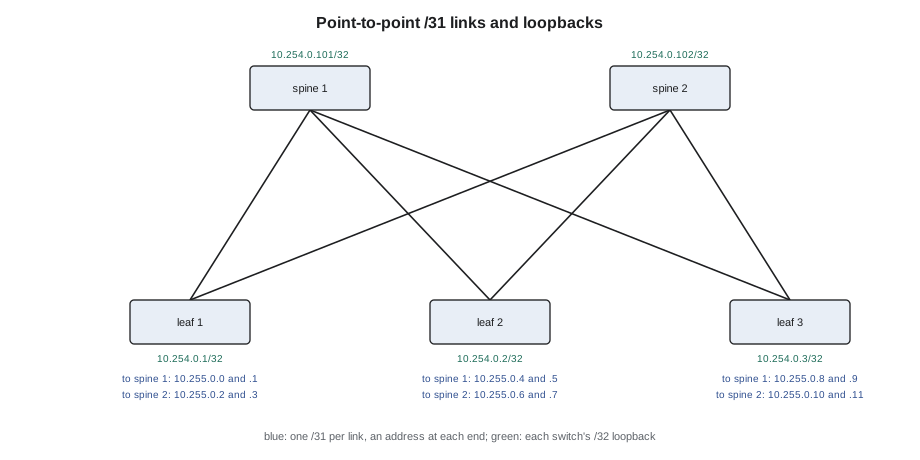
# Plan the point-to-point /31s for a small fabric and the server subnet of each leaf
import ipaddress
spines = ["sp1", "sp2", "sp3", "sp4"]
leaves = [f"lf{n}" for n in range(1, 7)]
p2p = ipaddress.ip_network("10.255.0.0/24").subnets(new_prefix=31)
loop = ipaddress.ip_network("10.254.0.0/24").hosts()
racks = ipaddress.ip_network("10.40.0.0/20").subnets(new_prefix=24)
links = 0
for lf in leaves:
    row = []
    for sp in spines:
        net = next(p2p); a, b = list(net)
        row.append(f"{sp}:{a}-{b}")
        links += 1
    print(lf, "loopback", next(loop), "servers", next(racks), "| first link", row[0])
print(f"{links} point-to-point links used {links * 2} addresses from 10.255.0.0/24")lf1 loopback 10.254.0.1 servers 10.40.0.0/24 | first link sp1:10.255.0.0-10.255.0.1 lf2 loopback 10.254.0.2 servers 10.40.1.0/24 | first link sp1:10.255.0.8-10.255.0.9 lf3 loopback 10.254.0.3 servers 10.40.2.0/24 | first link sp1:10.255.0.16-10.255.0.17 lf4 loopback 10.254.0.4 servers 10.40.3.0/24 | first link sp1:10.255.0.24-10.255.0.25 lf5 loopback 10.254.0.5 servers 10.40.4.0/24 | first link sp1:10.255.0.32-10.255.0.33 lf6 loopback 10.254.0.6 servers 10.40.5.0/24 | first link sp1:10.255.0.40-10.255.0.41 24 point-to-point links used 48 addresses from 10.255.0.0/24
The plan shows why addressing is designed once, in blocks, and recorded: each leaf gets its links, its loopback and its server subnet from predictable places, and an engineer can tell from an address alone which switch and which link it belongs to. A technician who replaces a leaf hands its port map and its management address to the engineer; the engineer reapplies the rest.
What a technician reads
Jamal is not expected to design addressing, but he is expected to read a few things correctly when an engineer shares them. A management address with its prefix tells him which subnet a device's management port must be cabled into. A gateway address tells him which device that port must reach. And a ping, a simple test that sends a small packet and waits for a reply, tells him whether a device can be reached at all. Engineers often ask a technician on a console to ping the gateway from a newly installed device, because a reply proves the cabling, the VLAN and the address all work.
| Test result | What it suggests | Likely owner of the fix |
|---|---|---|
| Link down | Physical fault: cable, optic, port, power | Technician first |
| Link up, cannot ping gateway | Wrong VLAN, wrong address or wrong port | Owner, with the technician confirming the port |
| Ping gateway works, far address fails | Routing or a firewall rule | Owner |
| Ping works, application fails | Above the network layers | Owner |
Worked problem
A new management switch that could not be reached
Jamal installs a new management switch for Hall D's network row and connects its uplink to the campus management network, as the work order says. The engineer cannot reach its management address.
Show solution
- Jamal connects to the switch's console (Lesson 10) and the engineer asks him to show the management interface: link up, address 10.20.4.51/24, gateway 10.20.4.1.
- He pings the gateway: no reply. The link is up, so layer 1 looks good.
- He reads the uplink label: it runs to port 18 of the row's aggregation switch. The work order says port 16.
- Port 18 is in the building systems VLAN, not the management VLAN. On the engineer's instruction he moves the cord to port 16; the ping succeeds and the switch appears in the engineer's tools.
Answer: The address and the gateway were right; the cord was two ports along. The ping from the console separated the cabling question from the configuration question in a minute.
IPv6 on the floor
More of the campus runs IPv6 every year. The cloud provider's fabric in Halls B and C uses IPv6 for nearly all of its internal traffic, and Corvid's frontend network runs both protocols. For a technician, IPv6 changes little: cables, optics and ports do not care which protocol runs over them. What changes is what engineers paste into tickets. IPv6 addresses are written as eight groups of four hexadecimal digits separated by colons, and long runs of zeros are shortened with a double colon, so 2001:0db8:0040:0012:0000:0000:0000:0007 is written 2001:db8:40:12::7. Subnets for devices are almost always /64, and point-to-point links in fabrics often use /127, the IPv6 equivalent of the /31. Many fabric links use only link-local addresses, which begin with fe80 and work only on that one link, so a neighbor table full of fe80 addresses is normal and not a sign that something is unconfigured.
One practical habit follows: copy IPv6 addresses from the owner's records or the switch output, never retype them. A single wrong digit in a long hexadecimal address is easy to miss and sends an engineer to the wrong device.
# Shortened and full forms of IPv6 addresses, and which network each belongs to
import ipaddress
for a in ["2001:db8:40:12::7", "2001:db8:40:12:0:0:0:1", "fe80::3efd:feff:fea1:5207"]:
    addr = ipaddress.ip_address(a)
    kind = "link-local" if addr.is_link_local else "global or private"
    print(f"{a:28} full {addr.exploded}  ({kind})")
net = ipaddress.ip_network("2001:db8:40:12::/64")
print(f"{net} holds {net.num_addresses:.2e} addresses; a /127 link holds", ipaddress.ip_network("2001:db8:ff::/127").num_addresses)2001:db8:40:12::7 full 2001:0db8:0040:0012:0000:0000:0000:0007 (global or private) 2001:db8:40:12:0:0:0:1 full 2001:0db8:0040:0012:0000:0000:0000:0001 (global or private) fe80::3efd:feff:fea1:5207 full fe80:0000:0000:0000:3efd:feff:fea1:5207 (link-local) 2001:db8:40:12::/64 holds 1.84e+19 addresses; a /127 link holds 2
DHCP and DNS on the management network
LVT-220 introduced DHCP, which hands out addresses automatically, and DNS, which turns names into addresses. Both matter in the data center's management networks. Many owners give new devices their first management address by DHCP, often tied to the device's MAC address or serial number so that a new switch receives its intended address and even its starting configuration as soon as it is connected and powered, a process called zero-touch provisioning. For this to work, the device's management port must be cabled to the right management VLAN, and the serial number or MAC address recorded during installation must be correct. A transposed digit in a serial number on the installation form can leave a new switch waiting for a configuration that never arrives. Jamal photographs the serial label of every device he racks and attaches the photograph to the ticket, so the engineer can check it directly.
DNS names are how engineers refer to devices: d4-leaf-r3-02 rather than an address. Stonebridge's naming convention puts the hall, the role and the position in the name, so that a name on a ticket tells a technician where to go. When a device is moved or replaced, its name and its records are updated as part of the change, because an engineer who connects to a name and reaches the wrong box is set up to make a mistake.
Network address translation, briefly
Private addresses such as 10.40.12.7 are not routed on the internet. Where a customer's servers need to reach the internet, an edge router or firewall translates their private addresses to a public address, keeping a table of which inside conversation each outside conversation belongs to. This is network address translation, NAT. A technician never touches it, but it explains why a server's address seen from outside is different from its own, and why a failed edge firewall can cut internet access for a whole customer while everything inside keeps working.
Reading an address plan
Owners give technicians address plans as tables: device, port, address, prefix, gateway, VLAN. Reading one is mostly a matter of checking that each row is consistent: the address lies inside the subnet its prefix describes, the gateway lies inside the same subnet, and no two devices share an address. A row that fails any of these is a typing error to raise with the owner before cabling, not after.
Common mistakes
MistakeReading a /31 link as a mistake because it has no broadcast address.
InsteadPoint-to-point links in fabrics use /31s with both addresses usable.
MistakeAssuming a device with link up must be reachable.
InsteadTest with a ping to the gateway; link up proves only layer 1.
MistakeGuessing which port is the management uplink.
InsteadUse the work order and the labels; ports differ in VLAN and purpose.
MistakeExpecting a replaced network card to work in the first second.
InsteadAddress caches can hold the old MAC address for a short time.
MistakeTyping addresses from memory into tickets.
InsteadCopy them from the owner's records to avoid transposed digits.
Summary and key terms
- The prefix length marks how many bits of an address are the network.
- Devices send traffic outside their subnet to their default gateway.
- Routers forward by the longest matching prefix in the routing table.
- ARP finds the MAC address that goes with an IP address on the local subnet.
- Fabric links use /31 networks; each switch has a /32 loopback address.
- A ping to the gateway from a console separates cabling problems from configuration problems.
- Prefix length
- The number of leading bits of an address that identify its network.
- Default gateway
- The router address a device sends traffic to for other networks.
- Longest prefix match
- The rule that a router uses the most specific matching route.
- ARP
- Address Resolution Protocol, which finds the MAC address for an IPv4 address.
- Loopback address
- An address that belongs to the device itself, reachable over any working link.
- Ping
- A reachability test that sends a small packet and waits for a reply.
Practice problems
Work each problem on paper first, then reveal the answer to check.
How many usable addresses does a /31 point-to-point link have?
Show answer
Two, one at each end.
A router has routes to 10.40.0.0/16 and 10.40.12.0/24. Which does it use for 10.40.12.9?
Show answer
The /24, the longer prefix.
A new device has link up but cannot ping its gateway. Name two possible causes.
Show answer
Any two of: wrong VLAN, wrong port, wrong address or gateway.
Why do routing sessions use loopback addresses?
Show answer
A loopback stays reachable as long as any link to the switch works.
Lesson quiz · 5 questions
Score 60% or more to complete this lesson.
Create a free account to save your progress, take quizzes and earn a certificate.