
DCE-320 · Lesson 10 of 12 · 28 min
Cabinets, cable management and administration
The last meters of every link, inside the cabinets, are where most of the hands-on work in a data center happens and where most cabling problems are created. Cords are added, moved and removed daily; a cabinet that was neat at handover can within a year become a tangle that blocks airflow, hides which cord goes where, and turns every change into a risk of unplugging the wrong link. This lesson covers the layout of network and server cabinets, cable managers and cord lengths, the relationship between cabling and airflow, and the administration system of labels, records and change control (TIA-606) that keeps a plant usable for its whole life.
Cabinet layout
Server cabinets in data centers are typically 600 mm wide and 1,070 mm to 1,200 mm deep, 42U to 52U tall (1U = 44.45 mm). Network cabinets, which carry many more cords, are often 800 mm wide, giving space for vertical cable managers on both sides of the equipment rails. Layout decisions at the design stage include:
- Where patch panels go: commonly at the top of the cabinet, close to overhead pathways, so trunks enter without crossing equipment. In network cabinets, panels may be interleaved with switches to keep cords short.
- Where power distribution units (PDUs) go: vertical PDUs in the rear corners, on the opposite side from data cables where possible, to keep power and data separate.
- Front or rear connection: switch ports and server network ports may face the cold aisle or the hot aisle. Panels should face the same side as the equipment ports they serve.
- Space for slack and cord routing, especially at the rear, where liquid-cooling manifolds and rear-door heat exchangers may now also compete for space.
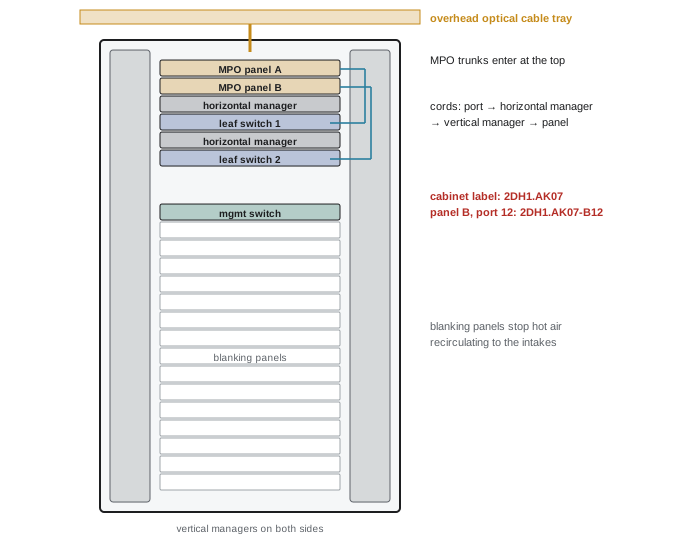
Cable managers and cord routing
Cords should never hang across equipment faces or rest on other equipment. They are routed through managers:
- Horizontal managers (1U or 2U, with fingers or rings) above or below each panel or switch, which lead cords sideways to the edges.
- Vertical managers at the sides of the rails, which carry cords up or down to their destination. Their capacity, in cross-sectional area, limits the number of cords a cabinet can hold.
- Rear managers, rings and lacing bars, which support cords at server and switch ports so their weight does not pull on the connectors.
The capacity of a vertical manager is set by its usable cross-section and a fill ratio, usually 40% to 60%, to allow cords to be added and removed without pulling others.
Worked problem
Vertical manager capacity
A vertical manager has a usable opening of 150 mm by 250 mm. Duplex LC fiber cords (two 1.6 mm cords, treat as a 3.2 mm by 1.6 mm pair, about 5.1 mm²) and Category 6A cords (6.5 mm diameter, about 33 mm²) are both used. At 50% fill, how many of each could the manager hold on its own?
Show solution
- Usable area: \(150 \times 250 \times 0.5 = 18{,}750\) mm².
- Duplex fiber cords: \(18{,}750 / 5.1 \approx 3{,}670\).
- Category 6A cords: \(18{,}750 / 33 \approx 568\).
Answer: About 3,700 fiber cords or about 570 Category 6A cords. A 48-port Category 6A switch in each of ten positions would already need 480 cords, which is why high-density copper cabinets need the widest managers, and why fiber and small-diameter cords are preferred in network cabinets.
Cord lengths
Cords should be the right length: long enough to route through the managers without strain, short enough not to leave large coils of slack. A standard set of lengths (for example 0.5 m increments) and a rule for choosing them, based on the vertical distance between ports plus a fixed allowance for the managers, keeps cabinets tidy. Excess slack should be stored in designated slack managers, not wound around rails.
Worked problem
Choosing a cord length
A switch in position U20 connects to a patch panel at U46 in the same cabinet. Each U is 44.45 mm. The cord runs horizontally 0.3 m to the vertical manager at each end and needs 0.2 m of allowance for bends. What standard length (in 0.5 m steps) should be used?
Show solution
- Vertical distance: \(26 \times 0.04445 = 1.16\) m.
- Horizontal runs: \(2 \times 0.3 = 0.6\) m; bend allowance 0.2 m.
- Total: 1.96 m; next standard length: 2.0 m.
Answer: 2.0 m. If the result were just over a standard length, the next length up would be chosen, with the small excess stored in the manager.
Color and connector conventions
Many operators use cord colors to identify networks: for example, yellow for single-mode, aqua for OM3 and OM4, lime green for OM5, and copper cords colored by network (blue for front-end, red for management, and so on). Connector housing colors identify fiber type and polish (blue for single-mode UPC, green for APC, beige or aqua for multimode). Conventions only work if they are written into the site standard and followed consistently; a second visual cue does not replace labels.
Cabling and airflow
Cabinets are part of the cooling system. Cold air must pass from the front of the cabinet through the equipment to the rear, and any leak or obstruction raises equipment temperatures and wastes cooling energy:
- Blanking panels must fill every unused U space at the front, so hot exhaust cannot recirculate through gaps to the intake.
- Cable entry openings in the top or bottom of the cabinet, and in raised floor tiles, need brush grommets or seals.
- Cords must not block the exhaust of servers and switches. A dense curtain of cords hanging across the rear of a cabinet can significantly restrict airflow.
- Network switches often take air in at the port side and exhaust it at the power-supply side (or the reverse); their airflow direction must match the cabinet orientation, which decides whether ports face the cold or hot aisle.
Hot aisles reach 40 °C to 50 °C and more in high-density rooms. Cords and patch panels in the hot aisle are rated for it, but technicians working there need limited exposure times, which is another reason to place frequently used panels on the cold-aisle side where the design allows.
Administration: labels and identifiers
TIA-606 (currently TIA-606-D) defines an administration system: a consistent way to identify every element of the plant, to label it, and to keep records. It defines classes of administration of increasing complexity, from a single equipment room (Class 1) to a multi-building campus (Class 4); data centers usually need Class 3 or 4.
Identifiers are built hierarchically, so that the identifier of a port contains the identifiers of the panel, cabinet, room and building it is in. A scheme in the style of TIA-606, for a floor laid out on a 600 mm grid (Lesson 1), might be:
| Element | Example identifier | Meaning |
|---|---|---|
| Space | 2DH1 | Building 2, data hall 1 |
| Cabinet | 2DH1.AK07 | Cabinet at grid position AK07 |
| Patch panel | 2DH1.AK07-B | Panel B (second from the top) in that cabinet |
| Port | 2DH1.AK07-B12 | Port 12 of that panel |
| Cable | 2DH1.AK07-B / 2DH1.AF02-D | Trunk between panel B in AK07 and panel D in AF02 |
Labeling rules follow from the scheme:
- Both ends of every cable carry a label with its identifier, within a set distance of the connector.
- Labels are machine-printed, on durable self-laminating or wrap-around labels, never handwritten.
- Panels show their identifier and port numbering; cabinets show their grid identifier on the front and rear, visible from the aisle.
- Fire-stopping locations, pathways and bonding conductors are labeled too.
The aim is that a technician standing at either end of any link can identify where the other end is without opening a record, and that the record can identify every link from either end.
Records and DCIM
Labels are only half of administration. The records, which today are usually kept in a data center infrastructure management (DCIM) system or a dedicated cabling database, hold:
- Every space, cabinet, panel, port and cable, with its identifier and location.
- Every connection: which port connects to which, including cords, giving the end-to-end path of each circuit through panels and cross-connects.
- Test results for every link, linked to the link record.
- Pathway records: which cables run in which trays and conduits, and their fill.
- Change history: who changed what, when, and under which work order.
Good records allow capacity planning (how many free ports and fibers remain between two locations), impact analysis (which services use a given trunk before it is moved) and quick fault isolation. They also allow abandoned cables to be identified and removed, which some electrical codes require (Lesson 8).
Automated infrastructure management
Records drift from reality whenever a change is not recorded. Automated infrastructure management (AIM) systems, standardized in ISO/IEC 18598, add sensors to patch panels that detect when a cord is connected or removed, and report it to the management system, so that the records update themselves and unauthorized changes raise alarms. AIM costs more but is used in large or highly regulated sites. Network discovery tools (LLDP, Lesson 9) give a similar check for active links.
Change management
Most outages caused by cabling come from changes: a cord unplugged from the wrong port, a trunk cut during work in a tray, a mislabeled panel. Change management reduces this risk:
- Every move, add or change (MAC) is done under a work order that identifies the exact ports and cords, generated from the records.
- Changes in production areas are scheduled, reviewed and, for critical links, verified with the network team before and after.
- The technician verifies the label at both ends before disconnecting, and updates the record (or confirms the AIM update) on completion.
- Abandoned cords are removed as part of the change, not left in place "just in case".
- Periodic audits compare records with the physical plant, sampling cabinets and correcting differences.
Worked problem
Audit sampling
A site has 40,000 recorded connections. An audit samples 400 at random and finds 12 that do not match the records. Estimate the number of incorrect records on the site and the error rate.
Show solution
- Error rate: \(12/400 = 3\%\).
- Estimated incorrect records: \(0.03 \times 40{,}000 = 1{,}200\).
Answer: About 3%, roughly 1,200 incorrect records. Even a few percent means that a technician following the records will regularly find a mismatch, which is why the procedure must always verify labels at both ends before disconnecting anything.
Common mistakes
MistakeLeaving U spaces open in cabinets.
InsteadFill every unused space with blanking panels to prevent recirculation.
MistakeUsing long cords and coiling the excess on the rails.
InsteadChoose cord lengths by rule and store small slack in managers.
MistakeHandwritten or one-end labels.
InsteadMachine-printed labels at both ends, using a hierarchical identifier scheme.
MistakeTrusting records without checking labels.
InsteadVerify both ends before disconnecting, and audit records regularly.
MistakeLeaving abandoned cords in place.
InsteadRemove them during the change and update the records.
Summary and key terms
- Network cabinets need width for vertical managers; panels usually sit at the top.
- Horizontal and vertical managers carry cords; capacity is limited by area and fill.
- Cord lengths should be chosen by rule, with conventions for color and connectors.
- Blanking panels, sealed openings and clear exhausts keep cabling from harming airflow.
- TIA-606 identifiers are hierarchical; every cable is labeled at both ends.
- Records in DCIM or AIM, work orders and audits keep the plant usable.
- Rack unit (U)
- 44.45 mm of vertical space in a cabinet.
- Vertical cable manager
- A channel at the side of the rails that carries cords up and down.
- Blanking panel
- A cover that closes an unused rack space.
- TIA-606
- The standard for administration of telecommunications infrastructure.
- Identifier
- A unique name for a space, cabinet, panel, port or cable.
- DCIM
- Data center infrastructure management software.
- AIM
- Automated infrastructure management with sensing patch panels.
- MAC
- A move, add or change to the cabling.
- Work order
- A documented instruction for a specific change.
- Audit
- A comparison of the records with the physical plant.
Practice problems
Work each problem on paper first, then reveal the answer to check.
Height of a 42U cabinet's mounting space?
Show answer
42 × 44.45 = 1,867 mm.
Why are network cabinets often 800 mm wide?
Show answer
To fit vertical cable managers beside the rails.
Usable area at 40% fill of a 100 × 200 mm manager?
Show answer
8,000 mm².
Cord from U10 to U40 with 0.6 m horizontal and 0.2 m allowance, 0.5 m steps?
Show answer
1.33 + 0.8 = 2.13 m → 2.5 m.
What color usually marks APC connectors?
Show answer
Green.
Why fill unused U spaces?
Show answer
To stop hot exhaust recirculating to equipment intakes.
Which TIA-606 classes suit data centers?
Show answer
Class 3 or 4.
What does "2DH1.AK07-B12" identify in the example scheme?
Show answer
Port 12 of panel B in cabinet AK07, data hall 1, building 2.
What does AIM add to records?
Show answer
Automatic detection of cord connections and removals.
Audit finds 5 errors in 250 samples of 20,000 records. Estimate errors.
Show answer
2%, about 400.
Lesson quiz · 5 questions
Score 60% or more to complete this lesson.
Create a free account to save your progress, take quizzes and earn a certificate.