
CINE-430 · Lesson 3 of 12 · 32 min
HDR fundamentals for delivery: PQ, HLG and metadata
CINE-202 introduced high dynamic range and its standards, and CINE-310 showed how a colorist places a grade in HDR and trims it for SDR. Delivery adds a different question: what exactly is inside the HDR file, and how will a television, a tablet or a phone interpret it? This lesson looks at the numbers behind HDR delivery. It covers the PQ and HLG transfer functions, the difference between the container color space and the mastering color space, code values and banding, and the static and dynamic metadata that travel with an HDR master. These details decide whether the image the cinematographer approved in the grading suite is the image viewers see at home.
Display-referred signals and absolute brightness
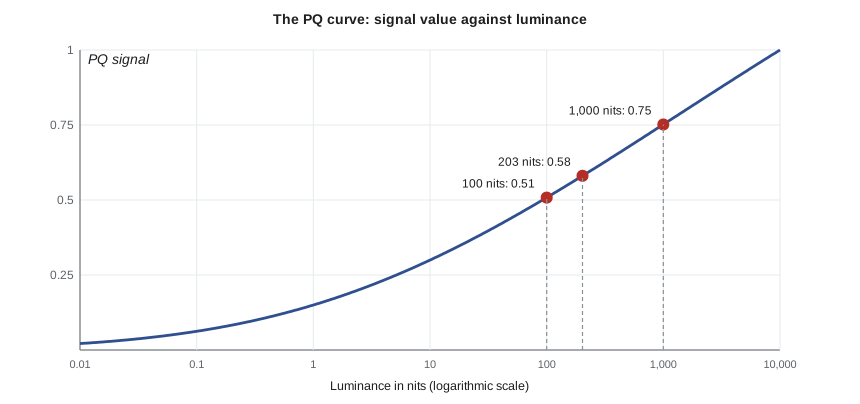
In SDR, the signal is relative. A code value near the top of the range means "as bright as this display goes", whether that display reaches 100 nits or 400 nits. PQ HDR works differently. The Perceptual Quantizer, standardized as SMPTE ST 2084 and included in ITU-R BT.2100, assigns each code value an absolute luminance in candelas per square meter (nits), from 0 up to 10,000 nits. A PQ code value of about 0.508 of the full range always means about 100 nits, and about 0.752 always means about 1,000 nits. This is useful for mastering, because the colorist knows exactly what brightness each part of the image has. It also means that televisions which cannot reach the mastered brightness must map the signal down to what they can show, which is where metadata helps.
The PQ curve
PQ was designed to match human contrast sensitivity, so that each code step is roughly equally visible from deep shadows to bright highlights. Its inverse electro-optical transfer function turns luminance into a signal value between 0 and 1.
Here \( L \) is luminance in nits and the constants are \( m_1 = 0.1593 \), \( m_2 = 78.84 \), \( c_1 = 0.8359 \), \( c_2 = 18.85 \) and \( c_3 = 18.69 \). You will never need to calculate this by hand on a job, because grading software and scopes do it for you, but working through it once makes code values and nit levels easier to read.
Worked problem
From nits to a PQ code value
A colorist places a white shirt at 203 nits, the reference level for diffuse white suggested in ITU-R BT.2408. What PQ signal value and 10-bit full-range code value does that represent?
Show solution
- Normalize: \( Y = 203 \div 10\,000 = 0.0203 \).
- Apply the PQ formula (or a table): \( E' \approx 0.581 \).
- Full-range 10-bit code: \( 0.581 \times 1023 \approx 594 \).
Answer: About 0.58 of the signal range, or code 594 in full range. In narrow (legal) range, which runs from 64 to 940, it is about \( 64 + 0.581 \times 876 \approx 573 \).
Worked problem
From a code value back to nits
A QC report flags a specular highlight at full-range 10-bit code 769 on a show mastered on a 1,000-nit display. About how bright is it, and is it inside the mastering range?
Show solution
- Normalize: \( 769 \div 1023 \approx 0.752 \).
- Invert PQ (or read a table): 0.752 corresponds to about 1,000 nits.
Answer: About 1,000 nits, right at the mastering display's peak. A highlight at code 846 (about 2,000 nits) would be outside the range of a 1,000-nit master and would be flagged, because nobody saw it on the reference display.
| Luminance (nits) | PQ signal | Full-range code | Narrow-range code |
|---|---|---|---|
| 0.1 | 0.062 | 64 | 119 |
| 1 | 0.150 | 153 | 195 |
| 10 | 0.300 | 307 | 327 |
| 100 | 0.508 | 520 | 509 |
| 203 | 0.581 | 594 | 573 |
| 1,000 | 0.752 | 769 | 723 |
| 4,000 | 0.903 | 923 | 855 |
| 10,000 | 1.000 | 1023 | 940 |
Code values, bit depth and banding
A 10-bit signal has 1,024 code values per channel. In narrow range, which most professional video uses, only 64 to 940 carry picture, giving 877 usable steps. Because PQ spreads those steps across 0 to 10,000 nits, each step near 100 nits is about 1 % brighter than the one below, and each step near 1,000 nits is also about 1 % brighter, roughly 9 nits. That is close to the threshold at which people can see a step in a smooth gradient on a large, bright display. This is why HDR delivery requires 10-bit or better signals, why 12-bit is used internally in mastering and Dolby Vision, and why heavy compression or 8-bit intermediate files cause visible banding in skies, smoke and dark walls.
Worked problem
How big is one code step?
Near 1,000 nits, full-range codes 768 and 769 correspond to about 990 and 999 nits. What is the relative step, and would a 12-bit signal help?
Show solution
- Step: 999 − 990 = 9 nits.
- Relative step: 9 ÷ 990 ≈ 0.009, or about 0.9 %.
- A 12-bit signal has 4 times as many codes, so each step is about a quarter as large, about 0.23 %.
Answer: About 0.9 % per step in 10-bit; 12-bit cuts that to about 0.23 %, well below visibility. That margin is why mastering and Dolby Vision pipelines use 12-bit internally even though delivery files are often 10-bit.
HLG: hybrid log-gamma
Hybrid log-gamma (HLG), developed by the BBC and NHK and also part of BT.2100, takes a different approach. It is scene-referred and relative: the signal describes scene light, and each display maps it to its own brightness. The lower part of the curve behaves like a conventional gamma curve, so an HLG signal looks reasonable on an SDR display without metadata. The upper part is logarithmic to hold highlights.
The constants are \( a = 0.17883 \), \( b = 0.28467 \) and \( c = 0.55991 \). At \( E = 1/12 \), both parts give \( E' = 0.5 \), so the curve is continuous.
HLG is popular in live broadcast and sports, where there is no time for a separate SDR grade and metadata is hard to manage. Premium streaming originals are usually mastered in PQ, but many services accept or create HLG versions for some uses, and some productions deliver HLG for broadcast partners.
Worked problem
Reading the HLG curve
A scene light value of \( E = 0.26 \) (on the normalized scale) is captured in HLG. What signal value results?
Show solution
- Since \( 0.26 > 1/12 \), use the log part: \( E' = 0.17883 \ln(12 \times 0.26 - 0.28467) + 0.55991 \).
- \( 12 \times 0.26 = 3.12 \); \( 3.12 - 0.28467 = 2.835 \); \( \ln 2.835 \approx 1.042 \).
- \( E' \approx 0.17883 \times 1.042 + 0.55991 \approx 0.746 \).
Answer: About 0.75. On an HLG display, the brightness this produces depends on the display's peak capability, which is the main difference from PQ's absolute values.
Container gamut and mastering gamut
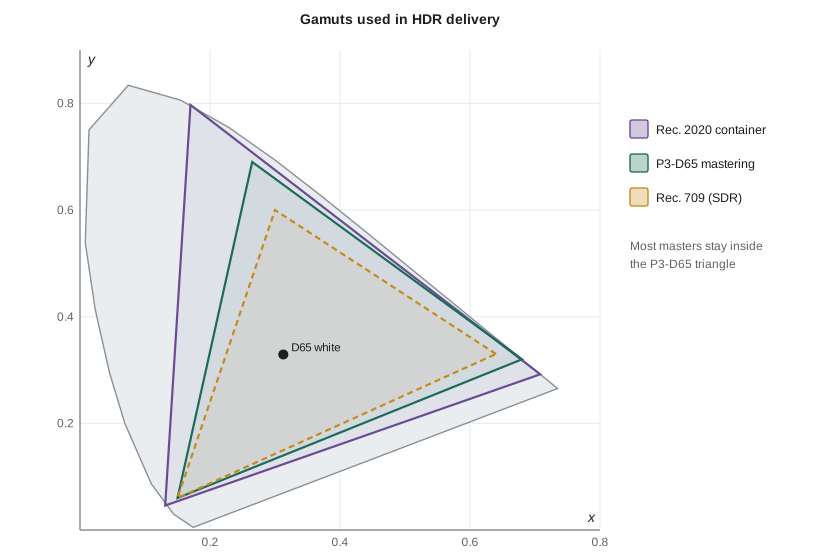
HDR files are usually labeled Rec. 2020 (BT.2020) primaries with a PQ transfer function. Rec. 2020 is a very wide gamut that most displays cannot fully reproduce. In practice, most reference displays used for mastering cover the P3 gamut with a D65 white point, so colorists grade within P3-D65 and the file is placed in a Rec. 2020 container. Some services ask for P3-D65 masters in a Rec. 2020 container explicitly and limit colors to the P3 triangle. Others accept true P3-D65 PQ masters as an intermediate and convert later.
- Container: the color space the file declares, usually Rec. 2020 primaries and PQ.
- Mastering gamut: the colors actually used, usually limited to P3-D65 by the reference display.
- Out-of-gamut colors: values outside the mastering gamut that nobody saw on the reference display. QC tools flag them.
The cinematographer does not usually set these labels, but should ask the colorist and finishing facility to confirm the container and mastering gamut early, so that LUTs and monitors on set match the final pipeline.
Static metadata: HDR10
HDR10 is the most common baseline HDR format. It uses PQ, Rec. 2020 primaries, 10-bit video and static metadata that describes the whole program.
- Mastering display color volume (SMPTE ST 2086): the primaries, white point and minimum and maximum luminance of the reference display used for mastering, for example P3-D65 with 0.0001 to 1,000 nits.
- MaxCLL (maximum content light level): the brightest single pixel anywhere in the program, in nits.
- MaxFALL (maximum frame-average light level): the highest average brightness of any single frame, in nits.
A television uses these values to decide how to tone-map the program to its own capability. Because the values are fixed for the whole title, a single very bright frame can change how the entire program is mapped. Lesson 5 shows how MaxCLL and MaxFALL are measured.
Dynamic metadata: HDR10+ and Dolby Vision
Dynamic metadata describes the picture shot by shot or frame by frame, so a television can tone-map each scene differently.
- Dolby Vision: a proprietary system that adds shot-by-shot metadata generated by analysis and adjusted by the colorist with trims for target displays. Many premium services deliver in Dolby Vision; Lesson 5 covers its metadata levels.
- HDR10+: an open dynamic-metadata system based on SMPTE ST 2094-40, supported by some televisions and services.
- HLG: has no metadata in its basic form; displays rely on the relative signal.
A single PQ master can carry Dolby Vision metadata, from which HDR10 and SDR versions can be derived. This is one reason many services ask for a Dolby Vision master with its metadata file even when they also distribute HDR10.
Worked problem
Why static metadata can mislead a television
A 60-minute episode has an average highlight level around 400 nits, except for one 2-second explosion with a few pixels at 4,000 nits. The master was graded on a 1,000-nit display. What happens to MaxCLL, and why does it matter?
Show solution
- MaxCLL is set by the brightest pixel in the whole program: about 4,000 nits.
- A 600-nit television reading MaxCLL of 4,000 may compress the whole program heavily to make room for that peak.
- The 4,000-nit pixels were also outside the 1,000-nit mastering display, so nobody saw them.
Answer: MaxCLL becomes about 4,000 nits, which can make the whole episode look duller on many televisions and is out of range for the mastering display. QC would flag it; the fix is to clip or roll off the explosion within 1,000 nits in the grade.
Putting the pieces together
A typical premium HDR master is a 4K (3,840 × 2,160) picture with PQ transfer, Rec. 2020 container primaries, a P3-D65 mastering gamut, a mastering display peak of 1,000 nits, 12-bit or 16-bit image files in the finishing facility and 10-bit or 12-bit compressed or lossless delivery files, plus Dolby Vision metadata, HDR10 static metadata and an SDR version. These values are common examples; always follow the current specification. The cinematographer's practical takeaway is simple: know the mastering peak and gamut, light and expose so that important detail sits comfortably inside them, and ask to see the image on a calibrated HDR monitor before signing off.
Common mistakes
MistakeA PQ code value means "as bright as the display can go".
InsteadIn PQ, each code value represents an absolute luminance in nits, up to 10,000 nits.
MistakeHDR files in a Rec. 2020 container use the whole Rec. 2020 gamut.
InsteadMost masters are graded within P3-D65 and placed in a Rec. 2020 container.
MistakeMaxCLL describes the average brightness of the program.
InsteadMaxCLL is the brightest single pixel; MaxFALL is the highest frame-average level.
Mistake8-bit intermediate files are fine for HDR.
InsteadPQ steps are already near the visible threshold in 10-bit; 8-bit files cause banding.
MistakeHLG and PQ are interchangeable labels.
InsteadPQ is absolute and display-referred; HLG is relative and scene-referred, with different curves.
Summary and key terms
- PQ (SMPTE ST 2084) maps code values to absolute luminance from 0 to 10,000 nits.
- About half the PQ signal range covers 0 to 100 nits, leaving the rest for highlights.
- In 10-bit PQ, each code step is close to 1 %, so 10-bit is a minimum and 12-bit is used in mastering.
- HLG is a relative, scene-referred curve that looks acceptable on SDR displays without metadata.
- HDR files usually declare a Rec. 2020 container while the picture is graded within P3-D65.
- HDR10 uses static metadata: mastering display data, MaxCLL and MaxFALL.
- Dolby Vision and HDR10+ add dynamic metadata so displays can tone-map shot by shot.
- PQ (Perceptual Quantizer)
- The SMPTE ST 2084 transfer function that maps code values to absolute luminance up to 10,000 nits.
- HLG (hybrid log-gamma)
- A relative, scene-referred HDR transfer function from BT.2100, compatible with SDR displays.
- Nit
- One candela per square meter, the unit of luminance used for displays.
- Narrow range
- A video signal range where 10-bit picture values run from 64 to 940.
- Rec. 2020 container
- A file labeled with BT.2020 primaries, which can hold colors wider than most displays show.
- P3-D65
- A wide color gamut with a D65 white point, commonly used for HDR mastering displays.
- SMPTE ST 2086
- The standard for static metadata describing the mastering display's color volume.
- MaxCLL
- Maximum content light level: the brightest pixel in the program, in nits.
- MaxFALL
- Maximum frame-average light level: the brightest frame's average luminance, in nits.
- Dynamic metadata
- Shot-by-shot or frame-by-frame information that guides display tone mapping.
Practice problems
Work each problem on paper first, then reveal the answer to check.
About what PQ signal value represents 100 nits?
Show answer
About 0.51.
About what PQ signal value represents 1,000 nits?
Show answer
About 0.75.
Convert a PQ signal of 0.581 to a full-range 10-bit code.
Show answer
0.581 × 10²³ ≈ 594.
How many usable picture steps does 10-bit narrow range have?
Show answer
940 − 64 + 1 = 877.
Why do mastering pipelines use 12-bit internally?
Show answer
Each step is about a quarter of a 10-bit step, well below the visible threshold.
What is the HLG signal at \( E = 1/12 \)?
Show answer
0.5, where the gamma and log parts meet.
What does ST 2086 metadata describe?
Show answer
The mastering display's primaries, white point and luminance range.
A program's brightest pixel is 950 nits and its brightest frame averages 310 nits. Give MaxCLL and MaxFALL.
Show answer
MaxCLL 950 nits; MaxFALL 310 nits.
Why might a single bright explosion affect the whole program on HDR10 televisions?
Show answer
Static MaxCLL covers the whole title, so tone mapping may compress everything to fit the peak.
Which HDR format suits live broadcast without metadata?
Show answer
HLG.
Lesson quiz · 5 questions
Score 60% or more to complete this lesson.
Create a free account to save your progress, take quizzes and earn a certificate.