
CINE-430 · Lesson 10 of 12 · 32 min
Archiving and preservation
A streaming title may stay in a service's library for decades, be remastered for new display technologies or be sold to new distributors long after its first season. All of that depends on the archive: the original camera files, the finished masters and the project data that allow the title to be rebuilt or improved later. Digital files are fragile in a different way from film. They do not fade slowly; they become unreadable all at once when media fail, formats become obsolete or nobody can find the right version. This lesson covers what to archive, how linear tape and cloud storage are used, how checksums protect data, why migration is necessary and how preservation works in Canada and the United States.
What to archive
An archive plan lists the material that must be kept and who keeps it. Streaming services usually keep the delivered masters themselves, but productions, studios, financiers and public funders may require additional archive deliverables.
- Original camera files (OCF): all camera originals, with metadata, sidecar files and camera reports. They allow a future remaster from the source.
- Conform and finishing data: the edit decision lists, conformed timelines, grading project files, LUTs, CDLs and Dolby Vision metadata.
- Masters: HDR and SDR picture masters, IMF packages, textless elements and inserts.
- Visual effects: final shots and, where required, plates, elements and project files.
- Audio: final mixes, stems, M&E, dialogue tracks and project sessions.
- Timed text and documents: subtitles, captions, scripts, music cue sheets, credits and legal documents.
- Stills and marketing materials where required.
Not every production can keep everything forever. A good plan balances cost with what future users are likely to need, guided by the contract and the deliverables list.
Linear tape and LTO
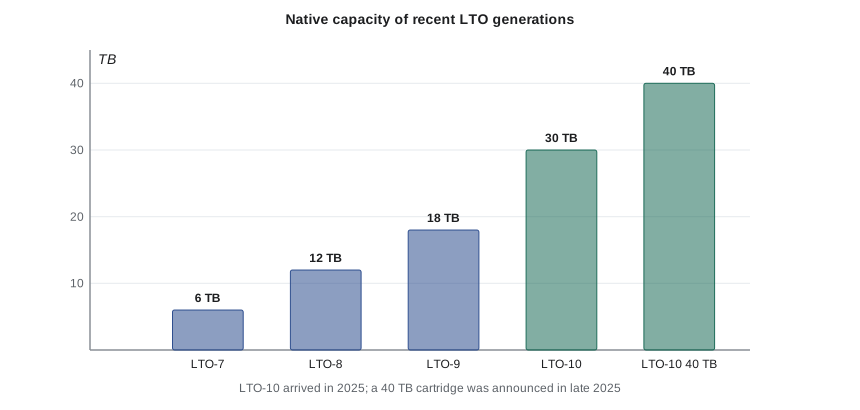
Linear Tape-Open (LTO) is the most common long-term storage medium for film and television archives. It is cheap per terabyte, stores data offline (safe from accidental deletion and ransomware), and is designed for a long shelf life when stored properly. LTO drives can usually read two generations back, which is one reason migration matters.
| Generation | Native capacity | Approximate native speed |
|---|---|---|
| LTO-7 | 6 TB | 300 MB/s |
| LTO-8 | 12 TB | 360 MB/s |
| LTO-9 | 18 TB | 400 MB/s |
| LTO-10 (2025) | 30 TB, with a 40 TB cartridge announced in late 2025 | about 400 MB/s |
Archive data is usually written with LTFS (Linear Tape File System), which lets the tape appear like a disk with folders and files, so it can be read without the software that wrote it. Media and camera files rarely compress further, so plan with native capacity.
Worked problem
How many tapes for a season archive?
A season archive contains 96 TB of original camera files, 12 TB of masters and IMF packages, 9 TB of VFX and 3 TB of audio and documents. The plan calls for two identical tape copies stored in different places, on 18 TB LTO-9 tapes filled to about 95 %. How many tapes are needed?
Show solution
- Total data: \( 96 + 12 + 9 + 3 = 120 \) TB.
- Usable per tape: \( 18 \times 0.95 = 17.1 \) TB.
- Tapes per copy: \( 120 \div 17.1 \approx 7.02 \), so 8 tapes.
- Two copies: 16 tapes.
Answer: 16 LTO-9 tapes. On 30 TB LTO-10 tapes at 95 % (28.5 TB each), each copy would need 5 tapes, or 10 in total.
Worked problem
How long does writing take?
Writing 120 TB to LTO-9 at an effective 300 MB/s (below the native maximum, allowing for verification and file overhead), how long does one copy take?
Show solution
- Data in MB: \( 120 \times 10^6 \) MB.
- Time: \( 120 \times 10^6 \div 300 = 400\,000 \) s ≈ 111 hours.
Answer: About 111 hours, or more than 4.5 days of continuous writing per copy. Archive writing must be scheduled, and using two drives in parallel halves the time.
Checksums and fixity
A checksum is a short value calculated from a file's contents, such as an MD5 or xxHash value. If even one bit of the file changes, the checksum changes. Archives record checksums when files are created and check them again whenever files are copied or periodically while in storage. This practice is called fixity checking.
- Create checksums at the first copy on set or at the lab, and keep them with the files in manifests.
- Verify checksums after every copy, including writing to tape and restoring from tape.
- Re-verify a sample, or everything, on a schedule while files are in storage.
- Keep the manifests in more than one place.
CINE-420 covered checksums and chain of custody on set. The same values follow the files into the archive, which is why accurate manifests matter from the first day.
Worked problem
Time to verify an archive
A fixity check reads 120 TB from tape at an effective 350 MB/s and computes checksums at that speed. How long does a full check take, and how many hours per month if it is spread over a year?
Show solution
- Time: \( 120 \times 10^6 \div 350 \approx 342\,857 \) s ≈ 95 hours.
- Spread over 12 months: \( 95 \div 12 \approx 8 \) hours per month.
Answer: About 95 hours for a full check, or about 8 hours a month if spread over a year. Many archives check samples more often and do full checks less often.
Migration
Digital media and formats become obsolete. LTO drives typically read only two generations back, file formats and software change and cartridges age. Archives therefore migrate data to new media every several years, verifying checksums along the way. Migration costs money and time, so it should be budgeted as an ongoing activity, not a one-time event. The Academy of Motion Picture Arts and Sciences highlighted these challenges in its reports The Digital Dilemma (2007) and The Digital Dilemma 2 (2012), which found that keeping digital masters accessible over the long term costs much more than storing film in a vault, because digital storage needs active management.
Worked problem
Planning migration
An archive of 400 TB is on LTO-8 tapes written in 2019. Drives that read LTO-8 may become scarce when LTO-10 and later generations dominate. If the archive migrates to LTO-10 at 28.5 TB usable per tape, how many tapes are needed, and how long does it take at 300 MB/s on one drive pair?
Show solution
- Tapes: \( 400 \div 28.5 \approx 14.04 \), so 15 tapes per copy.
- Time: \( 400 \times 10^6 \div 300 \approx 1\,333\,333 \) s ≈ 370 hours, or about 15 days of continuous copying.
Answer: About 15 tapes per copy and around two weeks of continuous transfer per copy, plus verification. Archives schedule migrations over months.
Cloud storage
Cloud object storage is increasingly used for archives, often alongside tape. Cloud providers offer archive tiers that are cheap to store but slow and costly to retrieve. Advantages include geographic redundancy and no need to manage drives; disadvantages include ongoing fees, retrieval costs, dependence on the provider and the need to monitor for accidental deletion or corruption. Many archives keep at least one copy on offline tape and one in the cloud, following the 3-2-1 rule: three copies, on two kinds of media, with one copy off site.
Worked problem
Ten-year cloud cost
An illustrative archive tier costs 1.00 dollar per terabyte per month to store. What does 120 TB cost over 10 years, ignoring retrieval and price changes?
Show solution
- Monthly: \( 120 \times 1.00 = 120 \) dollars.
- Ten years: \( 120 \times 12 \times 10 = 14\,400 \) dollars.
Answer: About 14,400 dollars for storage alone. Retrieving the whole archive could add significant costs, so archives budget for both. Prices vary widely by provider and tier.
Film-out and analog preservation
Some productions and archives also record digital masters to film for long-term preservation, often as black-and-white color separations: three black-and-white negatives recording the red, green and blue records. Black-and-white film stored in cold, dry conditions can last for a very long time without active management. Film-out is expensive and rarely required for streaming series, but it is used for some feature films and prestigious titles.
Preservation in Canada and the United States
Preservation in the US
- Studios and major streamers run their own archives and vaults for masters and source material.
- The Library of Congress preserves film and television collections, including the National Film Registry, at its Packard Campus for Audio-Visual Conservation.
- The Academy Film Archive and university archives preserve many titles, and the Academy's Digital Dilemma reports remain an important reference on the costs of digital preservation.
- Contracts and guild agreements may set how long producers must keep certain materials.
The cinematographer's role in preservation
The cinematographer's work is preserved in the original camera files and the graded masters. Simple steps help future remasters keep the intended look:
- Make sure camera reports, LUTs, CDLs and look notes are archived with the camera files.
- Ask that the graded masters, grading project files and Dolby Vision metadata be archived, not only the encoded deliverables.
- Write a short look document describing the intended look, references and grading decisions, for future colorists.
- Check that the archive plan includes key test footage and charts that explain the camera and lens choices.
A future remaster might use displays brighter than today's, new transforms or even reconstruct shots from the OCF. A clear record of intent helps keep the cinematographer's work true to its original vision.
Documenting the archive
An archive is only useful if people can find and understand what is in it years later. Good archives include documentation alongside the files.
- A manifest listing every file with its checksum, size and location.
- A readme describing the project, the formats, the color pipeline, software versions and the meaning of folder names.
- Camera and lens lists, frame rates, LUTs and look documents.
- Contact information for the production and the people who made key technical decisions.
Store documentation in open, simple formats, such as plain text, PDF or spreadsheets saved in common formats, so it remains readable when today's software is gone.
Common mistakes
MistakeArchiving the streaming encodes is enough.
InsteadFuture remasters need original camera files, graded masters and project data, not only compressed encodes.
MistakeOnce data is on tape, it is safe forever.
InsteadTapes and drives become obsolete, so archives check fixity and migrate data every several years.
MistakeMedia files compress well on tape.
InsteadCamera and master files rarely compress further; plan with native capacity.
MistakeCloud storage removes the need for checksums.
InsteadCloud files also need fixity checks and protection from deletion or corruption.
MistakePreservation is only the studio's concern.
InsteadThe cinematographer can help by archiving LUTs, CDLs, look notes and test footage with the files.
Summary and key terms
- An archive plan lists camera originals, finishing data, masters, VFX, audio, timed text and documents.
- LTO tape with LTFS is the main offline archive medium; LTO-10 brought 30 TB native and a 40 TB cartridge was announced in late 2025.
- Checksums and fixity checks prove files have not changed.
- Archives must migrate data to new media every several years.
- Cloud storage adds redundancy but has ongoing and retrieval costs.
- Film-out to black-and-white separations remains a long-term option for some titles.
- Canada and the US each have national archives and funder or studio requirements for preservation.
- Original camera files (OCF)
- The files recorded by the camera, with metadata and sidecar files.
- LTO
- Linear Tape-Open, a magnetic tape format used for archives.
- LTFS
- Linear Tape File System, which makes tape readable like a disk without the original software.
- Checksum
- A value calculated from a file's contents that changes if the file changes.
- Fixity check
- Verifying checksums to prove files have not changed.
- Migration
- Copying archived data to newer media or formats before the old ones become unreadable.
- 3-2-1 rule
- Three copies, on two kinds of media, with one off site.
- Black-and-white separations
- Three black-and-white film records of the red, green and blue components.
- The Digital Dilemma
- Academy reports on the costs and risks of long-term digital preservation.
- Library and Archives Canada
- The federal institution that preserves Canada's documentary heritage.
Practice problems
Work each problem on paper first, then reveal the answer to check.
How many 18 TB tapes at 95 % fill hold 60 TB?
Show answer
60 ÷ 17.1 ≈ 3.5, so 4 tapes.
How long does 36 TB take to write at 300 MB/s?
Show answer
36 × 10^6 ÷ 300 = 120,000 s ≈ 33 hours.
What does LTFS allow?
Show answer
Reading tape files like a disk without the software that wrote them.
Why do archives migrate data?
Show answer
Drives read only a few generations back and media and formats age.
What is the 3-2-1 rule?
Show answer
Three copies, on two kinds of media, one off site.
50 TB at 1.20 dollars per TB per month costs how much per year?
Show answer
50 × 1.20 × 12 = 720 dollars.
Name three items besides OCF that belong in an archive.
Show answer
Any three of grading projects, LUTs and CDLs, masters, VFX, audio stems, timed text and documents.
What do black-and-white separations record?
Show answer
The red, green and blue records of the image on three black-and-white negatives.
What can a cinematographer add to help future remasters?
Show answer
A look document with references, LUTs, CDLs and grading notes.
What did the Academy's Digital Dilemma reports highlight?
Show answer
The high, ongoing cost of keeping digital masters accessible.
Lesson quiz · 5 questions
Score 60% or more to complete this lesson.
Create a free account to save your progress, take quizzes and earn a certificate.