
CINE-430 · Lesson 2 of 12 · 33 min
Camera approval and capture requirements
The first technical decision on a streaming production is the camera package. Premium services set minimum capture requirements because the original camera files are the raw material for every later version of the title: the HDR master, the SDR version, visual effects plates and future remasters. If the capture is weak, nothing in finishing can fully repair it. This lesson explains the kinds of capture requirements services publish, how to read them, how to plan framing for several aspect ratios and how to document the camera plan for approval. Figures quoted here are examples from public sources at the time of writing (October 2026); always check the current requirements for your production.
What capture requirements usually cover
Capture requirements tend to cover the same set of properties, even when the exact values differ between services.
- Sensor resolution: many premium services ask for a true 4K sensor, meaning the sensor has at least about 3,840 photosites across the active width used for the image, not an upscaled HD image.
- Bit depth: 10-bit or greater recording, so that gradients survive HDR grading without visible steps.
- Encoding: raw formats or scene-referred log encodings with a documented transfer function and gamut, rather than baked-in display looks.
- Codec and data rate: intraframe or raw codecs with a minimum data rate, so compression does not damage fine detail and noise.
- Chroma sampling: 4:2:2 or better, or raw, so that color edges and keys hold up.
- Frame rate: the project frame rate agreed with the service, recorded consistently, with high-frame-rate material planned and labeled.
- Approved list and runtime rule: a share of the final runtime must come from approved cameras, with listed exceptions.
Netflix, for example, has publicly described requirements that include a true 4K UHD sensor, 10-bit or greater recording and a minimum data rate of about 240 Mb/s at 24 frames per second for compressed formats, and a rule that about 90 % of the final runtime must come from cameras on its approved list. Other services publish similar but not identical rules, and some do not publish them at all, sharing them only with productions. Treat these figures as examples and confirm the current rules for your production.
Why each requirement matters
Each requirement maps to a problem it prevents.
| Requirement | Problem it prevents | What you would see if ignored |
|---|---|---|
| True 4K sensor | Soft images that do not hold up on large 4K screens | Lack of fine detail, upscaling artifacts |
| 10-bit or greater | Too few code values for smooth gradients in HDR | Banding in skies, walls and smoke |
| Log or raw encoding | Highlights and shadows clipped by a display look | Lost highlight detail, no room to grade |
| Minimum data rate | Compression artifacts in noise and detail | Blocky shadows, smeared texture |
| 4:2:2 or raw | Poor color edges and keys | Fringing on green screen, color bleeding |
| Consistent frame rate | Judder and conversion artifacts | Stutter, blended frames, sync problems |
The table explains why a service will reject a request to shoot a whole series on a camera that records 8-bit 4:2:0 at low data rates, even if the pictures look acceptable on a phone. They will look very different after an HDR grade on a 1,000-nit display.
Worked problem
Data rate and storage for a shooting day
An approved camera records a compressed log format at 280 Mb/s. A two-camera unit records 3 hours of footage per camera per day. How much storage does one day need, before copies?
Show solution
- Bytes per second: 280 Mb/s ÷ 8 = 35 MB/s.
- Per hour: 35 × 3,600 = 126,000 MB ≈ 126 GB.
- Per camera per day: 126 × 3 = 378 GB; two cameras: 756 GB.
Answer: About 0.76 TB per day for the originals. With three verified copies, the data team must manage about 2.3 TB a day. CINE-420 covered data management on set.
Worked problem
Is the camera recording enough data?
A small camera records 4K at 23.976 fps in a 10-bit 4:2:2 intraframe format at 200 Mb/s. The service's example minimum is 240 Mb/s at 24 fps for compressed formats. Does it pass, and what could the production do?
Show solution
- Compare data rates: 200 Mb/s is below 240 Mb/s.
- Check other modes: a higher-quality codec setting or raw recording may exceed the minimum.
- Check the approved list: the camera may be approved only in certain modes.
Answer: In this mode it does not meet the example minimum. The production should switch to a compliant mode, use an approved alternative or seek a written exception for limited use, such as a crash camera.
Approved lists and exceptions
An approved list names camera models and, often, the recording modes that meet the service's requirements. A camera might be approved in raw and high-bitrate intraframe modes but not in its long-GOP or lower-bitrate modes. Some lists also include notes about firmware versions or settings. Exceptions are common for practical reasons:
- Specialty cameras: crash cameras, small action cameras, underwater housings and drones, where approved cameras would be impractical or unsafe.
- Archival and found footage: material shot long ago or by others, such as news footage or home video.
- Documentary and unscripted work: some services apply different rules to unscripted genres.
- Creative choices: film origination, vintage video or intentionally low-fidelity looks, agreed with the service.
The usual process is to describe the camera plan in a pipeline document, estimate how much final runtime each camera will supply and request written approval for anything outside the list. Some services want test footage from the camera in the exact mode planned.
Worked problem
Checking the runtime rule
A 50-minute episode is expected to contain 41 minutes from the main approved cameras, 4 minutes from an approved drone, 3 minutes from an unapproved crash camera and 2 minutes of archival news footage that the service treats as an exception. If the rule is that 90 % of runtime must come from approved cameras, excluding listed exceptions from the total, does the episode pass?
Show solution
- Runtime counted: 50 − 2 (archival exception) = 48 minutes.
- Approved runtime: 41 + 4 = 45 minutes.
- Share: 45 ÷ 48 = 0.9375, or about 93.8 %.
Answer: About 93.8 %, which passes an example 90 % rule. If the crash camera footage grew to 6 minutes, approved runtime would fall to about 87.5 % and the plan would need changes or an exception. Always confirm how the service counts exceptions.
Resolution, sensor modes and extraction
Cameras can record using different areas of the sensor. A large-format sensor might offer full-width, Super 35 and anamorphic modes. The resolution that matters is the number of photosites across the area used to make the delivered frame, not the camera's headline figure. For example, if a camera records 4.6K across its full width but the production uses a 2.39:1 extraction from the center of a 16:9 recording, the active image is still more than 3,840 pixels wide. If the production crops heavily in post or uses a small window of the sensor, the effective resolution may fall below the requirement.
For a 3,840-pixel-wide delivery at 2.39:1, the active picture height is about 3,840 ÷ 2.39 ≈ 1,607 pixels, and the rest of the 2,160-pixel frame is black bars or protected area. Many services still want the full 3,840 × 2,160 container, with the picture letterboxed inside it.
Worked problem
Effective resolution after a crop
A camera records 4,608 × 2,592. The director wants to reframe in post by cropping 20 % of the width. What is the remaining width, and does it still exceed 3,840?
Show solution
- Remaining width: 4,608 × 0.8 = 3,686 pixels.
- Compare: 3,686 is less than 3,840.
Answer: About 3,686 pixels, below a true-4K threshold. Plan reframing within the recorded margin, record a larger image or discuss with the service whether limited reframing is acceptable.
Framing for multiple aspect ratios
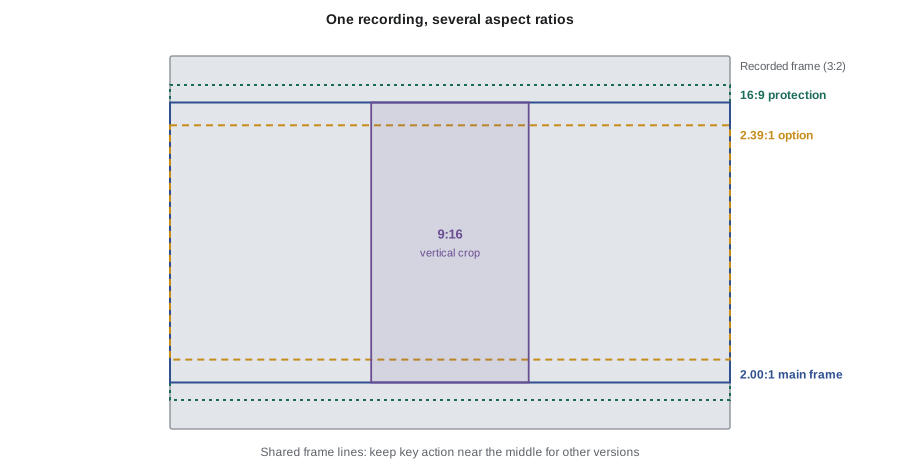
Streaming titles often need more than one aspect ratio. The main version may be 2.00:1 or 2.39:1, while some territories, broadcasters, promotional clips or social media need 16:9, 1:1, 4:5 or 9:16. Some services also ask for a 16:9 full-frame version for certain devices. The cinematographer handles this with frame lines and protection.
- Choose a common center or common top for the frame lines, depending on how other versions will be extracted; the figure shows centered frame lines.
- Protect the area outside the main frame from booms, lights and crew when other versions will use it.
- Agree a vertical-crop plan with marketing if promotional cuts will be made, and keep key action near the center where possible.
- Record frame-line metadata where the camera supports it, and send the frame-line files to dailies and editorial.
CINE-330 covered social-first deliverables for commercials. On a series, the main frame comes first, but a quick check of the 16:9 and vertical safe areas on the monitor can prevent problems later.
Frame rates and high-frame-rate material
Streaming services usually accept common frame rates such as 23.976, 24, 25, 29.97 and 50 or 59.94 frames per second, depending on territory and genre. Scripted drama in North America is usually 23.976 fps. The rule is to choose a project frame rate with the service and keep it consistent. High-speed shots for slow motion should be planned, recorded at a rate that divides cleanly into the project rate where possible, and labeled. Lesson 6 covers frame rate conversions and pulldown for deliverables.
In the United States, most scripted series use 23.976 fps, and network broadcast versions use 29.97 or 59.94 fps. International sales to territories that use 25 fps may require a converted version.
Writing the camera plan for approval
A clear camera plan helps the service approve the package quickly. It should be short, specific and honest about exceptions.
- Main cameras: model, sensor mode, resolution, codec, bit depth, chroma sampling, transfer function and gamut.
- Lenses and filtration: anything that affects resolution or flare, such as heavy diffusion or vintage lenses, with test footage if needed.
- Specialty cameras: models, modes and expected runtime.
- Frame rates: project rate and any high-speed rates.
- Aspect ratios and frame lines: main ratio, protection and extraction plan.
- Monitoring and LUTs: how the image will be viewed on set, in HDR and SDR.
- Data and dailies: recording media, copies, checksums and dailies color.
- Estimated runtime by camera: a simple table showing how the runtime rule will be met.
Attach test footage and a short note on any creative reasons for exceptions. Keep the approved plan with the production records.
Worked problem
A runtime table for approval
A season of 8 episodes, each 55 minutes, will use an approved A and B camera for about 92 % of runtime, an approved drone for 3 % and an unapproved compact camera for car interiors for 5 %. How many minutes per season come from the unapproved camera, and what should the plan say?
Show solution
- Season runtime: 8 × 55 = 440 minutes.
- Unapproved share: 440 × 0.05 = 22 minutes.
- Approved share: 92 % + 3 % = 95 %, above an example 90 % rule.
Answer: About 22 minutes. The plan should name the compact camera, its best recording mode, the reason (space in car interiors) and the runtime estimate, and ask for written approval of the exception.
Common mistakes
MistakeA camera's headline resolution proves it meets a 4K requirement.
InsteadWhat matters is the photosite count across the sensor area used for the delivered frame, after any extraction or crop.
MistakeAn 8-bit recording is fine if it looks good on set.
InsteadHDR grading exposes banding in 8-bit material; most premium services require 10-bit or greater.
MistakeAny mode of an approved camera is approved.
InsteadApproval often applies only to specific modes, such as raw or high-bitrate intraframe.
MistakeExceptions can be sorted out at delivery.
InsteadExceptions should be agreed in writing during prep, with test footage if requested.
MistakeFrame lines only matter for the main aspect ratio.
InsteadProtect areas needed for other versions such as 16:9 or vertical crops, and share frame lines with post.
Summary and key terms
- Capture requirements usually cover sensor resolution, bit depth, encoding, codec, data rate, chroma sampling and frame rate.
- Published examples include a true 4K sensor, 10-bit or greater, about 240 Mb/s at 24 fps and about 90 % of runtime from approved cameras.
- Each requirement prevents a visible problem such as softness, banding, clipping or compression artifacts.
- Approval often depends on the recording mode, not just the camera model.
- Effective resolution depends on extraction and cropping, so plan reframing within the recorded margin.
- Frame lines and protection let one shoot serve several aspect ratios.
- A short camera plan with a runtime table and test footage speeds approval.
- True 4K sensor
- A sensor with about 3,840 or more photosites across the area used for the delivered image.
- Bit depth
- The number of bits per color sample; 10-bit gives 1,024 levels per channel.
- Log encoding
- A transfer function that stores a wide scene range in the recorded signal for grading.
- Raw
- Sensor data recorded before most image processing, giving maximum flexibility in post.
- Intraframe codec
- A codec that compresses each frame on its own, without depending on other frames.
- Chroma sampling
- How much color detail is recorded relative to brightness, such as 4:4:4 or 4:2:2.
- Approved list
- A service's list of cameras and modes accepted for original productions.
- Exception
- A written approval to use a camera or material outside the standard requirements.
- Extraction
- The area of the recorded frame used for a delivered aspect ratio.
- Protection
- Keeping parts of the frame outside the main ratio clean for other versions.
Practice problems
Work each problem on paper first, then reveal the answer to check.
A camera records at 320 Mb/s. How many gigabytes per hour?
Show answer
320 ÷ 8 = 40 MB/s; × 3,600 = 144,000 MB ≈ 144 GB.
What is the active height of a 3,840-wide 2.39:1 picture?
Show answer
3,840 ÷ 2.39 ≈ 1,607 pixels.
A recording is 4,096 pixels wide and is cropped by 10 %. Is it still above 3,840?
Show answer
4,096 × 0.9 = 3,686, so no.
Why do services prefer log or raw capture?
Show answer
They preserve highlights, shadows and color for grading rather than baking in a display look.
A 60-minute episode has 52 minutes from approved cameras and 8 minutes from an unapproved camera, with no exceptions. What share is approved?
Show answer
52 ÷ 60 ≈ 86.7 %.
Name two typical exceptions to approved-camera rules.
Show answer
Any two of crash cameras, action cameras, drones, underwater housings, archival footage and creative film origination.
What should a camera plan include for specialty cameras?
Show answer
Model, mode, reason and estimated runtime.
What is the usual scripted frame rate in North America?
Show answer
23.976 frames per second.
Why share frame-line files with editorial?
Show answer
So editors see the intended framing and protected areas for all versions.
What should accompany a request for an exception?
Show answer
Test footage in the planned mode and a short explanation of the reason.
Lesson quiz · 5 questions
Score 60% or more to complete this lesson.
Create a free account to save your progress, take quizzes and earn a certificate.