
CINE-420 · Lesson 5 of 12 · 27 min
The second assistant camera and data management
Every frame shot on a production must be identified, recorded and delivered safely to post-production. The second assistant camera and the data team make that happen. The slate tells editors which take is which; camera reports record what was shot and how; media and data procedures make sure that no footage is lost between the camera and the editing room. These jobs are detailed and repetitive, and they are where many careers begin. A 2nd AC who slates accurately, keeps clean reports and never loses a card becomes someone DPs and 1st ACs want on every job. This lesson covers the 2nd AC's core duties, the slate and reports, marks and media, and the data management practices that protect footage.
The slate
The slate, or clapperboard, identifies each take visually and gives a sync point for picture and sound. It shows the production title, director, DP, date, roll or card number, scene, set-up and take number, and often the frame rate and camera letter. Electronic timecode slates also display timecode from the sound recorder. The 2nd AC presents the slate in frame, in focus and readable, calls out the information, waits for the operator's signal and claps cleanly. Variations include tail slates at the end of a take (held upside down), second sticks after a bad clap, multi-camera slates showing each camera's letter, and MOS takes recorded without sound, where the slate is shown with the sticks held apart or without a clap.
Slate numbering
Productions use one of two main numbering systems, and the 2nd AC follows whichever the script supervisor and editor use.
- Scene and letter system, common in North America: scene 42 is shot in set-ups 42, 42A, 42B and so on, with take numbers for each. Letters I and O are often skipped because they look like numbers.
- Sequential slate system, common in the UK and some other countries: each set-up gets a new slate number regardless of scene.
Whatever the system, the slate, the camera report and the script supervisor's notes must agree. Any mismatch costs editors time and can lose takes.
Camera reports
Camera reports, now often digital, record each card or roll: scene, set-up, take, lens, T-stop, focus distance, filters, frame rate, shutter, notes on good and bad takes and any problems. The script supervisor marks circled takes, and the camera report helps editors, visual effects and the colorist find what they need. Visual effects plates often need detailed lens data, camera height and distance to subject. Digital report apps and lens metadata systems reduce errors but do not replace careful checking.
Marks and the actor's eye lines
The 2nd AC lays marks for actors during blocking and rehearsal, using colored tape so each actor's marks are distinct. Marks must be visible to actors but not to the camera; assistants use small marks, sandbags or toe marks in wide shots, and remove marks when the camera sees the floor. The 2nd AC also helps the 1st AC measure to marks and may hold eye-line marks or targets for actors looking at off-screen characters or effects elements.
Media, batteries and the camera cart
The 2nd AC manages the department's consumables and logistics: charging and labeling batteries, labeling and tracking media, keeping the camera cart organized, ordering expendables such as tape and lens tissue, and moving equipment between set-ups. On busy days the 2nd AC tracks how much recording time is left on each card and calls for a reload before a long take, so no take is cut short by full media.
Data management and chain of custody
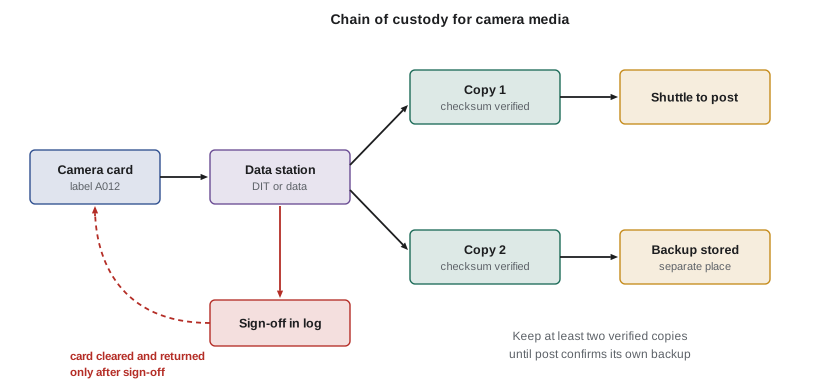
Losing footage is one of the most expensive mistakes a production can make, because a lost day may have to be reshot. Data management keeps footage safe with a clear chain of custody.
- Cards leave the camera labeled and are handed directly to the data manager or DIT, never left on a cart.
- The data team copies each card to at least two separate drives using software that verifies the copies with checksums, a digital fingerprint that proves the copy matches the original.
- Copies are checked by reviewing footage, not just by reading the software's success message.
- A card is cleared and returned to camera only after verified copies exist, and many productions mark cleared cards with colored tape or a label.
- One copy goes to post-production on a shuttle drive, and a backup copy is kept in a separate location.
- The data log records each card, its copies, checksums and the person who signed it off.
Some productions use a "3-2-1" rule: three copies of the data, on two types of media, with one stored off site, until post-production confirms its own backups.
Worked problem
Data volume and copy time
Two cameras each record about 2.5 hours of footage a day at a data rate of 280 megabytes per second. The data station copies to two drives at an effective 800 megabytes per second, including checksum verification. How much data is shot per day, and how long does copying take?
Show solution
- Seconds recorded per camera: 2.5 × 3,600 = 9,000 s.
- Data per camera: 9,000 × 280 = 2,520,000 MB ≈ 2.52 TB.
- Both cameras: about 5.04 TB per day.
- Copy time: 5,040,000 MB ÷ 800 MB/s = 6,300 s = 1.75 hours.
Answer: About 5 TB per day and about 1.75 hours of copying, which must keep pace with shooting so cards return to camera in time. Real copy speeds depend on drives, readers and software.
Worked problem
How many cards does a camera need?
A card holds 40 minutes of footage at the production's settings. The camera records about 75 minutes per day, and the data station returns verified cards about 2.5 hours after they arrive. The camera fills a card about every 2 hours of shooting. How many cards should be in rotation per camera?
Show solution
- Cards needed to cover the turnaround: while one card is being copied for 2.5 hours, the camera may fill and swap at least one more.
- One card in the camera, one or two at the data station and one spare: about four cards.
Answer: Plan at least four cards per camera, plus spares for problems. Running out of cards creates pressure to clear unverified cards, which is how footage gets lost.
Common data mistakes and how to avoid them
- Clearing a card before copies are verified: never format a card that has not been signed off.
- Unlabeled or mislabeled media: label everything, every time, with the same naming system.
- Single copies: always keep at least two verified copies until post confirms receipt.
- Rushed transfers at wrap: plan enough time and readers for the day's volume.
- Drives left in vehicles or unsecured offices: drives are valuable and confidential; keep them secure.
Most lost footage comes from simple process errors, not exotic technical failures. Clear procedures and a data team with the authority to say "not yet" prevent almost all of these losses.
Data, privacy and confidentiality in the US
Footage may include personal information about actors, extras and members of the public. State privacy and data breach laws, such as California's, require organizations to protect certain personal information and to notify people when it is exposed, and productions have confidentiality agreements that bind crew. Studios and streamers often set their own content security requirements for footage. Secure storage, encrypted drives where required and careful handling of shuttle drives are part of protecting both the production and the people in the footage.
Communication duties of the 2nd AC
On many sets the 2nd AC is the camera department's voice on the radio and the link to other departments.
- Telling the ADs when camera is ready, when a lens change will take time and when reloads are needed.
- Asking grips for apple boxes, sandbags or a dolly move, and electricians for power at the camera cart.
- Coordinating with sound about timecode, slates and wireless channels.
- Updating the script supervisor about slate numbers, camera letters and lenses.
- Passing equipment requests and faults to the rental house through the 1st AC.
Clear, brief communication makes the camera department look prepared and helps the whole set move faster.
Wrap and returns
At the end of each day, the 2nd AC organizes the wrap: cameras are broken down and packed, batteries are charged, media is delivered to the data station, the cart is secured and the day's reports are completed and handed in. At the end of a production, the department returns the package to the rental house, where the 1st and 2nd ACs check everything back in, report damage and losses and keep copies of the return paperwork. A clean, complete return protects the department's reputation with the rental house and the production's budget.
Film productions
Some productions still shoot on film, especially features, music videos and commercials that want its look. Film adds tasks for the 2nd AC and loader: loading and unloading magazines in a darkroom or changing bag, labeling exposed rolls, keeping stock records, preparing camera reports for the laboratory and shipping film safely. Exposed film must be protected from light, heat, X-rays and moisture until it reaches the lab. Loaders who can handle both film and digital media are valuable, because skilled film loaders have become rarer as digital capture has spread.
Data security and content protection
Studios and streamers treat unreleased footage as highly confidential and often require specific security measures: encrypted drives, restricted access to data stations, logs of who handled each drive and secure transfer to post-production. A leaked image from set can damage a production's marketing and lead to legal action. Data teams follow the production's security rules exactly, never copy footage to personal devices and report any loss or suspected breach immediately.
Naming conventions
A consistent naming system for cards, clips, drives and folders prevents confusion when footage passes through many hands. Typical names combine the camera letter, card or roll number and date, such as A012 for the twelfth card from A camera. The DIT, data manager, 2nd AC and post-production agree the system in prep, write it into the data plan and use it on labels, reports and folders. Changing the system mid-production causes errors, so settle it before the first shooting day and stick to it.
Checking your own work
Before handing over each card, the 2nd AC checks that the slate, camera report and label agree, and that any notes about problems, such as a camera fault, a missed take or a change of settings, are written down. Thirty seconds of checking prevents hours of confusion later.
Common mistakes
MistakeFormatting a card that has not been signed off
InsteadClear cards only after verified copies exist and the data team signs off
MistakeLetting slate numbers drift from the script supervisor's notes
InsteadCheck slate, camera report and script notes agree after each set-up
MistakeLeaving marks visible in a wide shot
InsteadUse small or hidden marks and remove marks when the floor is in frame
MistakeTrusting a copy's success message without checking
InsteadVerify with checksums and review the footage
MistakeRunning out of cards on a busy day
InsteadKeep enough cards in rotation for the copy turnaround plus spares
Summary and key terms
- The 2nd AC slates, keeps camera reports, lays marks and manages media, batteries and the cart.
- Slates identify each take and give a sync point; numbering must match the script supervisor's notes.
- Camera reports record technical data that editors, VFX and colorists need.
- Data management keeps footage safe with verified copies, labeling and a clear chain of custody.
- Cards are cleared only after at least two verified copies exist and are signed off.
- Data volumes of several terabytes a day are common and must be planned for.
- Privacy and confidentiality rules apply to footage and drives.
- Slate
- A board shown at the start of a take to identify it and give a sync point
- Tail slate
- A slate shown upside down at the end of a take
- MOS
- A take recorded without sound
- Camera report
- A record of the takes, settings and notes for each card or roll
- Checksum
- A digital fingerprint used to confirm that a copy matches the original
- Chain of custody
- The documented handling of media from camera to post-production
- Shuttle drive
- A drive used to carry footage to post-production
- Data manager
- The person who copies, verifies and logs camera media
- Circled take
- A take marked by the script supervisor as preferred
- 3-2-1 rule
- Three copies of data on two types of media, with one stored off site
Practice problems
Work each problem on paper first, then reveal the answer to check.
What information does a slate show?
Show answer
Production, date, card or roll, scene, set-up, take and often camera letter and frame rate
When is a tail slate used, and how is it held?
Show answer
At the end of a take, held upside down
What is a checksum used for?
Show answer
To confirm that a copy matches the original exactly
When may a camera card be cleared?
Show answer
Only after verified copies exist and the data team signs it off
Two cameras shoot 2.5 hours each at 280 MB/s. About how much data is that?
Show answer
About 5 TB
Why should letters I and O often be skipped in set-up letters?
Show answer
They look like the numbers 1 and 0
Name two causes of lost footage.
Show answer
Any two of clearing unverified cards, mislabeled media, single copies, rushed transfers and unsecured drives
What should the camera report, slate and script supervisor's notes do?
Show answer
Agree with each other
Why should marks be hidden in wide shots?
Show answer
The camera would see them on the floor
Why do productions keep a backup in a separate location?
Show answer
To protect footage from loss, theft, fire or damage at one location
Lesson quiz · 5 questions
Score 60% or more to complete this lesson.
Create a free account to save your progress, take quizzes and earn a certificate.