
APT-120 · Lesson 4 of 12 · 23 min
Electronic parts lookup systems
▶ Video coming soon A video version of this lesson is on the way.
On Wednesday, September 30, Imani set up two screens side by side at the back counter. On the left was the Tessaro electronic parts catalog, the manufacturer's own system. On the right was the aftermarket catalog that Linmore Parts Supply uses, which covers almost every make sold in North America. "Same car, same part," she said. "Front brake pads for the Vela on the sticky note. Find them in both and tell me what's different." It took Talia twenty minutes, and the differences taught her more than either catalog alone.
Almost all parts lookup today happens in electronic catalogs. Printed catalogs and microfiche, which filled whole walls of parts departments a generation ago, are gone from most counters. This lesson explains how manufacturer and aftermarket catalogs are organized, how they find a vehicle, how to search them, how to read a catalog line and its notes, and how the catalog connects to the dealer management system. The catalogs used in this course are generic: every manufacturer's and supplier's screens look different, but they are built on the same ideas.
Manufacturer catalogs
A manufacturer's electronic parts catalog (EPC) covers that manufacturer's vehicles, usually back 15 to 30 years, and is supplied to its dealers by subscription. Its strengths are precision and completeness. It is built from the manufacturer's engineering and build data, so it can filter by VIN to the exact vehicle (lesson 3), it shows every serviceable part including clips, brackets and labels, and it carries the manufacturer's own notes, supersessions and service bulletins. It is updated frequently, often daily over the internet.
Manufacturer catalogs are usually organized like the vehicle itself. A typical structure has a few main groups, such as engine, fuel and exhaust, transmission, suspension and brakes, electrical, body, and interior, each divided into subgroups and illustrations. The Tessaro EPC, for example, places front brake pads under Brakes, then Front brakes, then an illustration of the front brake assembly. Lesson 5 covers reading those illustrations.
Aftermarket catalogs
Aftermarket catalogs cover many makes and the products of many suppliers. A jobber store like Linmore Parts Supply uses an aftermarket catalog to show, for one vehicle, several brands and quality levels of brake pads, filters or water pumps, with prices and stock from the store, its warehouse distributor and sometimes its suppliers.
Behind most North American aftermarket catalogs are industry data standards published by the Auto Care Association. ACES, the Aftermarket Catalog Exchange Standard, describes which vehicles a part fits, and PIES, the Product Information Exchange Standard, describes the part itself: its dimensions, weight, packaging, images, descriptions and prices. Both rely on reference databases, including the Vehicle Configuration database, which lists vehicles and their configurations in a standard way. The Auto Care Association released ACES 5.0 and PIES 8.0 in April 2026. Parts technicians rarely see these standards directly, but they explain why the same supplier's part shows the same fitment notes in different stores' catalogs, and why an error in a supplier's data can appear everywhere at once.
Aftermarket catalogs usually find a vehicle by year, make, model and engine, often shortened to YMME, and then ask follow-up questions: drive type, brake system, body style, trim or production date. Many can also decode a VIN to fill in the first answers, but they do not have the manufacturer's full build record, so the follow-up questions remain.
| Feature | Manufacturer catalog | Aftermarket catalog |
|---|---|---|
| Coverage | One manufacturer's vehicles, very deep | Many makes, the most common parts |
| Finding the vehicle | VIN, filtered by full build record | Year, make, model, engine, then questions; VIN decode helps |
| Parts shown | Every serviceable part, OEM numbers | Popular replacement parts, several brands |
| Notes | Option codes, production splits, bulletins | Fitment qualifiers, attributes such as size and position |
| Prices and stock | Dealer and distribution center | Store, distributor and supplier |
| Typical user | Dealership parts department | Jobber store, repair shop, retail |
Finding the vehicle
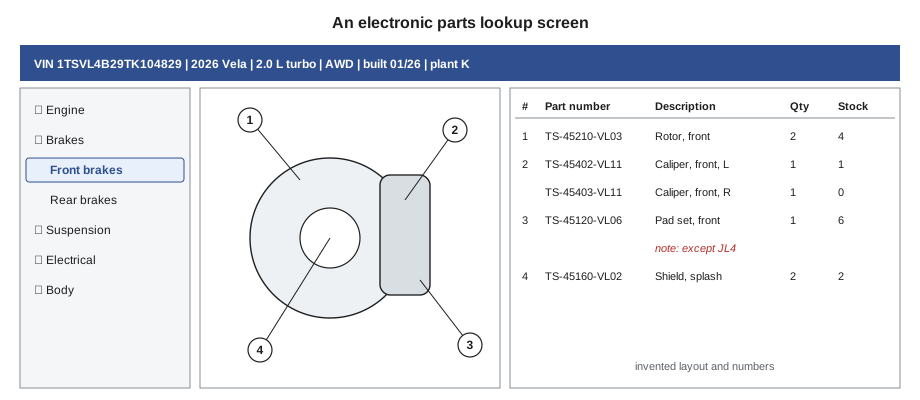
Every lookup starts by telling the catalog which vehicle it is. In a VIN-filtered EPC, entering the VIN is enough; the catalog shows the model, model year, engine and transmission at the top of the screen. The first habit Imani taught was to read that header back before going further. If the header says front-wheel drive and the customer said all-wheel drive, something is wrong: the VIN was copied incorrectly, the customer is mistaken, or the vehicle has been modified.
In a YMME catalog, each answer narrows the list. A wrong answer at any step leads to a wrong part, so the parts technician answers only what is known and asks the customer, or checks the labels, for the rest. "I don't know" is a better answer than a guess: many catalogs will then show both parts with their qualifiers, which is exactly what the parts technician needs to see.
Searching the catalog
Catalogs offer several ways to find a part, and good parts technicians use whichever is fastest for the request:
- Browsing the groups, from Brakes to Front brakes to the illustration. This is the most reliable method because it shows the part in context, with the parts around it.
- Searching by description, such as "front pad" or "thermostat". Fast, but catalog names do not always match common names: Tessaro calls a sway bar link a "stabilizer link", and searching for "sway" finds nothing.
- Searching by part number, to check what a number is, whether it has been superseded and which vehicles use it. Useful when a customer brings a part with a number on it (lesson 6).
- Searching by illustration number or callout, when a technician quotes the service manual's illustration.
Catalog searches are only as good as the words typed. When a description search finds nothing, Imani's rule was to browse the group instead of trying different spellings for five minutes.
Reading a catalog line
A catalog line contains much more than a part number. A typical EPC line shows:
- the callout or reference number linking the line to the illustration;
- the part number;
- the description, often in a standard order: noun first, then adjectives, such as "PAD SET, BRAKE, FRONT";
- the quantity used per vehicle, or per assembly;
- notes and qualifiers, such as side, option codes, production dates, engine codes or "included in" references;
- price and stock, drawn from the DMS.
| Callout | Part number | Description | Qty | Notes |
|---|---|---|---|---|
| 1 | TS-46010-VL22 | Pad set, brake, front | 1 | Except JL4 |
| 1 | TS-46010-VL31 | Pad set, brake, front | 1 | With JL4 |
| 2 | TS-46350-VL05 | Caliper, brake, front, left | 1 | Except JL4 |
| 2 | TS-46340-VL05 | Caliper, brake, front, right | 1 | Except JL4 |
| 3 | TS-46220-VL12 | Rotor, brake, front | 2 | Up to 01/26 |
| 3 | TS-46220-VL14 | Rotor, brake, front | 2 | From 02/26 |
| 4 | TS-90110-0812 | Bolt, caliper bracket | 4 | Single use |
Two lines with the same callout number are alternatives for the same position, and the notes decide between them. A quantity of 2 means two are used per vehicle, not that two must be sold. Notes such as "single use" mean the part must be replaced whenever it is removed, which matters when a technician is replacing something nearby (lesson 8 covers one-time fasteners).
Worked problem
Building the front brake order from the page
A technician needs front pads and rotors for the Vela on the sticky note, which was built 01/26 and, from its service parts label, does not have JL4. The job replaces both rotors and the pads, and the shop always replaces the caliper bracket bolts because they are single-use. What should Talia sell?
Show solution
- Pads: no JL4, so TS-46010-VL22, quantity 1 set.
- Rotors: built 01/26, so the "up to 01/26" rotor TS-46220-VL12, quantity 2.
- Bolts: TS-90110-0812, 4 per vehicle.
Answer: One pad set TS-46010-VL22, two rotors TS-46220-VL12 and four bolts TS-90110-0812. Note that the rotor note and the pad note are checked separately: each line has its own qualifier. The part numbers are invented.
Comparing the two catalogs
When Talia compared the two catalogs for the same Vela, she found that the Tessaro EPC showed the pads, the clips, the wear sensors and the single-use bolts on one page, with the JL4 split clearly marked. The aftermarket catalog showed five brands of front pads at three price levels, several with the hardware included, and asked her one extra question the EPC had not: "Brake size: 320 mm or 345 mm rotor?" The aftermarket catalog did not know about option code JL4, so it asked for the rotor size instead.
Neither catalog was wrong. They described the same choice in different terms. A parts technician who understands both can move between them: JL4 means the larger brakes, which means the 345 mm rotor, which means the aftermarket's "345 mm" pads. Lesson 7 returns to choosing between OEM and aftermarket parts.
Catalogs and the dealer management system
In most dealerships the EPC is linked to the dealer management system. Selecting a line in the catalog can show stock on hand, bin location, price, and whether the part is on order. Adding the part to a pick list or invoice transfers the part number directly, which avoids typing errors. APT-110 introduced the DMS, and APT-210 covers its inventory side.
The link also works the other way. When a part is superseded (lesson 6), the catalog shows the new number, and the DMS can show whether old stock under the previous number is still on the shelf. Many catalogs can also print the illustration or attach it to a repair order, so the technician can see exactly which part was looked up.
Worked problem
How much time does a direct link save?
Imani estimated that typing a part number from the catalog into the DMS by hand takes about 20 seconds and leads to a typing error about once in 150 entries, while transferring it with one click takes about 3 seconds with no typing errors. The back counter handles about 180 part lines a day. How much time does the link save per day, and about how many typing errors a week does it prevent, at five days a week?
Show solution
- Time saved per line:
- \[20 - 3 = 17\ \text{s}\]
- Time saved per day:
- \[180 \times 17 = 3{,}060\ \text{s} = 51\ \text{min}\]
- Errors prevented per week:
- \[\frac{180 \times 5}{150} = 6\]
Answer: About 51 minutes a day and about 6 typing errors a week. The figures are sample estimates for this course.
When the catalog is wrong
Catalogs contain errors. A fitment may be listed for the wrong engine, a note may be missing, an illustration may show the previous design, or an aftermarket supplier's data may simply be wrong. Experienced parts technicians recognize the signs: a part that the catalog says fits but the old part clearly contradicts, a technician who reports the same problem twice, or a note that does not make sense.
When the catalog and the vehicle disagree, the vehicle wins. The parts technician verifies with the old part, the labels or measurements, sells the part that actually fits, and reports the error. Manufacturers' catalogs have a feedback or query function, and aftermarket suppliers have catalog support lines. Reporting errors matters: the next counter that sees the same vehicle may not have a technician to ask.
Online catalogs and customers
Many dealerships and stores now run online parts stores where customers look up parts themselves. The same data powers them, usually without the parts technician's questions. Orders from online customers therefore deserve a quick check before they ship: the VIN, the option codes or a phone call can prevent a return. Talia found that about one online order in twelve at Linmore Tessaro needed a phone call before it was picked, usually because the customer had chosen a part without reading its notes.
Good habits in the lookup system
A few habits make electronic lookup faster and safer. Experienced parts technicians keep the vehicle header visible while they work, so they never pick a part for the wrong vehicle after switching screens. They read the notes column before the price column. They use the system's own notes or comments feature to flag catalog errors they have confirmed, so colleagues are warned. And they clear the vehicle selection before starting the next customer's lookup, because a part chosen while the previous vehicle is still loaded is one of the most common counter errors.
When the counter is busy, it is tempting to skip these steps. Imani's rule for Talia was to slow down at exactly those moments: the busier the counter, the more likely a wrong vehicle or a missed note.
Common mistakes
MistakeSkipping the vehicle header after entering a VIN.
InsteadRead the decoded model, engine and drive type back to confirm the VIN was right.
MistakeGuessing an answer in a YMME catalog.
InsteadAnswer only what is known; let the catalog show the alternatives with their qualifiers.
MistakeTreating two lines with the same callout as two parts to sell.
InsteadRead the notes: lines with the same callout are alternatives for one position.
MistakeReading the quantity as the number to sell.
InsteadThe quantity is the number used per vehicle; sell what the job needs.
MistakeTrusting the catalog over the old part.
InsteadWhen they disagree, the vehicle wins; verify and report the catalog error.
Summary and key terms
- Manufacturer catalogs filter by VIN and show every serviceable part with the maker's notes and supersessions.
- Aftermarket catalogs cover many makes and brands and usually find vehicles by year, make, model and engine, then ask questions.
- ACES and PIES are the industry standards behind most North American aftermarket catalog data.
- Browsing the groups is the most reliable search; description searches depend on the catalog's own names.
- A catalog line gives the callout, part number, description, quantity, notes, price and stock.
- Catalogs linked to the DMS save time and prevent typing errors.
- When the catalog and the vehicle disagree, verify, sell what fits and report the error.
- Electronic parts catalog
- Software showing the parts for a vehicle in illustrations and parts lists, often filtered by VIN.
- YMME
- Year, make, model and engine: the usual way aftermarket catalogs find a vehicle.
- ACES
- Aftermarket Catalog Exchange Standard, the industry standard for describing which vehicles a part fits.
- PIES
- Product Information Exchange Standard, the industry standard for describing the part itself.
- Callout
- The number on an illustration that links a part to its line in the parts list.
- Qualifier
- A note on a catalog line, such as an option code, side or date range, that limits where it applies.
- Fitment
- The list of vehicles a part fits.
Practice problems
Work each problem on paper first, then reveal the answer to check.
What does YMME stand for?
Show answer
Year, make, model and engine.
What is the difference between ACES and PIES?
Show answer
ACES describes which vehicles a part fits; PIES describes the part itself.
Two lines share callout 3 and differ only in date notes. How many of them do you sell for one vehicle?
Show answer
Only the one whose date range matches the vehicle.
A description search for "sway bar link" finds nothing. What should you do?
Show answer
Browse the suspension group, because the catalog may use another name such as stabilizer link.
The catalog says a part fits, but the old part clearly differs. Which do you trust?
Show answer
The old part; verify, sell what fits and report the catalog error.
Lesson quiz · 5 questions
Score 60% or more to complete this lesson.
Create a free account to save your progress, take quizzes and earn a certificate.