
ACCT-341 · Lesson 5 of 12 · 30 min
SQL for accountants I: querying the ledger
SQL, the Structured Query Language, is the standard language for working with relational databases, and relational databases are where accounting data live. Every major ERP system stores its ledger, subledgers and master files in database tables, and every business intelligence tool and audit analytics package either speaks SQL or translates into it. An accountant who can write a query can answer questions directly from the source, at any scale, in a form that can be saved, reviewed and rerun. ACCT-240 introduced SQL with queries for an aging schedule, a trial balance and duplicate payments. This lesson consolidates the core of the language with a focus on the general ledger. Lesson 6 adds window functions, common table expressions and a toolkit of exception queries.
Why SQL matters to accountants
Three properties make SQL valuable for accounting work. It is declarative: you describe the result you want, such as total sales by region for 2025, and the database works out how to produce it. It is precise: a query states exactly which records were included and how they were combined, so a reviewer can read it and see whether it is right, which is much harder with a spreadsheet built from manual steps. And it scales: the same query runs on a hundred rows or a hundred million.
SQL comes in dialects. SQLite, used in this course because it is built into Python and needs no server, is close to the standard. Microsoft SQL Server, Oracle, PostgreSQL, MySQL and the cloud data warehouses all share the same core of SELECT, FROM, WHERE, GROUP BY and JOIN, but differ in functions for dates, text and rounding. When you move to a new system, expect to look up a few function names; the logic carries over unchanged.
Most analysts need only to read data, and they should be given read-only access. A query that selects data cannot change the ledger, whereas commands such as UPDATE and DELETE can. Separating the ability to analyze from the ability to change is a basic control, and an auditor using client data should always work from read-only access or a copy.
The Cedarbrook ledger
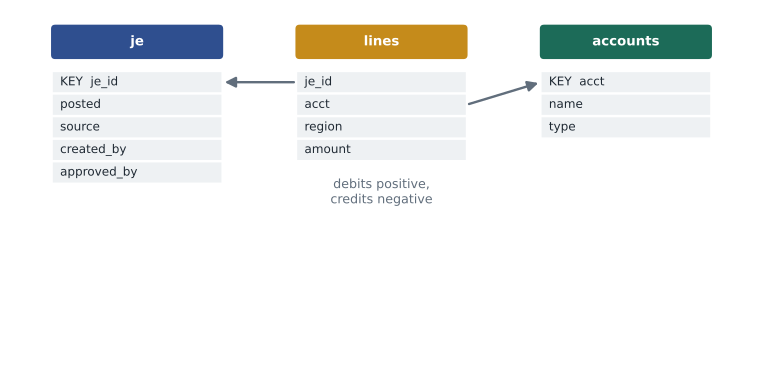
The programs in this lesson build a simplified version of Cedarbrook's 2025 general ledger in an in-memory SQLite database. There are three tables. The accounts table is the chart of accounts. The je table holds one header row per journal entry, with the posting date, the source (SALES for system batches or MANUAL for entries keyed by staff), who created it and who approved it. The lines table holds the debit and credit lines, with debits stored as positive amounts and credits as negative, plus a region for income statement lines. Storing debits and credits as signed amounts in one column is a common design that makes balancing checks a simple sum. The data are simulated, so totals differ slightly from the summary figures in lesson 1, but the patterns are the same.
Anatomy of a query
A SELECT query has up to six main clauses. They must be written in a fixed order, but the database evaluates them in a different logical order, and understanding that order explains many puzzling errors.
| Written order | Purpose | Logical evaluation order | Spreadsheet analogy |
|---|---|---|---|
| SELECT | Choose and compute the output columns | 5 | The columns you show in a report |
| FROM and JOIN | Name the tables and how they link | 1 | Gathering sheets and lookups |
| WHERE | Filter individual rows | 2 | An AutoFilter on the data |
| GROUP BY | Form groups for aggregation | 3 | The rows area of a pivot table |
| HAVING | Filter groups after aggregation | 4 | A filter on pivot table totals |
| ORDER BY | Sort the result | 6 | Sorting the final report |
Because WHERE is evaluated before GROUP BY, it cannot refer to an aggregate: WHERE SUM(amount) > 10000 is an error, and the condition belongs in HAVING. Because SELECT is evaluated after WHERE, most databases will not let WHERE use an alias defined in SELECT. And because ORDER BY comes last, it can sort by anything in the output. When a query fails or returns something unexpected, walking through the clauses in logical order is the fastest way to find the problem.
Filtering, conditions and NULL
WHERE conditions combine comparisons with AND, OR and NOT. Useful operators include IN for a list of values, BETWEEN for a range, and LIKE for text patterns, where % matches any characters. Dates in SQLite are stored as ISO text such as 2025-03-31, which sorts and compares correctly as text, so posted BETWEEN '2025-01-01' AND '2025-12-31' selects the 2025 entries. Other databases have proper date types, but the principle of filtering on a range is the same.
NULL deserves careful attention. In SQL, NULL means unknown or missing, and it does not behave like zero or an empty string. Any comparison with NULL, including NULL = NULL, gives unknown rather than true, so a row with a NULL region is excluded by both region = 'West' and region <> 'West'. To test for missing values you must write IS NULL or IS NOT NULL. Aggregates skip NULLs: COUNT(region) counts only rows with a region, while COUNT(*) counts every row, and SUM over no rows returns NULL rather than 0. COALESCE(x, 0) substitutes a value for NULL when the business meaning really is zero.
| Expression | Result | Why it matters |
|---|---|---|
| NULL = NULL | Unknown (treated as not true) | Joins and filters on NULL keys never match |
| region <> 'West' | Excludes rows where region is NULL | Rows with missing values vanish from both sides of a test |
| COUNT(*) versus COUNT(region) | All rows versus rows with a region | Use the right count for the question |
| SUM(amount) over no rows | NULL | Wrap in COALESCE when a zero is meant |
| COALESCE(region, 'Unassigned') | Replaces NULL with a label | Keeps rows visible in grouped reports |
CASE expressions
CASE is SQL's if-then-else. It lets a query compute values conditionally, which is essential for accounting data with signed amounts and account types. CASE WHEN a.type = 'Revenue' THEN -l.amount END returns the revenue line's amount with its sign flipped so revenue shows as positive, and NULL for every other line. Wrapping that in SUM gives total revenue, because SUM ignores the NULLs. This pattern, conditional aggregation, produces several totals side by side in one pass through the data, much like a pivot table with several value columns.
Revenue and margin by region
Maya's first query reproduces the regional margin analysis from lesson 1 directly from the ledger lines. It joins lines to accounts, keeps only sales and cost of sales lines with a region, groups by region and uses conditional aggregation to put revenue, cost and margin side by side.
# Build a small invented Cedarbrook ledger in an in-memory SQLite database
import sqlite3, random, datetime as dt
random.seed(341)
db = sqlite3.connect(":memory:")
db.executescript("""
CREATE TABLE accounts (acct TEXT PRIMARY KEY, name TEXT, type TEXT);
CREATE TABLE je (je_id INTEGER PRIMARY KEY, posted TEXT, source TEXT,
                 created_by TEXT, approved_by TEXT);
CREATE TABLE lines (je_id INTEGER REFERENCES je, acct TEXT REFERENCES accounts,
                    region TEXT, amount REAL);   -- debit +, credit -
""")
db.executemany("INSERT INTO accounts VALUES (?,?,?)", [
    ("1000", "Cash", "Asset"), ("1100", "Receivables", "Asset"),
    ("1200", "Inventory", "Asset"), ("2100", "Accrued liabilities", "Liability"),
    ("4000", "Sales", "Revenue"), ("5000", "Cost of sales", "Expense"),
    ("6100", "Freight", "Expense"), ("6200", "Wages", "Expense")])
def post(day, source, user, appr, lines):
    cur = db.execute("INSERT INTO je (posted, source, created_by, approved_by)"
                     " VALUES (?,?,?,?)", (day.isoformat(), source, user, appr))
    db.executemany("INSERT INTO lines VALUES (?,?,?,?)",
                   [(cur.lastrowid, a, r, x) for a, r, x in lines])
target = {"North": 15.9, "Central": 23.1, "South": 14.6, "East": 18.4,
          "West": 13.9}                      # 2025 sales, $ millions
for m in range(1, 13):                       # three sales batches a month
    for r, t in target.items():
        for k in range(3):
            day = dt.date(2025, m, 8 + 7 * k)
            s = round(t * 1e6 / 36 * random.uniform(0.85, 1.15), 2)
            c = round(s * (0.85 if r == "West" and m >= 4 else 0.761), 2)
            post(day, "SALES", "batch", "batch", [("1100", r, s),
                 ("4000", r, -s), ("5000", r, c), ("1200", r, -c)])
users = ["mokafor", "jli", "dreyes", "tpatel"]
for n in range(60):                          # manual journal entries
    day = dt.date(2025, 1, 1) + dt.timedelta(days=random.randrange(365))
    amt = random.choice([round(random.uniform(500, 40_000), 2),
                         float(random.choice([5_000, 10_000, 25_000]))])
    u = random.choice(users)
    a = u if n in (17, 44) else random.choice([x for x in users if x != u])
    acct = random.choice(["6100", "6200"])
    post(day, "MANUAL", u, a, [(acct, random.choice(["North", "West"]), amt),
                               ("2100", None, -amt)])
# Query 1: revenue, cost of sales and gross margin by region
q = """
SELECT l.region,
       ROUND(SUM(CASE WHEN a.type = 'Revenue' THEN -l.amount END) / 1e6, 2)
           AS revenue_m,
       ROUND(SUM(CASE WHEN a.acct = '5000' THEN l.amount END) / 1e6, 2)
           AS cost_m,
       ROUND(100.0 * (1 - SUM(CASE WHEN a.acct = '5000' THEN l.amount END)
           / SUM(CASE WHEN a.type = 'Revenue' THEN -l.amount END)), 1)
           AS margin_pct
FROM lines AS l
JOIN accounts AS a ON a.acct = l.acct
WHERE l.region IS NOT NULL AND a.acct IN ('4000', '5000')
GROUP BY l.region
ORDER BY margin_pct;
"""
print(f"{'region':<8}{'revenue_m':>10}{'cost_m':>8}{'margin_pct':>11}")
for row in db.execute(q):
print(f"{row[0]:<8}{row[1]:>10.2f}{row[2]:>8.2f}{row[3]:>11.1f}")region revenue_m cost_m margin_pct West 13.96 11.55 17.2 Central 23.84 18.14 23.9 East 18.92 14.40 23.9 North 16.10 12.26 23.9 South 14.96 11.38 23.9
The query confirms the lesson 1 story from the transaction level: four regions earn a margin of 23.9 percent while West earns 17.2 percent. Because the query reads the ledger lines directly, it also documents exactly how the figures were produced. A reviewer can see that revenue is the negated sum of account 4000, that cost is the sum of account 5000, and that lines without a region were excluded, and can challenge any of those choices.
Note that the margin is computed from the summed revenue and cost, not by averaging line-level margins. This is the aggregation rule from lesson 4 expressed in SQL: compute ratios from summed parts.
Basic integrity checks and grouped summaries
Before analyzing a ledger, it is worth confirming that every entry balances. With signed amounts this is a single GROUP BY with a HAVING clause: group the lines by entry and keep only groups whose net is not zero. ROUND guards against tiny floating-point differences. The second query in the program below summarizes manual journal entries by the user who created them, using HAVING to keep only users with at least ten entries, a threshold Maya chose to focus on people who post regularly.
# Build a small invented Cedarbrook ledger in an in-memory SQLite database
import sqlite3, random, datetime as dt
random.seed(341)
db = sqlite3.connect(":memory:")
db.executescript("""
CREATE TABLE accounts (acct TEXT PRIMARY KEY, name TEXT, type TEXT);
CREATE TABLE je (je_id INTEGER PRIMARY KEY, posted TEXT, source TEXT,
                 created_by TEXT, approved_by TEXT);
CREATE TABLE lines (je_id INTEGER REFERENCES je, acct TEXT REFERENCES accounts,
                    region TEXT, amount REAL);   -- debit +, credit -
""")
db.executemany("INSERT INTO accounts VALUES (?,?,?)", [
    ("1000", "Cash", "Asset"), ("1100", "Receivables", "Asset"),
    ("1200", "Inventory", "Asset"), ("2100", "Accrued liabilities", "Liability"),
    ("4000", "Sales", "Revenue"), ("5000", "Cost of sales", "Expense"),
    ("6100", "Freight", "Expense"), ("6200", "Wages", "Expense")])
def post(day, source, user, appr, lines):
    cur = db.execute("INSERT INTO je (posted, source, created_by, approved_by)"
                     " VALUES (?,?,?,?)", (day.isoformat(), source, user, appr))
    db.executemany("INSERT INTO lines VALUES (?,?,?,?)",
                   [(cur.lastrowid, a, r, x) for a, r, x in lines])
target = {"North": 15.9, "Central": 23.1, "South": 14.6, "East": 18.4,
          "West": 13.9}                      # 2025 sales, $ millions
for m in range(1, 13):                       # three sales batches a month
    for r, t in target.items():
        for k in range(3):
            day = dt.date(2025, m, 8 + 7 * k)
            s = round(t * 1e6 / 36 * random.uniform(0.85, 1.15), 2)
            c = round(s * (0.85 if r == "West" and m >= 4 else 0.761), 2)
            post(day, "SALES", "batch", "batch", [("1100", r, s),
                 ("4000", r, -s), ("5000", r, c), ("1200", r, -c)])
users = ["mokafor", "jli", "dreyes", "tpatel"]
for n in range(60):                          # manual journal entries
    day = dt.date(2025, 1, 1) + dt.timedelta(days=random.randrange(365))
    amt = random.choice([round(random.uniform(500, 40_000), 2),
                         float(random.choice([5_000, 10_000, 25_000]))])
    u = random.choice(users)
    a = u if n in (17, 44) else random.choice([x for x in users if x != u])
    acct = random.choice(["6100", "6200"])
    post(day, "MANUAL", u, a, [(acct, random.choice(["North", "West"]), amt),
                               ("2100", None, -amt)])
# Query 2: every journal entry should balance
unbalanced = db.execute("""
    SELECT je_id, ROUND(SUM(amount), 2) AS net
    FROM lines GROUP BY je_id HAVING ROUND(SUM(amount), 2) <> 0
""").fetchall()
print("entries:", db.execute("SELECT COUNT(*) FROM je").fetchone()[0],
      " unbalanced:", len(unbalanced))
# Query 3: manual entries by user, largest totals first
q = """
SELECT j.created_by, COUNT(*) AS entries,
       ROUND(SUM(l.amount), 2) AS total_debits,
       ROUND(MAX(l.amount), 2) AS largest
FROM je AS j
JOIN lines AS l ON l.je_id = j.je_id AND l.amount > 0
WHERE j.source = 'MANUAL'
GROUP BY j.created_by
HAVING COUNT(*) >= 10
ORDER BY total_debits DESC;
"""
for row in db.execute(q):
print(row)entries: 240 unbalanced: 0
('tpatel', 19, 358166.76, 38746.09)
('jli', 18, 320337.85, 38534.71)
('mokafor', 12, 181614.28, 36888.0)
('dreyes', 11, 169554.14, 39015.49)All 240 entries balance, so the extract is internally consistent. Four people post manual entries, and the largest single entry is about 39,000. Manual entries matter because they bypass the automated controls built into the sales and purchasing modules, and auditing standards single them out for testing, as lesson 11 explains. This summary is a starting point: lesson 6 scores each manual entry against several risk indicators.
Worked problem
Writing a query from a question
Daniel asks: "How much freight did we record each quarter of 2025, and which quarter had the most manual freight entries?" Outline the query.
Show solution
- FROM lines joined to je on je_id, so the posting date and source are available.
- WHERE acct = '6100' (freight) and the posting date is in 2025.
- Derive the quarter from the posting date, for example with a CASE on strftime('%m', posted) or a join to a calendar table.
- SELECT the quarter, SUM(amount) for total freight, and SUM(CASE WHEN source = 'MANUAL' THEN 1 ELSE 0 END) to count manual lines.
- GROUP BY quarter and ORDER BY quarter; check that the four quarters add to the annual freight balance in the trial balance.
Answer: A grouped query with a derived quarter and conditional aggregation, reconciled to the trial balance.
Joins in SQL
SQL expresses the joins from lesson 4 directly. INNER JOIN keeps matching rows; LEFT JOIN keeps every row of the left table. SQL has no ANTI JOIN keyword, but the same result comes from a LEFT JOIN followed by WHERE right_table.key IS NULL, or from WHERE NOT EXISTS with a subquery. The cardinality trap applies with full force: joining lines to a table with two rows per account would double every amount. Before relying on a join, compare COUNT(*) and the sum of amounts with and without it.
Join conditions can include more than the key. The second query above joins lines to je ON l.je_id = j.je_id AND l.amount > 0, which attaches only the debit lines. Putting a condition in the ON clause of a LEFT JOIN behaves differently from putting it in WHERE: in ON it limits which right-hand rows match while keeping all left rows; in WHERE it filters the joined result and can turn a left join into an inner join. This subtle difference causes many errors.
Good habits
- Format queries so each clause starts on its own line and conditions are indented; readable queries are reviewable queries.
- Comment the purpose and any judgment calls, such as excluded accounts or thresholds, with -- comments.
- Use table aliases consistently and qualify every column, such as l.amount, so it is clear where each column comes from.
- Check row counts and totals at each stage, and reconcile the final result to the trial balance.
- Save queries with the working papers, together with the date run and the data source, so results can be reproduced.
- Never run commands that change data on a production system; work from read-only access or a copy.
Queries used as audit evidence become part of the audit documentation, and auditors must evaluate the reliability of the data they run on. A well-commented query that reconciles to the trial balance makes both requirements easier to meet.
Common mistakes
MistakePutting an aggregate condition in WHERE.
InsteadFilter rows in WHERE and groups in HAVING.
MistakeTesting for missing values with = NULL.
InsteadUse IS NULL or IS NOT NULL.
MistakeAveraging line-level margins.
InsteadSum revenue and cost separately, then compute the margin.
MistakeFiltering the right-hand table of a LEFT JOIN in WHERE.
InsteadPut conditions on the right-hand table in the ON clause to keep unmatched left rows.
MistakeRunning analysis with write access to the live ledger.
InsteadUse read-only access or a copy of the data.
Summary and key terms
- SQL is the standard language of relational databases and therefore of ERP data.
- Queries are written SELECT, FROM, WHERE, GROUP BY, HAVING, ORDER BY but evaluated FROM, WHERE, GROUP BY, HAVING, SELECT, ORDER BY.
- NULL means unknown: comparisons with it are not true, aggregates skip it, and IS NULL tests for it.
- CASE inside SUM (conditional aggregation) produces several totals side by side.
- Signed amounts make balancing checks a simple GROUP BY with HAVING.
- Anti joins are written as LEFT JOIN with IS NULL, or NOT EXISTS.
- Readable, commented, reconciled queries saved with the working papers make analysis reviewable and repeatable.
- SQL
- Structured Query Language, the standard language for relational databases.
- Query
- A request for data from a database, usually a SELECT statement.
- Clause
- A component of a SQL statement, such as WHERE or GROUP BY.
- Alias
- A short name given to a table or column within a query.
- NULL
- A marker for a missing or unknown value in SQL.
- HAVING
- A clause that filters groups after aggregation.
- CASE expression
- SQL's conditional expression, returning different values depending on conditions.
- Conditional aggregation
- Using CASE inside an aggregate to total only rows meeting a condition.
- COALESCE
- A function returning the first non-NULL value in its list.
- Read-only access
- Permission to query data without the ability to change it.
Practice problems
Work each problem on paper first, then reveal the answer to check.
Why does WHERE SUM(amount) > 10000 fail?
Show answer
WHERE is evaluated before grouping; aggregate conditions belong in HAVING.
A table has 100 rows, 8 with a NULL region. What do COUNT(*) and COUNT(region) return?
Show answer
100 and 92.
Write a condition that keeps rows where region is missing.
Show answer
WHERE region IS NULL.
In the first program, why is revenue computed as -l.amount?
Show answer
Credits are stored as negative amounts, so revenue must be negated to show as positive.
Change the first query to show cost of sales as a percentage of revenue instead of margin. What changes?
Show answer
Replace 1 - cost/revenue with cost/revenue; West shows about 82.8 and the others about 76.1.
In the second program, what does HAVING COUNT(*) >= 10 do?
Show answer
Keeps only users who created at least ten manual entries.
Write the skeleton of an anti join listing accounts with no lines.
Show answer
SELECT a.acct FROM accounts a LEFT JOIN lines l ON l.acct = a.acct WHERE l.acct IS NULL.
What is conditional aggregation?
Show answer
Summing a CASE expression so only rows meeting a condition contribute to a total.
Why should analysts have read-only access?
Show answer
So analysis cannot change the ledger; separating analysis from changes is a control.
What should you reconcile a query's result to?
Show answer
The trial balance or another trusted control total.
Lesson quiz · 5 questions
Score 60% or more to complete this lesson.
Create a free account to save your progress, take quizzes and earn a certificate.