
ACCT-341 · Lesson 3 of 12 · 28 min
Preparing data I: cleaning and standardizing
Surveys of analysts regularly find that preparing data takes more of their time than analyzing it, and accountants are no exception. Raw extracts arrive with stray spaces, inconsistent names, numbers stored as text, dates in three formats and duplicate rows. This lesson covers how to clean such data reliably. The emphasis is on discipline as much as technique: cleaning changes the data, and an accountant must be able to show exactly what was changed, why, and that the changes did not distort the result. Lesson 4 continues with transforming, joining and reshaping clean data.
Extract, transform, load
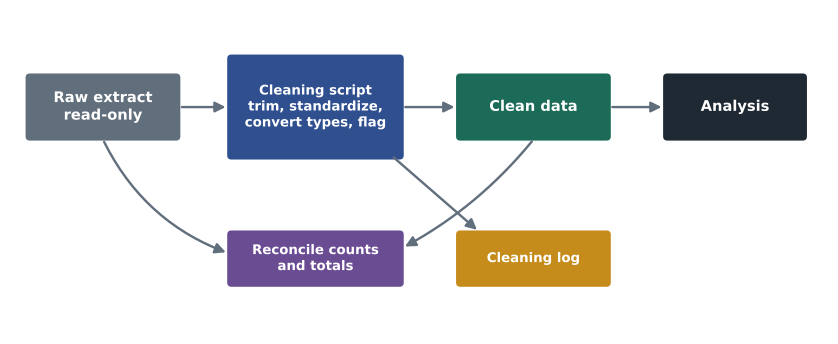
The general process of moving data from source systems into a form ready for analysis is called extract, transform, load (ETL). Data are extracted from the source, transformed by cleaning, standardizing and restructuring, and loaded into the place where analysis happens, which might be a spreadsheet, a database or a data warehouse. Modern cloud platforms often reverse the last two steps, loading raw data first and transforming it inside the warehouse (ELT), but the transformations are the same. For an individual analysis, Maya's version of ETL is: extract the file, keep an untouched copy, write a repeatable cleaning script, and save the clean result separately.
Principles of responsible cleaning
Four principles keep data cleaning honest. They are worth adopting as habits whether the tool is a spreadsheet, Power Query or Python.
- Never alter the original. Keep the raw extract read-only and do all work on a copy, so you can always return to the source and so a reviewer can compare before and after.
- Make every step repeatable. Record cleaning steps as a script, a Power Query recipe or at minimum a written procedure, so that next month's data can be cleaned the same way and a reviewer can check the logic.
- Flag rather than delete. When a record looks wrong, mark it with a reason and decide later whether to exclude it. Silently dropping rows is one of the most common ways analyses go wrong, and it can hide exactly the exceptions an accountant should be investigating.
- Keep a log. Note each change, the number of records affected and the reason. The log becomes part of the documentation of the analysis and, in an audit, part of the working papers.
These principles matter because cleaning involves judgment. Deciding that two vendor names refer to the same company, that a blank amount means zero, or that an unusual value is an error rather than a real transaction are all judgments that can change the answer. Recording them makes the judgment visible and reviewable.
Common data problems
| Problem | Example | Typical fix |
|---|---|---|
| Extra spaces and invisible characters | " Prairie Pipe " or a non-breaking space from a web page | Trim spaces; remove non-printing characters |
| Inconsistent case | "NORTHLINE ELECTRIC" and "Northline Electric" | Convert to one case for matching, keep the original for display |
| Numbers stored as text | "$1,250.00", "1 250,00", "(75.00)", "75.00 CR" | Remove symbols and separators; convert parentheses or CR to negative; convert to numeric |
| Lost leading zeros | Vendor 00417 shown as 417 | Read as text; pad to the standard length |
| Inconsistent dates | 2025-04-03, 04/03/2025, 3-Apr-25 | Parse with an explicit format; flag what does not parse |
| Missing values | Blank, "n/a", "NULL", 0 used to mean unknown | Standardize to one missing marker; decide treatment case by case |
| Exact duplicates | The same invoice extracted twice | Identify by key; investigate cause; flag |
| Near duplicates | "Westgate Freight Ltd" and "Westgate Frieght" | Normalize and compare similarity; confirm manually |
| Inconsistent categories | "N. Dak.", "ND", "North Dakota" | Map to a standard list |
| Outliers | An invoice for 1,250,000 among invoices of a few thousand | Verify against source; flag; do not delete automatically |
Sign conventions deserve special mention in accounting data. Systems and reports represent credits in different ways: as negative numbers, in parentheses, with a CR suffix, or in a separate credit column. Before combining data from different sources, decide on one convention, such as debits positive and credits negative, and convert everything to it. Mixing conventions can turn a refund into a sale and double a balance instead of canceling it.
Missing values
A missing value is not the same as zero. A blank amount on an invoice may mean the amount was zero, that it was not captured, or that the row is a comment line rather than a transaction. Replacing all blanks with zero, a common spreadsheet shortcut, can quietly understate totals and averages. The right treatment depends on why the value is missing.
| Treatment | When it is appropriate | Risk |
|---|---|---|
| Investigate and obtain the value | Few missing values, each material | Time |
| Leave missing and exclude from calculations that need it | The record is otherwise useful; the analysis can handle gaps | Totals and averages describe a smaller population; disclose it |
| Replace with zero | The business meaning really is zero, confirmed | Understates if the value was simply not captured |
| Replace with an estimate (imputation) | Statistical modeling where gaps are random and small | Can create false precision; rarely appropriate for accounting balances |
| Exclude the record | The record is not a real transaction, such as a comment line | Must be documented and the effect on totals checked |
Cleaning an accounts payable file
Cedarbrook's purchasing team sends Maya an export of recent vendor invoices from a supplier portal so she can compare it with the ERP. The file has several typical problems: vendor numbers with and without leading zeros, inconsistent names and spaces, amounts with dollar signs, commas and parentheses, a placeholder text instead of a date, and what looks like the same invoice twice. The program below applies the four principles: it works on a copy, records each step in a log, converts types explicitly, and flags problems rather than deleting rows.
# Cleaning a messy accounts payable invoice file (invented data)
import pandas as pd
raw = pd.DataFrame({
    "vendor_no": ["00417", "417", "00982", "01133", "00982", "01250"],
    "vendor":    ["  Prairie Pipe & Valve ", "PRAIRIE PIPE & VALVE",
                  "Northline Electric", "Westgate Freight Ltd",
                  "Northline Electric", "Kestrel Tools"],
    "inv_no":    ["PP-5521", "PP-5521", "NE/0093", "WF 7710", "NE/0094", "KT-31"],
    "inv_date":  ["2025-04-03", "2025-04-03", "2025-04-07", "2025-04-09",
                  "2025-04-10", "n/a"],
    "amount":    ["$1,250.00", "1250", "(75.00)", "3,410.55", "980.00", ""],
})
log = []
df = raw.copy()
df["vendor_no"] = df["vendor_no"].str.zfill(5)
log.append("padded vendor_no to 5 characters")
df["vendor"] = df["vendor"].str.strip().str.upper()
log.append("trimmed spaces and upper-cased vendor names")
amt = (df["amount"].str.replace(r"[$,]", "", regex=True)
       .str.replace(r"^\((.*)\)$", r"-\1", regex=True))
df["amount"] = pd.to_numeric(amt, errors="coerce")
df["inv_date"] = pd.to_datetime(df["inv_date"], format="%Y-%m-%d",
                                errors="coerce")
bad = df["amount"].isna() | df["inv_date"].isna()
log.append(f"flagged {bad.sum()} row(s) with a missing amount or date")
dups = df.duplicated(["vendor_no", "inv_no"], keep="first")
log.append(f"flagged {dups.sum()} duplicate vendor/invoice row(s)")
df["flag"] = ""
df.loc[bad, "flag"] = "missing value"
df.loc[dups, "flag"] = "duplicate"
print(df[["vendor_no", "vendor", "inv_no", "amount", "flag"]].to_string())
print("\n".join(log))vendor_no vendor inv_no amount flag 0 00417 PRAIRIE PIPE & VALVE PP-5521 1250.00 1 00417 PRAIRIE PIPE & VALVE PP-5521 1250.00 duplicate 2 00982 NORTHLINE ELECTRIC NE/0093 -75.00 3 01133 WESTGATE FREIGHT LTD WF 7710 3410.55 4 00982 NORTHLINE ELECTRIC NE/0094 980.00 5 01250 KESTREL TOOLS KT-31 NaN missing value padded vendor_no to 5 characters trimmed spaces and upper-cased vendor names flagged 1 row(s) with a missing amount or date flagged 1 duplicate vendor/invoice row(s)
After cleaning, the two Prairie Pipe rows are identical on vendor number and invoice number, so the second is flagged as a duplicate. Note that the duplicate was invisible before cleaning, because one row had vendor 00417 and the other 417, and one amount was text with a dollar sign. This is a general lesson: duplicate detection only works after standardization. The Northline credit note in parentheses has become a negative number. The Kestrel row has no usable amount or date, so it is flagged for follow-up rather than silently treated as zero. Nothing has been deleted, and the log records what was done.
Worked problem
Is it a duplicate?
After cleaning, Maya finds two Northline Electric invoices for 980.00 dated April 10, numbered NE/0094 and NE-0094. Should she treat them as duplicates?
Show solution
- The invoice numbers differ only in punctuation, a common sign that the same invoice was keyed twice.
- Normalize invoice numbers by removing punctuation and spaces, then retest: both become NE0094.
- Check the ERP: were both paid? If so, this is a potential duplicate payment to recover.
- Check with the vendor statement or the purchasing team before concluding, because some vendors do reuse numbers.
Answer: Probably a duplicate, but confirm against source documents before acting; record the conclusion in the log.
Matching names that are almost the same
Exact matching fails when the same entity is recorded with small differences: abbreviations, legal suffixes, punctuation, spelling mistakes. Fuzzy matching handles this by first normalizing names, then measuring how similar they are. Normalizing typically means converting to one case, replacing symbols such as & with words, removing punctuation, and dropping common legal suffixes such as Ltd, Inc and LLC. A similarity measure then scores each pair of names, typically between 0 for nothing in common and 1 for identical.
# Finding vendor names that are probably the same vendor (invented data)
import re
from difflib import SequenceMatcher
vendors = ["PRAIRIE PIPE & VALVE", "Prairie Pipe and Valve Ltd.",
           "NORTHLINE ELECTRIC", "North Line Electric Inc",
           "KESTREL TOOLS", "WESTGATE FREIGHT LTD", "Westgate Frieght"]
def normal(name):
    n = name.upper().replace("&", " AND ")
    n = re.sub(r"[^A-Z ]", " ", n)
    n = re.sub(r"\b(LTD|INC|CORP|CO|LLC)\b", " ", n)
    return " ".join(n.split())
clean = [normal(v) for v in vendors]
for i in range(len(vendors)):
    for j in range(i + 1, len(vendors)):
        score = SequenceMatcher(None, clean[i], clean[j]).ratio()
        if score >= 0.85:
print(f"{score:.2f} {vendors[i]!r:32} ~ {vendors[j]!r}")1.00 'PRAIRIE PIPE & VALVE' ~ 'Prairie Pipe and Valve Ltd.' 0.97 'NORTHLINE ELECTRIC' ~ 'North Line Electric Inc' 0.94 'WESTGATE FREIGHT LTD' ~ 'Westgate Frieght'
The program flags three pairs as probable matches, including a misspelling, Frieght for Freight, that exact matching would never catch. A threshold of 0.85 is a judgment: a lower threshold finds more true matches but also more false ones, such as two genuinely different vendors with similar names. Fuzzy matching produces candidates for review, not conclusions. In practice, analysts also compare other fields, such as addresses, phone numbers, tax registration numbers and bank accounts, which are often stronger evidence that two records refer to the same entity.
Fuzzy matching of vendor names has an important audit and fraud application. Duplicate vendor records are a control weakness because they make duplicate payments easier, and a fictitious vendor set up with a name similar to a real one is a classic fraud scheme. Lesson 11 returns to vendor master testing.
Cleaning in spreadsheets
Most of these techniques have direct spreadsheet equivalents, and for smaller data sets a spreadsheet is often the fastest tool. The risk is that manual edits leave no trail, so prefer formulas in new columns or Power Query steps over typing over the original values.
| Task | Excel worksheet functions | Power Query |
|---|---|---|
| Remove spaces | TRIM, CLEAN | Transform, Format, Trim and Clean |
| Change case | UPPER, LOWER, PROPER | Transform, Format, Uppercase |
| Convert text to numbers | VALUE, NUMBERVALUE, SUBSTITUTE | Change Type to Decimal Number, with Replace Values first |
| Pad codes with zeros | TEXT(A2,"00000") | Text.PadStart in a custom column |
| Parse dates | DATEVALUE, DATE with LEFT, MID, RIGHT | Change Type Using Locale |
| Find duplicates | COUNTIFS on the key columns | Group By key and count, or Keep Duplicates |
| Look up a standard value | XLOOKUP against a mapping table | Merge Queries with the mapping table |
Power Query deserves particular attention because it records each transformation as a step in a list, shown in the Applied Steps pane, which can be reviewed, edited and rerun on next month's file with one click. In effect it turns a sequence of spreadsheet clicks into a repeatable script. Be cautious with the Remove Duplicates command in both Excel and Power Query: it deletes rows rather than flagging them, and it only removes exact duplicates on the columns you select.
Checking the cleaning
After cleaning, check that the cleaning itself did not introduce errors. Compare record counts before and after: if rows were excluded, the difference should equal the number of excluded rows in the log. Compare totals: the clean total plus the total of excluded or flagged rows should equal the raw total, allowing for documented corrections. Spot-check a sample of cleaned records against the raw file. And look at the distribution of key fields for surprises, such as a sudden spike in a category that may indicate a mapping error.
These checks are part of the review that any analysis used for financial reporting or audit should receive. A reviewer, whether a manager in finance or an audit senior, should be able to read the log, rerun the script and get the same result. If the analysis supports an audit conclusion, the documentation requirements of AS 1215 or AU-C 230 apply: an experienced auditor with no previous connection to the work should be able to understand what was done and why.
Common mistakes
MistakeTyping corrections directly over the raw data.
InsteadKeep the raw file read-only and make changes with formulas, Power Query steps or a script.
MistakeReplacing every blank amount with zero.
InsteadFind out why each value is missing and choose a treatment; disclose excluded records.
MistakeSearching for duplicates before standardizing.
InsteadTrim, standardize case and codes, and convert types first; then look for duplicates.
MistakeDeleting outliers because they look wrong.
InsteadVerify against source documents and flag; outliers are often the most interesting records.
MistakeAccepting fuzzy matches automatically.
InsteadTreat them as candidates and confirm with other fields such as addresses or bank accounts.
Summary and key terms
- Extract, transform, load (ETL) moves data from source systems into an analysable form.
- Responsible cleaning never alters the original, is repeatable, flags rather than deletes, and is logged.
- Common problems include spaces, case, numbers as text, lost leading zeros, mixed dates, missing values, duplicates and inconsistent categories.
- Use one sign convention throughout; parentheses and CR suffixes usually mean negative amounts.
- Missing is not zero; choose a treatment based on why the value is missing.
- Duplicates often become visible only after standardization; fuzzy matching finds near duplicates for review.
- Power Query records cleaning steps so they can be reviewed and rerun.
- Check the cleaning by reconciling counts and totals between raw and clean data.
- ETL
- Extract, transform, load: the process of moving source data into a form ready for analysis.
- Data cleaning
- Detecting and correcting or flagging errors and inconsistencies in data.
- Standardization
- Converting values to one consistent format, such as one case, code length or sign convention.
- Missing value
- A field with no recorded value, which is not necessarily zero.
- Imputation
- Replacing a missing value with an estimate.
- Exact duplicate
- Two records with identical values in the key fields.
- Fuzzy matching
- Identifying records that are similar but not identical, using a similarity score.
- Normalization (of names)
- Removing case, punctuation and common words so similar names can be compared.
- Power Query
- An Excel and Power BI tool that records data preparation steps so they can be repeated.
- Cleaning log
- A record of each cleaning step, the records affected and the reason.
Practice problems
Work each problem on paper first, then reveal the answer to check.
Convert "(1,240.50)" to a number under a debits-positive convention, assuming it is a credit.
Show answer
-1240.50.
Why might a blank invoice amount not mean zero?
Show answer
The value may not have been captured, or the row may not be a transaction.
In the cleaning program, why was the Prairie Pipe duplicate not visible in the raw data?
Show answer
Vendor numbers and amounts were formatted differently until they were standardized.
Add a row to the cleaning program with vendor_no "1250", invoice "KT-31" and amount "412.00". What happens?
Show answer
It pads to 01250 and is flagged as a duplicate of the earlier Kestrel row on vendor and invoice number.
What does a fuzzy match threshold control?
Show answer
The trade-off between finding more true matches and accepting more false ones.
Lower the threshold in the fuzzy program to 0.5. What risk increases?
Show answer
Genuinely different vendors may be flagged as matches.
Name two fields besides the name that help confirm two vendor records are the same.
Show answer
Address, phone number, tax registration number or bank account.
Which Excel function removes leading and trailing spaces?
Show answer
TRIM.
Why is Power Query's Remove Duplicates risky for audit work?
Show answer
It deletes rows rather than flagging them, leaving no trail of what was removed.
How do you check that cleaning did not lose records?
Show answer
Reconcile record counts and totals between the raw and clean data, accounting for logged exclusions.
Lesson quiz · 5 questions
Score 60% or more to complete this lesson.
Create a free account to save your progress, take quizzes and earn a certificate.