
RCDD-114 · Lesson 4 of 12 · 20 min
Audiovisual systems infrastructure
▶ Video coming soon A video version of this lesson is on the way.
The college's facilities director, a former theatre technician named Aileen Park, arrives at the design office with a bundle of room drawings. Harbourview will have twenty-two classrooms, a 120-seat lecture hall, six meeting rooms, a simulation lab for nursing students and a large multipurpose room that can be divided in two. Every one of them needs audiovisual systems: displays or projectors, cameras for hybrid classes, microphones, speakers, control panels and connections for whatever device an instructor brings. 'The audiovisual integrator will design the systems,' she says, 'but if your cabling and power are in the wrong place, there will be cables taped across the floor on opening day.' Daniel writes that sentence at the top of his notes.
Audiovisual systems, usually shortened to AV, have changed dramatically. A generation ago they were islands of analogue video cable and speaker wire with their own racks and specialized connectors. Today most AV signals travel over the same structured cabling and network as everything else, using balanced cabling to extend video and control, network-based audio and video protocols, and PoE to power cameras, microphones and control panels. That convergence makes AV a core concern of the ICT design. The RCDD does not choose projectors or speakers, but must provide the cabling, pathways, outlets, spaces, power and network capacity that the AV designer's systems need.
The parts of an AV system
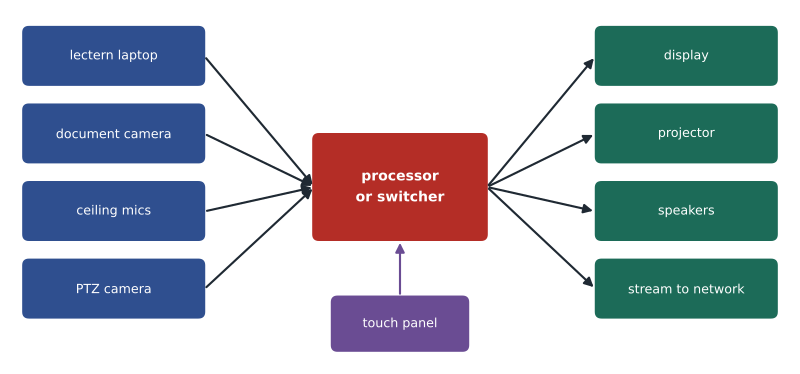
Every AV system, from a small meeting room to a large venue, has the same basic parts. Sources produce content: laptops, document cameras, media players, cameras and microphones. Processing equipment switches, scales, mixes and controls signals. Destinations present content: displays, projectors, speakers, assisted listening systems and recording or streaming services. A control system ties it together, usually through a touch panel or wall plate. Each part has infrastructure needs: a source needs an input point near where users sit or stand; processing equipment needs a rack or credenza with power, cooling and network connections; destinations need mounting, power and signal cabling; and control panels need a network or control connection.
Video over structured cabling
High-resolution video produces enormous data rates. Uncompressed 4K video at 60 frames per second can exceed 12 gigabits per second, far more than HDMI cables can carry reliably beyond a few metres. AV systems solve this with extenders and network transport. Point-to-point extenders, such as those based on the HDBaseT technology, carry uncompressed or lightly compressed video, audio, control and power over a single balanced cabling channel of up to about 100 m, typically requiring Category 6A or better for full performance. Network-based AV, often called AV over IP, compresses video and sends it through standard network switches, which lets any source reach any display, at the cost of switch capacity and careful network design.
For the RCDD, both approaches have the same infrastructure message: AV needs dedicated balanced cabling links between where sources are used and where equipment and displays sit, often more of them than a quick glance at the room suggests. A lectern, for example, may need two or three Category 6A links to the rack or to the display location in addition to data outlets for the instructor. Ceiling projectors and wall displays need their own links and power. Where AV over IP is used, the network switches that carry the video must have the port speeds and multicast capability the AV designer specifies, and the backbone must carry the extra traffic if video is distributed between rooms.
| Signal type | Typical transport | Infrastructure notes |
|---|---|---|
| Video to a nearby display | HDMI or USB-C cable, a few metres | Floor box or table connection close to the user |
| Video to a remote display or projector | Point-to-point extender over Category 6A, up to about 100 m | Dedicated link, short patch cords, no intermediate network switch |
| Video across a building | AV over IP through network switches | Multi-gigabit or 10 Gb/s ports, multicast support, backbone capacity |
| Networked audio | Audio over IP through network switches | Quality of service and clock synchronization on the network |
| Microphones, cameras, touch panels | PoE over balanced cabling | PoE budget and outlets at device locations |
| Loudspeakers | Speaker cable or networked amplifiers | Separate pathways from data where power-level audio is used |
Bandwidth and network capacity
When AV over IP is chosen, video becomes network traffic. Compressed formats vary widely in bit rate, from a few megabits per second for a streaming camera to several hundred megabits or more for high-quality, low-latency video between rooms. The AV designer provides the bit rates; the ICT designer checks that ports, uplinks and the backbone can carry them, along with all the other traffic in the building.
Worked problem
The divisible multipurpose room
The multipurpose room has four displays and two projectors fed by AV over IP. Each video stream uses up to 900 Mb/s. In the worst case, all six streams cross the uplink between the AV switch in the room and the floor switch. The uplink is a single 10 Gb/s port. How much of the uplink do the streams use?
Show solution
- Total video: 6 × 900 = 5,400 Mb/s, or 5.4 Gb/s.
- Uplink capacity: 10 Gb/s.
- Share used: 5.4 ÷ 10 = 0.54.
Answer: About 54 hundredths of the uplink. That fits, but adding two more displays or a second room on the same uplink would approach the limit, so Daniel plans a second 10 Gb/s uplink or a 25 Gb/s port.
Rooms, racks and equipment locations
AV processing equipment has to live somewhere. In small rooms it may be a compact unit behind a display or in a lectern. In larger rooms it often sits in a dedicated rack in a small AV equipment room, a ventilated credenza or the telecommunications room. Each location needs power, cooling, network connections and cable pathways to the room's sources and destinations. Daniel's experience as an installer tells him that the hardest part is the path between the lectern and the rack. Floor boxes, conduit under the slab or through raised floors, and conduit from the lectern location to the ceiling or wall must be planned before the concrete is poured.
Displays and projectors raise their own coordination questions. A large wall display needs structural backing, a recessed box for power and signal behind the screen, and a path from that box to the rack or ceiling. A ceiling projector needs a mount point, power, signal and often a nearby service outlet for its network connection. Ceiling microphones need positions that suit the acoustic design, often in a grid that conflicts with lights, diffusers and sprinklers. Cameras for hybrid teaching need clear sight lines and their own PoE links. All of these must be shown on the coordinated ceiling and wall drawings.
Power, grounding and noise
AV systems are sensitive to electrical noise and to differences in ground potential between equipment powered from different circuits. Hum bars on displays and buzzes in speakers are classic symptoms. The ICT and electrical designers can avoid most of these problems by feeding all of a room's AV equipment from the same electrical panel and phase, bonding racks to the telecommunications bonding infrastructure, keeping speaker and power cabling separate from low-level audio and data cabling, and using balanced audio and network-based transport where possible. The AV designer will often specify dedicated circuits, isolated ground receptacles or power conditioning; the ICT designer should coordinate these with the electrical engineer, Priya Raman in Harbourview's case.
PoE now powers many AV devices: cameras, ceiling microphones, touch panels, small amplifiers and even some displays. The PoE budget for an AV-rich room can be significant, and the switch feeding the room must provide it. A lecture hall with four pan-tilt-zoom cameras at about 25 W each, twelve ceiling microphones at about 6 W each and three touch panels at about 13 W each needs roughly 210 W of PoE at the switch. That load belongs in the telecommunications room power and cooling calculations.
Worked problem
PoE for the lecture hall
The lecture hall will have four PTZ cameras at 25.5 W each, twelve ceiling microphone arrays at 6.5 W each and three touch panels at 13 W each, all powered by PoE from one switch. What PoE budget do these devices need?
Show solution
- Cameras: 4 × 25.5 = 102 W.
- Microphones: 12 × 6.5 = 78 W.
- Touch panels: 3 × 13 = 39 W.
- Total: 102 + 78 + 39 = 219 W.
Answer: About 219 W of PoE, before any access points or phones. Daniel adds this to the switch and room power calculations for the second floor.
Assisted listening and accessibility
Accessibility rules require assisted listening systems in many assembly spaces, such as lecture halls and large meeting rooms, so that people with hearing loss can hear amplified speech. Common technologies include induction loops, which use a cable loop around the room to transmit audio to hearing aids with telecoils, and radio-frequency or infrared systems with personal receivers. Induction loops have significant infrastructure implications: the loop cable must be installed in the floor or perimeter, often before finishes, and must be kept away from metal that distorts its field. Accessibility requirements also influence the height and location of control panels, the placement of displays and the provision of captioning. Canadian accessibility standards and provincial building codes set the rules; the AV designer applies them, and the RCDD must provide for them.
Working with the AV integrator
In many projects the AV systems are designed by a consultant and installed by an AV integrator, often under a separate contract. That creates risk at every interface. Who provides the cabling between the lectern and the rack? Who supplies the floor box? Who terminates the links at each end? Who tests them? Roz insists on a responsibility matrix for every AV room, listing each cable, box, conduit and device and the party responsible for providing, installing, terminating and testing it. Without that matrix, she says, every gap becomes a change order.
The ICT design should also set a consistent standard for AV cabling: the same category and connector types as the rest of the building where possible, labelling that follows the building's administration scheme, test results for every link, and documentation that shows each AV link with its endpoints. Proprietary AV cables are sometimes unavoidable, but every proprietary cable is a future problem when the equipment is replaced. The more of the AV system rides on standards-based cabling, the longer the infrastructure will last.
Exam focus: AV questions
Exam questions on audiovisual infrastructure usually test whether you recognize the infrastructure consequences of an AV design rather than the AV technology itself. Expect questions about the reach of point-to-point extenders over balanced cabling, the need for dedicated links between source locations and equipment, the effect of AV over IP on switch ports and backbone capacity, and the coordination of floor boxes, conduit and display backing before construction. When a question describes hum, noise or flicker, think first about power from different panels, missing bonding and speaker or power cabling run alongside low-level signals.
Common mistakes
MistakeAssuming one data outlet at the lectern is enough.
InsteadLecterns often need several dedicated AV links plus data and power. Get a cable schedule from the AV designer.
MistakeRunning AV extenders through network switches or extra patch panels.
InsteadPoint-to-point extenders need a continuous link with minimal connections; follow the manufacturer limits.
MistakeFeeding AV equipment in one room from different electrical panels.
InsteadDifferent panels and phases cause ground potential differences and hum. Coordinate circuits with the electrical engineer.
MistakeLeaving floor boxes and conduit to the AV contractor.
InsteadFloor boxes and in-slab conduit must be designed before concrete is placed; they belong in the coordinated design.
Summary and key terms
- AV systems now ride largely on structured cabling and the network, so they are a core part of the ICT design.
- Point-to-point extenders carry video over dedicated Category 6A links up to about 100 m; AV over IP sends compressed video through network switches.
- The ICT designer checks ports, uplinks and backbone capacity against AV bit rates, and adds AV PoE loads to switch and room budgets.
- Lecterns, displays, projectors, microphones and cameras each need coordinated cabling paths, power and mounting.
- Common power and bonding, separation of speaker and power wiring, and a clear responsibility matrix prevent most AV problems.
- AV over IP
- Transport of audio and video as compressed streams through standard network switches.
- Extender
- A pair of devices that carry video, audio and control over a balanced cabling link beyond the reach of HDMI.
- Floor box
- A recessed box in the floor providing power, data and AV connections, usually fed by conduit in or under the slab.
- Assisted listening system
- A system that delivers amplified audio to people with hearing loss through hearing aids or receivers.
- Induction loop
- An assisted listening system that uses a cable loop to send audio to hearing aids with telecoils.
- Responsibility matrix
- A table that assigns each cable, box and device to the party that provides, installs, terminates and tests it.
Practice problems
Work each problem on paper first, then reveal the answer to check.
Eight AV over IP streams use 600 Mb/s each. Will they fit on one 10 Gb/s uplink?
Show answer
Yes: 8 × 0.6 = 4.8 Gb/s, about half the uplink.
Why might a hum bar appear on a display?
Show answer
A ground potential difference between equipment on different circuits; common circuits and proper bonding help.
Name three items that should appear on an AV responsibility matrix.
Show answer
Each cable, floor box or conduit, and device, with who provides, installs, terminates and tests it.
Lesson quiz · 5 questions
Score 60% or more to complete this lesson.
Create a free account to save your progress, take quizzes and earn a certificate.