
NET-110 · Lesson 8 of 12 · 30 min
TCP, UDP and ports
▶ Video coming soon A video version of this lesson is on the way.
IP delivers packets from one host to another, but a host runs many programs at once. Anita's laptop may be syncing files, streaming music, showing a web page and receiving email all at the same moment, and every arriving packet must reach the right one. IP also makes no promises: packets can be lost, duplicated or arrive out of order. The transport layer sits on top of IP to solve both problems, using port numbers to tell programs apart and, when needed, sequence numbers and acknowledgements to make delivery reliable.
This lesson covers the two main transport protocols, TCP and UDP: how ports and sockets identify conversations, how TCP sets up a connection with its three-way handshake, how it achieves reliable, ordered delivery and controls its sending rate, why UDP's simplicity suits other jobs, and the well-known port numbers that every network technician should recognize on sight. It ends with firewall rules, which are written mostly in terms of protocols and ports.
Ports and sockets
A port is a 16-bit number, from 0 to 65535, that identifies a program or service on a host. Servers listen on well-known ports so that clients know where to find them: web servers on 80 for HTTP and 443 for HTTPS, DNS servers on 53, SSH on 22. Clients use temporary ports chosen by the operating system for each conversation, called ephemeral ports, usually from the range 49152 to 65535 recommended by IANA, although Linux uses 32768 to 60999 by default. When the till connects to the payment service, its packets go from some ephemeral port such as 51432 to port 443 at the server, and the replies come back the other way.
A socket is the combination of an IP address and a port, written 10.20.20.21:51432 for IPv4 or [2001:db8:5a00:20::15]:51432 for IPv6, with brackets so the port is not confused with the address's colons. A single conversation is identified by five values together: the protocol, the source address and port, and the destination address and port. This five-tuple is how a host keeps hundreds of simultaneous connections apart, and how NAT and firewalls track them.
| Range | Name | Use |
|---|---|---|
| 0 to 1023 | Well-known ports | Standard services; binding to them usually needs administrator rights |
| 1024 to 49151 | Registered ports | Services registered with IANA, such as 3306 for MySQL and 8080 for alternative HTTP |
| 49152 to 65535 | Dynamic or ephemeral ports | Temporary client ports chosen for each connection |
Try it yourself
Parse a socket address
Write parse_socket(text) that splits a socket address into a tuple (address, port), with the port as an integer. IPv4 sockets look like 10.20.20.21:51432; IPv6 sockets put the address in square brackets, like [2001:db8::15]:443, and the brackets are not part of the returned address.
Also write port_range(port) that returns 'well-known', 'registered' or 'dynamic' for a port number.
def parse_socket(text):
    address, port = text.split(':')
    return address, port

def port_range(port):
    return 'dynamic'

print(parse_socket('10.20.20.21:51432'))
TCP: reliable, ordered streams
The Transmission Control Protocol gives applications a reliable, ordered stream of bytes between two programs, hiding the losses and reordering of the network beneath. It is connection-oriented: before any data flows, the two ends set up a connection and agree on starting sequence numbers. Each byte sent is numbered; the receiver acknowledges what it has received; the sender retransmits anything that is not acknowledged in time; and the receiver uses the numbers to put segments back in order and discard duplicates. Web pages, email, file transfers, SSH sessions and database connections all run over TCP because they cannot tolerate missing or jumbled data.
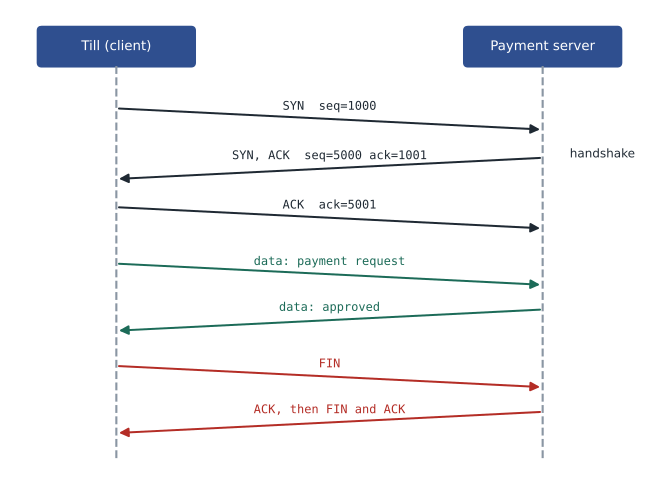
A connection begins with the three-way handshake. The client sends a segment with the SYN flag set and its initial sequence number. The server replies with SYN and ACK set, acknowledging the client's number and sending its own. The client sends an ACK, and the connection is established. Closing uses FIN segments from each side, acknowledged in turn, or an RST segment to abort at once. The handshake costs one round trip before any data moves, which is why latency, not bandwidth, often limits how quickly a web page appears.
| Flag | Meaning |
|---|---|
| SYN | Synchronize: start a connection and set the initial sequence number |
| ACK | The acknowledgement number is valid; almost every segment after the first sets it |
| FIN | The sender has finished sending |
| RST | Reset: abort the connection at once, or refuse a connection to a closed port |
| PSH | Push the data to the application promptly |
| URG | Urgent data is present (rarely used) |
def handshake(client_isn, server_isn):
    steps = [('client', 'server', 'SYN', client_isn, None),
             ('server', 'client', 'SYN, ACK', server_isn, client_isn + 1),
             ('client', 'server', 'ACK', client_isn + 1, server_isn + 1)]
    for src, dst, flags, seq, ack in steps:
        line = (src + ' -> ' + dst).ljust(17) + flags.ljust(10) + 'seq=' + str(seq)
        if ack is not None:
            line += '  ack=' + str(ack)
        print(line)

handshake(1000, 5000)client -> server SYN seq=1000 server -> client SYN, ACK seq=5000 ack=1001 client -> server ACK seq=1001 ack=5001
TCP also controls how fast it sends. Flow control stops a fast sender overwhelming a slow receiver: the receiver advertises a window, the amount of data it can accept, and the sender never has more unacknowledged data in flight than that. Congestion control protects the network: TCP starts slowly, increases its rate while acknowledgements keep arriving, and backs off sharply when it detects loss, which it takes as a sign of congestion. These mechanisms are why one large download does not freeze everyone else's connection, and why packet loss on a link makes every TCP transfer across it slow down dramatically.
Because a sender can only have one window of data in flight per round trip, the throughput of a single TCP connection is limited to roughly the window size divided by the round-trip time. With a 64 KB window and a 100 ms round trip, that is about 5 megabits per second, however fast the link. Modern systems scale their windows far larger to fill long, fast paths, but the relationship explains why distance matters so much: the same window gives a tenth of the throughput when the server is ten times further away.
def max_throughput_mbps(window_bytes, rtt_ms):
    return window_bytes * 8 / (rtt_ms / 1000) / 1_000_000

for window_kb in (64, 256, 1024):
    row = [str(round(max_throughput_mbps(window_kb * 1024, rtt), 1)).rjust(7) for rtt in (5, 40, 100, 600)]
print(str(window_kb).rjust(5), 'KB window:', ' '.join(row), ' Mbps at 5, 40, 100 and 600 ms')64 KB window: 104.9 13.1 5.2 0.9 Mbps at 5, 40, 100 and 600 ms 256 KB window: 419.4 52.4 21.0 3.5 Mbps at 5, 40, 100 and 600 ms 1024 KB window: 1677.7 209.7 83.9 14.0 Mbps at 5, 40, 100 and 600 ms
Try it yourself
Reassemble TCP segments
Segments may arrive out of order and some may be duplicated. Each segment is a tuple (seq, data), where seq is the sequence number of the first byte of data. Write reassemble(segments, start) that returns the bytes, as a string, that can be delivered to the application in order, starting from sequence number start, stopping at the first gap. Ignore duplicates.
For example, with segments (1004, 'EF'), (1000, 'ABCD') and (1000, 'ABCD') and start 1000, the result is 'ABCDEF'.
def reassemble(segments, start):
    return ''.join(data for seq, data in segments)

print(reassemble([(1004, 'EF'), (1000, 'ABCD'), (1000, 'ABCD')], 1000))
UDP: small, fast and simple
The User Datagram Protocol does almost nothing beyond adding port numbers and a checksum to IP. There is no connection, no handshake, no acknowledgements, no retransmission and no ordering: each datagram is sent once and either arrives or does not. Its header is only 8 bytes, against TCP's 20 or more. That sounds like a weakness, but it suits several kinds of traffic. Short request-and-reply exchanges, such as DNS lookups and NTP time queries, finish in one round trip with no setup. Real-time audio and video prefer a late packet to be skipped rather than resent, because a resent sound arrives too late to be useful. And protocols that broadcast or multicast, such as DHCP, cannot use TCP connections at all.
| Feature | TCP | UDP |
|---|---|---|
| Connection | Connection set up with a three-way handshake | None: each datagram stands alone |
| Reliability | Acknowledgements and retransmission | None built in; the application may add its own |
| Ordering | Data delivered in order | Datagrams may arrive in any order |
| Flow and congestion control | Yes | No |
| Header size | 20 bytes or more | 8 bytes |
| Typical uses | Web (HTTPS), email, SSH, file transfer, databases | DNS, DHCP, NTP, voice and video calls, online games, streaming |
Modern protocols blur the line. QUIC, the transport under HTTP/3, runs over UDP but builds its own reliability, ordering, congestion control and encryption on top, which lets it set up connections faster than TCP plus TLS and recover from loss more gracefully on mobile networks. Many video calling platforms also run over UDP with their own recovery methods. The choice between TCP and UDP is really a choice about where reliability is handled: in the operating system's TCP, or in the application.
Try it yourself
TCP or UDP?
Write transport_for(app) that returns 'TCP' or 'UDP' for the traditional transport of an application name, using the dictionary USUAL provided in the setup. Names should match regardless of capital letters. If the application is not in the dictionary, return 'unknown'.
Then write count_by_transport(apps) that returns a dictionary counting how many of a list of application names use each transport, including unknown.
def transport_for(app):
    return USUAL[app]

def count_by_transport(apps):
    return {}

print(transport_for('HTTPS'))
Well-known ports to recognize
Network technicians read port numbers constantly, in firewall rules, connection lists, packet captures and logs. These are the ones worth knowing by heart. Several use both TCP and UDP, and a few services that once ran unencrypted on one port moved to an encrypted version on another.
| Port | Protocol | Service | Notes |
|---|---|---|---|
| 20, 21 | TCP | FTP data and control | Old, unencrypted; replaced by SFTP or FTPS |
| 22 | TCP | SSH and SFTP | Encrypted remote login and file transfer |
| 23 | TCP | Telnet | Unencrypted remote login; avoid |
| 25 | TCP | SMTP | Mail between servers; 587 is used for sending from clients |
| 53 | UDP and TCP | DNS | UDP for most queries, TCP for large replies and zone transfers |
| 67, 68 | UDP | DHCP server and client | IPv4 address assignment |
| 80 | TCP | HTTP | Unencrypted web |
| 110, 143 | TCP | POP3 and IMAP | Mail retrieval; encrypted versions on 995 and 993 |
| 123 | UDP | NTP | Time synchronization |
| 161, 162 | UDP | SNMP and SNMP traps | Device monitoring |
| 389, 636 | TCP | LDAP and LDAPS | Directory services |
| 443 | TCP (and UDP for QUIC) | HTTPS | Encrypted web, HTTP/3 over UDP |
| 445 | TCP | SMB | Windows file sharing |
| 514 | UDP | Syslog | Sending log messages to a collector |
| 3389 | TCP | RDP | Windows remote desktop |
Try it yourself
Name the service on a port
Write service(port) that returns the service name for the ports in the table PORTS given in the setup, or 'unknown' for other ports. Then write insecure(ports) that returns, in sorted order, the ports from a list that carry the unencrypted services Telnet, FTP or HTTP.
def service(port):
    return PORTS[port]

def insecure(ports):
    return []

print(service(443), insecure([443, 80, 22, 23]))
Ports and firewall rules
Firewalls decide what to allow mostly by protocol, address and port. A rule might say: allow TCP from the payments network to any address on port 443, allow UDP from all internal networks to the firewall on port 53, deny everything from the guest network to every internal network, deny everything else. Stateful firewalls track each connection's five-tuple, so a rule that allows the till's outgoing connection to port 443 automatically allows the replies, without a separate rule for return traffic. Rules are checked from the top, and the first match decides, so specific rules go before general ones, and an explicit deny at the end documents the default.
Ridgeline's new firewall policy, drafted in Lesson 12, is written exactly this way. The payments network may reach only the card processor's addresses on 443 and the DNS and NTP services; the guest network may reach the internet on any port but no internal address; the office may reach the storage box on SMB port 445 and the management network on SSH and HTTPS; the management network may reach everything for maintenance. Each rule names a source, a destination, a protocol and a port, and has a comment saying why it exists.
Worked problem
Reading a connection list
Sam lists the connections on the office storage box and sees: TCP 10.20.99.10:445 to 10.20.10.37:51522 ESTABLISHED; TCP 10.20.99.10:22 to 10.20.10.12:60044 ESTABLISHED; UDP 10.20.99.10:123 listening; TCP 10.20.99.10:23 listening. What is going on, and is anything wrong?
Show solution
- Port 445 is SMB: Anita's laptop, 10.20.10.37, has a file share open from an ephemeral port. Normal.
- Port 22 is SSH: Sam's own laptop, 10.20.10.12, is logged in for maintenance. Normal.
- UDP 123 listening is NTP: the storage box can serve time. Harmless, though it could be disabled if unused.
- TCP 23 listening is Telnet, an unencrypted remote login service. Nobody should use it, and it should be turned off.
- Disable Telnet on the storage box, confirm SSH still works, and add a firewall rule so only the management and office networks can reach the box at all.
Answer: Everything is expected except the Telnet service on port 23, which should be disabled because it sends logins in plain text.
Common mistakes
MistakeThinking a port number identifies a computer.
InsteadAddresses identify hosts; ports identify services or conversations on a host.
MistakeWriting firewall rules for return traffic on a stateful firewall.
InsteadStateful firewalls track connections; allow the outgoing direction and replies follow.
MistakeAssuming UDP is unreliable and therefore bad.
InsteadUDP suits short exchanges and real-time traffic; reliability can be added where needed.
MistakeAllowing DNS only over UDP.
InsteadDNS also uses TCP port 53 for large responses; allow both.
MistakeLeaving unencrypted services such as Telnet and FTP enabled.
InsteadUse SSH and SFTP, and disable the old services.
MistakeIgnoring latency when estimating throughput for one connection.
InsteadA single TCP connection is limited to about window size divided by round-trip time.
Summary and key terms
- The transport layer uses 16-bit port numbers to deliver data to the right program on a host.
- A socket is an address plus a port; a connection is identified by protocol and both sockets (the five-tuple).
- TCP is connection-oriented and reliable: handshake, sequence numbers, acknowledgements, retransmission, ordering.
- TCP's flow and congestion control adjust its rate; one connection's throughput is limited by window and round-trip time.
- UDP is connectionless with an 8-byte header, suited to DNS, DHCP, NTP and real-time media.
- Well-known ports include 22 SSH, 25 SMTP, 53 DNS, 67/68 DHCP, 80 HTTP, 123 NTP, 443 HTTPS, 445 SMB and 3389 RDP.
- Firewall rules are written by protocol, address and port, checked in order, with stateful tracking of replies.
- Port
- A 16-bit number identifying a service or conversation on a host.
- Ephemeral port
- A temporary client port chosen by the operating system for one connection.
- Socket
- An IP address combined with a port number.
- TCP
- Transmission Control Protocol: reliable, ordered, connection-oriented delivery.
- UDP
- User Datagram Protocol: simple, connectionless delivery without guarantees.
- Three-way handshake
- SYN, SYN-ACK, ACK: how TCP sets up a connection.
- Sequence number
- The number TCP gives each byte so data can be ordered and acknowledged.
- Window
- The amount of unacknowledged data a TCP sender may have in flight.
- Stateful firewall
- A firewall that tracks connections and allows their return traffic automatically.
Practice problems
Work each problem on paper first, then reveal the answer to check.
Which port does HTTPS use?
Show answer
TCP 443 (and UDP 443 for HTTP/3).
What are the three steps of the TCP handshake?
Show answer
SYN, SYN-ACK, ACK.
Why does DNS mostly use UDP?
Show answer
Queries are short request-and-reply exchanges that finish in one round trip without connection setup.
What is an ephemeral port?
Show answer
A temporary port the client's operating system picks for one connection.
A TCP connection has a 128 KB window and a 50 ms round trip. Roughly what is its maximum throughput?
Show answer
131,072 x 8 / 0.05 = about 21 Mbps.
What does an RST segment do?
Show answer
Aborts a connection immediately or refuses one to a closed port.
Which service uses port 3389?
Show answer
RDP, Windows remote desktop.
Why are video calls often carried over UDP?
Show answer
A late packet is useless, so skipping it is better than waiting for a retransmission.
How large is a UDP header?
Show answer
8 bytes.
Why must specific firewall rules come before general ones?
Show answer
Rules are checked from the top and the first match decides.
Lesson quiz · 5 questions
Score 60% or more to complete this lesson.
Create a free account to save your progress, take quizzes and earn a certificate.