
NET-110 · Lesson 1 of 12 · 35 min
What a network is and how it is built
▶ Video coming soon A video version of this lesson is on the way.
On a Saturday morning in October the card terminals at Ridgeline Coffee Roasters stop working. The tills still ring up lattes, but every card payment fails with a message about the connection, and a line forms at the counter. Mei switches the cafe to cash only while Theo phones the internet provider. Ten minutes later everything works again: a technician had restarted the provider's equipment down the street. Nobody at Ridgeline could have fixed that fault, but Rosa realizes that nobody could even have explained it. The shop runs on its network, from the tills and card terminals to the roaster's controller, the office computers, the guest Wi-Fi and the online shop, and nobody on staff understands how it fits together.
Rosa asks Sam Okoye, the co-op developer who joined to work on the shop's Python tools, and Jordan Reyes, the barista who writes many of those tools, to learn the network properly. This course follows them as they map, document and finally redesign it. Along the way it covers the material of an introductory networking course at the level of the CompTIA Network+ exam: how networks are organized, the models used to describe them, Ethernet and switching, IPv4 and IPv6 addressing, subnetting, routing, transport protocols and ports, the core services DNS, DHCP and NTP, wireless networking, and the tools used to test and troubleshoot. Python appears throughout, because many networking chores, from checking addresses to reading logs, are easier and safer with a short script, and every Python example on these pages can be edited and run in the browser.
This first lesson builds the vocabulary for everything that follows: what a network is, the kinds of devices on it, how the parts are connected, the difference between local and wide area networks, and how to describe a real network so that other people can understand and support it.
What a network is
A computer network is a set of devices connected so they can exchange data. The devices that use the network, such as laptops, phones, servers, printers, tills and sensors, are called hosts or end devices, and the boxes that move data between them, such as switches, routers and wireless access points, are called network devices or intermediary devices. The connections between them are links: copper cables, fibre optic cables or radio signals. Every exchange of data follows protocols, agreed rules about the format of messages and the order in which they are sent, so that equipment from different manufacturers can work together.
Networks exist to share things. In the early days the shared thing was often an expensive printer or a disk; today it is mostly information and services. At Ridgeline the tills send each sale to the point-of-sale service in the cloud, the card terminals reach the payment processor, Anita's bookkeeping software syncs with the bank, Kai's roast controller logs every batch, customers browse the online shop, and the guest Wi-Fi keeps people in the cafe for a second coffee. A network is useful when all of those conversations happen reliably, quickly and safely, and when the people who run it can tell what is happening.
Data crosses a network in small pieces rather than as one long stream. A photo uploaded from the office is cut into packets of at most around 1,500 bytes each, every packet carries addresses saying where it came from and where it is going, and the packets may even take different paths before the receiving computer puts them back together. This idea, called packet switching, is what lets many devices share the same links at once: the packets of a card payment, a video call and a software update are interleaved on the same cable a few microseconds apart.
photo_bytes = 2_400_000      # a 2.4 MB photo from the office camera
payload = 1_460              # data carried by one full TCP packet on Ethernet
headers = 40 + 18            # TCP and IP headers plus the Ethernet frame overhead

packets = -(-photo_bytes // payload)          # round up: a partly full last packet still counts
total_on_wire = photo_bytes + packets * headers
print('packets needed:', packets)
print('bytes sent on the wire:', total_on_wire)
print('overhead added by headers:', round(100 * (total_on_wire - photo_bytes) / photo_bytes, 1), 'out of every 100 bytes')packets needed: 1644 bytes sent on the wire: 2495352 overhead added by headers: 4.0 out of every 100 bytes
The figure of roughly four bytes in every hundred is the price of packet switching. Each packet carries enough information to be delivered on its own, which makes the network flexible and resilient, at the cost of some extra bytes. Later lessons open those headers up one by one.
Try it yourself
How many packets?
Write packet_count(size, payload) that returns how many packets are needed to send size bytes when each packet carries at most payload bytes of data. A partly filled last packet still counts as one packet, and sending 0 bytes needs 0 packets.
For example, packet_count(3000, 1460) is 3.
def packet_count(size, payload):
    return size // payload

print(packet_count(3000, 1460))
The devices on a network
Most networks, from a coffee shop to a large company, are built from the same handful of device types. Knowing what each one does is the first step in reading any network diagram.
| Device | What it does | At Ridgeline |
|---|---|---|
| Host or end device | Creates and uses data; the reason the network exists | Tills, card terminals, laptops, phones, the roast controller |
| Switch | Connects devices in the same local network and forwards frames by hardware address | A 24-port managed switch in the back office cabinet |
| Router | Connects different networks and forwards packets by IP address | The firewall-router that links the shop to the internet |
| Wireless access point | Connects Wi-Fi devices to the wired network | One access point in the cafe and one in the roastery |
| Firewall | Allows or blocks traffic according to rules | Built into the same box as the router |
| Modem or optical terminal | Converts the provider's line signal to Ethernet | The provider's box on the wall where the fibre comes in |
| Server | Offers a service to other hosts | The online shop in the cloud; a small network storage box |
In small networks several of these jobs are combined into one box. A home internet router is usually a router, a firewall, a small switch, a wireless access point and often a modem all at once. Ridgeline outgrew that arrangement two years ago, when the roastery opened, and now has separate pieces: the provider's optical terminal, a firewall-router, a managed switch and two access points. Separate devices cost more but can be replaced, upgraded and configured independently, which matters once the network carries the business.
Hosts and network devices are identified at two levels, a distinction that runs through the whole course. Every network interface has a hardware address, the MAC address, burned in at the factory and used to deliver data within one local network. Every host on an IP network also has an IP address, assigned by the network's administrator or handed out automatically, and used to deliver data across networks. A switch works with MAC addresses; a router works with IP addresses. Lessons 3 and 4 explore each in turn.
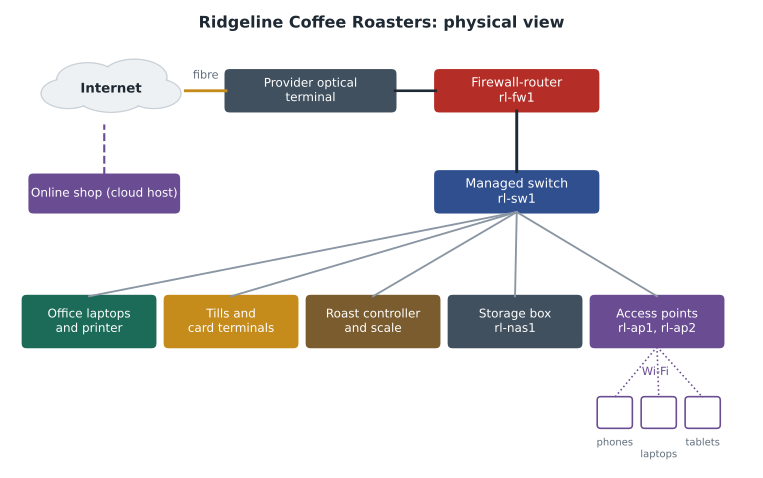
The diagram above is the first thing Sam drew, after an afternoon of following cables with a flashlight. It is a physical view: it shows boxes and the cables between them. Network professionals use several kinds of diagram, and physical diagrams are often paired with logical diagrams that show the networks, addresses and paths that data takes. Ridgeline's logical design comes later in the course, once IP addressing has been covered.
Topologies: how the parts are connected
The pattern of links between devices is called the topology. Several classic topologies appear in textbooks and exam questions, and real networks are usually a combination of them.
| Topology | Shape | Strengths | Weaknesses | Where it appears |
|---|---|---|---|---|
| Star | Every device connects to a central switch | Easy to add devices; one bad cable affects one device | The centre is a single point of failure | Almost every wired office and home |
| Bus | Every device taps into one shared cable | Cheap and simple | One break takes everything down; shared bandwidth | Early Ethernet; now mostly historical |
| Ring | Each device connects to two neighbours in a loop | Predictable access | One break can stop traffic unless the ring is doubled | Some provider fibre networks |
| Mesh | Devices connect to many others | Many alternative paths; very resilient | Many links to buy and manage | Internet backbones, Wi-Fi mesh systems |
| Hybrid | A mix, such as stars joined by a mesh core | Matches each part of the network to its needs | More complex to design | Campuses and large companies |
Ridgeline's wired network is a star: every cable runs from a device back to the switch in the office cabinet. That makes the switch and the firewall-router single points of failure. If the switch fails, every wired device stops at once, which is why Sam keeps a note of how to put a spare in its place quickly and why larger businesses buy two of everything at the centre. The two access points form a small star of their own over the air, with phones and laptops joining whichever one is nearer.
A full mesh connects every device to every other device, which gets expensive quickly: n devices need n times n minus 1 divided by 2 links. Four routers need six links, ten need forty-five and a hundred need nearly five thousand. Partial meshes, with just enough extra links that no single failure cuts a site off, are the usual compromise in backbones and between the sites of larger organizations.
def full_mesh_links(n):
    return n * (n - 1) // 2

def star_links(n):
    return n - 1 if n > 1 else 0    # every device except the hub needs one link to it

print('devices  star  full mesh')
for n in (2, 4, 6, 10, 24, 100):
print(str(n).rjust(7), str(star_links(n)).rjust(5), str(full_mesh_links(n)).rjust(10))devices star full mesh
2 1 1
4 3 6
6 5 15
10 9 45
24 23 276
100 99 4950Try it yourself
Count the links in a mesh
Write mesh_links(n) that returns the number of links needed to connect n devices in a full mesh, where every device has a direct link to every other device. One device needs no links.
Then write spare_ports(n, ports) that returns how many ports each device has left over after joining the full mesh, given that each device has ports ports in total. Each device uses one port for each of the other devices.
def mesh_links(n):
    return n * n

def spare_ports(n, ports):
    return ports

print(mesh_links(4), spare_ports(4, 8))
LANs, WANs and the internet
Networks are also described by the area they cover. A local area network, or LAN, connects devices in one building or campus, usually owned and run by the organization itself, with high speeds and low delays. Ridgeline's cafe, roastery and office form one LAN. A wireless LAN, or WLAN, is a LAN whose devices connect over Wi-Fi. A wide area network, or WAN, connects LANs over long distances, usually over links rented from a telecommunications provider. A company with offices in three cities connects them with a WAN, either through private circuits or, more often today, through encrypted tunnels across the internet.
Other terms describe scale or purpose. A personal area network, or PAN, connects devices around one person, such as a phone, earbuds and a watch over Bluetooth. A metropolitan area network covers a city, such as a municipal fibre network. A campus area network joins the buildings of a university or hospital. A storage area network is a specialized network that connects servers to shared disks in data centres. The labels matter less than the questions behind them: who owns the links, how far apart the devices are, how fast and how reliable the connection needs to be, and who is responsible when it fails.
The internet is a network of networks. It has no single owner: tens of thousands of independent networks run by providers, universities, companies and governments agree to exchange traffic using common protocols. Your provider connects your LAN to its own network and, through agreements with other providers, to everyone else. When Ridgeline's card terminals failed, the fault was inside the provider's part of the path, which is why restarting equipment down the street fixed it. Knowing where the boundary lies, the point where the business's responsibility ends and the provider's begins, called the demarcation point or demarc, is one of the most useful facts in any network's documentation.
In Canada, internet service is provided by large telephone and cable companies and by many smaller independent providers that resell or build their own networks, under rules set by the Canadian Radio-television and Telecommunications Commission (CRTC). Ridgeline's fibre service in Kelowna comes from a regional provider whose optical terminal hangs on the office wall: everything on the provider's side of that box is the provider's responsibility.
Bandwidth, throughput and latency
Three numbers describe how well a link or a path performs, and they are easy to confuse. Bandwidth is the capacity of a link, the maximum rate at which it can carry data, measured in bits per second: a gigabit Ethernet link has a bandwidth of 1,000 megabits per second. Throughput is the rate actually achieved, always lower than the bandwidth because of headers, other traffic, errors and the behaviour of the protocols. Latency is the delay, the time it takes a piece of data to get from one end to the other, measured in milliseconds. A link can have plenty of bandwidth and still feel slow because of high latency, as anyone who has used a satellite connection with a 600-millisecond delay knows.
Network speeds are quoted in bits per second, while file sizes are quoted in bytes, and a byte is eight bits. Providers advertise a 500-megabit service, written 500 Mbps; a 500-megabyte file, 500 MB, therefore takes at least 8 seconds on it, not one. Ridgeline's fibre service is 500 Mbps down and 50 Mbps up: downloads are ten times faster than uploads, which matters for nightly backups to the cloud, a job that sends data upward.
def transfer_seconds(size_mb, speed_mbps, efficiency=0.9):
    """Time to move size_mb megabytes over a speed_mbps link that delivers efficiency of its bandwidth."""
    bits = size_mb * 8 * 1_000_000
    return bits / (speed_mbps * 1_000_000 * efficiency)

jobs = [('Software update download', 900, 500),
        ('Nightly backup upload', 6_000, 50),
        ('Menu photo upload', 12, 50)]
for name, size, speed in jobs:
    s = transfer_seconds(size, speed)
print(name.ljust(26), str(round(s, 1)).rjust(7), 'seconds =', round(s / 60, 1), 'minutes')Software update download 16.0 seconds = 0.3 minutes Nightly backup upload 1066.7 seconds = 17.8 minutes Menu photo upload 2.1 seconds = 0.0 minutes
The nightly backup takes about eighteen minutes because it travels up the slow direction. That is fine at two in the morning but would hurt during opening hours, when card payments and the online shop share the same 50 Mbps upload. Choosing when jobs run, and limiting how much bandwidth they may use, is a large part of running a small network well.
Try it yourself
Convert a download time
Write seconds_to_download(size_mb, mbps) that returns the time in seconds to download size_mb megabytes over a connection of mbps megabits per second, assuming the full bandwidth is available. Remember that one byte is eight bits. Round the result to 1 decimal place.
For example, 500 MB at 500 Mbps takes 8.0 seconds.
def seconds_to_download(size_mb, mbps):
    return round(size_mb / mbps, 1)

print(seconds_to_download(500, 500))
Documenting a network
A network that nobody has written down is fragile: the person who set it up leaves, a cable is unplugged during cleaning, and nobody knows which port the card terminals use. Good documentation is short, current and kept where the people who need it can find it. For a small business it usually includes a physical diagram showing devices, rooms and cables; a logical diagram showing networks and addresses; an inventory listing each device with its model, serial number, location, firmware version, warranty and the person to call; a list of the provider's account numbers and support contacts, including where the demarc is; a record of the configuration of each network device, with backups of its settings; and a change log noting what was changed, when, by whom and why.
Sam keeps Ridgeline's inventory as a CSV file in the same repository as the shop's Python tools, so that it is versioned like everything else and a short script can check it. The listing below reads a few rows of that inventory and reports the devices whose firmware is older than the version the team has standardized on, a typical small automation that saves a monthly chore.
import csv, io

inventory = """name,type,location,model,firmware
rl-fw1,router,office cabinet,FW-60,7.4.2
rl-sw1,switch,office cabinet,SW-24P,3.1.0
rl-ap1,access point,cafe ceiling,AP-6,6.5.1
rl-ap2,access point,roastery wall,AP-6,6.4.9
rl-nas1,storage,office cabinet,NAS-2,4.0.3"""

standard = {'FW-60': '7.4.2', 'SW-24P': '3.1.0', 'AP-6': '6.5.1', 'NAS-2': '4.1.0'}

def version(text):
    return tuple(int(part) for part in text.split('.'))

for row in csv.DictReader(io.StringIO(inventory)):
    want = standard[row['model']]
    if version(row['firmware']) < version(want):
print(row['name'].ljust(8), row['location'].ljust(15), row['firmware'], '->', want)rl-ap2 roastery wall 6.4.9 -> 6.5.1 rl-nas1 office cabinet 4.0.3 -> 4.1.0
Comparing versions as tuples of numbers, rather than as text, matters: as text, 6.10.0 sorts before 6.9.0, because the character 1 comes before 9. The same trap appears when sorting IP addresses as text, which is why later lessons convert addresses to numbers before comparing them.
Worked problem
Writing a one-page network summary
Rosa wants a single page she can hand to an outside technician during an outage. What should Sam put on it?
Show solution
- Start with the provider: company name, account number, support phone line, the circuit identifier printed on the optical terminal, and the location of the demarc (office wall, beside the cabinet).
- Add the physical diagram from this lesson, with each device labelled by name and location.
- List the network devices with model, management address and where their configuration backups are kept, but not their passwords, which live in the shop's password manager.
- Note the critical services and how to test them: card terminals (run a test payment), tills (ring a test sale), online shop (open the site from a phone on mobile data).
- End with a short change log of the last three changes, because the most recent change is the most likely cause of a new problem.
Answer: One page with the provider details, a labelled diagram, the device list, quick tests for critical services and recent changes gives a stranger enough to start safely.
Common mistakes
MistakeTreating bandwidth and throughput as the same thing.
InsteadBandwidth is the link's capacity; throughput is what you actually get, which is always lower.
MistakeMixing up megabits and megabytes when estimating transfer times.
InsteadNetwork speeds are in bits; multiply file sizes in bytes by 8 first.
MistakeAssuming the network is the problem whenever something fails.
InsteadLocate the fault: device, local network, provider or the remote service.
MistakeKeeping network knowledge in one person's head.
InsteadWrite down diagrams, inventory, provider details and changes, and keep them current.
MistakeComparing version numbers or addresses as text.
InsteadConvert them to numbers or tuples of numbers before comparing.
MistakeOverlooking single points of failure in a star topology.
InsteadIdentify the central devices and plan how to replace them quickly.
Summary and key terms
- A network is a set of hosts and network devices joined by links, exchanging data according to protocols.
- Data travels in packets, each carrying addresses, so many conversations can share the same links.
- Switches connect devices within a local network using MAC addresses; routers connect networks using IP addresses.
- Topologies describe how devices are connected: star, bus, ring, mesh and hybrid, each with strengths and weaknesses.
- LANs cover a building or campus, WANs join distant sites, and the internet is a network of independently run networks.
- Bandwidth is capacity, throughput is the rate achieved and latency is delay; speeds are quoted in bits per second.
- Good documentation covers diagrams, inventory, provider details, configurations and a change log.
- Host
- A device that sends and receives data on a network, such as a computer, phone or till.
- Protocol
- An agreed set of rules for the format and order of messages.
- Packet
- A small unit of data that carries its own source and destination addresses.
- Switch
- A device that connects hosts in the same local network and forwards frames by MAC address.
- Router
- A device that connects networks and forwards packets by IP address.
- Topology
- The pattern of connections between the devices on a network.
- LAN
- A local area network covering a building or campus.
- WAN
- A wide area network connecting distant sites, usually over provider links.
- Bandwidth
- The maximum data rate a link can carry.
- Latency
- The delay for data to travel from one end of a path to the other.
- Demarcation point
- The boundary between the customer's network and the provider's.
Practice problems
Work each problem on paper first, then reveal the answer to check.
Name three hosts and three network devices at Ridgeline.
Show answer
Hosts: tills, laptops, roast controller (also card terminals, phones). Network devices: switch, firewall-router, access points.
What is the main weakness of a star topology?
Show answer
The central device is a single point of failure.
How many links does a full mesh of 6 devices need?
Show answer
6 x 5 / 2 = 15.
A provider sells a 200 Mbps service. How long, at least, does a 100 MB file take to download?
Show answer
100 x 8 = 800 megabits; 800 / 200 = 4 seconds.
What is the difference between bandwidth and latency?
Show answer
Bandwidth is how much data per second a link can carry; latency is how long data takes to cross the path.
Why does data travel in packets rather than one long stream?
Show answer
So many devices can share the same links and each packet can be delivered on its own.
What does a router do that a switch does not?
Show answer
It connects different networks and forwards packets between them by IP address.
What is a demarc and why should it be documented?
Show answer
The point where the provider's responsibility ends and the customer's begins; it tells you who must fix a fault.
Which kind of network connects a phone to wireless earbuds?
Show answer
A personal area network (PAN), usually over Bluetooth.
Why should firmware versions be compared as numbers rather than text?
Show answer
As text, 6.10.0 sorts before 6.9.0; as numbers it correctly sorts after.
Lesson quiz · 5 questions
Score 60% or more to complete this lesson.
Create a free account to save your progress, take quizzes and earn a certificate.