
NET-110 · Lesson 7 of 12 · 29 min
Routing basics
▶ Video coming soon A video version of this lesson is on the way.
Once Ridgeline is split into separate networks, something has to carry traffic between them. A till in the payments network must reach the card processor on the internet; Anita's laptop in the office network must reach the storage box in the management network; nothing in the guest network should reach anything except the internet. That something is a router, and the decisions it makes, packet by packet, are called routing. At Ridgeline the router is the firewall-router in the office cabinet, the same box that connects the shop to its provider.
This lesson explains what a router does with each packet, how a routing table is organized, how a router chooses among several matching routes using the longest prefix match, the difference between connected, static and dynamic routes, what the default route is for, how network address translation lets private networks use the internet, and how a packet's journey from a till to a remote server looks hop by hop.
What a router does
A router connects two or more networks and forwards packets between them. Each of its interfaces belongs to a different network and has an address in it; that address is the default gateway for the hosts on that network. When a frame arrives addressed to the router's MAC address, the router strips the frame, reads the destination IP address in the packet, looks it up in its routing table to find where to send it next, decrements the packet's time to live, and wraps the packet in a new frame for the outgoing link. If no route matches, or the time to live reaches zero, the router drops the packet and usually sends an ICMP message back to the sender explaining why.
The time to live, or TTL, is a counter in every IPv4 packet; IPv6 calls it the hop limit. The sender sets it, commonly to 64 or 128, and every router subtracts one. It exists to stop packets circling forever if a routing mistake creates a loop: after enough hops the packet expires and is discarded. Lesson 11 shows how the traceroute tool deliberately uses small TTL values to discover every router on a path.
Routers also separate broadcast domains. A broadcast sent in the guest network stays in the guest network, because routers do not forward broadcasts between networks. This is the same containment that subnets and VLANs aim for, and in practice each VLAN gets its own router interface, often a virtual sub-interface on one physical port.
The routing table
A routing table is a list of destinations the router knows how to reach. Each entry, called a route, has a destination network in CIDR notation, the next hop or outgoing interface to use, a source saying how the route was learned, and a metric or preference for choosing between routes. A small router's table is short and readable; an internet backbone router's table holds over a million routes.
| Destination | Next hop | Interface | Source |
|---|---|---|---|
| 10.20.10.0/24 | directly connected | vlan10 (10.20.10.1) | Connected |
| 10.20.20.0/24 | directly connected | vlan20 (10.20.20.1) | Connected |
| 10.20.30.0/24 | directly connected | vlan30 (10.20.30.1) | Connected |
| 10.20.40.0/24 | directly connected | vlan40 (10.20.40.1) | Connected |
| 10.20.99.0/24 | directly connected | vlan99 (10.20.99.1) | Connected |
| 10.21.0.0/16 | 10.255.0.2 | tunnel to the downtown cafe | Static |
| 203.0.113.40/29 | directly connected | wan (203.0.113.42) | Connected |
| 0.0.0.0/0 | 203.0.113.41 | wan | Static (default route) |
Connected routes appear automatically for every network a router has an interface in, as soon as the interface is configured and up. Static routes are typed in by an administrator, such as the route to the planned downtown cafe through an encrypted tunnel. Dynamic routes are learned from other routers using routing protocols, covered next. The last entry, 0.0.0.0/0, is the default route: it matches every destination and is used when nothing more specific does. Its next hop, 203.0.113.41, is the provider's router at the other end of the fibre.
Longest prefix match
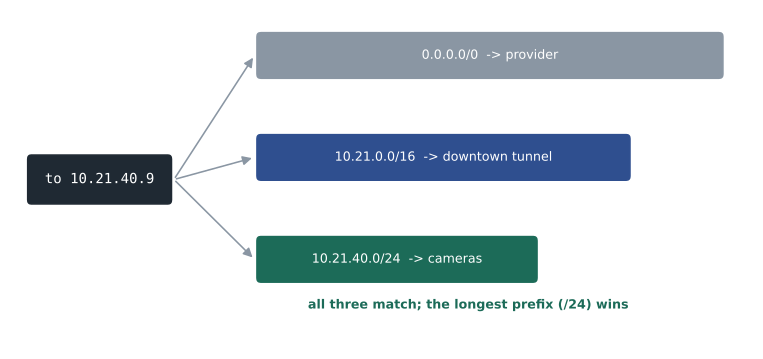
A destination often matches several routes. A packet for 10.21.40.9 matches 10.21.0.0/16 and also 0.0.0.0/0, because the default route matches everything. Routers always choose the most specific match, the route with the longest prefix length, because a longer prefix describes a smaller, more precise set of addresses. So the packet for 10.21.40.9 goes through the tunnel, not out to the internet. This rule, the longest prefix match, is the heart of IP forwarding, and it is what lets a summary route and a more specific exception coexist in the same table.
import ipaddress

routes = [('0.0.0.0/0', 'provider 203.0.113.41'),
          ('10.20.10.0/24', 'vlan10'),
          ('10.20.20.0/24', 'vlan20'),
          ('10.21.0.0/16', 'tunnel to downtown'),
          ('10.21.40.0/24', 'tunnel, downtown cameras via 10.255.0.6')]
table = [(ipaddress.ip_network(net), hop) for net, hop in routes]

def lookup(destination):
    addr = ipaddress.ip_address(destination)
    matches = [(net, hop) for net, hop in table if addr in net]
    best = max(matches, key=lambda m: m[0].prefixlen)
    return best

for d in ('10.20.20.21', '10.21.40.9', '10.21.9.1', '142.250.1.10'):
    net, hop = lookup(d)
print(d.ljust(13), 'matches', str(net).ljust(14), '->', hop)10.20.20.21 matches 10.20.20.0/24 -> vlan20 10.21.40.9 matches 10.21.40.0/24 -> tunnel, downtown cameras via 10.255.0.6 10.21.9.1 matches 10.21.0.0/16 -> tunnel to downtown 142.250.1.10 matches 0.0.0.0/0 -> provider 203.0.113.41
When two routes have the same prefix length but were learned in different ways, the router uses a preference, called administrative distance on Cisco equipment, that ranks the trustworthiness of each source: connected routes beat static routes, which beat routes learned from most dynamic protocols. Among routes from the same protocol, the metric decides, such as the number of hops or a cost based on link speed. Those tie-breakers matter in larger networks; in a network like Ridgeline's, the longest prefix match settles nearly everything.
Try it yourself
Write a longest prefix match
ROUTES is a list of (network, next_hop) tuples, with networks in CIDR notation. Write next_hop(routes, destination) that returns the next hop of the most specific route containing the destination address, or None if no route matches.
Use the ipaddress module. Note that a route list without 0.0.0.0/0 may match nothing.
import ipaddress

def next_hop(routes, destination):
    addr = ipaddress.ip_address(destination)
    for net, hop in routes:
        if addr in ipaddress.ip_network(net):
            return hop
    return None

print(next_hop(ROUTES, '10.20.40.7'))
Static and dynamic routing
Static routes are simple, predictable and use no bandwidth, which makes them ideal for small networks with one way out, like Ridgeline's. Their weakness is that they never adapt: if a link fails, a static route keeps pointing at it until someone changes it by hand. Dynamic routing protocols solve that by letting routers tell each other which networks they can reach. When a link fails, the routers notice, exchange updates and converge on new paths, often within seconds.
| Protocol | Type | Where it is used | Chooses paths by |
|---|---|---|---|
| RIP | Distance vector | Small, older networks; teaching | Hop count (maximum 15) |
| OSPF | Link state | Most enterprise networks | Cost based on link bandwidth |
| EIGRP | Advanced distance vector | Networks built mainly on Cisco equipment | Bandwidth and delay |
| IS-IS | Link state | Provider and very large networks | Configurable cost |
| BGP | Path vector | Between organizations on the internet, and large data centres | Policy and the list of networks a route crosses |
Interior protocols such as OSPF run inside one organization's network, called an autonomous system. BGP, the Border Gateway Protocol, connects autonomous systems to each other and is how the internet's tens of thousands of independent networks exchange reachability. BGP decisions are driven by business policy as much as by distance, which is why internet paths sometimes look roundabout. Routing protocols are the main subject of the Routing and Switching courses that follow this one; at this level the important ideas are that routes can be connected, static or dynamic, and that the longest prefix match chooses among them.
The default route and the default gateway
The default route on a router and the default gateway on a host are the same idea at two levels. A host knows only its own network, so everything else goes to its gateway. Ridgeline's router knows its own five networks and the tunnel, so everything else goes to the provider. The provider's routers know far more, and so on up to the backbone routers, which carry a full table of internet routes and have no default at all. A missing default route is a common cause of a network where every local device works and nothing on the internet responds.
Network address translation
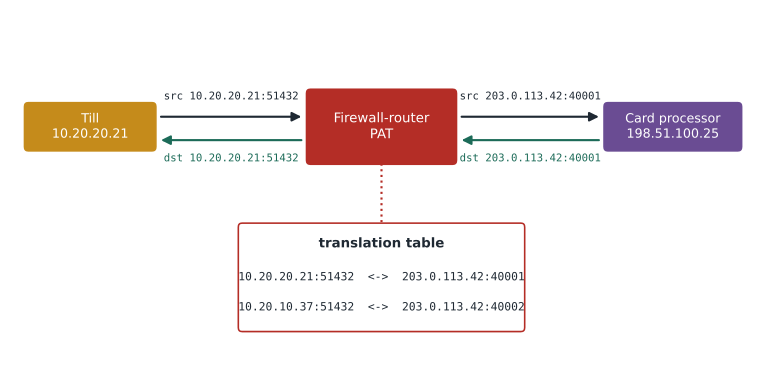
Ridgeline's internal networks use private 10.20.x.x addresses, which internet routers refuse to carry. Network address translation, or NAT, solves that at the edge. As each packet leaves through the WAN interface, the firewall-router replaces the private source address with its own public address, 203.0.113.42, and records the change in a translation table. Replies come back to 203.0.113.42, and the router uses the table to restore the original private destination and forward the reply inside. Because many devices share one public address, the router also changes source port numbers to keep their conversations apart, a form of NAT called port address translation, PAT, or NAT overload. This is what home routers do too.
class Pat:
    def __init__(self, public_ip):
        self.public_ip = public_ip
        self.next_port = 40000
        self.out = {}          # (private ip, private port) -> public port
        self.back = {}         # public port -> (private ip, private port)

    def outbound(self, src_ip, src_port):
        key = (src_ip, src_port)
        if key not in self.out:
            self.next_port += 1
            self.out[key] = self.next_port
            self.back[self.next_port] = key
        return self.public_ip, self.out[key]

    def inbound(self, dst_port):
        return self.back.get(dst_port, 'dropped: no translation')

nat = Pat('203.0.113.42')
print(nat.outbound('10.20.20.21', 51432))    # till 1 to the card processor
print(nat.outbound('10.20.10.37', 51432))    # a laptop happens to pick the same port
print(nat.outbound('10.20.20.21', 51432))    # the same conversation reuses its entry
print(nat.inbound(40002))
print(nat.inbound(45555))('203.0.113.42', 40001)
('203.0.113.42', 40002)
('203.0.113.42', 40001)
('10.20.10.37', 51432)
dropped: no translationThe last line shows a side effect of NAT that many people treat as a security feature: unsolicited traffic from the internet finds no entry in the translation table and is dropped, so internal devices cannot be reached from outside unless a port forwarding rule is added on purpose. NAT is not a firewall, and real protection comes from explicit firewall rules, but the effect is real. NAT also has costs: it complicates applications that carry addresses inside their data, such as some voice and gaming protocols, and it hides which internal device made a connection unless the router keeps logs. IPv6 normally needs no NAT at all, because every device can have a global address, and the firewall alone decides what may come in.
Try it yourself
Read a translation table
A firewall-router exports its PAT table as lines like 10.20.20.21:51432 -> 203.0.113.42:40001. The text is in TABLE. Write inside_host(table_text, public_port) that returns the private ip:port string that a reply to the given public port should be sent to, or None if there is no entry.
Then write busiest(table_text) that returns the private IP address with the most entries in the table.
def inside_host(table_text, public_port):
    return None

def busiest(table_text):
    return ''

print(inside_host(TABLE, 40003), busiest(TABLE))
A packet's journey
Putting the pieces together, here is what happens when till 1, at 10.20.20.21 with gateway 10.20.20.1, sends a payment request to a processor at 198.51.100.25. The till sees that the destination is not in 10.20.20.0/24, so it needs the gateway's MAC address; it finds it with ARP, or already has it cached. It sends a frame to the router's MAC address containing a packet from 10.20.20.21 to 198.51.100.25. The router receives the frame on its VLAN 20 interface, strips it, looks up 198.51.100.25, finds only the default route, applies NAT to change the source to 203.0.113.42 and a new port, decrements the TTL, and sends a new frame out of the WAN interface to the provider's router. From there the packet crosses perhaps a dozen routers, each doing its own lookup, until it reaches the processor's network. The reply retraces the logic in reverse, and the router's NAT table delivers it back to the till.
Every one of those steps can fail in a different way, which is why the troubleshooting order from Lesson 2 works so well: check the till's address, mask and gateway; check that it can reach the gateway; check that the router has a default route and that NAT is working; check the path beyond, with the tools of Lesson 11.
Worked problem
Why can the office reach the roastery but not the internet?
After a firmware update on the firewall-router, office laptops can still open the roast controller's web page at 10.20.40.11, but no website loads. What does the routing view suggest?
Show solution
- Office to roastery works, so the laptops' addresses and gateway are fine and the router is routing between connected networks.
- Websites fail, so the problem lies in what the router does with destinations outside its connected networks.
- Check the routing table: the default route 0.0.0.0/0 via 203.0.113.41 is missing. The update reset the WAN settings, which held the static default route.
- Re-add the default route, then confirm NAT is still enabled on the WAN interface, because without NAT the private source addresses would be dropped by the provider.
- Record the fix in the change log and add a check of the routing table to the firmware update checklist.
Answer: The default route was lost. Connected routes kept internal traffic working; restoring 0.0.0.0/0 to the provider (and confirming NAT) restores internet access.
Common mistakes
MistakeAssuming the first matching route wins.
InsteadRouters choose the longest prefix match among all matching routes.
MistakeForgetting the default route on an edge router.
InsteadConfigure 0.0.0.0/0 (and ::/0 for IPv6) towards the provider.
MistakeTreating NAT as a replacement for a firewall.
InsteadWrite explicit firewall rules; NAT's blocking of unsolicited traffic is a side effect.
MistakeExpecting broadcasts to cross a router.
InsteadRouters do not forward broadcasts; each network is its own broadcast domain.
MistakeUsing static routes where links fail and paths should adapt.
InsteadUse a dynamic routing protocol where there are alternative paths.
MistakeForgetting the return path when adding a route.
InsteadTraffic must be able to come back; check routes in both directions.
Summary and key terms
- Routers forward packets between networks by looking up the destination IP address in a routing table.
- Each hop decrements the TTL (hop limit in IPv6); packets that reach zero are dropped to stop loops.
- Routes are connected, static or dynamic; dynamic protocols include RIP, OSPF, EIGRP, IS-IS and BGP.
- The longest prefix match chooses the most specific route among all that match.
- The default route 0.0.0.0/0 catches everything without a more specific route.
- NAT and PAT translate private addresses to a shared public address at the network edge.
- Routers do not forward broadcasts, so each routed network is a separate broadcast domain.
- Routing
- Choosing the path a packet takes from one network to another.
- Routing table
- A router's list of known destination networks and how to reach them.
- Next hop
- The address of the next router a packet should be sent to.
- Longest prefix match
- The rule that the most specific matching route is used.
- Default route
- The route 0.0.0.0/0 (or ::/0) used when no more specific route matches.
- Static route
- A route entered by an administrator.
- Dynamic routing protocol
- A protocol routers use to exchange reachability and adapt to failures.
- TTL
- Time to live: a hop counter that stops packets looping forever.
- NAT
- Network address translation: rewriting addresses as packets cross a router.
- PAT
- Port address translation: NAT that also changes ports so many hosts share one address.
Practice problems
Work each problem on paper first, then reveal the answer to check.
A router has routes 10.0.0.0/8 and 10.20.0.0/16. Which does a packet for 10.20.5.5 use?
Show answer
10.20.0.0/16, the longer prefix.
What does 0.0.0.0/0 match?
Show answer
Every IPv4 destination.
Name the three ways a router can learn a route.
Show answer
Connected, static and dynamic.
A packet leaves a host with TTL 64. What is its TTL after 5 routers?
Show answer
59.
Which routing protocol connects different organizations on the internet?
Show answer
BGP.
Why do routers drop packets whose TTL reaches zero?
Show answer
To stop packets circulating forever in routing loops.
What does PAT change in addition to the IP address?
Show answer
The source port number.
Why does an unsolicited packet from the internet usually not reach a device behind NAT?
Show answer
There is no translation entry telling the router where to send it.
Does IPv6 normally need NAT?
Show answer
No; devices can have global addresses, and the firewall controls access.
Office devices reach each other but nothing on the internet. What router entry do you check first?
Show answer
The default route (and NAT on the WAN interface).
Lesson quiz · 5 questions
Score 60% or more to complete this lesson.
Create a free account to save your progress, take quizzes and earn a certificate.