
NET-110 · Lesson 3 of 12 · 32 min
Ethernet, cabling and switching basics
▶ Video coming soon A video version of this lesson is on the way.
Behind the office door at Ridgeline is a small wall cabinet: a patch panel with twenty-four numbered sockets, a managed switch with twenty-four ports and four extra uplink slots, a tangle of short blue and yellow patch cables, and the firewall-router on a shelf below. Every wired device in the building, from the tills to Kai's roast controller, ends up here. Sam's first job is to work out which socket goes where, why two cables are yellow, and what the blinking lights on the switch mean.
This lesson covers the bottom two layers of the network, where most wired traffic is carried by Ethernet. It explains the cables and connectors, the speeds and distance limits that come with them, how fibre differs from copper, what a MAC address is, how an Ethernet frame is laid out, and how a switch learns where every device is so it can send each frame only where it needs to go. It ends with a first look at VLANs, which let one switch carry several separate networks.
Ethernet
Ethernet is the family of standards, published by the IEEE as 802.3, that defines how devices on a wired local network share a medium, format frames and address each other. It began in the 1970s as a shared coaxial cable that every computer tapped into, became the dominant LAN technology in the 1990s, and has been extended again and again to higher speeds and new media, from 10 megabits per second to 400 gigabits and beyond. The frame format has stayed recognizably the same throughout, which is one reason it has lasted.
Today almost all Ethernet runs in full duplex over point-to-point links: each device has its own cable to a switch port, and each end can send and receive at the same time. The collisions that early shared Ethernet had to detect and recover from, using a method called CSMA/CD, no longer happen on modern switched links. You may still meet the terms half duplex and collision domain in older material and exam questions, and a link stuck in half duplex because of a configuration mismatch is still a classic cause of mysteriously slow transfers.
Copper cabling
Most office Ethernet runs over unshielded twisted pair copper cable: four pairs of thin copper wires, each pair twisted together to cancel electrical interference, ending in eight-pin modular connectors usually called RJ45. Cables are sold in categories that set how much bandwidth they support. The standard maximum length for a copper Ethernet channel is 100 metres, made up of up to 90 metres of permanent cable inside walls plus patch cables at each end.
| Category | Typical use | Highest common Ethernet speed | Notes |
|---|---|---|---|
| Cat 5e | Older office and home runs | 1 Gbps (2.5 Gbps on short runs) | Still common; fine for most desks |
| Cat 6 | Current office standard | 1 Gbps; 10 Gbps up to about 55 m | Thicker cable, better interference performance |
| Cat 6A | New installations, Wi-Fi access points | 10 Gbps to 100 m | Recommended for long life and high-power PoE |
| Cat 8 | Data centre switch links | 25 or 40 Gbps up to 30 m | Short runs between racks |
The wires inside a connector follow one of two colour codes, T568A or T568B. Which one a building uses matters less than using the same one at both ends of every permanent run. A cable wired the same at both ends is a straight-through cable, the normal kind. A crossover cable, with the send and receive pairs swapped, was once needed to connect two switches or two computers directly, but almost every modern port has auto-MDIX, which detects the wiring and adjusts, so crossovers are rarely needed now.
Many switches can also deliver electrical power over the same cable, a feature called Power over Ethernet or PoE. Ridgeline's access points, the office phone and a security camera all draw power from the switch, so they need no electrical outlets on the ceiling. The IEEE PoE standards supply roughly 15 watts per port (802.3af), 30 watts (802.3at, often called PoE+) or up to 60 and 90 watts (802.3bt). Each switch has a total power budget, and a switch can run out of power before it runs out of ports.
budget_w = 370           # total PoE budget of Ridgeline's 24-port switch
devices = [('rl-ap1 cafe access point', 25.5), ('rl-ap2 roastery access point', 25.5),
           ('office phone', 6.5), ('front door camera', 12.95), ('roastery camera', 12.95),
           ('till 1 display', 15.4), ('till 2 display', 15.4)]

used = sum(watts for name, watts in devices)
print('PoE devices:', len(devices))
print('power drawn (watts):', round(used, 2))
print('power left (watts): ', round(budget_w - used, 2))
print('more 25.5 W access points that would fit:', int((budget_w - used) // 25.5))PoE devices: 7 power drawn (watts): 114.2 power left (watts): 255.8 more 25.5 W access points that would fit: 10
Fibre optic cabling
Fibre optic cable carries data as pulses of light through a hair-thin glass core. Light does not pick up electrical interference, cannot be tapped easily and travels much further than signals on copper, so fibre is used between buildings, between floors, in data centres and for the provider connections that now reach many homes and shops, including Ridgeline's. There are two main kinds. Multimode fibre has a wider core and is used for shorter runs inside buildings, typically up to a few hundred metres at 10 gigabits. Single-mode fibre has a very narrow core and carries light tens of kilometres; it is what providers run down the street.
Fibre connects to switches through small pluggable transceivers, usually called SFP modules (SFP+ for 10 gigabits, QSFP for 40 and 100), which slot into the switch's uplink ports and take a fibre connector, commonly LC. The transceiver must match the fibre type and the module at the other end. Fibre needs care: connectors must be kept clean, cables must not be bent tighter than their minimum bend radius, and you should never look into the end of a fibre or transceiver, because some carry laser light that can damage eyes even when it is invisible.
| Medium | Typical reach | Strengths | Limits |
|---|---|---|---|
| Copper twisted pair (Cat 6A) | 100 m | Cheap, easy to terminate, carries PoE | Distance, interference, not between buildings |
| Multimode fibre | About 300 to 550 m at 10 Gbps | Immune to interference, high speed inside buildings | Needs transceivers; careful handling |
| Single-mode fibre | 10 km and much further | Very long distances, huge capacity | More expensive optics |
| Wi-Fi radio | Tens of metres indoors | No cables to devices, mobility | Shared airtime, interference, lower throughput |
MAC addresses
Every Ethernet and Wi-Fi interface has a 48-bit media access control address, written as six pairs of hexadecimal digits such as 3c:22:fb:10:00:21 or 3C-22-FB-10-00-21. The first three bytes are the organizationally unique identifier, assigned by the IEEE to the manufacturer, so a MAC address usually reveals who made the network card. The last three bytes are a serial number chosen by the manufacturer. The address is stored in the hardware, though software can override it, and modern phones and laptops deliberately use random MAC addresses on Wi-Fi networks to make it harder to track people from place to place.
Two special kinds of address matter. The broadcast address, ff:ff:ff:ff:ff:ff, means every device on the local network, and switches flood broadcast frames out of every port. Multicast addresses deliver to a group of interested devices. Within the first byte, the lowest bit marks a group (multicast or broadcast) address when it is 1, and the second-lowest bit marks a locally administered address, such as a randomized one, when it is 1. Python's int() function can read the hexadecimal digits, so checking those bits takes one line each.
def describe(mac):
    first = int(mac.replace('-', ':').split(':')[0], 16)
    kind = 'group (multicast or broadcast)' if first & 1 else 'single device'
    origin = 'locally administered, e.g. randomized' if first & 2 else 'factory assigned'
    return kind + ', ' + origin

for mac in ('3c:22:fb:10:00:21', 'ff:ff:ff:ff:ff:ff', '01:00:5e:00:00:fb', 'da:a1:19:42:7e:03'):
print(mac, '->', describe(mac))3c:22:fb:10:00:21 -> single device, factory assigned ff:ff:ff:ff:ff:ff -> group (multicast or broadcast), locally administered, e.g. randomized 01:00:5e:00:00:fb -> group (multicast or broadcast), factory assigned da:a1:19:42:7e:03 -> single device, locally administered, e.g. randomized
Try it yourself
Validate and normalize a MAC address
Switches, firewalls and spreadsheets write MAC addresses in different styles: 3C-22-FB-10-00-21, 3c:22:fb:10:00:21 or 3c22.fb10.0021. Write normalize_mac(text) that accepts any of these styles and returns the address as six lowercase pairs separated by colons. If the text does not contain exactly 12 hexadecimal digits once the separators :, - and . are removed, return None.
def normalize_mac(text):
    return text.lower()

print(normalize_mac('3C-22-FB-10-00-21'))
The Ethernet frame
An Ethernet frame starts with a preamble that lets the receiver synchronize, then carries the destination MAC address, the source MAC address and a two-byte type field, called the EtherType, that says what is inside: 0x0800 for IPv4, 0x86DD for IPv6 and 0x0806 for ARP. Then comes the payload, from 46 to 1,500 bytes on standard Ethernet, and finally a four-byte frame check sequence, a CRC computed over the frame. The receiver recomputes the CRC and silently drops any frame that does not match, so damaged frames never reach the layers above; the transport layer notices the missing data and arranges for it to be sent again.
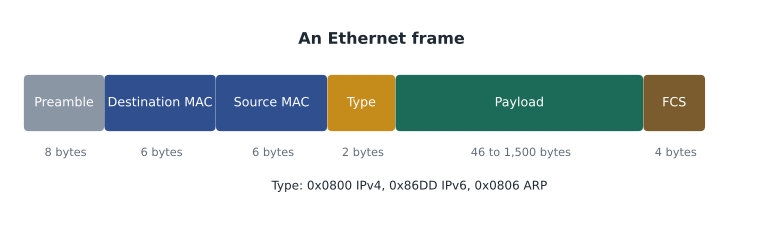
Putting the destination address first is deliberate: a switch can start deciding where to send a frame as soon as the first six bytes arrive. Ethernet frames also carry no hop count and no route: they are delivered only within one local network. Getting data between networks is the job of IP and routers, one layer up.
How a switch forwards frames
A switch keeps a table, usually called the MAC address table or CAM table, listing which MAC address was last seen on which port. It builds the table by watching traffic: every time a frame arrives, the switch records its source address against the port it came in on. To forward a frame, the switch looks up the destination address. If the address is in the table, the switch sends the frame out of that one port only, called forwarding or filtering. If the address is unknown, or the frame is a broadcast, the switch floods it out of every port except the one it arrived on. Entries age out after a few minutes without traffic, so devices that move are relearned quickly.
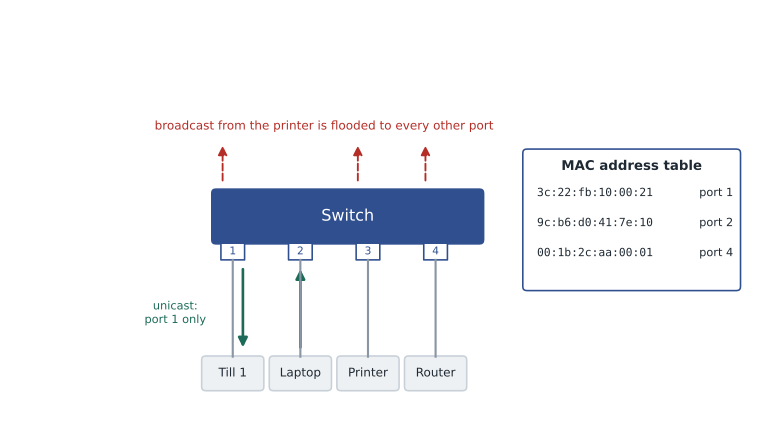
This behaviour is what makes a switch better than the hubs it replaced. A hub repeats every frame out of every port, so all devices share the bandwidth and see each other's traffic. A switch gives each port its own full-speed link and sends unicast frames only where they need to go. Broadcasts still reach every port in the same network, which is why very large flat networks become noisy and why networks are divided into smaller broadcast domains with routers or VLANs.
class Switch:
    def __init__(self, ports):
        self.ports = ports
        self.table = {}

    def receive(self, port, src, dst):
        self.table[src] = port                              # learn where the sender is
        if dst != 'ff:ff:ff:ff:ff:ff' and dst in self.table:
            return [self.table[dst]]                        # known: forward out of one port
        return [p for p in range(1, self.ports + 1) if p != port]   # unknown or broadcast: flood

sw = Switch(4)
print(sw.receive(2, 'laptop', 'till1'))    # till1 unknown yet: flood
print(sw.receive(1, 'till1', 'laptop'))    # laptop was learned on port 2
print(sw.receive(2, 'laptop', 'till1'))    # till1 now known on port 1
print(sw.receive(3, 'printer', 'ff:ff:ff:ff:ff:ff'))
print(sw.table)[1, 3, 4]
[2]
[1]
[1, 2, 4]
{'laptop': 2, 'till1': 1, 'printer': 3}Try it yourself
Build a MAC address table
FRAMES is a list of (port, source_mac, destination_mac) tuples in the order a switch received them. Write learn(frames) that returns the switch's MAC address table as a dictionary mapping each source MAC address to the port it was most recently seen on.
Then write out_ports(table, port, dst, ports=8) that returns the list of ports a frame arriving on port for dst is sent out of: the single known port in a list, or every other port from 1 to ports when the destination is unknown or is the broadcast address ff:ff:ff:ff:ff:ff.
def learn(frames):
    table = {}
    for port, src, dst in frames:
        table[dst] = port
    return table

def out_ports(table, port, dst, ports=8):
    return [table[dst]]

t = learn(FRAMES)
print(t, out_ports(t, 2, 'cc:03'))
A first look at VLANs
A virtual LAN, or VLAN, divides one physical switch into several separate layer 2 networks. Each port is assigned to a VLAN by number, and frames are switched only between ports in the same VLAN, so broadcasts in one VLAN never reach another. Traffic between VLANs has to pass through a router or firewall, where rules can control it. Ridgeline already uses one: the guest Wi-Fi is VLAN 50, separate from VLAN 1, which carries every staff device. A guest's infected laptop cannot even see the tills or the office computers, because they are on a different layer 2 network. Sam would like to go further and give the card terminals and tills a VLAN of their own, a change planned in Lesson 12.
When one cable has to carry several VLANs, for example between the switch and the firewall-router or between the switch and an access point that broadcasts both the staff and guest Wi-Fi, the link is configured as a trunk. Frames on a trunk carry a four-byte 802.1Q tag holding the VLAN number, so the device at the other end knows which network each frame belongs to. Ordinary device ports are access ports: they carry one VLAN and send frames untagged, so the connected device needs no VLAN knowledge at all. VLANs, trunking and inter-VLAN routing are covered in depth in the next course, Routing and Switching I; for now it is enough to know that Ridgeline's plan in Lesson 12 uses five of them.
Worked problem
Tracing a socket in the wall
The new espresso grinder in the cafe has a network port for its maintenance app, and Mei has plugged it into wall socket C-14. It gets no connection. How should Sam check the path?
Show solution
- Check the link light on the grinder's port and on the switch: no light at either end points to layer 1.
- Follow the record: the patch panel label says C-14 is panel port 14. In the cabinet, see whether panel port 14 has a patch cable to the switch at all; it does not, because socket C-14 has never been used.
- Patch panel port 14 to a free switch port, 14, and confirm the link light comes on at both ends.
- Check that switch port 14 is in the right VLAN. The grinder belongs with the staff devices in VLAN 1, not on the guest network, so set the port as an access port in VLAN 1 and note it as a candidate for the equipment VLAN in the new design.
- Update the documentation: socket C-14, panel 14, switch port 14, VLAN 1, device grinder, date and initials.
Answer: The socket was not patched to the switch. Patching it, assigning the correct VLAN and recording the change fixes the problem and keeps the map accurate.
Common mistakes
MistakeRunning copper Ethernet beyond 100 metres.
InsteadKeep channels within 100 m, or use fibre or an intermediate switch for longer runs.
MistakeExceeding the switch's PoE budget when adding cameras or access points.
InsteadAdd up the power of every PoE device and compare it with the switch's total budget.
MistakeLooking into a fibre connector to see whether it is lit.
InsteadNever look into fibre or transceivers; use a power meter or the switch's optics readout.
MistakeExpecting a switch to learn from destination addresses.
InsteadSwitches learn source addresses and flood frames for unknown destinations.
MistakeThinking VLANs on the same switch can talk to each other directly.
InsteadTraffic between VLANs must be routed, which is where it can be filtered.
MistakeLeaving patch panel and switch port records out of date.
InsteadUpdate labels and the port map every time a cable moves.
Summary and key terms
- Ethernet (IEEE 802.3) is the standard for wired LANs; modern links are switched and full duplex.
- Twisted pair copper cables come in categories such as Cat 6 and Cat 6A, with a 100 m channel limit.
- Power over Ethernet powers access points, phones and cameras through the data cable, within a switch's power budget.
- Fibre carries light: multimode for shorter runs in buildings, single-mode for long distances.
- A MAC address is 48 bits, written as six hex pairs; the first three bytes identify the manufacturer.
- An Ethernet frame carries destination and source MAC addresses, an EtherType, the payload and a CRC check.
- Switches learn source addresses, forward known destinations out of one port and flood unknown and broadcast frames.
- VLANs split a switch into separate layer 2 networks; trunks carry several VLANs using 802.1Q tags.
- Ethernet
- The IEEE 802.3 family of standards for wired local networks.
- Twisted pair
- Copper cable made of wire pairs twisted to reduce interference.
- Power over Ethernet
- Delivering electrical power to devices over the network cable.
- Fibre optic cable
- Cable that carries data as light through a glass core.
- SFP
- A small pluggable transceiver module used for fibre and some copper uplinks.
- MAC address
- A 48-bit hardware address that identifies a network interface on a local network.
- Frame check sequence
- A CRC at the end of a frame used to detect damaged frames.
- MAC address table
- A switch's record of which MAC address is reachable through which port.
- Flooding
- Sending a frame out of every port except the one it arrived on.
- VLAN
- A virtual LAN: a separate layer 2 network defined on a switch.
- Trunk
- A link that carries several VLANs, with each frame tagged by VLAN number.
Practice problems
Work each problem on paper first, then reveal the answer to check.
What is the maximum length of a standard copper Ethernet channel?
Show answer
100 metres.
Which cable category is recommended for 10 Gbps over 100 m?
Show answer
Cat 6A.
A switch has a 370 W PoE budget and already supplies 120 W. How many 30 W access points can be added?
Show answer
(370 - 120) / 30 = 8.3, so 8.
Which kind of fibre would connect two buildings 5 km apart?
Show answer
Single-mode fibre.
What does the first half of a MAC address identify?
Show answer
The manufacturer (the organizationally unique identifier).
What is the Ethernet broadcast address?
Show answer
ff:ff:ff:ff:ff:ff.
What does a switch do with a frame whose destination is not in its table?
Show answer
Floods it out of every port except the incoming one.
Why does the destination MAC address come before the source in a frame?
Show answer
So a switch can begin forwarding as soon as it has read the destination.
What happens to a frame whose CRC does not match?
Show answer
The receiver discards it.
Why put card terminals in their own VLAN?
Show answer
So other devices, such as guests, cannot reach them directly; traffic between VLANs must pass through a router or firewall with rules.
Lesson quiz · 5 questions
Score 60% or more to complete this lesson.
Create a free account to save your progress, take quizzes and earn a certificate.