
MSBA-360 · Lesson 6 of 12 · 18 min
Dependabot alerts
▶ Video coming soon A video version of this lesson is on the way.
Once every Skerry repository had a dependency graph, Dependabot alerts arrived in volume. In the first week after the baseline configuration was enforced there were 9,460 open Dependabot alerts across the enterprise. Seraphine did not try to fix them in the sixth session. She tried to read them: what an alert says, where its information comes from, which ones matter and how a team can stop drowning in the rest.
Where alerts come from
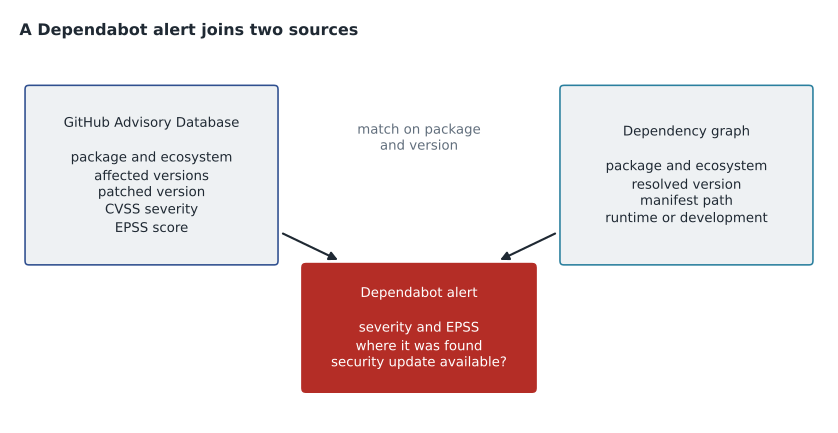
A Dependabot alert is raised when a package in a repository's dependency graph matches a security advisory for a vulnerable version of that package. The advisories come from the GitHub Advisory Database, a public database of vulnerabilities in open source packages. It draws on the National Vulnerability Database, ecosystem security feeds, security researchers and maintainers who publish advisories through GitHub's own repository security advisories feature.
Advisories in the database are either reviewed or unreviewed. A reviewed advisory has been checked by GitHub's curation team, which confirms the package name, the ecosystem, the affected version ranges, the patched versions and the severity. Only reviewed advisories normally produce Dependabot alerts, because an alert based on wrong version ranges would send developers chasing problems that do not exist. Malware advisories are a deliberate exception, covered later in this lesson.
Dependabot checks for matches in two directions. When a repository's graph changes, for example because a pull request adds a package, Dependabot checks the new dependencies against existing advisories. When a new advisory is published, Dependabot checks every repository that has the affected package. Either way, a new alert appears within minutes, and alerts close automatically when the vulnerable version is removed or upgraded.
Reading an alert
An alert shows the package, the ecosystem and the manifest or lock file where the vulnerable version was found. It shows the advisory's summary and identifiers, usually a GitHub advisory identifier beginning GHSA and often a CVE identifier. It shows the affected versions and the first patched version, and whether Dependabot can open a security update pull request to move to it. It shows the severity and, increasingly, a measure of how likely the vulnerability is to be exploited.
Severity comes from the advisory's CVSS score, the Common Vulnerability Scoring System, which rates how bad exploitation would be on a scale from 0 to 10, grouped into low, moderate, high and critical. CVSS measures impact, not likelihood. A critical score means that if someone exploited the flaw, the damage could be serious; it does not mean anyone is trying.
Since February 2025, Dependabot alerts also show the EPSS score where one is available. The Exploit Prediction Scoring System, maintained by FIRST, estimates the probability that a vulnerability will be exploited in the wild in the next 30 days, based on observed activity. A score of 0.02 means about a 2 in 100 chance; a score of 0.9 means exploitation is very likely or already happening. The GH-500 outline names EPSS explicitly in its supply chain domain, because combining it with severity gives far better priorities than severity alone.
| Signal | What it measures | Where it comes from | Use it to |
|---|---|---|---|
| CVSS severity | How harmful exploitation would be | The advisory | Judge impact |
| EPSS score | Probability of exploitation in the next 30 days | FIRST, shown on the alert | Judge likelihood |
| Development dependency | Whether the package is used only for development | The manifest | Lower priority for build-only tools |
| Patched version available | Whether an upgrade fixes it | The advisory | Decide whether a security update can be used |
Worked problem
Two critical alerts
The checkout service has two critical alerts. One, in an image-processing library, has an EPSS score of 0.003. The other, in an HTTP request parser, has an EPSS score of 0.71. Both have patched versions. Which should the team fix first?
Show solution
- Both are critical, so severity does not separate them.
- The parser's EPSS score means exploitation in the next month is likely; the image library's is very unlikely.
- The checkout service handles every customer request, so the parser is reachable from the internet.
- Fix the parser today with a security update; schedule the image library in the normal update cycle this week.
Dismissing alerts
An alert closes automatically when the vulnerable version is gone. It can also be dismissed by someone with permission, with a reason. The reasons are: a fix has already been started; no bandwidth to fix this; risk is tolerable to this project; this alert is inaccurate or incorrect; and vulnerable code is not actually used. Dismissed alerts can be reopened, and the reason and an optional comment are kept for reporting.
Teams sometimes dismiss alerts to make a number go down. Freya asked for the opposite: dismissals were allowed, but each one needed a reason that would make sense to an auditor reading it a year later. "Risk is tolerable" with no comment was not acceptable. "Risk is tolerable: the library is used only by the internal report generator, which has no network access and processes trusted files" was.
Auto-triage rules
Manual dismissal does not scale to thousands of alerts. Dependabot auto-triage rules dismiss, snooze or label alerts automatically based on criteria such as severity, scope, package name, ecosystem, CVE, manifest and EPSS. GitHub maintains presets; the best known automatically dismisses low-impact alerts on development dependencies in the npm ecosystem, which are the most common source of noise. Organizations can write custom rules, and rules can auto-dismiss alerts that match or keep them open but apply labels so they are routed somewhere else.
An auto-dismissed alert is not deleted. It is closed with the reason that it was auto-dismissed, and it reopens automatically if the rule stops matching, for example because a later advisory raises the severity. The GH-500 outline asks candidates to understand this auto-dismiss behaviour and how it interacts with security campaigns, which can collect alerts for focused remediation; campaigns are covered in MSBA-361.
| Rule at Skerry | Criteria | Action |
|---|---|---|
| GitHub preset | Low-impact alerts on npm development dependencies | Auto-dismiss |
| Old internal tools | Repositories with lifecycle maintenance, severity low or moderate, EPSS below 0.01 | Auto-dismiss with comment template |
| Likely exploited | Any severity with EPSS at or above 0.5 | Label exploit-likely and keep open |
| Private package names | Malware alerts on packages that match Skerry's internal npm scope | Review, then dismiss as false positive |
Malware alerts
Not every supply chain threat is a mistake in a trustworthy package. Some packages are malicious on purpose: typosquats with names one letter away from a popular package, dependency-confusion packages that impersonate a company's internal package names in a public registry, and real packages whose maintainer accounts were taken over. GitHub publishes malware advisories for such packages in the Advisory Database.
In March 2026 Dependabot started alerting on malware in npm dependencies. In August 2026 malware alerts expanded to eight ecosystems: npm, PyPI, Maven, RubyGems, NuGet, Go, crates.io and Composer, drawing in part on the OpenSSF malicious packages feed. Malware advisories are published automatically, without the human review that vulnerability advisories receive, so that malicious packages are flagged quickly; they can also be retracted. Malware alerts are opt-in, turned on with a malware alerts setting under Dependabot alerts in repository, organization or enterprise settings, and appear as a separate category so they can be triaged on their own.
Malware alerts need a different response from vulnerability alerts. A vulnerable package is fixed by upgrading. A malicious package means code written by an attacker may already have run on developer machines or build servers that installed it. The response is closer to an incident: remove the package, check which machines and pipelines installed it and when, rotate any credentials those machines could reach, and check for persistence. Skerry's first malware alert, in August, was a false positive: an internal package in a private registry shared a name with a malicious public one. That is exactly the case GitHub's documentation warns about, and it is why the team wrote the rule in the table above.
Who sees alerts and who is told
By default, Dependabot alerts are visible to people with write, maintain or admin access to the repository and to security managers. Organization owners can give other teams access through custom roles. Notifications go by default to people watching the repository who can see alerts, by email, on GitHub and in the mobile app, and can be filtered to only high and critical alerts. Larger organizations route alerts through webhooks or the REST API into ticketing tools, assigning them by the owning-team custom property, which Skerry did.
# Open, high or critical Dependabot alerts for an organization, with EPSS percentage scores
gh api --paginate \
  "/orgs/skerry/dependabot/alerts?state=open&severity=high,critical" \
  --jq '.[] | [.repository.full_name, .security_advisory.ghsa_id, .security_vulnerability.package.name, (.security_advisory.epss[0].percentage // "n/a")] | @tsv'
How long alerts are kept
Alerts accumulate. In June 2026 GitHub announced a retention policy for closed security alerts on GitHub.com, starting with Dependabot alerts. From September 25, 2026, Dependabot alerts that were closed two or more years earlier move to archival storage: they no longer appear in the user interface or API, but administrators and security managers can download them as CSV files, and they are kept for the life of the account. Open alerts are never archived. The policy does not apply to GitHub Enterprise Server. For an audit, that means evidence about alerts closed long ago must be exported, not browsed.
The session's result
With the preset and Skerry's own rules in place, the 9,460 open alerts became 3,140 that needed human attention and 214 labelled exploit-likely. Seraphine shared the second number in the incident channel and asked every owning team to clear its exploit-likely alerts first. Most of them, as lesson 7 shows, could be fixed with pull requests Dependabot had already opened.
Alerts for GitHub Actions
Dependabot alerts cover GitHub Actions used in workflows as well as packages. When an advisory is published for an action, every repository whose workflows reference an affected version receives an alert. In 2025 several widely used third-party actions were compromised, with attackers changing what existing version tags pointed to so that workflows pulled malicious code. Repositories that referenced those actions by tag received alerts once advisories were published; repositories that pinned them by full commit identifier, as Skerry required, were not affected in the first place, because a commit identifier cannot be repointed. That is one reason Skerry's baseline treated action pinning as a supply chain control, not just a tidiness rule.
Alerts on archived and inactive repositories
Alerts on repositories nobody works on are a particular source of noise. An archived repository is read-only and nobody deploys it, so its alerts rarely matter. Security overview views can exclude archived repositories, and most teams leave their alerts out of work queues. Repositories that are not archived but are no longer deployed are harder, because nothing in GitHub knows they are inactive. Skerry's lifecycle custom property, with its value retired, filled that gap: one of the auto-triage rules dismissed low and moderate alerts on repositories marked retired, and the platform team archived those repositories once their owners confirmed they were no longer needed.
Notifications without noise
Seraphine changed the notification defaults for owning teams so that only high and critical alerts sent an email, while every alert still appeared in the team's queue through the router. Developers had been receiving dozens of emails a week for low-severity alerts in development dependencies and had started filtering them all to a folder they never opened. After the change, the emails that did arrive were read, and the queue held everything else for planned work.
Common mistakes
MistakePrioritizing alerts by CVSS severity alone.
InsteadCombine severity with EPSS, reachability and whether the dependency ships to production.
MistakeDismissing alerts without a reason anyone could check later.
InsteadChoose the right dismissal reason and add a comment that explains the decision.
MistakeTreating a malware alert like a vulnerability to upgrade.
InsteadHandle it as a possible compromise: remove, investigate installs and rotate reachable credentials.
MistakeExpecting to browse alerts closed years ago in the interface.
InsteadAlerts closed two or more years ago are archived and must be exported as CSV.
Summary and key terms
- Dependabot alerts match the dependency graph against reviewed advisories in the GitHub Advisory Database.
- Alerts show severity from CVSS and, since February 2025, the EPSS probability of exploitation.
- Alerts can be dismissed with reasons; auto-triage rules and GitHub presets dismiss or label alerts automatically.
- Malware alerts, opt-in since March 2026 and covering eight ecosystems since August 2026, need an incident-style response.
- From September 25, 2026, Dependabot alerts closed two or more years earlier are archived on GitHub.com.
- Dependabot alert
- A notice that a dependency in the graph matches a security advisory.
- GitHub Advisory Database
- GitHub's public database of security advisories for open source packages.
- Reviewed advisory
- An advisory checked by GitHub's curation team for accurate package and version data.
- CVSS
- The Common Vulnerability Scoring System, rating the impact of a vulnerability from 0 to 10.
- EPSS
- The Exploit Prediction Scoring System, estimating the probability of exploitation in the next 30 days.
- Auto-triage rule
- A rule that automatically dismisses, snoozes or labels Dependabot alerts.
- Malware advisory
- An advisory for a package that is malicious by design, published automatically.
Practice problems
Work each problem on paper first, then reveal the answer to check.
What does an EPSS score of 0.7 mean?
Show answer
About a 70 in 100 estimated chance the vulnerability will be exploited in the next 30 days.
What happens to an auto-dismissed alert if the rule later stops matching?
Show answer
It reopens automatically.
Why are malware advisories published without human review?
Show answer
So that malicious packages are flagged quickly instead of waiting in a review queue.
Lesson quiz · 5 questions
Score 60% or more to complete this lesson.
Create a free account to save your progress, take quizzes and earn a certificate.